
Dell Keyboard Smartcard USB
4.7Editor score
Reliable Wired USB
Spill-Resistant
Quiet Low Profile Keys
This guide compares the top ten keyboards with smart card readers for secure access control, helping you choose the best device for enterprise and government
Finding the right keyboard with smart card reader is essential for organizations that prioritize secure access and efficient authentication processes. These devices integrate secure credential verification directly into your typing interface, eliminating the need for separate card readers and simplifying workstation setups for IT professionals and end users alike.
We have analyzed ten top-rated models based on compatibility, build quality, and security standards compliance. Our evaluation includes products that meet federal standards like FIPS 201 and TAA requirements, ensuring they suit government, healthcare, and enterprise environments that demand rigorous security protocols and reliable performance under demanding conditions.
Each selection in this list highlights specific strengths such as ergonomic design, mechanical switches, or specialized certification levels. Prices and availability fluctuate frequently, so verify current details before purchasing. We provide detailed insights to help you match the right keyboard to your security infrastructure and daily workflow requirements effectively.
4.7Editor score
4.6Editor score

4.2Editor score
This table provides a side-by-side comparison of all ten selected products, highlighting key specifications and certifications to help you quickly identify which model aligns with your organizational security standards and ergonomic needs.


The Dell KB813 is a highly rated keyboard designed for environments that require secure authentication alongside standard typing tasks. With a strong user rating of 4.6, it offers an integrated smartcard reader that streamlines login processes without needing peripheral hardware. This makes it an excellent choice for businesses seeking to enhance workstation security efficiently.
We may earn a commission when you buy through this link, at no additional cost to you.
Its integrated smartcard reader supports seamless authentication, which is crucial for industries like healthcare and finance where secure web applications and identity systems are daily necessities. The keyboard features a spill-resistant design, ensuring that accidental liquid spills do not compromise functionality. Additionally, the ergonomic design with a detachable palm rest supports comfort during long working hours.
While the keyboard offers robust security features and durability, it lacks advanced multimedia controls that some users might expect in a modern setup. The cable is fixed, which may limit placement flexibility compared to wireless options. However, for secure workstations, these trade-offs are minimal compared to the benefits of built-in security and reliability.
This keyboard is ideal for IT managers and professionals who need a reliable, secure input device that integrates smoothly with Dell systems. It provides the perfect balance of security, comfort, and durability. We recommend this model for anyone prioritizing secure access and ergonomic comfort in a professional environment.
The built-in smartcard reader allows users to authenticate securely without needing extra hardware, simplifying workstation setup and reducing clutter.
The detachable palm rest and low-profile keys reduce strain, making extended typing sessions more comfortable and productive for office workers.
We may earn a commission when you buy through this link, at no additional cost to you.
The Adesso TruForm AKB-150SB-TAA is designed specifically for organizations that require TAA compliance, such as government agencies and military suppliers. With a rating of 4.1, it combines secure smartcard authentication with ergonomic features that promote healthy typing habits. This keyboard is a solid choice for regulated environments needing both security and comfort.
We may earn a commission when you buy through this link, at no additional cost to you.
Its built-in smartcard reader supports international standards like ISO7816 and PC/SC 2.0, making it versatile for secure logon and web applications. The split ergonomic design encourages a natural position for hands and wrists, reducing discomfort during prolonged use. Additionally, the integrated palm rest further enhances comfort and promotes better posture.
While it offers extensive features, the split layout may require a short adjustment period for users accustomed to traditional keyboards. The price point is higher than basic models, reflecting its specialized compliance and ergonomic benefits. For organizations requiring TAA compliance, these investments are justified by regulatory adherence and user health benefits.
We recommend this keyboard for government contractors, defense suppliers, and enterprises needing compliant, secure input devices. Its combination of security, ergonomics, and compliance features makes it a standout option. Choose this model to ensure your hardware meets federal sourcing standards without compromising on user experience or security.
Designed to meet U.S. Trade Agreement Act specifications, this keyboard ensures eligibility for GSA sales and federal government procurement requirements.
The split key zones and sloped shape minimize wrist strain, helping prevent long-term repetitive stress injuries for office professionals.
We may earn a commission when you buy through this link, at no additional cost to you.
The Cherry KC 1000 is a security-focused keyboard designed for environments requiring stringent certification. With a high rating of 4.6, it is approved under FIPS 201 and EMV 2000 Level 1, ensuring reliable authentication for secure data access. It is an excellent fit for government and financial institutions prioritizing regulatory compliance.
We may earn a commission when you buy through this link, at no additional cost to you.
This keyboard supports secure PIN entry and offers one-handed operation of the smart card module, which improves efficiency during authentication processes. It also includes cross-platform driver support for Windows, MacOS, and Linux, making it versatile for diverse IT ecosystems. The thin design ensures it does not occupy excessive desk space.
While it excels in security features, it lacks the multimedia keys and aesthetic flair found in consumer-oriented models. The focus is strictly on functionality and compliance, which may limit appeal in general office settings. However, for security-critical applications, these limitations are negligible compared to the assurance of certified performance.
We recommend this keyboard for security officers and IT administrators managing sensitive systems. Its certifications and robust security protocols provide peace of mind for high-stakes environments. Choose this model if you need a keyboard that meets federal and financial security standards without compromising on reliability or performance.
With FIPS 201 and EMV 2000 Level 1 approvals, this keyboard ensures compliance with strict government and financial security requirements.
Driver support for Windows, MacOS, and Linux makes it suitable for diverse operating system environments without additional configuration.
We may earn a commission when you buy through this link, at no additional cost to you.
The Adesso EasyTouch 130SB is a unique blend of security and mechanical typing excellence, featuring red switches for tactile feedback and durability. It includes a built-in smartcard reader and a dedicated Copilot AI hotkey, making it modern and efficient for developers and creative professionals. Its rating of 4.6 reflects user satisfaction with its robust build.
We may earn a commission when you buy through this link, at no additional cost to you.
This keyboard supports multiple security standards including EMV 4.0 and FIPS Publication 201, ensuring reliable authentication for banking and secure applications. The large print keycaps enhance readability, which is beneficial for users with vision needs or low-light conditions. The mechanical switches offer a long lifecycle, ideal for high-volume typing environments.
The mechanical switches may produce more noise than membrane models, which could disturb quiet office spaces. The keyboard is also larger than compact alternatives due to the full-size layout. However, the productivity gains from multimedia access and AI features make these considerations minor for tech-focused users.
We recommend this keyboard for developers and creative professionals who value mechanical feedback and modern AI integration. Its security features ensure it remains suitable for sensitive work. Choose this model to combine the best of secure access with premium typing performance and innovative productivity tools.
The dedicated Copilot AI key offers instant access to assistance, streamlining coding and writing tasks without leaving the keyboard.
Large print keycaps improve character visibility, reducing eye strain during extended typing sessions in various lighting conditions.
We may earn a commission when you buy through this link, at no additional cost to you.
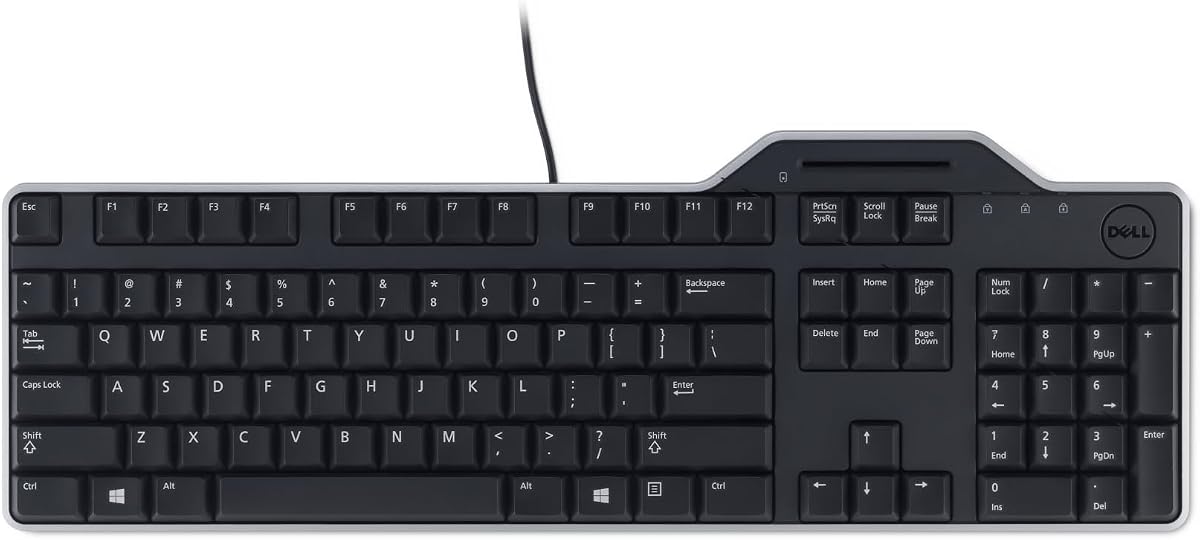
The Dell Keyboard Smartcard USB is an affordable solution for businesses requiring secure card authentication without breaking the budget. With an impressive 4.7 rating, it delivers reliable performance with a spill-resistant design that safeguards against accidents. This model is perfect for bulk deployments where cost-effectiveness is a priority.
We may earn a commission when you buy through this link, at no additional cost to you.
It features a quiet typing experience that minimizes distractions in shared office spaces. The full-size layout ensures all standard keys are accessible, and the detachable palm rest adds comfort during long sessions. Wired USB connectivity provides fast and secure data transfers without the need for batteries or pairing.
While it lacks advanced multimedia controls, its focus on core functionality makes it highly reliable for daily operations. The price point is significantly lower than premium options, but it still meets essential security needs. For organizations prioritizing value and reliability, this keyboard is an excellent choice.
We recommend this keyboard for small businesses and IT departments looking for cost-efficient security solutions. It offers the essentials without unnecessary extras. Choose this model to ensure secure access and comfortable typing while maintaining a tight budget for your hardware procurement.
This keyboard offers essential smartcard integration at a competitive price, making it accessible for organizations of all sizes.
The spill-resistant design protects internal components from beverage mishaps, extending the lifespan of the device in busy workspaces.
We may earn a commission when you buy through this link, at no additional cost to you.
The Kensington KB201C is a secure, TAA-compliant keyboard designed for government and federal institutions requiring robust security standards. It features FIPS-201 and PC/SC compliance, ensuring reliable authentication with PIV and ISO/IEC 7816 standards. With a rating of 3.8, it offers dependable performance for regulated environments.
We may earn a commission when you buy through this link, at no additional cost to you.
Its quiet-click design maintains a peaceful workspace, allowing users to focus without disturbing colleagues. The keyboard supports Windows, macOS, and ChromeOS, providing broad compatibility across different systems. The 3-year limited warranty offers peace of mind, reflecting Kensington's confidence in the product's quality and longevity.
While the rating is lower than competitors, it reflects specific expectations from government procurement rather than general consumer appeal. The design is functional rather than stylish, prioritizing compliance and reliability over aesthetics. For institutional buyers, these trade-offs are often acceptable given the regulatory requirements.
We recommend this keyboard for government agencies and contractors needing compliant hardware for secure access. Its certifications and warranty make it a safe choice for federal projects. Choose this model to ensure your hardware meets rigorous sourcing and security standards without compromising on essential functionality.
Meets U.S. Federal Government standards, making it suitable for use in federal institutions and organizations requiring compliant sourcing.
The quiet-click mechanism reduces noise pollution, fostering a more focused and professional environment for office workers.
We may earn a commission when you buy through this link, at no additional cost to you.
The Lenovo Smartcard Wired Keyboard II is a straightforward solution for businesses needing standard US English typing with smartcard compatibility. With a rating of 4.4, it offers a reliable wired connection and standard dimensions that fit easily on desks. It is an ideal option for enterprises prioritizing functionality and compatibility.
We may earn a commission when you buy through this link, at no additional cost to you.
Its compact dimensions make it suitable for workspaces with limited room. The standard wired connection ensures stable performance without battery concerns. While it does not feature advanced ergonomic or multimedia capabilities, it delivers consistent performance for everyday administrative tasks requiring secure authentication.
Users may find the feature set minimal compared to specialized models. However, for basic needs, its reliability and compatibility make it a strong contender. The simple packaging ensures quick deployment across multiple systems without complex setup requirements or drivers.
We recommend this keyboard for organizations needing standard keyboards with secure card access. Its simplicity and reliability make it a solid choice for bulk deployment. Choose this model to ensure consistent performance and compatibility across your existing Lenovo or generic systems.
Designed for standard compatibility, this keyboard integrates easily into existing Lenovo and Windows-based ecosystems without extra configuration.
Its compact dimensions allow for better desk organization, making it ideal for shared workspaces or home offices with limited room.
We may earn a commission when you buy through this link, at no additional cost to you.
The HP USB Business Slim Smartcard Keyboard combines professional aesthetics with secure authentication. With a rating of 4.5, it features a slim design that reduces clutter while maintaining standard functionality. Its LED key indicators and spill drain protection ensure reliability and visual feedback for users in demanding environments.
We may earn a commission when you buy through this link, at no additional cost to you.
The built-in spill drain directs liquid away from sensitive components, protecting against accidental damage during office use. The membrane keyswitch technology provides a quiet typing experience, ideal for open office settings. The 6ft cable ensures sufficient length for flexible desk arrangements without stretching.
While it lacks advanced hotkeys, its focus on durability and professional design appeals to business users. The slim profile is sleek but may not offer the same tactile feedback as mechanical switches. For standard corporate workstations, these considerations are minimal compared to its protective features.
We recommend this keyboard for business professionals needing a sleek, durable, and secure typing solution. Its protective features make it resilient against daily office hazards. Choose this model to combine style, reliability, and security in a compact and efficient package.
LED key indicators provide clear visual feedback, while the spill drain protects internal electronics from liquid damage during spills.
The slim and modern profile complements professional workstations, reducing visual clutter and maintaining a clean office look.
We may earn a commission when you buy through this link, at no additional cost to you.
The Cherry Secure Board 1.0 is a premium security keyboard designed for high-security environments requiring advanced authentication. With a rating of 4.2, it supports smart cards and cards/tags with RF/NFC interfaces, providing versatile and secure access. This model is ideal for institutions prioritizing top-tier data protection.
We may earn a commission when you buy through this link, at no additional cost to you.
Its secure mode with authentication and encryption ensures data integrity, especially useful for thin client environments. The keyboard supports ISO 14443 A/B compliant cards alongside traditional 7816 standards, making it highly versatile. GS Approval indicates quality and compliance with security standards.
The price is higher than standard models, reflecting its specialized security architecture. It may not appeal to general users who do not need advanced NFC or encryption features. However, for financial or government security, these features justify the investment and provide peace of mind.
We recommend this keyboard for enterprises handling highly sensitive data and requiring advanced card verification. Its premium features ensure robust protection. Choose this model to secure your infrastructure with one of the most advanced and versatile keyboards available for secure access.
Supports both contact and contactless card standards, offering maximum flexibility for secure access in high-security environments.
The dedicated secure mode ensures data integrity during authentication, protecting against unauthorized access and interception.
We may earn a commission when you buy through this link, at no additional cost to you.
The NEW OEM Dell KB813t is an excellent replacement option for those needing a standard Dell smartcard keyboard without the original packaging. With a rating of 4.4, it offers the same reliable performance and integrated smartcard reader as other Dell models. This makes it a great choice for bulk upgrades or replacements.
We may earn a commission when you buy through this link, at no additional cost to you.
It features a standard English layout and USB connection, ensuring compatibility with most Dell systems. The product is listed as new and unopened, indicating it meets original specifications. Its affordable price makes it accessible for organizations needing to replace multiple units quickly.
While it lacks detailed specs, it is functionally identical to the standard KB813. The focus is on providing a cost-effective solution rather than advanced features. For enterprises managing large fleets, this model offers the reliability and compatibility they need without premium extras.
We recommend this keyboard for IT departments managing system refreshes or replacements. It offers consistent performance at a competitive price. Choose this model to ensure your team has reliable secure typing solutions without incurring additional costs or compatibility issues.
Ideal for replacing older keyboards in large fleets, ensuring consistent security and typing performance across the organization.
Designed for Dell systems, it integrates seamlessly with existing hardware, reducing the need for additional configuration or drivers.
We may earn a commission when you buy through this link, at no additional cost to you.
Selecting the right keyboard with smart card reader requires understanding your security needs and operational environment. We outline key factors to ensure your choice aligns with regulatory standards, ergonomic requirements, and budget constraints.
Organizations in government, healthcare, or finance must verify that the keyboard meets necessary certifications like FIPS 201 or TAA compliance. These standards ensure the device is eligible for use in regulated environments and meets strict security protocols for authentication.
Always check the product specifications for compliance markers before purchasing to avoid issues with procurement or security audits.
Consider whether you need a contact-only reader or one supporting RF/NFC interfaces. Different industries use different card standards, such as ISO 7816 or ISO 14443, so ensure the keyboard supports your organization's existing card technology.
Verify compatibility with your current card infrastructure to ensure seamless integration and authentication processes.
Extended typing sessions require comfortable layouts to prevent fatigue and repetitive stress injuries. Look for keyboards with split designs, adjustable angles, or detachable palm rests to support natural hand positions.
Investing in ergonomic features improves employee productivity and reduces long-term health risks for daily users.
Workstation keyboards must withstand heavy use and accidental spills. Models with spill-resistant designs and robust key switches ensure longevity and consistent performance in demanding environments.
Prioritize keyboards with proven durability and warranties to protect your investment over time.
Most secure keyboards use wired USB for reliability and security. Ensure the keyboard supports your operating system—Windows, macOS, or Linux—to avoid driver issues and maintain smooth integration.
Check for cross-platform support to ensure flexibility across mixed-device work environments.
Additional hotkeys for internet or media access can improve workflow efficiency. Consider whether your team benefits from dedicated AI keys or volume controls in addition to secure authentication.
Balance productivity features with security needs to avoid unnecessary complexity in your setup.
Prices vary based on certifications and features. While basic models are affordable, specialized compliance may increase costs. Evaluate long-term benefits and replacement cycles to calculate total cost of ownership.
Choose a model that fits your budget while meeting essential security and operational requirements.
Reliable customer support and a strong warranty are crucial for enterprise hardware. Look for manufacturers offering extensive support terms to ensure quick resolution of issues.
Check warranty length and coverage details to ensure your organization is protected against defects or failures.
To begin using your keyboard with smart card reader, connect it to a USB port on your computer. Install any required drivers for the smart card module, ensuring compatibility with your operating system and authentication software. Most modern keyboards are plug-and-play, but verifying drivers will ensure smooth functionality.
For maintenance, regularly clean the keyboard surface with a dry, soft cloth to remove dust and debris. Avoid spraying liquids directly on the keyboard, even if it has spill-resistant features. Store it in a dry environment to prolong its lifespan and maintain key responsiveness.
If the smart card reader stops functioning, check the connection and reinstall drivers if necessary. Ensure the card is properly inserted or tapped depending on the interface type. For advanced issues, contact manufacturer support or consult the documentation for troubleshooting steps specific to your model.
A smart card reader keyboard is an input device that combines standard typing functionality with an integrated card reader for secure authentication. This allows users to insert or tap secure credentials directly on the keyboard, streamlining login processes and reducing the need for separate peripherals.
Many models, especially those from major brands like Dell and Cherry, offer driver support for macOS alongside Windows and Linux. Always check the product specifications to confirm compatibility with your specific operating system version and required drivers.
No, the primary benefit of these keyboards is that the smart card reader is built-in. This eliminates the need for external devices, reducing clutter and ensuring your authentication credentials are always available at your workstation.
Common standards include ISO 7816 for IC cards, PC/SC for Windows, and FIPS 201 for federal compliance. Government and enterprise environments typically require these certifications to ensure secure and regulated authentication processes.
Most keyboards in this category feature spill-resistant designs to protect against accidental liquid spills. While this enhances durability, it is still best to avoid liquids to maintain the device's long-term performance and reliability.
While mechanical versions exist, smart card keyboards focus on security rather than gaming performance. They may lack the advanced features of dedicated gaming keyboards, such as high refresh rates or RGB lighting, but are suitable for standard office productivity.
Install drivers from the manufacturer's website or included disc if provided. The software allows the OS to recognize the card reader module. For government cards, additional middleware may be required based on agency security protocols.
Most manufacturers offer limited warranties ranging from one to three years. Check the specific product listing for warranty details, as specialized compliance models may have extended coverage for business customers.
The keyboards highlighted in this guide offer a range of secure and ergonomic solutions for diverse environments. From budget-friendly Dell models to premium Cherry options, each device balances authentication features with comfort and durability to meet specific organizational needs.
When selecting your keyboard, prioritize certifications that match your security protocols and ergonomic features that support your team's health. Consider factors like TAA compliance for government projects and spill resistance for active workspaces to ensure long-term reliability.
Remember that prices and availability can change frequently. Verify current product details and specifications before purchasing to ensure you get the best value for your investment. We hope this guide helps you make an informed decision for your secure workplace setup.