
2×2 4k Video Wall Controller
4.6Editor score
11 Splicing Modes
DVI and HDMI Input
Plug and Play Design
This guide compares the top HDMI Video Wall Controllers for seamless multi-screen setups, focusing on resolution, input options, and control features.
Selecting the right HDMI Video Wall Controller is crucial for creating professional multi-screen displays in commercial or home environments. These devices split a single video source across multiple monitors or TVs to create a unified visual experience that enhances engagement and information delivery significantly.
We evaluated ten leading models based on their resolution support, input versatility, and ease of configuration. Each product was assessed for its ability to handle 4K signals, manage bezel adjustments, and provide reliable control options like RS-232 or remote interfaces for flexible installation scenarios.
Each pick below highlights specific strengths such as budget friendliness or premium features like web control. Please note that availability and pricing can change frequently so verify current details on the product pages before making your final purchasing decision for your specific setup.
4.6Editor score

4.8Editor score

4.2Editor score
The following table provides a side-by-side comparison of the top HDMI Video Wall Controllers available in the market today. We have organized the key specifications to help you quickly identify which model aligns best with your display requirements and budget constraints.

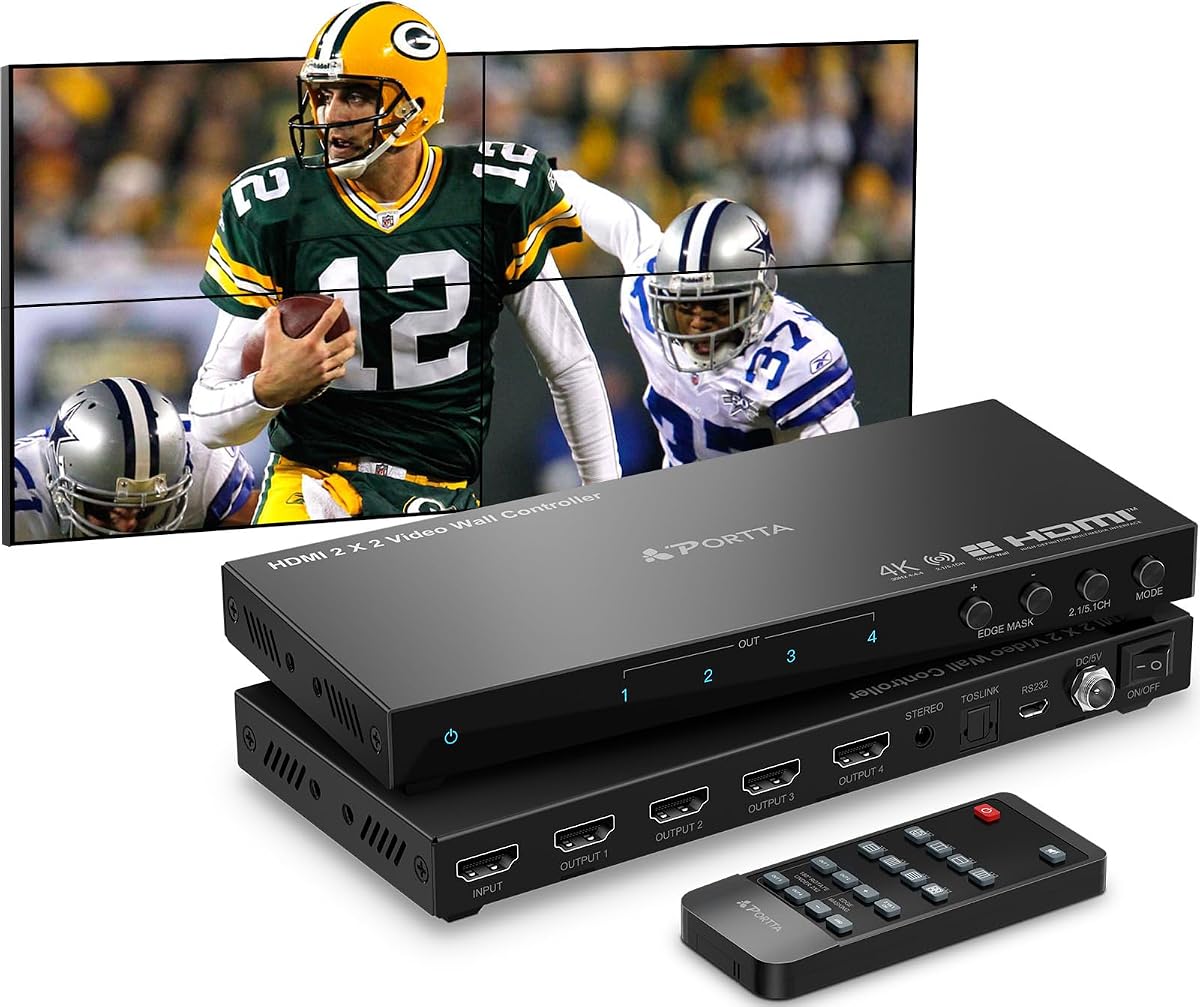


This HDMI Video Wall Controller is widely recognized for its robust performance in combining four displays into one seamless image. With a strong rating of 4.8 stars it stands out as a top choice for users needing reliable video distribution capabilities for professional setups or home entertainment.
We may earn a commission when you buy through this link, at no additional cost to you.
Its standout feature is the ability to accept a 4K 30Hz signal and distribute it across four 1080P screens. The processor includes precise edge masking functions that help align images perfectly despite physical bezel gaps. Additionally the SPDIF optical and 3.5mm audio outputs allow you to route sound to external speakers easily.
While it does not support 4K input at 60Hz which may limit high motion gaming scenarios the trade-off is acceptable for most business and static content uses. The lifetime technical support provided by the manufacturer offers peace of mind for complex installations or troubleshooting needs.
Anyone looking for a balanced solution between performance and support will find this model highly recommended. It is ideal for digital signage or control rooms where image alignment and audio routing are critical for a seamless visual experience.
The edge masking feature adjusts up to 8 pixels to eliminate visual distortion between screens ensuring a professional look.
Audio extraction allows you to separate sound from video enabling high-quality sound systems to enhance presentations.
We may earn a commission when you buy through this link, at no additional cost to you.
This budget-friendly HDMI Video Wall Controller transforms four TV screens into a single large wall display without requiring expensive professional hardware. It supports both HDMI and DVI inputs making it versatile for older legacy systems while still offering modern 4K capabilities for compatible sources.
We may earn a commission when you buy through this link, at no additional cost to you.
One of its most practical features is the memory function which remembers your last settings when the device is plugged in again. This ensures a seamless experience for users who need to turn the system on and off frequently without reconfiguring the display modes each time.
The device offers 11 splicing modes including vertical splicing options which are useful for portrait orientation setups. However note that while it accepts 4K signals the outputs are optimized for 1080P which may not be suitable for high-resolution content distribution needs.
For small businesses or hobbyists looking to create a multi-screen display on a tight budget this controller delivers exceptional value. Its plug-and-play design means you can start using it immediately without needing to install drivers or complex software configurations.
The combination of low cost and versatile input support makes it ideal for retrofitting older systems.
Settings are saved automatically allowing for instant restoration of your preferred layout upon restart.
We may earn a commission when you buy through this link, at no additional cost to you.
This premium HDMI Video Wall Controller is designed for users who need to handle high-speed 4K60Hz video signals with seamless switching capabilities. It routes input signals to any combination of four output displays without any noticeable delay or picture loss which is critical for dynamic content environments.
We may earn a commission when you buy through this link, at no additional cost to you.
The standout capability here is the LAN web control which allows you to manage the controller remotely via a network connection. This is particularly useful for installations where the device is mounted in hard-to-reach locations like ceiling racks or behind heavy wall panels.
While the unit is more expensive than standard models the investment pays off in terms of performance and scalability. It supports advanced features like upscaling and downscaling to fit different output resolutions ensuring that content looks sharp on all connected screens regardless of their native resolution.
Enterprise users or high-end home theater enthusiasts will appreciate the robust feature set and the ability to view multiple source signals simultaneously. The multiviewer presets simplify the process of managing complex display layouts without needing custom configuration scripts.
LAN web control provides secure and efficient management of the video wall from any connected device.
The seamless switch matrix ensures no flicker or lag when changing between different video sources.
We may earn a commission when you buy through this link, at no additional cost to you.
This OREI HDMI Video Wall Controller is designed to handle modern input sources including USB-C which makes it ideal for connecting laptops and mobile devices directly. It accepts 4K 60Hz inputs ensuring smooth playback for high-quality video content across up to four connected displays.
We may earn a commission when you buy through this link, at no additional cost to you.
The device offers a dual voltage power supply and includes an adapter for international use making it a great choice for businesses with international offices or travel setups. It also features RS-232 control allowing for integration with automated control systems for advanced installations.
While it provides solid performance for standard video content it does not support HDR10 or Dolby Vision which limits its utility for premium cinematic experiences. However for digital signage or corporate presentations the standard dynamic range is usually sufficient for clear visibility.
This model is best suited for users who prioritize input versatility and need a reliable processor that works with a variety of signal sources. The one-year warranty and OREI support add a layer of trust for professional deployments.
USB-C connectivity allows for direct connection to modern laptops without needing extra adapters.
Dual voltage supply ensures the device works reliably in different electrical regions worldwide.
We may earn a commission when you buy through this link, at no additional cost to you.
This HDMI Video Wall Controller from OREI offers a robust set of features for managing multi-screen displays efficiently. It accepts high bandwidth HDMI 2.0 signals and supports USB-C inputs ensuring that modern devices can connect seamlessly without requiring additional dongles or converters.
We may earn a commission when you buy through this link, at no additional cost to you.
The inclusion of EDID management helps optimize screen setup by ensuring that the connected displays negotiate the correct resolution and timing settings. This reduces the risk of display errors or image stretching issues that often occur in complex video wall configurations.
While the output resolution is fixed at 1080p which may not be ideal for 4K monitors the input flexibility allows you to connect high-resolution sources and scale them down. The optical audio output provides a clean way to route sound to external amplifiers or soundbars.
This controller is a solid choice for users who need to connect a mix of modern and legacy devices to a video wall setup. Its support for international voltage ranges makes it a flexible option for global business deployments.
EDID management ensures connected screens are recognized correctly preventing common configuration issues.
Support for both HDMI and USB-C ensures compatibility with a wide range of contemporary devices.
We may earn a commission when you buy through this link, at no additional cost to you.
This device serves as both a video wall controller and a matrix switch allowing you to route four different HDMI sources to four different displays. It supports 4K@60Hz and includes advanced EDID management to ensure compatibility with various display types and signal sources.
We may earn a commission when you buy through this link, at no additional cost to you.
The web control feature allows you to manage the matrix via a browser interface making it easier to switch sources or change configurations remotely. This is particularly useful for large installations where physical access to the device might be limited.
The audio system supports a wide variety of formats including Dolby TrueHD and DTS-HD which ensures high-quality sound reproduction for entertainment applications. This makes it suitable for environments where both visual and audio fidelity are paramount.
For businesses that need a single device to handle both display switching and video wall creation this matrix offers significant versatility. It is best suited for professional environments where reliability and remote control are critical operational needs.
Combines matrix switching and video wall processing in one unit reducing hardware clutter.
Supports advanced audio formats ensuring rich sound for multimedia presentations and entertainment.
We may earn a commission when you buy through this link, at no additional cost to you.
This HDMI Video Wall Controller offers a wide range of display configurations including eleven different splicing modes. It accepts a 4K input at 30Hz and distributes it across four 1080p outputs providing a smooth and clear visual experience for most content types.
We may earn a commission when you buy through this link, at no additional cost to you.
The device includes robust audio extraction capabilities with Toslink and 3.5mm outputs allowing you to route sound independently from the video signal. This is essential for scenarios where you need to send audio to a separate sound system or amplifier.
Edge masking and 180-degree rotation features allow for precise alignment of images across screens minimizing the visual impact of bezels. These tools are crucial for creating a professional looking seamless display in retail or control room environments.
The inclusion of mounting ears simplifies installation by allowing the device to be securely attached to standard rack mounts or walls. This makes it a practical choice for fixed installations where space and organization are important considerations.
Eleven splicing modes provide flexibility for various room layouts and content requirements.
Built-in audio extractors simplify the setup of external sound systems without extra hardware.
We may earn a commission when you buy through this link, at no additional cost to you.
This HDMI Video Wall Controller is designed to support 4K60Hz signals on both input and output ensuring that high-resolution content remains sharp and fluid. It accepts both HDMI and USB-C inputs making it compatible with modern laptops and media players.
We may earn a commission when you buy through this link, at no additional cost to you.
The device supports sixteen different splice modes allowing you to create various layouts from a simple 1×4 line to a complex 2×2 grid. The plug and play design ensures that you can set up the video wall quickly without needing to install complex drivers.
Stability is a key feature with the manufacturer promising stable work for 24×7 which is essential for businesses running continuous displays. The 180-degree rotation feature allows you to install TVs upside down and still display the image correctly.
This model is ideal for users who need to maintain high image quality across all screens without compromising on resolution. It is best suited for premium retail displays or high-end home theater systems.
Support for 4K60Hz output ensures crystal clear visuals across all connected displays.
Built for 24×7 reliability ensuring your display system is always ready when needed.
We may earn a commission when you buy through this link, at no additional cost to you.
This advanced HDMI Video Wall Controller is designed for professional environments that require high fidelity and remote management capabilities. It allows you to route any 4K60Hz input signals to any combination of output displays without any picture loss or delay.
We may earn a commission when you buy through this link, at no additional cost to you.
The multiviewer presets allow end users to view all four source signals on one screen in a 2×2 layout which is useful for monitoring multiple feeds simultaneously. This functionality is essential for security or broadcast monitoring where context is key.
Web control allows for network-based management enabling you to adjust the video wall from any device on the same network. This reduces the need for physical access to the device and streamlines operational workflows significantly.
This solution is best suited for corporate offices or broadcast facilities where multiple video feeds need to be monitored and managed efficiently. It provides a professional grade experience that justifies its advanced feature set.
Multiviewer presets allow you to see multiple sources on a single display for better oversight.
LAN web control provides a convenient way to adjust settings without accessing the device.
We may earn a commission when you buy through this link, at no additional cost to you.
This HDMI Video Wall Controller supports direct USB playback allowing you to play videos and images directly from a USB drive without needing a computer. It supports resolutions up to 4096×2160@60Hz ensuring that high quality content displays smoothly across the screens.
We may earn a commission when you buy through this link, at no additional cost to you.
The auto display feature ensures that when you insert a USB drive the system automatically detects the media and begins playing without manual intervention. This is particularly useful for digital signage where content needs to change frequently without physical interaction.
Image cropping and brightness adjustment functions allow you to tailor the display to your specific environment. You can adjust contrast and color temperature to ensure the display is visible under different lighting conditions in your room.
This controller is an excellent choice for users who want a standalone solution for playing media files without managing a PC. It offers high resolution support and easy setup for businesses and home users alike.
USB auto display eliminates the need for a computer for playing video and image files.
Brightness and color temperature settings allow you to optimize visibility in any lighting.
We may earn a commission when you buy through this link, at no additional cost to you.
Choosing the right HDMI Video Wall Controller requires understanding your specific display requirements and technical constraints. This section breaks down the critical factors you should evaluate to ensure a seamless multi-screen experience.
Ensure the controller supports the native resolution of your source and display devices. Most modern controllers accept 4K input but may output 1080p. If you need high-speed motion handling look for models that support 60Hz input and output to avoid motion blur.
Prioritize models that explicitly state support for your target resolution such as 4K60Hz to avoid compatibility issues with high-end content.
Check the number and type of inputs available. HDMI and USB-C are essential for connecting modern laptops and media players. If you have legacy equipment ensure the device supports DVI or HDMI 1.4 if necessary.
Count the number of HDMI outputs required for your specific layout whether it is a 2×2 grid or a 1×4 strip.
Different applications require different layouts. A 2×2 grid is common for retail displays while a 1×4 line might be better for timeline viewing. Look for controllers that offer multiple splicing modes to give you flexibility.
Verify that the unit can handle vertical splicing if you plan to rotate screens for portrait mode.
Video walls often require external sound systems. Look for controllers with SPDIF optical or 3.5mm analog audio outputs to route sound cleanly to amplifiers.
Ensure the audio extraction supports the formats you need such as stereo or 5.1 surround sound for immersive experiences.
Management can be done via remote control RS-232 or LAN web interfaces. For remote installations LAN web control is ideal. For local setups a physical remote is sufficient.
Check if the controller supports IR extension cables to allow for remote control in hard-to-reach locations.
Physical bezels can create visual gaps. Look for edge masking or bezel adjustment features that allow you to crop pixels to hide these gaps.
Rotation support such as 180-degree flipping helps align screens that are mounted upside down for a seamless look.
Continuous operation requires stable power. Check if the unit supports dual voltage for international use or has redundant power supplies for high-uptime needs.
Ensure the device has robust heat dissipation features to maintain performance during 24×7 operation.
Video walls are complex setups. Check if the manufacturer offers lifetime technical support or a replacement warranty to resolve potential issues quickly.
Look for clear documentation and accessible support teams to assist with configuration and troubleshooting.
Start by connecting your source device to the input port and your displays to the output ports. Power on the controller before the displays to ensure EDID detection works correctly.
Use the remote control or RS-232 interface to select the desired display mode such as 2×2 or 1×4. Adjust the bezel settings if your controller supports edge masking.
Regularly update the firmware if available to maintain compatibility with new display standards. Clean the device with a dry cloth to prevent dust buildup.
Yes many models support HDMI or USB-C inputs directly from laptops. Ensure your laptop supports the resolution required by the controller.
Use the edge masking feature available on most controllers to crop the image slightly and hide the thick middle border between screens.
Not necessarily many controllers can run standalone using USB playback or remote control without a permanent PC connection.
It is highly recommended if you plan to use external speakers. Most controllers offer SPDIF or analog outputs for this purpose.
Premium models offer LAN web control allowing you to manage settings remotely which is ideal for hard-to-reach installations.
Look for 4K60Hz support if you need high quality video. Most models support 1080p output which is sufficient for many commercial uses.
Enable the 180-degree rotation feature on the controller and rotate the physical screens to align the image correctly.
Most basic models are plug and play but advanced setups may require configuration via RS-232 or web interface.
The J-Tech Digital HDMI Video Wall Controller stands out as the top choice for its balanced performance and robust support features. Its ability to handle 4K inputs with precise edge masking makes it ideal for professional setups.
For budget-conscious buyers the 2×2 4k Video Wall Controller offers excellent value with its wide range of splicing modes and memory recall features. It is a great option for simpler deployments.
Remember to check current prices and availability before making a purchase as models and features can change over time. Select the controller that best fits your specific resolution and control requirements.