
NETGEAR Nighthawk Multi-Gig Cable Modem for Xfinity Voice (CM2050V)
4.0Editor score
Supports up to 2.5Gbps speeds
Two telephone lines with call features
DOCSIS 3.1 certification
This guide compares the top cable modems with phone support for Xfinity and other providers, helping you save on rental fees while keeping your landline
Finding a cable modem with phone support is essential for households that still rely on landline VoIP services alongside high-speed internet. These devices combine connectivity with voice features, ensuring your home network stays efficient and cost-effective without sacrificing critical communication tools.
We evaluated ten top-rated models based on compatibility, speed capabilities, voice port availability, and overall performance. Our analysis focuses on DOCSIS standards, Ethernet options, and provider certifications to help you choose the right hardware for your specific internet plan and home setup.
Each pick highlights key strengths and limitations, so you can make an informed decision. Note that pricing and availability fluctuate regularly, so check current listings before purchasing to ensure you get the best deal for your needs.
4.0Editor score

4.0Editor score

4.2Editor score
Here is a side-by-side comparison of the ten best cable modems with phone support, highlighting their key specifications, provider compatibility, and standout features to help you decide quickly.


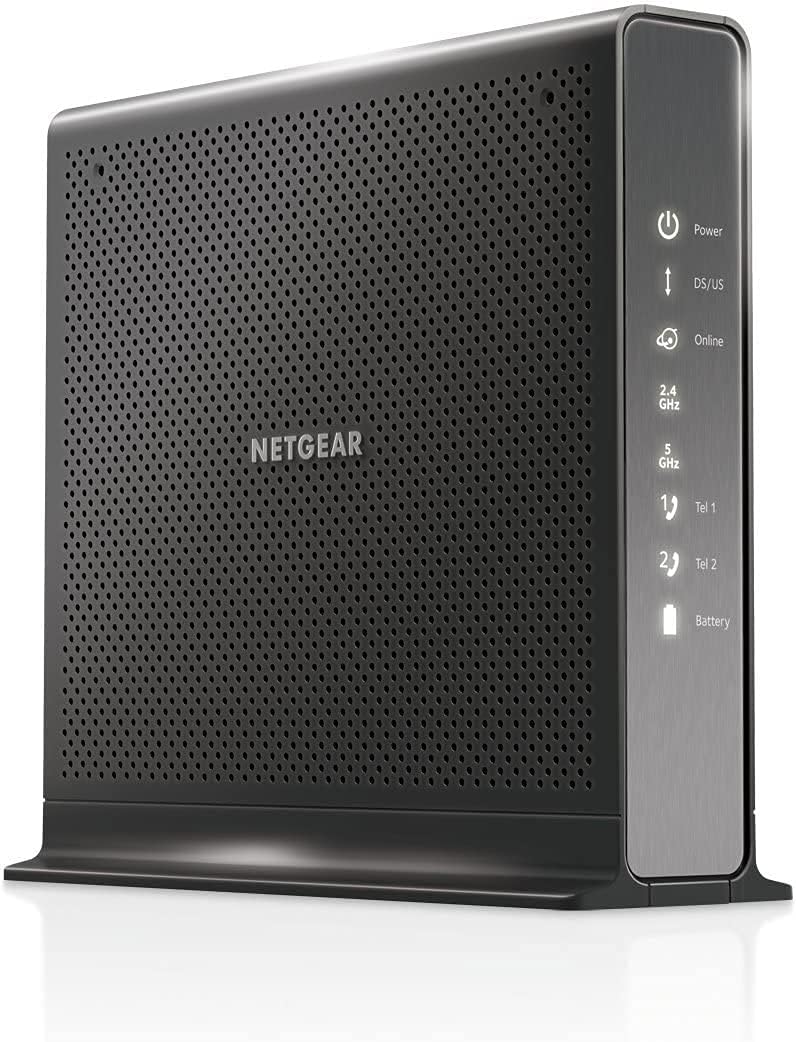

The NETGEAR Nighthawk CM2050V stands out as the top premium choice for users needing high-speed internet with reliable voice support. It holds a strong rating due to its DOCSIS 3.1 capabilities, which unlock the fastest cable plans available today.
We may earn a commission when you buy through this link, at no additional cost to you.
Its standout feature is the ability to handle speeds up to 2.5Gbps while supporting two telephone lines with enhanced call features. This makes it ideal for households that demand bandwidth for streaming and gaming without sacrificing landline convenience.
While the price is higher than basic models, the performance justifies the investment. The only trade-off is its exclusivity to Xfinity, but for those within that network, it offers unmatched speed and stability.
If you need the best performance and have an Xfinity plan that supports multi-gig speeds, this is the modem to buy. It ensures your voice lines stay active while your internet future-proofs for upcoming upgrades.
The 2.5Gbps Ethernet port allows you to fully utilize fast cable plans without bottlenecks.
Certified for Xfinity Voice, it ensures clear calls with features like caller ID and conference calling.
We may earn a commission when you buy through this link, at no additional cost to you.
The NETGEAR Nighthawk CAX30 is a robust combo unit that pairs a high-speed modem with a powerful WiFi 6 router. While it lacks voice ports, its speed and coverage make it a top contender for modern households focusing on wireless connectivity.
We may earn a commission when you buy through this link, at no additional cost to you.
It supports major providers like Xfinity, Spectrum, and Cox, offering flexibility. Its DOCSIS 3.1 technology ensures you get gigabit+ speeds, while the WiFi 6 network handles dozens of devices seamlessly.
The only drawback for voice users is the lack of integrated phone lines. However, if you use a separate VoIP adapter, this unit provides superior internet performance and whole-home coverage.
For users prioritizing wireless speed and coverage over integrated voice, this is an excellent choice. It simplifies your setup by combining two devices into one high-performance unit.
Dual-band AX2700 WiFi handles heavy traffic without lag for gaming or streaming.
Works across multiple ISPs, giving you freedom to switch without replacing hardware.
We may earn a commission when you buy through this link, at no additional cost to you.
The Motorola MT7711 is a three-in-one device that combines a cable modem, router, and voice ports. It is an ideal budget-friendly solution for Xfinity users who want to eliminate monthly rental fees without paying a premium.
We may earn a commission when you buy through this link, at no additional cost to you.
Its main strength is its value proposition. By including both internet and voice capabilities along with WiFi, it simplifies your setup. The AC1900 router handles everyday tasks well, and the voice ports support up to two lines.
Users should note it supports speeds up to 400Mbps, which may not suffice for ultra-fast plans. Also, as a renewed product, checking for warranty coverage is wise.
If you want to save money and need a single box for internet and phone, this is a solid buy. It strikes a great balance between features and cost for average household needs.
Purchasing this unit can save you significant money compared to monthly rental fees.
Includes standard features like caller ID and call forwarding for added convenience.
We may earn a commission when you buy through this link, at no additional cost to you.
The ARRIS T25 offers a reliable balance of speed and voice support. It is designed for Xfinity users needing faster speeds than DOCSIS 3.0 models provide, while still maintaining essential phone line functionality.
We may earn a commission when you buy through this link, at no additional cost to you.
Its DOCSIS 3.1 technology ensures future-proofing and better efficiency during peak hours. The two phone ports are sufficient for most homes, and the setup process is straightforward via the central app.
The only limitation is that it requires a separate router, adding complexity. However, for those seeking gigabit-tier internet speeds with voice, this modem performs consistently well.
Choose this if you want high-speed internet and voice lines without overspending. It is a dependable option for mid-tier Xfinity plans.
Handles up to 800Mbps, suitable for most fast internet plans available today.
Includes built-in security features to protect your network from common attacks.
We may earn a commission when you buy through this link, at no additional cost to you.
The NETGEAR C7000 is a high-performing combo modem and router ideal for users prioritizing wireless speed over voice features. While it does not support bundled voice plans, it excels in internet connectivity and stability.
We may earn a commission when you buy through this link, at no additional cost to you.
Its AC1900 WiFi ensures fast streaming and gaming performance. It works with major providers like Xfinity and Cox, making it versatile for different households needing strong internet.
The lack of voice support is a key consideration. If you rely on landlines, you will need a separate solution. However, for data-centric homes, this is a solid choice.
Select this for its reliability and speed if you do not need integrated phone lines. It simplifies your home network setup effectively.
Provides fast wireless speeds suitable for streaming HD video and online gaming.
Includes robust parental controls and security tools for household protection.
We may earn a commission when you buy through this link, at no additional cost to you.
The NETGEAR CM1150V is a powerful modem designed specifically for Xfinity users who need both internet and voice. It offers solid speed capabilities and supports two phone lines with clear call quality.
We may earn a commission when you buy through this link, at no additional cost to you.
Its DOCSIS 3.1 technology ensures it can handle future speed upgrades. The four Gigabit Ethernet ports allow for multiple wired connections, which is beneficial for gaming consoles and desktops.
While it is priced higher than some competitors, its reliability and feature set justify the cost. The only downside is its limitation to Xfinity networks.
This is a great choice if you are within the Xfinity ecosystem and need a dedicated voice modem. It balances speed and reliability effectively.
Four Gigabit ports give you flexibility for connecting multiple wired devices.
Ensures clear and stable VoIP calls essential for business or personal use.
We may earn a commission when you buy through this link, at no additional cost to you.
The NETGEAR CM3000 delivers exceptional multi-gig speeds for users prioritizing data over voice. It supports major providers and uses mid-split technology to unlock the fastest tiers available on cable networks.
We may earn a commission when you buy through this link, at no additional cost to you.
Its speed capabilities far exceed standard modems, ensuring smooth streaming and gaming even during peak hours. Link aggregation allows for combined wired speeds up to 2Gbps, which is rare in this category.
Since it lacks voice ports, you will need a separate device if you rely on landlines. However, for pure internet performance, this modem is unmatched.
Choose this if you want the fastest possible cable connection without bundled voice needs. It is a top-tier option for power users.
Revolutionary technology that unlocks significantly higher download and upload speeds.
Link aggregation supports combined wired speeds, ideal for desktops and servers.
We may earn a commission when you buy through this link, at no additional cost to you.
The NETGEAR C7100V combines internet, WiFi, and voice support in a single device. It is ideal for Xfinity households that need a straightforward solution with clear voice capabilities.
We may earn a commission when you buy through this link, at no additional cost to you.
Its DOCSIS 3.0 technology supports speeds up to 600Mbps, which is suitable for most families. The AC1900 router ensures reliable wireless coverage throughout the home.
While it is not the fastest modem on the market, its integration of voice and internet makes it convenient. Note that it does not support Xfinity Gigabit plans.
For users needing a single box that handles everything including phone lines, this is a solid option. It simplifies your network setup significantly.
Eliminates the need for multiple devices by combining router and modem functions.
Includes two lines for home phone use with standard call features.
We may earn a commission when you buy through this link, at no additional cost to you.
The NETGEAR CM500V is a budget-friendly option for Xfinity users who need basic internet and voice support. It is designed for plans up to 300Mbps, making it a solid choice for average households.
We may earn a commission when you buy through this link, at no additional cost to you.
Its small footprint makes it easy to place anywhere, and it offers standard voice features like caller ID. The setup is quick, and it works reliably for everyday tasks.
While it lacks advanced speed capabilities, it delivers on cost efficiency. If you do not need gigabit internet, this modem provides all the essential features you need.
Select this if you are looking for the lowest price for a certified voice modem. It is perfect for small or average-sized plans.
Small design allows it to fit neatly on shelves or desks without clutter.
Provides essential phone line support with features like call forwarding.
We may earn a commission when you buy through this link, at no additional cost to you.
The ARRIS SVG2482AC is a renewed device that combines modem, router, and voice into one unit. It is perfect for budget-conscious users who still need reliable voice and internet features.
We may earn a commission when you buy through this link, at no additional cost to you.
Its dual-band WiFi ensures decent performance, and it supports Xfinity plans up to 600Mbps. This makes it a strong contender for mid-tier needs at a lower price.
However, it does not support gigabit plans, so check your speed needs. Also, as a renewed unit, warranty terms may vary compared to new devices.
Choose this if you want a cost-effective all-in-one solution for voice and internet. It is a great way to save on rental fees without buying new hardware.
Renewed option offers substantial savings compared to buying brand new units.
Consolidates modem, router, and voice into a single convenient device.
We may earn a commission when you buy through this link, at no additional cost to you.
Selecting the right modem involves considering speed, compatibility, and voice features.
DOCSIS standards define your modem's speed capabilities. DOCSIS 3.1 supports faster speeds and better efficiency than 3.0, making it ideal for high-bandwidth households.
Opt for DOCSIS 3.1 to ensure your hardware is ready for future internet upgrades.
Check how many phone lines the modem supports. Most models support two lines, which is standard for home VoIP needs. Ensure it includes features like caller ID or call forwarding.
Verify line counts match your household needs before purchasing.
Not all modems work with every provider. Models certified for Xfinity will not work with Spectrum or Cox. Always confirm your ISP and plan compatibility before buying.
Match your modem exactly to your cable provider to avoid activation issues.
Your internet plan dictates the modem's speed tier. If you have a 1Gbps plan, you need a modem that supports gigabit speeds. Lower speeds can lead to bottlenecks and poor performance.
Align your modem's speed limit with your current internet plan.
Combo units combine modem and router for convenience, while separate units offer more flexibility. If you need voice, some combos include it, but some modems require a separate voice adapter.
Consider whether you prefer one device or modular flexibility.
Check the number and type of Ethernet ports. Gigabit ports are essential for wired devices like consoles or PCs. Some high-end models include 2.5Gbps ports for future-proofing.
Ensure enough ports exist for your wired devices.
Modern modems include security features like firewalls. WPA3 and denial-of-service prevention help protect your home network from external threats.
Look for built-in security tools for peace of mind.
Purchasing a modem saves you monthly rental fees. Over time, this investment pays for itself. Compare the cost of the modem against the annual rental fees to calculate savings.
Calculate long-term savings to decide if buying is worth it.
Connect your modem to the coaxial outlet and power it on. Wait for the lights to stabilize before connecting devices.
For voice lines, plug your phone directly into the designated phone port. Ensure your account is activated with your ISP.
Keep your modem in a cool, dry place to prevent overheating. Reset it occasionally to clear any performance issues.
Yes, these modems support Voice over IP (VoIP) services. Your phone line connects directly to the modem via an Ethernet phone port. Ensure your ISP provides VoIP service for the lines to work properly.
No, only certified modems work with Xfinity voice. Check the product description for Xfinity voice certification. Using non-certified hardware may lead to activation failures.
Most modems do not have built-in batteries. You will need a separate backup power supply to keep calls active during outages. Some models may support external battery backups.
It depends on the model. Some combo units include a router, while standalone modems do not. If you have a separate router, ensure it connects via the modem's Ethernet port.
Your speed is limited by your plan. However, buying a modem ensures you get the full speed of your plan without throttling from outdated rental hardware. It may stabilize your connection significantly.
Yes, DOCSIS 3.1 modems are backward compatible with older plans. They will work with slower speeds but ensure you get maximum performance. Check your plan speed before purchasing.
Plug your phone into the modem's phone port. Call your ISP to register the device on your account. Once registered, your line will activate shortly after.
Only if the modem is certified for that specific provider. Most Xfinity modems do not work with other ISPs. Always verify compatibility with your cable company before buying.
We highlighted the top three picks: the NETGEAR CM2050V for premium performance, the Motorola MT7711 for budget value, and the NETGEAR CM500V for entry-level savings.
Prioritize compatibility with your provider and the number of phone lines you need. Ensure your modem supports your current plan speed for optimal performance.
Check current prices before buying to get the best deal. Prices fluctuate regularly, and finding a discount can significantly reduce your overall cost.