
Ubiquiti Unifi Security Appliance (USG), Single,White
4.5Editor score
Integration with Unifi Controller
Convenient VLAN support
QoS for enterprise VoIP
This guide compares the top firewall appliances for home and business networks, evaluating performance, security features, port options, and compatibility with
Choosing the right firewall appliance is critical for protecting your network from modern cyber threats. Whether you manage a small office or a home lab, the right device ensures data integrity and secure connectivity across all your devices.
We compared ten leading firewall appliances based on performance metrics, port configurations, security capabilities, and user feedback. Each product was evaluated for its ability to handle traffic loads and integrate with existing network infrastructures effectively.
Each pick highlights specific strengths like throughput, port speed, and software compatibility. Note that prices and availability change frequently, so verify current details before making your final purchase decision for your network setup.
4.5Editor score

4.7Editor score

4.4Editor score
The following table provides a side-by-side comparison of all ten firewall appliances, highlighting their key specifications, connectivity options, and performance capabilities to help you find the right fit for your network needs.



The SonicWall TZ280 stands out as a top choice for users needing robust security without sacrificing speed. With a rating of 4.7, it delivers up to 2.5 Gbps firewall inspection powered by Reassembly-Free Deep Packet Inspection technology. This appliance ensures your network remains secure against sophisticated threats while maintaining high performance for daily operations.
We may earn a commission when you buy through this link, at no additional cost to you.
Its connectivity options are versatile, featuring 8 Gigabit Ethernet ports and 2 SFP ports for fiber connections. The SonicOS 8 platform provides intrusion prevention, gateway anti-malware, and application control. When paired with a service subscription, it offers TLS SSL decryption and multi-engine sandboxing for comprehensive threat protection across your environment.
One trade-off is that the hardware unit is sold without a service subscription, meaning security services and firmware updates must be purchased separately. This upfront cost might seem high initially, but it allows you to tailor the service level to your specific needs without being locked into a bundled package.
This appliance is ideal for small businesses and branch offices needing reliable secure WAN capabilities. Its desktop form factor fits easily into any setup, and the ability to manage on-box or via cloud Network Security Manager simplifies administration. We recommend it for users prioritizing throughput and advanced security features.
The Reassembly-Free Deep Packet Inspection engine ensures rapid traffic analysis without compromising security depth.
Multiple Ethernet and SFP ports allow seamless integration into diverse network topologies and cabling systems.
We may earn a commission when you buy through this link, at no additional cost to you.
The Ubiquiti Unifi Security Appliance offers an affordable entry point into enterprise-grade network security. With a rating of 4.5, it delivers powerful firewall performance that integrates directly with the Unifi Controller. This makes it a favorite among users who already utilize Ubiquiti hardware for their networking infrastructure.
We may earn a commission when you buy through this link, at no additional cost to you.
Its key strengths include convenient VLAN support and QoS specifically designed for enterprise VoIP. The device supports 10/100/1000Base-T connections and includes a VPN server for secure remote communications. While it has fewer ports than high-end models, it covers essential routing and firewall needs effectively for small offices.
A notable limitation is that full management requires the Unifi Controller software which adds complexity if you do not already use it. Additionally, with only three ports, you may need switches for larger setups. These constraints are acceptable given its low cost and simplicity for smaller networks.
We recommend this appliance for budget-conscious users who value ecosystem integration over raw port density. It is particularly well-suited for small offices or home labs where the Unifi Controller is already deployed. Its wall mountable design ensures it fits unobtrusively into your workspace.
Direct integration with Unifi Controller allows unified management across your entire network infrastructure effortlessly.
QoS settings and VLAN support ensure voice traffic remains clear and network segments stay isolated.
We may earn a commission when you buy through this link, at no additional cost to you.
The FortiGate-60F is engineered for enterprises needing high-density connections and superior security performance. Rating 4.4, it features 10 Gigabit Ethernet RJ45 ports including WAN DMZ and internal options. This flexibility makes it ideal for complex network environments requiring multiple secure segments.
We may earn a commission when you buy through this link, at no additional cost to you.
Performance is driven by purpose-built security processor technology delivering 1.4 Gbps IPS throughput. It offers the industry's highest SSL inspection performance ensuring encrypted traffic is inspected without bottlenecks. The management console supports comprehensive automation and integrates with Fortinet's Security Fabric for streamlined operations.
While the hardware is sold without a subscription, the initial investment reflects its robust build and feature set. The lack of included services means ongoing costs for threat intelligence, but this modular approach allows you to scale protection as your needs grow. It is a premium choice for serious security requirements.
This appliance is best for medium to large businesses needing extensive connectivity and advanced threat mitigation. Its ability to handle SD-WAN functionalities adds value for organizations with multiple branches. We suggest it for those prioritizing raw performance and scalability in their firewall infrastructure.
Ten Gigabit ports provide ample connectivity for diverse network segments and future expansion.
Advanced SSL inspection ensures threats hidden in encrypted traffic are detected and blocked effectively.
We may earn a commission when you buy through this link, at no additional cost to you.
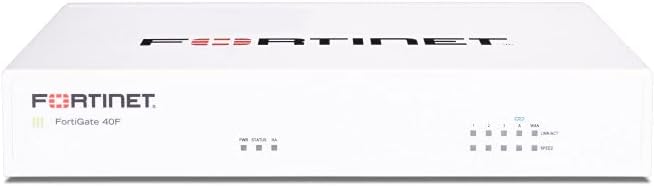
The FortiGate-40F is designed specifically for small to mid-sized businesses needing enterprise security in a compact package. With a rating of 4.2, it offers robust connectivity with 5 Gigabit Ethernet ports and a fanless desktop form factor. This design ensures quiet operation while minimizing space usage in busy environments.
We may earn a commission when you buy through this link, at no additional cost to you.
It delivers up to 1 Gbps IPS throughput using purpose-built security processor technology. This allows for industry-leading performance and protection for SSL encrypted traffic. Integrated with AI-powered FortiGuard Labs, it identifies and mitigates both known and unknown threats effectively across your network.
The main trade-off is the lower port count compared to higher models, which may limit expansion without switches. Also, like other Fortinet devices, security services require a separate subscription. However, for small offices, the balance of performance and form factor makes it a practical choice.
This appliance is ideal for branch offices or small businesses needing reliable security without bulk. The simplified management and Zero Touch Integration make deployment quick. We recommend it for users needing a quiet efficient firewall that integrates well with Fortinet ecosystems.
The fanless desktop form factor ensures silent operation while fitting easily into tight spaces.
Purpose-built processors handle encrypted traffic inspection without slowing down network performance.
We may earn a commission when you buy through this link, at no additional cost to you.
The Protectli Vault FW4B is an excellent choice for home lab enthusiasts and small office users wanting flexibility. Rating 4.6, it features a compact fanless design with Intel Quad Core processing. It comes with 8GB RAM and 120GB SSD ready for any major open-source firewall software.
We may earn a commission when you buy through this link, at no additional cost to you.
Its key strength is compatibility with popular solutions like pfSense and OPNsense. The hardware is fully tested for these platforms ensuring smooth operation. With four Gigabit Ethernet ports and hardware AES-NI support, it handles encryption tasks efficiently without external dependencies.
Users must install the OS themselves as no system comes pre-installed. While this offers flexibility, it adds a setup step for those preferring plug-and-play solutions. The compact size and silent operation make it ideal for residential environments where noise is a concern.
We recommend this appliance for DIYers and small businesses needing a cost-effective secure gateway. The US-based support adds confidence for troubleshooting. It is best suited for users comfortable with software installation who want a reliable hardware base for custom setups.
Fully tested with pfSense and OPNsense allows users to choose their preferred firewall software freely.
The fanless design ensures silent operation perfect for home offices and quiet residential spaces.
We may earn a commission when you buy through this link, at no additional cost to you.
The Netgate 1100 pfSense+ is designed for businesses needing a ready-to-run security gateway. With a rating of 4.1, it ships pre-loaded with pfSense+ software to get you started immediately. The device includes one year of hardware warranty and TAC Lite support for setup assistance.
We may earn a commission when you buy through this link, at no additional cost to you.
Its dual core ARM Cortex-A53 delivers near gigabit routing for common traffic. It provides over 650 Mbps of firewall throughput suitable for many small networks. The low power draw and compact form factor allow it to run unnoticed on a desktop or rack.
The main limitation is its ARM architecture which offers lower performance than x86 systems like the Protectli FW4B. However, for smaller setups needing reliability and support, it is a solid choice. Three Gigabit Ethernet ports offer flexible configuration for WAN LAN and optional networks.
This appliance is best for small businesses preferring a supported solution without OS installation hassles. The included software updates ensure long-term viability. We recommend it for those needing a simple secure edge gateway with accessible technical support.
Pre-loaded pfSense+ software eliminates setup time and ensures a secure start upon unboxing.
Low power draw ensures efficient operation suitable for always-on network security needs.
We may earn a commission when you buy through this link, at no additional cost to you.
The FORTINET FG-100E offers robust network security for enterprises needing strong threat detection. With a rating of 4.7, it protects against known exploits and malware while detecting unknown attacks. It also identifies thousands of applications ensuring granular control over network traffic.
We may earn a commission when you buy through this link, at no additional cost to you.
Its advanced security features help maintain robust defenses across diverse traffic types. Fortinet's reputation for quality ensures reliable performance in business environments. The appliance is designed to integrate seamlessly with other security tools for comprehensive protection.
Detailed specifications are less visible than other models, but the focus on threat detection highlights its core strength. As with other Fortinet devices, full protection requires a service subscription. This cost must be factored into the total deployment budget.
This appliance is suitable for businesses needing strong defense against sophisticated threats. The app identification helps enforce policies effectively. We recommend it for organizations prioritizing threat intelligence and application awareness in their security posture.
Advanced detection capabilities identify emerging threats that traditional signature-based systems might miss.
Thousands of apps identified allow precise control over network usage and resource allocation.
We may earn a commission when you buy through this link, at no additional cost to you.
The Palo Alto PAN-PA-220 is a Next Generation Firewall designed for robust security needs. While the listing shows a rating of 3.0, Palo Alto remains a top industry vendor for advanced threat protection. This unit comes in new condition with 8 physical ports for flexible connectivity.
We may earn a commission when you buy through this link, at no additional cost to you.
It features next generation security capabilities ensuring modern threats are mitigated effectively. The compact design fits well into standard network racks or desktop setups. Given the brand reputation, it is a trusted choice for enterprises prioritizing security depth.
The listing provides minimal technical details, which may require checking official specs for performance metrics. Also, the rating suggests potential issues with specific units or listings. However, the underlying hardware remains capable for secure edge environments.
We recommend this for buyers familiar with Palo Alto systems needing a compact next-gen firewall. Verify specifications before purchase to ensure it meets throughput needs. It is best for small businesses seeking trusted brand reliability.
Advanced threat protection ensures your network stays safe from evolving cyber risks effectively.
Eight physical ports allow diverse connections without needing additional network hardware immediately.
We may earn a commission when you buy through this link, at no additional cost to you.
The Protectli Vault FW4C distinguishes itself with 2.5 Gigabit Ethernet ports for faster internal throughput. With a rating of 4.5, it features an Intel J3710 Pentium Quad Core processor optimized for performance. The fanless design ensures silent operation while supporting major open-source firewall solutions.
We may earn a commission when you buy through this link, at no additional cost to you.
It comes with 4GB RAM and 32GB SSD, adequate for most standard use cases. Hardware AES-NI support enhances encryption speeds efficiently. The US-based support adds value for troubleshooting setup or hardware issues quickly.
Unlike the FW4B, this model has less RAM which may limit heavy multi-service deployments. Also, OS installation is required before use. These trade-offs are acceptable for users needing faster port speeds without upgrading to enterprise gear.
This appliance is ideal for users with multi-gigabit internet plans requiring faster internal speeds. It balances cost and performance well for home labs or small offices. We recommend it for those prioritizing connection speed over raw system resources.
Four 2.5 Gigabit ports support faster data transfer and modern high bandwidth internet plans.
Fanless operation ensures noise-free performance while maintaining reliable processing power consistently.
We may earn a commission when you buy through this link, at no additional cost to you.
The FortiGate-60F bundle offers the hardware plus one year of FortiGuard Unified Threat Protection and FortiCare Premium. With a rating of 4.2, it ensures your network is protected from advanced threats immediately. This bundle includes web filtering and anti-botnet technologies for robust defense.
We may earn a commission when you buy through this link, at no additional cost to you.
It is optimized for medium-sized businesses needing reliable support without large enterprise infrastructure. The FortiCare Premium ensures high-quality service and continuity throughout the year. This package simplifies deployment by removing the guesswork of service selection.
The upfront cost is higher than hardware alone, but it covers essential protection and support for a full year. After the initial year, renewals must be purchased separately. This is acceptable for users wanting an all-inclusive security package from day one.
We recommend this bundle for businesses seeking complete protection and support without initial configuration delays. The advanced filtering and service continuity ensure peace of mind. It is best for organizations prioritizing ease of deployment and immediate security coverage.
Includes comprehensive threat protection and support services to secure your network from day one.
Premium support ensures issues are resolved quickly maintaining consistent network operations and trust.
We may earn a commission when you buy through this link, at no additional cost to you.
Selecting the right firewall appliance depends on your specific network size, throughput needs, and security requirements. This guide outlines key factors to help you make an informed decision.
Throughput determines how much traffic your firewall can handle while applying security rules. Look for devices that support your current internet speed plus a buffer for future growth. High IPS throughput ensures security features do not slow down your network unnecessarily.
Choose a model with IPS throughput that matches or exceeds your highest traffic periods to avoid bottlenecks.
Consider the number and type of ports needed for WAN LAN DMZ and internal connections. Gigabit Ethernet is standard, but 2.5G or 10G options are available for faster links. Having extra ports can simplify cabling without requiring additional switches.
Ensure the device has enough physical ports for all connected devices or plan for switch expansion.
Modern firewalls offer threat prevention, intrusion prevention, and SSL inspection capabilities. Check if the device supports features you need like sandboxing or anti-botnet protection. Advanced tools help detect both known and unknown threats effectively.
Prioritize appliances with robust threat intelligence and encrypted traffic inspection for comprehensive security.
Some appliances require specific firmware or come pre-installed with software like pfSense. Others may allow open-source OS installation for flexibility. Compatibility ensures you can use your preferred management tools and configurations.
Verify software support matches your technical comfort and operational requirements before purchasing hardware.
Many appliances sell hardware only, requiring a subscription for updates and threat intelligence. This adds ongoing costs but ensures your device stays effective against new threats. Compare hardware-only vs bundled options based on your budget.
Factor in annual subscription fees when calculating total cost of ownership for the appliance.
Firewalls come in desktop or rack-mount forms with varying noise levels. Fanless models are quieter and better for office environments. Consider where the device will live and whether rack space is available.
Choose a form factor that fits your physical space without disrupting workspace comfort.
Technical support quality varies between manufacturers. Some offer dedicated help centers or lifetime software updates. Check warranty length and availability of user community resources for troubleshooting.
Select a vendor with reliable support channels to minimize downtime during network issues.
Plan for future network growth by choosing an appliance that can handle increased traffic. Some models offer SD-WAN capabilities for expanding branches or remote workers. Scalability ensures you won't need to replace the device soon.
Opt for models with features that grow alongside your business needs over time.
Start by connecting your internet source to the WAN port and internal devices to LAN ports. Configure basic settings through the web interface or controller software provided. Ensure all connections are secure and properly labeled to avoid confusion.
Regularly update the firmware or software to maintain protection against new vulnerabilities. Monitor logs periodically for unusual activity or blocked threats that might indicate issues. Adjust rules as needed based on network usage patterns.
Keep the appliance in a cool, well-ventilated area to prevent overheating. Dust accumulates over time so gentle cleaning helps maintain performance. Back up your configuration regularly so recovery is easy if settings are reset.
Many appliances sell as hardware only, requiring a subscription for threat updates and advanced protection. This ensures your device stays effective against emerging threats. However, basic routing and firewalling works without one.
Some appliances like Protectli allow custom OS installation for flexibility. Others ship with pre-installed software. Check compatibility before purchasing if you want specific OS options.
IPS refers to Intrusion Prevention Systems that monitor and block threats. IPSec is used for secure VPN tunnels. Both features are often found together on modern appliances.
Yes, fanless models operate silently and are durable for office environments. They reduce noise pollution while maintaining performance. Ensure proper ventilation is available to prevent overheating.
Three to five ports work for small setups, while larger networks may need ten or more. Extra ports reduce the need for switches. Consider WAN LAN DMZ and future expansion needs.
Yes, many appliances function as both firewall and router. They handle routing, NAT, and security rules. This simplifies your network setup by consolidating hardware.
Many modern appliances offer cloud-based management dashboards. This simplifies remote monitoring and configuration. Check if the model supports cloud or on-box management options.
SSL inspection decrypts secure traffic to check for hidden threats. This helps detect malware inside encrypted connections. It requires proper configuration to avoid breaking secure sites.
We highlighted top picks like the SonicWall TZ280 for performance and the Ubiquiti Unifi Security Appliance for budget needs. Each option delivers reliable protection suited to different network sizes and requirements.
Prioritize throughput and port configurations that match your current infrastructure. Consider whether subscription services fit your long-term security strategy. The right choice balances performance, features, and total cost.
Prices and availability change frequently, so verify the latest details before purchasing. These models offer a strong starting point for secure networking. Take the time to evaluate your needs to find the perfect fit.