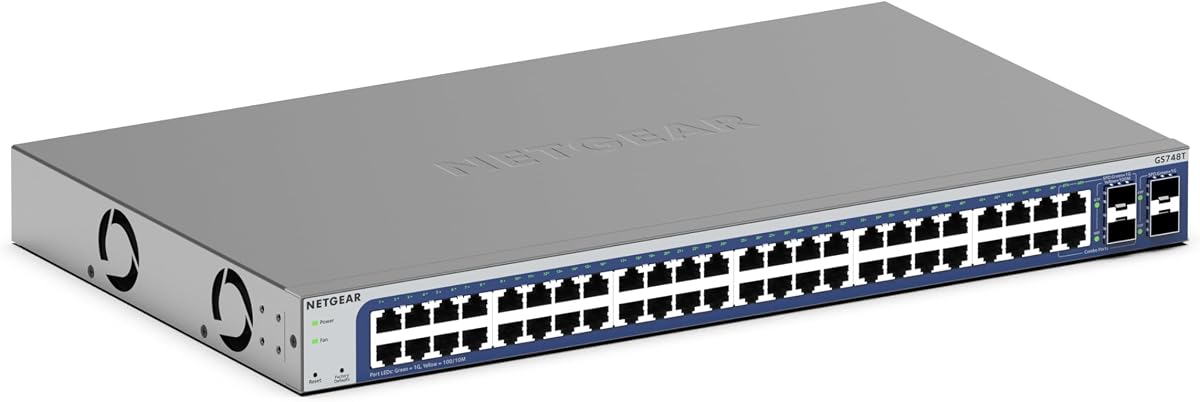
NETGEAR GS748T
4.4Editor score
4 SFP Uplinks
Smart Managed Software
Lifetime Protection
This guide compares the top 48 Port Gigabit Managed Switch models for 2026 focusing on performance security and scalability for enterprise and small business
Finding the right network infrastructure is crucial for modern businesses requiring reliable connectivity. A 48 Port Gigabit Managed Switch offers the bandwidth and control needed to support growing device counts efficiently.
We evaluated leading models based on port density, management features, power delivery, and security protocols. Our analysis covers both fully managed and smart managed options suitable for diverse IT environments.
Each selection highlights key strengths and potential limitations to help you make an informed decision. Please note that pricing and availability may fluctuate over time as markets evolve.
4.4Editor score

4.7Editor score

4.3Editor score
The following table provides a side by side overview of specifications and features for all ten selected switches to facilitate quick comparison.




The TP-Link SG2452LP stands out as a fully managed switch designed for enterprises needing centralized control. Its integration with the Omada Cloud Management Platform allows administrators to monitor and configure networks remotely with ease.
We may earn a commission when you buy through this link, at no additional cost to you.
This device offers a comprehensive suite of security features including IP-MAC-Port binding and DoS protection ensuring safe network access. The fanless design is particularly beneficial for offices where noise reduction is a priority during operation.
While powerful, integrating with Omada requires some familiarity with the platform which may initially slow down deployment for new users. However, the zero touch provisioning feature significantly reduces long term configuration time across multiple sites.
IT managers looking for a scalable and secure solution will find this switch highly rewarding. Its combination of advanced networking functions and quiet operation makes it a top recommendation for modern office environments.
The Omada platform provides a single interface to manage multiple devices across different locations efficiently.
Built-in security protocols defend against threats while failover connections minimize network downtime risks.
We may earn a commission when you buy through this link, at no additional cost to you.
The NETGEAR GS748T is a robust smart managed switch ideal for organizations requiring fiber optic connectivity. It features 48 gigabit Ethernet ports alongside four SFP slots for high speed network expansion.
We may earn a commission when you buy through this link, at no additional cost to you.
Its smart software interface simplifies secure setup and access control while supporting SNMP for professional management tools. The inclusion of one year NETGEAR Insight allows users to manage the network remotely from anywhere.
While the device is energy efficient and silent, the lack of PoE ports might require separate power solutions for connected devices. This limits its utility in deployments where powering endpoints directly from the switch is necessary.
Network professionals prioritizing uplink flexibility and reliable management will appreciate this model. Its sturdy build and lifetime protection offer peace of mind for long term infrastructure investments.
The four SFP ports enable direct fiber connections for high speed backbone links and network expansion.
NETGEAR Insight provides remote visibility and control over network health and configurations without onsite presence.
We may earn a commission when you buy through this link, at no additional cost to you.
The Omada SG3452 delivers powerful L2 plus features at a competitive price point making it attractive for budget conscious buyers. It supports static routing to improve internal traffic efficiency across segmented networks.
We may earn a commission when you buy through this link, at no additional cost to you.
Integration with the Omada SDN platform allows centralized management of switches access points and gateways from a single controller. Standalone management options like web GUI and CLI ensure flexibility without mandatory cloud dependency.
Users must ensure devices run compatible SDN firmware for full platform integration which can complicate mixed environment setups. Non SDN controllers will not communicate with SDN devices requiring careful planning during procurement.
This switch is an excellent choice for small to medium businesses aiming to expand their network capabilities affordably. Its balance of performance management and cost positions it as a strong contender in the value segment.
Static routing capabilities enable more efficient traffic management between different network segments without external routers.
Support for both standalone and SDN modes ensures adaptability to varying IT skill levels and infrastructure needs.
We may earn a commission when you buy through this link, at no additional cost to you.
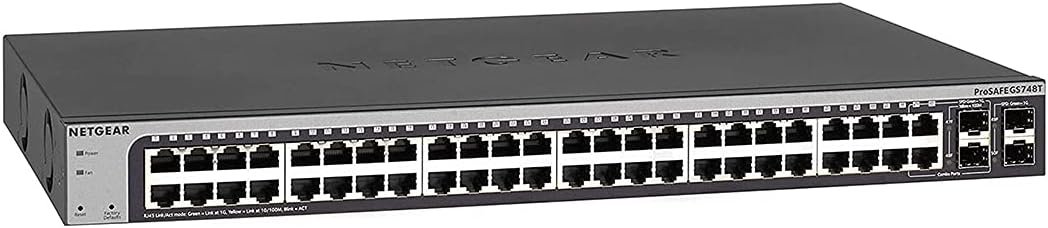
This earlier model of the NETGEAR GS748T remains a reliable option for those needing straightforward gigabit connectivity. It includes 48 ports and basic SFP uplinks suitable for small enterprise environments.
We may earn a commission when you buy through this link, at no additional cost to you.
The unit supports desktop or rackmount placement with included hardware ensuring versatile installation options. Its energy efficient design adheres to IEEE standards reducing power consumption during continuous operation.
While the lifetime warranty is a strong selling point the hardware may lack newer features found in recent iterations. Limited uplink options might restrict scalability for growing networks needing multiple high speed connections.
Buyers seeking a proven track record and minimal maintenance will find this unit satisfactory. Its quiet operation and ease of use make it suitable for environments where noise and simplicity are valued.
Lifetime hardware warranty and next business day replacement ensure long term reliability and minimal downtime risks.
Included mounting hardware supports both desktop and rackmount setups adapting to various physical space requirements.
We may earn a commission when you buy through this link, at no additional cost to you.
The TP-Link TL-SG3452P is engineered for environments requiring extensive Power over Ethernet capabilities. It provides 384W total power budget supporting numerous IP phones cameras and access points simultaneously.
We may earn a commission when you buy through this link, at no additional cost to you.
Features like PoE auto recovery and static routing enhance network stability and traffic management efficiency. The integration with Omada SDN allows seamless management alongside other compatible network devices.
The high power output necessitates robust power management which can increase operational costs slightly. Additionally, active cooling may be required in some scenarios unlike fanless models which could introduce noise.
For deployments relying heavily on PoE devices this switch offers exceptional capacity and control. Its balance of power and management features makes it ideal for large offices or educational facilities.
A 384W power budget ensures sufficient energy delivery for multiple high demand devices like wireless access points.
Static routing capabilities optimize internal traffic flows reducing load on external routers in complex networks.
We may earn a commission when you buy through this link, at no additional cost to you.
The NETGEAR GS348 is an unmanaged switch designed for simplicity and rapid deployment without technical expertise. It offers 48 gigabit ports that auto-negotiate speed for connected devices effortlessly.
We may earn a commission when you buy through this link, at no additional cost to you.
Its fanless design ensures silent operation which is ideal for quiet environments like classrooms or offices. The compact metal body supports both desktop and rack-mount installation for flexible placement options.
While easy to use it lacks VLAN and advanced security features which limits control over network traffic segmentation. Users needing complex configurations will find this model too basic for their requirements.
This switch is perfect for expanding basic connectivity quickly without administrative overhead. Its reliability and energy efficiency make it a practical choice for straightforward network expansions.
Plug and play functionality eliminates the need for software installation or configuration steps saving time.
The fanless design reduces noise pollution making it suitable for noise-sensitive work environments.
We may earn a commission when you buy through this link, at no additional cost to you.
This renewed version of the NETGEAR GS748T provides an opportunity to access enterprise features at a reduced cost. It retains the core smart managed capabilities and fiber uplink options of the original model.
We may earn a commission when you buy through this link, at no additional cost to you.
Buying renewed hardware can be cost-effective though buyers should check warranty terms as they may differ from new units. The device still includes ProSAFE lifetime protection ensuring support for hardware failures.
Potential buyers must accept the risk of not having a verified user rating due to the renewed status. However, certified refurbished items often undergo testing to meet specific quality standards before sale.
For budget conscious organizations needing managed features this option offers significant value. It balances cost savings with essential network performance and security capabilities.
Certified refurbished units provide access to high-end features at lower prices compared to buying brand new models.
Smart management software allows secure configuration and monitoring similar to new units without compromise.
We may earn a commission when you buy through this link, at no additional cost to you.
The Ubiquiti EdgeSwitch Lite offers substantial switching capacity ideal for high bandwidth environments. It features non-blocking performance and SFP Plus ports for enhanced data flow capabilities.
We may earn a commission when you buy through this link, at no additional cost to you.
Its design supports both AC and DC power inputs allowing flexible deployment scenarios in industrial settings. The compact form factor supports wall mounting which saves rack space in smaller installations.
Ubiquiti interfaces can differ from standard managed switches requiring some learning time for IT teams. The premium price reflects its robust throughput and hardware quality but may be steep for small budgets.
Network architects needing high performance will value the speed and flexibility provided by this unit. Its physical and power design makes it versatile for various infrastructure requirements.
With 140Gbps capacity the switch handles heavy traffic loads without bottlenecking network performance.
Support for DC inputs enables redundancy or use in environments with limited AC power availability.
We may earn a commission when you buy through this link, at no additional cost to you.
The YuanLey switch brings L3 management features to a price point accessible for smaller enterprises. It includes six 10G SFP Plus slots providing significant future-proofing for network growth.
We may earn a commission when you buy through this link, at no additional cost to you.
A built-in 460W power supply supports dense PoE deployments without external injectors. The fanless design ensures quiet operation while maintaining effective temperature monitoring through passive cooling.
Brand recognition is lower than major vendors which might impact long-term support expectations. Configuration interfaces may require more manual setup compared to established platforms.
This switch is recommended for technical users seeking high performance specs without premium branding costs. Its hardware capabilities make it a strong contender for cost-conscious network planners.
Six SFP Plus slots allow direct 10G connections for high-speed aggregation and backbone expansion.
Layer 3 features like static routing help manage traffic efficiently across larger network segments.
We may earn a commission when you buy through this link, at no additional cost to you.
The NETGEAR GS348TPv2 offers a robust combination of PoE power and smart management capabilities. It features 48 PoE Plus ports with a 380W budget to support numerous connected devices.
We may earn a commission when you buy through this link, at no additional cost to you.
Smart management software ensures secure setup and access control while SFP uplinks provide flexibility for fiber connections. This makes it suitable for businesses needing both power and data expansion.
The higher price point reflects the premium features and reliability expected from NETGEAR. However, for those needing extensive PoE without separate injectors the cost is often justified.
Organizations requiring a versatile managed switch with high power delivery will find this model effective. Its balanced feature set and ease of use simplify network administration tasks.
Compliance with IEEE energy standards ensures reduced power consumption without compromising network performance.
User-friendly smart software allows secure configuration without complex command-line knowledge.
We may earn a commission when you buy through this link, at no additional cost to you.
Selecting the right switch requires analyzing several technical factors to ensure compatibility with your infrastructure needs.
Decide between fully managed smart managed and unmanaged switches based on your IT team expertise. Fully managed offers the most control while unmanaged is easiest to deploy.
Choose managed switches if you need VLANs security policies or remote monitoring capabilities.
Determine if your devices like cameras or phones require Power over Ethernet support. Ensure the total wattage budget covers all connected devices simultaneously.
Look for PoE Plus (802.3at) standards if your devices demand higher power outputs than basic standards.
Verify the number and type of uplink ports available for connecting to core switches or servers. SFP ports provide flexibility for fiber optic cables which are essential for long distances.
Prioritize models with multiple uplinks if you expect future network expansion or redundancy needs.
Consider whether the switch supports stacking or additional features that allow easy growth. Scalable solutions reduce the need to replace hardware as your network expands.
Opt for switches with software defined networking capabilities if you plan to integrate multiple sites.
Ensure the switch supports advanced security features like 802.1X authentication or ACLs to protect network access. These features prevent unauthorized connections and control traffic flow.
Check for regular firmware updates from the manufacturer to keep security patches current over time.
Evaluate whether a fanless or active cooling design fits your physical space requirements. Fanless units are quieter but may have lower power limits or higher heat generation.
Choose rack mountable designs if you have a server closet and need organized cable management.
Review the length and terms of the hardware warranty offered by the vendor. A longer warranty period indicates confidence in the product durability.
Prioritize vendors that offer accessible technical support channels like phone or chat for troubleshooting issues.
Balance your features against total cost of ownership including power consumption and cabling needs. A cheaper unit might lack necessary features that require additional hardware later.
Investing in a slightly more expensive switch often saves costs by avoiding future hardware upgrades.
Begin by mounting the switch securely in a ventilated rack or stable surface to prevent overheating. Connect your devices using high quality Cat6 cables and ensure SFP modules are properly seated.
Access the web interface using the default IP address to configure VLANs security settings and port management. Change default passwords immediately to prevent unauthorized access to your network infrastructure.
Regularly check firmware updates to maintain security and performance. Monitor traffic statistics through the dashboard to detect anomalies or bottlenecks early.
Managed switches allow configuration of network settings like VLANs and security policies while unmanaged switches work out of the box without setup. Managed switches offer greater control and security for enterprise networks.
Not necessarily, but if you connect IP cameras or wireless access points you will need sufficient PoE power budget. Ensure the total wattage supports all active PoE devices simultaneously.
Yes if the switch includes SFP or SFP plus slots you can use fiber optic cables for long distance or high speed connections. This provides flexibility for connecting distant network segments.
Many models offer cloud platforms or remote access tools that allow management via web or mobile apps. Ensure your network security allows remote connections securely.
Zero Touch Provisioning automates device setup so new switches can be deployed with minimal manual configuration. This reduces setup time and errors across multiple sites.
Fanless switches operate silently making them ideal for quiet environments like offices or classrooms. They also have fewer moving parts which can increase reliability over time.
Access the switch web interface navigate to VLAN settings and assign ports to specific VLAN groups. This separates network traffic logically for better security and performance.
Switches with IEEE 802.3az compliance adjust power usage based on link activity reducing energy waste. This helps lower operational costs and environmental impact.
Our top picks cover a range of needs from centralized management to high power PoE capabilities. The TP-Link SG2452LP offers excellent value for those prioritizing cloud management and security.
Prioritize PoE budget and uplink options based on your current devices and future growth plans. A well chosen switch ensures stable connectivity and simplifies network administration tasks.
Remember to verify pricing and availability as market conditions change regularly. Investing in reliable infrastructure now prevents costly upgrades later.