
Nelko P21
4.4Editor score
Compact and portable
High-quality thermal print
Free app with icons
Discover the top easy to use label makers for home and office. Our guide compares features, price, and ease of use to help you organize smarter.
Finding a reliable labeling solution can transform your daily organization efforts. Whether you manage a busy home office or a cluttered garage, the right tool saves time. An easy to use label maker ensures you create clear, professional tags without frustration.
We analyzed ten top-rated devices based on portability, printing quality, and interface design. Our selection includes Bluetooth-enabled models and traditional handheld units. Each option offers unique strengths for different labeling tasks and budgets.
Each pick highlights key features, pros, and cons to help you decide. Prices and availability change frequently, so verify current details before purchasing. This guide aims to streamline your search for the perfect organizational companion.
4.4Editor score

4.5Editor score

4.6Editor score
This table provides a side-by-side overview of the top ten label makers. Compare key specifications like printing method, connectivity, and included accessories to find the best fit for your needs.




The SUPVAN E11 stands out as a versatile labeling tool combining keyboard and app printing. With a strong 4.5 rating, users appreciate its flexibility for home and office tasks. The inclusion of four tapes adds immediate value upon unboxing.
We may earn a commission when you buy through this link, at no additional cost to you.
Its rechargeable battery offers up to one month of use per charge, reducing downtime. The minimal margin printing saves material while maintaining professional readability. You can design labels with over 30 fonts and 660 icons via Bluetooth.
While the app enhances creativity, it requires a phone connection which might slow down quick tasks. Some users note Bluetooth pairing takes a moment initially. However, the keyboard mode bypasses this for simple labels.
This model suits those wanting advanced features without high costs. It balances portability with robust functionality. Choose it for projects needing customization and long-term battery efficiency.
Use the keyboard for speed or the app for designs without switching devices.
The 1200 mAh battery ensures you can label for weeks on a single charge.
We may earn a commission when you buy through this link, at no additional cost to you.
The Brother PTD220 is a solid choice for home and small office organization. It offers a straightforward QWERTY keyboard for quick text entry. The 4.5 rating reflects satisfaction with its reliability and print quality.
We may earn a commission when you buy through this link, at no additional cost to you.
It prints on genuine TZe tapes which are durable and laminated. You can save up to 30 labels in memory for easy reprinting. The included templates help create professional labels instantly for various categories.
Users must purchase batteries separately, which can be an added cost. The reliance on specific tapes means you cannot use generic alternatives easily. However, the tape quality ensures longevity.
Ideal for those preferring a no-fuss traditional label maker. It works well for pantry or file labeling. The memory function is a great feature for frequently used tags.
Save up to 30 labels to reprint them quickly without retyping text.
Use pre-set templates to design professional labels in seconds.
We may earn a commission when you buy through this link, at no additional cost to you.
This bundle includes four tapes, making it ready for use right away. The PTD210 offers a high 4.6 rating for its ease of use and build quality. It is a premium choice for those who value durability.
We may earn a commission when you buy through this link, at no additional cost to you.
Genuine Brother laminated tapes survive freezers and dishwashers. The preview display lets you see how the label looks before printing. One-touch keys provide quick access to symbols and frames.
The device requires a power adapter for desktop use, limiting true portability unless batteries are added. It lacks Bluetooth connectivity for smartphone design. However, the hardware controls are robust.
Perfect for office environments where reliability is key. The bundle value is excellent for initial setup. Use it for labeling bins, files, and cables with confidence.
Get four label tapes included so you can start labeling immediately.
Laminated tapes resist water and heat for long-lasting labels.
We may earn a commission when you buy through this link, at no additional cost to you.
The Nelko P21 is one of the most affordable options in this list. It boasts a 4.4 rating for its portability and ease of use in classrooms. The thermal print technology avoids ink costs completely.
We may earn a commission when you buy through this link, at no additional cost to you.
Its app includes over 7,000+ symbols and templates for creative designs. The battery lasts a long time on a single charge. You can slip it into a pocket for on-the-go labeling.
It does not support Android 14 devices which may affect compatibility. The printer is monochrome so you cannot print full color images. But the pattern tapes allow for some color effects.
Great for budget-conscious buyers and students organizing supplies. It is lightweight enough for daily carry. Check app compatibility before buying if you have specific phone models.
Weighing little, it fits in pockets for instant labeling anywhere.
No ink cartridges mean low running costs for long-term use.
We may earn a commission when you buy through this link, at no additional cost to you.
The PT-N10 is designed for personal labeling with fun Btag tapes. It features a 4.3 rating for its compact size and unique color options. It is excellent for travel or dorm room organization.
We may earn a commission when you buy through this link, at no additional cost to you.
You can use 17 colorful tape options to match your style. The built-in cutter ensures clean edges every time. The display screen lets you preview text to avoid errors.
It only supports 12mm tape width which limits label size. There are fewer fonts compared to desktop models. But the ease of use compensates for the limitations.
Ideal for students or travelers needing quick identification tags. The color range makes it stand out. Use it for bags, water bottles, and electronics.
Choose from 17 tape colors to personalize your labels.
Cut labels cleanly without extra tools or scissors.
We may earn a commission when you buy through this link, at no additional cost to you.
This bundle comes with three cassettes for immediate use. The 160 features a large display and one-touch keys for efficient typing. It holds a 4.4 rating for consistent performance and build.
We may earn a commission when you buy through this link, at no additional cost to you.
The QWERTY keyboard feels natural for most users. Energy-saving auto-off extends battery life significantly. The smart keys allow quick formatting changes during label creation.
The unit is bulkier than handheld Bluetooth models. It relies on specific D1 cassettes which can be costlier. However, the print quality is sharp and readable.
A solid choice for home offices needing standard labeling. The large screen helps view longer texts easily. Buy it if you prefer a sturdy device over a portable one.
Access common formats quickly with dedicated one-touch buttons.
Auto-off feature ensures batteries last longer during use.
We may earn a commission when you buy through this link, at no additional cost to you.
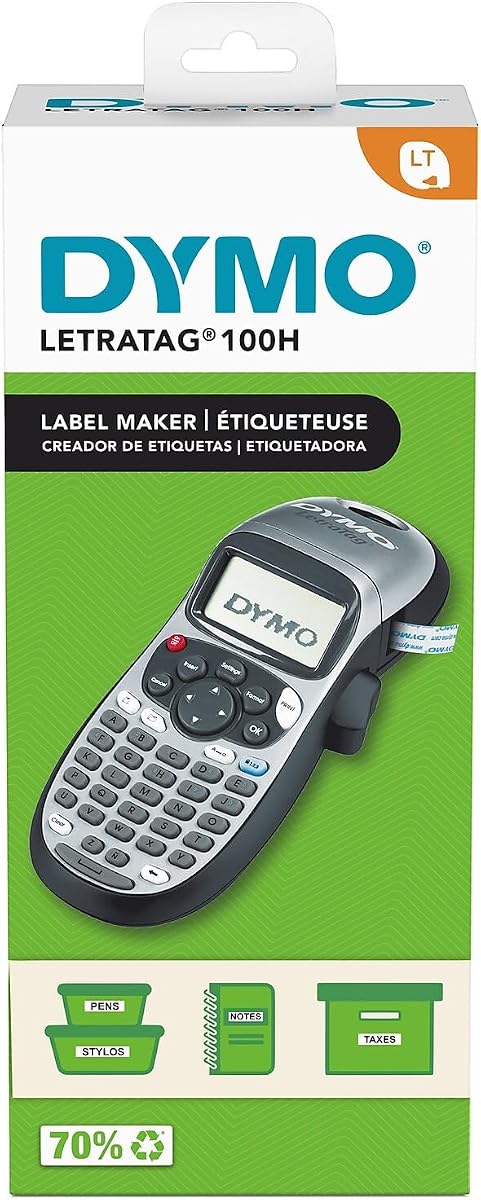
The LetraTag 100H uses thermal printing for quiet operation. It has a 4.6 rating for its simplicity and reliability. The graphical display shows text effects before printing.
We may earn a commission when you buy through this link, at no additional cost to you.
You can choose 5 font sizes and 8 box styles for variety. It is very lightweight making it easy to carry around. The auto-off function conserves power when idle.
It prints only on specific LT tapes which may be pricier. The screen is small so long text requires scrolling. But the interface is intuitive for beginners.
Best for users needing quick basic labels without fuss. It works well for shelves or small bins. Keep extra batteries handy for continuous use.
Print without ink using heat-sensitive technology for clean results.
See exactly how your label looks on screen before printing.
We may earn a commission when you buy through this link, at no additional cost to you.
The PT-M95 bundle provides four tapes for immediate labeling needs. It has a 4.5 rating for its practical design and ease of use. The Deco Mode adds patterns to labels for style.
We may earn a commission when you buy through this link, at no additional cost to you.
It supports 9mm and 12mm tapes for versatile sizing. The QWERTY keyboard makes typing text fast and accurate. Monochrome printing ensures high contrast and readability.
The display is simple without full graphical previews. It lacks wireless connectivity which limits remote design. Still, it is robust for daily office tasks.
Ideal for those needing a dedicated labeling device. The Deco patterns make it fun for home use. Choose it for files, shelves, and storage containers.
Add unique patterns to labels for better visual organization.
Supports multiple tape widths for different labeling tasks.
We may earn a commission when you buy through this link, at no additional cost to you.
This green bundle includes three tapes and a charger. The E10 offers 40 fonts and waterproof laminated tapes for durability. It has a 4.3 rating for its balance of features and cost.
We may earn a commission when you buy through this link, at no additional cost to you.
The rechargeable battery lasts a full month on a charge. You can use the app to create custom labels easily. The built-in cutter simplifies the labeling process.
The case is only available in green which limits options. App dependency might annoy users preferring keyboard input. But it is compact for storage.
Great for home organization with a touch of style. The laminated tapes resist kitchen grease and water. Use it for pantry jars and bathroom bottles.
Waterproof and oil-proof tapes keep labels looking new.
Small size fits in drawers or bags for easy access.
We may earn a commission when you buy through this link, at no additional cost to you.
The DYMO 160 is a standard workhorse for office tasks. It holds a 4.6 rating for its large display and user-friendly interface. The smart keys help format text quickly.
We may earn a commission when you buy through this link, at no additional cost to you.
It supports 1/2 inch tapes for clear labels. The battery life is extended with auto power-off. You can save 20 labels in memory for easy access.
It lacks USB connection which limits file transfer options. The device is a bit heavy for travel. However, it is reliable for desk use.
Perfect for businesses needing consistent labeling solutions. The large screen reduces typing errors. Use it for inventory, files, and archives.
See more text on screen to prevent typing mistakes.
Store up to 20 labels for quick reprinting later.
We may earn a commission when you buy through this link, at no additional cost to you.
Selecting the right label maker depends on your specific needs and budget. Consider connectivity, tape type, and portability before buying.
Bluetooth models allow you to design labels on smartphones for more creativity. Traditional keyboard models are faster for quick text entry without setup. Decide if you need design apps or simple typing.
Choose Bluetooth for design flexibility or a keyboard for speed and simplicity.
Thermal printers save on ink costs but require specific heat-sensitive tape. Dye-sublimation tapes are durable but more expensive. Check tape widths to ensure compatibility with your labels.
Look for tapes that fit your budget and durability needs for long-term use.
Handheld units are light and fit in pockets for on-the-go tasks. Desktop models are heavier but offer larger screens. Consider where you will keep the device daily.
Select a size that balances comfort with storage space in your home or office.
Accessories with 30+ fonts and 600+ symbols allow for detailed labeling. Standard models offer basic fonts and frames for simplicity. More options help you create visual hierarchy.
Ensure the device supports enough customization for your specific organization system.
Rechargeable batteries save money over time but need charging. AAA batteries are easy to replace but cost more in the long run. Check battery life estimates for your usage.
Prioritize rechargeable units if you label frequently to reduce waste and cost.
Laminated tapes resist water, oil, and heat for harsh environments. Non-laminated tapes are cheaper but may fade or peel easily. Match the tape to the location of the label.
Use durable tapes for kitchens or labs where moisture or chemicals are present.
Memory functions save frequently used labels for quick reprinting. Templates provide pre-made designs for standard items. These features save time and ensure consistency.
Look for at least 30 label memory to speed up repetitive tasks.
Large displays let you preview text and reduce errors before printing. Small screens save space but limit viewing area. A graphical display helps with design accuracy.
Choose a large screen if you often create long or complex labels.
Insert the tape cassette correctly by aligning the rollers and ensuring the tape feeds smoothly. This prevents jams and ensures clean cuts during operation.
Download the required app for Bluetooth models and pair your device before printing. Keep the app updated to access the latest design templates and features.
Store the device in a cool dry place to protect the print head from dust and moisture. Replace batteries or recharge regularly to maintain optimal performance.
Yes, most models feature intuitive interfaces with QWERTY keyboards or guided mobile apps. Step-by-step instructions help new users create professional labels quickly without technical skills.
Most portable label makers print monochrome text on colored tapes. For full color photos you need a dedicated thermal transfer printer. Stick to text labels for these compact models.
Many bundles include starter tapes but will run out quickly. Check tape width compatibility before buying refills to avoid compatibility issues. Some brands offer universal third-party tapes.
Rechargeable batteries typically last weeks on a single charge. AAA battery models depend on usage frequency and battery quality. Expect several months of light use per set.
Small handheld models fit in gloveboxes but require batteries. Ensure you have power for Bluetooth pairing. Consider portable kits for labeling auto parts on the go.
Most laminated tapes peel off cleanly from smooth surfaces. Test on a hidden spot first. Adhesive quality varies by brand so check for residue claims.
The SUPVAN E11 and Nelko P21 offer excellent value for budget and feature seekers. Traditional models like the Brother PTD210 provide reliable performance for office needs.
Prioritize battery life and tape durability if you plan heavy daily use. Bluetooth connectivity adds design flexibility for modern organizing tasks.
Always verify current pricing and tape availability before purchase. These devices are an investment in long-term organization and efficiency.