
2.5 inch Desktop Recessed Outlet
4.5Editor score
20W fast charging USB C port
Fits standard 2.5 inch cable holes
Flush mount round desk grommet
Modern workspaces demand clean, organized desks without exposed cables cluttering the surface. A quality desk grommet with USB C integration transforms your furniture into a sleek charging station. These units hide wires while providing fast, accessible power directly at your fingertips for all devices.
We evaluated ten leading desk grommets with USB C capabilities based on power output, installation ease, and build quality. Our analysis covers models ranging from compact 2 inch units to larger 4 inch solutions. Each product offers unique features like retractable cables or dual sided ports for flexible placement.
Each pick in this guide highlights key specifications, pros, cons, and real world performance details. We focus on how these grommets enhance your workflow by reducing cable clutter. Please note that prices and availability fluctuate frequently, so verify current listings before purchasing your preferred model.
4.5Editor score

4.6Editor score

4.6Editor score
As an Amazon Associate we earn from qualifying purchases.
The following table presents a side by side comparison of all ten desk grommets with USB C featured in this guide. It highlights critical specs like port counts, power ratings, and hole sizes to help you quickly identify the best fit for your specific furniture and charging needs.



The Reccessed Power Grommet 65W USB C stands out as the best overall choice for modern workspaces needing reliable power and fast charging. With a 4.5 rating from users, it delivers efficient PD 3.0 charging for laptops and phones while maintaining a sleek, clutter free desktop appearance.
We may earn a commission when you buy through this link, at no additional cost to you.
Its standout feature is the 65W USB C port which supports advanced PD 3.0, QC3.0, and PPS technologies. This allows simultaneous fast charging of phones, laptops, smartwatches, and earbuds through a mix of two USB C and two USB A ports. The design ensures a nearly flush surface with 2 power outlets for larger devices.
Installation requires a 3 inch grommet hole but the process is straightforward for existing or new openings. The unit includes a 6ft flat plug 16AWG extension cord and integrates a 1200J surge protector within fireproof plastic for comprehensive safety. However, users must ensure their desk has adequate mounting space for the 3 inch cutout.
This grommet is ideal for L shaped desks, side tables, and headboards where organized charging is essential. If you prioritize fast laptop charging and robust safety features in a low profile design, this model offers the best balance. Check current availability before purchasing as stock may vary.
The 65W PD 3.0 port delivers rapid charging for compatible laptops and smartphones using standard USB C cables.
Integrated 1200J surge protector and fireproof plastic construction protect your devices and desk from electrical spikes.
We may earn a commission when you buy through this link, at no additional cost to you.
This 100W USB C Desktop Power Grommet offers premium performance for users needing maximum charging power. It features a 100W PD GaN USB C port that can fully power high demand devices like gaming laptops or external monitors. The dual side design provides 5 outlets total reducing the need for additional power strips.
We may earn a commission when you buy through this link, at no additional cost to you.
Key strengths include the 100W USB C max output supporting 20V 5A which is ideal for professional workstations. The 15Amp safety rating ensures reliable power delivery without overheating even under heavy loads. The fire resistant PC plus Aluminum shell adds durability and heat dissipation. Installation requires a 4 inch standard grommet hole.
While the 4 inch hole requirement is larger than standard options, the benefit of doubled ports and high wattage makes it worthwhile for power users. The 45 degree flat plug saves space behind furniture and the 6ft extension cord provides flexibility. It is perfect for modern homes offices and entertainment centers.
Buy this if you need professional grade power output and maximum port availability on your desk. The 100W capability ensures your high performance devices stay powered without compromises. Verify your desk can accommodate the 4 inch cutout before installation to avoid extra modifications.
The 100W USB C port supports 20V 5A output for fast charging of power hungry laptops and tablets.
Three outlets on top and two on bottom maximize port availability without increasing footprint on desk surface.
We may earn a commission when you buy through this link, at no additional cost to you.
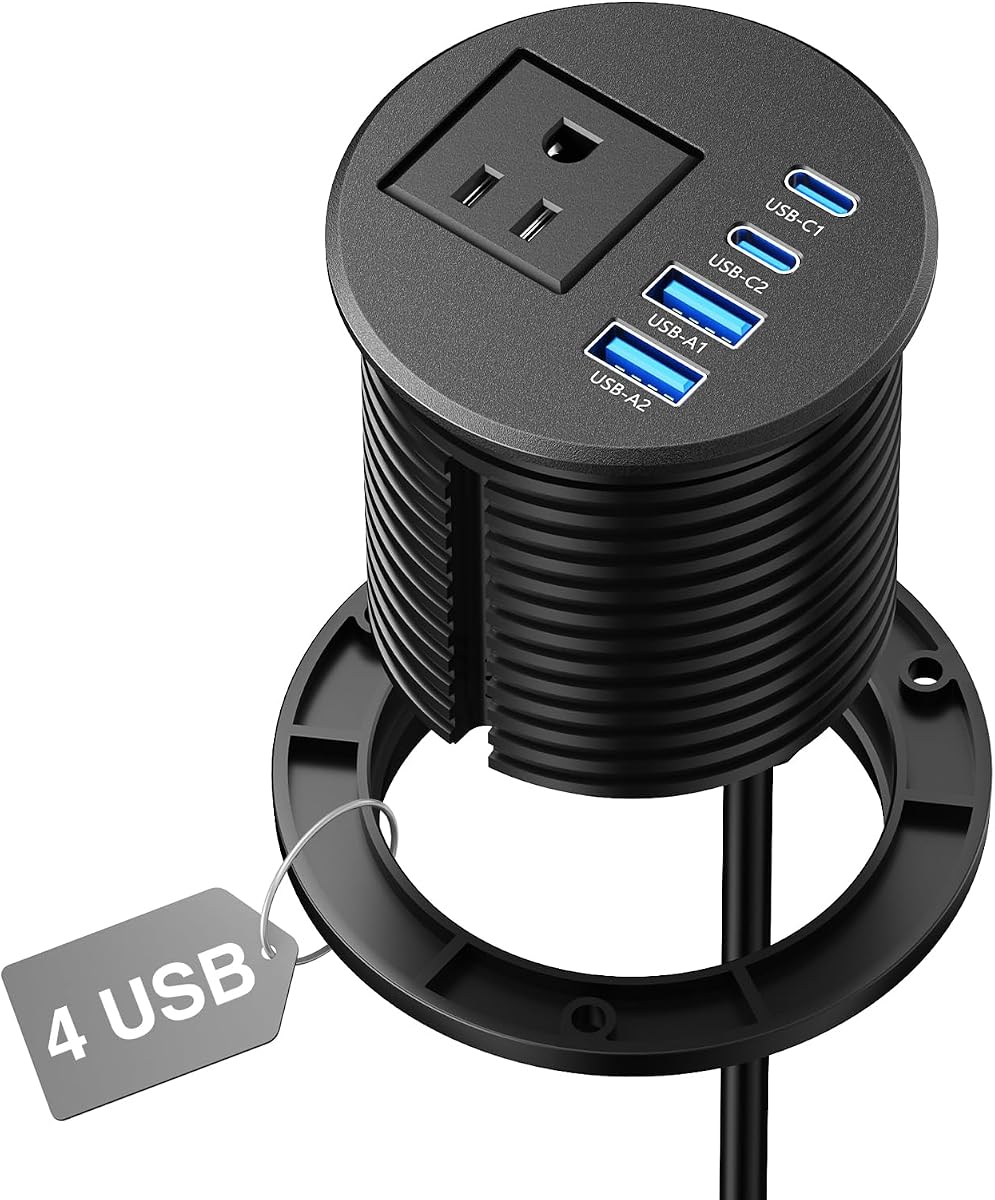
The 2.5 inch Desktop Recessed Outlet provides an affordable solution for basic charging needs in offices or homes. With a 4.5 rating it offers 20W USB C PD 3.0 ports ideal for smartphones and tablets. The flush mount design keeps your workspace neat and organized by eliminating bulky adapters.
We may earn a commission when you buy through this link, at no additional cost to you.
Its compact size fits standard 2.5 inch cable holes making it versatile for various desks and countertops. The unit includes one AC outlet and two USB C ports for simultaneous charging of multiple devices. Installation is straightforward requiring just a drill or existing hole plus an included locking ring for secure fit.
The main trade-off is the 20W USB C output which charges phones quickly but cannot power laptops at full speed. However for budget conscious buyers who prioritize cable management over laptop charging this is a minor limitation. It is great for conference rooms side tables or coffee tables.
Choose this if you want a cost effective way to add USB C charging without extensive desk modifications. The 20W power is sufficient for daily phone charging needs. Ensure you have at least a 2.5 inch hole available before purchasing for easy installation.
At a lower price point this grommet delivers reliable 20W USB C charging for mobile devices without premium cost.
The 2.5 inch design fits standard cable holes allowing easy installation on existing furniture without major cuts.
We may earn a commission when you buy through this link, at no additional cost to you.
This 2.5 inch Desk Power Grommet Outlet earns the highest rating of 4.8 stars for its reliable performance and clean design. It combines two 20W USB C ports with two 18W USB A ports providing versatile charging options for phones tablets and accessories without blocking AC outlets.
We may earn a commission when you buy through this link, at no additional cost to you.
Key strengths include the balanced port configuration that supports simultaneous charging of multiple devices. The 12A 1500W rating ensures safe power delivery for daily use in home offices or gaming setups. Installation requires a 2.5 inch cutout and the unit sits flush for a modern space saving look.
Users note that USB C ports are not designed for laptop charging limiting high power use. However for small devices and peripherals the 20W output is sufficient. The 6ft extension cord adds flexibility for positioning outlets under desks or behind furniture safely.
Buy this for its proven reliability and user satisfaction score. It is perfect for gaming desks nightstands or countertop setups where moderate device charging is needed. Check product details to confirm hole size compatibility before purchase.
The 4.8 rating reflects high customer satisfaction with performance build quality and ease of installation.
Mix of two USB C and two USB A ports accommodates both modern and legacy devices seamlessly.
We may earn a commission when you buy through this link, at no additional cost to you.
This VILONG 2 Inch Recessed Power Grommet is sold as a 2 pack providing two units for multiple workstations or homes. With a 4.7 rating it offers 20W USB C PD charging suitable for smartphones and Bluetooth earphones. The flush mount design keeps your desk clean without clutter from wall adapters.
We may earn a commission when you buy through this link, at no additional cost to you.
The 2 inch size fits standard cable holes on most desks and countertops making it highly versatile. Each unit includes a 6ft extension cord and requires a simple drill and locking ring installation. The ETL certification ensures electrical safety standards are met for peace of mind.
While the 20W USB C output is not for laptops it is efficient for daily mobile charging. Having two units allows you to install at a desk and a nightstand simultaneously. The compact design ensures flexible installation without major desk modifications.
Ideal for budget conscious users needing multiple charging points with verified safety. The 2 pack value makes it a smart choice for families or offices. Ensure your desk supports a 2 inch cutout for proper installation.
Two units included allow for charging stations at multiple locations without buying separate items.
ETL certification confirms the grommet meets strict electrical safety standards for reliable use.
We may earn a commission when you buy through this link, at no additional cost to you.
This 3 Inch Desk Power Grommet with 65W USB C offers a balanced option for home office setups needing laptop charging. It supports PD 3.0 QC3.0 and PPS technologies for efficient device charging through two USB C and two USB A ports. The minimalist design saves space by eliminating heavy adapters.
We may earn a commission when you buy through this link, at no additional cost to you.
The 65W USB C output delivers up to 20V 3.25A for fast charging of compatible laptops. It fits 3 inch holes and includes a 6.6 ft extension cord for flexible placement. The durable heat resistant materials withstand frequent use maintaining electrical safety standards.
While it has a 4.1 rating lower than similar models it remains a functional choice for basic charging needs. Some users report installation challenges or minor fit issues. Ensure you measure your desk hole accurately before buying to avoid return hassles.
Buy this if you need a reliable 65W option without premium features. It suits L shaped desks side tables and headboards. Check reviews for specific installation tips before purchasing to ensure compatibility with your furniture.
The 65W USB C port allows fast charging of laptops and tablets without external power bricks.
Heat resistant materials ensure long term reliability even with daily heavy use of multiple devices.
We may earn a commission when you buy through this link, at no additional cost to you.
This 2 Inch Desk Power Grommet Outlet brings accessible power directly to your workstation with a slim flush design. It features two 20W USB C PD ports and one 18W USB A port supporting simultaneous charging of phones tablets and wireless earbuds. The 10A AC outlet runs monitors or laptops while charging phones.
We may earn a commission when you buy through this link, at no additional cost to you.
The recessed power outlet sits nearly flush with a 5mm raised profile keeping plugs below the surface. Installation requires only a standard 2 inch opening and included 6ft 18 AWG cord making it easy without an electrician. The clean look reduces visual clutter on home office desks.
Its 4.7 rating reflects strong performance for compact setups. The slim profile ensures a wipeable countertop free of clutter. However it only fits 2 inch holes which may limit use on thicker furniture. Verify your hole size before installation.
Choose this for clean minimalist charging in tight spaces. Ideal for conference tables gaming setups or home offices. Ensure your desk has a 2 inch opening for proper fit and optimal performance.
The 5mm raised design keeps the desk surface smooth and free of tripping hazards.
No electrician is required for installation using a standard 2 inch hole and tightening a collar.
We may earn a commission when you buy through this link, at no additional cost to you.
This VILONG Recessed Power Grommet provides maximum connectivity with 8 USB ports and 2 AC outlets for versatile charging. It offers 20W PD 3.0 USB C ports and 20W QC3.0 USB A ports to charge multiple devices simultaneously. The design is ideal for homes offices or schools needing organized power.
We may earn a commission when you buy through this link, at no additional cost to you.
The flush mount round grommet fits standard 3.15 inch cable holes. The 1500W output capacity ensures safe power delivery even with multiple devices connected. Installation involves drilling or using an existing hole and securing with a locking ring. The compact design keeps workspaces neat.
While the 3.15 inch hole is larger than standard it justifies the high port count. Users benefit from reduced cable clutter by charging phones tablets and accessories directly at the desk. It is a great addition to nightstands or furniture tables.
Buy this if you need many ports without separate power strips. The 8 USB configuration supports families or teams sharing a workspace. Confirm your desk can accommodate the 3.15 inch hole before installation.
Eight USB ports and two AC outlets provide ample charging options for multiple users or devices.
A locking ring secures the grommet firmly in the hole ensuring it stays in place during use.
We may earn a commission when you buy through this link, at no additional cost to you.
This 3 1/4 Desk Power Grommet features retractable USB C cables for innovative cable management and reduced clutter. It delivers 35W PD fast charging via USB C and 18W QC3.0 via USB A for efficient charging of phones tablets and accessories. The flush mount design keeps your desktop clean.
We may earn a commission when you buy through this link, at no additional cost to you.
Key strengths include built-in retractable cables that extend to 2.2ft with smooth one second retraction. The 35W USB C supports fast charging for most phones and tablets. Two AC outlets power larger devices without extra strips. Installation requires a 3 1/4 inch hole.
The retractable cables may wear over time compared to fixed cables but the convenience is unmatched for shared spaces. The compact design fits L shaped desks side tables and headboards well. It avoids messy strips and tangled cords at your feet.
Choose this for its unique retractable feature and moderate 35W power. It suits shared desks or small workstations. Verify your desk hole size matches 3 1/4 inch before purchasing.
Built-in cables extend to 2.2ft and retract smoothly reducing cable clutter on the desk.
35W USB C PD supports quick charging for phones and tablets compatible with this power standard.
We may earn a commission when you buy through this link, at no additional cost to you.
This 2 Pack Desktop Power Grommet offers two units for multi point charging with PD20W fast charging USB C. Each unit provides 3 USB ports and 2 AC outlets for comprehensive connectivity. The flush mount design keeps the desktop clean by hiding wiring harnesses under the table.
We may earn a commission when you buy through this link, at no additional cost to you.
The 4.6 rating reflects reliable performance with ETL listing for safety. Charging an iPhone 14 from 0 to 50 percent takes 30 minutes with certified cables. Installation is simple requiring a pre-cut 3 1/8 inch hole and a bottom ring tightening. It complies with UL and CSA standards.
Installation requires 3.6 inch round space for countertop and 4.1 inch for underside. If height is restricted ensure at least 2.4 inch is available at the bottom. This allows flexible placement on sofas bedside tables or drawers.
Buy this for value and verified safety in homes or offices. The two pack ensures you can set up charging at multiple locations. Confirm your mounting space meets the required dimensions before installation to avoid issues.
PD20W charging delivers 0 to 50 percent battery in 30 minutes with certified USB C cables.
ETL listed certification ensures compliance with UL and CSA safety standards for reliable operation.
We may earn a commission when you buy through this link, at no additional cost to you.
Selecting the right desk grommet with USB C requires understanding your charging needs, furniture constraints, and safety requirements.
The USB C power output determines which devices can be charged at full speed. Models range from 20W for phones to 100W for high-performance laptops. If you plan to charge laptops, ensure the USB C port supports at least 65W. For phones and tablets, 20W to 35W is sufficient. Higher wattage usually increases cost but offers more versatility.
Choose higher wattage if you rely on laptops or tablets for daily work. Otherwise, 20W to 35W is cost-effective for mobile devices.
Desk grommets come in various hole sizes from 2 inches to 4 inches. Measure your existing cable hole or plan a new cutout accordingly. Smaller holes like 2 inches are easier to drill and fit tighter spaces. Larger holes like 4 inches accommodate more ports but require more desk space. Some models have retractable cables reducing hole needs.
Ensure your desk can accommodate the required hole size before purchasing to avoid modifications.
Port count affects how many devices you can charge simultaneously. Options range from 2 USB ports to 8 or more. Layout matters too; some models have dual-sided ports for better cable management. Consider whether you need AC outlets alongside USB ports for larger devices. More ports mean more clutter-free charging without extra power strips.
Select a port count that matches your daily device count to prevent overloading or unused capacity.
Installation ranges from simple drop-in units to those needing drilling or locking rings. Most grommets include extension cords for flexible placement under desks. Check if the model fits existing holes or requires new cuts. Tools needed usually include a drill and screwdriver. Easy installation saves time and effort for DIY users.
Look for models with included locking rings and clear instructions for hassle-free setup.
Safety certifications like ETL or UL ensure the grommet meets electrical standards. Look for surge protectors and fire-resistant materials to protect devices and furniture. Over-voltage and short-circuit protection are critical for long-term reliability. Higher-rated safety features reduce risks of electrical fires or damage to expensive electronics.
Always verify safety certifications and protective features before purchase to ensure safe operation.
Build materials like PC plastic, aluminum, or heat-resistant compounds affect durability. Metal shells dissipate heat better for high-wattage use. Plastic units are lighter and cheaper but may wear faster. Consider your usage frequency; daily heavy use warrants robust materials. Durability ensures long-term value and safety.
Opt for durable materials if the grommet will see frequent daily use in busy offices.
Design impacts how well the grommet blends with your desk. Flush-mount designs are sleeker and reduce clutter. Colors like black or white match modern furniture. Some models feature flat plugs to save space behind desks. A clean design contributes to a professional workspace appearance.
Choose a design that matches your desk color and profile for a cohesive look.
Budget varies from affordable 20W units to premium 100W models. Consider if you need one or multiple units; some packs offer better value. Higher cost often brings more ports and safety features. Balance your budget with needed features to avoid overspending on unused capabilities.
Assess your needs versus cost to find the best value for your specific setup.
To install your desk grommet, measure and drill the required hole size accurately. If using an existing cable hole, ensure it matches the grommet diameter. Insert the grommet through the hole and tighten the locking ring underneath the desk securely.
Plug the included extension cord into a wall outlet and connect your devices to the USB or AC ports. Organize cables to avoid tangling by using cable ties or clips. Keep the desk surface clean and dry to protect the grommet and prevent electrical hazards.
Periodically inspect ports and cords for wear or damage. Avoid plugging in high-power devices exceeding the rated wattage to ensure safety. Clean the grommet with a dry cloth to remove dust and maintain performance for long-term use.
Yes, some models support laptop charging via 65W to 100W USB C ports. Check the wattage rating before purchasing to ensure compatibility with your laptop. Lower wattage models may charge slower or not at all for high-power laptops.
Hole sizes range from 2 inches to 4 inches depending on the model. Measure your desk or existing hole before buying to ensure fit. Some units include templates or guides to help with accurate drilling and installation.
Many models include built-in surge protection for safety. Look for specifications mentioning 1200J or similar surge ratings. This feature protects connected devices from power spikes and electrical damage during use.
No, these grommets are designed for dry indoor use only. Avoid installing them near sinks or wet areas to prevent electrical hazards. Keep the surface and plugs dry to maintain safety and prevent damage.
If your desk has an existing cable hole matching the grommet size, you may use it without drilling. Verify hole diameter and depth to ensure proper fit. Some models work with pre-cut holes to minimize additional modifications.
It depends on the port count and total wattage. Models with multiple USB ports allow charging of several phones or tablets. Ensure total draw does not exceed the grommet's wattage capacity to avoid overloading the unit.
Contact the seller or manufacturer for warranty support or replacement. Check cable and connections first to rule out simple issues. Most units offer after-sales service for troubleshooting faulty ports or components.
Most models include both USB C and USB A ports for versatility. This allows charging modern and legacy devices simultaneously. Check the port configuration to ensure your specific devices are supported.
We reviewed ten top desk grommets with USB C, highlighting models like the 100W Desktop Power Grommet for premium needs and the 2.5 inch Recessed Outlet for budget users. Each offers unique port counts, wattages, and installation options to suit different desks and charging demands.
Prioritize USB C wattage and hole size compatibility when selecting a grommet. Safety certifications and build durability ensure long-term reliability. Whether you need one or multiple units, choosing the right model enhances your workspace organization significantly.
Remember to verify current prices and availability on Amazon before purchasing as these fluctuate frequently. Check the product page for latest specs and user feedback. Investing in a quality grommet keeps your desk clean and your devices charged efficiently.