
TECKNET 2.4G Wireless Keyboard
4.4Editor score
Ultra-portable compact design
Long battery life
Quiet chocolate keycaps
Discover the top lightweight keyboards for 2026. This guide compares portability, battery life, and typing comfort to help you choose the perfect slim keyboard.
Finding a lightweight keyboard is essential for modern professionals and travelers who value portability without sacrificing typing quality. These devices offer slim profiles and reduced weight, making them ideal for commuting or home offices with limited desk space.
We evaluated ten top-rated models based on build quality, connection stability, battery performance, and ergonomic design. Each option provides unique advantages, from ultra-compact layouts to full-size functionality, ensuring a versatile choice for various computing needs and environments.
Every selection includes detailed insights on connectivity, key feel, and durability to help you make an informed decision. Remember that specifications and availability can change, so verify current details before purchasing to ensure the device meets your specific requirements.
4.4Editor score

4.4Editor score

4.3Editor score
This comparison table highlights key specifications for all ten lightweight keyboards. Use it to quickly assess differences in layout, connectivity, and portability before diving into detailed reviews.





The Logitech MX Keys Mini stands out as a top choice for those seeking a lightweight keyboard with premium features. It earns high marks for its smart illumination and ergonomic design that supports comfortable typing sessions.
We may earn a commission when you buy through this link, at no additional cost to you.
Its key strength lies in the Perfect Stroke Typing technology which shapes keys to match fingertips. The backlighting activates when hands approach and adjusts to ambient light, ensuring visibility without draining the battery unnecessarily.
While it offers exceptional performance, the price is higher than basic models. Users might also notice battery life varies depending on backlighting usage, which is a minor trade-off for such advanced functionality.
This keyboard is ideal for professionals who value typing comfort and multi-device workflows. It bridges the gap between portability and full-featured performance, making it a versatile choice for modern workspaces.
The backlight automatically adjusts to lighting conditions and saves power by turning off when not in use.
Pair with up to three devices and switch between them instantly for a seamless cross-platform experience.
We may earn a commission when you buy through this link, at no additional cost to you.
The ProtoArc XK01 offers a unique solution for users who need full-size functionality in a portable form. Its tri-fold design and Bluetooth capabilities make it a strong contender for travelers.
We may earn a commission when you buy through this link, at no additional cost to you.
It features a 105-key layout that supports complete productivity including a number pad. The aluminum hinges are tested for thousands of folds, ensuring longevity despite frequent travel usage.
The keyboard is slightly heavier due to its robust build and full key layout. Setup requires unfolding the hinges which takes a moment but provides a stable typing surface.
Ideal for remote workers or frequent flyers who need a dedicated workspace. It balances size and capability better than most foldable options, offering a premium typing experience anywhere.
Internal aluminum hinges support thousands of folds ensuring the keyboard remains stable over time.
Low-profile keys reduce noise making it suitable for shared spaces like cafes or open offices.
We may earn a commission when you buy through this link, at no additional cost to you.
The TECKNET 2.4G Wireless Keyboard delivers impressive value for budget-conscious buyers seeking portability. It is recognized for its long battery life and slim profile that fits easily into any bag.
We may earn a commission when you buy through this link, at no additional cost to you.
Its chocolate keycaps provide a comfortable typing experience with reduced finger fatigue. The compact layout saves desk space while maintaining essential media hotkeys for daily tasks.
Adjustment may be needed for the non-standard Enter key layout which differs from full-size keyboards. Additionally, it relies on a USB receiver rather than Bluetooth limiting compatibility with some mobile devices.
This keyboard is perfect for home offices or casual use where cost and weight are priorities. It offers reliable performance without breaking the bank making it a great entry-level option.
The sculpted keycaps reduce finger strain and provide a satisfying tactile feel during typing.
Designed to run for up to twelve months on a single set of batteries ensuring minimal interruptions.
We may earn a commission when you buy through this link, at no additional cost to you.
The Logitech Pebble Keys 2 K380s is designed for users who prioritize sleek design and portability. It stands out with its rounded key shape and ability to switch between multiple devices effortlessly.
We may earn a commission when you buy through this link, at no additional cost to you.
Its slim form factor makes it one of the thinnest keyboards available ideal for travel or minimal desks. Bluetooth connectivity ensures a clean setup without wires or dongles cluttering the workspace.
Some users might find the rounded keys less precise than traditional square layouts. The lack of backlighting can be a limitation for low-light environments but enhances battery efficiency.
This keyboard suits mobile professionals who value aesthetics and versatility. It supports various operating systems and offers a comfortable typing experience in a package that is easy to carry.
Contains significant recycled plastic content reducing environmental impact without compromising durability.
Designed to last years on a single battery charge with auto-sleep features.
We may earn a commission when you buy through this link, at no additional cost to you.
The ProtoArc XK04 is tailored for users needing a keyboard specifically for smartphones and tablets. It folds down to an incredibly small size that fits easily in a pocket or small bag.
We may earn a commission when you buy through this link, at no additional cost to you.
It features a premium PU leather cover that protects the keys while adding a professional look. This design makes it convenient to carry without needing extra cases or protective gear.
The compact layout may take adjustment for long typing sessions due to smaller key spacing. It is optimized for messaging and notes rather than heavy text input work.
Ideal for digital nomads who need quick input on mobile devices. Its portability and battery features ensure you are always ready to type regardless of your location.
The integrated cover shields the keyboard from scratches and adds a premium aesthetic.
Layout is optimized specifically for phones and tablets for efficient on-the-go typing.
We may earn a commission when you buy through this link, at no additional cost to you.
The Arteck 2.4G Wireless Keyboard offers a unique blend of durability and portability. Its stainless steel body provides a premium feel while remaining light enough for daily transport.
We may earn a commission when you buy through this link, at no additional cost to you.
The ultra-slim design fits under most laptop cases making it a great companion for mobile work. The battery life is impressive supporting months of use on a single charge.
Because it uses a USB receiver it may not work with all tablets or phones without adapters. Customization is limited compared to smart keyboards but it offers essential functionality.
This keyboard is a practical choice for office environments requiring robust build quality. It balances professional appearance with reliable wireless performance at a reasonable price point.
Constructed with durable stainless steel to withstand daily use while keeping a slim profile.
High capacity lithium battery supports extended usage reducing the need for frequent charging.
We may earn a commission when you buy through this link, at no additional cost to you.
The Logitech K400 Plus is a versatile tool for controlling media and light typing from a distance. It combines a keyboard with a touchpad which simplifies setup for home theater PC setups.
We may earn a commission when you buy through this link, at no additional cost to you.
Its large touchpad allows for easy navigation without needing a separate mouse. This feature is particularly useful for streaming services or smart TV controls.
While great for entertainment it is not designed for heavy typing tasks due to its layout. The size is larger than typical lightweight keyboards which might affect portability.
This keyboard is perfect for living rooms or media centers where convenience is key. It provides reliable control and comfortable usage for managing digital content.
Integrated touchpad eliminates the need for a separate mouse simplifying the user experience.
Built to withstand spills and daily use ensuring long-term reliability in busy households.
We may earn a commission when you buy through this link, at no additional cost to you.
The Arteck 2.4G USB Wireless Keyboard is designed for users who need full functionality without a wired setup. It includes a numeric keypad which is often missing in lightweight models.
We may earn a commission when you buy through this link, at no additional cost to you.
Its stainless steel casing adds a premium touch and ensures durability during daily use. The slim profile keeps weight manageable while providing stability on a desk.
The device requires a USB receiver which means it may not work with devices lacking USB ports. It is slightly heavier than ultra-slim options which might limit travel convenience.
This keyboard is ideal for home offices where space saving is important. It offers a complete typing experience with modern wireless convenience and solid build quality.
Includes a complete numeric keypad for efficient data entry without extra peripherals.
Ultra-thin design keeps weight low while maintaining stability for comfortable typing.
We may earn a commission when you buy through this link, at no additional cost to you.
The GEODMAER 65% Gaming Keyboard brings gaming style to lightweight needs with its compact layout. It offers a balance of space-saving design and functional features for daily tasks.
We may earn a commission when you buy through this link, at no additional cost to you.
The LED backlighting ensures visibility in dim environments and adds a modern aesthetic. The wired connection provides stable input with low latency suitable for both work and play.
Because it is wired it lacks the mobility of Bluetooth options. The membrane feel might not satisfy users seeking mechanical switch feedback but offers a quiet experience.
This keyboard is great for compact setups where desk space is limited. It provides essential gaming and office features at an affordable price making it a practical choice.
The 65% layout reduces desk clutter while retaining essential navigation and typing keys.
Adjustable lighting modes help visibility in dark rooms and personalize the desk look.
We may earn a commission when you buy through this link, at no additional cost to you.
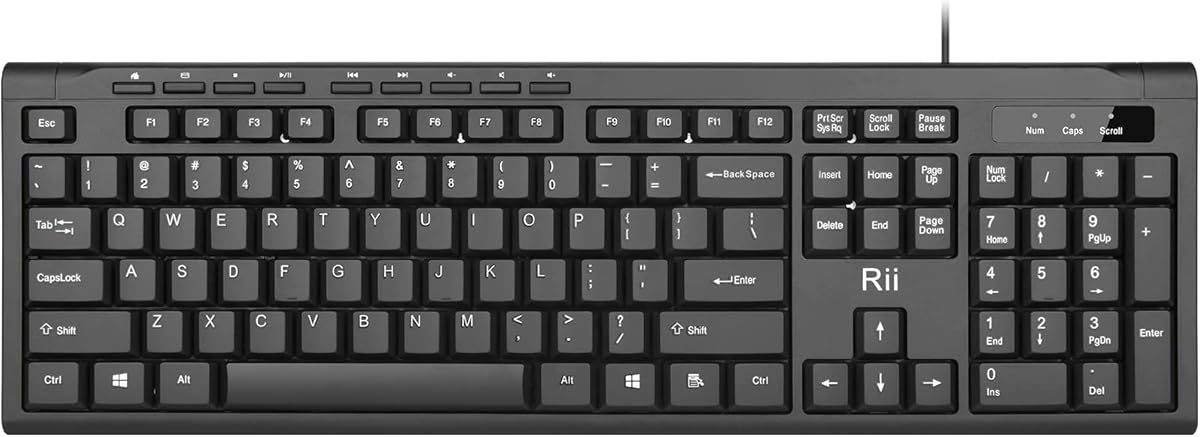
The Rii RK907 is an entry-level option for those seeking a minimal footprint. It focuses on simplicity with a slim design that fits anywhere on a desk.
We may earn a commission when you buy through this link, at no additional cost to you.
Its low-profile keys provide a quiet and comfortable experience without distractions. The splash-resistant feature adds durability for casual office or home use.
As a wired keyboard it is limited to desktop setups. It lacks wireless or backlighting features but fulfills basic typing needs effectively.
This keyboard is a solid choice for budget shoppers prioritizing form factor. It offers reliability and a professional look at a competitive price point.
Ultra-thin profile allows the keyboard to slide easily under monitor stands or cases.
Protects against minor spills ensuring the device remains functional in daily use.
We may earn a commission when you buy through this link, at no additional cost to you.
Selecting the right lightweight keyboard involves understanding your specific needs regarding portability connectivity and typing experience. This guide outlines key factors to help you find the perfect match.
Lightweight keyboards come with wireless Bluetooth or wired USB options. Wireless models offer cleaner desks and better mobility but may require batteries or charging. Wired models provide stable connections without charging needs but limit your setup range.
Choose wireless for versatility and wired for stable setups where mobility is less of a priority.
Keyboards range from full size to compact layouts like 65% or ultra-minimalist options. Full size provides a number pad for data entry while compact models save desk space and are easier to carry.
Select a layout that matches your typing needs ensuring you do not lose essential keys for your workflow.
For wireless models battery life is crucial. Rechargeable models offer sustainability while battery-powered ones provide convenience. Look for features like auto-sleep to extend usage between charges or battery changes.
Prioritize long battery life if you travel frequently to avoid interruptions during important tasks.
Materials like aluminum or stainless steel add durability and a premium feel. Plastics can keep weight low but may feel less sturdy. Consider the balance between weight and durability based on how often you travel.
Opt for durable materials if your keyboard will see heavy travel or daily use.
Key height and shape impact long-term comfort. Low-profile keys reduce wrist strain while rounded keycaps improve finger placement. Ensure the keyboard provides a typing experience you find comfortable over hours of use.
Test key travel and feel if possible to prevent fatigue during extended sessions.
Check if the keyboard supports your operating system or devices. Some models switch between multiple platforms like Windows macOS or Android. Multi-device support enhances productivity for users with multiple screens or tablets.
Verify OS compatibility to ensure all functions work smoothly with your current setup.
Lightweight keyboards range from budget-friendly options to premium models with advanced features. Consider what features matter most to you such as backlighting or battery type. Avoid overpaying for features you will not use.
Set a budget that aligns with your needs to find the best value for your money.
Some keyboards offer unique features like backlit keys media controls or foldable designs. These can improve usability in low light or travel scenarios. Decide if these extras justify the cost and weight.
Focus on features that solve specific problems you face in your daily routine.
Start by connecting your keyboard to the device. For wireless models pair via Bluetooth or insert the USB receiver to ensure a secure link.
Adjust the key settings using any companion software if available. Customize shortcuts or backlighting to suit your working environment and preferences.
Clean your keyboard regularly with a soft cloth to remove dust. Store it in a protective sleeve or case when traveling to prevent scratches and damage.
Yes many lightweight keyboards are designed for durability using materials like aluminum or reinforced plastics. Check for scratch-resistant finishes and warranties to ensure long-term reliability in demanding environments.
Many models support Windows macOS Linux and Android. Look for multi-device switching features to easily transition between different platforms without re-pairing the keyboard.
Turn off backlighting when not needed and use auto-sleep features if available. Store the keyboard in a cool dry place and replace batteries promptly to maintain efficiency and prevent corrosion.
Most users adapt to compact layouts quickly since key positions remain familiar. Practice with essential shortcuts and layouts to improve efficiency and reduce initial adjustment time.
Yes lightweight keyboards with Bluetooth support work well with tablets. Ensure the device has USB ports or a compatible connection method for seamless integration with your mobile setup.
Some models include adjustable backlighting for low-light environments. Check product specifications to confirm if the feature is available and if it is customizable for your needs.
Use compressed air to remove dust between keys and wipe with a damp cloth. Avoid harsh chemicals that might damage the finish or electronics.
Check your connection and recharge or replace batteries. If issues persist restart your device and verify Bluetooth pairing settings to restore functionality.
The Logitech MX Keys Mini TECKNET 2.4G and ProtoArc XK01 lead the list with exceptional balance of features and portability. Each serves different needs from premium typing to budget-conscious choices.
Prioritize features like connectivity and layout size based on your daily tasks. Investing in a quality lightweight keyboard enhances productivity and comfort for work or casual use.
Always verify current availability and details before purchasing as models may evolve. Choose the option that best fits your mobility requirements and budget constraints.