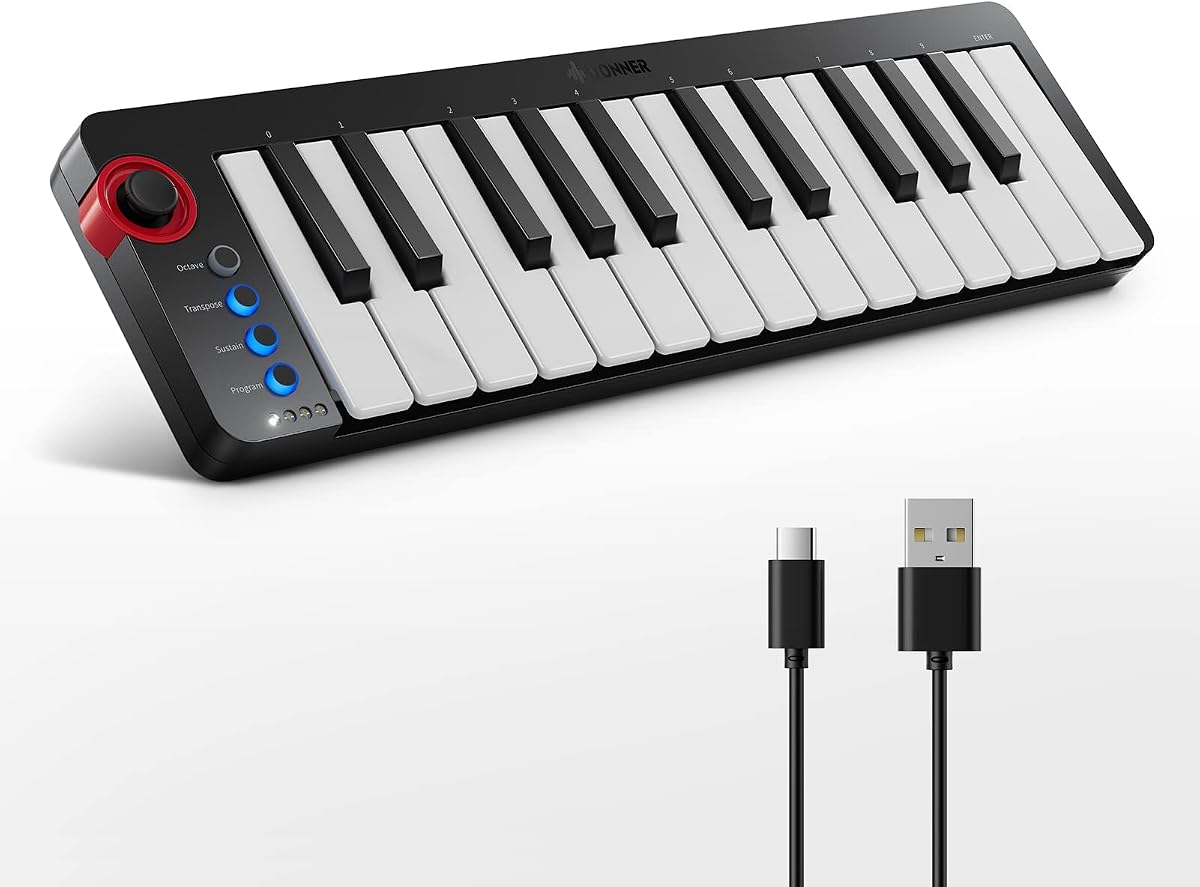
Donner Mini MIDI Keyboard N-25
4.1Editor score
Forty teaching courses included
Light up rocker buttons
Plug and play setup
This guide compares the top 25 key MIDI controllers for producers and musicians, evaluating features, portability, and DAW integration to help you choose the
Finding the right 25 key MIDI controller can transform your music production workflow. These compact devices offer essential controls for triggering samples, playing melodies, and mixing tracks without taking up valuable desk space.
We have analyzed ten leading models based on build quality, key action, software integration, and user feedback. Our selection process ensures each pick delivers reliable performance for both home studios and mobile setups.
Each entry below highlights specific strengths and potential limitations to guide your decision. Remember that pricing and availability may shift over time, so verify current details before purchasing your next production tool.
4.1Editor score

4.6Editor score

4.6Editor score
The following table provides a side by side comparison of all ten selected controllers. Review the key specifications and features to identify which model aligns best with your specific production needs and budget constraints.


The Akai Professional MPK Mini MK3 stands out as a top choice for producers needing a compact yet powerful interface. With a 4.6 rating from users, it delivers reliable performance for beat making and live sets.
We may earn a commission when you buy through this link, at no additional cost to you.
Its eight velocity sensitive MPC style pads allow for expressive drum programming, while the four way thumbstick provides dynamic pitch and modulation control. The Native Kontrol Standard integration ensures seamless compatibility with Native Instruments presets.
While the keys do not feature aftertouch, the overall feel remains responsive for most tasks. The lack of battery power means it relies on USB connection, which is standard for this class of device.
This controller is ideal for beginners and intermediate producers seeking a balance of features and portability. Its comprehensive software bundle makes it an excellent starting point for music production.
The backlit velocity sensitive pads offer Note Repeat and Full Level modes for intricate rhythm programming.
Included MPC Beats and virtual instruments provide a complete production environment right out of the box.
We may earn a commission when you buy through this link, at no additional cost to you.
The Donner N-25 offers an accessible entry point for aspiring musicians looking for a compact MIDI controller. With a 4.1 rating, it provides essential features without a heavy price tag.
We may earn a commission when you buy through this link, at no additional cost to you.
Its light up rocker buttons and pitch bend wheel add a layer of visual and expressive feedback. The inclusion of forty teaching courses helps users learn music theory while practicing on the keys.
Build quality is functional but basic compared to higher end models. The lack of advanced software means users may need to source their own production tools separately.
This model is perfect for students or casual creators who want to start making music quickly. It serves well as a travel companion or a first keyboard for home use.
The integrated teaching courses cover essential arrangement skills to accelerate the learning curve for novices.
It works seamlessly with smartphone apps via OTG adapters, enabling music creation on the go.
We may earn a commission when you buy through this link, at no additional cost to you.
The Novation Launchkey Mini 25 MK4 brings premium features to a compact form factor. With a 4.6 rating, it is respected for its deep integration with major digital audio workstations.
We may earn a commission when you buy through this link, at no additional cost to you.
Its sixteen FSR pads support polyphonic aftertouch, allowing for nuanced control over drum samples and synth parameters. The Scale Mode ensures users never hit a wrong note by locking keys to specific musical scales.
The price is higher than budget options, but the build quality justifies the cost. Advanced features like clip launching and step sequencing require time to master but offer significant creative flexibility.
This controller is best suited for serious producers who demand high performance and software connectivity. It is a reliable tool for both studio recording and live performance environments.
The FSR pads act as step sequencers and chord triggers, expanding creative possibilities beyond simple triggering.
Seamless mapping for Ableton Live and Logic Pro reduces setup time and speeds up the creative process.
We may earn a commission when you buy through this link, at no additional cost to you.
The Akai Professional LPK25 focuses on simplicity and portability for melody creation. Its 4.7 rating reflects strong user satisfaction with its straightforward design and responsive keys.
We may earn a commission when you buy through this link, at no additional cost to you.
Eight programmable preset slots allow for quick recall of mappings across different software instruments. The built-in arpeggiator adds creative texture to melodies without complex setup procedures.
The absence of drum pads limits its use for beat production. Users looking for a multi-purpose controller might find the feature set too restricted compared to similar models.
This unit is ideal for composers who prioritize keyboard feel over additional controls. It fits easily into laptop bags, making it a great choice for traveling musicians.
Managing presets directly from the computer allows for efficient organization of custom control mappings.
The sustain button and octave controls ensure expressive playing even without advanced modulation features.
We may earn a commission when you buy through this link, at no additional cost to you.
The Arturia MiniLab 3 adapts to various workflows with its intuitive layout. A 4.7 rating highlights its effectiveness in both studio and live environments for controlling virtual instruments.
We may earn a commission when you buy through this link, at no additional cost to you.
Eight drum pads and four faders provide a balanced control surface for mixing and triggering. The velocity sensitive keys ensure dynamic expression when playing melodies or chords.
The white finish is sleek but can show wear over time. Reliance on proprietary software for full customization might be a barrier for users preferring open standards.
This controller suits producers who value design and usability. It is an excellent addition to any setup requiring hands on control without bulk.
Color feedback on controls helps users quickly identify active parameters during live performance sessions.
Included instruments and effects expand the sonic possibilities immediately upon purchase without extra cost.
We may earn a commission when you buy through this link, at no additional cost to you.
The Rhymo controller introduces modern connectivity options with USB C and Bluetooth MIDI. A 4.1 rating indicates solid performance for casual users and beginners.
We may earn a commission when you buy through this link, at no additional cost to you.
An X Y joystick offers pitch bend and modulation in one device. The loop function and tap tempo features simplify beat creation without complex software interactions.
Bluetooth connectivity may introduce slight latency in some scenarios. The key feel is functional but lacks the weight of premium models.
This model is best for users needing a travel friendly device with wireless capabilities. It is suitable for sketching ideas on tablets or laptops.
Support for both USB and Bluetooth allows flexible integration with various modern devices and tablets.
The included loop function helps users build rhythmic patterns quickly without external software tools.
We may earn a commission when you buy through this link, at no additional cost to you.
The M-VAVE 25 Key USB MIDI offers significant flexibility with its wireless capabilities. A 4.5 rating suggests it is a reliable option for mobile production and casual use.
We may earn a commission when you buy through this link, at no additional cost to you.
Eight backlit drum pads and rotary encoders provide detailed control over sound parameters. The smart chord function helps users create harmonies quickly with single key presses.
Battery life is impressive but requires occasional recharging. The learning curve for wireless setup can be slightly complex for first time users.
This controller fits users who need freedom from cables. It is a good choice for songwriters moving around their home or studio space.
The 2000mAh battery supports extended sessions without needing a constant USB connection for power.
Integrated smart sound functions streamline the creative process by automating complex harmony selection.
We may earn a commission when you buy through this link, at no additional cost to you.
The MPK Mini Play MK3 stands out with its ability to work as a standalone instrument. A 4.5 rating highlights its appeal for users who want to play without a computer.
We may earn a commission when you buy through this link, at no additional cost to you.
The built-in speaker allows for immediate practice and playback. Over one hundred internal drum sounds provide a complete production experience on their own.
Connectivity is limited to USB MIDI in, meaning external hardware integration is not possible. The internal speaker quality is adequate for practice but not professional monitoring.
This unit is perfect for beginners or travelers needing a self-contained solution. It bridges the gap between a toy and a serious production controller.
Battery power operation ensures you can create music anywhere without relying on an external power source.
The included Melodics software offers structured lessons to improve pad and keyboard skills over time.
We may earn a commission when you buy through this link, at no additional cost to you.
This black version of the MPK Mini MK3 offers identical functionality to its white counterpart. With a 4.6 rating, it maintains the high quality standards expected from the MPK series.
We may earn a commission when you buy through this link, at no additional cost to you.
The durable finish resists fingerprints and scratches better than lighter colors. Features like the four way thumbstick and NKS integration provide deep control over virtual instruments.
There are no functional differences compared to the standard model. Users should choose based on aesthetic preference or local availability rather than feature sets.
It remains a top pick for producers needing a reliable and portable setup. The black variant is often preferred for professional stage environments.
The matte black finish helps maintain a clean look during intensive use in various lighting conditions.
Included software ensures you have access to professional sounds and effects immediately after setup.
We may earn a commission when you buy through this link, at no additional cost to you.
The APC Key 25 MK2 is tailored specifically for Ableton Live users needing clip launch control. A 4.4 rating confirms its strong performance within that specific ecosystem.
We may earn a commission when you buy through this link, at no additional cost to you.
Forty RGB pads provide visual feedback for launching clips and scenes. Eight assignable rotary knobs allow for direct control of device macros and automation parameters.
Its functionality is somewhat limited outside of Ableton Live compared to generic controllers. The directional arrow buttons simplify navigation in large projects.
This controller is a specialized tool for live performers. It transforms Ableton Live into a hardware instrument for dynamic and responsive shows.
The large pad matrix allows for triggering complex arrangements and loops without mouse interaction.
Directional buttons allow quick scrolling through tracks and scenes during live performance or composition.
We may earn a commission when you buy through this link, at no additional cost to you.
Selecting the right MIDI controller depends on your workflow needs and production style. This section outlines critical factors to consider before making a purchase decision.
The physical feel of the keys impacts how naturally you can express dynamics. Look for velocity sensitive keys that respond to your playing intensity for better musical results.
Prioritize controllers with responsive keybeds that suit your playing style.
Consider whether you need drum pads, knobs, or faders to manage your software effectively. A balanced layout ensures you do not have to switch between mouse and hardware constantly.
Choose a surface that matches your primary tasks like mixing or drumming.
Some controllers come pre-mapped to specific digital audio workstations like Ableton or Logic. This feature saves setup time and ensures buttons trigger the correct functions immediately.
Verify that your preferred software is supported for smooth workflow.
If you travel frequently, a lightweight design powered by USB is essential. Some models offer battery power or wireless connectivity for greater freedom of movement.
Opt for a portable design if you record in different locations.
Many controllers include virtual instruments or production software to help you start making music right away. These additions can save money if you need those tools.
Check if the included software adds real value to your current setup.
Durability ensures your investment lasts through daily use and transport. Look for solid materials and robust buttons that can withstand heavy sessions.
Invest in a controller that feels sturdy and reliable over time.
Modern controllers may support Bluetooth MIDI or multiple USB ports for flexible setups. Ensure it connects easily with your computer, tablet, or mobile device.
Confirm connectivity matches the devices you use most often.
Price varies significantly across models. Set a realistic budget that balances essential features with affordability to avoid overspending on unnecessary extras.
Find the best balance between features and cost for your situation.
Begin by connecting the controller to your computer via USB to ensure power and data transfer. Most modern units support plug and play functionality so you do not need to install drivers immediately.
Launch your preferred DAW software and navigate to the MIDI settings menu to recognize the device. Assign specific functions to knobs or pads if the default mapping does not suit your workflow.
Keep your controller clean by wiping it with a dry cloth after each session. Avoid exposing it to liquids or extreme temperatures to maintain the integrity of its internal electronics.
A 25 key MIDI controller allows musicians to input notes and control parameters in music software. It is ideal for compact studios or portable setups where space is limited.
Most controllers work with any digital audio workstation without extra software. Some come with bundled tools to enhance production capabilities but are not strictly required.
Yes, many models support mobile devices via OTG adapters or Bluetooth. This enables music creation on tablets and smartphones without a computer.
Velocity detects how hard a key is pressed while aftertouch detects pressure while the key is held. Aftertouch adds expressive modulation but is found on more expensive units.
Most modern MIDI controllers are class compliant and work with both Mac and Windows systems. Always check the specific compatibility list before purchasing to confirm.
Visit the manufacturer's website to download their editor or updater tool. Connect the device and follow the instructions to install the latest software version.
Yes, they are designed for both studio work and live gigs. Features like clip launching and assignable knobs make them suitable for dynamic stage performances.
Build materials, software bundles, and advanced features like aftertouch impact pricing. Higher end models cost more due to enhanced durability and deeper integration.
We explored ten diverse options ranging from beginner friendly units to professional tools. Each model offers unique strengths suited to different production styles and preferences.
Prioritize controllers that align with your primary needs such as portability or specific software integration. The right choice will streamline your workflow and inspire creativity.
Always check the latest availability and details before purchasing to ensure you get the current version of the product. Your ideal tool is ready to elevate your music production journey.