
Zobirez 420W 10-Port Fast USB Charging Station for Multiple Devices, Black
4.5Editor score
Ten fast charging ports
Compact desktop footprint design
Includes ten short cables
This guide compares the top charging stations for Chromebooks to help you find durable racks with power strips and cable management for classrooms.
Finding the right charging station for Chromebooks is essential for schools and offices managing multiple devices daily. A good unit organizes cables while protecting your investments from damage during storage.
We compared ten top-rated models based on capacity, build quality, and included power solutions. Our selection includes mobile carts and desktop racks designed to handle high traffic efficiently.
Each pick highlights unique features like adjustable dividers or surge protection to meet specific needs. Please note that prices and availability change frequently so verify details before purchasing.
4.5Editor score

4.7Editor score
The following table provides a side-by-side comparison of all ten models reviewed. It highlights key specifications to help you quickly identify the best fit for your workspace needs.


The POCHAR 8-Device Universal AC Laptop Charging Station is our top pick for classrooms needing reliable organization. It rates highly for its ability to hold devices up to 14 inches securely.
We may earn a commission when you buy through this link, at no additional cost to you.
This unit features wide-angle slots designed for Chromebooks and laptops that exceed standard tablet dimensions. The included power strip ensures you have safe power access without extra adapters.
While the price reflects its robust build it is a worthwhile investment for high traffic areas. It does not require assembly which saves time during setup.
We recommend this for schools prioritizing device safety and easy access. It is an excellent balance of capacity and durability for daily use.
The surge protected power strip prevents voltage spikes from damaging your valuable Chromebooks during charging.
Unbox and use immediately since this station arrives fully assembled and ready for deployment.
We may earn a commission when you buy through this link, at no additional cost to you.
This station offers a flexible mix of AC outlets and USB ports for diverse device needs. It is built for environments needing organized multi-device charging.
We may earn a commission when you buy through this link, at no additional cost to you.
The built-in cable management system helps keep cords organized and reduces clutter on your desk or workstation.
It is open design allows for easy insertion and removal of laptops and tablets quickly without doors.
This is a solid choice for libraries or offices needing to charge a variety of devices.
Access both traditional AC adapters and modern USB charging in one central location.
Maximize storage while minimizing footprint with a compact vertical rack layout.
We may earn a commission when you buy through this link, at no additional cost to you.
With fourteen independent slots this rack handles high-density charging demands better than most models. It rates perfectly for reliability and build quality.
We may earn a commission when you buy through this link, at no additional cost to you.
The open frame design enables natural ventilation preventing overheating during extended charging sessions.
It features adjustable leveling feet which allow it to adapt to uneven surfaces safely.
Choose this if you need maximum capacity and are prepared to source your own power strip.
Natural airflow prevents heat buildup ensuring devices charge safely without overheating.
Leveling feet ensure stability even on uneven classroom or library floors.
We may earn a commission when you buy through this link, at no additional cost to you.
This desktop cart is designed for smaller spaces needing to store eight devices securely. It includes an approved power strip for safe charging.
We may earn a commission when you buy through this link, at no additional cost to you.
Soft pads on the shelves prevent accidental scratches and damage to your devices.
Cord clips help keep cables organized at the back of the shelves.
It is ideal for smaller classrooms or home offices needing compact storage.
The power strip is UL approved ensuring safe electrical standards are met.
Remove or adjust dividers to fit different device sizes easily.
We may earn a commission when you buy through this link, at no additional cost to you.
This unit delivers massive power with two sixty-five watt USB-C ports for laptops and other devices. It is built for families or offices needing speed.
We may earn a commission when you buy through this link, at no additional cost to you.
The inclusion of ten short cables eliminates the mess of wall chargers.
It uses GaN technology for safer faster charging and temperature monitoring.
Choose this if you need fast power for modern USB-C devices.
Dual 65W ports ensure your laptops charge fast even when others are plugged in.
Short included cables keep your desk tidy without long wire runs.
We may earn a commission when you buy through this link, at no additional cost to you.
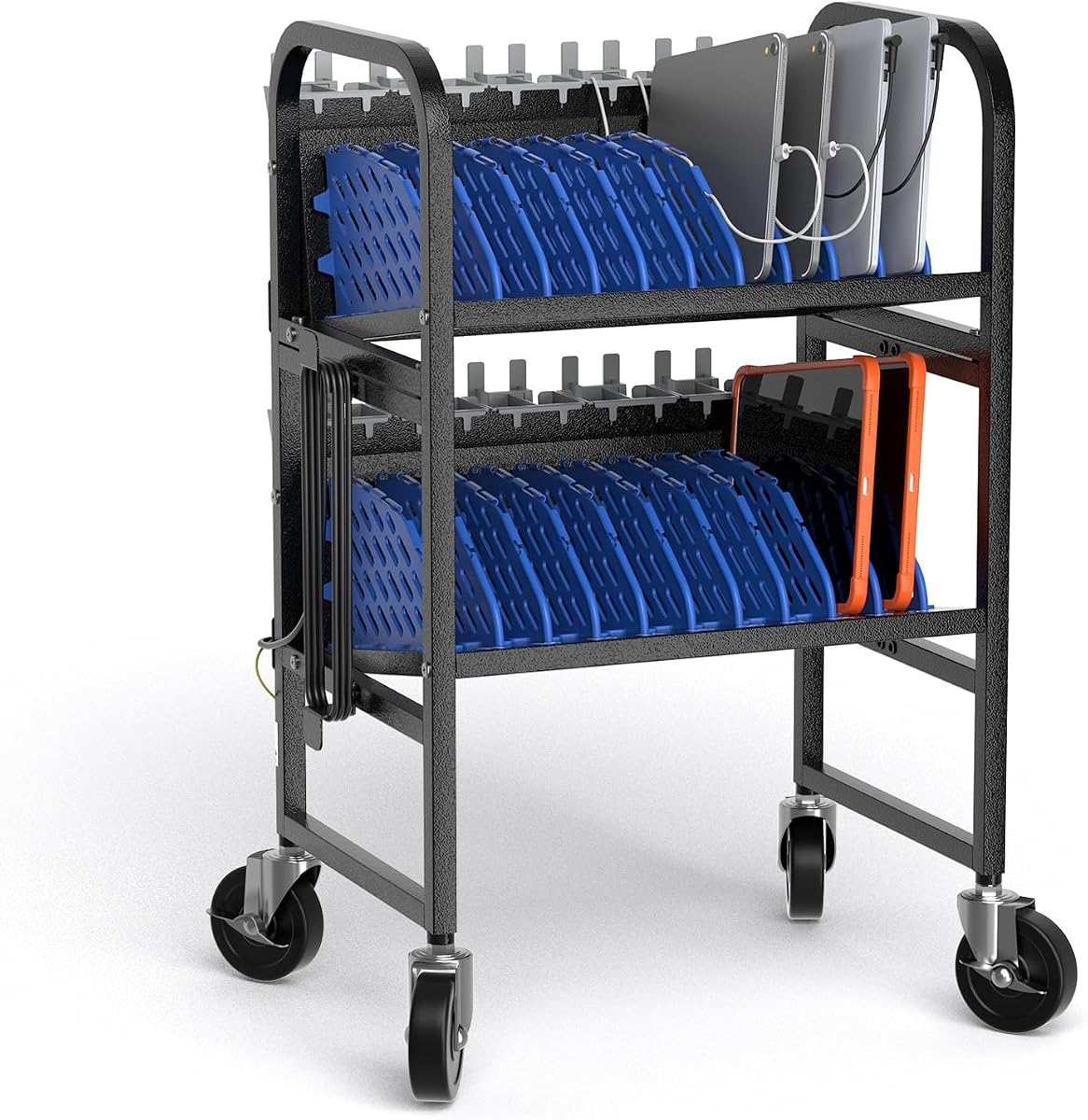
This mobile cart allows schools to move a full fleet of devices easily. It holds twenty devices and features durable locking casters.
We may earn a commission when you buy through this link, at no additional cost to you.
Adjustable dividers fit various laptop and tablet sizes without gaps.
The open ventilated design reduces heat buildup during charging.
Best for large campuses needing secure transport between labs or classrooms.
Ergonomic handles and quiet casters allow smooth movement between learning spaces.
Dividers adjust to fit different device sizes for better storage.
We may earn a commission when you buy through this link, at no additional cost to you.
Built with a heavy-duty steel frame this station withstands daily wear in high traffic areas. It fits ten devices and includes a power strip.
We may earn a commission when you buy through this link, at no additional cost to you.
The open frame structure promotes airflow to reduce overheating risks.
Cable clips on the back help consolidate wires and reduce clutter.
This is a robust choice for offices needing reliable desktop storage.
Industrial-strength steel ensures stability even with frequent access.
A lower tray holds chargers or school supplies out of the way.
We may earn a commission when you buy through this link, at no additional cost to you.
Belkin is a trusted brand for safety in this charging station. It provides automatic surge protection and fits devices up to 1.18 inches.
We may earn a commission when you buy through this link, at no additional cost to you.
The design allows mounting to standard AV carts for transport.
Labeling space helps personalize and identify specific devices.
Ideal for schools needing brand assurance and warranty coverage.
Secure the unit to a table or cart for a permanent installation.
Includes a fifteen thousand dollar equipment warranty for added peace of mind.
We may earn a commission when you buy through this link, at no additional cost to you.
This model offers excellent value with fast GaN charging and included cables. It is a sturdy desktop station for ten devices.
We may earn a commission when you buy through this link, at no additional cost to you.
The one-piece slots are durable and designed to fit tablets and laptops.
It includes eight short cables to keep your desk organized.
Pick this if you need a compact affordable solution for USB-C devices.
Fits easily on desks or nightstands without taking up too much space.
Top ports deliver high speed charging for modern devices.
We may earn a commission when you buy through this link, at no additional cost to you.
This simple mobile unit moves devices easily and sets up without tools. It features steel construction and smooth rolling casters.
We may earn a commission when you buy through this link, at no additional cost to you.
The open design allows quick pickup and drop-off for students.
Cable clips and routing holes keep cords organized on the cart.
Best for home offices needing a portable and simple solution.
Get organized quickly with a straightforward tool-free assembly process.
Locking wheels allow you to park the station securely in place.
We may earn a commission when you buy through this link, at no additional cost to you.
Selecting the right charging station depends on your capacity needs and the environment where it will be used.
Determine how many devices you need to charge at once. For classrooms with larger classes choose a unit with at least fifteen slots to avoid overcrowding.
Match the number of slots to your total device count to ensure every Chromebook has space.
Check if the unit includes a power strip or if you need to plug in adapters separately. Built-in surge protection is vital for safety.
Ensure the power strip has enough outlets for all your devices without needing extra strips.
Look for steel frames or high-quality plastics that can withstand daily drops and bumps. A sturdy build prevents deformation over time.
Choose materials rated for commercial use if the station will be in a busy hallway.
Effective cable clips or routing holes keep wires organized and safe. Messy cables can be a tripping hazard.
Verify the station has enough space to tuck away excess cord length securely.
Decide if the station needs to move between rooms. Mobile carts with casters allow transport while desktop units stay in place.
Locking casters are essential to keep the station stable during use.
Open-frame designs promote airflow which prevents overheating. Avoid enclosed cabinets unless they have active cooling.
Ensure there is enough space around devices for air to circulate.
Verify the width and thickness of slots to fit your specific Chromebook models. Some units only support small tablets.
Check measurements against your devices to ensure a proper fit.
Surge protection and fire-retardant materials protect your devices from electrical hazards. Look for UL or equivalent certification.
Prioritize safety features to extend the lifespan of your Chromebooks.
Place the station on a flat stable surface away from direct sunlight. Ensure the power outlet is close enough to reach the power cord without tension.
Insert devices into slots one by one ensuring they are upright. Connect the power adapters to the outlets or USB ports securely.
Wipe the steel or plastic surfaces with a dry cloth regularly. Keep vents clear of dust to maintain proper airflow.
Not all units include power strips. Some models require you to provide your own power strip or use individual USB chargers. Always check the product specs before buying to see if a power strip is included.
Use a station with an open-frame design that allows air to circulate. Avoid stacking devices too tightly and ensure the power strip is not blocking vents.
Most units allow mixed charging but verify the slot sizes. Adjustable dividers help you fit both tablets and Chromebooks in the same rack.
Most desktop units support standard 10A loads. Mobile carts often include 20-outlet power strips rated for classroom use.
Mobile carts are valuable if you need to share devices across rooms. They provide flexibility that desktop units cannot offer.
Clean with a soft dry cloth and avoid harsh chemicals. This keeps the plastic looking new and prevents discoloration over time.
Most modern units are designed to fit Chromebooks with cases. Check the slot thickness to ensure it accommodates your specific case.
We found the POCHAR 8-Device station offers the best balance of capacity and safety for most users. For high capacity needs the 20-Device mobile cart is the top choice.
Prioritize safety features like surge protection and heat management to protect your investment. Durability matters most in daily use environments.
Remember to verify the latest pricing and shipping options before finalizing your order. Prices fluctuate often so check the current listings.