
HiLetgo MAX7219 Dot Matrix Module
4.4Editor score
4 in 1 display design
Simple 5pin line interface
Affordable price point
This guide compares the top 10 LCD dot matrix modules for builders, focusing on display type, controller compatibility, and ease of integration for any project.
LCD dot matrix modules are essential components for embedding text and graphics into electronic projects. They provide a clear and reliable way to display data, status, or messages using simple microcontroller interfaces. Choosing the right module ensures your project runs smoothly and looks professional.
We evaluated ten popular modules based on display quality, connectivity options, and developer support. Our comparison covers graphic LCDs, character displays, and LED matrix alternatives. Each product was assessed for resolution, backlight quality, and compatibility with common platforms like Arduino and ESP32.
Each pick highlights key strengths and ideal use cases for makers and engineers. We include detailed specs, pros, cons, and real-world application notes. Please note that availability and pricing may change over time, so check current listings before purchasing your components.
4.4Editor score
4.7Editor score
The following table provides a side-by-side comparison of all ten products reviewed in this guide. We highlight key specifications and display formats to help you quickly identify the module that best fits your technical requirements and project constraints.


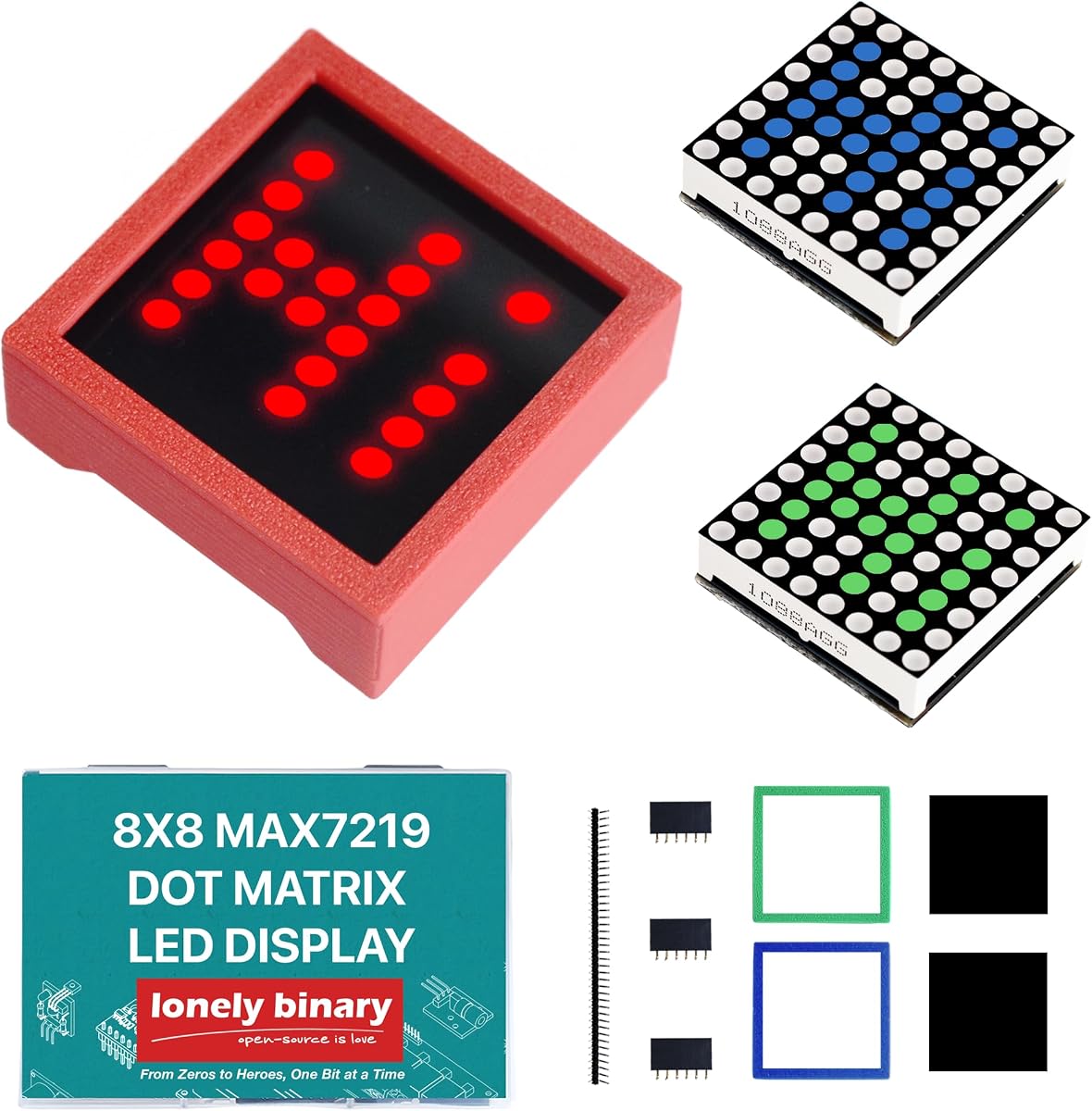
This Lonely Binary pack offers a unique solution for makers needing versatile LED displays. With one red, one green, and one blue module, you can create multi-color projects without RGB complexity. The high rating reflects its ease of use and solid build quality for hobbyists.
We may earn a commission when you buy through this link, at no additional cost to you.
The MAX7219 driver simplifies control via SPI, allowing low-power shutdown and adjustable brightness. You can daisy-chain modules for wider displays like 24×8 scrolling text. The included 3D-printed cases give your build a polished look while protecting the PCB from damage.
While the modules are single-color, this limitation encourages creative layering. Soldering is required to connect pin headers, which may be a hurdle for absolute beginners. However, the chainable design and low voltage options make it adaptable for various boards.
Buy this if you want a complete kit for visual indicators or retro games. It is perfect for classrooms or makerspaces due to its educational value. The variety pack ensures you have the right color for any status indication or pixel art project.
Mix red, green, and blue modules to create layered effects or distinct status indicators without complex wiring.
The custom 3D-printed enclosures shield components from dust and scratches, ensuring longevity in embedded builds.
We may earn a commission when you buy through this link, at no additional cost to you.
The HiLetgo module is a staple for budget-conscious makers needing a reliable LED matrix. It offers a standard 8×8 display with the popular MAX7219 driver. Its high rating confirms its reliability for basic Arduino projects and learning experiments.
We may earn a commission when you buy through this link, at no additional cost to you.
This unit includes a 5pin line for easy connection to microcontrollers. It operates at 5V and supports the common SPI interface. The 4-in-1 design allows for easy expansion if you need larger displays by chaining units together.
It lacks protective cases, which may be a drawback for permanent installations. However, the price point makes it ideal for testing and development. The standard pinout ensures compatibility with most existing libraries and code snippets.
Choose this for prototyping where cost is a major factor. It is suitable for simple notifications, clocks, or games. Its simplicity helps beginners focus on coding rather than complex hardware setup.
Ideal for large-scale projects where minimizing component costs is essential without sacrificing core functionality.
The included 5pin line simplifies initial setup, reducing time spent on soldering and connection.
We may earn a commission when you buy through this link, at no additional cost to you.
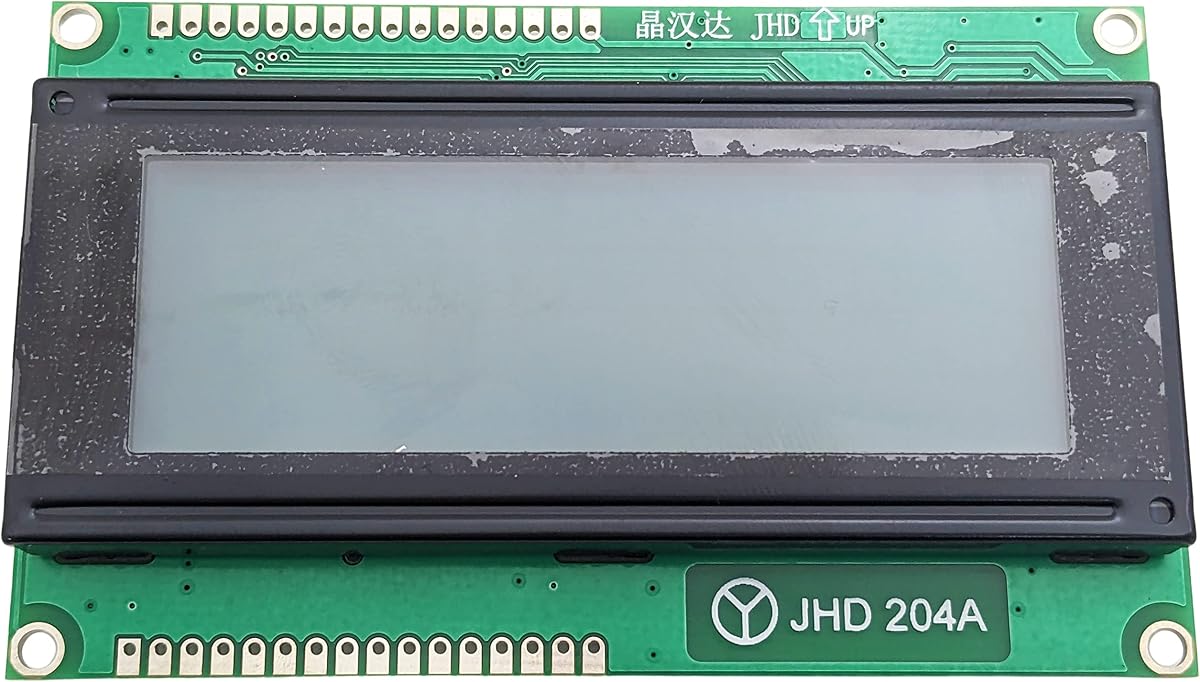
This premium module offers a substantial 20×4 character display for more information-rich interfaces. The reflective gray screen provides excellent contrast for indoor use. It is built for projects that require detailed text or data logging.
We may earn a commission when you buy through this link, at no additional cost to you.
The driver and controller are integrated, simplifying the circuit design. It uses a standard 5×7 dot matrix for clear characters. The size is larger than 1602 modules, allowing for more text lines without scrolling.
It is more expensive than smaller options and takes up more board space. However, for industrial or professional applications, the clarity and capacity are worth the investment. The build quality ensures durability over time.
Opt for this when you need extensive text output in a single screen. It fits well in control panels or monitoring systems. The premium design aligns with high-end embedded projects.
The four lines and twenty characters allow for complex system status reports without external scrolling logic.
Having the driver included reduces external component count and potential wiring errors during assembly.
We may earn a commission when you buy through this link, at no additional cost to you.
The Ximimark 12864 module is designed for graphic data rather than simple text. It allows you to draw shapes and icons alongside text. The blue backlight ensures visibility in various lighting conditions.
We may earn a commission when you buy through this link, at no additional cost to you.
An integrated potentiometer lets you adjust contrast easily. It includes dimmable LEDs to save power. Arduino libraries are available to simplify the coding process for beginners.
It does not support full images like OLEDs, but handles graphics well for simple UIs. The price is affordable for a graphic module. You may need to write custom code for complex layouts.
Buy this if you need icons or simple diagrams on your display. It works well for weather stations or system dashboards. The contrast control helps adapt to different environments.
The onboard potentiometer allows precise adjustment of display contrast for better readability.
Adjustable backlight brightness helps manage power consumption and reduces eye strain.
We may earn a commission when you buy through this link, at no additional cost to you.
This pack includes two standard 1602 LCD modules, providing excellent value. It uses a blue backlight for clear character visibility. The parallel interface connects easily to most controllers.
We may earn a commission when you buy through this link, at no additional cost to you.
The module supports a wide operating temperature range from -20 to 70 degrees Celsius. Its small size fits well in compact project enclosures. The standard layout means libraries are readily available.
It is strictly for text, which limits graphical capabilities. You will need to wire headers yourself if not pre-soldered. For simple status displays, it is a reliable choice.
Buy this when you need multiple units for different zones. It is perfect for backup displays or multi-panel setups. The durability makes it suitable for indoor and outdoor prototypes.
Getting two modules allows you to build redundant systems or multi-zone control panels easily.
The ability to operate in extreme temperatures makes it reliable for varied environments.
We may earn a commission when you buy through this link, at no additional cost to you.
This module specializes in numeric output, ideal for clocks or counters. It supports 7-segment displays and individual LEDs. The MAX7219 driver ensures efficient control via SPI.
We may earn a commission when you buy through this link, at no additional cost to you.
Advanced features include scan limits and brightness adjustment. It supports BCD decoding for simplified code. The low-power shutdown mode helps in battery-powered applications.
It is not suitable for full graphics or complex text. The fixed digit count limits layout flexibility. However, for precise numerical data, it performs excellently.
Choose this for digital clocks or counters. It fits well in sports scoreboards or timers. The efficiency makes it great for long-term projects.
The design is optimized for displaying numbers clearly with minimal processing overhead.
Low-power modes ensure this module runs longer on battery sources.
We may earn a commission when you buy through this link, at no additional cost to you.
The SunFounder LCD2004 provides 20 characters across four lines. The white-on-blue scheme offers strong contrast for easy reading. It is a standard choice for complex text display.
We may earn a commission when you buy through this link, at no additional cost to you.
It includes a 50K potentiometer for simple contrast adjustment. The module dimensions are standard for this format. Bright backlight ensures legibility even in bright rooms.
The larger size may not fit small enclosures. It requires more pins than smaller LCDs. However, for user interfaces needing more text, it is a solid choice.
Buy this if you need to show detailed messages or menu options. It is suitable for control panels or data loggers. The brand reliability ensures consistent quality.
The white-on-blue format makes text clear even in varying light conditions.
Compatible with common Arduino libraries, simplifying integration into existing codebases.
We may earn a commission when you buy through this link, at no additional cost to you.
This wide matrix module allows for longer scrolling text without scrolling. With 256 LEDs per unit, it supports high-resolution animations. The 3-pack offers color variety for diverse designs.
We may earn a commission when you buy through this link, at no additional cost to you.
It supports daisy-chaining for wider banners or displays. The MAX7219 driver ensures consistent brightness. Included enclosures protect the large PCB from damage.
The large physical size needs dedicated mounting space. Longer chains may require more power. However, for scoreboards or large displays, it is unmatched.
Buy this for event displays or large tickers. It works well for music visualizers. The variety pack supports creative multi-color effects.
The 32-column width allows for extended text lines without complex scrolling logic.
The included custom-fit enclosures ensure durability in industrial settings.
We may earn a commission when you buy through this link, at no additional cost to you.
This 2-pack includes four-in-1 modules designed for compact setups. The 5-pin SPI interface simplifies wiring. Each unit has 64 mounting holes for secure installation.
We may earn a commission when you buy through this link, at no additional cost to you.
The slim profile makes it ideal for thin enclosures. It supports daisy-chaining for extended displays. The high rating reflects its quality and ease of use.
You need to solder headers for full connectivity. Individual pixel control requires specific libraries. But for standard LED matrices, it is reliable.
Buy this for space-constrained builds. It suits wearable tech or small dashboards. The mounting holes ensure stability in vibrating environments.
The slim profile allows integration into tight spaces without bulk.
Pre-drilled holes provide flexible options for panel mounting.
We may earn a commission when you buy through this link, at no additional cost to you.
This module offers a standard 128×64 graphic display with bright contrast. The wide viewing angle ensures visibility from different positions. It is compatible with MEGA and Nano boards.
We may earn a commission when you buy through this link, at no additional cost to you.
It includes pin headers for easy connection. The high contrast ensures text and graphics are clear. It is a solid choice for general-purpose graphic LCDs.
It lacks some advanced contrast features. The build is standard but functional. For most projects, it provides necessary graphic capability.
Buy this for general graphic displays. It fits well in DIY electronics. The standard format ensures broad support.
Users can view the display clearly from various angles.
Compatible with most Arduino boards, simplifying project planning.
We may earn a commission when you buy through this link, at no additional cost to you.
Selecting the right matrix module depends on your project requirements. This guide outlines key factors to consider when comparing options.
Decide between LED and LCD technologies. LEDs are bright and suitable for outdoor use. LCDs are better for detailed text and indoor applications.
Choose LEDs for visibility and LCDs for text density.
Resolution affects how much content you can display. Higher resolutions allow for graphics. Lower resolutions focus on text.
Prioritize resolution based on your content needs.
Check the interface type like SPI or I2C. SPI is faster for graphics. I2C uses fewer pins.
Ensure your controller supports the interface.
The driver chip determines complexity. MAX7219 is common for LEDs. HD44780 is common for LCDs.
Select a driver with good library support.
Verify the operating voltage matches your system. 5V is standard. 3.3V is needed for some boards.
Match voltage to avoid damage.
Backlight color affects readability. Blue is standard. Green can be easier on eyes.
Consider ambient lighting conditions.
Check physical dimensions and mounting holes. Some come with enclosures. Others need custom cases.
Ensure it fits your enclosure.
If you need large displays, check for daisy-chain support. This allows you to add modules easily.
Opt for chainable modules for growth.
Connect the power pins to your board's voltage supply. Ensure you use the correct pins for ground and data. Check the voltage ratings before powering on.
Use compatible libraries like LiquidCrystal or LedControl. These simplify sending text or pixels. Install them via your IDE's library manager.
Keep the modules away from moisture to protect electronics. Clean with dry air if dusty. Avoid pressing hard on the display.
LCD modules use liquid crystals to show images and text. LED modules use light-emitting diodes for brightness. LEDs are better for outdoor visibility. LCDs are better for text density.
Yes, most modules work with ESP32 boards. Ensure the voltage levels match. Use logic level shifters if necessary.
Standard 1602 LCDs only support text. You can draw custom characters using CGRAM. However, true graphics require a graphic LCD.
The MAX7219 is common for LEDs. The HD44780 is common for LCDs. These chips have many available libraries.
Yes, libraries simplify the process. They handle low-level commands. Without them, writing code is complex.
Most LCDs use a potentiometer. Turn it to adjust contrast. Some drivers allow software contrast control.
This guide highlighted the top options for LCD dot matrix modules. We selected products based on quality, ease of use, and versatility.
Prioritize resolution and compatibility. Your choice should match your project's display needs and controller capabilities.
Check current listings before buying. Features and pricing may change over time.