
XPPen StarG640
4.3Editor score
Battery-free stylus pen
6×4 inch active area
Compatible with Chromebook
This guide compares the top digital signature pads for PC to help businesses and professionals choose the right device for secure and efficient electronic
Digital signature pads for PC streamline document signing by capturing handwritten signatures electronically. These devices replace paper processes with secure digital workflows ensuring compliance and efficiency across various professional environments.
We evaluated ten leading models based on connectivity build quality software compatibility and user feedback. Our analysis covers diverse use cases from small office needs to enterprise-level transaction processing requirements.
Each selection highlights unique strengths and ideal scenarios for adoption. Readers can find detailed insights into features performance and integration options to make informed decisions for their specific signing workflows.
4.3Editor score

4.2Editor score

4.0Editor score
This side-by-side comparison outlines key specifications and features across all ten selected digital signature pads for PC to help you identify the model that best fits your technical and operational needs.


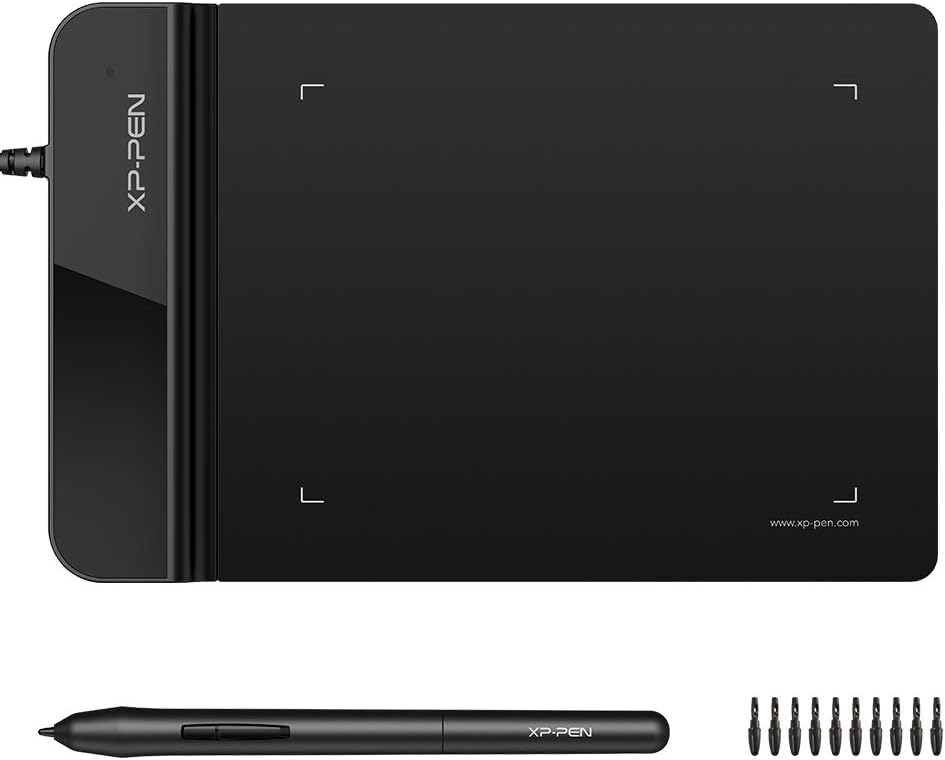



The XPPen StarG640 serves as an excellent budget-friendly option for individuals seeking basic digital signing capabilities without high costs. It features a battery-free stylus that eliminates charging needs allowing for uninterrupted signing sessions during meetings or document processing tasks.
We may earn a commission when you buy through this link, at no additional cost to you.
This tablet offers 6×4 inches of active space which is adequate for capturing clear signatures and handwritten notes. Its ultra-thin profile makes it easy to carry between offices or remote work setups. Compatibility extends to Windows Mac and Chromebook platforms ensuring broad usability across different IT environments.
While the compact size suits personal use it may feel limited for users needing extensive drawing space. Driver setup requires initial configuration but once installed it integrates smoothly with common office applications. The lack of a built-in screen means signatures are viewed on the monitor rather than the device surface.
This model is ideal for freelancers small business owners or students needing an affordable way to sign documents digitally. It provides reliable performance for routine signing tasks without investing in enterprise-grade hardware. Users should confirm driver compatibility with their specific operating system before purchasing.
The included stylus requires no charging ensuring it is always ready for immediate use during critical signing moments.
Seamless support for Chromebook devices allows educational institutions to use this tablet for digital sign-ins and remote learning activities.
We may earn a commission when you buy through this link, at no additional cost to you.
The PenPower ePaper SignPad stands out for its focus on streamlining document workflows through instant signature capture and metadata tracking. It allows users to send handwritten signatures directly to documents with a single tap making it highly efficient for repetitive signing tasks.
We may earn a commission when you buy through this link, at no additional cost to you.
Every signature includes a timestamp and printed name which enhances traceability and credibility for business or legal transactions. The device works with common file types including Word PDF and images ensuring versatility across different software ecosystems. Additional features like digital sticky notes help users organize reminders and memos efficiently.
Users must be prepared for a learning curve when integrating with enterprise systems as custom SDK integration may be required for deeper workflows. The absence of an integrated display means signatures appear on the computer screen not the pad itself. This design prioritizes speed over visual feedback during the signing process.
This solution is best suited for teams prioritizing speed and compliance in daily operations. It reduces paper waste and accelerates approval cycles significantly. Businesses should evaluate integration needs before purchase to ensure smooth operation within existing document management frameworks.
Automatic addition of timestamps and printed names to signatures provides enhanced traceability for compliance and legal requirements.
Works with widely used platforms including WhatsApp Slack Zoom and Outlook to facilitate seamless communication and signature sharing.
We may earn a commission when you buy through this link, at no additional cost to you.
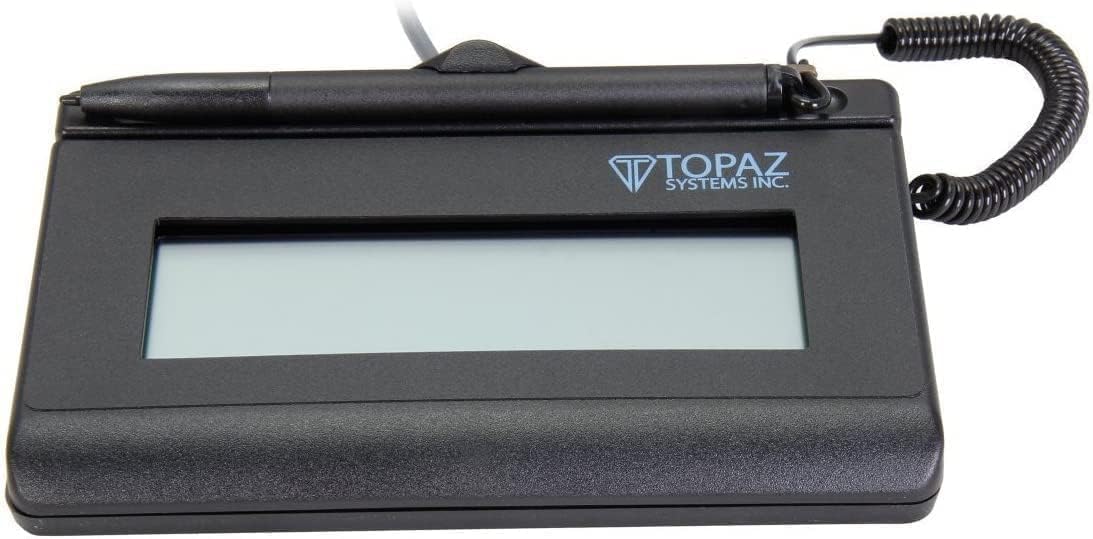
The Topaz T-LBK462 offers enterprise-grade reliability with its rugged design and high-quality biometric capture capabilities. This device is engineered for environments where frequent usage and legal validity of signatures are critical concerns such as banking or healthcare settings.
We may earn a commission when you buy through this link, at no additional cost to you.
Its LCD display allows for customized instructions or branding which can guide users during the signing process and enhance professionalism. The USB virtual serial interface ensures compatibility with legacy systems that rely on virtual COM ports for secure communication. The signing surface is built to withstand heavy use over time.
While the renewed condition offers a cost saving buyers should verify warranty terms carefully. The unit is compact which aids portability but might require careful setup in public counter spaces. Users seeking forensic-level verification will appreciate the attention to detail in its capture technology.
This pad is ideal for businesses requiring secure compliant and frequent signature collection. It balances durability with functional features like custom display text to improve user experience. Organizations should confirm system compatibility especially for virtual serial support before integrating this into existing infrastructure.
Captures detailed forensic data during signing to ensure legal validity and prevent fraud in sensitive transactions.
Allows businesses to display custom messages or branding on the screen to guide signers or enhance brand presence.
We may earn a commission when you buy through this link, at no additional cost to you.
The Topaz T-S460-HSB-R provides a straightforward and reliable method for capturing electronic signatures without unnecessary complexity. Its design focuses on functionality and cost efficiency making it a practical choice for businesses needing to digitize document processes without high overhead.
We may earn a commission when you buy through this link, at no additional cost to you.
The pad connects via USB and displays signatures directly on the computer screen which simplifies the workflow for both signers and administrators. While it lacks a backlight this model performs well in standard office lighting conditions. The capture technique ensures clear and consistent signature images for record keeping.
Users should note that this model does not include advanced features like LCD text customization found in higher-end versions. It is best suited for internal approvals or low-volume external signing where basic functionality is sufficient. Setup is generally simple requiring minimal driver configuration.
This device is recommended for small businesses looking for a no-frills digital signature solution. It offers good value for money while maintaining the reliability expected from Topaz systems. Buyers should assess their lighting conditions before purchase to ensure the non-backlit screen meets their needs.
Ensures clear and legible signature images that are suitable for digital records and compliance requirements.
Connects easily to most PC systems via USB without requiring additional adapters or complex configurations.
We may earn a commission when you buy through this link, at no additional cost to you.
The XPPen G430S is an ultra-thin compact tablet that offers high pressure sensitivity in a small form factor. This makes it ideal for users with limited desk space or those who need to carry a signing device frequently between locations.
We may earn a commission when you buy through this link, at no additional cost to you.
With 8192 levels of pressure sensitivity it captures fine details in handwriting which is beneficial for detailed signatures. It supports both left and right-handed users allowing customization based on personal preference. The battery-free stylus ensures it is always ready for use without charging interruptions.
The small active area might be challenging for individuals with larger handwriting or those used to standard signing pads. Mac users may need an OTG adapter to connect since the device uses micro USB to USB-A. Compatibility with EMR systems should be verified before purchase.
This model suits remote workers or professionals needing a portable signing solution. It balances performance with portability offering a lightweight option for on-the-go document processing. Confirming port compatibility is essential especially for modern laptops without USB-A ports.
At just 2mm thick this tablet is easy to slip into a laptop bag or briefcase for mobile use.
Users can easily switch between left and right-handed modes to ensure comfortable signing for anyone.
We may earn a commission when you buy through this link, at no additional cost to you.
The Wacom STU500 is designed for high-traffic public counter environments where durability and visibility are paramount. It features a hardened glass signing surface that resists scratches and wear from frequent use ensuring longevity in busy offices or retail locations.
We may earn a commission when you buy through this link, at no additional cost to you.
Its monochrome reflective LCD provides clear viewing even in bright lighting conditions without needing backlighting. This reduces power consumption and extends the device lifetime. The resolution allows for text and soft keys giving flexibility in user interface design for different applications.
Data encryption is available as an option which enhances security for sensitive personal information during transactions. While the display is monochrome it supports adequate contrast for signature verification. Users should note that this model is optimized for public service workflows rather than creative tasks.
This pad is best suited for businesses requiring robust devices for front-desk operations. It balances durability with functional features that support efficient customer interactions. Organizations should verify encryption needs and software compatibility before deployment in secure environments.
Extremely durable and resistant to scratches ensuring long life in high-use public or office environments.
Provides bright high contrast viewing without backlighting which reduces power use and extends device lifespan.
We may earn a commission when you buy through this link, at no additional cost to you.
The Topaz SigLite 1X5 offers a backlit LCD display which improves visibility in varied lighting conditions compared to non-backlit models. This feature ensures that signers can clearly see instructions or prompts during the signing process reducing errors and improving user experience.
We may earn a commission when you buy through this link, at no additional cost to you.
It supports both USB and virtual serial interfaces providing flexibility for integration with different legacy systems or modern PCs. The rugged signing area is built to withstand frequent use while maintaining high-quality biometric and forensic capture capabilities. Its small size and weight aid portability for on-site transactions.
While the features are comprehensive the higher price point may not suit all budgets. Users should also be aware that integration might require technical knowledge for virtual serial setup. The device is optimized for environments where consistent visibility and secure capture are critical priorities.
This model is ideal for enterprises needing reliable secure and visible signing solutions across multiple locations. It offers a balance of advanced features and durability for professional use. Buyers should evaluate their budget and technical capacity before opting for this premium feature set.
The backlit screen ensures clear visibility of text and signatures even in dimly lit rooms or evening hours.
Records detailed biometric data to enhance security and legal validity for sensitive business or legal transactions.
We may earn a commission when you buy through this link, at no additional cost to you.
This pack offers three Topaz T-S460 signature pads providing a cost-effective solution for businesses needing multiple devices across different workstations. It simplifies procurement by allowing bulk acquisition of compatible units ensuring consistency in operation and support across the organization.
We may earn a commission when you buy through this link, at no additional cost to you.
Each unit features a modern style design and is ambidextrous accommodating both left and right-handed users comfortably. The devices are optimized for PC environments making integration into existing office infrastructure straightforward. This uniformity helps streamline maintenance and driver management for IT teams.
Purchasing in bulk is beneficial for scaling operations but might be excessive for single-location small businesses. It is essential to ensure that all staff are trained on using the devices effectively to maximize productivity. Compatibility with specific software should be verified before deployment.
This option is recommended for growing companies or franchises needing standardized digital signature capabilities. It reduces per-unit costs while maintaining reliable performance for routine signing tasks. Buyers should consider their long-term usage plans to justify the bulk investment.
Buying in bulk reduces per-unit costs and ensures consistency across multiple office locations or departments.
Supports both left and right-handed users without requiring device adjustments ensuring comfort for all signers.
We may earn a commission when you buy through this link, at no additional cost to you.
The Topaz SigLite Renewed provides a cost-effective way to access a backlit LCD signature pad without paying full retail prices. It delivers reliable performance with high-quality biometric capture ensuring secure and valid electronic signatures for business transactions.
We may earn a commission when you buy through this link, at no additional cost to you.
Its touch-screen signing surface offers a modern user experience and the LCD allows for customizable instructions or branding. The device supports USB connection making it easy to integrate with standard PC setups. Monochrome printer output compatibility helps in producing physical copies when needed for records.
As a renewed product buyers should verify warranty and return policies carefully. High customer ratings suggest satisfaction with condition and functionality but users should inspect the unit upon arrival. This option is suitable for cost-conscious businesses needing professional features.
This model is ideal for small to mid-sized businesses seeking a balance of features and affordability. It offers a premium experience through backlit display and customization while managing budget constraints. Confirming the renewal terms is essential before finalizing the purchase.
Purchasing a renewed unit offers significant cost savings while maintaining performance and functionality standards.
Businesses can display custom text or instructions to guide signers and enhance brand visibility during transactions.
We may earn a commission when you buy through this link, at no additional cost to you.
This model distinguishes itself with a two-year factory warranty which provides extended peace of mind for long-term business operations. It includes software necessary for immediate setup reducing initial configuration time and allowing teams to begin signing workflows quickly.
We may earn a commission when you buy through this link, at no additional cost to you.
The HID USB connection ensures compatibility with modern PC systems without requiring complex virtual serial configurations. It also features a terminal wiring block allowing for integration into specialized hardware setups if needed. The included software supports standard electronic signature processing and validation.
While the price is higher the warranty and included software offset some costs over time. It is ideal for organizations prioritizing long-term reliability and support. Buyers should ensure they have the technical resources to handle potential wiring block configurations if utilizing advanced features.
This solution is best for businesses seeking a fully supported device with guaranteed longevity. It reduces downtime risks and offers a complete package out of the box. Evaluating total cost of ownership including warranty benefits is recommended before purchase.
Provides extended protection against defects ensuring long-term reliability and reducing long-term maintenance costs.
Comes with necessary software to streamline initial setup and enable immediate use of signature capture features.
We may earn a commission when you buy through this link, at no additional cost to you.
Selecting the right digital signature pad requires understanding your specific workflow needs connectivity requirements and budget constraints to ensure seamless integration.
Ensure the device supports your operating system and integrates with your document management software. Most pads work with Windows and Mac but check for specific driver requirements before purchasing.
Verify that the device integrates smoothly with your current IT environment to avoid costly setup issues.
Look for models with high-resolution capture and biometric features to ensure signatures are legally binding and secure. This is critical for compliance and legal document validity.
Prioritize biometric and high-quality capture features to ensure signatures are valid and secure.
Decide between backlit LCD non-backlit or touchscreen displays based on lighting conditions and user feedback needs. Some models allow customization of text or instructions on the screen.
Choose a display type that suits your environment and user feedback needs to reduce errors.
Check whether the device uses standard USB virtual serial or HID connections. Legacy systems might require virtual serial while newer PCs support HID without additional drivers.
Match the connection type to your system requirements to minimize setup complexity and driver needs.
For high-volume usage select models with rugged signing surfaces and durable casings. Business environments with frequent signing need devices that withstand daily wear.
Select models with durable and rugged construction to ensure longevity in high-usage office environments.
If you need to move the device between locations choose ultra-thin and lightweight models. Portability is essential for remote work or sales teams visiting clients.
Opt for lightweight and compact designs if mobility is a priority for your workflow.
Consider the total cost including accessories and warranty coverage. Some models offer extended warranties which can save money on repairs over time.
Evaluate the total cost of ownership including warranty terms before making a final decision.
Check if the device comes with necessary software or requires third-party plugins. Easy integration with email or cloud storage can streamline document workflows significantly.
Confirm that software requirements are met to ensure a smooth transition to digital signing.
Install the manufacturer's drivers before connecting the device to your computer. Follow the step-by-step guide to ensure the software recognizes the pad correctly.
Connect the device via USB to an available port on your PC. If using a virtual serial setup configure the COM port settings in the software preferences.
Clean the signing surface with a soft dry cloth to maintain responsiveness and clarity. Avoid using harsh chemicals that might damage the screen or stylus.
Digital signatures are generally legally binding when captured with compliant devices. Ensure the device supports high-quality capture and encryption for secure records.
Most signature pads come with basic software for setup and signature capture. Advanced workflows may require integration with document management systems.
Many modern signature pads support Mac systems. Check for Mac-specific drivers and USB-A compatibility or an adapter if needed.
Backlit pads provide better visibility in low light conditions. Non-backlit models are often more affordable and sufficient for standard office lighting.
Use a soft dry cloth to wipe the surface gently. Avoid harsh chemicals that might damage the screen or stylus sensitivity.
Yes with proper integration software. Many devices support exporting signatures to PDF or Word files for cloud storage.
This guide has highlighted ten diverse digital signature pads for PC ranging from budget-friendly tablets to enterprise-grade solutions. Each option offers unique features suited for different business sizes and security requirements.
Prioritize compatibility and capture quality when making your final decision. Ensuring the device integrates well with existing workflows will maximize efficiency and reduce administrative burdens.
Remember to check current availability and support policies before purchasing. Investing in a reliable model ensures long-term satisfaction and secure electronic signature management for your organization.