
PS5/Slim/Pro Cooling Station with Controller Charging Station
4.5Editor score
Three speed turbo cooling fan
Dual controller fast charging dock
USB hubs and headset holder
Find the best Cooling Stand for PS5 Console with this guide comparing top models featuring cooling fans, charging docks, RGB lighting, and storage options for
Keeping your PlayStation 5 cool during intense gaming sessions is essential for longevity. A quality cooling stand not only dissipates heat efficiently but also organizes your accessories neatly. Choosing the right model ensures your console runs smoothly without overheating risks.
We compared ten top-rated cooling stands based on fan performance, charging capabilities, and build quality. Each product was evaluated for compatibility with standard, slim, and pro models. Our goal is to help you find the perfect accessory for your setup.
Every pick highlights key features like speed settings, LED indicators, and storage space. Prices fluctuate often so check current deals before purchasing. Read our detailed reviews to see which stand fits your needs and budget best today.
4.5Editor score

4.5Editor score

4.4Editor score
This side by side comparison reviews all ten selected cooling stands. We evaluate each model on cooling efficiency, charging speed, and overall design to help you make an informed decision for your PlayStation 5 console.
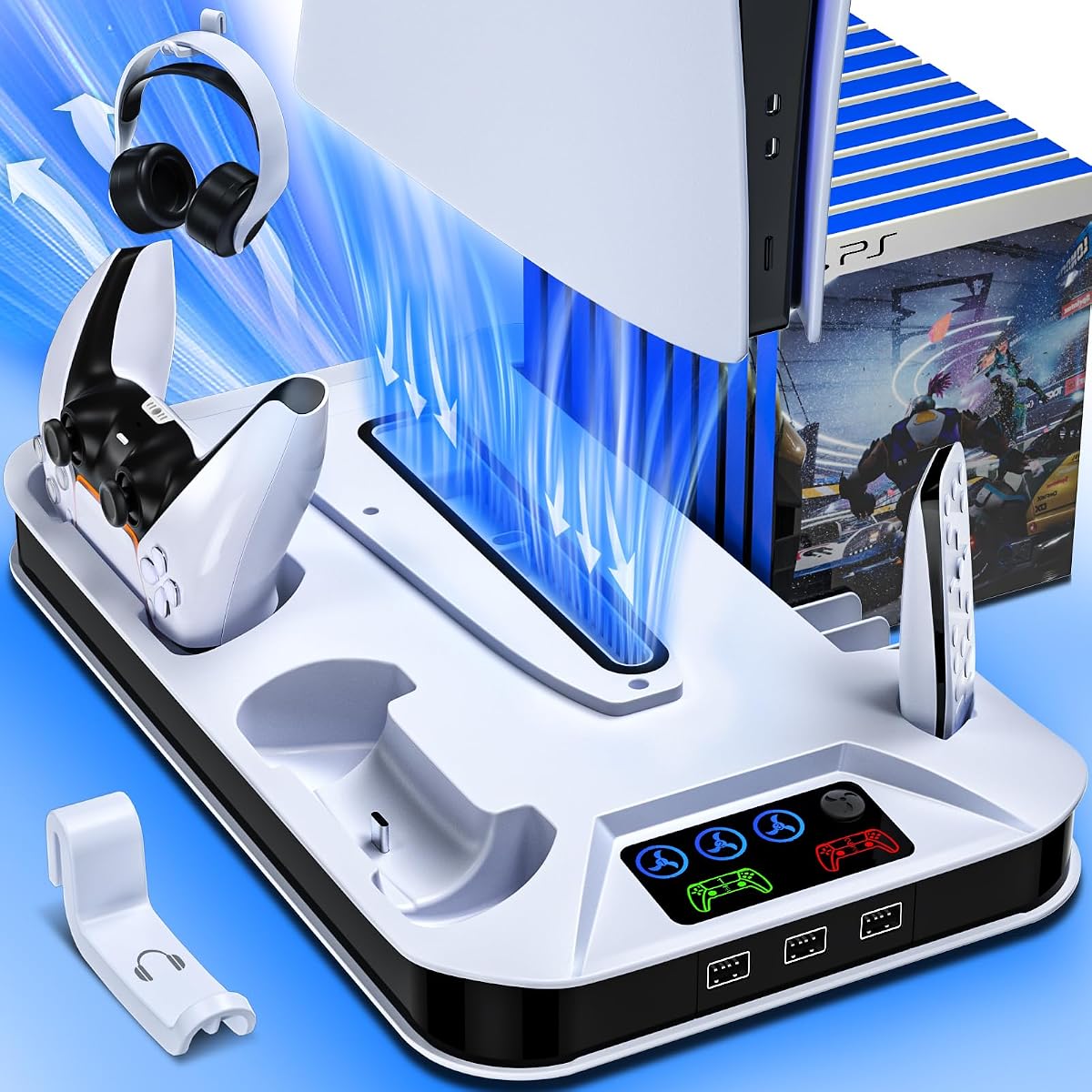


This cooling station stands out with its efficient turbo fan and comprehensive accessory support. It rates highly for keeping your console cool during long gaming sessions. The built-in charging station adds significant value to the overall package.
We may earn a commission when you buy through this link, at no additional cost to you.
The three speed fan allows you to adjust cooling power based on demand. It dissipates hot air effectively from the bottom of the console. The USB hubs let you charge headsets and other devices simultaneously without clutter.
You will need to remove the panel adapter for slim digital models which adds a step. It does not support the Edge controller so check compatibility if you own one. These minor drawbacks are outweighed by the performance.
Ideal for PS5 owners who want a tidy setup and reliable cooling. This station keeps your console safe and organized. We recommend it for anyone seeking a balance of function and style.
The turbo fan design ensures hot air is pushed away from the console base preventing overheating risks effectively.
With slots for games and headsets plus USB ports this stand keeps your gaming area clutter free and tidy.
We may earn a commission when you buy through this link, at no additional cost to you.
This horizontal stand offers a unique solution for users preferring a sideways layout. It supports both Edge and original controllers with a convenient push design. The scalable design ensures a perfect fit for standard slim and pro consoles.
We may earn a commission when you buy through this link, at no additional cost to you.
Installation is straightforward with no tools required for most users. The three speed fans provide customizable cooling to match your gaming intensity. It helps keep your setup organized by combining charging and cooling into one unit.
The horizontal stance might not suit every TV stand or shelf space. It relies on a power connection which adds cable management considerations. However these are common trade-offs for enhanced functionality.
Perfect for those who prioritize Edge controller compatibility and space efficiency. The stand helps manage heat while keeping controllers ready. We suggest it for gamers with limited vertical space.
Unlike many models this stand supports the Edge controller ensuring you can charge premium controllers easily.
No tools are needed to install this stand making it accessible for beginners setting up their gaming area.
We may earn a commission when you buy through this link, at no additional cost to you.
This station uses a temperature probe to adjust fan speed automatically for optimal cooling. It charges both original and Edge controllers quickly while offering vibrant RGB lighting. The memory function remembers your preferred settings after power cycles.
We may earn a commission when you buy through this link, at no additional cost to you.
The automatic mode reacts to console temperature changes without manual input. This ensures efficient cooling during intense sessions and quiet operation when idle. The RGB lights add a personal touch to your gaming environment.
Some users may find the lighting distracting or unnecessary for their setup. The multiple modes can be slightly complex to configure initially. Yet the smart features provide significant convenience for tech savvy gamers.
Recommended for those who want automated cooling and style options. It handles heat well and keeps controllers charged reliably. We consider it a premium choice for modern PS5 setups.
The built in probe detects heat levels and adjusts fan speed instantly for consistent performance.
Nine RGB lighting modes let you match the stand to your room decor or gaming mood.
We may earn a commission when you buy through this link, at no additional cost to you.
This white cooling station offers essential features at an attractive price. It includes a three speed fan and dual charging docks for convenience. The safety chip protects against overcharging ensuring long battery life for controllers.
We may earn a commission when you buy through this link, at no additional cost to you.
The turbo fan efficiently moves air from the console bottom to prevent overheating. It supports all PS5 versions including standard and slim editions seamlessly. The included headset holder adds value to the overall package.
It lacks Edge controller support which may limit users with premium accessories. The design is functional but lacks advanced lighting features. These limitations are acceptable given the competitive pricing.
Great for budget conscious gamers needing reliable cooling and charging. It keeps your console organized and safe from heat damage. We recommend it for essential setup needs.
Get essential cooling and charging without breaking the bank with this efficient and practical accessory.
Intelligent circuit chips prevent overcharging keeping your controllers safe during overnight charging cycles.
We may earn a commission when you buy through this link, at no additional cost to you.
This stand is designed to accommodate the Edge controller along with standard models. It features a secure screw lock to keep the console steady on surfaces. The fan speeds adjust easily to meet cooling demands effectively.
We may earn a commission when you buy through this link, at no additional cost to you.
The memory function saves your preferred fan setting after restarts. It includes USB ports to charge additional accessories like headsets or cameras. This reduces cable clutter around your TV stand or desk.
It lacks RGB lighting which some users may prefer for ambiance. The materials are functional but lack premium finishes. However the compatibility with Edge controllers is a major advantage.
Ideal for Edge controller owners who need reliable cooling. The stand keeps your console protected and accessories charged. We suggest it for practical performance over aesthetics.
Safety screws lock your console in place preventing accidental slips or movements during use.
Multiple USB ports let you power other devices without needing extra adapters or outlets.
We may earn a commission when you buy through this link, at no additional cost to you.
This model combines automatic cooling with eye-catching honeycomb RGB lighting. It adjusts fan speed based on temperature for efficient performance. The fast charging ensures your controllers are ready for the next session quickly.
We may earn a commission when you buy through this link, at no additional cost to you.
You can choose from nine lighting modes including single color and breathing effects. The touch switch makes it easy to toggle settings or turn off the lights. This adds a dynamic element to your gaming room.
The lighting might not suit all users who prefer a clean look. It is a minor issue given the cooling and charging performance. Most users appreciate the customization options available.
Perfect for gamers who want style and function in one unit. It keeps your console cool while enhancing your setup visually. We recommend it for those who love RGB effects.
Nine RGB modes let you personalize the look of your stand to match your gaming vibe.
The automatic fan adjustment ensures your console stays cool without manual intervention.
We may earn a commission when you buy through this link, at no additional cost to you.
This horizontal stand uses a scalable design to fit any PS5 version. It supports Edge controllers with a secure docking mechanism for reliable charging. The setup requires no tools making it easy to use quickly.
We may earn a commission when you buy through this link, at no additional cost to you.
The cooling fans run at three speeds to manage heat during gameplay. It consolidates charging and cooling into one unit saving valuable desk space. The design is robust and helps organize your gaming area well.
It is only horizontal which may not suit vertical preferences. Cable management can be tricky depending on your TV stand layout. Despite these points it is a strong all in one option.
Ideal for those with horizontal space and Edge controllers. It simplifies your setup while keeping your console safe. We suggest it for practical console management.
No tools are needed to assemble this stand so you can start using it right away.
The docking design works perfectly with Edge controllers ensuring secure charging for premium devices.
We may earn a commission when you buy through this link, at no additional cost to you.
This stand features an upgraded turbo fan with automatic speed adjustments. It supports both disc and digital versions seamlessly. The auto mode changes fan speed based on console temperature for efficiency.
We may earn a commission when you buy through this link, at no additional cost to you.
You get two controller charging docks that work while the console is off. The organizer slot holds games and media remotes neatly. The Type-C cable provides flexible power options for your setup.
The cable routing might require care to keep things tidy. The design is simple and prioritizes function over flair. It is a reliable choice for maintaining stable temperatures.
Great for users who want automatic cooling without manual input. It keeps your accessories organized and your console cool. We recommend it for everyday use.
The included Type-C cable allows you to power the stand from multiple sources easily.
Slots for games and remotes help keep your gaming area tidy and organized.
We may earn a commission when you buy through this link, at no additional cost to you.
This stand offers a balance of cooling charging and lighting for a good price. It features a silent fan that keeps noise levels low during play. The RGB ring adds vibrant colors to your setup effectively.
We may earn a commission when you buy through this link, at no additional cost to you.
It supports up to 12 game disks and includes a headset holder. The charging docks allow you to charge two controllers at once. USB ports let you connect additional devices for more versatility.
It does not fit digital editions without an adapter which is a limitation. The build is functional but not premium. It is a solid option for those who prioritize storage.
Perfect for gamers with physical media collections needing cooling and storage. The lights add a fun touch to your room. We suggest it for casual users.
The fan runs quietly so you can focus on your game without distractions.
Built-in slots hold multiple game disks keeping them safe and easy to reach.
We may earn a commission when you buy through this link, at no additional cost to you.
This station focuses on stability with hidden cables and security screws. It supports a wide range of devices via USB and Type-C ports. The LED indicators show charging status clearly for both controllers.
We may earn a commission when you buy through this link, at no additional cost to you.
The fan operates at three levels to manage heat efficiently. The durable build withstands daily use without shaking or wobbling. It also comes with a 24-month warranty for peace of mind.
It lacks RGB lighting and advanced style features. It is purely functional which may not appeal to those wanting flair. But for reliability it is hard to beat.
Recommended for users prioritizing safety and device compatibility. It keeps your console secure and your accessories charged. We suggest it for practical setups.
Multiple USB ports allow you to charge laptops phones and other devices easily.
The included 24 month warranty shows the manufacturer confidence in product durability.
We may earn a commission when you buy through this link, at no additional cost to you.
Choosing the right cooling stand requires considering several key factors to ensure compatibility and performance.
Ensure the stand fits your specific PS5 model whether it is standard slim or pro. Some stands require panel removal for digital versions so check the product details carefully before purchasing.
Compatibility ensures a secure fit without scratching your console or blocking essential vents.
Look for adjustable fan speeds to control cooling power based on your usage. A turbo fan should be efficient but not overly noisy during gameplay sessions.
Good fan performance prevents overheating and extends the lifespan of your console.
Check if the stand supports your controller type including Edge controllers if you own one. Fast charging capabilities save time between gaming sessions.
Charging docks with LED indicators help you track battery status easily.
Additional USB ports allow you to charge headsets cameras and other accessories. More ports reduce cable clutter around your entertainment center.
USB hubs add versatility to your setup by centralizing power needs.
Consider the style of the stand whether you prefer white or black designs. RGB lighting can enhance your gaming atmosphere but is optional based on preference.
A clean design helps your console blend with your TV stand or shelf.
Some stands include slots for game disks and media remotes. This feature keeps your collection organized and easily accessible.
Organizer slots help maintain a tidy gaming area.
Look for models that offer tool-free installation for convenience. Screw locks provide extra security but may require a small effort to set up.
Easy setup ensures you can start using the stand immediately.
Safety chips prevent overcharging and short circuits for your devices. This protects both your controllers and console from electrical issues.
Protection features ensure long-term safety for your electronics.
Start by ensuring the stand is placed on a flat stable surface to prevent any wobbling during use. Connect the power cable to your console or wall outlet to activate the cooling fan and charging docks.
Insert your PS5 console securely into the stand using the provided safety screws. This step is crucial to keep the console from sliding and to align the cooling fan correctly with the console vents.
Regularly dust the fan and vents of the stand to maintain optimal airflow. If you notice reduced cooling performance check for blockages or clean the surfaces with a soft dry cloth.
Yes most of the selected stands are designed to work with the PS5 Pro standard and slim models. Always verify product descriptions to confirm compatibility with your specific console version before buying.
Only specific models support Edge controller charging. Look for stands that explicitly mention Edge compatibility in their product features to ensure they will fit your controller properly.
Most stands draw power from the PS5 console via USB so no separate outlet is needed. Some models include wall adapters for independent operation so check the package details.
Fan noise varies by model but most offer low speeds for quiet operation. Turbo modes may be louder but are effective during intense gaming sessions.
Yes you can use the cooling stand without utilizing the charging docks. The fans will operate independently of the charging features so it functions as a simple cooler if needed.
Not all stands feature RGB lighting. Those that do typically allow you to change colors or modes using a button on the base or side of the stand.
We reviewed ten top cooling stands that offer a mix of cooling charging and organization features. The top picks balance performance and price to suit various user needs and preferences effectively.
When choosing prioritize compatibility with your console model and controller type. Consider features like RGB lighting and storage options that enhance your specific gaming setup.
Remember to check current deals and availability since prices change frequently. Investing in a quality stand will help protect your console and improve your overall gaming experience.