
ASUS ROG Raikiri II Pro PC Controller
4.0Editor score
8K Sampling Rate
Hot-Swappable TMR Sticks
Full Color Display
This guide compares the top ASUS ROG Ally controllers featuring TMR sticks, OLED displays, and wireless modes for PC and Xbox handheld gaming.
Finding the right controller for your handheld gaming setup is essential for comfort and performance. The ASUS ROG Ally ecosystem offers several high-quality options designed to enhance your experience across PC and Xbox platforms.
We evaluated each model based on connectivity, build quality, customization features, and overall user feedback. This list covers wired and wireless options with various button layouts and trigger technologies to suit different play styles.
Each pick highlights key strengths and ideal use cases to help you decide quickly. Keep in mind that availability and pricing can change frequently, so check the latest listings before purchasing.
4.0Editor score

3.9Editor score

4.1Editor score
Here is a side-by-side comparison of all ten controllers to help you identify the best fit for your specific gaming needs and budget.


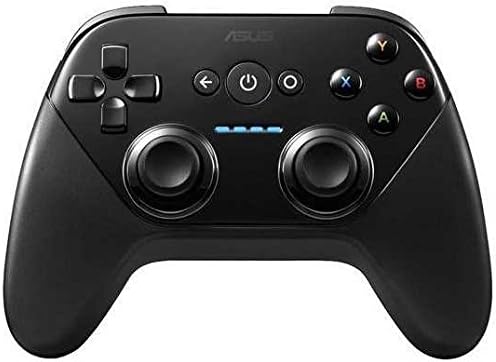
The ASUS ROG Raikiri II stands out as a top choice for gamers seeking versatile connectivity and precision. It features TMR joysticks designed to reduce drift and maintain accuracy over time.
We may earn a commission when you buy through this link, at no additional cost to you.
Its tri-mode support allows seamless switching between USB-C, 2.4GHz RF, and Bluetooth. This flexibility ensures low latency on PC and handheld devices without compromising convenience.
While the price is higher than standard controllers, the build quality and customization options justify the cost for serious players. The dual-mode triggers offer unique tactile feedback.
If you prioritize performance and flexibility across multiple platforms, this controller delivers exceptional value. It is well-suited for competitive gaming and long sessions.
The TMR joysticks consume less power and resist drift better than traditional Hall Effect sensors.
Users can switch between wired and wireless modes depending on their preferred setup.
We may earn a commission when you buy through this link, at no additional cost to you.
This model takes customization further with an 8K sampling rate and hot-swappable joystick modules. It caters to users who demand the highest precision and minimal latency.
We may earn a commission when you buy through this link, at no additional cost to you.
The full color display allows for quick profile changes and calibration adjustments directly on the controller. This level of integration is rare in standard gamepads.
While the battery life is impressive, the price reflects its position as a high-end option. It may be overkill for casual gamers but suits enthusiasts well.
Investing in this controller ensures you have the latest technology for responsive gameplay. It is ideal for those who value every millisecond of input delay.
The ROG SpeedNova technology ensures minimal delay for competitive advantages in fast games.
Adjust settings without navigating menus using the integrated display and rear buttons.
We may earn a commission when you buy through this link, at no additional cost to you.
The Tessen offers an affordable entry point for mobile gamers seeking console-style control. Its folding mechanism makes it easy to carry in a pocket or small bag.
We may earn a commission when you buy through this link, at no additional cost to you.
Designed specifically for Android phones, it ensures a secure fit for devices up to 14.5mm thick. The pass-through charging keeps you gaming longer without battery concerns.
While it lacks wireless freedom, the wired connection ensures zero latency during intense matches. The programmable paddles add a competitive edge to standard inputs.
For Android users looking to elevate their mobile gameplay without breaking the bank, this is a top recommendation. It balances features and cost effectively.
The folding design ensures it fits easily into travel cases or backpacks.
Rubber pads and an extended USB-C connector keep your phone stable during play.
We may earn a commission when you buy through this link, at no additional cost to you.
This controller introduces visual flair with a customizable OLED display for status indicators and animations. It combines this with robust connectivity options for PC and Xbox users.
We may earn a commission when you buy through this link, at no additional cost to you.
Selectable step triggers allow you to switch between short and full travel modes. This versatility is useful for different genres ranging from racing to shooters.
The inclusion of a high-quality DAC improves audio clarity for those using wired headsets. However, the display features consume power more than simpler models.
If you enjoy personalizing your setup visually while maintaining strong functional controls, this model fits well. It bridges the gap between utility and style.
Create unique animations that reflect your play style or team colors.
The ESS DAC ensures immersive sound when connected via the 3.5mm jack.
We may earn a commission when you buy through this link, at no additional cost to you.
The standard Raikiri Pro offers many features of the OLED version at a slightly different price point. It supports wired and wireless modes for broad platform compatibility.
We may earn a commission when you buy through this link, at no additional cost to you.
Back buttons allow for quick remapping of essential actions without pausing gameplay. This is particularly useful in competitive environments where reaction time matters.
While some users report mixed feedback, the hardware itself remains robust for extended sessions. It is a solid choice for those who want extra programmable inputs.
For gamers who need additional controls beyond standard layouts, this controller provides necessary utility. It balances comfort with functional enhancements effectively.
The design ensures comfortable grip during long gaming marathons.
Switch between different game profiles on the fly using rear inputs.
We may earn a commission when you buy through this link, at no additional cost to you.
Renewed options provide access to premium features at a more accessible price point. This unit has been tested and certified to function like new.
We may earn a commission when you buy through this link, at no additional cost to you.
It retains the OLED display and tri-mode connectivity found in the standard version. This makes it a smart choice for budget-conscious buyers wanting high-end specs.
The 90-day warranty offers peace of mind regarding functionality. While it may show minor signs of wear, performance remains consistent.
For those willing to buy refurbished for savings, this controller delivers strong utility. It is a practical pick for casual or secondary setups.
Every unit undergoes inspection to ensure it meets performance standards.
Save significantly while getting similar features to new models.
We may earn a commission when you buy through this link, at no additional cost to you.
While technically a handheld console, the ROG Xbox Ally includes controllers compatible with its ecosystem. It brings the Xbox experience directly to your lap with seamless integration.
We may earn a commission when you buy through this link, at no additional cost to you.
The device features a 120Hz touchscreen that ensures smooth visuals during gameplay. Its performance specs rival many entry-level gaming laptops.
This is not a traditional controller but offers built-in controls for handheld play. It is perfect for those who want a complete solution without extra accessories.
If you are looking for a self-contained gaming unit that supports Xbox Game Pass, this is a top choice. It delivers console-quality play in a portable form.
Boot straight into Xbox Game Pass titles without complex setup.
The 120Hz screen ensures every frame is rendered smoothly.
We may earn a commission when you buy through this link, at no additional cost to you.
This renewed version of the Raikiri II provides a cost-effective entry into advanced controller features. It comes with a protective case for safe storage and transport.
We may earn a commission when you buy through this link, at no additional cost to you.
The TMR joysticks help maintain precision over time. Web-based configuration allows for easy setup without needing extra software installations.
Battery life remains strong for wireless play. While the unit is refurbished, it is certified to work like new.
For travelers or budget buyers who want reliability, this option is practical. It offers the core benefits of the standard model at a better value.
The included case protects the controller during commutes or trips.
Configure buttons and profiles quickly via a web interface.
We may earn a commission when you buy through this link, at no additional cost to you.
The CRKD NEO S works across multiple devices including the ROG Ally. Hall Effect sticks eliminate drift, providing a consistent experience over time.
We may earn a commission when you buy through this link, at no additional cost to you.
Its collectible nature allows users to swap stick tops and match their style. Remappable back buttons add versatility without extra cost.
While not an official ASUS product, it is highly rated for performance. It offers great value for those who game on PC and handhelds.
This is a smart alternative if you want flexibility across different systems. It balances quality and price effectively for casual and serious gamers.
Hall Effect sensors ensure long-term accuracy without physical wear.
Connect to Switch, PC, or Ally seamlessly via Bluetooth.
We may earn a commission when you buy through this link, at no additional cost to you.
The TV500BG is a straightforward option for Android TV users. It supports wireless connections and basic gamepad functions for casual play.
We may earn a commission when you buy through this link, at no additional cost to you.
It is designed to be simple without complex customization. This makes it easy for non-technical users to start gaming quickly on the big screen.
While it lacks modern programmable buttons, it works well for retro and casual titles. It offers basic comfort for extended couch gaming.
For users needing a simple controller for family game nights, this is a reliable choice. It balances functionality with ease of use.
Pair quickly with Android TV for immediate gameplay.
Use on Android phones or Windows devices as needed.
We may earn a commission when you buy through this link, at no additional cost to you.
Selecting the right controller involves evaluating several key factors to match your gaming needs.
Consider whether you need wired, Bluetooth, or RF wireless connections. Wired offers the lowest latency while wireless provides convenience.
Choose a model with tri-mode connectivity if you switch between devices often.
TMR and Hall Effect sticks prevent drift and maintain accuracy over time. They are superior to traditional potentiometers.
Look for controllers with anti-drift features to avoid issues during long sessions.
Programmable buttons and triggers allow for better control over in-game actions. Rear paddles are particularly useful for complex commands.
Ensure the software supports easy remapping for your preferred game genres.
Wireless controllers should have at least 20 hours of battery life to reduce charging interruptions. Models with pass-through charging are also beneficial.
Check if RGB lighting affects battery duration if you plan to use it.
Grip texture and weight distribution impact comfort during extended use. Premium materials often lead to longer durability.
Try to handle the controller physically if possible to assess fit.
A built-in audio jack allows for direct connection to headsets. This ensures low latency audio and clear communication.
Look for models with high-quality DACs for better sound clarity.
Ensure the controller supports your primary gaming platforms such as PC and Xbox. Some are optimized specifically for certain ecosystems.
Check driver support to avoid configuration issues on your system.
Balance your budget with the features you need. Premium options offer advanced tech but may not be necessary for everyone.
Consider refurbished models if you want high-end specs at a lower price.
Pair the controller to your device using the appropriate mode, such as Bluetooth or 2.4GHz RF. For PC, ensure Armoury Crate is installed to enable advanced features and button mapping.
Keep the controllers in a dry, cool place when not in use. Use the included travel case if available to protect buttons and sticks from dust or impact.
Regularly update firmware through the manufacturer's software to maintain performance. Avoid exposing the device to extreme temperatures to ensure battery health and longevity.
TMR joysticks use magnetoresistive sensors which are more durable and consume less power than traditional analog sticks. They significantly reduce the risk of drift, ensuring accurate control throughout the device's lifespan.
Yes, many of the models listed are certified for Xbox and connect via USB-C or wireless RF. They function as standard Xbox controllers on consoles and PCs with proper setup.
You can remap rear buttons using software like Armoury Crate for ROG devices. Simply launch the app, select your profile, and assign the desired input to the rear buttons.
Most Bluetooth enabled models support the Steam Deck. However, specific drivers may be required on Windows to access all customization features like display settings.
Yes, having the OLED display active can reduce battery life. Users can often disable the display or set it to turn off automatically to conserve power.
Pro models typically include advanced features like higher polling rates, hot-swappable components, or extra displays. They are designed for competitive gamers who need the lowest possible latency.
The ergonomic layouts are generally designed for right-handed use. However, you can reassign buttons via software to mimic left-handed setups if needed.
It is best to charge the controller when battery levels drop below 20 percent to maintain health. Most models take about two to three hours to charge fully.
The ROG Raikiri II stands out for its balance of precision and connectivity options. For those seeking the ultimate in performance, the Raikiri II Pro offers unmatched customization.
Consider your specific needs regarding budget and platform when selecting a model. Casual gamers might prefer simpler options while enthusiasts should look for advanced triggers.
Prices and availability change frequently so always check the latest details before purchasing. The right controller can elevate your gaming experience significantly.