
WALI Computer Monitor Stand for Desk
4.7Editor score
Large metal shelf up to 44lbs
Adjustable height for ergonomics
Vented platform for cooling
Finding the right laptop rack for desk can transform your workspace into a highly efficient and organized environment. A quality stand elevates your device, improves airflow, and reduces strain on your neck and back during long work sessions.
We have analyzed ten top products based on stability, compatibility, build quality, and user feedback. Each option offers unique features to suit different desk setups and usage needs whether you work from home or in a shared office.
Every pick highlights key strengths and potential trade-offs to help you make an informed decision. Keep in mind that availability and pricing may change so checking current details on the product page is always recommended before purchasing.
4.7Editor score

4.8Editor score

4.6Editor score
As an Amazon Associate we earn from qualifying purchases.
This side-by-side comparison highlights key specifications and features across all ten products to help you quickly identify the best fit for your specific desk setup and laptop model.





The OMOTON Dual Vertical Desk Laptop Stand Holder earns the top spot with its robust build and versatile dual dock design. With a high rating from users, it stands out for its ability to hold two laptops simultaneously while maintaining stability and protecting devices from scratches.
We may earn a commission when you buy through this link, at no additional cost to you.
Its anodized aluminum construction ensures durability and a premium look that matches MacBook aesthetics. The adjustable width slots accommodate laptops ranging from 0.55 inches to 1.65 inches thick, making it suitable for various models including Samsung, Microsoft Surface, and more.
While highly stable, the stand requires sufficient desk width to place without obstructing other items. Additionally, it is designed for vertical storage only, which may not suit users who need horizontal access to their laptops frequently during work.
This rack is ideal for professionals managing multiple devices who want a clean, organized desk setup. Its combination of security, adjustability, and style makes it the best overall choice for most users seeking a reliable laptop rack for desk.
The dual dock feature allows you to store two laptops vertically side by side, freeing up significant desktop space while keeping both devices within easy reach and secure.
Crafted from sandblasted and brushed anodized aluminum, this stand resists scratches and offers a sturdy base that prevents tipping even with heavier laptops in place.
We may earn a commission when you buy through this link, at no additional cost to you.
The NODOCA 2-Slot Laptop Storage for Desk is an excellent option for those looking to maximize desk real estate by utilizing the side space. It features a sturdy carbon steel frame and includes a convenient hook for hanging headphones or other accessories.
We may earn a commission when you buy through this link, at no additional cost to you.
Its adjustable slots fit laptops from 13 to 17 inches and support various brands like Dell, HP, and Lenovo. The design ensures your devices stay secure without taking up valuable work surface area, which is crucial for small home offices.
Installation requires a desk depth greater than 5cm and thickness less than 6cm, which may not suit all furniture. Also, the side placement might complicate cable management if you frequently plug and unplug devices.
Ideal for users with limited desk space, this stand offers a practical way to keep laptops organized and accessories handy. It balances affordability with functionality, making it a strong contender for side storage needs.
Mounting on the desk side means your main workspace remains clear for keyboard, mouse, and documents while your laptop stays upright and protected in the slot.
The integrated hook at the bottom allows you to hang headphones or controllers reducing clutter and keeping essential gear within arm's reach when needed.
We may earn a commission when you buy through this link, at no additional cost to you.
The BYMECOST No Drill Under Desk Laptop Mount is perfect for users who want to free up their entire desk surface. It attaches securely underneath without drilling and provides a spacious shelf for laptops and other electronics like hard drives or hubs.
We may earn a commission when you buy through this link, at no additional cost to you.
Made from high quality metal with a powder coated body, it supports up to 44 pounds and features a hollow structure that aids airflow and reduces dust. The tray includes openings to route cables neatly keeping the area below organized.
However, it cannot be installed on tables with crossbars and needs a tabletop area of at least 20 inches wide. Users must measure carefully before purchasing to ensure compatibility with their specific desk structure.
This mount is ideal for standing desks or gaming setups where desktop space is at a premium. Its sturdy construction and easy installation make it a practical choice for hiding tech clutter from view.
By moving your laptop and accessories under the desk you reclaim the entire top surface for writing drawing or using multiple monitors without obstruction.
The three cable openings allow you to thread power and data wires through the tray preventing tangles and keeping the underside of your desk tidy.
We may earn a commission when you buy through this link, at no additional cost to you.
This Adjustable Laptop Stand for Desk is designed for versatility and portability making it great for frequent travelers or those who switch between work locations. It features a foldable design and adjustable height settings to reduce neck strain during long sessions.
We may earn a commission when you buy through this link, at no additional cost to you.
Constructed from sturdy metal, it supports up to 17.6 lbs and includes ventilation holes to keep laptops cool. Rubber mats on the hooks and base prevent slipping and protect your device from scratches while in use.
Though durable, its lighter build may feel less stable than heavier models when typing directly on the laptop. Also it is optimized for laptops up to 15.6 inches so larger gaming machines may not fit well.
Ideal for remote workers and students who need a reliable stand on the go, this product balances function and convenience. It offers ergonomic benefits at an accessible price point for everyday users.
The adjustable angles let you set the screen at eye level which helps maintain good posture and reduces fatigue during extended work periods.
Its foldable design allows it to slip easily into a backpack making it perfect for office commuting or working from cafes and co working spaces.
We may earn a commission when you buy through this link, at no additional cost to you.
The LOXP Adjustable Laptop Stand stands out with its unique 360 degree rotating base allowing you to share your screen easily or adjust the viewing angle without moving the entire stand. It is built from one-piece fiber metal for enhanced stability.
We may earn a commission when you buy through this link, at no additional cost to you.
Users can freely adjust the height and angle to maintain eye level comfort which reduces physical strain during work. The non-slip silicone protects your laptop from sliding and the stand folds flat for easy transport or storage.
While the rotation feature is convenient it may require periodic tightening to maintain firmness over long term use. Additionally it supports laptops up to 16 inches so it may not accommodate larger gaming notebooks.
This stand is perfect for collaborative environments or users who value flexibility in device positioning. Its durable construction and ergonomic features make it a top choice for versatile desktop setups.
The rotating base enables you to pivot the laptop to face clients or teammates facilitating easy presentations or collaborative work sessions.
Made from upgraded fiber metal the base provides a stable platform that minimizes wobble even when typing on the laptop while on the stand.
We may earn a commission when you buy through this link, at no additional cost to you.
The BESIGN LS03 Aluminum Laptop Stand is renowned for its premium build and ergonomic design. It elevates your laptop by 6 inches to a comfortable viewing level helping improve posture and reduce neck strain significantly during daily tasks.
We may earn a commission when you buy through this link, at no additional cost to you.
Its detachable design allows for quick assembly in just three steps and the open structure ensures maximum airflow to prevent overheating. The premium aluminum alloy provides a stable base that holds up to 8.8 lbs without any wobbling.
Since it has a fixed height and angle users who need variable positioning might find it limiting. Also it is optimized for laptops between 10 and 15.6 inches so it may not support larger 17 inch models.
Ideal for stationary workstations where reliability and aesthetics matter, this stand combines function with a sleek look. Its strong construction and ergonomic benefits make it a favorite among office professionals.
Lifting the laptop to eye level helps align your neck and spine reducing the risk of pain and fatigue from looking down during long work hours.
The open aluminum design allows air to flow freely around the laptop bottom which keeps it cooler during intensive tasks like video editing or gaming.
We may earn a commission when you buy through this link, at no additional cost to you.
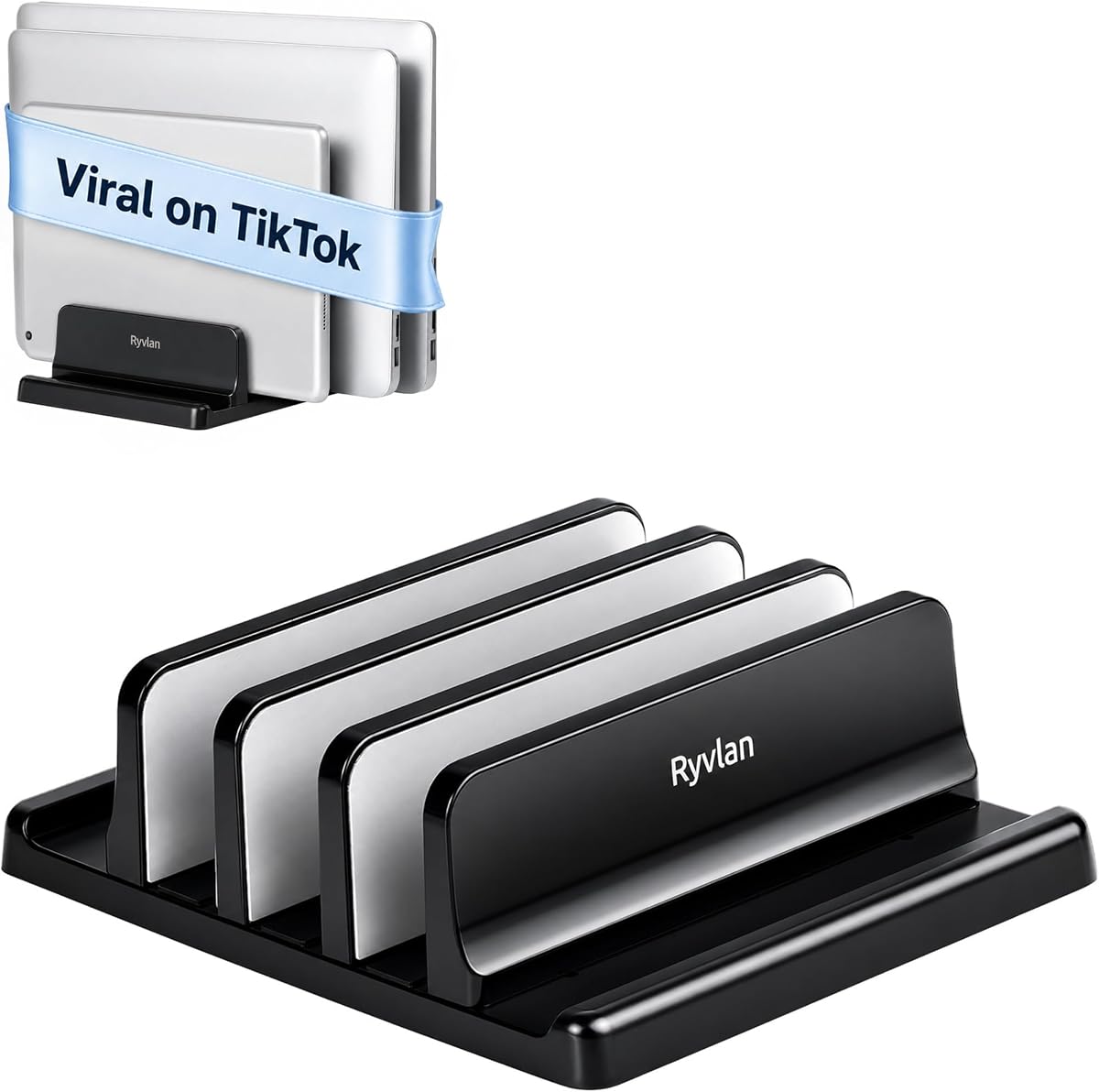
The Ryvlan Vertical Laptop Stand for Desk is a standout for multi-device users needing to organize laptops and tablets together. Its 3-slot design can hold up to three laptops plus two tablets or phones making it a powerful space saver.
We may earn a commission when you buy through this link, at no additional cost to you.
Each slot adjusts from 0.47 inches to 1.2 inches allowing you to fit thin notebooks and thick gaming machines securely. The stand uses impact-resistant ABS with silicone padding to protect devices from scratches and keep them from sliding.
While sturdy its plastic construction may feel lighter compared to metal alternatives. It is also designed for vertical storage which means laptops are not immediately accessible for typing without being removed.
This organizer is perfect for shared workspaces or families with multiple devices needing order. Its flexibility and compact design help keep desks tidy without sacrificing accessibility to any gadget.
With separate slots for laptops and tablets you can store all your essential devices in one compact footprint reducing the need for multiple stands.
Silicone padding across all walls and bases grips each device firmly preventing accidental drops and protecting surfaces from scratches during daily use.
We may earn a commission when you buy through this link, at no additional cost to you.
The Vaydeer Vertical Laptop Stand Holder Organizer offers a practical solution for users needing to store multiple devices vertically. It cradles one laptop and a phone or iPad simultaneously helping build a neat and organized workspace quickly.
We may earn a commission when you buy through this link, at no additional cost to you.
Adjustable slots fit laptops from 0.55 inches to 1.69 inches thick supporting brands like MacBook HP and Dell. Soft silicone mats protect your devices from scratches and the polished finish gives it a clean modern look.
Being made of ABS plastic it is lighter than metal stands which may affect stability with heavier laptops. Also vertical storage limits quick access so you must remove devices to use them actively.
This stand is ideal for those on a budget who still want effective organization. It balances simplicity with utility making it a great choice for home offices or student dorms.
By stacking devices vertically you clear up significant desk space for other work essentials like notebooks documents and writing tools.
Soft silicone mats surround the grooves preventing scratches and keeping your laptop and tablet safe from accidental contact with hard surfaces.
We may earn a commission when you buy through this link, at no additional cost to you.
The Elestoria 5-Slot Vertical Laptop Stand is a premium option designed for heavy users with multiple devices. Crafted from solid aluminum alloy it offers a stable base that securely holds up to four laptops and one tablet without tipping.
We may earn a commission when you buy through this link, at no additional cost to you.
Its adjustable slots fit laptops from 12mm to 38mm thick including gaming laptops up to 17.3 inches. The tool free adjustment ensures you can customize each slot easily to secure different devices properly and prevent slipping.
While expensive compared to plastic alternatives the durability and design justify the investment for power users. However it requires sufficient desk depth and may not fit smaller workspaces comfortably.
Ideal for shared offices or creative studios needing to store multiple tech devices neatly this stand streamlines your tech ecosystem. Its premium construction and functionality make it a top choice for those seeking long term reliability.
Solid aluminum alloy provides a weight and stability that ensures even the heaviest gaming laptops stay upright securely without wobbling or tipping.
Each slot can be adjusted individually so you can accommodate different thicknesses allowing you to mix and match laptops tablets and phones easily.
We may earn a commission when you buy through this link, at no additional cost to you.
The WALI Computer Monitor Stand for Desk is an exceptional budget choice for those needing a sturdy riser for laptops or monitors. Its large metal shelf supports up to 44 pounds making it suitable for heavy laptops or even printers.
We may earn a commission when you buy through this link, at no additional cost to you.
The stand offers adjustable height levels to help create a comfortable viewing position reducing neck and back stress. Beneath the shelf there is open space for storing keyboards notebooks and other accessories to reduce desktop clutter.
Adjusting the height requires inserting the platform into different slots which might be less convenient than single click options. It also has a larger footprint so it may not suit very small desks.
This riser is perfect for users seeking an affordable and robust solution. Its combination of capacity storage and ergonomics makes it a practical choice for home and office setups.
With support up to 44 pounds this stand can handle even the heaviest laptops or monitors without bending or compromising stability.
The open space beneath the shelf provides a convenient place to store peripherals keeping your desk surface clear and organized for work tasks.
We may earn a commission when you buy through this link, at no additional cost to you.
Selecting the right laptop rack involves considering your specific workspace needs device size and desired features. This guide breaks down the key factors to help you make an informed choice.
Ensure the rack fits your laptop dimensions including width and thickness. Vertical stands often have adjustable slots while risers need enough surface area to support the device securely.
Check maximum size limits and adjustability features to confirm the rack can handle your current and future devices.
Metal stands made of aluminum or steel offer greater stability and longevity compared to plastic. They resist bending and provide better airflow for cooling.
Invest in stands with solid construction and anti-slip materials to prevent device damage and tipping.
Look for stands that elevate your laptop screen to eye level to reduce neck strain and improve posture during long sessions.
Adjustable height options allow you to customize the viewing angle based on your seating position.
If you travel frequently choose lightweight and foldable stands that pack easily in a backpack without adding bulk.
Heavier stands stay fixed on the desk but are less convenient to move between locations.
Multi-device users should consider stands with multiple slots or shelves to organize laptops tablets and accessories in one place.
Single device stands work best if you only need to support one laptop at a time.
Some under desk mounts require drilling or specific desk dimensions which may not fit all furniture. Always measure your desk before purchasing.
Choose tool-free or adjustable options if you want easy setup without permanent changes to your workspace.
Open designs with ventilation holes help dissipate heat keeping your laptop cool during intensive tasks.
Avoid enclosed stands that trap heat and may lead to performance throttling or hardware damage.
Set a budget that aligns with your needs since prices range from affordable plastic options to premium metal stands.
Prioritize features that matter most to you like durability or adjustability over extra bells and whistles.
Start by measuring your desk dimensions and laptop size to select a compatible rack. For under desk models ensure your tabletop is wide enough and free of crossbars.
When placing your laptop on the stand align it carefully within the slots or shelf. Use any provided padding or mats to prevent scratching the device's exterior.
Regularly wipe the stand with a dry cloth to remove dust and debris. Check screws and adjustments periodically to maintain stability and prevent loosening over time.
Check your laptop width and thickness to find a stand that accommodates it. Most stands support laptops from 10 to 17 inches. Look for adjustable slots if you have multiple devices of different sizes.
Yes vertical stands are safe when they include anti-slip padding and a sturdy base. Ensure the stand is not placed on a slippery surface and that the laptop sits securely in the slot.
Absolutely. Raising your laptop screen to eye level while using an external keyboard improves ergonomics significantly. Most stands leave room for keyboards underneath or on the desk.
Stands with open designs or ventilation holes improve airflow around the laptop preventing overheating. Vertical stands also keep the laptop off hot surfaces which aids heat dissipation.
Most quality racks include rubber pads or mats to protect desk surfaces from scratches and slipping. Ensure these pads are intact and clean to maintain protection over time.
Use a soft dry cloth to wipe down the stand regularly. For metal stands you can use a mild cleaner occasionally but avoid soaking the material to prevent rust or damage.
Some stands like multi-slot vertical holders support multiple laptops and tablets. Check the maximum capacity and adjustability to ensure all devices fit securely without overloading the stand.
Adjustable stands offer more flexibility for different users and devices. Fixed stands are simpler and more stable but may not suit everyone's ergonomic needs or device sizes.
Selecting the ideal laptop rack for desk depends on balancing your specific needs with product features. The top picks like OMOTON and BESIGN offer excellent stability and ergonomic support for most users.
Prioritize factors such as material quality adjustability and size compatibility to ensure long term satisfaction. A well-chosen stand enhances productivity by protecting your devices and improving your workspace organization.
Always verify current availability and details on the product page since features and stock can change. With the right rack you can transform your desk into a clean efficient environment ready for any task.