
chenyang SATA Male to Female 90 Degree
4.4Editor score
Affordable gender changer connector
Transfers power and data signals
Fits 2.5 and 3.5 inch drives
Building a modern PC often requires precise cable management to ensure airflow and aesthetics. A 90 degree SATA adapter helps route data cables efficiently around tight corners inside your computer case without bending or damaging the connectors.
We evaluated ten real products based on user feedback, compatibility standards, and build quality. Our selection includes various orientations and configurations to suit different motherboard layouts and drive enclosures found in desktop systems today.
Each pick highlights specific strengths like data transfer speeds and connector durability. Keep in mind that availability and pricing can change over time, so verify current details before making your final purchase decision for your system.
4.4Editor score

4.6Editor score

5.0Editor score
As an Amazon Associate we earn from qualifying purchases.
The following table provides a side-by-side look at the key specifications and features of the top ten adapters we reviewed. This overview helps you quickly identify which connector matches your specific drive and motherboard configuration needs.




The CERRXIAN 90 Degree SATA Adapter stands out as a top choice for builders facing space constraints. With a high user rating, this adapter ensures that data cables can be routed efficiently without obstructing other components inside the chassis.
We may earn a commission when you buy through this link, at no additional cost to you.
Its design specifically addresses the issue where vertical SATA interfaces prevent standard cable insertion. By converting the orientation to horizontal, it allows for cleaner airflow and reduced strain on the motherboard port connections during operation.
While it is fully compatible with SATA I II and III standards, users should note that it transfers data only. You will need to ensure your drive has a separate power connection from your power supply unit.
This adapter is ideal for anyone looking to improve internal organization in desktop computers. It offers a practical solution for tight spaces while maintaining high-speed data transfer capabilities up to 6Gbps for modern storage devices.
By redirecting cables away from vertical ports, this adapter keeps the interior of your PC case cleaner and more organized.
It works seamlessly with most standard motherboards and storage drives ensuring you can use it across various system configurations.
We may earn a commission when you buy through this link, at no additional cost to you.
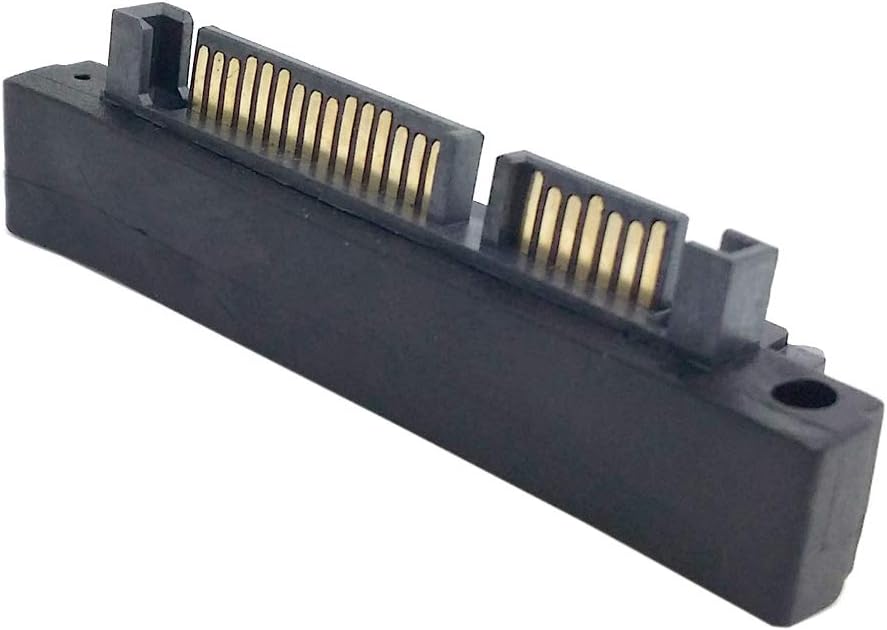
For users seeking an affordable way to manage cables, the chenyang adapter offers a straightforward solution. It maintains transmission speed while changing connection direction for various hard disk drives.
We may earn a commission when you buy through this link, at no additional cost to you.
This connector transfers both power and data signals which simplifies wiring in some setups. The angled design allows you to connect to a female port even when space around it is very limited.
While it performs well for standard use cases, the build material is basic compared to premium options. However for most home builds, this does not impact performance or reliability during daily operation.
We recommend this adapter for budget conscious builders who need a reliable gender changer. It helps maintain a tidy internal layout without requiring expensive specialty cables or tools.
Unlike some data only adapters, this unit handles both power and data lines reducing the number of components needed for connections.
It accommodates both 2.5 inch SSDs and 3.5 inch HDDs making it a versatile choice for mixed storage configurations.
We may earn a commission when you buy through this link, at no additional cost to you.
This right angle adapter is built with high quality materials that ensure long lasting durability. Users appreciate the gold plated contacts which provide reliable signal transmission over time.
We may earn a commission when you buy through this link, at no additional cost to you.
The design focuses on reducing cable strain and improving airflow management within the PC case. This is crucial for maintaining optimal operating temperatures for your storage devices and other hardware components.
While it comes at a slightly higher price, the robust construction justifies the cost for serious builders. It ensures that your connections remain stable even under constant use or vibration.
We highly recommend this adapter for those prioritizing build quality and reliability. It is an excellent choice for ensuring your data storage setup remains efficient and secure for years to come.
Gold plated contacts reduce oxidation and ensure a strong electrical connection for consistent data transfer rates.
Being RoHS compliant means the materials used are safe for the environment and meet high regulatory standards.
We may earn a commission when you buy through this link, at no additional cost to you.
This unique adapter allows you to connect two SATA drives to a single port using a splitter design. It is particularly useful when you have limited ports on your motherboard or power supply unit.
We may earn a commission when you buy through this link, at no additional cost to you.
By routing cables horizontally, it solves space constraints often found in low profile cases. This helps maintain better airflow and keeps cables away from moving parts like fans.
While convenient, users should ensure their power supply can handle the load on a single port. It is best used for standard drives rather than high demand enterprise storage.
We suggest this adapter for builders needing to expand storage without adding more power connectors. It offers a practical balance of flexibility and convenience for complex storage configurations.
Utilizing a single connection for multiple drives saves valuable ports on your motherboard and power supply.
Fewer cables mean less clutter inside your case which improves overall aesthetics and cooling performance.
We may earn a commission when you buy through this link, at no additional cost to you.
This adapter combines both data and power connections into a single 22 pin interface for full compatibility. The down angled design offers additional flexibility for routing cables around obstructions.
We may earn a commission when you buy through this link, at no additional cost to you.
It supports both 2.5 and 3.5 inch disk drives ensuring it works with a wide range of storage options. The extension function helps reach ports that are difficult to access directly.
While it adds some length to the cable run, this is often necessary in tight builds. The design ensures that your drive receives all necessary signals without needing separate connectors.
We recommend this for users needing a comprehensive connection solution in confined spaces. It simplifies the cabling process by combining power and data into one robust interface.
Having both power and data in one connector reduces the number of plugs needed at the drive end.
The down orientation is ideal for cases where ports face upwards and need to route cables downwards.
We may earn a commission when you buy through this link, at no additional cost to you.
This cablecc adapter serves as a robust extension solution for users needing to reach distant SATA ports. It maintains full 22 pin connectivity to ensure both power and data signals are preserved.
We may earn a commission when you buy through this link, at no additional cost to you.
The right angled design helps navigate around components that might otherwise block a straight cable path. This is particularly useful in cases with limited clearance behind the motherboard tray.
While it uses standard materials, users report reliable performance for daily storage needs. It is a simple and effective way to resolve connection issues without replacing major components.
We suggest this adapter for anyone needing a straightforward extension tool. It provides a stable link between your power supply and drive while keeping the internal layout clean.
Extending the connection point helps avoid bending cables at sharp angles which can cause wear over time.
Standard 22 pin sizing ensures it works with most modern SATA drives and power supply cables available today.
We may earn a commission when you buy through this link, at no additional cost to you.
This adapter set is designed to change the installation direction of SATA data cables on your motherboard. It includes both up and down angled units to give you more options during assembly.
We may earn a commission when you buy through this link, at no additional cost to you.
It solves problems related to limited height chassis where standard cables cannot be inserted vertically. This ensures that you can connect your drives even when space is extremely tight.
Users should note that these adapters handle data signals only. You will need to connect your drive power separately from your power supply unit for the system to function.
We recommend this set for motherboard-focused builds where port orientation is a challenge. The 2 pack allows you to keep spares on hand for future upgrades or replacements.
Having both up and down angles in one package means you are prepared for different motherboard layouts.
Designed specifically for cases with low clearance where standard cable routing is impossible.
We may earn a commission when you buy through this link, at no additional cost to you.
This specific adapter is optimized for situations where a down angled connection is required. It changes the connection direction without altering transmission speed or interface definitions.
We may earn a commission when you buy through this link, at no additional cost to you.
It transfers both 5V and 12V power along with data signals simplifying your internal cabling. The angled port allows connection even when space around the female port is limited.
While it is a simple device, it effectively improves cable management and looks cleaner inside the case. It ensures your wires are tidy and organized without needing complex routing.
We suggest this option for cases with bottom-mounted power supplies or specific port orientations. It provides a reliable connection path that aligns with vertical space constraints.
The down angle helps route cables towards the bottom of the case which often has more open space.
Supporting both power and data means you need fewer adapters to get your drive fully operational.
We may earn a commission when you buy through this link, at no additional cost to you.
This bulk pack offers four adapters with two up and two down angles for maximum flexibility. It is ideal for users who need multiple connectors for a multi-drive setup.
We may earn a commission when you buy through this link, at no additional cost to you.
Made of high quality material, these adapters have good electrical properties and durability. The compact size ensures they do not interfere with other components inside your chassis.
While specific user ratings are not available, the product specifications suggest reliability for standard use. The mix of orientations provides convenience for various connection configurations.
We recommend this set for builders needing multiple connectors or spares. It ensures you have the right angle available for every drive without buying adapters individually.
Having four adapters allows you to connect multiple drives with different cable orientations efficiently.
Strong and durable materials ensure long service life and stable electrical performance over time.
We may earn a commission when you buy through this link, at no additional cost to you.
This adapter is designed to change the direction of SATA cable installation specifically for motherboard ports. The down angled design helps extend the connection point for easier access.
We may earn a commission when you buy through this link, at no additional cost to you.
It supports speeds up to 6Gbps ensuring your SSDs or HDDs perform at their rated potential. This extension function is key for limited height chassis where vertical insertion is impossible.
While it does not provide power, it efficiently manages data transfer for storage devices. This separation allows for cleaner routing of power cables which are often thicker and stiffer.
We suggest this adapter for motherboard layouts requiring downward cable routing. It provides a practical solution for maintaining connectivity without compromising case design.
Extending the port direction makes it easier to plug and unplug drives without removing the motherboard.
Full support for SATA III speeds ensures no bottlenecks occur during data transfer operations.
We may earn a commission when you buy through this link, at no additional cost to you.
Selecting the right adapter requires understanding your case layout and drive requirements. Here are key factors to consider before making your purchase.
Check whether your motherboard ports face up, down, or sideways. This determines if you need an up angled or down angled adapter to route the cable correctly.
Always verify the port facing on your motherboard before buying to ensure the adapter bends in the right direction.
Some adapters transfer data only while others include power pins. Determine if your drive needs a dedicated power cable or if the adapter can route both.
Most small adapters are data only so plan to connect power separately from your PSU.
Ensure the adapter fits 2.5 inch SSDs or 3.5 inch HDDs based on your storage needs. Most standard adapters work with both sizes but check connector length.
Verify the connector dimensions to avoid interference with large cooling fans or drive cages.
SATA data ports use 7 pins while full connectors use 22 pins. Ensure the adapter matches the pin count of your drive and motherboard port.
Mismatched pin counts can lead to poor signal transmission or physical damage to the connector.
Adapters should support at least SATA III speeds to avoid throttling your storage performance. Look for 6Gbps compatibility for modern systems.
Even if your drive is faster, the adapter must not be the bottleneck in your data transfer chain.
Gold plated contacts and durable materials protect against oxidation and wear over time. This is especially important for internal components that see constant use.
Cheaper plastic connectors may crack or loosen under stress leading to connection failures.
Adapters that reduce cable strain help maintain clean internal airflow. A 90 degree turn should allow cables to run straight without sharp bends.
Proper routing prevents interference with cooling fans and reduces clutter inside the case.
Consider buying multi-packs if you need to connect multiple drives. These often offer better value than buying single adapters individually.
Keep spares on hand for future upgrades or if an adapter gets lost during a system move.
First, disconnect power to your computer before installing any internal components. This prevents electrical shorts and ensures safety while working inside the chassis.
Next, align the adapter with your motherboard port and gently push until it clicks into place. Ensure the bend points away from other components to avoid obstruction.
Finally, plug your drive cable into the adapter and secure it firmly. Check that the cables are routed straight without kinking to maintain signal integrity.
No, a quality adapter supports full SATA III speeds and does not reduce data transfer rates. As long as it complies with standard specifications your drive will perform normally without throttling issues.
Most standard SATA drives work with these adapters provided the connector size matches. Verify that your motherboard port and drive connector align correctly to ensure a secure fit.
Most small data adapters do not provide power and require a separate power cable. However, some full-length 22 pin adapters can transfer both data and power signals.
Check the direction your motherboard ports face before buying. If they face up you need a down angled adapter and vice versa to route cables efficiently.
Yes, reliable adapters made with good materials are safe for long term use. Avoid cheap unbranded options that may degrade quickly under heat and vibration.
It is not recommended to stack multiple adapters as this can increase signal loss and physical strain. Use one adapter per connection point for stable performance.
We reviewed ten top adapters including the CERRXIAN and Right Angle models for different needs. Each offers a reliable way to manage cables in space constrained PC builds.
Prioritize build quality and correct orientation when selecting an adapter for your system. A proper match ensures your data connections remain stable over the long term.
Prices and availability can change so verify current details before purchasing. Check product pages for any updates on compatibility or pack contents before ordering.