
Creality Ender 3 V3 SE
3.8Editor score
CR Touch auto leveling sensor
Sprite direct drive extruder
Dual Z-axis linear shafts
This guide compares the top auto bed leveling 3D printers for beginners, evaluating speed, build quality, ease of setup, and features to help you choose the
Starting your 3D printing journey requires the right tools to ensure success from the very first print. An auto bed leveling 3D printer removes the guesswork of manual calibration, making it easier for newcomers to achieve perfect adhesion and consistent results without frustration. These machines simplify the setup process, allowing you to focus on creativity rather than technical adjustments.
We have evaluated ten leading models based on their leveling systems, print speed, build volume, and overall user experience. Each product offers unique strengths, from fast Core XY motion systems to versatile material compatibility and advanced software integration. Our analysis focuses on reliability, ease of use, and features that specifically benefit those new to additive manufacturing.
Every selection in this list highlights key specifications and real-world performance traits to guide your decision. While prices may fluctuate over time, the value proposition of each printer remains consistent with its target audience. Reviewing these options carefully will help you find a machine that aligns with your project goals and budget constraints.
3.8Editor score

4.3Editor score

4.3Editor score
This side-by-side comparison highlights the core specifications and standout features of each model to help you quickly identify which printer matches your specific needs for speed, material support, and ease of use.


The FLASHFORGE Adventurer 5M stands out as a top choice for beginners seeking speed and simplicity without sacrificing reliability. Its fully auto leveling system ensures that every print starts with a perfect first layer, reducing the frustration often associated with manual calibration. With a maximum speed of 600mm/s, it delivers rapid project turnaround times while maintaining consistent quality across various materials.
We may earn a commission when you buy through this link, at no additional cost to you.
This printer features an upgraded direct extruder that allows for quick detachment and nozzle changes, making maintenance straightforward even for novices. The dual-sided PEI coating plate provides excellent adhesion for common filaments like PLA and PETG, while also supporting more advanced materials with the appropriate nozzle size. Vibration compensation technology minimizes ghosting, ensuring clean and precise details even during high-speed prints.
While the open frame design limits the use of certain temperature-sensitive materials without enclosure, it promotes better airflow and reduces the risk of overheating for standard filaments. Users should be prepared for some noise during operation at maximum speeds, though lower speed modes offer quieter alternatives. The power loss recovery feature adds a layer of security, allowing prints to resume after unexpected interruptions.
This model is ideal for hobbyists and educators who need a reliable machine that can grow with their skills. The combination of high performance, user-friendly features, and robust build quality makes it a strong contender for anyone starting in 3D printing. Its ability to handle both basic and slightly more advanced projects ensures long-term value and versatility.
The 600mm/s speed capability combined with one-click leveling means you spend less time setup and more time printing meaningful projects quickly.
Quick detachable components and a robust nozzle system allow for effortless cleaning and replacement, keeping your printer running smoothly with minimal downtime.
We may earn a commission when you buy through this link, at no additional cost to you.
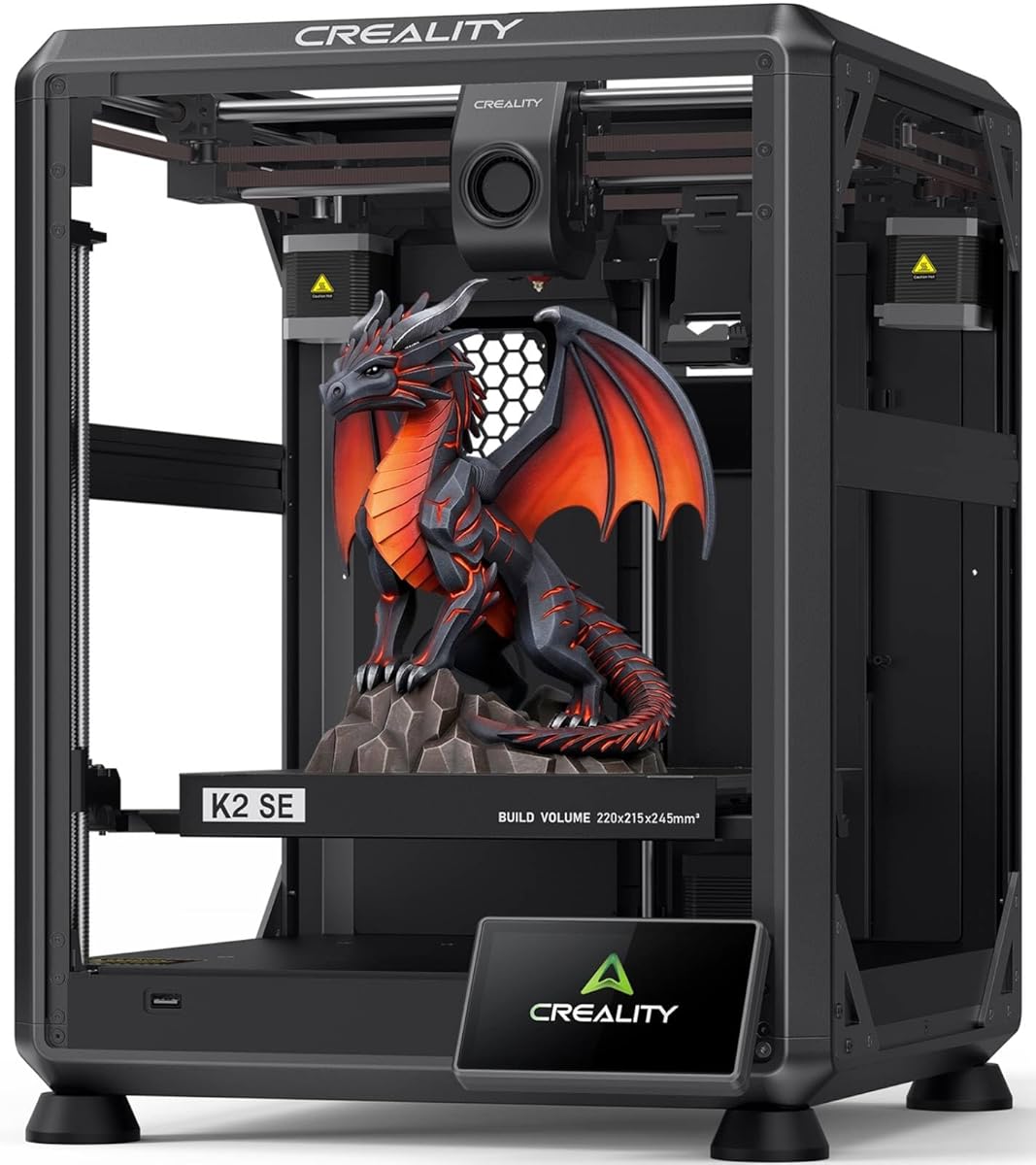
The Creality K2 SE offers a compelling blend of speed and structural integrity, making it a strong candidate for beginners who plan to expand their capabilities later. Its Core XY motion system supports up to 500mm/s printing speeds, aided by built-in vibration sensors that reduce ringing for cleaner prints. The solid metal build ensures stability during rapid movements, which is crucial for maintaining accuracy over larger models.
We may earn a commission when you buy through this link, at no additional cost to you.
A key feature of this printer is its compatibility with the Creality CFS system for multi-color printing, though the system must be purchased separately. The direct drive extruder supports precise filament control and includes a quick-swap nozzle for minimal downtime during maintenance. Automatic leveling simplifies the setup process, while the large build volume accommodates a wider range of project sizes without compromising detail.
While the current rating suggests some room for improvement in user satisfaction, the hardware specs indicate potential for high-quality output when tuned correctly. Beginners might find the setup straightforward but should be prepared to explore firmware updates and profiles to maximize performance. The option to grow into a multi-material solution adds significant long-term value for users with evolving needs.
This printer suits those who want a stable foundation for 3D printing with room to upgrade. Its focus on speed and material versatility makes it suitable for functional parts and prototypes. With careful use and adjustments, it can deliver professional results that meet the demands of both hobbyist and semi-professional applications.
The K2 SE is designed to evolve with your skills, offering a clear path to multi-color printing through compatible accessory systems.
A die-cast aluminum frame and dual crossbeams provide the rigidity needed for high-speed printing without sacrificing dimensional accuracy.
We may earn a commission when you buy through this link, at no additional cost to you.
While not a printer itself, the E-Leveler 2 is a valuable accessory for users with manual leveling systems who want to improve their first layer accuracy. It provides visual feedback through an LED light while you adjust the print bed, ensuring a perfectly level surface before starting a job. This tool is especially helpful for beginners who may struggle with paper-based methods or feel uncertain about their adjustments.
We may earn a commission when you buy through this link, at no additional cost to you.
The device features a redesigned build that includes a stronger battery holder and clearer LED indicators to simplify the process. It works with most 3D printers that have manually adjustable beds, though it is not compatible with resin or Delta printers. The balancing end caps act as legs, stabilizing the tool during use and reducing the chance of user error during calibration.
For those who prefer to fine-tune their printers manually, this tool offers a reliable way to achieve consistent results without expensive hardware upgrades. It complements any printer that lacks built-in auto leveling and can save time in the long run by reducing failed prints due to poor adhesion. Its portability and simplicity make it a great addition to any maker's toolkit.
This accessory is best for users who own printers without auto leveling or who want to double-check their machine's calibration. It enhances the manual process by providing objective visual cues, ensuring peace of mind before printing starts. While it doesn't replace automatic systems, it is a cost-effective solution for maintaining print quality.
The LED light indicator removes guesswork from bed leveling, giving you clear confirmation when your bed is perfectly set for printing.
Designed to fit most manual beds, this tool ensures you can optimize older or budget printers without needing to upgrade the machine itself.
We may earn a commission when you buy through this link, at no additional cost to you.
The FLASHFORGE AD5M is designed to deliver a stress-free creative journey by combining advanced technology with user-friendly features. Its fully automatic one-click leveling system measures the nozzle-to-build plate distance to set accurate offsets, ensuring a flawless first layer every time without manual intervention. The all-metal Core XY structure supports high-speed printing while maintaining stability and low noise performance.
We may earn a commission when you buy through this link, at no additional cost to you.
With a patent quick-release nozzle, you can switch between different diameters in as little as three seconds, simplifying maintenance and expanding print capabilities. The flexible double-sided PEI steel plate allows for easy removal of printed models and supports various materials including PETG on the reverse side. Power loss recovery ensures that unexpected interruptions do not ruin long print jobs, saving time and material.
Remote monitoring via the Flash Maker APP gives you control over your prints from anywhere, allowing you to track status and adjust parameters without physical access. However, the open frame design may not be suitable for materials that require enclosed heating environments. Beginners will appreciate the simplicity of setup and the assurance of reliable performance across a range of projects.
This printer is ideal for users who want speed and convenience without compromising on print quality. Its balance of hardware performance and software integration makes it accessible for newcomers while offering enough power for more experienced makers. With robust features that prioritize user experience, it stands out as a solid investment for consistent and efficient 3D printing.
One-click calibration removes the complexity of manual setup, ensuring every print starts on a perfectly leveled bed regardless of experience level.
Tool-free nozzle swaps enable rapid changes between precision and efficiency modes, keeping your workflow smooth and interruptions to a minimum.
We may earn a commission when you buy through this link, at no additional cost to you.
The QIDI Q2 redefines the entry-level experience by offering professional features that bridge the gap between hobbyist and expert needs. Its nozzle acts as a leveling sensor, delivering unmatched first-layer accuracy without needing separate hardware or complex calibration steps. A 2nd-generation PTC heated chamber reaches 65C to minimize warping, making it easier to print with materials like ABS and nylon without failures.
We may earn a commission when you buy through this link, at no additional cost to you.
With a 370C high-temp nozzle and support for up to 16-color multi-material printing via the QIDI BOX, this machine unlocks advanced possibilities for functional prototypes and vibrant models. Safety is prioritized with a triple filtration system that reduces odors and particles, ensuring safe indoor use. Auto leveling, filament detection, and power-loss recovery work together to provide a reliable and hassle-free experience from unboxing onward.
While the initial cost may be higher than budget options, the reliability and material versatility justify the investment for serious makers. Beginners will appreciate the plug-and-play nature of the leveling system and the responsive customer support that comes with the product. The enclosed design also means fewer environmental constraints, allowing for consistent results regardless of room conditions.
This printer is perfect for those who want to grow into engineering-grade printing without changing machines later. Its combination of speed, precision, and material support makes it a powerful tool for both creative and technical projects. With features typically found in more expensive models, the Q2 offers exceptional value for users focused on quality and long-term usability.
The high-temperature capabilities and heated chamber enable printing of advanced composites and engineering materials often inaccessible to standard beginner printers.
A triple filtration system with HEPA and activated carbon filters ensures a cleaner printing environment suitable for homes and classrooms.
We may earn a commission when you buy through this link, at no additional cost to you.
The FLASHFORGE 5M Pro is a versatile tool designed for both productivity and comfort, making it suitable for home and classroom environments. Its fully enclosed design keeps the printing process contained while enabling high-speed performance up to 600mm/s without compromising stability. A dedicated low-speed silent mode ensures that printing does not disturb work or study, operating under 50 dB in quiet conditions.
We may earn a commission when you buy through this link, at no additional cost to you.
Health and safety are addressed through a dual filtration system that includes HEPA13 and activated carbon filters to block particles and VOCs. The automatic leveling system uses distance measurements to calculate offsets, eliminating manual Z-axis calibration for flawless first layers every time. Quick detachable nozzles support a variety of materials, from flexible TPU to high-performance carbon fiber composites.
Remote monitoring and multi-printer network management allow for efficient control over multiple devices via the Flash Maker APP. While the price point is higher than entry-level models, the combination of enclosure, filtration, and speed provides a complete package for serious users. Beginners will find the setup intuitive and the features designed to reduce ongoing maintenance and troubleshooting.
This printer is best for those who need a quiet, clean, and reliable machine for regular use. Its focus on air quality and noise reduction makes it ideal for shared spaces. With powerful performance and user-centric features, it delivers consistent results that meet both hobbyist and educational needs.
A low-speed silent mode allows you to print during evening hours or work sessions without disruptive noise, enhancing user comfort.
Advanced filtration ensures that harmful particles are captured during printing, creating a safer space for indoor environments and classrooms.
We may earn a commission when you buy through this link, at no additional cost to you.
The Creality Ender 3 V3 SE delivers essential auto leveling capabilities at an accessible price point, making it a great entry option for beginners. Its CR Touch sensor handles bed leveling and strain sensor manages Z-offset automatically, reducing manual work during setup. The upgraded Sprite direct extruder provides smooth filament feeding, while dual Z-axis lead screws reduce wobbling for consistent layer alignment.
We may earn a commission when you buy through this link, at no additional cost to you.
Print speeds of up to 250mm/s save significant time compared to older models, cutting project times by over 70 percent. The printer comes mostly preassembled, allowing users to go from unboxing to first print in about twenty minutes. Automatic filament loading and unloading further simplify the process, making it easier to change materials without manual effort.
While the rating reflects some variability in user experiences, the core features provide a solid foundation for learning and experimentation. The dual Z-axis and linear shafts ensure stability over long print jobs, improving accuracy for basic parts. Beginners will appreciate the official support service that offers timely responses to questions or issues.
This model is ideal for those entering the world of 3D printing who want reliable auto leveling without spending a fortune. Its balance of affordability and performance makes it a strong recommendation for students and hobbyists. With a straightforward setup and dependable features, it helps new users focus on creativity rather than technical hurdles.
The V3 SE offers auto leveling and modern features at a budget-friendly price, lowering the barrier to entry for new makers.
Preassembly and auto calibration let you start printing within minutes of unboxing, minimizing setup frustration and getting to creation faster.
We may earn a commission when you buy through this link, at no additional cost to you.
The Creality CR Touch Kit is a practical upgrade for owners of older Ender 3 series printers who want to add automatic leveling without replacing the whole machine. It uses multi-point detection to build a virtual plane and automatically compensates for tilt angles, ensuring consistent first layers even if the bed is uneven. The sensor is durable enough to be reused over 100,000 times, making it a reliable long-term investment.
We may earn a commission when you buy through this link, at no additional cost to you.
Installation requires flashing new firmware to compatible motherboards, which can be done via SD card following straightforward steps. The package includes mounting brackets and nozzles, simplifying the physical installation process. It works with various bed types including PEI, glass, and metal, providing flexibility across different setups.
For users on a tight budget, this kit is a cost-effective way to modernize an older printer with essential convenience features. While it demands some technical steps like firmware updates, the stability and compensation it offers reduce failed prints significantly. Beginners should ensure their printer model and motherboard version are compatible before purchasing to avoid compatibility issues.
This solution is perfect for those who want to extend the life of their existing printer while improving usability. Its high reliability rating and smart compensation make it a trusted choice among the community. With proper installation, it transforms a manual setup into an automated experience, enhancing confidence in print outcomes.
Multi-point detection builds a virtual plane that adjusts nozzle height automatically, ensuring consistent results across uneven bed surfaces.
Updating the firmware is necessary for the sensor to function correctly, requiring careful attention to board version compatibility.
We may earn a commission when you buy through this link, at no additional cost to you.
The FLASHFORGE AD5X brings multi-color capabilities to beginners with a fully auto leveling system and high-speed printing potential. It supports up to four colors simultaneously through its Intelligent Filament System, allowing for vibrant and intricate designs without manual swaps. The all-metal Core XY structure ensures stability during rapid movements, resulting in smoother and more accurate prints even at full speed.
We may earn a commission when you buy through this link, at no additional cost to you.
With a maximum speed of 600mm/s and acceleration of 20,000mm/s, this printer delivers rapid project turnaround while maintaining precision. The auto leveling feature simplifies setup, ensuring a perfect first layer every time without manual calibration. A large printing size provides flexibility for various project types, from functional prototypes to artistic pieces.
While the multi-color system adds complexity, it opens up creative possibilities that single-color printers cannot match. Beginners interested in design and prototyping will appreciate the ability to produce visually stunning models with minimal interruption. The system handles filament detection and refills automatically, keeping the focus on creation rather than maintenance.
This printer is ideal for those who want to explore multi-color designs without waiting for advanced systems. Its combination of speed, auto leveling, and creative potential makes it a powerful tool for artists and designers. With robust construction and smart features, it delivers reliable performance for both personal and professional projects.
Four-color simultaneous printing allows for complex designs and vibrant models without manual intervention or extended downtime.
The Intelligent Filament System ensures continuous operation by automatically managing supply and refills, keeping projects on track.
We may earn a commission when you buy through this link, at no additional cost to you.
The Ender 3 V3 SE Basic is designed specifically for beginners seeking a straightforward path into 3D printing with auto leveling included. CR Touch auto leveling and automatic Z-offset calibration help achieve a reliable first layer with minimal manual adjustments. The upgraded Sprite Direct Drive Extruder supports consistent filament feeding for common materials like PLA and PETG.
We may earn a commission when you buy through this link, at no additional cost to you.
Dual synchronized Z-axis lead screws and precision Y-axis linear shafts work together to reduce vibration and improve accuracy over long print jobs. The 32-bit silent mainboard ensures a quiet operating experience, making it suitable for home environments. A flexible PC spring steel build plate allows printed models to be removed quickly with minimal effort, simplifying the post-processing workflow.
With a build volume of 8.66×8.66×9.84 inches, it accommodates a wide range of typical projects without taking up excessive space. Assembly is quick and easy, allowing users to start printing in minutes. While it lacks advanced enclosure or color features, it covers the essentials needed to learn the fundamentals effectively and reliably.
This model is perfect for those prioritizing ease of use and affordability. Its focus on auto leveling and stable motion helps beginners avoid common pitfalls associated with early prints. For anyone starting out, it provides a dependable platform to build skills and confidence in additive manufacturing.
Auto leveling and simple assembly steps reduce the technical burden for new users, allowing them to focus on learning rather than troubleshooting.
A silent mainboard and dual-axis stabilization provide a peaceful printing experience without compromising on print accuracy or consistency.
We may earn a commission when you buy through this link, at no additional cost to you.
Selecting the right printer involves considering features that impact ease of use, print quality, and long-term reliability for those new to the technology.
Auto leveling can be achieved through touch sensors, BLTouch-style probes, or strain sensors. Touch sensors are common and reliable, while strain sensors often integrate directly into the extruder for compact designs. Beginners should look for systems that offer one-click leveling to minimize manual calibration steps.
Ensure the printer offers one-click leveling to minimize manual calibration steps. Automatic systems reduce failed prints due to poor first layers.
Higher speeds can reduce print times significantly but may require tuning to maintain quality. Acceleration affects how quickly the printer reaches top speed and how responsive it is to directional changes. Beginners might benefit from printers that balance speed with ease of tuning.
Balance speed with stability to ensure quality output without needing advanced calibration skills.
The build volume determines the maximum size of objects you can print in one piece. Larger volumes allow for more ambitious projects but can increase cost and footprint. Beginners should consider their typical project sizes to avoid overspending on unnecessary capacity.
Choose a build volume that fits your typical project needs without exceeding your workspace limits.
Direct drive extruders are generally better for flexible filaments like TPU due to shorter filament path and better control. Bowden setups may be lighter and faster but struggle with flexible materials. Ensure the extruder supports the range of materials you plan to use.
Direct drive setups offer better control for flexible filaments, improving versatility for different project types.
Printers vary widely in operating noise, with some featuring silent mainboards to reduce disruption. Enclosed chambers help contain odors and temperature fluctuations, which is important for materials like ABS. Beginners using printers in living spaces should prioritize quiet operation and enclosed designs.
Select quieter models with enclosure options to ensure a comfortable environment during operation.
Many modern printers support cloud connectivity, remote monitoring, and advanced slicing features. Compatibility with user-friendly software reduces friction in the workflow. Beginners should look for systems with pre-configured profiles and active community support.
Opt for printers with integrated software support to simplify slicing and remote management tasks.
Reliable customer support and warranty coverage are critical when facing technical issues. Brands with active communities and documentation make troubleshooting easier for newcomers. Check for included support periods and availability of spare parts.
Ensure strong manufacturer support and warranty coverage to minimize downtime and maintain printer longevity.
Begin each print session by verifying the auto leveling routine has completed successfully. Check the nozzle temperature and bed settings to match the filament type you are using. This ensures optimal adhesion and prevents common issues like warping or failed first layers.
Maintain your printer by cleaning the build plate regularly with isopropyl alcohol to remove oils and debris. Keep the extruder nozzle clean and replace it if you notice signs of wear or clogging. Lubricate linear rails and screws according to the manufacturer's guidelines to ensure smooth motion.
Store filaments in a dry environment to prevent moisture absorption, which can lead to poor print quality. If your printer supports it, use drying boxes for sensitive materials. Regularly back up your printer settings and firmware updates to stay current with improvements and bug fixes.
Auto leveling is a feature that automatically measures and adjusts the distance between the nozzle and the build plate. It ensures a consistent first layer across the entire print surface without manual calibration. This reduces failed prints and simplifies setup for users of all skill levels.
While not strictly necessary, auto leveling significantly reduces setup time and frustration for beginners. It ensures consistent bed calibration which is critical for first layer success. If you want a smoother start to your printing journey, choosing a model with this feature is highly recommended.
If your printer lacks built-in sensors, you must manually level the bed each time. You can add aftermarket kits like CR Touch if your model supports them. Check your printer manual or community forums to determine upgrade compatibility and required firmware steps.
Auto leveling compensates for surface unevenness but does not replace initial bed leveling. You still need to ensure the bed is mechanically level before the first auto-level routine. Think of auto leveling as fine-tuning rather than a complete replacement for mechanical adjustments.
Sensors can fail due to wear or misalignment, requiring recalibration or replacement. Regular maintenance helps prevent issues. Always test a sample print to verify performance after installing or replacing a leveling sensor.
Yes, the time saved and increased success rate make auto leveling a valuable feature. It reduces frustration and material waste, which adds up over time. The convenience and consistency it offers justify the investment for most users.
We reviewed ten top models offering auto leveling features tailored for beginners. The FLASHFORGE Adventurer 5M leads with speed and simplicity, while the Ender 3 V3 SE offers affordability with reliable performance. QIDI Q2 stands out for those needing professional-grade material support.
Prioritize features that match your project goals and workspace needs. Consider noise levels, build volume, and support options before making a decision. Selecting a printer with strong community support and reliable parts availability ensures a smoother experience.
Prices and availability can change quickly, so verify current offers before purchasing. We encourage checking user reviews and latest updates to confirm the model fits your specific requirements. With the right choice, your journey into 3D printing can be both productive and enjoyable.