
TECKNET Mouse Jiggler
4.6Editor score
Three smart movement modes
Color LED indicator light
Plug and play setup
This guide compares the top laptop jiggler devices for keeping your computer awake without software. Find the best undetectable mouse mover for remote work and
Keeping your computer active during long tasks is essential for remote workers and gamers. A laptop jiggler simulates mouse movement to prevent sleep mode or away status. These devices ensure your screen stays on without requiring software installation.
We evaluated ten top-rated mouse movers based on detectability, noise levels, and ease of use. Our selection includes hardware-based solutions that work across Windows, Mac, and Linux systems. Each product was chosen for its reliability in maintaining active status during meetings.
Each pick highlights key features like plug-and-play functionality and silent operation. You will find options ranging from simple USB sticks to mechanical platforms. Prices fluctuate often, so check current listings before purchasing to ensure the best value.
4.6Editor score

4.7Editor score

4.5Editor score
This side-by-side comparison highlights the core specifications of each selected device. We focus on connectivity type, power source, and movement style to help you decide quickly.



This device stands out for its patented design and effectiveness. With a 4.7 rating, users appreciate the ambient glow ring that adds style to desks. It simulates natural mouse movement without any software installation needed.
We may earn a commission when you buy through this link, at no additional cost to you.
The 3D hologram disc allows any mouse size to work seamlessly. You can choose from three motion levels to suit your environment. The built-in timer lets you set auto shut-off for added convenience during long sessions.
While it costs more than basic USB sticks, the build quality justifies the price. It requires placing your mouse on the disc which might feel bulky for some. However, the undetectable nature ensures it remains safe for office use.
This is the top pick for professionals needing reliability and style. It works perfectly for remote work and gaming sessions where activity status matters. Buy it if you value a premium feel and solid customer support.
The glow ring and hologram disc make this unit unique. They serve both functional and aesthetic purposes on your desk setup.
It mimics natural movement perfectly. IT departments will not flag it as suspicious hardware.
We may earn a commission when you buy through this link, at no additional cost to you.
Meatanty offers a robust solution for keeping computers active. Its physical turntable design ensures your cursor moves naturally. Users report it is completely undetectable by IT scans.
We may earn a commission when you buy through this link, at no additional cost to you.
The device features an LED display to visualize your settings. You can adjust the movement interval from five to sixty seconds. This flexibility helps avoid detection patterns while maintaining activity status.
Its size is the main trade-off for desk space. However, it eliminates the need to calibrate your mouse position. The silent motor ensures it does not disturb meetings or focus.
Choose this if you have a large gaming mouse or need precise control. It is a premium tool for power users who value customization. Ensure you have enough room on your desk before buying.
The adjustable timer gives you exact control over movement frequency.
The large turntable fits almost any mouse model perfectly.
We may earn a commission when you buy through this link, at no additional cost to you.
This unit delivers excellent value for its low price. It is recognized as a standard USB mouse device ensuring safety. The three modes allow you to switch between slight and random movements.
We may earn a commission when you buy through this link, at no additional cost to you.
A color LED light indicates which mode is active. This helps you track status without looking directly at the device. It works on Windows, Mac, and Linux without extra drivers.
Build quality is standard plastic which feels less premium. However, for the price it performs reliably. It is perfect for students or casual users who need a simple solution.
Buy this if you want to try a jiggler without big spending. It covers all basic needs effectively. Keep it handy for work meetings or gaming sessions.
Three modes cover all needs from subtle to random movement.
The LED provides visual feedback without drawing attention.
We may earn a commission when you buy through this link, at no additional cost to you.
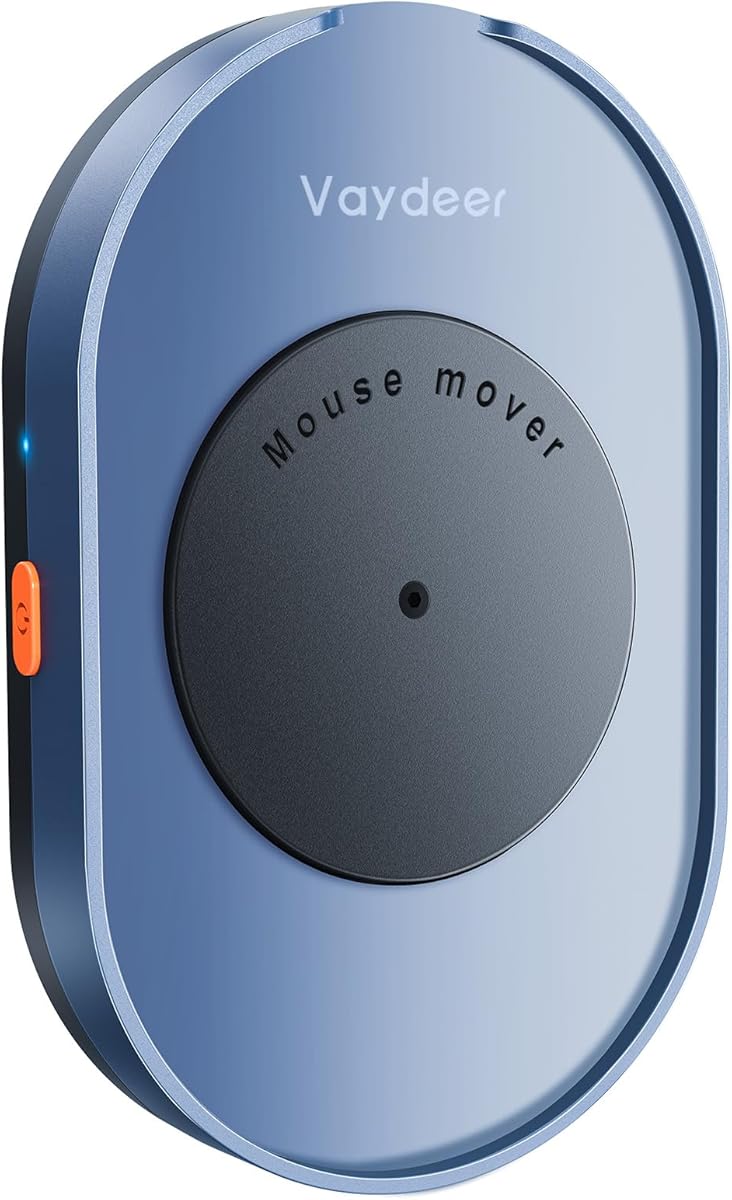
Vaydeer focuses on security with ISO certification. The motor stays under forty five decibels for quiet operation. You can power it via USB or an external adapter for flexibility.
We may earn a commission when you buy through this link, at no additional cost to you.
The switch button eliminates plugging and unplugging constantly. It simulates physical movement without hardware detection. This makes it ideal for strict office environments where trust is key.
The need for a power cable might clutter desks. However, the reliability and safety features outweigh this downside. It is a solid choice for corporate users.
Get this if you need verified security compliance. It ensures your device passes audits without issues. Great for professionals working in regulated industries.
The device meets strict security standards for enterprise use.
Noise levels are kept extremely low for quiet offices.
We may earn a commission when you buy through this link, at no additional cost to you.
This pack gives you two devices for the price of one. It looks and acts like a standard wireless mouse receiver. You get a cheap solution for multiple laptops or computers.
We may earn a commission when you buy through this link, at no additional cost to you.
It works on Windows, Mac, and Linux systems easily. The slight shaking is invisible to your eyes during work. It keeps your status active during meetings or downloads.
Build quality is basic plastic which may feel fragile. But for the cost this is acceptable. It is best for temporary or backup use.
Purchase this for households with multiple devices. It covers both desktops at home efficiently. Ideal for budget-conscious users needing backups.
Two units mean you can keep one at work and home.
It runs natively on Linux without drivers.
We may earn a commission when you buy through this link, at no additional cost to you.
This unit is designed for modern USB-C laptops. It plugs directly without needing dongles for new machines. The switch allows you to toggle between slight and random movement modes.
We may earn a commission when you buy through this link, at no additional cost to you.
Recognized as a USB composite device it ensures safety. It fits well with MacBooks and newer PCs. This is the most compatible option for current hardware.
It lacks USB-A support so adapters may be needed. But for Type-C it is perfect. The price is reasonable for the connector type.
Buy this if you own a recent laptop model. It simplifies your setup by matching the port. Ideal for modern workstations.
Connects directly to USB-C ports without adapters.
Perfect for laptops that dropped the older USB ports.
We may earn a commission when you buy through this link, at no additional cost to you.
This jiggler offers a sleek slim profile. It sits easily under your mouse or desk without taking space. The automatic start feature begins movement as soon as you connect it.
We may earn a commission when you buy through this link, at no additional cost to you.
A built-in button lets you pause when needed. The cable length helps route it neatly around equipment. It ensures your system stays awake without software.
The platform is simpler than mechanical turntables. But it works reliably for standard use. The compact design makes it great for travel.
Choose this for portability and minimal space use. It is a lightweight solution for remote workers. Ideal if you move desks often.
Fits neatly under standard mice without bulk.
No need to press a button after connecting.
We may earn a commission when you buy through this link, at no additional cost to you.
This model uses aluminum alloy for durability. It feels sturdy and premium compared to plastic options. The included adapter ensures compatibility with various USB-C devices.
We may earn a commission when you buy through this link, at no additional cost to you.
You can switch between slight and random movement easily. The button controls are responsive and simple to use. It keeps your connection active without detection.
Design is functional rather than decorative. But the metal build offers longevity. This is a solid choice for frequent use.
Buy this if you want a robust build. It survives daily wear and tear well. Great for busy offices or workstations.
Aluminum alloy provides better durability than plastic.
Comes with USB-C adapter for broad compatibility.
We may earn a commission when you buy through this link, at no additional cost to you.
This unit is incredibly small and portable. It fits in a pocket or laptop sleeve easily. Recognition as a regular mouse makes it safe for use everywhere.
We may earn a commission when you buy through this link, at no additional cost to you.
It requires zero configuration to work. Simply plug and it begins movement. This simplicity is perfect for temporary needs or quick fixes.
The lack of physical switches means it runs always connected. Be sure to unplug when not in use. It offers minimal features but does its job.
Take this for travel or hotel stays. It ensures your screen stays awake without bulk. Best for on-the-go professionals.
Fits easily in a bag pocket for travel.
No settings to adjust before using.
We may earn a commission when you buy through this link, at no additional cost to you.
This device simulates finger movement on touchpads. It is completely cordless and uses a battery. This makes it ideal for laptops without extra ports.
We may earn a commission when you buy through this link, at no additional cost to you.
It is silent and runs up to six months on one battery. You do not need to plug anything into your laptop. Just place it on the touchpad and it works.
Price is higher due to cordless tech. Battery replacement is necessary eventually. But it offers unmatched convenience for touchpad users.
Choose this if you use a laptop without mouse ports. It keeps your screen awake without wires. Best for minimalist desk setups.
No USB cables needed for operation.
Runs for months on a single AA battery.
We may earn a commission when you buy through this link, at no additional cost to you.
Selecting the right jiggler depends on your specific workflow and device type. We break down the key factors to consider.
Many employers use software to detect non-standard peripherals. Look for devices that simulate standard mouse input or are hardware-based to avoid flags. This ensures your device remains safe for work environments.
Prioritize models that mimic physical movement rather than software scripts.
Devices can run on USB power or batteries. USB models are convenient for desktops while cordless ones suit laptops. Check if your device has enough ports for your setup.
Choose USB for constant power and batteries for portability.
Ensure the jiggler works with your operating system. Most support Windows and Mac but some may not support Linux. Check connector types like USB-A or USB-C for your laptop.
Match the connector to your computer's available ports for ease.
Movement types vary from slight shakes to random patterns. Slight movements are better for meetings where visibility matters. Random patterns can prevent detection more effectively in some cases.
Select a mode that suits your need for stealth versus convenience.
Material affects durability and feel. Metal models last longer than plastic ones. A sturdy base prevents accidental slips during long use.
Invest in quality materials if you plan to use it daily.
Look for plug-and-play functionality without drivers. Devices with switches are easier to control than those needing plugs. Simple controls reduce distractions during work.
Choose models with one-button control for simplicity.
Motors should be silent to avoid distracting others. Noise levels over forty five decibels might disturb meetings. Check user reviews for quiet performance feedback.
Silent operation is critical for shared workspaces.
Budget options exist but premium models offer better features. Decide if you need timers or LEDs or just basic function. A higher price often means better build or security.
Balance cost against the features you actually need.
Start by plugging the device into your computer or placing the platform under your mouse. If using a USB stick, simply insert it into an available port. The device will begin moving immediately without setup.
For mechanical models, place your optical mouse on the rotating surface. Ensure the sensor is aligned correctly to prevent the wheel. Adjust settings if your device offers movement frequency controls.
Clean the device occasionally with a soft cloth to remove dust. Avoid liquids near the electrical components. If using batteries, replace them when movement slows to maintain efficiency.
Most modern devices are undetectable by IT because they simulate standard hardware input. Software jigglers are easier to find but physical devices usually pass scans. Check for certification labels if unsure.
Most support Windows, Mac, and Linux. Some require specific USB configurations but plug-and-play ones work universally. Verify compatibility on the product page before purchasing.
Yes most hardware devices are designed for office use. They keep your status active during long meetings or downloads. Just ensure your company policy allows external peripherals.
No driver jigglers do not need drivers. They work as standard USB mouse devices upon connection. This avoids installation issues and potential software conflicts.
Quality models can last years with regular use. Mechanical parts like motors may wear over time. Check warranty terms for expected lifespan details.
Yes it is safe as long as it is from certified. Ensure it does not overheat during long sessions. Many include auto shut-off features for extra safety.
We reviewed ten devices ranging from simple USB sticks to mechanical platforms. The TECH8 USA model stands out for its premium design. The TECKNET unit offers the best value for money.
Prioritize security and noise levels when making your choice. Ensure your selected device matches your laptop's ports for seamless connection. Consider battery life if portability is key for you.
Prices for these products change frequently based on demand. Always verify current listings before finalizing your purchase. Pick the model that fits your workflow best.