
Learning Resources Code & Go Robot Mouse
4.5Editor score
Screen-free coding activity
Ideal for ages 4 and up
Includes maze grids and walls
Teaches sequencing and logic
Discover the top coding toys for kids in October 2026. This guide compares ten best robotic and programming kits for screen-free and app-based learning.
Coding toys have revolutionized how children learn technology by turning abstract programming concepts into tangible, playful experiences. These interactive devices engage young minds with robotics, sensors, and logical challenges that build foundational skills for the future digital workforce without requiring heavy screen time.
We evaluated ten leading coding kits based on educational value, ease of use, build quality, and age appropriateness. Our analysis considers screen-free options for early learners alongside app-connected robots for advanced students ensuring every family finds a suitable tool to spark engineering curiosity and problem-solving confidence.
Each selection below highlights unique strengths from simple sequence buttons to complex Blockly interfaces with clear pros and cons for informed decisions. Remember that availability and pricing fluctuate frequently so check current listings before purchasing to secure the best value for your child specific developmental needs and interests.
4.5Editor score

4.6Editor score

4.6Editor score
This side-by-side comparison highlights key specifications for all ten selected coding toys to help you quickly identify the right fit for your child skill level and learning goals.




The Makeblock mBot stands out as a premier entry-level robotics kit for children aged 8 to 12. Rated highly by users it balances physical construction with software programming to deliver a comprehensive STEM experience suitable for classroom or home environments.
We may earn a commission when you buy through this link, at no additional cost to you.
Its standout quality lies in the transition from Scratch to Arduino allowing kids to grow with the robot without needing a new device. The build quality features metal materials and clear instructions ensuring durability and ease of assembly within 15 minutes for most young builders.
Users might find the initial setup slightly tricky if they expect plug-and-play simplicity but the included tutorials clarify this quickly. The need to buy separate batteries for the remote and robot is a minor inconvenience common to many robotics kits in this price range.
This kit is ideal for families seeking a long-term learning tool that evolves with a child interest in engineering. We recommend it for those ready to explore both hardware assembly and coding logic through a supported and versatile platform.
The mBot supports Scratch for beginners and Arduino for advanced users allowing skills to progress naturally as children gain confidence.
With compatibility for 100+ modules and LEGO parts kids can customize and expand their robot for endless creative projects.
We may earn a commission when you buy through this link, at no additional cost to you.
This robot mouse introduces coding concepts to the youngest learners with a playful and screen-free approach. It has earned high praise for helping 4-year-olds understand sequencing and problem-solving through tactile buttons and colorful coding cards.
We may earn a commission when you buy through this link, at no additional cost to you.
The kit includes substantial accessories like 16 maze grids and 22 walls which allow for varied and repeated play without needing extra purchases. Teachers appreciate its use in classroom STEM centers where small groups can collaborate on routing the mouse through mazes.
While it lacks the advanced programming features of older robots the simplicity is exactly what makes it effective for early education. Parents note that children sometimes struggle with longer sequences but the trial-and-error nature reinforces logical thinking naturally.
We recommend this toy for parents of preschoolers or kindergarteners looking to introduce logic skills before moving to screen-based coding. Its robust construction and clear design make it a reliable foundation for future engineering interests.
Designed specifically for emerging programmers it builds confidence through playful trial-and-error that reinforces core STEM concepts.
Teachers use the repeatable activities with maze grids to facilitate STEM rotations and small-group coding exercises.
We may earn a commission when you buy through this link, at no additional cost to you.
Wonder Workshop Dash offers a polished and interactive coding experience that eliminates assembly time entirely. Rated highly for its engagement and reliability it serves as a premium choice for children 6 and older ready to dive into robotics.
We may earn a commission when you buy through this link, at no additional cost to you.
Dash sings dances and responds to voice commands making it a lively friend that keeps kids entertained while teaching sequencing and loops. The inclusion of five different apps ensures that learning can be tailored to different ages and skill levels over several years.
The reliance on a tablet or phone for coding may limit accessibility in some homes but the app ecosystem is robust and well-supported. Battery life lasts up to five hours of active play which is generous for most daily usage scenarios.
We recommend this robot for families who value durability and advanced features over cost. It is an excellent long-term investment for children who show strong interest in STEM and need a device that grows with their skills.
Dash responds to voice commands and performs dances keeping children motivated through active play and immediate feedback.
Used in 40000 schools worldwide Dash comes with five coding apps to support various teaching styles and classroom needs.
We may earn a commission when you buy through this link, at no additional cost to you.
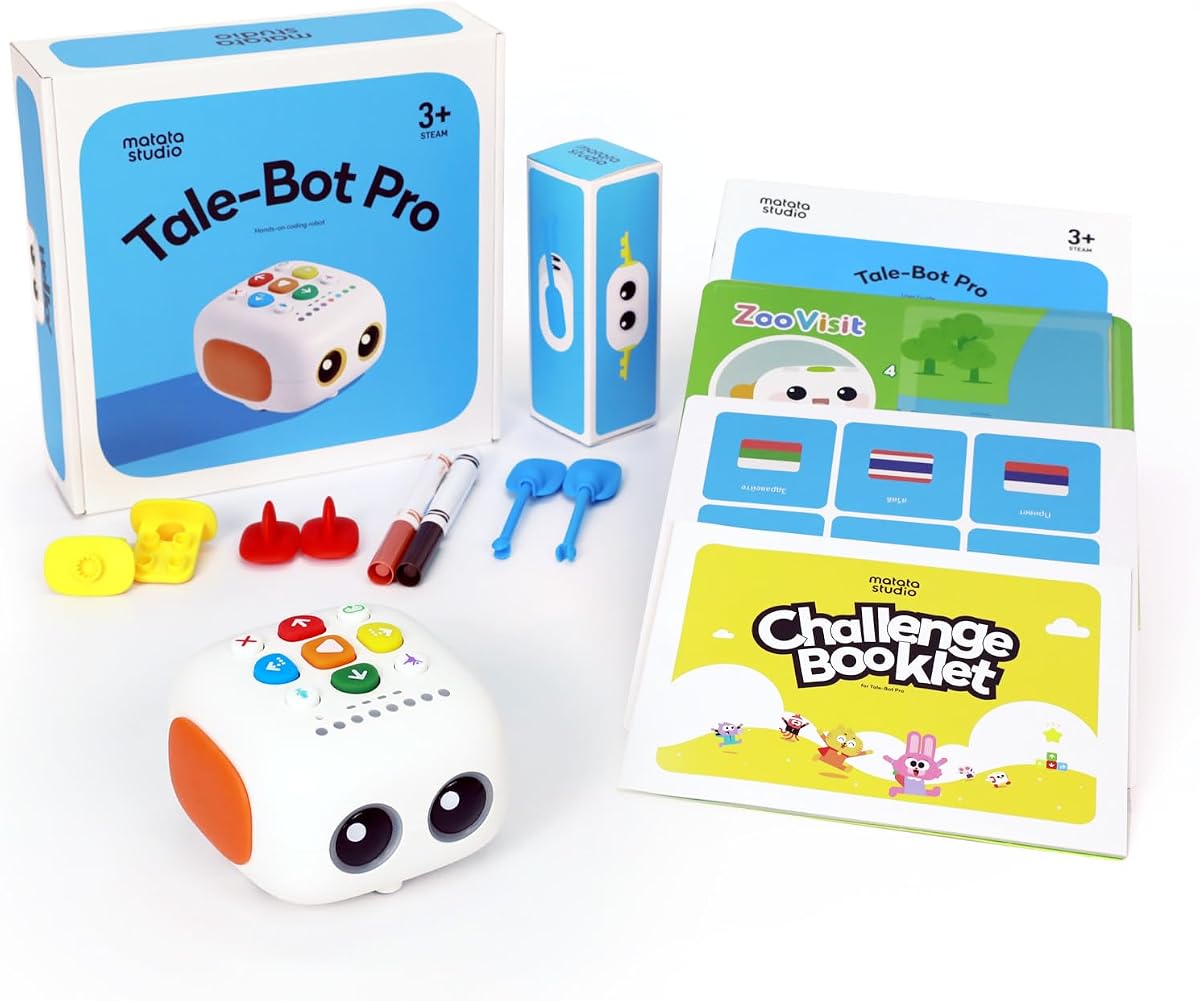
TaleBot Pro introduces coding through storytelling and voice feedback making it uniquely suited for toddlers aged 3 to 5. It earns high ratings for encouraging creativity while teaching basic programming concepts like commands and sequences without a screen.
We may earn a commission when you buy through this link, at no additional cost to you.
The ability to record and play back voices turns the robot into a narrative partner that can interact with interactive maps and challenges. This feature boosts language skills and imagination which are critical developmental areas for preschoolers.
While it focuses heavily on storytelling rather than mechanical assembly the depth of interaction keeps young children engaged for long periods. Some parents note that the maps wear over time so handling with care is recommended to extend usability.
This robot is best for families seeking a gentle introduction to tech that prioritizes language and creativity. Its autism-friendly design and multi-sensory feedback make it a safe and accessible choice for diverse learning needs.
Children record voice commands and tales that the robot brings to life through the interactive map and movement.
Touch-based controls and sensory feedback create a safe and accessible learning environment for children with autism.
We may earn a commission when you buy through this link, at no additional cost to you.
This robotic chameleon kit blends biology and engineering to offer a realistic animal-inspired coding experience. With its color sensors and articulated joints it allows kids to program movements without any digital screens or apps.
We may earn a commission when you buy through this link, at no additional cost to you.
The 48-page manual guides users through assembly and explains how nature inspired the design which deepens the educational value. Kids can change the robot color to match surroundings or program specific sequences using physical action cards.
Building the model takes significant time and requires adult assistance which might be challenging for younger builders. However the detailed engineering and realistic movements provide a tangible connection to robotics that many children find highly rewarding.
We recommend this kit for children aged 8 and older who enjoy hands-on assembly and animal-themed toys. It serves as an excellent introduction to sensors and responsive behavior without the distraction of a screen.
The robot mimics a chameleon color change and movement teaching how nature solves engineering design problems.
Color sensors and action cards help kids understand how robots perceive their environment and respond accordingly.
We may earn a commission when you buy through this link, at no additional cost to you.
Botley 2.0 advances the coding toy category with object detection and multi-step path programming that challenges young minds. It continues to be a favorite for screen-free play while adding new layers of complexity for older preschoolers and early elementary students.
We may earn a commission when you buy through this link, at no additional cost to you.
The remote programmer allows children to see their code in real time which reinforces cause-and-effect understanding. Features like 45-degree turns and secret code combinations keep the play fresh and encouraging continuous exploration of logic concepts.
Setting up the mazes requires planning and creativity which can be frustrating for some children but it ultimately strengthens problem-solving skills. The robot requires batteries which is a standard requirement for many of these toys but should be budgeted for.
This kit is best for families who want a step up from basic button coding. It offers a robust set of accessories and features that support growing skills from simple sequences to complex obstacle course navigation.
Multi-step coding paths and turns introduce complex strategies for planning and logic skills.
Stackable obstacles and creative stories allow children to invent custom adventures every time they play.
We may earn a commission when you buy through this link, at no additional cost to you.
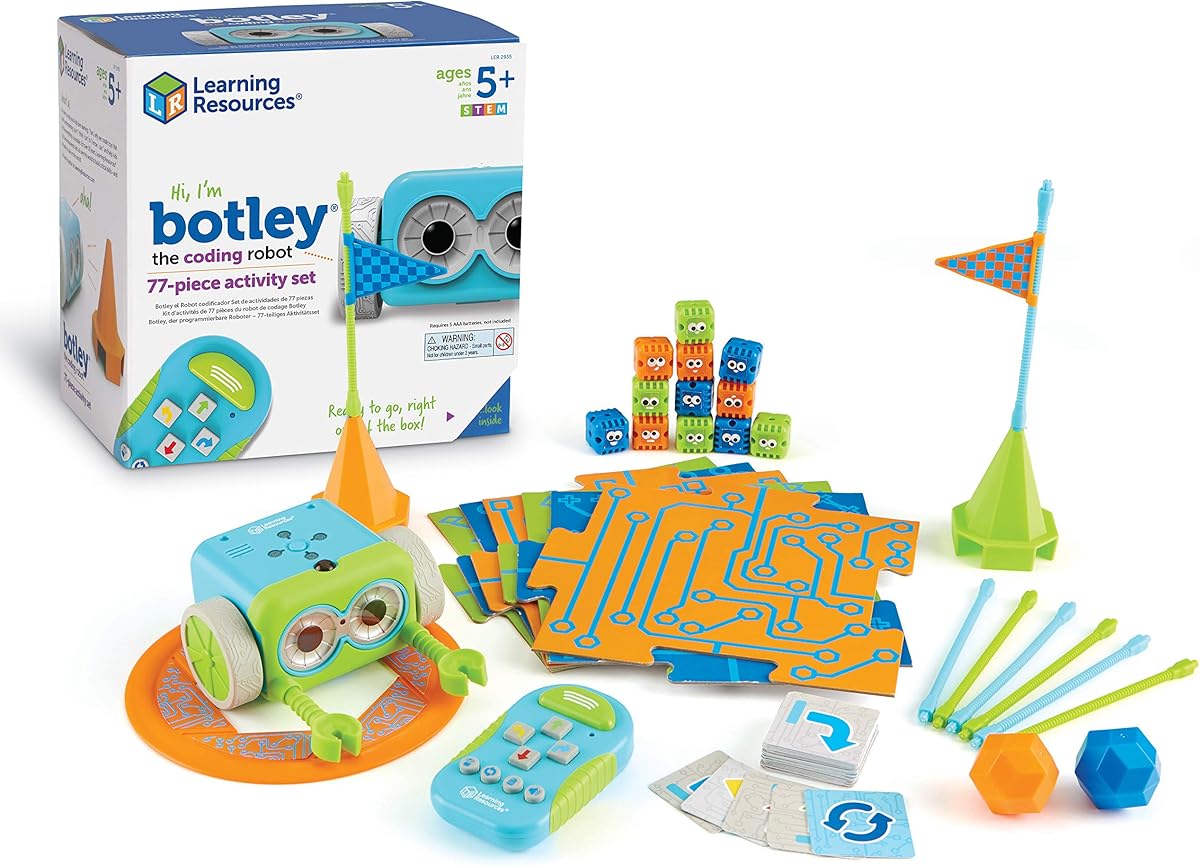
The original Botley remains a trusted and reliable introduction to robotics for children aged 5 and up. It focuses on screen-free play with a remote programmer that teaches sequencing and logic through tangible coding cards and simple buttons.
We may earn a commission when you buy through this link, at no additional cost to you.
Its ability to detect and avoid objects adds a layer of interaction that makes the robot feel responsive and alive to young users. The 77-piece activity set provides ample materials to build obstacle courses and practice coding challenges over weeks of play.
While newer models offer more advanced features the simplicity of this version ensures that children can master basics without confusion. It is a solid foundation for learning loops and sequencing before moving to more complex apps or devices.
We recommend this toy for parents seeking a straightforward coding introduction that does not require screens. It is particularly effective for classroom use or playgroups where durability and ease of setup are high priorities.
Botley helps child learn early STEM skills while playing and having fun without screen time.
Programming mouse navigation strengthens sequencing and logic for emerging programmers.
We may earn a commission when you buy through this link, at no additional cost to you.
Mech-5 offers a deep mechanical engineering experience that requires time and patience to assemble. It is designed for children 10 and older who want to understand how physical parts interact with coding to create movement and actions.
We may earn a commission when you buy through this link, at no additional cost to you.
The robot can throw lift and kick which gives immediate physical feedback on coding efforts. This mission-based approach turns learning into a series of challenges that motivate kids to troubleshoot and refine their programming.
Building the robot takes multiple hours which can be rewarding but also demanding for impatient builders. However the detailed instructions ensure that the final product works reliably and provides a satisfying sense of accomplishment.
This kit is best for children interested in mechanics and construction. It is a perfect bridge between basic coding and serious robotics engineering offering a tactile way to learn about motors and gears.
This is an in-depth STEM building project requiring proper assembly for a true engineering experience.
Kids learn mechanical engineering principles through mission-based coding challenges.
We may earn a commission when you buy through this link, at no additional cost to you.
The Sphero Mini packs powerful sensors into a ball the size of a ping pong ball making it a portable coding option for kids 8 and older. Its gyroscope and accelerometer allow for tilt-based control which is intuitive for beginners.
We may earn a commission when you buy through this link, at no additional cost to you.
Users can drive the robot using joystick mode or tilt their phone which feels natural and fun. The included bowling pins and cones turn any floor space into an obstacle course for practicing coding and driving skills.
While it relies on a smartphone for coding the free app provides drag-and-drop blocks and JavaScript options for growth. Battery life lasts one hour which is short compared to larger robots but adequate for short play sessions.
We recommend this toy for children who want a small and cool robot that feels like a game controller. It is perfect for travel or limited space where larger robots might not fit.
Packs a ton of fun into a tiny programmable robot the size of a ping pong ball.
Powered by Sphero Edu app you can create and customize games using JavaScript or coding blocks.
We may earn a commission when you buy through this link, at no additional cost to you.
Ozobot Evo offers a unique color-based coding method where drawing lines with special markers tells the robot what to do. It bridges the gap between physical drawing and digital coding making it accessible for kids 5 to 11.
We may earn a commission when you buy through this link, at no additional cost to you.
The kit includes markers and a zip case for organization which is practical for classrooms or busy homes. With over 700 free lessons it provides extensive educational resources that teachers and parents can rely on for structured learning.
The robot is durable enough for daily use and the color coding is fast and intuitive once the patterns are learned. It supports Blockly for online learning which adds flexibility for schools wanting digital curriculum alignment.
We recommend this kit for educators or families who value organization and structured lessons. Its dual capability for online and offline play makes it versatile for different learning environments and needs.
Color Code Markers allow screen-free coding while Ozobot Blockly provides online skill development.
Access to over 700 free lessons covering STEAM CS and core subjects.
We may earn a commission when you buy through this link, at no additional cost to you.
Choosing the right coding toy involves considering age, learning style, and technical requirements to ensure a positive educational experience.
Coding toys are designed for specific developmental stages so matching the robot to your child age is critical. Younger children need simple button interfaces and tactile feedback while older kids can handle app-based programming and complex logic.
Select a toy that matches their cognitive level to avoid frustration and keep engagement high throughout the learning process.
Decide whether your family prefers screen-free interaction or digital app support based on your screen time goals. Screen-free options use physical buttons or cards which help build logic without device dependency.
App-based robots offer advanced features and coding languages but require a tablet or smartphone for operation.
Some toys teach basic sequencing with buttons while others support visual blocks or text-based languages like Python. Choose a platform that can grow with your child so they do not need to replace the toy as skills advance.
Look for systems that transition from drag-and-drop to text coding to support long-term educational progress.
Robots are handled frequently by children so durable materials and sturdy construction are essential. Metal and reinforced plastic bodies withstand drops and rough play better than lightweight plastic alternatives.
Prioritize kits with robust parts to ensure the toy lasts through years of classroom or home use.
A complete kit should include obstacles cards or walls to allow for varied play without extra purchases. Check what is in the box to ensure you have enough materials to create challenges and test code.
Kits with extensive accessories provide better value and more opportunities for creative experimentation.
Many coding robots require batteries which can be a hidden cost if not accounted for. Check how many batteries are needed and if they are rechargeable to avoid frequent replacements.
Rechargeable options are more eco-friendly and cost-effective over time for frequent users.
Kits with manuals or online lessons help parents and teachers guide the learning experience effectively. Look for resources that explain concepts clearly so adults do not need to be coding experts.
Strong educational support ensures that the toy is used to its full potential for learning.
Choose a robot that supports add-ons or other parts to allow for creativity and growth. Open-source platforms let kids modify and expand their robots for new projects.
Expandable toys provide long-term value and prevent the kit from becoming obsolete as skills grow.
Start by reading the included guide to understand basic operations and battery requirements before the first use. Many robots need batteries to be installed in the remote before the child can interact with the device.
Practice with simple sequences first such as moving forward and stopping to build confidence before attempting complex obstacle courses. Encourage children to draw the path they want the robot to take before programming it to improve planning skills.
Store coding toys in a cool dry place to prevent damage to motors and sensors. Use the provided cases or bins to keep small parts organized and ready for future play sessions.
For preschoolers we recommend screen-free toys like the Learning Resources Code & Go Robot Mouse. These devices use physical buttons to teach sequencing without requiring reading skills or screen time making them ideal for early learners.
Not all coding robots need a smartphone. Screen-free options like Botley use physical remotes while others like Sphero require a tablet. Choose based on your family screen time preferences and budget.
Many toys like Makeblock mBot assemble in under 15 minutes with clear instructions. Some like Mech-5 require longer build times so check the difficulty level before purchasing if you have limited time.
Coding toys teach sequencing logic problem-solving and basic programming concepts. They also build patience and critical thinking skills through trial-and-error coding and debugging exercises.
Yes many of these kits like Ozobot Evo and Learning Resources sets are designed for classroom use. They include durable parts and lesson plans suitable for group activities and rotations.
Most kits include essential accessories like cards and grids but you may need batteries separately. Check the product details to see if batteries are included to avoid unexpected costs.
Yes coding toys are fun for adults and children alike. They are great for family bonding and adults can help younger kids troubleshoot logic or plan complex routes together.
Keep the robot away from water and store it in a dry place. Use the provided cases for small parts and avoid dropping the device to maintain motor health.
We reviewed ten top-rated coding toys that offer a range of experiences from screen-free mouse adventures to complex robotics kits. Each product brings unique benefits to help children learn logic and engineering in a fun and interactive way.
When selecting a toy consider your child age preferred interaction style and the amount of technical setup you are ready to handle. The best choice is one that matches their current skill level while offering room to grow.
Prices and availability can change frequently so please verify the current listings before making a purchase to secure the best deal for your family. Investing in a quality coding toy today can lay a strong foundation for future technical skills.