
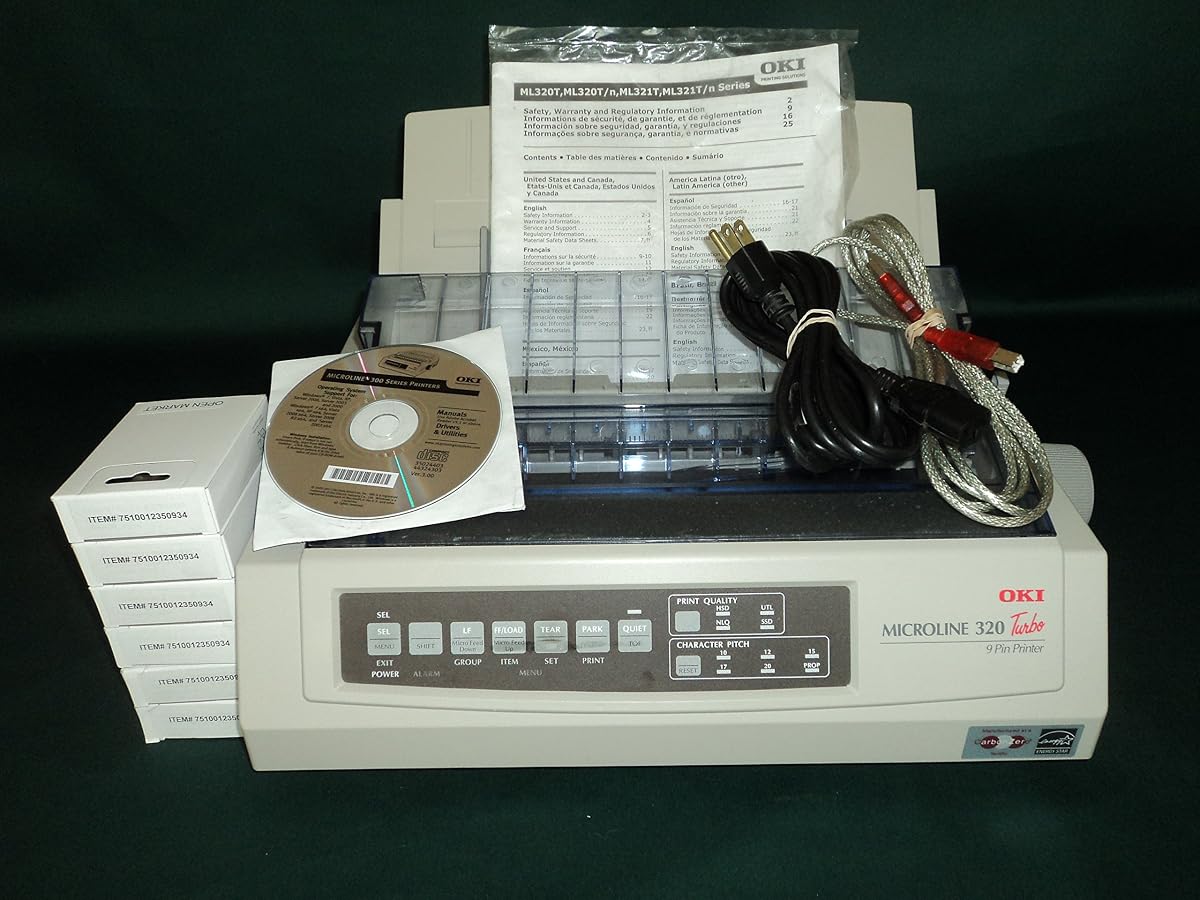
Oki MICROLINE 320 Turbo Dot Matrix Printer
5.0Editor score
435 characters per second draft speed
Serial USB and parallel interfaces
High durability for heavy business use
This guide compares the top 10 dot matrix computer printers for 2026, evaluating speed, durability, connectivity, and value to help you choose the right impact
Dot matrix computer printers remain essential for businesses requiring durable, multi-part printing. These impact devices excel in high-volume environments where reliability and carbon copy capabilities are critical for daily operations.
We evaluated ten top-rated models based on print speed, pin count, connectivity options, and duty cycle. Our analysis highlights performance differences to help you find the ideal printer for your specific workflow needs.
Each selection showcases key strengths and weaknesses to guide your decision. Prices and availability fluctuate frequently, so verify current details before purchasing to ensure you receive the best value for your investment.
5.0Editor score

4.3Editor score

3.7Editor score
This table compares specifications and features across all ten selected models to help you quickly identify the right fit for your printing volume and connectivity requirements.



The Epson LQ-590II stands out as a top performer in the impact printer category. With a solid 4.3 star rating, it balances speed and reliability effectively for demanding office environments.
We may earn a commission when you buy through this link, at no additional cost to you.
Its 24-pin technology delivers crisp text at 584 characters per second. This makes it highly suitable for invoices and multi-part forms. The inclusion of both USB and parallel ports ensures compatibility with legacy systems.
While it operates loudly, this is expected for impact printers. The paper feed mechanism is robust enough to handle continuous forms without jams. Some users note the size requires significant desk space.
For offices needing consistent high-volume carbon copy printing, this model is a strong candidate. It offers the best balance of performance and connectivity in its price range today.
The 584 cps speed ensures quick turnaround for bulk documents and invoices.
Supporting both USB and parallel allows easy integration with older hardware.
We may earn a commission when you buy through this link, at no additional cost to you.
The LQ-590II NT adds Energy Star certification to the standard 590II features. This makes it appealing for green-conscious businesses wanting reduced power consumption without sacrificing performance.
We may earn a commission when you buy through this link, at no additional cost to you.
It maintains the high 584 cps speed and 24-pin clarity. The addition of a serial port broadens compatibility for specific industrial or legacy setups. Reliability remains high in demanding environments.
Users report consistent performance with continuous forms. The energy savings are modest per unit but add up over time in large fleets. The price is higher than non-certified models.
Choose this if energy ratings are a priority alongside print quality. It is an excellent upgrade for offices already using the standard 590II wanting efficiency gains.
Meets Energy Star standards for lower power usage during operation.
Serial port support enables connections to specialized legacy equipment easily.
We may earn a commission when you buy through this link, at no additional cost to you.
The Oki Microline 320 Turbo holds an impressive 4.7 rating. It is known for robust construction and consistent performance in basic printing scenarios. This model suits smaller offices needing simplicity.
We may earn a commission when you buy through this link, at no additional cost to you.
It uses a 9-pin head which produces slightly less dense text than 24-pin units. However, it is faster in draft mode for internal documents. The design prioritizes durability over advanced features.
Maintenance is straightforward with accessible parts. The smaller size saves desk space compared to bulkier models. Some users find the noise level comparable to other impact printers.
Ideal for businesses needing a reliable workhorse for receipts or labels. It may lack modern connectivity options found in newer 24-pin competitors.
Space-saving form factor fits well on crowded office desks.
Built to withstand continuous use without frequent breakdowns.
We may earn a commission when you buy through this link, at no additional cost to you.
This Mono variant offers a 20,000 page monthly duty cycle. It handles steady office loads effectively without overheating. The 64 KB buffer improves handling of complex text streams.
We may earn a commission when you buy through this link, at no additional cost to you.
Print quality is sharp for invoices and reports. The 9-pin head ensures speed in draft modes. Users appreciate the straightforward setup process. Connectivity includes both USB and parallel.
The noise level is noticeable during long runs. While durable, it lacks the speed of premium 24-pin units. Regular maintenance keeps it running smoothly over years of service.
It serves well for departments needing moderate volume without premium costs. Ideal for internal records where speed is secondary to reliability.
Handles 20,000 pages monthly to ensure continuous workflow.
64 KB memory smooths data flow and prevents paper jams.
We may earn a commission when you buy through this link, at no additional cost to you.
The MICROLINE 420 targets high-volume centers with a 24,000 page cycle. It processes 570 characters per second efficiently. The 128 KB memory handles large document buffers easily.
We may earn a commission when you buy through this link, at no additional cost to you.
Energy Star status reduces power costs significantly over time. The paper path supports multi-part forms without jams. This unit is built for industrial strength demands in busy settings.
It is a heavy and expensive unit compared to others. Installation may require more effort due to weight. However, uptime is high and maintenance costs are reasonable for the lifespan.
Choose this for shipping or accounting departments printing thousands daily. It justifies the cost through reduced downtime and energy savings.
Supports heavy 24,000 page monthly loads with ease.
570 cps speed ensures rapid output for internal documents.
We may earn a commission when you buy through this link, at no additional cost to you.
With a perfect 5.0 rating, this model excels in reliability. It combines USB serial and parallel ports for maximum flexibility. The rear tractor system prevents paper jams during heavy use.
We may earn a commission when you buy through this link, at no additional cost to you.
Print quality is crisp for invoices and labels. The 20,000 page duty cycle handles moderate loads well. Users praise the ease of setup and driver compatibility. The design is robust.
It lacks the high speed of 24-pin alternatives. The cost is higher than standard impact printers. However, the connectivity options make it versatile for diverse hardware environments.
Ideal for environments needing diverse connectivity without network adapters. It ensures smooth workflow across older and newer computer systems seamlessly.
Supports Serial USB and Parallel for flexible office setups.
Rear tractor ensures smooth feeding of continuous forms.
We may earn a commission when you buy through this link, at no additional cost to you.
The LQ-2090II offers a solid 550 cps speed with 24-pin clarity. It maintains the Energy Star efficiency of the LQ series. This model targets standard office needs reliably.
We may earn a commission when you buy through this link, at no additional cost to you.
Print quality is consistent for general business documents. The parallel port ensures compatibility with older systems. Users find the paper loading process simple and intuitive.
Some reviews note occasional mechanical issues with paper feed. It is generally quiet compared to older models. Regular cleaning helps maintain print head quality over time.
It suits small businesses needing affordable reliable impact printing. While not the top rated, it delivers consistent daily performance.
Reduces power usage with Energy Star certification features.
550 cps speed balances speed and print quality well.
We may earn a commission when you buy through this link, at no additional cost to you.
This model features Zero-Tear technology to prevent waste. It can produce one original and five carbon copies. The 5 inch per second feed rate ensures smooth operation.
We may earn a commission when you buy through this link, at no additional cost to you.
The SuperSpeed Draft mode prints 435 cps. Multiple emulation modes support different software requirements. Users appreciate the reliability for continuous forms. The auto-park feature simplifies maintenance.
The design is basic but functional. Warranty terms vary by region. The paper handling is robust enough for invoices. It remains a strong contender for budget-conscious buyers.
Great for retail shops needing multi-part receipts. It balances cost and features effectively for everyday business tasks.
Ensures paper feeds cleanly without tearing during removal.
Handles original plus five copies for invoices and forms.
We may earn a commission when you buy through this link, at no additional cost to you.
The Microline 620 earns a 4.8 rating for reliability. It handles high volume tasks with precise sharp prints. The media loading process is simplified for user convenience.
We may earn a commission when you buy through this link, at no additional cost to you.
Users report few mechanical issues over time. The print head maintains clarity even after heavy use. It is built to withstand demanding industrial environments consistently. The build quality is excellent.
The price point is higher than standard models. Technical support is responsive when needed. The machine is quiet for an impact printer. It ensures minimal downtime in busy settings.
Ideal for warehouses or logistics needing clear labels. It justifies the investment through long-term reliability and performance.
Delivers sharp text and barcodes for accurate labels.
Quick media setup reduces operator downtime significantly.
We may earn a commission when you buy through this link, at no additional cost to you.
The LQ-590 provides essential impact printing at a low cost. It supports USB and legacy PPDS or IBM ESC/P modes. This model is ideal for entry-level needs and basic tasks.
We may earn a commission when you buy through this link, at no additional cost to you.
Print quality is adequate for internal documents. The paper feed is standard for the class. Users find driver setup straightforward on modern systems. The design is compact and functional.
It lacks high-speed capabilities of newer models. Noise levels are consistent with standard impact devices. Regular care ensures steady performance over time. It is a budget-friendly workhorse.
Great for small businesses needing multi-copy forms. It offers solid entry into impact printing without high expense.
Lower price makes it accessible for small startups.
Supports legacy IBM and PPDS emulation modes.
We may earn a commission when you buy through this link, at no additional cost to you.
Choosing the right printer depends on volume and format needs. This guide breaks down the key factors to consider.
Speed is measured in characters per second (cps). Higher speeds reduce wait times for large batches of invoices or reports. Consider your daily output volume to decide if 400 cps or 600 cps is required for your workflow efficiency.
Faster printers cost more but save valuable staff time.
The number of pins determines print quality. 24-pin models offer near-letter quality suitable for customer-facing documents. 9-pin models are faster in draft mode but produce lower resolution text ideal for internal drafts.
Choose 24-pin for external documents and 9-pin for speed.
Modern offices may need USB ports for direct PC connection. Legacy systems often require parallel or serial ports. Ensure the printer supports your existing network or hardware interfaces to avoid extra adapters.
Verify USB, parallel, and serial availability before buying.
Monthly duty cycle indicates how many pages the printer can handle. High volume needs require 20,000 or more pages. Exceeding the duty cycle can lead to overheating and premature mechanical failure in the long run.
Select a model with a cycle exceeding your average usage.
Most impact printers handle multi-part forms. Tractor feeds ensure continuous paper flow. Check maximum thickness support to ensure carbon copies or labels feed through without jamming during peak times.
Tractor feeds are essential for continuous form printing.
Software compatibility requires specific printer languages like IBM ESC/P or OKI emulation. Confirm the printer supports your accounting or shipping software to ensure features like barcodes print correctly.
Check emulation modes match your software requirements.
Energy Star certified models save power during idle times. While the difference is small per unit, it adds up in larger fleets. Lower power consumption also reduces heat output in confined office spaces.
Look for Energy Star labels to reduce operational costs.
Consider the price of ribbons and replacement heads. Some models use standard ribbons while others need proprietary cartridges. A slightly higher upfront cost might be cheaper in the long run if consumables are affordable.
Calculate ribbon costs for accurate long-term budgeting.
Proper paper loading is critical for jam-free operation. Ensure continuous forms are aligned with the tractor pins before starting. Adjust the paper guide to fit the width tightly so edges do not tear during printing.
Regular cleaning of the print head and platen prevents dust buildup. Use a soft cloth or brush to remove residue after every few hundred pages. Keep the ribbon clean to avoid smudges on final documents.
Perform self-test cycles monthly to verify head alignment and functionality. Update drivers and firmware when available for better OS compatibility. Replace ribbons before they run out to avoid damaging the printhead.
Yes, they remain essential for businesses needing carbon copies and multi-part forms. Impact technology is unmatched for durability and reliability in harsh environments.
24-pin printers produce higher quality text suitable for customer documents. 9-pin printers are faster in draft mode but have lower resolution for internal use.
Most models include USB support and drivers for Windows 10 and 11. Check manufacturer compatibility lists before buying for specific OS versions.
Place the printer on a rubber mat to dampen vibration. Use draft mode for internal docs. Keep covers closed during operation to contain sound.
They support continuous sheets with tractor holes. Multi-part forms work with impact heads. Ensure paper thickness matches the printer's maximum capacity.
Replace the ribbon when print quality fades or gaps appear. This typically happens after 500,000 characters depending on your usage.
We highlighted top performers like the Epson LQ-590II and Oki MICROLINE 320 Turbo. Each offers unique strengths in speed, durability, or connectivity for diverse business needs.
Prioritize duty cycle and connectivity to match your workflow. A robust printer prevents downtime and ensures consistent output for critical documents.
Always check current prices and stock availability before purchasing. These models offer reliable solutions for businesses requiring impact printing power.