
Portable Digital Video Magnifier for Visually Impaired
4.3Editor score
2X to 32X zoom magnification
26 customizable color modes
Ergonomic foldable handle
HD LCD screen with 800×480 resolution
Memory function for user settings
Choosing the right digital magnifier for low vision can transform daily reading and navigation for those with visual impairments. These devices offer adjustable zoom, color modes, and portability to enhance clarity and reduce eye strain during essential tasks.
We compared ten leading models based on screen size, magnification range, battery life, and user-friendly design. Our analysis focuses on how each device supports independent reading, shopping, and document handling for users with macular degeneration or similar conditions.
Each pick highlights unique strengths like dual lenses, OCR capabilities, or simplified controls. Prices may change over time, so please verify current listings on Amazon before making your final decision to ensure you get the best value for your needs.
4.3Editor score

4.6Editor score
4.0Editor score
As an Amazon Associate we earn from qualifying purchases.
This side by side comparison evaluates all ten digital magnifier models based on screen size, magnification power, battery life, and special features to help you find the ideal device for your specific visual needs.


The Eyoyo 3.5" Portable Digital Video Magnifier stands out as the top pick for general users needing reliable low vision support. It holds a solid 4.6 rating from verified purchasers who praise its clarity and ease of use for everyday reading tasks.
We may earn a commission when you buy through this link, at no additional cost to you.
Its 2X to 25X zoom range covers most common needs like grocery labels and book text. The eight adjustable color modes let you tweak contrast to reduce eye strain, while the snapshot function saves important pages for later review.
The foldable bracket and lightweight build make it easy to slide across surfaces without fatigue. While the screen is smaller than some competitors, the AV output allows you to connect to a TV for a larger view when needed.
Anyone looking for a budget friendly and versatile digital magnifier should consider this model first. It balances performance and portability exceptionally well, making it a practical gift for seniors or anyone managing low vision.
The eight color modes ensure text stands out clearly against any background to minimize eye strain during prolonged reading sessions.
Its compact design allows you to carry it anywhere, so you can read menus or signs without needing a desk.
We may earn a commission when you buy through this link, at no additional cost to you.
This model features a 5 inch screen and simplified buttons designed for elderly users or those with limited dexterity. It aims to make low vision aids more accessible by removing redundant controls and focusing on daily reading needs.
We may earn a commission when you buy through this link, at no additional cost to you.
Users appreciate that the device remembers settings from previous sessions, so adjustments like zoom and color modes stay consistent. The 2X to 32X zoom covers a wide range, from fine print to distant signs.
The 800×480 HD LCD restores colors accurately to reduce deformation during magnification. While the price is higher than basic models, the ergonomic handle and bracket provide comfortable viewing angles that reduce neck strain.
It suits anyone prioritizing ease of use over advanced features. The simplified interface ensures quick setup, though prospective buyers should weigh the rating against the intended simplicity for their specific needs.
The device stores preferred settings before shutdown so users do not need to readjust every time they pick it up.
The integrated handle and bracket allow you to lay the magnifier at an angle for comfortable long term reading.
We may earn a commission when you buy through this link, at no additional cost to you.
This Portable Digital Video Magnifier offers exceptional value with a 5 inch screen and 26 color modes tailored for diverse vision needs. It earns a strong 4.3 rating for helping users with macular degeneration read clearly and independently.
We may earn a commission when you buy through this link, at no additional cost to you.
The 2X to 32X zoom ensures flexibility for various tasks, while the memory function saves preferred settings automatically. The foldable handle provides stability, eliminating the need to hunch over while viewing documents.
High resolution LCD ensures true to life color restoration without distortion. Though it lacks HDMI output, the AV connection still allows larger screen display. This model strikes a great balance between cost and performance for everyday use.
Anyone seeking a reliable digital magnifier without breaking the bank should choose this unit. Its intuitive design and robust feature set make it ideal for seniors or individuals managing visual impairments at home.
With 26 modes you can customize contrast to find the perfect combination for your specific visual requirements.
The integrated bracket supports angled placement to reduce fatigue during extended reading or writing sessions.
We may earn a commission when you buy through this link, at no additional cost to you.
The 5 Inch Low Vision Aids model is built with simplified buttons to suit elderly users or children with amblyopia. It aims to streamline daily reading by removing unnecessary complexity while maintaining essential magnification features.
We may earn a commission when you buy through this link, at no additional cost to you.
Users report that the habit memory function prevents the need for constant recalibration. The 2X to 32X zoom range handles everything from menus to magazines, and the 800×480 HD screen ensures clear visuals.
The ergonomic handle allows comfortable positioning on a page to reduce neck strain. While it connects to a TV via included cable, some users note that the price is higher than comparable models with similar specs.
This device is best for those who prioritize intuitive operation over advanced connectivity. If ease of use is the top priority, this model offers a thoughtful solution despite its slightly lower market rating.
With no redundant buttons the device focuses on core functions to make daily reading tasks straightforward and accessible.
The integrated handle and bracket let you place the magnifier at an angle to prevent hunching over text.
We may earn a commission when you buy through this link, at no additional cost to you.
VEVOR's Portable Digital Magnifier offers unique dual lens technology with 13MP near and far lenses for versatile viewing. It stands out with 2X to 48X zoom and HDMI support, appealing to users who need both near reading and distant object clarity.
We may earn a commission when you buy through this link, at no additional cost to you.
The 26 color modes and 5 level brightness allow deep customization for comfort. HDMI and AV outputs let you project images onto a TV for maximum visibility, and the foldable handle provides stable positioning on any surface.
While the zoom range is impressive, some users find the settings overwhelming compared to simpler models. The 3.4 rating suggests room for improvement in usability, but the hardware capabilities remain strong for specific tasks.
This magnifier is ideal for travelers or those needing distant object viewing in addition to reading. If you value versatility over simplicity, the dual lens and HDMI features make it a compelling choice for complex visual needs.
Switch between near lens for reading and far lens for viewing signs or objects across a room seamlessly.
HDMI and AV outputs enable you to connect to a TV for an even larger viewing area when needed.
We may earn a commission when you buy through this link, at no additional cost to you.
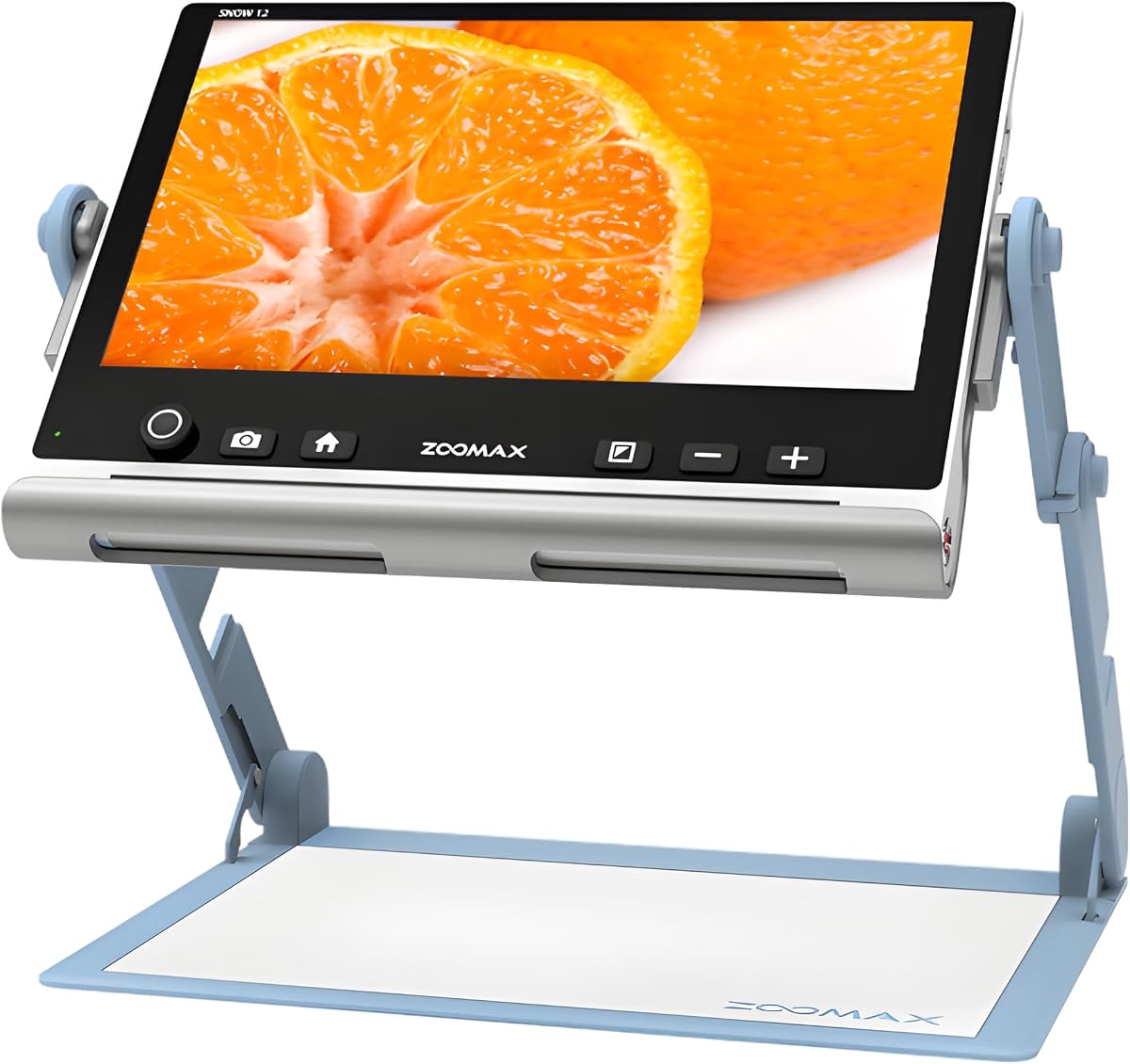
The Zoomax Snow 12 brings premium features like OCR and text to speech to assist users in converting text into spoken words across 20 languages. Its 12 inch screen provides an expansive viewing area for comfortable reading and writing.
We may earn a commission when you buy through this link, at no additional cost to you.
Users value the foldable stand for stability and the HD camera for detailed visuals. The OCR feature enhances independence by reading menus or labels aloud, making it a powerful tool for visually impaired individuals navigating public spaces.
While 19X magnification is lower than some competitors, the focus on accessibility and speech output justifies its position. The device is lightweight and ultra portable, ensuring you can carry it anywhere without burden.
This model suits those who need speech output or a larger display for daily tasks. Despite the higher price tag, the OCR and multilingual support offer unmatched productivity and accessibility for users seeking comprehensive low vision support.
Optical character recognition converts printed text to speech so users can hear documents read aloud independently.
With support for over 20 languages the device helps users worldwide understand text without language barriers.
We may earn a commission when you buy through this link, at no additional cost to you.
Eyoyo's 5" Portable Digital Video Magnifier is built for endurance with a 4500mAh battery supporting over four hours of continuous use. It offers a 5 inch screen and 4X to 32X zoom for clear and sharp viewing of documents and labels.
We may earn a commission when you buy through this link, at no additional cost to you.
The 17 color modes and 5 brightness levels allow personalized comfort to reduce eye strain during extended sessions. Memory settings remember your preferences automatically, so you do not need to reset them each time.
The foldable lightweight handle ensures a comfortable grip for long reading times. AV output allows connection to a larger display, though HDMI is absent. Its balance of battery life and portability makes it ideal for daily use.
Anyone needing a reliable magnifier for long sessions should consider this model. The robust battery and user memory features enhance convenience, making it a strong contender for those managing low vision on the go.
With over 4 hours of continuous operation you can read or work without frequent recharges during the day.
The device saves your preferred settings automatically so you can jump straight into reading without setup.
We may earn a commission when you buy through this link, at no additional cost to you.
This model offers 26 color modes to customize contrast for color blindness or amblyopia. It provides a 5 inch HD LCD screen and 2X to 32X zoom to support clear viewing of text and images for low vision users.
We may earn a commission when you buy through this link, at no additional cost to you.
The memory function remembers settings before shutdown, simplifying daily operation. The foldable bracket and integrated handle allow angled placement to reduce hunching and improve comfort during extended reading sessions.
Free switching between near and far cameras enhances usability for multiple tasks. Although HDMI output is not included, TV cable connections still support larger displays. It suits those needing high customization and comfort.
Anyone valuing color customization and ergonomic design will appreciate this unit. It delivers reliable magnification and intuitive controls, making it a solid option for seniors or individuals with complex visual requirements.
The 26 color modes let you select the optimal contrast for your specific vision needs and reduce strain.
The bracket on the handle enables angled placement to keep your posture comfortable while reading.
We may earn a commission when you buy through this link, at no additional cost to you.
Eschenbach SmartLux Digital Portable Magnifier is designed to be ultra lightweight and portable for easy carry. It features HD video magnification with 5x to 12x zoom levels and image capture to save important text for later review.
We may earn a commission when you buy through this link, at no additional cost to you.
Users appreciate its simplicity and ease of use. The five viewing modes allow quick adjustments for different tasks without complex menus. Its small form factor ensures you can keep it in a pocket or bag for ready access.
The high rating reflects satisfaction with build quality and clarity. While the zoom range is narrower than 32X models, its portability makes it ideal for quick checks during outings. It complements larger devices well.
This model is best for users prioritizing portability and simplicity over extreme zoom. If you need a reliable tool for quick reading tasks without heavy equipment, this compact magnifier delivers excellent performance.
Its lightweight and compact shape fits easily in pockets or bags so you can take it anywhere.
Capture photos of text or objects to review later without needing to hold the device steady.
We may earn a commission when you buy through this link, at no additional cost to you.
The 5.0 Inch Digital Magnifier delivers a high zoom range of 3X to 48X for users needing extreme magnification. Simplified buttons make it easy for elderly users to navigate, while the memory function retains preferred settings automatically.
We may earn a commission when you buy through this link, at no additional cost to you.
It supports external batteries for over four hours of use. The 800×480 HD screen ensures clear visuals without deformation when magnifying fonts. AV output allows connection to a TV for a larger viewing area.
Its lightweight and portable design is ideal for shopping or dining out. However, it is not recommended for long novels as the external battery may limit extended use. This makes it suitable for short tasks.
Anyone needing high zoom for small labels or signs should consider this model. It offers strong performance in a portable frame, though users should plan for external power if they intend to read for long periods.
Up to 48X zoom allows you to read extremely small text or details that standard magnifiers miss.
Connect external power to extend usage beyond four hours for more demanding tasks or extended outings.
We may earn a commission when you buy through this link, at no additional cost to you.
Selecting the right digital magnifier requires understanding your specific visual needs and lifestyle demands. This guide breaks down essential factors to ensure you choose a device that enhances readability and convenience.
Screen size impacts how much text you can see at once. Smaller screens like 3.5 inches offer portability, while 5 inch or larger displays reduce the need for constant scrolling.
Choose a screen that fits your daily use case. If you read books often, go for 5 inches or more. If you need to carry it everywhere, compact sizes are more convenient.
Magnification range determines how large text can appear. Ranges from 2X to 32X cover most daily needs, but some users require 48X for extremely small print.
Ensure the max zoom meets your smallest text needs. If you struggle with grocery labels, 32X should suffice, but prescriptions might need higher magnification.
Color modes allow customization of contrast to reduce eye strain. Options like black on white or blue on yellow help distinguish text for various conditions.
Look for devices with at least eight modes. More modes provide flexibility to find the optimal setting for your specific visual impairment.
Battery life affects how long you can use the device without recharging. Most models offer around four hours of continuous use.
If you need longer sessions, check for external battery support or fast recharge features. Extended battery life ensures uninterrupted reading during travel.
Simplified buttons and memory functions make daily operation easier. Devices that remember settings save time and reduce frustration for elderly users.
Avoid models with redundant controls. Look for intuitive interfaces that let you adjust zoom and brightness quickly.
AV and HDMI outputs allow connecting to TVs for larger displays. This is helpful when reading large documents or sharing content.
Verify if the device includes necessary cables. HDMI provides better quality, but AV is often sufficient for basic larger screen needs.
Foldable brackets and ergonomic handles reduce neck strain. Devices that allow angled placement let you read without hunching over.
Prioritize models with integrated handles. Comfort during extended use is essential to prevent fatigue.
Features like OCR or dual lenses add significant value. OCR reads text aloud, while dual lenses assist with both near and far viewing.
Consider if you need advanced tools like text to speech. If you navigate stores often, OCR can be a game changer.
Start by placing the magnifier directly over the text you want to read. Adjust the zoom and brightness until the characters appear clear and comfortable to view.
Use the foldable bracket or handle to maintain a steady position. Keeping the device stable ensures the image remains sharp without blurring due to hand movement.
Store the device in a cool dry place and clean the screen regularly with a soft cloth. Avoid exposing the magnifier to direct sunlight to prevent screen damage.
Your choice depends on the smallest text you need to read. For menus and labels, 2X to 32X is sufficient. For extremely small print like medication instructions, aim for higher zoom levels.
Yes, many models support AV or HDMI outputs. Connecting to a TV allows you to view text on a larger screen, which reduces eye strain and improves accessibility.
Black on white and white on black are most common. Experiment with color options like blue on yellow to find the combination that provides the highest contrast for your eyes.
Most devices offer four to six hours of continuous use. If you need longer sessions, consider models with external battery support or keep a backup charger handy.
Yes, simplified models with large buttons are great for children with amblyopia. The intuitive interface helps them focus on reading without getting distracted by complex settings.
Absolutely. The larger screens help you view pages clearly. However, for very long books, ensure the battery life supports extended sessions or use a portable charger.
Yes, placing the device over paper allows you to see your handwriting clearly. This helps with maintaining consistent writing and correcting errors on documents.
No, only premium models offer OCR. It converts printed text into speech, which is highly useful for those who prefer listening over reading text visually.
We highlighted ten top models ranging from compact handhelds to premium OCR devices. Each offers unique strengths in magnification, color modes, and portability to fit different visual needs.
Prioritize screen size and battery life for your lifestyle. If you need simplicity, choose models with memory functions and fewer buttons. For advanced tasks, consider OCR or dual lens features.
Prices may vary over time so verify current listings before purchase. Investing in the right digital magnifier for low vision can significantly improve independence and daily comfort.