
8Bitdo M30 Wired Controller
4.2Editor score
Officially licensed by Xbox
6-button arcade layout
USB-C wired connection
Discover the top fightpads for Xbox optimized for precision and speed. This guide compares licensed controllers and arcade sticks to help you dominate
Choosing the right fightpad for Xbox can transform your competitive gaming experience. Whether you play Street Fighter or Tekken, a quality controller offers the precision needed for complex combos and rapid inputs during intense matches.
We evaluated ten top-rated controllers and arcade sticks based on build quality, layout, and official licensing. Our comparison focuses on features like switch types, connectivity, and customization options to help you find the perfect match for your setup.
Each pick highlights key strengths and ideal use cases for different play styles. Keep in mind that prices and availability may change over time, so verify current details before making your final purchasing decision.
4.2Editor score
3.5Editor score

4.4Editor score
This side-by-side comparison evaluates all ten fightpads and arcade sticks to help you visualize differences in features, connectivity, and design.


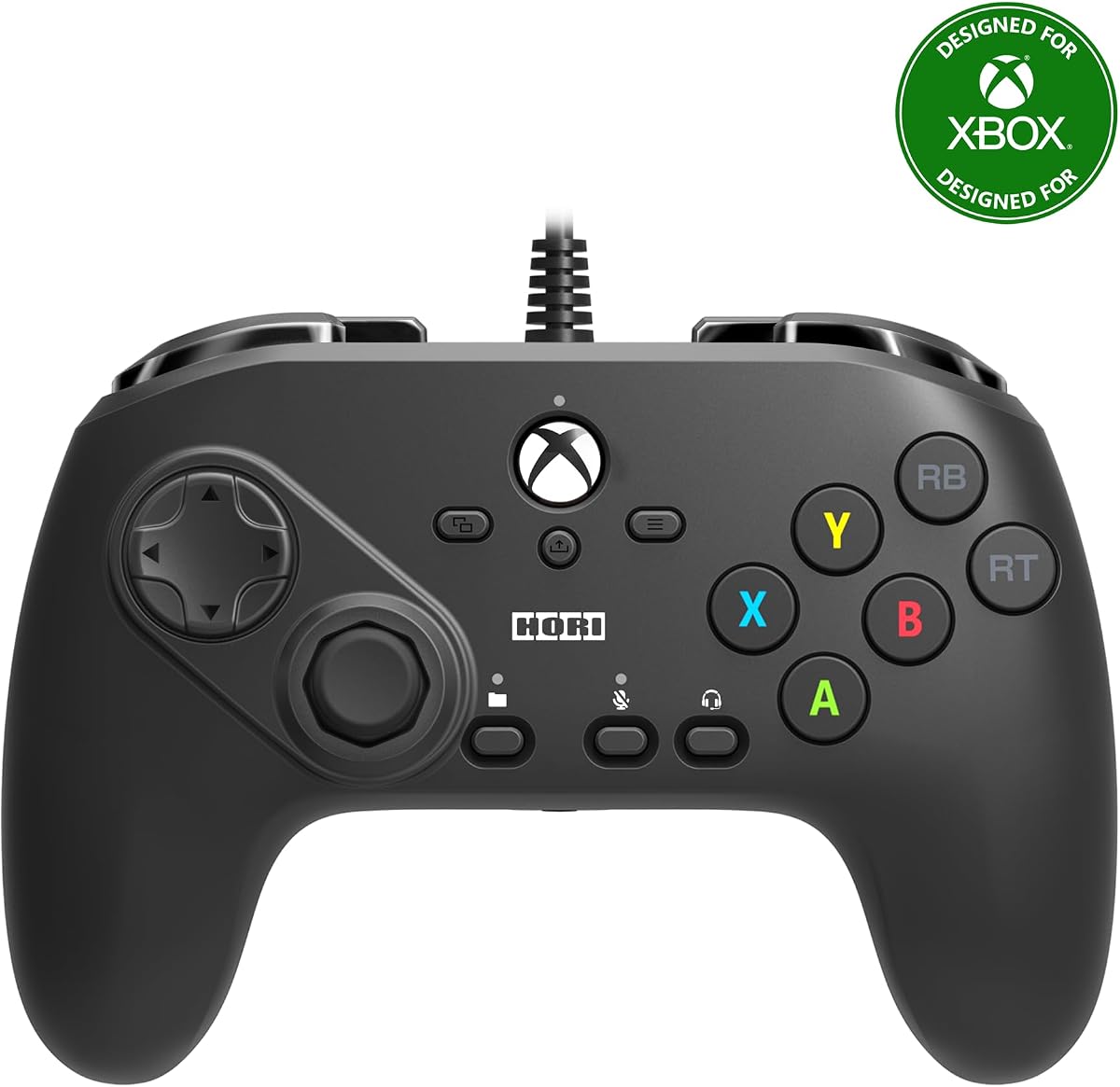
The HORI Fighting Commander Octa is designed specifically for fighting games on Xbox Series X|S. Its official licensing ensures full compatibility while its unique layout helps players execute moves quickly.
We may earn a commission when you buy through this link, at no additional cost to you.
This controller features a six-button layout and micro switch buttons that provide tactile feedback and fast response times. The adjustable D-pad allows you to find a shape that fits your grip perfectly.
While the specialized layout is great for precision, new users may need time to adjust. The wired connection limits mobility but guarantees consistent performance during long gaming sessions.
Competitive players who need speed and reliability will appreciate this controller. It is an excellent choice for anyone serious about improving their fighting game performance on Xbox.
The six-button layout mimics arcade standards, allowing for faster input registration compared to standard controllers.
You can save up to four profiles using the companion app and switch between them instantly with the profile button.
We may earn a commission when you buy through this link, at no additional cost to you.
The Xbox 360 Street Fighter IV FightPad is a retro controller designed for classic fighting games. It features a large D-pad and a six-button layout that appeals to arcade fans.
We may earn a commission when you buy through this link, at no additional cost to you.
Its floating D-pad allows for smooth movement, while the Turbo function helps perform rapid strikes. The integrated headset port lets you chat directly through the controller.
Compatibility with newer Xbox consoles might be limited compared to modern controllers. The design feels dated but still offers a reliable experience for specific retro titles.
Fans of the classic fighter or those playing on older systems may find this pad appealing. It remains a nostalgic choice for players who value traditional arcade layouts.
The multi-speed Turbo allows you to chain attacks quickly, which is essential for older fighting games.
An integrated headset port means you can connect headsets without needing extra adapters for audio.
We may earn a commission when you buy through this link, at no additional cost to you.
The 8Bitdo M30 Wired Controller offers exceptional value for budget-conscious gamers. It is officially licensed and provides a clean six-button layout suitable for fighting games.
We may earn a commission when you buy through this link, at no additional cost to you.
Its USB-C connection ensures a stable link with minimal latency. You can also manage custom profiles and settings using the 8BitDo Ultimate Software.
While affordable, it lacks wireless capability. Some users might find the smaller form factor less comfortable during extended play sessions.
New players or those with limited funds will find this controller a solid starting point. It delivers licensed performance without the high price tag of premium arcade sticks.
If wireless is a must, consider the other 8BitDo models, but for value this wired version stands out.
The Ultimate Software allows deep customization of button mapping and profile switching.
We may earn a commission when you buy through this link, at no additional cost to you.
The 8BitDo All-Button Arcade Controller brings leverless precision to Xbox Series X|S. Its compact design fits in your bag while offering professional-grade input accuracy.
We may earn a commission when you buy through this link, at no additional cost to you.
The quad-movement design allows for fast execution of combos. You can swap PCBs easily, and the wireless link keeps your setup clean without cables.
Transitioning from standard controllers might take time. Some players might find the lack of a stick less intuitive initially.
Portable players and tech enthusiasts will love the hot-swappable features. It is a great option if you want arcade precision in a small package.
Using buttons for movement instead of a stick can improve speed and reduce physical friction.
The Kailh Wizard switches let you change the feel of your controller without soldering.
We may earn a commission when you buy through this link, at no additional cost to you.
The HORI PAD Pro is a versatile controller with advanced tuning options. It works well for fighting games while retaining standard controller functions.
We may earn a commission when you buy through this link, at no additional cost to you.
You can adjust analog stick sensitivity and trigger zones to suit your style. The Share button helps capture highlights easily during gameplay.
It may not have the layout of a dedicated fighting pad. The settings depth is useful but could be overwhelming for casual players.
Players who want one controller for all genres will appreciate this flexibility. It balances general gaming with competitive customization effectively.
Switching between four saved profiles lets you adapt quickly to different game requirements.
Adjustable feedback ensures you feel the game without overwhelming sensory input.
We may earn a commission when you buy through this link, at no additional cost to you.
The Nacon Daija Arcade Fight Stick is a top-tier option designed for serious competitors. It comes with SANWA components known for durability and precision.
We may earn a commission when you buy through this link, at no additional cost to you.
Full button mapping allows you to customize every input. The lock function prevents accidental presses during intense matches.
Its size and price may deter casual players. You need a dedicated space on your desk to enjoy the full experience.
Pros players and enthusiasts who demand the best will find this stick worth the investment. It delivers professional performance for competitive Xbox gaming.
SANWA buttons and joysticks are industry standards for arcade quality and responsiveness.
Use the software to map buttons and create profiles tailored to different fighting games.
We may earn a commission when you buy through this link, at no additional cost to you.
The 8Bitdo Arcade Stick offers the convenience of wireless play on Xbox. It is officially licensed and designed to handle arcade inputs smoothly.
We may earn a commission when you buy through this link, at no additional cost to you.
Battery life supports long gaming sessions up to 30 hours. Fast mapping buttons make setup quick and easy.
You will need to charge it periodically. Some might prefer a wired option to avoid any latency issues.
Players who want a clean setup without cables will love this stick. It provides the power of an arcade stick with modern wireless tech.
Experience true arcade gameplay without worrying about cable clutter on your desk.
The 8BitDo Ultimate Software helps manage your profiles and button configurations.
We may earn a commission when you buy through this link, at no additional cost to you.
The HORI Fighting Stick alpha allows deep customization for fighters. Its chassis opens easily, letting you swap parts or repair the unit yourself.
We may earn a commission when you buy through this link, at no additional cost to you.
You can assign buttons and switch profiles via software. The key lock mode prevents accidental inputs during serious matches.
The price point is higher than standard controllers. Maintenance access is great but requires basic technical comfort.
Enthusiasts who want control over their hardware will appreciate this stick. It is a versatile option for competitive Xbox gamers.
The ability to open the case makes repairs and upgrades much easier for DIY users.
Assignable buttons give you more control over how the stick handles your inputs.
We may earn a commission when you buy through this link, at no additional cost to you.
The Akko FUNBOX brings next-generation tech to fighting games with Hall Effect switches. This design reduces wear and provides precise input detection.
We may earn a commission when you buy through this link, at no additional cost to you.
Rapid Trigger allows adjustable sensitivity from 0.1mm. The LCD screen acts as a hub for settings and animations.
The leverless design takes practice to master. The menu system is extensive but can be intimidating initially.
Tech-focused gamers who want cutting-edge features will love this controller. It offers high responsiveness for competitive play across platforms.
Magnetic switches eliminate friction, ensuring consistent performance over years of use.
Adjustable trigger depth lets you fine-tune inputs for faster execution in games.
We may earn a commission when you buy through this link, at no additional cost to you.
The HyperX Clutch Gladiate is a versatile controller with trigger locks for speed. It provides excellent grip and customizable rear buttons for competitive advantage.
We may earn a commission when you buy through this link, at no additional cost to you.
Trigger locks allow you to set short pulls for faster actions. The dual rumble motors give immersive feedback for hits and explosions.
It lacks a dedicated fighting layout. The wired connection ensures stability but limits portability.
Players who value comfort and versatile controls will enjoy this controller. It is a strong choice for general competitive gaming on Xbox.
Set the lock position to execute rapid actions without fully depressing triggers.
Map complex actions to the rear buttons for easier access during intense gameplay.
We may earn a commission when you buy through this link, at no additional cost to you.
Selecting the ideal fightpad requires considering several key factors to match your play style and hardware.
Standard controllers may work but dedicated pads or sticks offer better accuracy for combos.
Choose layouts with six to eight buttons and a responsive D-pad for best performance.
Wired models provide consistent low-latency performance essential for competitive matches.
Wireless options offer flexibility but require charging and might introduce minor delay.
Look for controllers made from durable plastics or aluminum that withstand frequent use.
Higher quality materials ensure longevity and consistent feel during extended sessions.
Mechanical or Hall Effect switches deliver faster actuation than traditional membrane buttons.
Faster switches help you execute moves quickly and with greater precision.
Features like software mapping, profile saving, and adjustable triggers add versatility.
More customization allows you to tailor the controller to specific games.
Ensure the controller is officially licensed or explicitly compatible with Xbox Series X|S.
Compatibility guarantees proper feature support and avoids connection issues.
Compact pads are easier to transport for tournaments or LAN events.
Smaller designs help you practice anywhere without needing a large desk.
Budget options provide solid performance while premium sticks offer advanced features.
Set a budget that balances essential features with long-term durability needs.
To use a fightpad, connect it via USB or Bluetooth and pair it with your console. Ensure all buttons are recognized in the settings menu before starting play.
Keep the controller clean by wiping it with a dry cloth to remove dust. Avoid exposure to liquids or extreme heat that might damage internal components.
Store the pad in a protective case if you transport it regularly. Check for firmware updates from the manufacturer to maintain performance and compatibility.
While you can use standard controllers, fightpads offer better layouts for combos and precise inputs. They improve accuracy and speed in competitive matches significantly.
Wired controllers generally provide lower latency and consistent performance. Wireless models have improved but may still have slight input delays compared to wired ones.
Most modern pads come with companion apps or software for button mapping. Access these tools on your Xbox or PC to customize controls easily.
Many Xbox fightpads are compatible with PC via USB or Bluetooth. Check product specifications to confirm PC support for your specific model.
Durable fightpads can last several years with proper care. Components like switches and D-pads wear out over time but are often replaceable.
The 8Bitdo M30 Wired Controller offers great value with official licensing. It combines affordability with solid performance for casual and semi-competitive players.
Our top picks include the 8Bitdo M30 for budget players and the Nacon Daija for premium performance. Each offers unique strengths to suit different competitive needs.
Focus on compatibility, layout type, and build quality when making your decision. These factors influence your accuracy and comfort during gameplay significantly.
Always verify the latest prices and availability before buying to ensure you get the best value. The market changes often so staying updated helps you save money.