
AOC 27" Gaming Monitor QHD 260Hz Overclocked IPS NVIDIA G-SYNC Q27G41ZE
4.6Editor score
240Hz Refresh Rate
0.3ms MPRT Response
Adaptive-Sync Support
Finding the perfect display for competitive gaming requires balancing resolution and speed. A 1440p gaming monitor at 240Hz offers sharp visuals and fluid motion. This combination ensures you see details clearly while reacting instantly to in-game events without motion blur.
We evaluated ten leading models based on panel technology, refresh rates, and adaptive sync compatibility. Our analysis covers IPS, OLED, and Fast IPS options to help you find the right fit. Each product was selected for its ability to deliver high performance in demanding scenarios.
Every pick includes detailed specs and real-world performance insights to guide your decision. Prices fluctuate frequently so check current listings before purchasing. We focus on value and features to ensure your investment enhances your gaming setup effectively.
4.6Editor score

4.3Editor score

4.6Editor score
As an Amazon Associate we earn from qualifying purchases.
This side-by-side comparison highlights the key specifications and strengths of each model to simplify your selection process.


The AOC Q27G41ZE stands out as a top contender for competitive gamers seeking speed and clarity. With a solid 4.6 star rating it delivers excellent value for its performance tier. The IPS panel provides vibrant colors while the 240Hz refresh rate ensures buttery smooth gameplay.
We may earn a commission when you buy through this link, at no additional cost to you.
Its standout feature is the 0.3ms MPRT response time which effectively eliminates ghosting during fast-paced action. The adaptive sync technology works seamlessly with both AMD and NVIDIA GPUs preventing screen tearing. This makes it ideal for shooters where reaction time matters most.
While the contrast ratio is standard for IPS panels the brightness levels are sufficient for most rooms. The stand offers tilt adjustment but lacks height or pivot options which might limit ergonomic setups. These trade-offs are acceptable given the aggressive pricing and high refresh rate.
Gamers looking for an affordable yet high-performance display will find this monitor highly satisfying. It balances cost and capability effectively making it a smart choice for competitive setups. We recommend this for those prioritizing speed over premium build features.
The 240Hz refresh rate paired with 0.3ms response ensures every movement is tracked instantly without lag.
IPS technology delivers wide viewing angles and accurate colors enhancing immersion in single-player experiences.
We may earn a commission when you buy through this link, at no additional cost to you.
The Acer Nitro XV272U offers a comprehensive package for gamers who value ergonomics alongside performance. It carries a reliable 4.2 rating from users who appreciate its balanced approach to display design. The 240Hz rate delivers smooth visuals suitable for competitive titles and casual play alike.
We may earn a commission when you buy through this link, at no additional cost to you.
Key strengths include its fully adjustable Ergostand which allows height swivel and pivot adjustments. This flexibility helps maintain healthy posture during long gaming sessions. The inclusion of FreeSync Premium ensures tear-free performance across supported hardware without needing extra software.
While the motion response is good it falls slightly short of the absolute fastest IPS panels. The color accuracy is solid making it a viable option for hybrid work and play setups. Users should weigh the ergonomic benefits against the slightly higher cost.
This monitor is perfect for those who want a complete solution without compromising on stand features. It bridges the gap between budget and premium effectively offering robust functionality. We suggest it for users needing vertical screen options or significant height flexibility.
The full stand adjustability supports long gaming marathons by allowing custom viewing angles and heights.
FreeSync Premium technology removes screen tearing ensuring a clean image even during rapid scene changes.
We may earn a commission when you buy through this link, at no additional cost to you.
LG brings a high-performance option with the 27GR83Q-B which boasts strong HDR capabilities and versatile connectivity. With a 4.4 rating it is trusted by gamers who demand both speed and visual fidelity. The panel supports 240Hz over both HDMI and DisplayPort offering flexibility in cabling.
We may earn a commission when you buy through this link, at no additional cost to you.
The DisplayHDR 400 certification brings a dynamic contrast boost that enhances dark and bright scenes. Its 95% DCI-P3 coverage ensures rich and accurate color reproduction which is vital for immersive games. The Fast IPS technology maintains low latency for competitive play while keeping visuals vibrant.
HDR performance is modest compared to OLED panels but impressive for an IPS model in this tier. The HDMI 2.1 port supports modern consoles providing future proofing for next-gen gaming. Users might miss a USB-C port but the existing options cover most needs.
We recommend this monitor for gamers who prioritize HDR support and console compatibility. It strikes a solid balance between competitive speed and visual enhancements. The adjustable stand adds to its appeal for long-term daily use scenarios.
DisplayHDR 400 adds depth to images making shadows and highlights pop for a more immersive experience.
HDMI 2.1 support ensures compatibility with the latest consoles and high bandwidth video signals.
We may earn a commission when you buy through this link, at no additional cost to you.
The Acer Predator X27U introduces OLED technology to the high refresh rate market with stunning visual results. A 4.5 rating reflects user satisfaction with its vivid colors and deep blacks. The QD-OLED panel delivers a cinematic feel that traditional IPS panels cannot match.
We may earn a commission when you buy through this link, at no additional cost to you.
Speed is paramount with a 0.03ms response time that eliminates ghosting completely even in rapid movements. The 240Hz refresh rate ensures fluid motion making it a top choice for competitive FPS titles. AMD FreeSync Premium maintains smooth synchronization across supported graphics cards.
Users must be mindful of burn-in risks inherent to OLED technology but modern care features help mitigate this. The ZeroFrame design maximizes screen real estate and offers an immersive viewing experience without bezel distractions. Color accuracy is exceptional making it great for content creation too.
We recommend this for gamers seeking the best possible image quality and response times. The trade-off of OLED care requirements is worth the visual leap for most enthusiasts. Ideal for those who want premium visuals without sacrificing competitive performance.
QD-OLED technology provides infinite contrast ratios allowing for true blacks and vibrant highlights simultaneously.
With 0.03ms response the monitor reacts instantly to inputs reducing input lag significantly during matches.
We may earn a commission when you buy through this link, at no additional cost to you.
KTC presents an intriguing option with the H27E6S featuring a native overclockable refresh rate exceeding 275Hz. While it lacks official ratings its performance specs appeal to enthusiasts seeking raw speed. The Fast IPS panel delivers quick response times suitable for competitive gaming environments.
We may earn a commission when you buy through this link, at no additional cost to you.
Its white finish offers a distinctive look that stands out in modern setups. The 123% sRGB coverage ensures rich colors making visuals pop during gameplay. Built-in speakers add convenience though external audio remains preferred for immersive experiences.
Connectivity is robust with multiple HDMI and DisplayPort inputs supporting various consoles and PCs. The ergonomic stand allows for full height and pivot adjustments which is rare in this price range. Users should verify driver support as third-party brands may have limited utility apps.
We suggest this monitor for budget-conscious gamers wanting top-tier speed and unique aesthetics. It delivers strong performance for the cost despite the lack of major brand backing. A solid choice for those willing to experiment with emerging display manufacturers.
Overclocking to 275Hz provides an edge in fast-paced games by rendering frames faster than standard displays.
The white finish and integrated speakers offer a clean look and functional audio without extra cables.
We may earn a commission when you buy through this link, at no additional cost to you.
ASUS ROG delivers a premium experience with the XG27ACMG which balances high speed with professional utility. It holds a 4.3 rating from users who value its robust feature set and build quality. The 270Hz overclocked rate pushes the limits of smooth gameplay for competitive users.
We may earn a commission when you buy through this link, at no additional cost to you.
A standout feature is the USB-C port which simplifies setup for laptops and modern consoles. The ELMB SYNC technology allows motion blur reduction without sacrificing adaptive sync benefits. Gaming AI features enhance the experience by adapting settings to the content on screen.
The monitor includes a Creative Cloud subscription adding value for content creators who game. While the price is higher it justifies the utility with versatile connectivity and high-end tech. This model appeals to professionals needing a dual-purpose workstation display.
We recommend this for users seeking the ultimate in connectivity and motion clarity. It bridges the gap between professional and gaming needs effectively. An ideal pick for those who appreciate extra utilities and high-performance hardware.
USB-C connectivity with DP Alt mode reduces cable clutter while supporting high bandwidth video.
G-Sync and ELMB work together to eliminate ghosting while keeping frame timing perfectly aligned.
We may earn a commission when you buy through this link, at no additional cost to you.
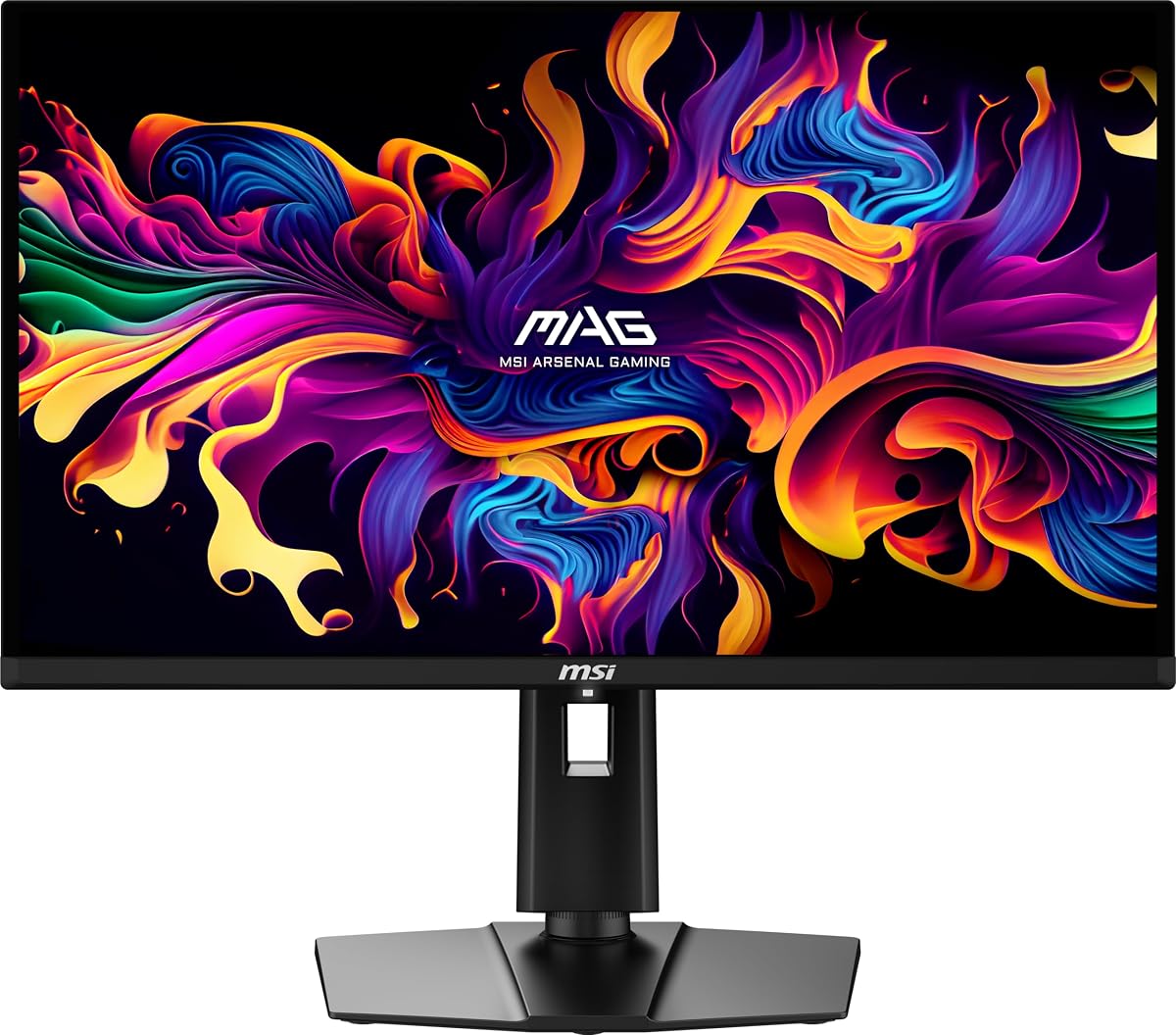
MSI combines Quantum Dot tech with OLED in the MAG 274QP delivering unmatched visual fidelity. It carries a 4.6 rating reflecting high user satisfaction with its color and contrast performance. The panel supports 240Hz ensuring fluid motion alongside its deep blacks and vibrant hues.
We may earn a commission when you buy through this link, at no additional cost to you.
A key advantage is the OLED Care 2.0 software designed to mitigate burn-in risks effectively. The 0.03ms response time ensures that fast objects remain crisp without trailing artifacts. Connectivity is robust with HDMI 2.1 for next-gen console compatibility.
The panel accuracy is exceptional making it suitable for both gaming and creative work. While the cost is high it delivers a visual experience that IPS panels cannot match. Users must manage screen time wisely to maintain panel health over years.
We recommend this for enthusiasts who want the absolute best picture quality for gaming. It represents the pinnacle of current display technology in the consumer space. A top pick for those prioritizing visuals and responsiveness equally.
Self-emitting pixels allow for true blacks and infinite contrast ratios unmatched by LCD technology.
OLED Care 2.0 helps protect the panel ensuring longevity through intelligent brightness management.
We may earn a commission when you buy through this link, at no additional cost to you.
Alienware brings premium build and aesthetics to the table with the AW2723DF model. It holds a 4.3 rating appealing to gamers who appreciate high-end industrial design and performance. The Fast IPS panel ensures speed while the InfinityEdge bezel provides a seamless viewing experience.
We may earn a commission when you buy through this link, at no additional cost to you.
NVIDIA G-Sync certification guarantees smooth synchronization without stuttering across supported GPUs. The DisplayHDR 600 certification offers brighter highlights which enhances contrast in HDR content. The stand is highly adjustable ensuring ergonomic comfort during extended sessions.
The design features include customizable lighting and a signature look that complements gaming rigs. While the price is higher due to branding the build quality is solid and durable. Users get a monitor that stands out visually as much as it performs.
We suggest this for those who value style and brand reputation alongside technical specs. It is a reliable choice for competitive gaming and immersive play. Best suited for users willing to pay for design and robust build quality.
Narrow bezels and HDR 600 create a cinematic experience that keeps focus on the action.
G-Sync compatible technology ensures every frame is rendered smoothly without tearing or lag.
We may earn a commission when you buy through this link, at no additional cost to you.
The Acer Nitro KG271U focuses on delivering accurate color alongside high refresh speed for hybrid use. With a 4.4 rating it satisfies users needing precise visuals for creative work or gaming. The IPS panel supports 240Hz which is fast enough for competitive titles.
We may earn a commission when you buy through this link, at no additional cost to you.
Color accuracy is a highlight with 99% sRGB coverage making it reliable for photo editing too. The 0.5ms GTG response time ensures motion clarity without noticeable ghosting. FreeSync Premium helps maintain smooth frame rates during gameplay.
The zero-frame design offers a modern look that maximizes screen real estate. While brightness is average it still delivers a vivid picture in most lighting conditions. Users should expect decent build quality at a reasonable price point.
We recommend this for users needing a balanced monitor for work and gaming. It excels in color fidelity which is rare at this price and speed. Ideal for designers or gamers who want visual precision.
99% sRGB ensures colors look true to life helping both creators and gamers see details correctly.
240Hz ensures fluid motion making fast-paced games playable without distracting screen artifacts.
We may earn a commission when you buy through this link, at no additional cost to you.
The MSI MAG 271QPX brings OLED technology to the forefront with exceptional contrast and speed. Its 4.6 rating reflects user satisfaction with its performance in dark environments. The QD-OLED panel produces deep blacks that enhance immersion during gaming sessions.
We may earn a commission when you buy through this link, at no additional cost to you.
The 240Hz refresh rate ensures that high-speed gameplay remains smooth and fluid. A 0.03ms response time eliminates blur making it ideal for competitive shooters. OLED Care 2.0 technology helps protect the panel against potential burn-in issues.
Color depth is rich ensuring accurate representation in HDR content. While brightness may not match LED panels in bright rooms it excels in controlled environments. Users must consider cooling and usage habits to maximize screen life.
We suggest this for those prioritizing deep blacks and color depth in their setup. It offers a cinematic experience unmatched by traditional panels. Best for users seeking the ultimate visual fidelity for gaming.
OLED pixels turn off completely for true blacks enhancing contrast in dark game scenes.
240Hz combined with 0.03ms response keeps motion crisp and ghosting free in action.
We may earn a commission when you buy through this link, at no additional cost to you.
Selecting the right monitor requires understanding panel types and features that affect your experience.
Panel technology defines color accuracy and response time. IPS panels offer wide viewing angles and reliable colors while OLED provides perfect contrast and faster response times.
Choose IPS for versatility and OLED for visual fidelity. Consider your budget and gaming priorities when selecting.
Refresh rate determines how many frames per second the display can show. Higher refresh rates like 240Hz reduce motion blur and make movement smoother during gameplay.
Ensure your PC hardware can drive this refresh rate to fully benefit. Aim for 240Hz minimum for competitive performance.
Response time measures how quickly pixels change color. Lower response times reduce ghosting and motion blur making fast action clearer on screen.
Look for panels with under 1ms response times. OLEDs often offer superior response times compared to IPS panels.
Adaptive sync technologies like G-Sync and FreeSync prevent screen tearing by matching display refresh to GPU output. This ensures a seamless image without visual glitches.
Check compatibility with your graphics card. G-Sync and FreeSync Premium provide the best tear-free experience.
Color gamut defines the range of colors the monitor can display. Wider gamuts like 95% DCI-P3 offer richer and more accurate visuals for games and content.
Prioritize high color coverage if you want vibrant visuals. Most high-end monitors now offer wide gamut support.
Connectivity ports determine how you connect devices. Ensure you have DisplayPort or HDMI 2.1 for high refresh rates and resolution support.
USB-C adds versatility for laptops and consoles. Verify your cables match the required bandwidth.
Adjustable stands improve comfort and reduce strain during long gaming sessions. Height tilt swivel and pivot adjustments help achieve the perfect viewing angle.
Check stand flexibility before buying. VESA mount compatibility offers alternative mounting options if needed.
Build quality ensures durability and stability. Look for sturdy frames and reliable stands that can handle regular adjustments.
Higher-end monitors often feature better materials. Check warranty terms for added peace of mind.
Connect the monitor using a DisplayPort or HDMI 2.1 cable to ensure the full 240Hz refresh rate. Verify settings in your operating system to confirm the correct refresh rate is active.
Adjust brightness and contrast to match your room lighting. Use preset gaming modes to optimize color and response settings automatically.
Clean the screen gently with a microfiber cloth. Avoid harsh chemicals. For OLED panels avoid static images to prevent burn-in and utilize built-in care features.
Yes it is highly beneficial for competitive games. A 240Hz refresh rate reduces motion blur and provides smoother visuals than lower rates. Most competitive gamers notice improved reaction times and comfort.
It depends on the HDMI version. HDMI 2.1 supports 240Hz at 1440p but HDMI 2.0 may be limited. Check your monitor's specs and cable compatibility.
High-end GPUs like RTX 4080 or RX 7900 XTX are recommended. Mid-range cards may struggle to maintain consistent frame rates in demanding titles.
Yes running higher refresh rates consumes more power. Lowering the refresh rate when on battery helps extend usage time significantly.
OLED offers superior contrast and response times. IPS is often cheaper and avoids burn-in risks. Choose based on priority between visual fidelity and safety.
Use screen savers and vary content. Avoid static elements like HUDs. Modern OLEDs have built-in features to reduce this risk over time.
We have reviewed ten top models offering speed and clarity for competitive gaming. Whether you prefer OLED vividness or IPS reliability there is a pick for every need.
Prioritize response times and adaptive sync features. These factors directly impact your gameplay experience more than minor spec differences.
Always check current availability and warranty terms before purchasing. Prices vary often so ensure you get the best value for your setup.