
Air Mouse Remote MX3 Pro
3.8Editor score
Mini Keyboard on Back
Plug-and-Play USB
IR Learning Keys
Discover the top air mouse for Android TV Box options compared in this guide featuring 10 remote controls with voice control, keyboard, and motion sensor
Finding the right air mouse for Android TV Box can transform your viewing experience by replacing clumsy navigation with smooth motion control and typing convenience.
We evaluated ten popular models based on connectivity, battery life, typing comfort, and compatibility with various Android TV Box streaming devices to help you choose.
Each selection includes key specs, pros, and cons to highlight strengths and limitations while noting that prices and availability may change over time on Amazon.
3.8Editor score

4.5Editor score
4.3Editor score
The following comparison table provides a side-by-side look at the key specifications and features of each air mouse model to help you decide which fits your setup.


This remote stands out as the top pick with its combination of Bluetooth and 2.4G connectivity alongside a reliable 6-axis gyroscope for precise navigation.
We may earn a commission when you buy through this link, at no additional cost to you.
It allows you to control your TV box smoothly while also learning IR commands to manage your TV power and volume from the same device.
While the voice search works well in supported apps, users should note that some legacy devices may not fully utilize the advanced features.
It is ideal for anyone seeking a universal solution that simplifies multiple remotes into one efficient unit for their entertainment system.
You can switch between Bluetooth and 2.4G for different devices ensuring you always have a stable connection for streaming or browsing.
The ability to learn IR buttons means you can consolidate control of your TV box and main TV into a single remote for convenience.
We may earn a commission when you buy through this link, at no additional cost to you.
This model offers an excellent entry-level option for users who need basic air mouse functionality without spending too much on a replacement remote.
We may earn a commission when you buy through this link, at no additional cost to you.
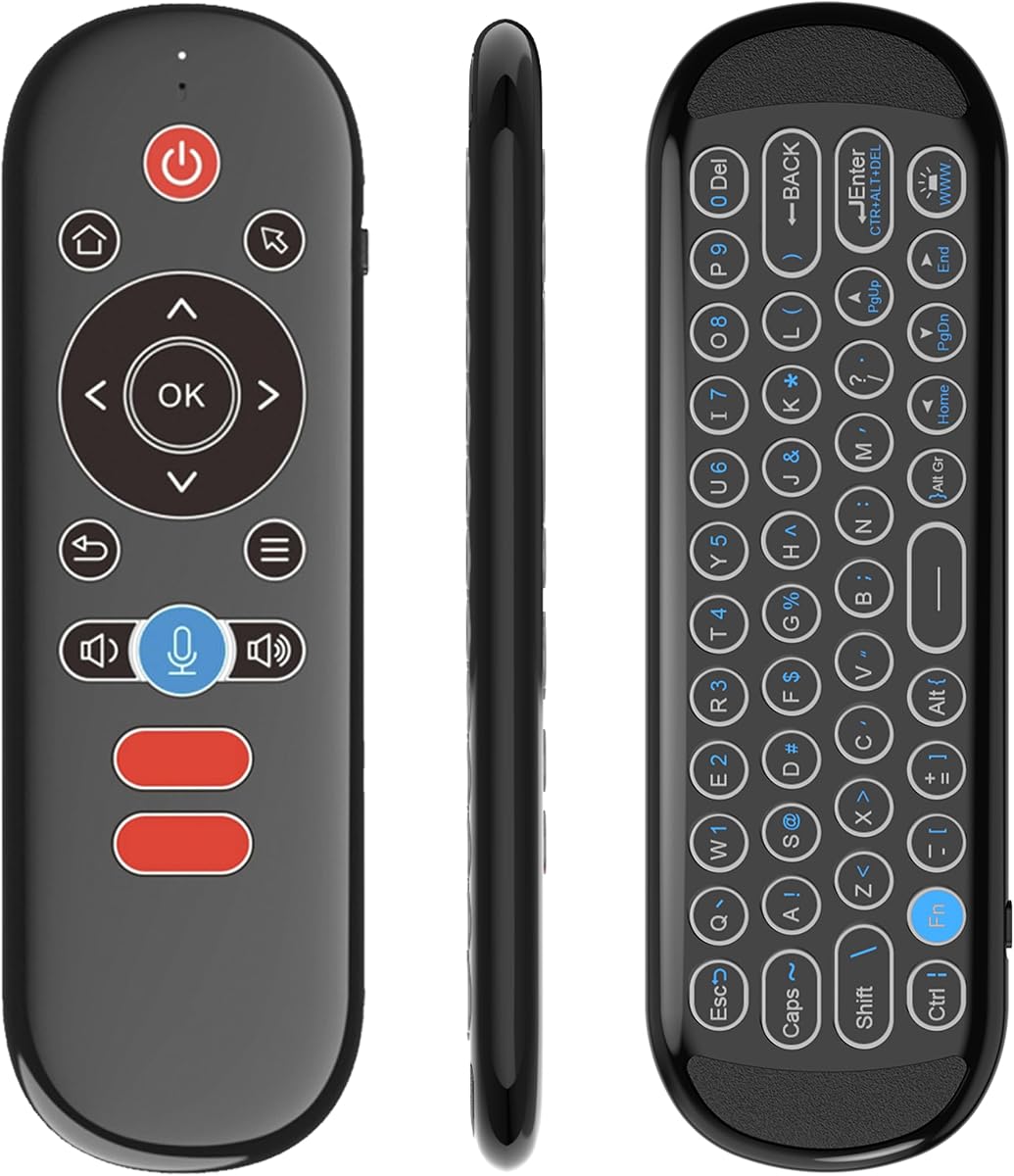
The mini keyboard on the back is a practical addition that makes typing search queries significantly faster than using an on-screen keyboard.
Although it supports motion control and IR learning, the range of programmable buttons is somewhat limited compared to higher-end models.
It is a solid choice for budget-conscious shoppers who want immediate usability with their Android TV Box or similar devices.
The built-in mini keyboard on the reverse side helps streamline text entry for emails or search terms during media consumption.
The 6-axis motion sensor allows you to navigate menus by moving the remote like a pointer which reduces the need for button presses.
We may earn a commission when you buy through this link, at no additional cost to you.
This remote provides a premium experience with a full QWERTY keyboard and rechargeable battery which enhances usability during long viewing sessions.
We may earn a commission when you buy through this link, at no additional cost to you.
The 7-color backlight is particularly useful when using the device in low light environments ensuring keys are always visible and easy to read.
Although it commands a higher price than basic remotes the additional features like voice control and full keyboard support justify the extra investment.
It is best suited for users who prioritize typing comfort and battery convenience over the initial cost of the device.
The vibrant backlighting helps you see keys clearly in the dark which is essential for typing without disturbing others in the room.
Using a built-in rechargeable battery reduces the need for constant battery replacements making it more environmentally friendly and cost-effective long term.
We may earn a commission when you buy through this link, at no additional cost to you.
This model emphasizes voice capabilities allowing you to search for shows or navigate interfaces quickly using spoken commands rather than manual input.
We may earn a commission when you buy through this link, at no additional cost to you.
The remote supports both Bluetooth and 2.4G RF ensuring you can use it with a wide range of modern and legacy Android TV Box devices.
While it requires batteries which are not included in the box the plug-and-play setup means you are up and running in minutes.
It is a great option for those who want to minimize typing and rely more on voice commands for their media consumption.
The built-in voice assistant helps you find content faster which is especially useful when you cannot remember the exact title of a movie.
With two firmware versions available you can switch modes to suit either standard TV usage or PC control needs easily.
We may earn a commission when you buy through this link, at no additional cost to you.
This remote is designed for flexibility working across Windows Android Mac and Linux systems which makes it a versatile tool for mixed device households.
We may earn a commission when you buy through this link, at no additional cost to you.
It includes a high fidelity microphone for voice input though you should be aware that the search function might be limited to specific apps.
The IR learning feature allows you to control your TV alongside your media player reducing the number of remotes you need to keep track of.
It is a reliable choice for those who need a simple cross-platform solution without needing advanced features like a full keyboard.
Supporting multiple operating systems ensures you can use the same remote for your TV box PC and even projector without compatibility issues.
The built-in microphone allows for voice commands which can speed up searching for content or opening specific applications easily.
We may earn a commission when you buy through this link, at no additional cost to you.
The standout feature of this remote is the 7-color backlight which ensures you can see the keys clearly even in a dark living room.
We may earn a commission when you buy through this link, at no additional cost to you.
It uses both Bluetooth and 2.4G wireless modes giving you flexibility depending on the specific needs of your Android TV Box or PC.
While the single IR learning key is less flexible than other models the rechargeable battery and motion control make it a strong contender.
It is perfect for late-night browsing sessions where visibility is key to avoiding accidental presses or navigation errors.
The RGB backlighting adds a modern touch to the device while ensuring functionality in low light conditions for comfortable typing.
Switching between Bluetooth and 2.4G allows you to connect to different devices seamlessly without needing multiple remotes.
We may earn a commission when you buy through this link, at no additional cost to you.
This remote combines a mini keyboard with a powerful motion sensor system making it suitable for both navigation and casual motion games.
We may earn a commission when you buy through this link, at no additional cost to you.
The 3-gyro plus 3-g sensor setup provides accurate directional control which is appreciated by users who play games on their media boxes.
It supports a range of up to 10 meters allowing you to stand back from the screen while maintaining a stable connection for control.
It is a well-rounded option for users who want a balance of navigation typing and gaming capabilities in a single device.
The motion sensor allows for intuitive control where you simply point the remote to move the cursor similar to a mouse on a desktop.
A stable 10 meter range ensures you can use the remote from anywhere in the room without worrying about signal drop or lag.
We may earn a commission when you buy through this link, at no additional cost to you.
This device focuses heavily on the typing experience with a backlit keyboard that ensures you can enter text accurately even in dim conditions.
We may earn a commission when you buy through this link, at no additional cost to you.
It includes IR learning capabilities for five keys allowing you to manage power and volume functions on your TV or other devices.
The keyboard layout supports 38 keys which helps you type passwords or search terms quickly without fumbling with on-screen virtual keyboards.
It is a strong recommendation for users who prioritize text entry speed and accuracy over advanced motion features.
The LED backlight helps you see the keys clearly in low light which reduces errors when typing out long search queries.
Compatibility with Windows Android Mac and Linux systems makes it a versatile choice for users with mixed hardware setups.
We may earn a commission when you buy through this link, at no additional cost to you.
This remote prioritizes simplicity with a single-sided design that reduces clutter and makes it easy to hold and operate for long periods.
We may earn a commission when you buy through this link, at no additional cost to you.
The gyroscope core compensation algorithm helps minimize shakes ensuring smooth cursor movement even when you are holding it with one hand.
While it is tailored specifically for Android systems the durability of its buttons makes it a reliable replacement for lost or broken originals.
It is ideal for users who want a no-frills reliable remote that works well for basic navigation without extra complexity.
The anti-tremor algorithm ensures that your hand shakes do not translate into erratic cursor movements during navigation or selection.
The wear-resistant buttons are designed to withstand frequent pressing making the remote last longer under heavy daily use.
We may earn a commission when you buy through this link, at no additional cost to you.
This remote is marketed for its wide compatibility with various systems including Xbox Raspberry Pi and Android which makes it a versatile pick for tech enthusiasts.
We may earn a commission when you buy through this link, at no additional cost to you.
It includes a mini wireless keyboard and motion sensor ensuring you can handle both text entry and menu navigation without switching devices.
The ability to learn five keys from your TV remote helps centralize control though you will need to follow the instructions carefully to set it up.
It is a solid choice for users who need a general-purpose remote that can adapt to different types of entertainment hardware in their home.
Working with systems like Xbox and Raspberry Pi adds value for users who have a mixed media setup beyond just Android TV.
The 3-gyro plus 3-g sensor allows for precise cursor movement making navigation through dense menus more intuitive and faster.
We may earn a commission when you buy through this link, at no additional cost to you.
Choosing the right air mouse involves considering several factors beyond just basic functionality to ensure you get a model that fits your viewing habits.
Air mice generally use 2.4G RF or Bluetooth to connect to your Android TV Box. RF requires a USB receiver which is simple but takes up a port, while Bluetooth connects directly if your device supports it. Choose RF for universal compatibility and Bluetooth if you want to save USB ports or reduce lag on supported devices.
For most users 2.4G RF is the safest bet as it works with almost any box with a USB port without needing specific pairing steps.
The quality of the gyroscope and accelerometer determines how smoothly the cursor moves when you wave the remote. Higher-end models often use 6-axis sensors which provide better tracking and reduce lag during navigation. Look for mentions of 6-axis gyroscope in specs to ensure precise control.
If you plan to use the remote for gaming or fast navigation prioritize a model with a high-quality 6-axis sensor to avoid jitter or missed movements.
Many air mice feature a mini keyboard on the back or a full QWERTY layout integrated into the remote. Mini keyboards are compact and space-efficient but can be tricky to use for long typing sessions. Full keyboards offer better key spacing and comfort for frequent text input.
Assess how often you type on your TV box—if you search often or log into apps frequently a full keyboard layout may be worth the extra bulk.
Remotes are powered either by replaceable batteries or a rechargeable battery. Replaceable AA or AAA batteries offer continuous use without charging waits but require replacements over time. Rechargeable models use USB-C or micro-USB which are more eco-friendly but require planning for charging cycles.
If you prefer convenience and hate buying batteries choose rechargeable, but if you want to use the remote immediately after purchasing batteries might be better.
IR learning allows the air mouse to mimic your existing TV remote signals to control volume or power. Some models support learning all buttons while others limit you to five keys like power and volume. Check the number of learnable keys if you want full control of your entertainment system.
Prioritize remotes with full IR learning if you want to eliminate extra remotes entirely and manage your TV and box from one device.
Voice control lets you speak commands to search for content or launch apps which is faster than typing. Not all air mice have this feature so check the product description for voice search capability. It is particularly useful for finding specific titles quickly without navigating menus manually.
If you rely on voice assistants to find shows ensure the remote supports voice search on your specific TV system like Google TV or Android TV.
While many remotes claim to be universal they may not work with every TV box or streaming device. Some models explicitly list exclusions like Fire Stick or Roku so always verify the compatibility list before buying. Ensure the remote supports your specific operating system such as Android TV or standard Android boxes.
Always check the manufacturer's compatibility notes to avoid returns and ensure the remote will work with your exact Android TV Box or streaming setup.
Ergonomics matter when holding a remote for long periods. Look for remotes with comfortable grips and button layouts that make sense for your hand size. A durable build ensures the remote withstands accidental drops and daily wear which is important for a frequently used gadget.
Select a design that feels balanced in your hand to reduce fatigue during extended use and ensures buttons are easy to press by feel.
To begin using your air mouse plug the USB receiver into a free USB port on your Android TV Box and ensure the remote is turned on. Most models connect automatically via 2.4G RF without needing drivers so you can start navigating immediately.
Use motion control by holding the remote vertically and moving your wrist to direct the cursor on the screen. For typing press the designated button to switch to keyboard mode if available or turn the remote over to reveal the mini keyboard for input.
Regularly update the remote's firmware if an option is provided and keep the sensors clean from dust or debris. If the remote stops responding check battery levels or reconnect the receiver to restore a stable signal for seamless control.
Most air mice are designed to work with any Android TV Box that has a USB port but some models may exclude specific brands like Fire Stick or Roku. Always check the product compatibility list before purchasing to ensure it supports your specific device and operating system.
To set up IR learning usually press and hold the learning button on the air mouse until it blinks then press the corresponding button on your original TV remote. Repeat this for each button you want to program such as volume or power according to the device's manual.
If the air mouse supports Bluetooth you can pair it directly with your TV Box without a USB receiver. However models that rely on 2.4G RF will need the receiver to function so check the product specs for Bluetooth support before assuming it is receiver-free.
Most air mice have a wireless range of up to 10 meters allowing you to control your TV from anywhere in the room. Factors like walls and interference can reduce this range so position the receiver in an unobstructed spot for the best performance.
No most air mice are plug-and-play devices that do not require additional software installation on your Android TV Box. Simply connect the receiver or pair via Bluetooth and the cursor will start moving as long as your TV supports mouse input.
If the cursor is jittery or lagging check that the battery is not low and that the sensor is clean. Ensure there are no physical obstructions between the remote and receiver and try recalibrating the device by turning it off and on again to reset the sensors.
We have reviewed ten top air mice ranging from budget-friendly options to premium models with full keyboards and voice control to help you find the right fit for your setup.
Prioritize features that match your needs such as IR learning for TV control or a backlight for late-night viewing to ensure the remote enhances your entertainment experience.
Remember to check current prices and availability on Amazon as costs may vary over time and some models might have updated versions with improved features.