
Corded Landline Phones for Seniors – Dementia/Alzheimers Phone for Seniors
4.2Editor score
9 big picture buttons
One-click dialing support
110dB loud ringer
This guide compares the top captioned telephone models for seniors and hearing impaired users, focusing on clarity, ease of use, and essential features to
Finding the right captioned telephone can transform daily communication for those with hearing loss. These devices combine traditional calling with real-time text display, ensuring no word is missed during important conversations with family and friends.
We evaluated ten leading models based on sound quality, caption accuracy, user interface design, and accessibility features. Our analysis highlights devices that offer reliable performance, intuitive controls, and robust support for various hearing and cognitive needs.
Each selection showcases unique strengths tailored to different user requirements. While specific pricing may fluctuate over time, these products represent the current market leaders in accessibility technology for home use and care facilities.
4.2Editor score

4.3Editor score
4.5Editor score
The following comparison provides a side-by-side overview of all ten selected models. It highlights key specifications such as amplification levels, display types, connectivity options, and special accessibility features to help users make an informed decision.


The Hamilton CapTel 2400iSPNBT stands out as the top choice for users seeking clarity in every conversation. With a 4.3 rating, it delivers reliable real-time captions and amplified sound to ensure no words are missed.
We may earn a commission when you buy through this link, at no additional cost to you.
Its large touchscreen allows for simple navigation and easy adjustments to caption size and tone. The device supports both auto and assisted captioning modes, providing flexibility depending on the user needs comfort level and call context.
While it requires internet access for captioning, the service is free for US residents with hearing loss. The built-in voicemail captioning adds extra convenience, letting users review messages visually at their own pace.
This model is ideal for seniors or individuals with significant hearing loss who want confidence in daily calls. The combination of visual and auditory support makes it a comprehensive solution for home communication needs.
Captions appear instantly as you speak, allowing you to listen and read simultaneously for complete understanding.
Adjustable settings let users tailor volume, caption size, and tone to match personal hearing requirements.
We may earn a commission when you buy through this link, at no additional cost to you.
This corded landline phone offers excellent value for those prioritizing simplicity over advanced captioning features. With a 4.2 rating, it excels in usability for seniors with memory or vision impairments.
We may earn a commission when you buy through this link, at no additional cost to you.
The nine large picture buttons make dialing effortless, reducing confusion for users with cognitive challenges. The 110dB ringer ensures calls are never missed, while the flashing light provides an extra visual cue.
Powered directly by the phone line, it remains operational during power outages without relying on batteries. This reliability is crucial for emergency communication and maintaining contact during severe weather events.
It is best suited for users who need basic, dependable connectivity without complex internet requirements. The hands-free option and large buttons make it accessible for those with limited mobility or arthritis.
Family photos on buttons allow instant calling without memorizing numbers or struggling with small keypads.
Connection works solely through standard phone lines, ensuring uptime even during electrical grid failures.
We may earn a commission when you buy through this link, at no additional cost to you.
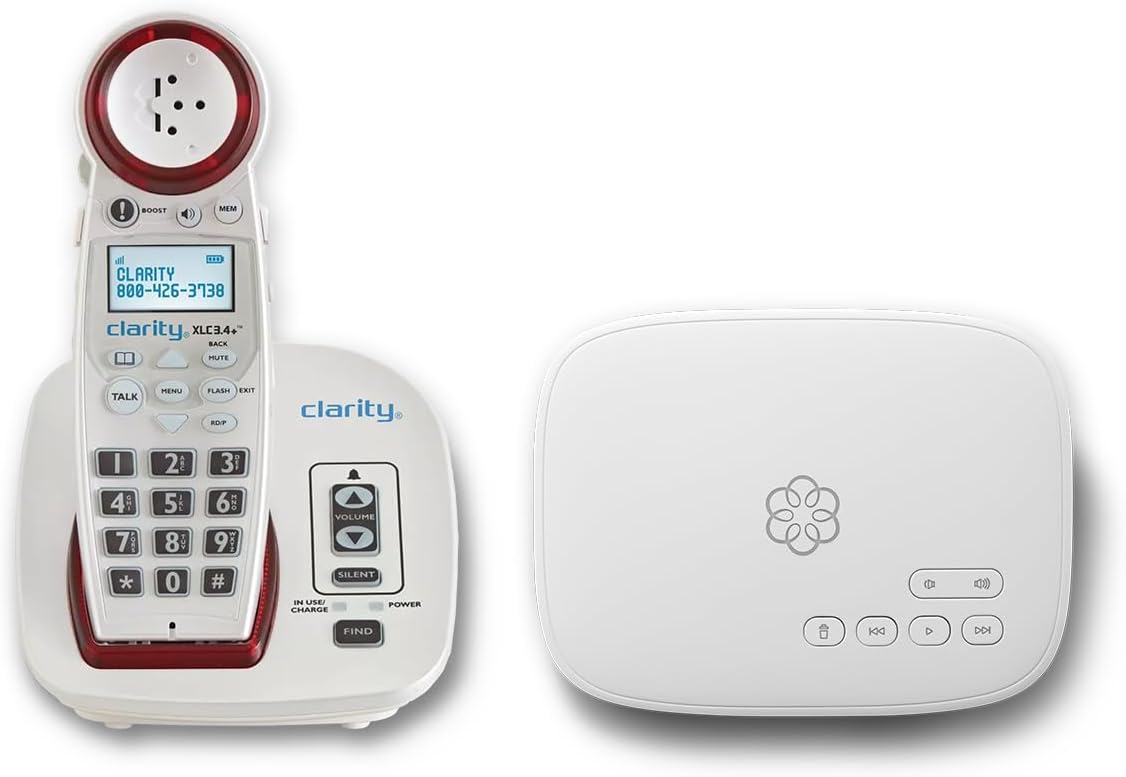
The Ooma Telo bundle delivers a premium experience with superior call clarity and extensive support features. Rated 4.5, it combines hardware and service to create a seamless communication solution for seniors.
We may earn a commission when you buy through this link, at no additional cost to you.
It supports unlimited calling across the US, Canada, and Mexico for a flat fee, making international contact affordable. The device is hearing aid compatible, allowing users to adjust speaker volume comfortably without interference.
Safety is enhanced through address-based 911 dispatch and text notifications to loved ones during emergencies. The built-in call blocking helps protect against scammers, ensuring users only receive calls from trusted contacts.
This option is best for households willing to invest in a full service package for maximum convenience. The concierge setup assistance ensures a smooth installation process, even for those unfamiliar with technology.
911 calls automatically send your address, and texts notify family members instantly if emergency is dialed.
White glove service includes personalized setup help and 24/7 access to US-based support professionals.
We may earn a commission when you buy through this link, at no additional cost to you.
This hybrid phone offers flexibility by combining a corded base for reliability with a cordless handset for mobility. With a 4.0 rating, it serves seniors who need both stationary and portable communication options.
We may earn a commission when you buy through this link, at no additional cost to you.
The 50dB audio assist and 90dB ringer ensure clear audio in various environments. Large high-contrast buttons and a backlit display make dialing and reading caller ID simple for those with low vision.
The answering machine supports slow playback, helping users catch details in messages. Photo speed dial slots allow quick access to loved ones, reducing the frustration of remembering numbers.
It is ideal for multi-device setups where family members may need individual handsets. The base unit continues working during outages, ensuring contact remains possible even when electricity is unavailable.
The corded base functions during blackouts, providing a reliable communication link when cordless power runs out.
Slow playback options and remote access help users review messages carefully without rushing through audio.
We may earn a commission when you buy through this link, at no additional cost to you.
This home telephone focuses on hands-free operation, allowing users to manage calls entirely through voice commands. While it lacks captions, its design supports those with severe vision or mobility impairments.
We may earn a commission when you buy through this link, at no additional cost to you.
By keeping the phone constantly listening, it eliminates the need to pick up a handset to activate dialing. Commands like 'dial' and 'hang-up' streamline the process for individuals with limited dexterity.
It connects directly to the home phone line, ensuring basic reliability without complex setup. The quality of audio is prioritized to ensure commands are recognized accurately in different environments.
This device is best for users who struggle with physical phone interfaces but have clear speech patterns. It represents a different approach to accessibility, focusing on voice rather than visual or tactile controls.
Eliminates the need to grasp or press buttons, making calling possible for those with hand mobility issues.
Continuous listening ensures the device responds instantly to voice commands without delay or preparation.
We may earn a commission when you buy through this link, at no additional cost to you.
This model provides a straightforward, reliable solution for elderly users needing large buttons and loud sound. With a 4.2 rating, it balances affordability with essential features like volume control and picture dialing.
We may earn a commission when you buy through this link, at no additional cost to you.
The adjustable volume reaches up to 40dB, helping those with moderate hearing loss hear conversations clearly. Picture buttons store favorite numbers, reducing cognitive load for users with memory issues.
Memory protection ensures stored contacts remain safe even if the phone line is temporarily disconnected. The wall-mountable design saves space and keeps the phone accessible at eye level.
It suits seniors who prefer a permanent location for their phone and do not need advanced digital features. The simplicity of operation makes it a dependable daily tool for staying connected with family.
Contact data persists through power loss or line disconnection, preventing accidental data loss.
Enhanced plastic pieces prevent slipping, ensuring the phone stays securely on desktop surfaces.
We may earn a commission when you buy through this link, at no additional cost to you.
This VoIP phone is specifically designed for environments like nursing homes and hospitals where digital setups are standard. Its perfect 5.0 rating reflects strong performance in audio clarity and ease of use.
We may earn a commission when you buy through this link, at no additional cost to you.
Customizable image keys allow families to insert photos for intuitive calling. The 110dB speakerphone volume ensures conversations are heard even in noisy communal areas.
A dedicated help key offers quick access to pre-programmed assistance, adding a layer of safety for users with special needs. The visual red light alerts users to calls when sound might be insufficient.
It is best suited for facilities or homes already using VoIP services. The secure mounting and simple interface make it a safe choice for individuals with dementia or mobility limitations.
Bright red lights alert users to incoming calls, aiding those with severe hearing loss in busy settings.
One-touch help key provides immediate connection to caregivers or emergency contacts when needed.
We may earn a commission when you buy through this link, at no additional cost to you.
Serene Innovations focuses on delivering high-quality audio through amplified traditional phone technology. With a 3.5 rating, it appeals to users who prioritize sound clarity over modern digital features.
We may earn a commission when you buy through this link, at no additional cost to you.
The design aims to reduce background noise and boost voice frequency to improve understanding during calls. It connects via standard lines, avoiding complex requirements for internet or digital services.
While it lacks advanced digital integration, its performance in basic voice transmission remains solid. Users appreciate the straightforward operation that avoids the confusion of menus or settings.
This option suits those who have used traditional phones for decades and need a louder version. It is a practical choice for simple, no-fuss communication where audio strength is the primary goal.
Amplification targets voice frequencies to make conversations more distinct and easier to follow.
Avoids digital complexity, ensuring reliable operation through standard telephone network connections.
We may earn a commission when you buy through this link, at no additional cost to you.
This model attempts to merge voice dialing with high volume and visual alerts. However, its low 2.1 rating suggests mixed experiences with reliability and usability in real-world scenarios.
We may earn a commission when you buy through this link, at no additional cost to you.
It stores up to 17 contacts via voice commands, which can be helpful for users who cannot type. The talking caller ID announces incoming names, aiding those who cannot read the display.
Despite its innovative features, users report challenges with setup accuracy and recognition. The voice prompts can be confusing for those unfamiliar with command structures, limiting ease of use.
It is best considered by users comfortable with advanced settings or tech troubleshooting. While it offers unique functionality, the trade-off in complexity may not suit all seniors seeking simplicity.
Users can save contacts by speaking names, reducing reliance on numeric keypads for storage.
LED indicators ensure users see incoming calls even when ringer volume is reduced or turned off.
We may earn a commission when you buy through this link, at no additional cost to you.
This landline phone offers a clean, distraction-free interface for seniors who prefer basic functions. With a 4.2 rating, it delivers reliable calling with hands-free options and loud audio for clear conversations.
We may earn a commission when you buy through this link, at no additional cost to you.
Nine photo memory keys allow quick access to family members, making calling intuitive for those with memory loss. The 110dB ringer ensures users notice calls even when away from the phone.
Hands-free calling reduces physical strain, enabling easier use for bedridden or mobility-limited individuals. Redial and flashback features provide simple error correction without navigating complex menus.
It is best for users who value dependability and ease of use over digital features. The absence of batteries and internet requirements ensures it works consistently as a primary home phone.
Storing family photos on keys makes connection instant, bypassing the need to memorize numbers.
No batteries mean fewer replacements, and the line powers the device continuously without interruption.
We may earn a commission when you buy through this link, at no additional cost to you.
Selecting the right captioned telephone involves understanding your specific hearing and accessibility needs. This guide outlines key factors to ensure the device you choose supports clear communication and ease of use.
Ensure the phone supports captioning services that are compatible with your location and internet connection. Most modern captioned phones rely on VoIP or high-speed internet to deliver real-time text during calls.
Check that the service is available in your state and that registration requirements are met before purchase.
Look for models with adjustable volume control that meets your hearing needs. Amplification should range from moderate to high decibels to ensure clarity in noisy environments.
High amplification is essential for users with significant hearing loss who need louder ringers and handsets.
Opt for phones with large, high-contrast displays if visual clarity is a priority. Captions should be easy to read without strain, especially for older eyes.
Touchscreen interfaces can offer easier navigation but may require more technical familiarity than physical buttons.
Consider whether picture dialing, speed dial, or voice commands best suits the user's memory capabilities. Simplified dialing processes reduce cognitive load and prevent frustration.
Large buttons and clear labeling help users with dexterity or vision challenges make calls independently.
Decide between traditional landline connections and internet-based VoIP setups based on your home infrastructure. Traditional lines offer reliability during power outages without batteries.
VoIP models provide more features but require stable internet and ongoing service subscriptions.
Visual alerts like flashing lights ensure users don't miss calls when volume is muted or in noisy settings. Some models also include emergency buttons or SMS alerts for added safety.
These features are critical for maintaining communication during emergencies or medical incidents.
Features like hearing aid compatibility and caller ID announcements enhance usability further. These tools bridge the gap between audio and visual information effectively.
Choose models that integrate these tools seamlessly without complicating daily operation or setup.
Evaluate the level of customer support provided by the manufacturer. Some brands offer white-glove setup and concierge help for installation.
Professional assistance can ease the burden of configuring complex captioning services for family members.
Start by placing the phone in a stable, easily reachable location near your usual seating area. Ensure the device is connected to the correct line or network depending on its model requirements.
Adjust the volume and caption size settings to match your personal comfort level before making your first call. This ensures that both audio and text are clear and easy to understand.
Regularly check for software or service updates if your model supports internet connections. Keep the surface clean and free of dust to maintain button responsiveness and display clarity.
Most captioned phones work with standard landline connections, though some models require internet access for captioning services. Ensure your line meets the technical specs needed for your chosen device.
Many captioning services for the hearing impaired are funded by government programs and are free to eligible users. However, some premium features may come with subscription fees.
Traditional corded phones continue working during outages if connected to a landline. Cordless and VoIP models typically need backup power sources to function during blackouts.
Registration is mandatory for accessing real-time captions. Contact your service provider to complete registration before expecting captions to appear on calls.
Many modern models are designed to be hearing aid compatible, allowing for seamless integration. Check for compatibility ratings when purchasing a new device.
Use a soft, dry cloth to wipe the surface and avoid liquids near buttons or ports. Regular dusting prevents buildup that could interfere with performance.
Amplified phones boost sound volume, while captioned phones add real-time text displays to conversations. Some models combine both features for comprehensive accessibility.
International calling depends on the service provider and your plan. Some services support international captioning but may have additional restrictions or fees.
The top models highlighted offer a range of features designed to enhance communication for those with hearing or vision impairments. Each phone balances affordability, ease of use, and technical capabilities to meet different needs.
Prioritize devices that offer reliable captioning support, clear audio amplification, and simple navigation. Consider your home's connectivity options and the user's specific physical limitations when making a selection.
Always verify current availability and service requirements before finalizing your choice. Regularly check for updates or service changes to ensure optimal performance over time.