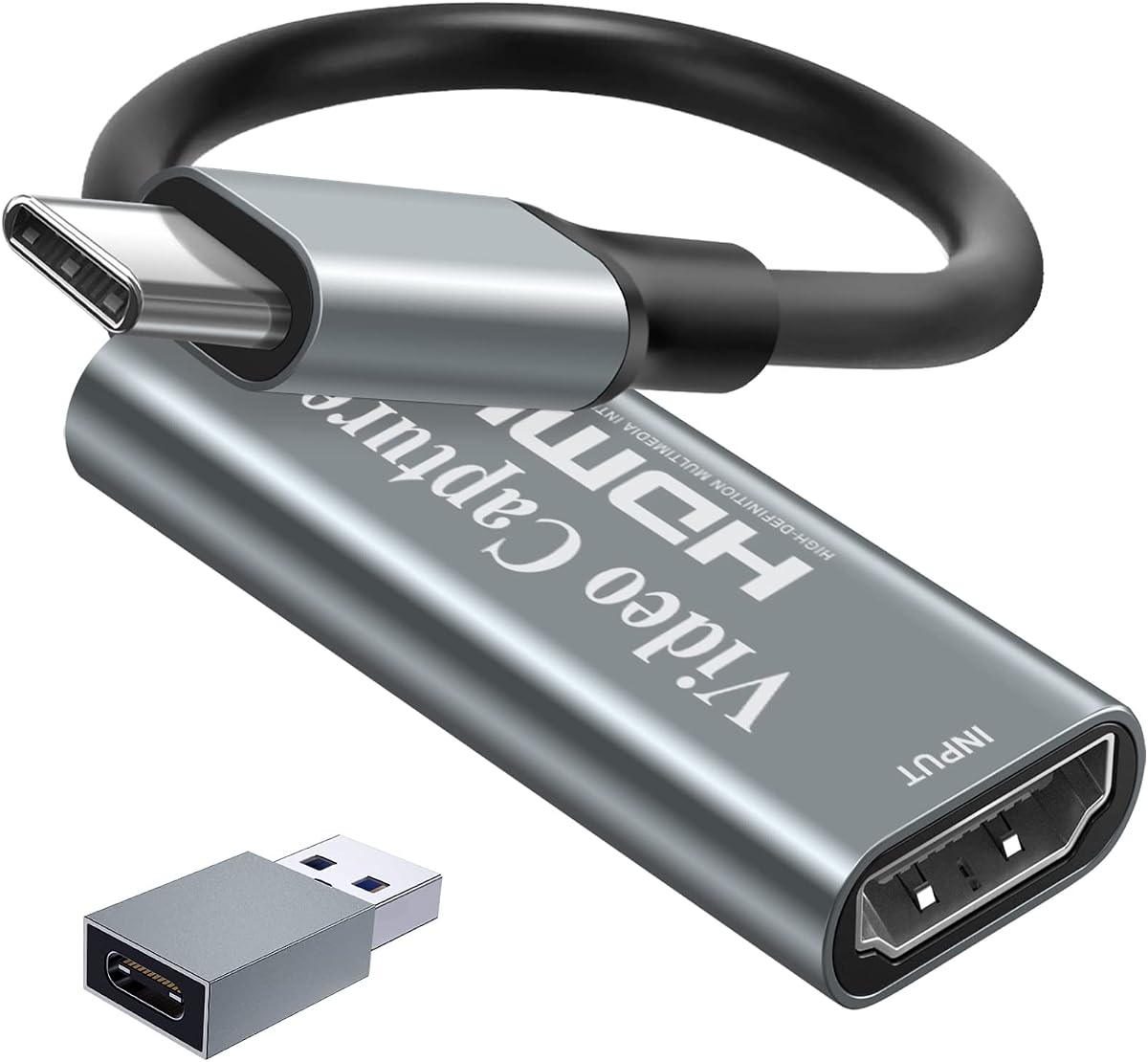
Papeaso Video Capture Card
4.2Editor score
Affordable Price
1080p 60FPS
Plug and Play
Discover the top capture cards for Linux systems, comparing compatibility, performance, and features to help you choose the right device for streaming and
Choosing the right capture card for Linux can be challenging due to varying driver support and hardware compatibility. This guide highlights devices that work seamlessly with open-source software like OBS Studio, ensuring smooth streaming and recording experiences for creators.
We evaluated ten top-rated capture cards based on their Linux compatibility, video quality, latency, and ease of use. Each product was selected for its ability to handle high-resolution inputs while maintaining stable performance on Linux distributions without requiring complex driver installations.
Each review details specific strengths and potential limitations to help you make an informed decision. Remember that pricing and availability can change frequently, so verify the latest details before purchasing to ensure you get the best value for your specific setup.
4.2Editor score

4.4Editor score

4.2Editor score
This table provides a side-by-side comparison of the top capture cards evaluated for Linux compatibility, video resolution support, and key features to help you quickly identify the best option for your workflow.






The acer USB 3.0 HDMI Capture Card offers a straightforward solution for Linux users looking to stream at 1080p 60Hz. With a 4.4 rating, it delivers reliable performance for basic gaming and video conferencing tasks.
We may earn a commission when you buy through this link, at no additional cost to you.
This device features YUY2 technology for richer colors and includes a mic-in port for direct commentary without extra adapters. It works seamlessly with OBS, YouTube, and other platforms via USB 3.0.
While it supports 4K input, capture is limited to 1080p. The compact design makes it portable, though the plastic build may feel less durable than aluminum alternatives.
Ideal for beginners needing a no-fuss capture card for Linux. If you need higher resolution, consider upgrading to a 4K capable model later.
No drivers are required; simply connect via USB 3.0 to your Linux system to begin capturing immediately.
Low latency tech ensures voice commentary stays synced with gameplay for professional-looking streams.
We may earn a commission when you buy through this link, at no additional cost to you.
UGREEN 4K@30Hz Loop Out HDMI Capture Card provides a robust middle ground with 2K 30fps capture and 4K input support. Its 4.4 rating reflects solid performance for streamers needing higher resolution than 1080p.
We may earn a commission when you buy through this link, at no additional cost to you.
This model includes both USB-A and USB-C interfaces for flexibility and an HDMI loop-out for real-time monitoring. The aluminum casing helps dissipate heat during extended use.
Note that PS5 requires HDCP to be off. While it supports Linux well, it does not work with Fire TV Stick which limits some smart TV usage.
Choose this for a balance of quality and compatibility. It handles major gaming consoles and works seamlessly with Linux-based recording software.
USB-A and Type-C ports ensure compatibility with various laptop and desktop configurations.
Aluminum casing protects internal components and improves heat dissipation for stability.
We may earn a commission when you buy through this link, at no additional cost to you.
Guermok Video Capture Card is designed for modern setups with its USB-C focus. It delivers 1080p 60fps and 2K 30fps options with a 4.4 rating for consistent streaming on Linux.
We may earn a commission when you buy through this link, at no additional cost to you.
The aluminum alloy casing ensures heat dissipation and low latency. It works with OBS and other capture software after a simple restart following audio setup.
Signal loss can occur if disconnected, requiring a reconnect. Ensure you use a USB 3.0 port for full resolution.
Best for users with USB-C laptops who need portability. It covers most consoles and cameras effectively.
Good quality aluminum alloy prevents overheating during long recording sessions.
Restart OBS after audio setup to ensure sound output functions correctly.
We may earn a commission when you buy through this link, at no additional cost to you.
Newhope USB 3.0 HDMI Capture Card focuses on simplicity with plug-and-play functionality. It offers 1080p 60fps capture and a 4K pass-through for gaming without delay.
We may earn a commission when you buy through this link, at no additional cost to you.
The mic-in port allows external commentary. It supports Linux, OBS, and major consoles like PS5 and Xbox Series X.
While effective for basic streaming, it lacks advanced features found in higher-end models. It is a practical choice for entry-level users.
Recommend for anyone needing a budget-friendly, functional capture card that integrates easily into Linux workflows.
Loop-out port allows gameplay on external display while capturing video simultaneously.
Direct microphone input simplifies voice recording during gaming sessions.
We may earn a commission when you buy through this link, at no additional cost to you.
Capture Card 4K HDMI Video Streaming is a lightweight device aimed at creators on the go. It records 1080p 60fps and supports 4K input for high-quality sources.
We may earn a commission when you buy through this link, at no additional cost to you.
Plug-and-play functionality simplifies setup on Linux systems. It works with Streamlabs and OBS for quick streaming.
The compact design fits easily in bags. However, it lacks advanced audio features found in larger models.
Choose this for casual streaming or travel setups. It offers solid performance for its size.
Lightweight design makes it easy to transport for LAN parties or events.
Plug into USB 3.0 to start capturing without any software installation.
We may earn a commission when you buy through this link, at no additional cost to you.
UGREEN 2K@30Hz 1080P 60FPS Video Capture Card is a top performer with a 4.5 rating. It balances 4K input with 2K output for high-quality post-production.
We may earn a commission when you buy through this link, at no additional cost to you.
The 5 Gbps USB 3.0 ensures low latency streaming. Aluminum casing protects against EMI and improves durability.
Ensure your HDMI source supports 2K. It works with major consoles but requires HDCP off for PS5.
Ideal for streamers wanting better than 1080p quality. It handles Linux environments effectively.
USB 3.0 technology ensures fast data transfer with minimal delay.
Aluminum alloy casing with tinned copper conductors enhances signal stability.
We may earn a commission when you buy through this link, at no additional cost to you.
4K HDMI Capture Card boasts a strong 4.6 rating and offers 1080p 60fps recording. It includes mic and headphone ports for real-time audio monitoring.
We may earn a commission when you buy through this link, at no additional cost to you.
Plug-and-play setup on Linux makes it beginner-friendly. It comes with cables and a user manual for easy start.
While not capturing 4K, the input support ensures signal quality. The 18-month warranty adds value.
Excellent for general streaming needs. A reliable choice for both casual and professional users.
Built-in headphone output allows checking audio levels while streaming.
18-month warranty provides peace of mind for long-term usage.
We may earn a commission when you buy through this link, at no additional cost to you.
AVerMedia Capture Card for Streaming offers professional features like 4K60 HDR passthrough. It records at 1080p60 while maintaining high-quality pass-through.
We may earn a commission when you buy through this link, at no additional cost to you.
Includes AVerMedia Streaming Center for easy management. Supports NV12, YUY2, and MJPEG formats for flexibility.
While priced higher, it suits serious streamers. Setup may take time to configure fully.
Recommended for those needing robust workflow tools. It delivers quality for demanding setups.
Play in stunning 4K60 HDR while recording in 1080p60 simultaneously.
Choose formats that match your editing or streaming workflow needs.
We may earn a commission when you buy through this link, at no additional cost to you.
Papeaso Video Capture Card stands out as the most affordable option with strong Linux support. It delivers 1080p 60fps capture with 4K input capabilities.
We may earn a commission when you buy through this link, at no additional cost to you.
No drivers are required for operation. It works with OBS, Twitch, and YouTube easily.
While build quality is simple, it functions reliably for entry-level use. Comes with a USB C adapter.
Perfect for budget-conscious creators needing a simple capture card that just works.
Lowest price point while maintaining essential 1080p 60fps performance.
No driver installations required for immediate use on Linux systems.
We may earn a commission when you buy through this link, at no additional cost to you.
AVerMedia Live Gamer Ultra S delivers premium performance with 4K60 capture and VRR passthrough. It captures 5.1 audio for immersive sound.
We may earn a commission when you buy through this link, at no additional cost to you.
Supports ultrawide and high-refresh recording. Requires Windows/macOS/iPadOS for full features.
Best for serious gamers and streamers needing top-tier specs. Setup uses Streaming Center.
Choose if budget allows for highest quality. It offers unmatched features for enthusiasts.
Record ultrawide formats like 3440×1440 for immersive gaming capture.
Capture full 5.1 channel audio for rich and immersive sound recording.
We may earn a commission when you buy through this link, at no additional cost to you.
Selecting a capture card for Linux involves checking software compatibility, resolution support, and connection types to ensure smooth operation with OBS and other tools.
Ensure the device uses UVC protocols or has open-source drivers. Many generic USB capture cards work via V4L2 or OBS plugin support.
Check reviews for specific Linux distribution success before purchasing.
Choose between 1080p 60Hz or 2K/4K based on your needs. Higher resolutions require more bandwidth.
Confirm output matches your streaming target to avoid upscaling issues.
USB 3.0 is standard for low latency. USB-C offers better portability on modern laptops.
Ensure your system has the necessary ports or adapters.
HDMI pass-through lets you play while capturing. Essential for console gaming without lag.
Verify 4K pass-through if using high-res displays.
Look for mic-in ports for commentary. Audio sync is critical for quality streams.
Some models offer 5.1 support for advanced setups.
Metal casings improve heat dissipation. Overheating can cause signal loss.
Sturdy construction ensures longevity during long sessions.
Entry-level cards suffice for 1080p. Premium options offer 4K and advanced features.
Balance cost against your specific streaming needs.
OBS Studio is the standard on Linux. Check for plugin or direct device support.
Avoid models requiring proprietary software not available on Linux.
Connect the capture card via USB 3.0 and ensure your HDMI source is powered on. Open OBS Studio or your preferred capture software and select the device from the input list.
Adjust your audio and video settings to match your desired resolution. Test a short recording to verify sync before going live to avoid issues.
Keep your USB ports clean and avoid frequent plugging/unplugging to prevent physical damage. Ensure adequate airflow around the device to prevent overheating.
Most capture cards in this list work on Ubuntu via UVC protocols. Verify specific model compatibility with OBS before purchasing to avoid driver issues.
Only premium models support 4K capture on Linux. Entry-level options typically max at 1080p due to bandwidth constraints.
No, most are plug-and-play using standard UVC protocols. This simplifies setup on most Linux systems.
PS5 works if HDCP is disabled in settings. Some models specifically list console support in their specs.
USB 3.0 is required for 1080p 60fps. USB 2.0 may cause lag or limit resolution.
Yes, these cards work with Zoom and similar apps to capture external video feeds. Ensure the app recognizes the USB device.
The top picks for Linux capture cards offer a range of options from budget-friendly 1080p devices to premium 4K models with advanced features.
Prioritize compatibility with your Linux distribution and software like OBS to ensure a smooth streaming experience without unnecessary troubleshooting.
Prices and availability change frequently, so verify the current details and specifications before finalizing your purchase decision.