
Canon PIXMA TR4720
3.8Editor score
Compact wireless design
Built-in fax capability
Auto document feeder
Compare the top cheap fax machines for home and office use. We review features, reliability, and value across ten affordable models to help you choose.
Finding a cheap fax machine does not mean sacrificing essential functionality for your home office or small business needs. We have analyzed current models to ensure you get reliable performance without overspending on outdated technology or unnecessary features.
Our team compared ten distinct fax machines based on transmission speed, memory capacity, paper handling, and overall user satisfaction ratings. This list includes dedicated fax units and multifunction printers that offer fax capabilities at competitive price points for various budgets.
Each pick below highlights key strengths and potential limitations so you can make an informed decision quickly. Please note that prices fluctuate frequently on Amazon and other retailers so check current listings before finalizing your purchase today.
3.8Editor score

4.0Editor score
4.0Editor score
This side-by-side comparison outlines the core specifications and capabilities of each model to help you identify the best fit for your specific faxing requirements.




The Brother FAX-575 stands out as a reliable option for those seeking a dedicated fax machine without modern frills. With a strong rating from users, this model proves its worth through consistent performance and straightforward operation suitable for home offices.
We may earn a commission when you buy through this link, at no additional cost to you.
Its 9,600 BPS modem ensures that pages transmit quickly at about fifteen seconds per page, which saves time during busy workflows. The 512 KB memory stores up to twenty-five pages so you can send documents even if the paper runs out temporarily.
While it lacks wireless connectivity which might be a downside for tech-savvy users the simplicity is often a benefit for those who just want faxing to work. The fifty-sheet paper capacity reduces the frequency of refills making it convenient for moderate volume needs.
This machine is ideal for small businesses or home users who need a sturdy fax solution that does not require complex setup. It balances cost and functionality well making it our top recommendation for a cheap fax machine that delivers on core tasks.
The 512 KB memory allows users to store up to twenty-five pages ensuring you never lose important documents if paper runs out during transmission.
With a modem speed of 9,600 BPS pages are sent in roughly fifteen seconds which minimizes wait times and improves overall productivity in daily workflows.
We may earn a commission when you buy through this link, at no additional cost to you.
This renewed version of the Brother FAX-575 offers the same essential features as the new model but at a reduced cost. It is a great choice for budget-conscious buyers who understand the benefits and potential drawbacks of refurbished electronics.
We may earn a commission when you buy through this link, at no additional cost to you.
Users can expect the same transmission speed and memory capacity as the original model which means no compromise on functionality. The black-and-white copying resolution ensures clear documents which is crucial for professional communications in any business environment.
The main trade-off is the condition of the unit which may vary depending on the refurbisher. However for many this is an acceptable risk given the significant savings compared to buying a brand new dedicated fax machine from a retailer.
We recommend this option for users who need a fax machine immediately and want to minimize upfront spending. It provides a practical bridge between high-end modern printers and basic fax needs without breaking the bank.
Buying a renewed unit allows you to access premium features like 512 KB memory and fast transmission at a fraction of the original retail price.
The specifications match the new model exactly ensuring you get the same 9,600 BPS modem speed and 50-sheet paper capacity without extra costs.
We may earn a commission when you buy through this link, at no additional cost to you.
The Sharp UXB20 is an inkjet fax machine that stands out for its generous memory capacity and speed dial features. It allows users to store up to twenty-four pages when paper runs out which is a rare feature in this price range.
We may earn a commission when you buy through this link, at no additional cost to you.
Its 30 speed dial presets make it easy to frequently send faxes to the same contacts saving time and effort for small offices. The caller ID readiness helps you screen incoming communications which adds a layer of convenience to daily operations.
While the rating is lower than competitors it still offers solid functionality for those who prioritize memory and speed over sleek design. The multi-copy function allows up to ninety-nine copies which is useful for distributing documents quickly.
This model is best for users who need a dedicated fax machine with strong storage capabilities without paying for modern wireless features. It is a practical workhorse for environments where consistent faxing is more important than cutting-edge connectivity.
With 449 KB of memory this unit can store up to twenty-four pages ensuring you can transmit documents even when the paper tray is empty.
Thirty speed dial presets let you store frequent numbers for instant access reducing the time needed to send faxes to regular contacts.
We may earn a commission when you buy through this link, at no additional cost to you.
The HP DeskJet 2955 is an affordable all-in-one printer that includes fax capabilities via mobile apps and scan-to-fax features. Its compact design fits easily into small home offices while providing essential printing and scanning functions alongside basic fax needs.
We may earn a commission when you buy through this link, at no additional cost to you.
Wireless connectivity allows you to print and scan from your smartphone which adds a layer of modern convenience missing from older fax machines. The HP AI features help optimize print formatting to ensure your documents look professional without wasting paper on layout issues.
While it does not have a dedicated fax line it supports faxing through digital workflows which is often sufficient for low-volume users. The 60-sheet input tray means you do not need to reload paper constantly for small jobs or occasional fax tasks.
This device is perfect for home users who want an all-in-one solution without spending a fortune on a dedicated fax unit. It balances cost and versatility well making it a strong contender for those who only fax occasionally but need daily printing.
HP AI technology optimizes print formatting automatically so your documents look clean and professional without manual adjustments or wasted pages.
Dual-band Wi-Fi ensures reliable connections allowing you to send and receive documents from mobile devices seamlessly without cables.
We may earn a commission when you buy through this link, at no additional cost to you.
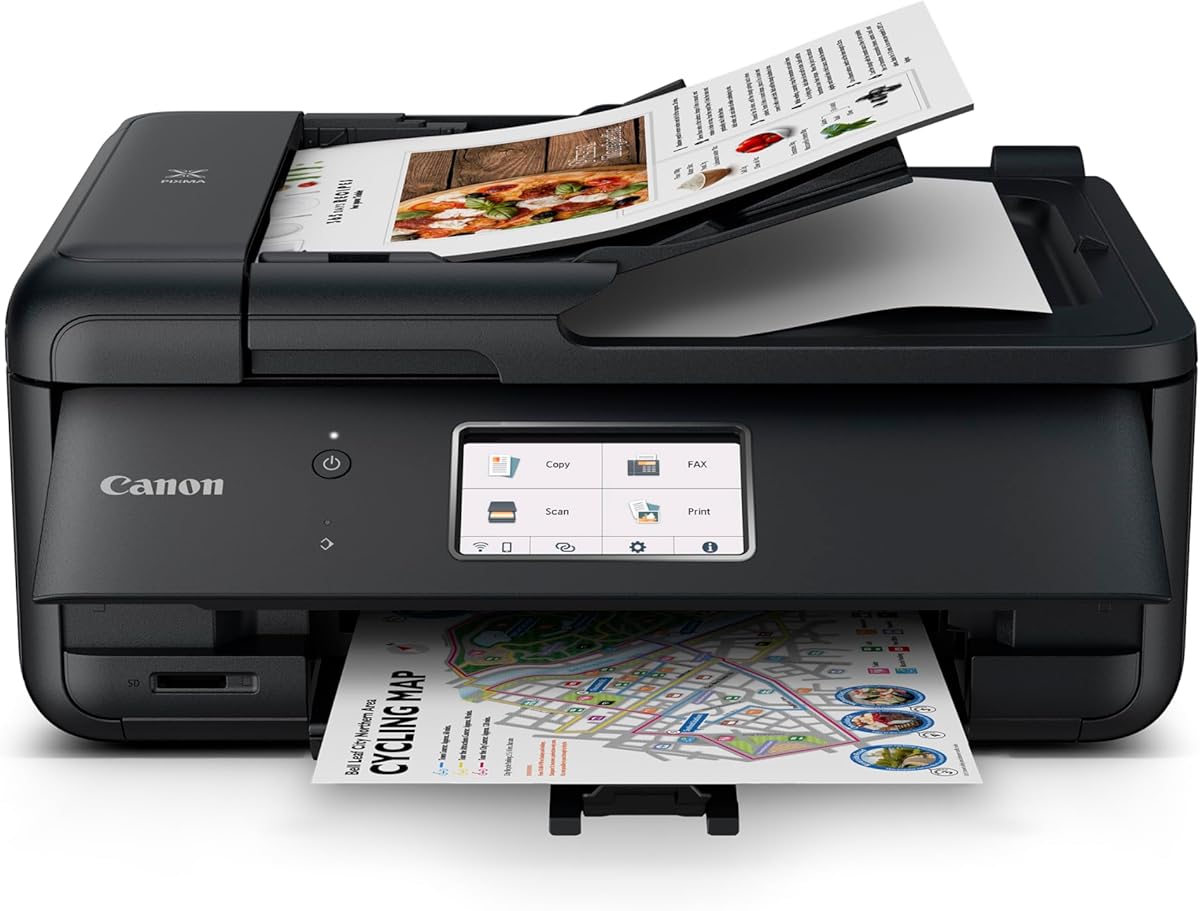
The Canon PIXMA TR4720 is a true four-in-one printer that includes built-in fax capabilities making it a versatile choice for home offices. Its compact design saves space while still offering an auto document feeder which simplifies multi-page fax transmission.
We may earn a commission when you buy through this link, at no additional cost to you.
Wireless connectivity and the Canon PRINT app make it easy to manage tasks from a smartphone which is helpful for modern workflows. The 100-sheet paper capacity ensures you have enough paper for several jobs without constant refilling or interruptions.
While it may not have the highest print speeds it offers a balance of features that justify its price point for average users. The quality of documents and photos is suitable for both office use and personal printing needs in a small setting.
This model is ideal for those who want a dedicated fax function within an all-in-one unit without sacrificing too much space. It is a reliable everyday machine that handles faxing and printing with ease for small home businesses.
Unlike scan-to-fax apps this unit has built-in fax functionality ensuring you can send documents directly over phone lines without extra software steps.
The included auto document feeder allows you to scan and fax multiple pages at once saving significant time during busy workdays.
We may earn a commission when you buy through this link, at no additional cost to you.
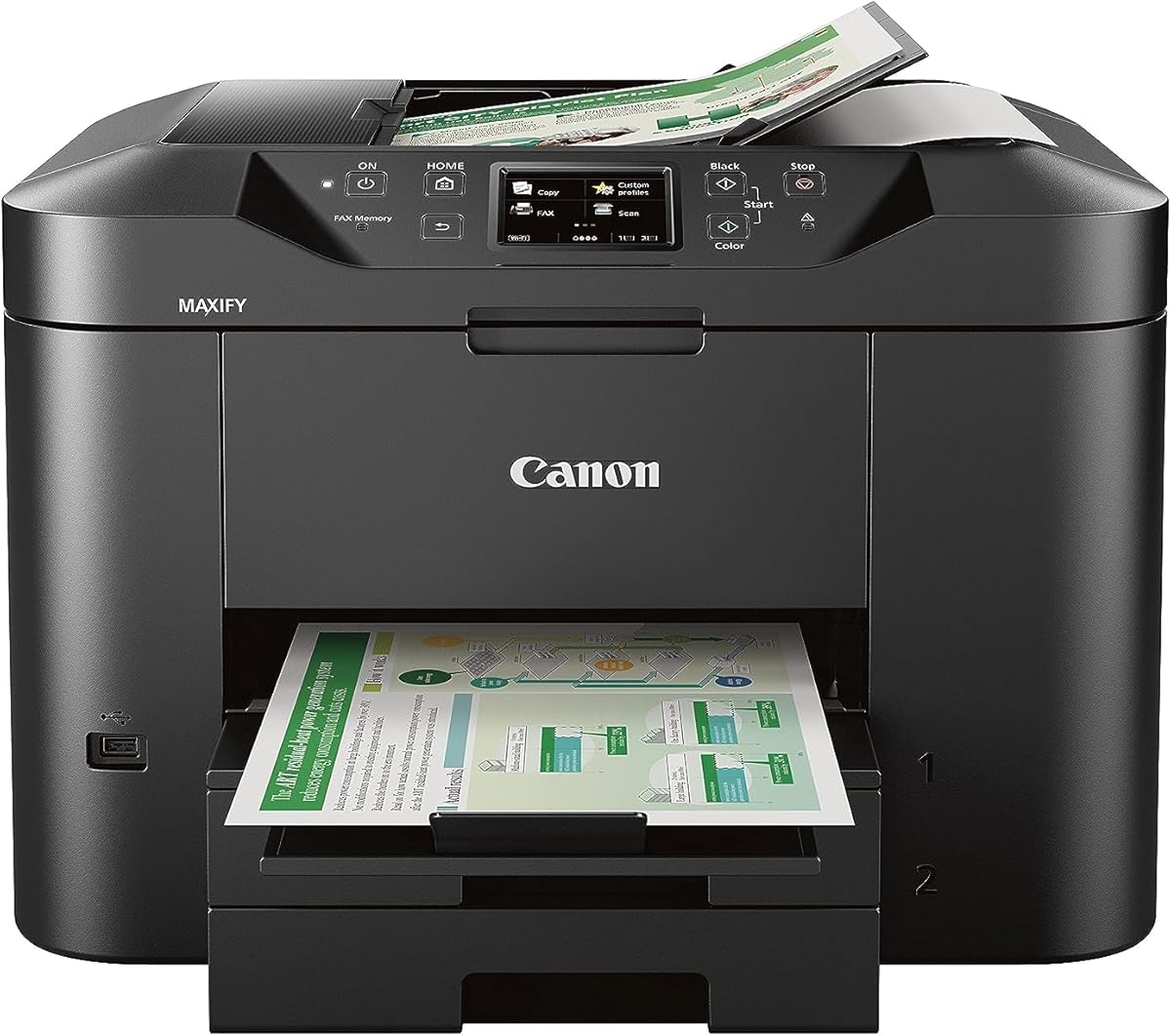
The Canon MAXIFY MB2720 is designed for small businesses that need a reliable printer with fax capabilities for high-volume tasks. Its massive 500-sheet paper capacity ensures you rarely need to reload paper even during busy days with multiple users.
We may earn a commission when you buy through this link, at no additional cost to you.
With a 20,000 page duty cycle this printer is built to withstand heavy use without faltering making it a long-term investment for growing offices. The laser-sharp text is resistant to highlighters and smudges which is essential for professional documents and contracts.
While it is more expensive than basic fax machines the efficiency and speed it offers can save money and time in the long run. The dual resistant high density inks ensure that your printed materials maintain their quality over time without fading quickly.
This model is best for businesses that require consistent faxing and printing without downtime. It offers a professional-grade experience that justifies its higher price through durability and high-volume capacity for serious work environments.
With a 20,000 page duty cycle this printer handles high volume loads effortlessly ensuring consistent performance for demanding office workflows.
The Dual Resistant High Density Inks ensure text remains crisp and does not smudge when handled or highlighted for important business documents.
We may earn a commission when you buy through this link, at no additional cost to you.
The Canon PIXMA TR8620a is a premium all-in-one printer that combines faxing with high-quality photo printing and voice assistant support. Its integration with Alexa allows you to receive low ink notifications and even place smart orders directly from your voice commands.
We may earn a commission when you buy through this link, at no additional cost to you.
With print speeds of up to fifteen pages per minute for black documents it keeps up with busy workflows without significant waiting times. The 200-sheet capacity and auto two-sided printing reduce manual intervention and paper waste significantly for everyday document printing.
While it is a premium product the features justify the cost for users who want the best performance in a compact package. The micro SD slot allows for direct printing from memory cards which is handy for photo projects alongside standard document faxing.
This machine is ideal for home offices that need high-end performance including faxing without needing a separate dedicated fax machine. It offers a comprehensive solution for printing scanning copying and faxing with added convenience from voice technology and automation.
Alexa integration lets you print and check ink levels with simple voice commands making daily tasks faster and more convenient for busy users.
Smart reorders ensure you never run out of ink by automatically placing orders when supplies run low without requiring subscription fees.
We may earn a commission when you buy through this link, at no additional cost to you.
The Brother IntelliFAX-2840 is a dedicated laser fax machine that delivers fast and sharp text for professional document transmission. Its 21 ppm speed ensures that pages are ready quickly which is ideal for offices that need to send multiple faxes in a row.
We may earn a commission when you buy through this link, at no additional cost to you.
Laser technology produces output that is smudge resistant and consistent which is superior to inkjet for text-only documents. The 200 x 300 dpi resolution provides enough clarity for legible text and basic graphics without the complexity of color printing.
While it lacks color capabilities this focus on black and white laser output keeps the machine simple and cost-effective for faxing. The dedicated nature means fewer potential failure points compared to multifunction units that handle too many tasks.
This unit is best for users who prioritize speed and clarity for text documents over color capabilities. It is a robust choice for business environments where clear faxed contracts and letters are essential for daily operations.
With a speed of 21 pages per minute this machine processes documents quickly ensuring efficient workflows during busy periods.
Laser technology provides crisp smudge-resistant text that is ideal for professional documents and contracts needing high legibility.
We may earn a commission when you buy through this link, at no additional cost to you.
The Brother IntelliFax 575 Thermal is a renewed unit that offers basic faxing capabilities with energy-efficient features. It uses thermal transfer technology which keeps operating costs low and is perfect for low-volume faxing needs in small offices.
We may earn a commission when you buy through this link, at no additional cost to you.
With 512 KB of memory it can store up to twenty-five pages ensuring reliable transmission even if paper runs out mid-job. The Energy Star rating means it consumes less power which is beneficial for reducing utility bills over time.
Thermal fax machines are generally cheaper but may produce prints that fade over time compared to laser or inkjet options. However for internal documents or receipts this is often a minor issue that does not impact daily business operations significantly.
This model is suitable for users who need a simple affordable fax machine without worrying about high maintenance costs. It is a practical solution for environments where occasional faxing is required and long-term print preservation is not critical.
The Energy Star certification ensures the machine uses minimal power during operation reducing electricity usage and operating costs.
512 KB of memory allows storing up to twenty-five pages ensuring continuous operation even when paper trays need refilling.
We may earn a commission when you buy through this link, at no additional cost to you.
The Panasonic KX-FHD331 is a plain paper fax machine that integrates with answering machines for a complete communication setup. Using plain paper allows you to file documents easily without needing special thermal rolls or expensive ink cartridges for daily tasks.
We may earn a commission when you buy through this link, at no additional cost to you.
Caller ID compatibility helps you identify incoming calls before answering which adds a layer of security and convenience. The 9.6 Kbps modem speed is standard for older fax machines ensuring compatibility with most phone lines without technical issues.
While the rating is lower than newer models it remains a functional choice for users who prioritize simplicity and standard paper. The answering machine interface allows you to manage voice and fax calls from a single unit reducing desk clutter.
This unit is best for basic home office needs where traditional faxing is required without complex features. It offers a straightforward way to handle faxes and calls with a design that fits unobtrusively into small workspaces.
Using standard plain paper means you can easily file and store documents without needing special supplies or handling delicate thermal paper.
The built-in caller ID helps you screen incoming calls ensuring you only answer important communications while maintaining privacy.
We may earn a commission when you buy through this link, at no additional cost to you.
Selecting the right cheap fax machine involves understanding key technical specifications and features that match your specific needs.
Transmission speed is measured in bits per second BPS and determines how quickly pages are sent. A standard 9,600 BPS modem will transmit a page in roughly fifteen seconds which is efficient for most users.
Look for higher BPS ratings if you send many faxes daily to avoid waiting around the machine during busy workflows.
Memory allows you to store documents in the device even if the paper runs out or the recipient line is busy. This feature prevents lost documents and ensures your data is not wasted due to temporary issues.
Choose a model with at least 512 KB of memory which can hold around twenty-five pages for reliable operation.
The number of sheets the machine can hold at once affects how often you need to refill the paper tray. Higher capacity means less frequent maintenance and better productivity during high-volume tasks.
Aim for machines with at least fifty to one hundred sheet capacity to reduce the need for constant refilling.
Laser fax machines produce sharper text and are more durable for high volumes while thermal machines are cheaper but use special paper. Inkjet options are often part of multifunction units that add printing and scanning capabilities.
Choose laser for text-heavy businesses and thermal or inkjet for budget-friendly or low-volume home office scenarios.
Modern all-in-one printers offer faxing over the phone line but some allow digital sending via apps or email. This can be more flexible than traditional fax lines especially if you work remotely.
If you need wireless faxing check for scan-to-email or mobile app support in addition to standard dial-up connectivity.
The duty cycle indicates how many pages the printer is designed to handle monthly without overheating or breaking down. A higher cycle means the machine is built for heavy daily use.
For business environments choose a unit with a duty cycle of at least 10,000 pages per month to ensure longevity.
A simple control panel with clear buttons makes operating the fax machine easier for everyone in the office. Complex menus can lead to errors and wasted paper during transmission.
Look for straightforward interfaces with large displays and intuitive navigation to streamline daily tasks.
A good warranty ensures that you are covered if the device fails shortly after purchase. Manufacturer support is crucial for troubleshooting technical issues with older fax hardware.
Prioritize brands with strong reputations for customer service and offer at least a one-year warranty on their products.
Place the machine on a stable surface away from direct sunlight and moisture to maintain optimal performance and prevent overheating during operation.
Regularly clean the glass scanner and rollers with a soft dry cloth to remove dust and prevent smudges on your documents and faxes.
Load paper correctly ensuring the tray is adjusted to the paper size to prevent jams which can damage the internal mechanisms over time.
Fax machines remain relevant for industries that require legal confirmation of transmitted documents or have regulatory compliance needs. While digital alternatives exist fax provides a secure line of communication that many businesses still rely on for contracts and official records.
Thermal fax machines require special thermal paper which can be costly and fade over time. Laser and inkjet fax machines use standard plain paper which is more convenient and easier to file for regular business use.
Yes, many modern all-in-one printers allow you to send faxes through mobile apps or scan-to-fax features. However, traditional dedicated fax machines usually require a physical phone line connection for transmission.
Memory capacity allows the machine to store documents if the paper tray runs out or the receiving line is busy. This ensures that important documents are not lost and are sent automatically once the issue is resolved.
A standard 9,600 BPS modem typically takes about fifteen to twenty seconds to transmit a single page. Faster modems can reduce this time but the difference is often negligible for low-volume users.
Refurbished fax machines can be reliable if they come with a warranty from a reputable seller. They offer significant savings but you should check the condition and ensure all components are tested before purchase.
Many fax machines struggle with VoIP phone systems due to signal compatibility issues. For reliable faxing with VoIP, check if your model supports T.38 protocols or use a digital fax service instead.
Regular maintenance involves cleaning the scanner glass, checking paper rollers, and ensuring the software firmware is updated. Keeping the unit dust-free also extends its lifespan and improves transmission quality.
We have reviewed ten top options ranging from dedicated fax units to multifunction printers that offer reliable communication tools for various budgets and needs.
When choosing prioritize memory capacity and transmission speed to ensure your documents are sent quickly and safely without technical issues or delays.
Always verify the current price and warranty details on Amazon before purchasing since offers change frequently and stock availability varies by region.