
RDS – Licensed Nintendo Action Grip NES Classic Controller
4.5Editor score
Licensed Nintendo accessory
Textured silicone material
Comfortable grip design
This guide compares the top Classic Nes Controller Replacement options for retro gaming on PC and consoles to help you find the best fit for your setup.
Finding the right Classic Nes Controller Replacement can transform your retro gaming experience significantly. Whether you need durability, longer cables, or wireless options, choosing the right controller ensures comfort during long sessions.
We evaluated ten top-rated replacements based on build quality, compatibility, and user feedback. Each product was assessed for button responsiveness, cable length, and overall value to provide an accurate comparison for buyers today.
Each pick highlights specific strengths and potential weaknesses found in real-world usage. Prices and availability fluctuate frequently, so verify current details before purchasing to ensure you get the best deal available now.
4.5Editor score

3.7Editor score

4.8Editor score
This table provides a side-by-side view of key specifications for every product reviewed. Use it to quickly identify which controller meets your specific connection and comfort needs for classic gaming setups.


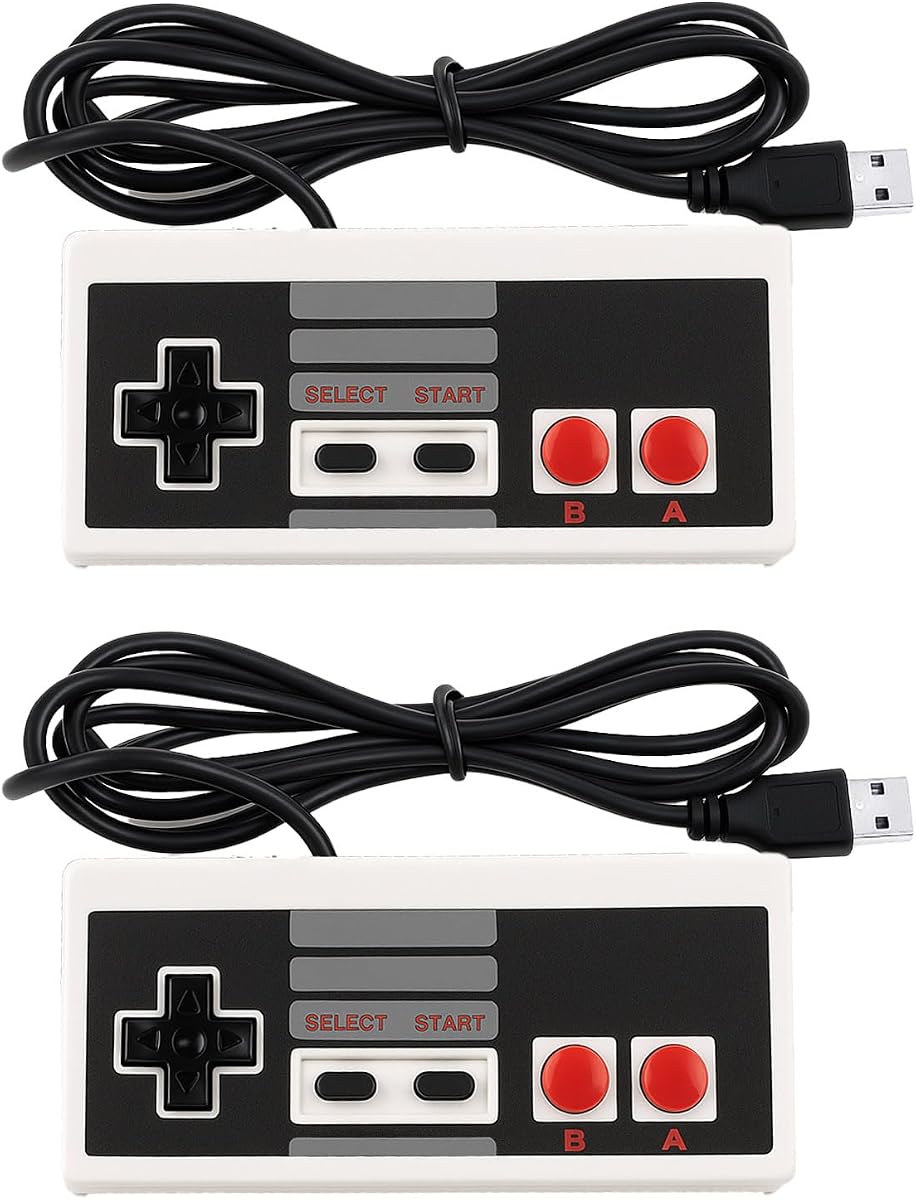


The NGHTMRE controller offers a unique solution for modern retro gaming setups requiring distance. With a massive 10ft cable, it allows players to sit comfortably away from screens. This product scores well for those prioritizing physical setup flexibility over compact design.
We may earn a commission when you buy through this link, at no additional cost to you.
Its sensitive buttons aim to replicate authentic retro feel without input delay. The inclusion of two controllers makes it ideal for multiplayer sessions immediately. Compatibility is strictly for the 2016 HDMI model, ensuring proper fit for modern consoles.
While the cable length is a standout feature, user feedback suggests some inconsistency in button response. This is a trade-off for the extended reach provided. It remains a solid choice for casual players who value seating distance.
Ideal for families or gamers who need room to spread out during play. The pack ensures you have enough controllers for two players without extra purchases. Verify your console model before buying to ensure compatibility.
The 10ft cable allows sitting back from the screen, reducing eye strain during long sessions.
Two controllers in one pack let you start playing immediately with a friend or family member.
We may earn a commission when you buy through this link, at no additional cost to you.
ZAMPAM wireless controllers bring freedom from cables for PC retro gaming enthusiasts. With 2.4GHz technology, they offer stable connections up to 10 meters away. The rechargeable battery supports long play times without constant replacements.
We may earn a commission when you buy through this link, at no additional cost to you.
The turbo function allows rapid firing which enhances gameplay in arcade titles. However, these do not work with Nintendo consoles like NES Classic Mini, limiting scope to PC users. Configuration software may be needed for full key mapping.
Battery life is impressive, lasting around 100 hours on a single charge. This reduces hassle compared to disposable batteries. Users should note the specific compatibility warnings to avoid returns if they own a Nintendo console.
Best for users who primarily game on PC and want a wireless setup. The turbo feature adds value for action games. Ensure you download necessary software before expecting full functionality.
Wireless range extends up to 10 meters, giving you freedom to move around your room.
Rechargeable lithium ion battery provides approximately 100 hours of continuous use.
We may earn a commission when you buy through this link, at no additional cost to you.
XYAB offers a straightforward USB controller designed for modern operating systems. It aims to provide a classic feel without driver installation. The design prioritizes comfort with ergonomic shaping for extended use.
We may earn a commission when you buy through this link, at no additional cost to you.
While it lists broad compatibility, the low rating suggests potential issues in real-world performance. It connects via USB for PC and Mac systems instantly. However, quality control might be inconsistent compared to higher-rated rivals.
The 6-foot cable offers decent flexibility for desk use. It is built with materials intended to last, but durability claims vary by user. This option suits those needing a basic controller for emulation on computers.
Consider this if you want a cheap alternative with classic styling. The low rating warrants caution. Verify return policies before purchase to mitigate risk of defects.
No drivers are needed; simply plug it into your computer to start gaming immediately.
Ergonomic shaping ensures the controller fits well in your hands during long sessions.
We may earn a commission when you buy through this link, at no additional cost to you.
happymaxplus controllers are designed for specific retro clone consoles using 9-pin ports. They offer high reliability with strong user feedback ratings. The continuous fire button enhances gameplay for action titles requiring rapid inputs.
We may earn a commission when you buy through this link, at no additional cost to you.
These controllers work seamlessly with models like AV 620 and HD 821 without complex setup. The pack includes two units, perfect for multiplayer gaming right away. Build quality is noted as sturdy for daily use.
While highly rated, they are not universal USB controllers for PC. You must confirm your console type before buying. The 9-pin design limits their use to specific retro hardware ecosystems.
Best for owners of specific retro clone consoles needing replacements. The high rating reflects consistent quality. Ensure your console uses a 9-pin port for compatibility.
The continuous fire button gives you an edge in games requiring fast repeated inputs.
Two controllers are included in the pack for sharing games with friends or family.
We may earn a commission when you buy through this link, at no additional cost to you.
ZENANBiBi controllers are tailored for emulation enthusiasts using diverse operating systems. They support RetroPie and Raspberry Pi setups effectively. The 5.6ft cable provides enough slack for comfortable desk positioning.
We may earn a commission when you buy through this link, at no additional cost to you.
These controllers connect directly without drivers across Windows, Mac, and Linux. This versatility makes them valuable for home theater PC setups. However, they are not compatible with official Nintendo hardware like Switch or Wii.
The two-pack allows immediate multiplayer gaming. Users appreciate the classic feel that mimics original designs. While ratings are decent, some users may find the build less robust than premium brands.
Ideal for those running emulation software on various devices. The versatility is a major plus. Confirm your platform is supported before purchasing to ensure a smooth experience.
Compatible with Windows, Mac, Linux, and RetroPie for flexible use across devices.
Includes two controllers to enable cooperative or competitive play immediately.
We may earn a commission when you buy through this link, at no additional cost to you.
MAYFLASH adapters allow you to use various controllers on specific consoles. It supports both NES and SNES controllers on the Wii U or Wii. The adapter features built-in turbo functionality for added versatility.
We may earn a commission when you buy through this link, at no additional cost to you.
Installation is straightforward as it requires no additional software. Users can swap D pads and sticks for personalized setups. This flexibility is great for collectors with many legacy controllers.
While effective, it acts as an intermediary device rather than a direct controller replacement. It depends on having compatible console ports. Ensure your system matches the supported list before buying.
Best for users wanting to integrate older controllers into modern consoles. The adapter bridges the gap between generations. Check your console model to confirm support.
Supports both NES and SNES controllers to expand your gaming options.
Integrated turbo function enhances gameplay in action games requiring rapid inputs.
We may earn a commission when you buy through this link, at no additional cost to you.
eXtremeRate offers a unique housing to modify Nintendo Switch Joycons. It transforms the look with a retro NES aesthetic while maintaining modern functionality. This is not a standalone controller but a replacement shell.
We may earn a commission when you buy through this link, at no additional cost to you.
The package includes full buttons and tools for installation. Users report good grip and comfort due to the soft touch material. However, installing it requires moderate technical skill and precision.
This option is for those who want customization without buying new consoles. The design improves usability for D-pad intensive games. Expect to spend time on assembly and configuration.
Best for Switch owners seeking visual upgrades. It offers a distinct look. Ensure you have the tools and patience for installation.
Brings a classic 80s style to modern Switch controllers for a unique look.
Ergonomic D-pad design improves control during games that require precise movements.
We may earn a commission when you buy through this link, at no additional cost to you.
This bundle offers essentials for setting up a console quickly. It includes a controller, power supply, and extension cables. This makes it convenient for those missing original components.
We may earn a commission when you buy through this link, at no additional cost to you.
While it covers multiple needs, user ratings suggest reliability issues. The controller component may not meet expectations for durability. It is a basic solution for getting started rather than a premium choice.
The 6ft cables help manage wire length but are not extremely long. It serves as a replacement for lost parts. Verify the specific contents before purchase as bundles vary.
Best for restoring a console with missing parts. Ensure you check current quality reviews. It is a functional but average option compared to standalone controllers.
Combines controller and power supply for a complete setup experience.
We may earn a commission when you buy through this link, at no additional cost to you.
RDS provides an officially licensed grip for the Classic Controller. It enhances comfort with textured silicone for better control. This option is ideal for those wanting quality assurance.
We may earn a commission when you buy through this link, at no additional cost to you.
The high rating reflects consistent user satisfaction with its durability. It fits seamlessly without setup. The grip adds precision to gameplay without altering internal mechanisms.
While only one unit is included, the quality offsets the single count. It is an add-on rather than a full replacement controller. Verify compatibility with your specific controller model.
Best for players needing extra comfort on existing hardware. The licensed status ensures fit. Check current stock availability as it may vary.
As a licensed product it guarantees compatibility and quality standards.
We may earn a commission when you buy through this link, at no additional cost to you.
KIWITATA delivers a value pack of two USB controllers for PC systems. They feature a frosted finish that prevents slipping. The package is well-rated for general emulation use.
We may earn a commission when you buy through this link, at no additional cost to you.
Design prioritizes comfort with contours fitting hands well. They work on Windows and Mac systems via standard USB. You must map buttons manually within emulators for specific games.
This is a solid choice for home PC setups needing multiple units. The anti-sweat surface helps during intense sessions. Verify your emulator settings to ensure proper key mapping.
Best for PC users running emulators who need two players. The design is ergonomic and functional. Manual configuration is required but straightforward.
Frosted concave design ensures the controller stays dry and secure in your hands.
Two controllers in the box allow for immediate multiplayer gaming sessions.
We may earn a commission when you buy through this link, at no additional cost to you.
Selecting the right replacement involves considering connection type, cable length, and compatibility. This guide breaks down key factors to help you find the perfect match.
Most replacements use USB for PC or proprietary plugs for consoles. Ensure your target device supports the connection method. Wired options offer reliability while wireless provides freedom of movement.
Check your console or PC ports before buying to avoid incompatibility issues.
Cable length determines your seating distance. Longer cables like 10ft allow sitting back for comfort, while shorter ones fit desks better. Consider your room layout.
Aim for a length that reduces strain without creating clutter.
Some controllers work only with specific models like the 2016 Mini. Others support general PC emulators. Verify your console model matches the product description.
Compatibility lists are critical for ensuring the product functions as expected.
Materials impact durability and grip. Silicone and soft-touch plastics improve comfort during long sessions. Sturdy construction reduces breakage risks.
Prioritize high-quality materials for longevity in daily use.
Button sensitivity affects gameplay precision. Responsive buttons with low latency are essential for action games. Test samples if possible or read reviews.
Look for feedback on input lag to ensure smooth gameplay.
Some packs include multiple controllers. This saves money compared to buying units separately. Check if the bundle matches your player count.
Two-packs are efficient for friends gaming together.
Prices vary based on features and brand. Licensed products cost more but offer guaranteed fit. Third-party options offer value. Balance features with your budget.
Set a clear budget to narrow down choices quickly.
Turbo buttons or battery charging add value. These features enhance gameplay for certain genres. Assess if they align with your gaming style.
Extra features should match your specific needs rather than generic specs.
Always plug in your controller before starting your console or PC to ensure proper recognition. If using a PC, check settings to map keys correctly before launching games.
Keep your controller away from liquids and heat sources to maintain functionality. Use a soft cloth to wipe down surfaces regularly to remove dust and sweat.
For wireless options, charge the battery fully before first use. Store controllers in a cool dry place when not in use to prolong battery life.
Most replacements are designed for modern mini consoles or PC emulators. The original 1985 NES uses a specific connector not supported by USB or HDMI replacements. Always verify compatibility before buying.
Yes, many options work with standard PC emulators via USB. You may need to configure key bindings within the emulator software for full functionality.
Turbo buttons allow rapid repeating input for specific game mechanics. This feature is popular in arcade shooters. It helps players gain an edge in fast-paced action titles.
Most wired USB controllers are plug and play without extra software. They are recognized by operating systems automatically. However, specific mapping tools might be needed for customization.
Wireless rechargeable batteries typically last between 50 to 100 hours depending on usage. It is best to keep a charging cable handy. Usage habits impact total play time between charges.
Try unplugging and reconnecting the device to the console or PC. Restart your system to reset the connection. If issues persist, consult the manufacturer for troubleshooting steps.
Most are not compatible with official Nintendo hardware like the Switch. They are tailored for PC or mini consoles. Check product details to confirm supported devices.
The NGHTMRE, ZAMPAM, and happymaxplus options offer strong choices depending on your specific needs. Each provides unique benefits ranging from long cables to wireless connectivity.
Prioritize connection type and comfort when making your selection. A good controller enhances immersion and ensures reliable performance during play.
Prices and stock change frequently so check current listings before finalizing your purchase. Verify compatibility details to ensure the best experience for your setup.