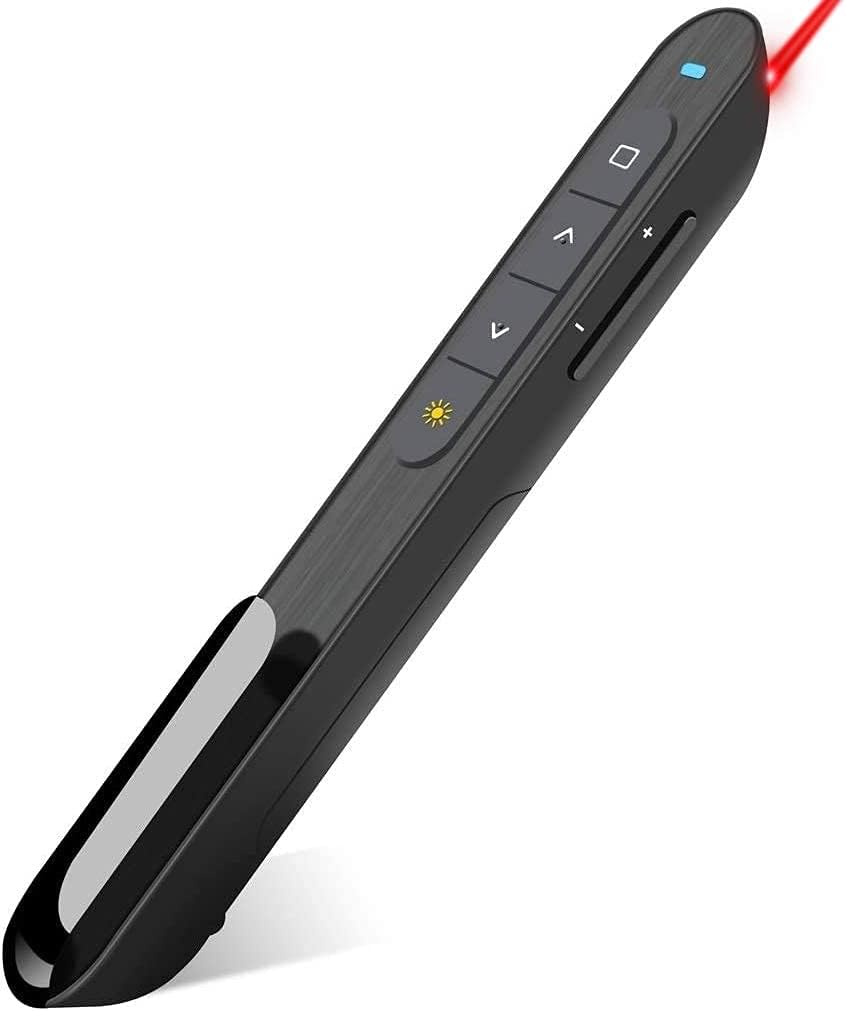
Hyperlink Volume Control Presentation Clicker
4.4Editor score
Volume control functionality
100-foot wireless range
Compact ergonomic design
This guide compares the top clicker for Power Point Presentations to help you find the best wireless remote with laser pointer for your next professional
Finding the right clicker for Power Point Presentations can transform how you deliver information to your audience. A reliable remote gives you the freedom to move around the room while keeping full control over your slides and visuals without being tethered to your computer.
We have carefully evaluated ten top-rated wireless presenters based on range, battery life, ergonomics, and compatibility. Each product was assessed for its ability to handle various presentation software and its ease of use for teachers, business professionals, and speakers alike.
Each pick in this list highlights specific strengths and ideal use cases to help you make an informed decision. Please note that prices and availability can change frequently, so always verify current details before making your final purchase decision.
4.4Editor score

4.6Editor score

4.4Editor score
Here is a side-by-side comparison of all ten products to help you quickly identify the features that matter most for your specific presentation needs and environment.


The Logitech Wireless Presenter R400 stands out as a reliable choice for professionals who need a straightforward clicker for Power Point Presentations. With a solid 4.6 rating from users, it delivers consistent performance without unnecessary complexity. Its design focuses on the essentials of slide control and pointer functionality.
We may earn a commission when you buy through this link, at no additional cost to you.
This device features an intuitive interface with touch keys that make navigating slides effortless during a live talk. The built-in Class 2 red laser pointer is bright enough to be seen against most backgrounds, ensuring your audience knows exactly where to look. The 50-foot wireless range provides ample freedom to move around a standard conference room or classroom.
While it lacks some advanced features like volume control or screen management found in newer models, its simplicity is also its strength. There is no software to install, and the receiver stores neatly in the remote itself to prevent loss. It works reliably across various systems which makes it a safe choice for mixed environments.
If you value dependability and brand trust over flashy extras, this presenter is an excellent investment. It is particularly well suited for teachers and business presenters who prioritize smooth operation. For those needing basic slide advancement and pointing, the R400 remains a top recommendation in the market today.
Simply plug the USB receiver into any standard port and the device is ready to use immediately without driver installation.
The remote includes a built-in docking bay that securely holds the USB receiver when not in use to prevent loss.
We may earn a commission when you buy through this link, at no additional cost to you.
The Hyperlink Volume Control Presentation Clicker offers an impressive array of features at a budget-friendly price point. Users appreciate its ability to handle more than just basic slide transitions, adding functionality that is often reserved for expensive models. It is a strong contender for those looking for value without sacrificing performance.
We may earn a commission when you buy through this link, at no additional cost to you.
One of the standout features is the inclusion of volume control buttons, which allows speakers to manage audio during multimedia presentations without touching the computer. The wireless range extends up to 100 feet, giving you significant mobility even in large lecture halls. The buttons are designed with soft rubber for a comfortable grip during long sessions.
Although it does not come with batteries included, the auto-sleep function helps extend battery life significantly between uses. The magnetic USB storage ensures the receiver stays attached to the remote when not in use. It supports hyperlinks and window switching making it versatile for interactive sessions or complex slide decks.
For presenters who need extra control features like audio management and hyperlink access on a tight budget, this remote is highly effective. It balances cost and capability well making it a smart choice for frequent speakers. Consider this model if you want advanced functionality without paying premium prices.
The remote includes dedicated buttons for adjusting volume and navigating hyperlinks directly from the presenter device.
With a 100-foot wireless range you can move freely around large rooms without losing signal connectivity.
We may earn a commission when you buy through this link, at no additional cost to you.
This Presentation Clicker for PowerPoint emphasizes ergonomics and user comfort in its design philosophy. The device is shaped to fit naturally in the hand reducing strain during long presentations. It also comes with two AAA batteries included which is a nice touch for immediate usability upon arrival.
We may earn a commission when you buy through this link, at no additional cost to you.
The buttons are spaced sufficiently to prevent accidental clicks which can happen with smaller or crowded remote layouts. It supports a wide range of systems including Windows Mac and Linux ensuring it works in diverse office or classroom environments. The lightweight construction makes it easy to carry in a pocket or bag.
While the laser pointer is functional it is not as bright as some premium options available on the market. However for most indoor presentations it provides enough visibility to highlight key points effectively. The device is sturdy enough to withstand daily use in active teaching or business settings.
If comfort and immediate readiness are your priorities this clicker is a strong choice for daily presenters. It avoids unnecessary complications and focuses on reliable performance for slide advancement. The included batteries eliminate the need to make an immediate trip to the store for power.
The buttons are designed to be large enough that you will not accidentally click the wrong one during use.
The package includes two AAA batteries so you can start using the remote immediately without extra purchases.
We may earn a commission when you buy through this link, at no additional cost to you.
This presentation clicker is designed with modern hardware in mind offering native support for both USB-A and USB-C ports. It eliminates the need for dongles or adapters which is a common pain point for users of newer MacBooks or laptops. This feature alone makes it a top choice for tech-savvy professionals.
We may earn a commission when you buy through this link, at no additional cost to you.
The device includes volume control and full screen toggles allowing for comprehensive management of your presentation environment. The body features a soft-touch oil coating that provides a secure grip even in humid conditions. The low power consumption extends standby time significantly between battery changes.
Storage for the receiver is magnetic which offers convenience but requires care to ensure it stays secure over time. The wireless range is generous allowing for movement across large conference rooms. It supports popular presentation software including PowerPoint and Keynote and Google Slides effectively.
For those with modern devices who want to avoid carrying extra adapters this remote is an ideal solution. It bridges the gap between legacy and modern hardware seamlessly. The ergonomic design ensures comfort during extended usage periods.
The receiver features both USB-A and USB-C connectors built right in so it works with any computer type.
The body features a soft-touch oil coating that fits naturally in your hand for a secure grip.
We may earn a commission when you buy through this link, at no additional cost to you.
This Wireless Presentation Clicker Remote is designed for portability without compromising on essential functions. It is compact enough to slip into a pocket yet sturdy enough for daily use. The inclusion of two AAA batteries in the package adds value and convenience for immediate use.
We may earn a commission when you buy through this link, at no additional cost to you.
The on/off switch on the side helps preserve battery life when the device is not in active use. This is a thoughtful feature for professionals who might leave the remote in a bag for extended periods. The buttons are responsive and provide clear feedback during slide transitions.
The wireless range is sufficient for most standard meeting rooms though it may not reach the extremes of larger auditoriums. It supports a wide range of systems ensuring compatibility across different platforms. The design focuses on simplicity and reliability over complex features.
If you are looking for a reliable companion for business trips or daily office use this model is well-suited. Its durable construction ensures it can survive being tossed in a briefcase. The included batteries mean you can start using it right away.
A convenient on/off switch on the side allows you to save battery when the clicker is not in use.
The package comes with two AAA batteries included so you do not need to buy them separately immediately.
We may earn a commission when you buy through this link, at no additional cost to you.
This Presentation Clicker comes with a dedicated fabric drawstring bag to protect the remote during transit. This addition is particularly useful for those who travel frequently and need to keep their gear organized and safe. The device itself has a high user rating indicating strong satisfaction with its performance.
We may earn a commission when you buy through this link, at no additional cost to you.
The buttons provide responsive tactile feedback which ensures smooth transitions without delays. This reliability is crucial during live presentations where timing matters. The USB receiver stores safely in the end of the remote reducing the risk of losing small parts.
It includes two AAA batteries to get you started immediately upon unboxing. The ergonomic design provides a soft touch and comfortable grip for extended use. It supports popular software suites making it versatile for various professional needs.
For anyone who needs protection for their presentation tools the included case makes this a practical choice. It is a solid investment for frequent speakers who want to keep their equipment in good condition. The high rating reflects its reliability and ease of use.
A fabric drawstring bag is included with the remote to keep it safe and organized during storage or travel.
The responsive buttons provide tactile feedback ensuring smooth and reliable operation without delays.
We may earn a commission when you buy through this link, at no additional cost to you.
This Wireless Presenter Remote is designed for interactive presentations that require more than just slide advancement. It supports hyperlink functionality and volume control which allows for dynamic engagement with your content. The battery is included in the package ensuring immediate usability upon unboxing.
We may earn a commission when you buy through this link, at no additional cost to you.
The long control range of up to 100 feet allows you to interact with the audience from any point in the room. The bright red light pointer is easily visible against most backgrounds ensuring your audience focuses on the correct area. It supports multiple systems including Mac OS and Linux.
While it offers advanced features the build materials are basic to keep the price affordable. Some users may need to perform simple setup steps when using it with Mac systems. However the functionality it provides for interactive demos is hard to beat in this price range.
If you frequently present interactive content like web demos or video clips this remote offers necessary tools. It allows for a more engaging experience than standard clickers. The included battery is a welcome addition for immediate use.
The clicker supports hyperlink functions enabling you to open links directly from your remote during a presentation.
The package includes a battery so you can start using the presenter immediately without needing replacements.
We may earn a commission when you buy through this link, at no additional cost to you.
This Presentation Clicker is engineered for minimalism and portability with a weight of just 38 grams. It fits easily into a pocket without adding bulk making it ideal for casual presenters or those who carry many devices. The design keeps a sleek profile while maintaining essential functionality.
We may earn a commission when you buy through this link, at no additional cost to you.
It uses a single AAA battery which helps reduce weight and bulk compared to dual-battery models. The USB dongle is stored inside the battery compartment which is a clever way to save space. However remember to remove the protective film from the battery before use.
The wireless range is adequate for standard rooms though it may not reach the extremes of larger venues. It supports a wide range of software ensuring flexibility in usage. The buttons are responsive providing reliable control for slide transitions.
For those who prioritize portability above all else this clicker is a great companion. It is small enough to forget you are carrying it until you need it. The single battery design simplifies power management for occasional users.
Weighing only 38 grams this remote fits easily in your pocket or bag for convenient transportation.
The USB dongle is stored inside the battery compartment of the remote to keep it secure and compact.
We may earn a commission when you buy through this link, at no additional cost to you.
The Logitech Spotlight Presentation Remote redefines what a clicker can do with advanced cursor control and timing alerts. It goes beyond simple slide advancing to allow you to highlight content like a mouse cursor. This makes it ideal for complex software demos or interactive virtual presentations.
We may earn a commission when you buy through this link, at no additional cost to you.
Smart time management features let you set timing milestones and receive vibration alerts to keep your talk on track. This is valuable for keynote speakers who need to manage their time strictly during events. The dual connectivity options offer flexibility for different computer setups.
While the price is higher than standard clickers the features justify the cost for professionals who present frequently. It works seamlessly across Windows and Mac systems and major presentation software. The Logi Options+ app allows for deep customization of effects and alerts.
If you deliver high-stakes presentations or teach complex skills this remote offers tools to elevate your delivery. It provides a level of control and engagement that standard devices cannot match. Consider this if you want a premium experience for your talks.
Use the on-screen cursor to play and pause videos open links and enjoy a range of rich content interaction.
Configure key timing milestones and receive vibration alerts directly to the remote to remind you when to wrap up.
We may earn a commission when you buy through this link, at no additional cost to you.
The DINOSTRIKE Wireless Presenter stands out by offering a rechargeable battery that eliminates the need for disposable cells. It also features an air mouse mode that turns the device into a cursor controller for navigating software without touching the keyboard. This versatility makes it suitable for tech-heavy presentations.
We may earn a commission when you buy through this link, at no additional cost to you.
The device supports both USB-A and USB-C connectivity and a USB receiver is conveniently stored in the rear housing. A built-in clip allows you to secure the remote to a pocket or notebook preventing loss. The air mouse feature serves like a real mouse for precise control.
While the rechargeable battery requires a few hours to charge it provides weeks of use time on a single charge. The long wireless range allows for freedom of movement around large rooms. It supports popular software suites ensuring broad compatibility across platforms.
If you want to avoid buying disposable batteries and need advanced cursor control this model is a strong choice. It combines the functions of a clicker and a mouse into one device. Consider this if you value sustainability and advanced functionality.
Built in 300 mAh battery allows you to charge for three hours to get weeks of use time without disposable batteries.
The remote offers a mouse feature that serves like a real mouse allowing you to enter and exit mouse mode easily.
We may earn a commission when you buy through this link, at no additional cost to you.
Selecting the right clicker involves considering several key factors to ensure it meets your specific presentation needs and environment.
Wireless range determines how far you can move from your computer while retaining control. For large lecture halls or auditoriums look for models offering at least 100 feet of range. Standard conference rooms may only need 50 feet but extra range provides flexibility for movement.
Ensure the wireless technology (usually 2.4GHz) is stable to prevent dropouts during critical moments of your talk.
Most clickers use AAA batteries while some premium models offer rechargeable options. Disposables are easy to replace but require ongoing purchases. Rechargeable models reduce waste but add charging time to your routine.
Consider your usage frequency. If you present daily a rechargeable unit may save money and hassle in the long run.
A laser pointer helps focus audience attention on specific parts of your slides. Look for bright red or green lasers that are visible in various lighting conditions. Green is often brighter but consumes more power.
Ensure the laser is safe for use in classrooms and public spaces. Most models use Class 2 lasers which are eye safe for momentary exposure.
Confirm the device works with your specific operating system. Most devices support Windows and Mac but check for Linux support if needed. Some devices work better with certain presentation software like Keynote or PowerPoint.
For mixed environments ensure the device is universally compatible across different computer setups in your office.
Modern laptops may only have USB-C ports so check if the receiver matches your computer or if adapters are needed. Some models offer dual receivers or USB-C direct support to eliminate adapter hunting.
Ensure the receiver stores securely on the remote to prevent losing the small part when packing up after a session.
If you present for long periods choose a model with a comfortable grip and well-spaced buttons. A bulky remote can tire your hand while a too-small one may cause accidental clicks.
Portability matters if you travel. A lightweight design with a pocket clip or storage case ensures you can carry it anywhere.
Some clickers include volume control volume cursor movement or timing alerts. Consider if these features add value to your workflow or just add complexity.
Advanced features are great for interactive demos but basic models often suffice for standard slide decks and lectures.
Durability ensures your clicker survives being tossed in a bag during travel. Check user reviews for feedback on button responsiveness and battery door durability.
A sturdy build is essential if you use the device daily in demanding professional or educational settings.
To start using your clicker simply insert the USB receiver into an available port on your computer. Ensure the device is turned on using the side switch if available. Test the slide advance buttons to confirm connectivity before your presentation begins.
Store the USB receiver in its designated slot on the remote after use to prevent loss. Keep batteries fresh by turning off the device when not in use to save power. If using a rechargeable model charge it fully before important presentations.
Clean the exterior with a soft dry cloth to remove dust or fingerprints. Avoid exposing the device to water or extreme heat which can damage electronics. Replace batteries immediately when the device shows signs of low power to avoid interruptions.
Most wireless clickers are plug and play and do not require driver installation. They work directly with the operating system using standard HID protocols. Some advanced features may require a specific app for customization but basic functions work immediately.
Locate the battery compartment usually on the back or bottom of the device. Slide or unscrew the cover to access the batteries. Insert new AAA batteries ensuring the positive and negative ends match the diagram inside.
Many clickers require a USB port to function which tablets and phones may lack without adapters. Some advanced models support Bluetooth which can connect to tablets directly. Check compatibility specifications before purchasing if mobile use is required.
A clicker is a remote device that advances slides on a computer. A laser pointer is a tool to highlight specific areas on a screen. Many devices combine both functions into one unit for convenience during presentations.
Remove the receiver from the computer and reinsert it to refresh the connection. Turn the clicker off and on again to reset its internal signal. If issues persist try repositioning both devices to avoid physical obstructions blocking the signal.
While clickers are designed for local control they do not directly control remote software without a computer connection. Some models with cursor control can help navigate virtual environments but they still need a host computer to function.
We have reviewed ten top clickers ranging from budget-friendly options to premium models with advanced features. The Logitech R400 remains a solid choice for reliability while the Hyperlink model offers great value for its price.
Prioritize your specific needs such as range or rechargeable power when making a final decision. Consider the type of software you use and the size of your typical presentation venue to ensure a good fit.
Remember to check current prices and availability before purchasing as these can change frequently. Choosing the right tool can significantly improve your confidence and delivery during professional presentations.