
Memory Card Reader, BENFEI 4in1 USB 3.0 and USB-C to SD Micro SD MS CF Card Reader Adapter
4.5Editor score
Supports four card types simultaneously
USB 3.0 and USB-C compatible
Up to 160MB/sec transfer speed
This guide compares the top 10 Compact Flash Card Reader models to help you choose the best device for your photography and data transfer needs based on speed
Finding the right Compact Flash Card Reader can significantly enhance your workflow when managing digital media. A high-quality reader ensures fast data transfer speeds and reliable compatibility with various memory card formats used by modern cameras and devices.
We evaluated ten leading options based on performance, build quality, and versatility. Our comparison focuses on USB connectivity, simultaneous card reading capabilities, and overall durability to help you make an informed decision for your specific requirements.
Each selection below highlights unique features and potential trade-offs to consider before purchasing. Please note that product availability and pricing may change over time, so verify current details on the retailer page before finalizing your order.
4.5Editor score

4.7Editor score

4.4Editor score
The following table provides a side-by-side comparison of all ten reviewed Compact Flash Card Reader models to highlight their key specifications and capabilities at a glance.


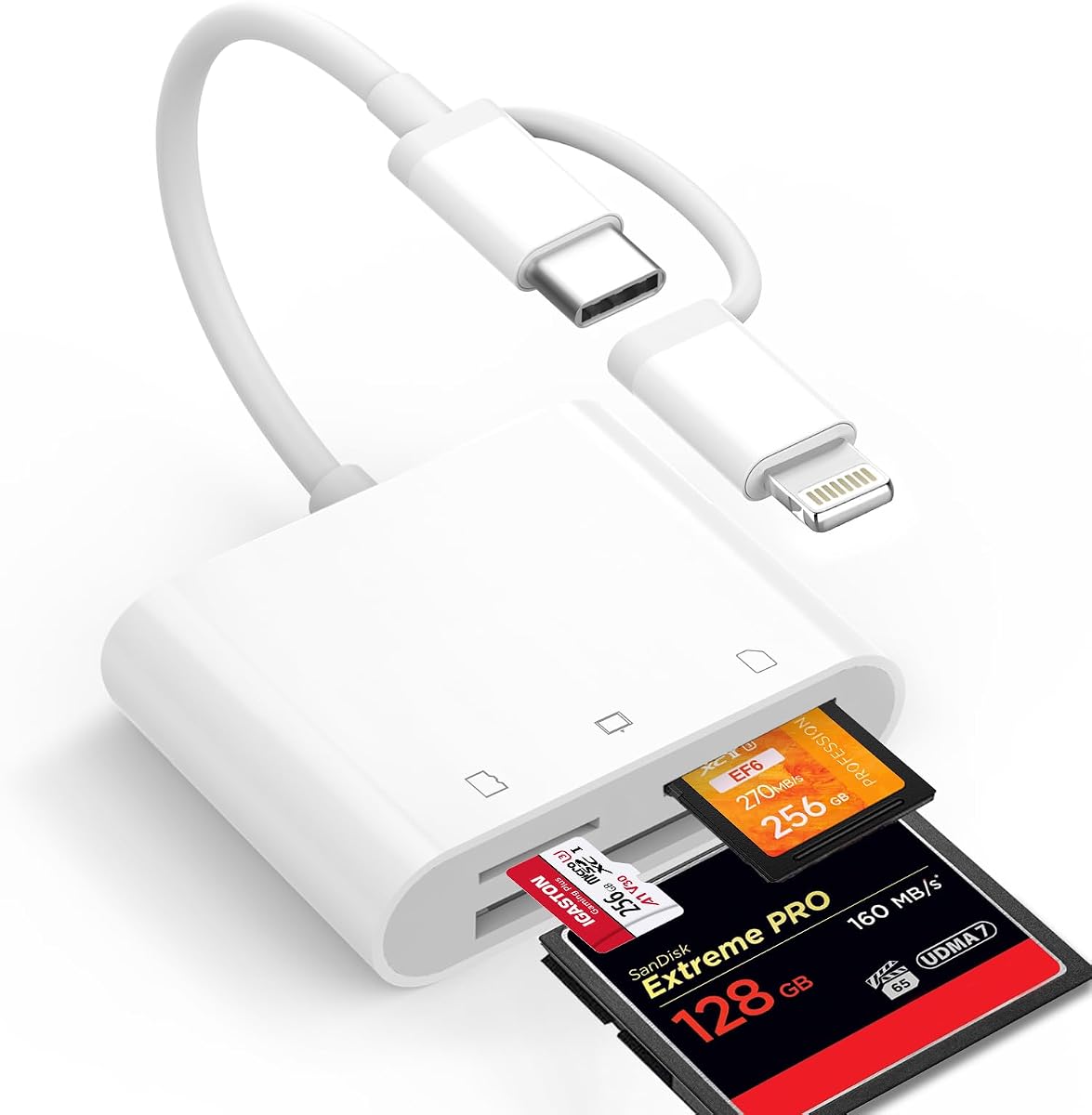

This BENFEI card reader offers exceptional value for users needing a versatile solution for multiple card formats at an affordable price. It supports SD, Micro SD, Memory Stick, and Compact Flash cards simultaneously making it ideal for photographers managing various devices.
We may earn a commission when you buy through this link, at no additional cost to you.
The dual USB-C and USB 3.0 interface ensures compatibility with modern laptops like MacBook Pro and older machines. It delivers transfer speeds up to 160MB/sec in UHS-I mode which significantly reduces waiting time when moving large media files between your camera and computer.
While it is a great budget option it is important to note that it does not support standard Memory Stick formats which limits its use for some legacy Sony cameras. Additionally compatibility with SDXC cards requires exFAT file system support on your operating system which may not be present on older versions of Windows or Mac OS.
This device is recommended for casual photographers and home users who need a reliable and economical way to access files from different memory cards without breaking the bank. It serves as a practical tool for everyday data transfer tasks while maintaining a solid build quality and customer support.
The ability to read four different card types at once saves time and prevents the need for multiple adapters during workflow.
Having both USB-C and USB 3.0 ports allows seamless connection to modern and legacy devices without additional dongles.
We may earn a commission when you buy through this link, at no additional cost to you.
The UGREEN card reader is a robust choice for those requiring high-speed data transfer and simultaneous reading of multiple cards. Its USB 3.0 interface supports speeds up to 5Gbps which is significantly faster than older USB 2.0 standards enabling quick access to large files.
We may earn a commission when you buy through this link, at no additional cost to you.
This model supports a wide range of card formats including SD CF TF and MS allowing users to manage files from different sources without swapping devices. The compact dimensions make it easy to carry in a camera bag or laptop sleeve for on-the-go data access.
The short cable length might be a limitation for users who prefer more flexibility in positioning their device relative to their computer. Additionally the plastic housing although durable may not offer the same heat dissipation benefits as metal alternatives during prolonged heavy transfers.
It is a strong contender for professionals or enthusiasts who need reliable performance and versatility across different card types. The plug and play feature ensures easy setup without requiring additional drivers making it convenient for immediate use on Windows Mac or Linux systems.
Utilizing USB 3.0 technology ensures that large video files can be transferred quickly minimizing downtime during editing sessions.
Support for various card standards means this reader can handle files from almost any modern camera or storage device.
We may earn a commission when you buy through this link, at no additional cost to you.
Lexar is a well-known name in storage solutions and this card reader delivers exceptional performance with transfer speeds up to 312MB/s for SD and microSD cards. It is specifically designed for users who prioritize speed and reliability when offloading high-resolution images and videos.
We may earn a commission when you buy through this link, at no additional cost to you.
The device supports SD microSD and CompactFlash cards covering the most common formats used by professional cameras. Its USB 3.1 interface ensures fast data rates while remaining backward compatible with USB 2.0 ports for broader accessibility across different systems.
While the performance is outstanding it may not be the best fit for users who need to read Memory Stick cards or those on a very tight budget. The price reflects the premium build and speed which might be unnecessary for casual users with slower card types.
This reader is ideal for professional photographers and videographers who require rapid data access and depend on durable hardware. The included two-year warranty adds to the confidence in its long-term reliability making it a top choice for demanding workflows.
The high transfer rate allows for quick ingestion of media which is crucial for time-sensitive professional assignments.
Lexar's reputation for quality storage hardware provides peace of mind regarding data safety and device longevity.
We may earn a commission when you buy through this link, at no additional cost to you.
This reader stands out by supporting six different card types including the legacy XD-Picture Card which is rare among modern options. It is a comprehensive solution for photographers who own older Olympus cameras alongside newer DSLR systems needing a single device to manage all archives.
We may earn a commission when you buy through this link, at no additional cost to you.
The aluminum alloy chassis provides excellent heat dissipation during large file transfers ensuring stable performance even under heavy load. The dual USB-C and USB-A connectors allow flexibility in connecting to both modern and traditional devices without needing extra adapters.
The higher price might be a consideration for users who do not need support for legacy formats like XD cards. Additionally the multiple slot design makes the unit slightly larger than single-format readers which could impact portability in tight camera bags.
It is best suited for archivists or those with diverse camera gear who need one reliable device to access various memory formats. The combination of build quality and extensive compatibility makes it a valuable tool for maintaining access to older media.
Accessing older XD cards ensures valuable photo archives remain readable without requiring obsolete hardware.
The metal housing protects internal components from heat and physical damage better than plastic alternatives.
We may earn a commission when you buy through this link, at no additional cost to you.
This card reader combines a slim profile with an aluminum cover that helps dissipate heat efficiently during data transfers. Its support for five different card types including M2 and MS makes it a versatile choice for various legacy and modern storage media.
We may earn a commission when you buy through this link, at no additional cost to you.
The USB 3.0 interface ensures fast data transmission rates which is beneficial when working with high-resolution images and videos. The intelligent multiple protection features help safeguard your equipment against over-current short circuit and other electrical issues providing peace of mind.
The M2 card support is less relevant today as most modern cameras use microSD or CF but it remains a nice feature for compatibility. Some users might find the grey finish less distinct compared to other designs though functionality remains the primary focus.
It is a solid option for travelers and professionals who need a compact yet durable device to handle multiple card formats. The combination of speed protection and build quality makes it a reliable companion for daily use in varied environments.
Built-in protection against electrical surges ensures the safety of connected devices and data integrity.
The small size makes it easy to slip into a pocket or camera bag without adding bulk.
We may earn a commission when you buy through this link, at no additional cost to you.
This reader is designed specifically for USB-C devices making it a perfect match for newer MacBooks iPads and Android smartphones. Its ability to read four card types simultaneously including CF and MS provides great versatility for users with diverse media needs.
We may earn a commission when you buy through this link, at no additional cost to you.
The USB-C connection ensures fast data transfer speeds up to 5Gbps which is essential for modern high-bandwidth applications. It is ideal for content creators who need to offload files directly to a tablet or laptop without carrying additional adapters.
Since it lacks a USB-A connector it is not suitable for older computers without USB-C ports. Users must ensure their system supports USB-C connectivity fully to take advantage of this adapter's capabilities.
It is a great choice for users invested in the USB-C ecosystem who want a simple and efficient solution for card reading. The plug and play nature adds to its convenience making it a practical addition for any digital creator.
Direct connection to smartphones and tablets simplifies the process of sharing photos on the go.
Eliminating the need for dongles reduces cable clutter and speeds up file access.
We may earn a commission when you buy through this link, at no additional cost to you.
The SmartQ C368 offers a straightforward and effective solution for reading common card types with a focus on ease of use. The blue LED light provides a clear visual indication when the device is powered on adding a touch of usability to the design.
We may earn a commission when you buy through this link, at no additional cost to you.
It supports SD Micro SD MS and CF cards ensuring compatibility with most consumer and prosumer cameras. The USB 3.0 interface guarantees fast data rates which helps streamline the workflow for photographers and videographers managing large media files.
The design is functional rather than premium which means it may not feel as robust as metal alternatives but it gets the job done reliably. The included cable organizer is a thoughtful addition that helps keep your workspace tidy when storing the device.
This reader is ideal for general users who need a no-frills reliable way to access files from multiple card types. Its simplicity and speed make it a practical choice for home offices and casual creative work.
The LED indicator helps users quickly confirm connectivity without needing to check system settings.
No driver installation is required ensuring immediate functionality across different operating systems.
We may earn a commission when you buy through this link, at no additional cost to you.
This reader is designed for professionals who use CFast 2.0 cards in high-end video cameras. It offers blazing-fast transfer speeds and a durable aluminum build that can handle the rigors of a professional environment.
We may earn a commission when you buy through this link, at no additional cost to you.
Support for five different card types ensures it can manage both modern and legacy formats which is useful for mixed equipment setups. The robust construction helps dissipate heat effectively during continuous high-volume data transfers.
The price is higher than standard readers which is expected given the specialized support for CFast cards. For users who do not use this format it may be overkill compared to standard SD readers.
It is the top choice for video professionals and broadcast engineers who require maximum speed and reliability for large media files. The comprehensive warranty further supports its suitability for demanding production workflows.
CFast 2.0 support enables rapid offloading of 4K and 8K video which is critical for tight production schedules.
The solid aluminum housing protects the device from physical stress and heat common in field production.
We may earn a commission when you buy through this link, at no additional cost to you.
This adapter is a unique solution for users who need to read memory cards on both iPhone and iPad or Mac devices. The dual Lightning and USB-C connectors eliminate the need for separate dongles making it versatile for Apple ecosystems.
We may earn a commission when you buy through this link, at no additional cost to you.
It supports CF SD and MicroSD cards providing broad coverage for most camera formats. The bi-directional transfer capability allows you to move files from the card to the phone or from the phone to the card easily.
The fixed connectors mean you cannot use both at the same time but this is a minor limitation compared to the convenience of a single device. Ensure you use the correct connector for your specific device model to avoid fit issues.
It is perfect for travelers and content creators who rely on mobile devices for editing and sharing photos. The simplicity of plug and play without needing extra apps or network connectivity is a huge benefit for quick transfers.
One adapter for multiple Apple devices reduces the number of accessories you need to carry while traveling.
Direct access to files without needing third-party apps streamlines the workflow for quick edits.
We may earn a commission when you buy through this link, at no additional cost to you.
This card reader features a built-in USB-C cable which prevents the common issue of losing a separate dongle. It is a clean and simple solution for accessing memory cards on USB-C equipped devices like the iPhone 15 and iPad Pro.
We may earn a commission when you buy through this link, at no additional cost to you.
It supports CF SD and MicroSD cards covering the most common formats used in digital photography. The plug and play functionality ensures you can start transferring files immediately without installing any software or drivers.
The built-in cable limits flexibility as you cannot adjust the length of the connection. Users should ensure they are comfortable with the fixed distance before connecting to a device.
It is an excellent choice for everyday users who want a hassle-free way to move files to their devices. The compact size and reliability make it a practical accessory for mobile editing and sharing.
The attached cable ensures you always have what you need without searching for extra accessories.
Plug and play operation saves time and reduces the technical steps involved in file transfer.
We may earn a commission when you buy through this link, at no additional cost to you.
Selecting the right Compact Flash Card Reader involves considering several key factors that impact speed compatibility and overall usability.
Ensure the reader supports all the card types you currently use such as SD CF microSD or older formats like XD or Memory Stick. Choosing a multi-format reader prevents the need for multiple adapters and simplifies your workflow.
Verify that the reader explicitly lists compatibility with your specific card types to avoid purchasing a device that cannot read your media.
Look for readers that support USB 3.0 or USB 3.1 standards as they offer significantly faster data transfer rates compared to USB 2.0. High-speed transfer is critical when dealing with large video files or high-resolution images.
Check the maximum theoretical speed listed but keep in mind that actual performance depends on the card quality and your computer's port capabilities.
Decide between USB-A USB-C or dual connector options based on the ports available on your devices. Modern laptops often rely solely on USB-C while older PCs may only have USB-A slots.
Dual connector models provide flexibility to work across both old and new systems without carrying additional adapters.
Metal housings offer better durability and heat dissipation than plastic alternatives which can help maintain consistent performance during long transfers. A sturdy build ensures the device survives daily transport in a camera bag.
Consider the physical size and weight of the reader if portability is a priority for your workflow.
Some readers allow multiple cards to be read at the same time which can be a huge time saver for those who need to copy files from multiple sources quickly. This feature eliminates the need to swap cards one by one.
If your workflow involves frequent transfers from multiple cameras this feature may justify the higher cost of a multi-slot hub.
Confirm that the reader is plug and play compatible with your operating system such as Windows macOS or Linux. This ensures you can use the device immediately without needing to install proprietary drivers.
Most modern readers support major operating systems but checking documentation prevents unexpected software issues.
A good warranty reflects the manufacturer's confidence in their product and provides peace of mind in case of hardware failures. Look for brands that offer at least a one-year warranty and accessible customer support.
Long-term support can save you money and effort if the device fails within the coverage period.
Balance the price against the features you actually need. While premium readers offer higher speeds and durability budget options may be sufficient for occasional use.
Investing in a slightly more expensive model with better build quality can provide better long-term value than replacing cheaper units frequently.
Connect the reader to your computer or device using the appropriate USB cable or connector. Ensure the port is clean and dry to prevent connection issues or electrical damage.
Insert the memory card into the designated slot gently pushing until it clicks into place. Wait for the operating system to recognize the drive and access the files through your file explorer.
Always safely eject the drive before unplugging it to prevent data corruption or hardware damage. Store the reader in a protective case when not in use to avoid physical scratches or impact.
Generally no standard Compact Flash readers do not support CFast cards as they use different protocols and interfaces. You need a dedicated CFast reader or a multi-format model that explicitly lists CFast support.
This could be due to a loose connection or a faulty USB port. Try connecting to a different port or using a different cable. Additionally ensure your computer has the necessary drivers installed.
Most modern plug and play card readers are compatible with Linux without needing extra drivers. However you may need to ensure your file system supports the card format.
Yes many readers support USB On-The-Go or have USB-C connectors that work with modern smartphones. Check if your phone supports file management over USB to access files directly.
No most card readers are plug and play and do not require any software installation. They will appear as external drives in your system automatically upon connection.
SDXC cards have capacities larger than 32GB and often require a file system like exFAT. Ensure your reader and operating system support this format to access larger files.
Slow speeds can be caused by using a USB 2.0 port a low-quality card or an older reader. Using USB 3.0 ports and cards rated for high speeds can significantly improve performance.
Always use the safe eject option in your operating system before physically removing the card. This ensures all data is written completely and prevents corruption or data loss.
We reviewed ten versatile options ranging from budget-friendly multi-format readers to specialized CFast models. Whether you need high speed or broad compatibility there is a suitable choice for your workflow.
Prioritize transfer speeds and build quality if you work with large files daily. For casual users a compact affordable reader may be all you need for occasional access.
Always check the latest pricing and availability as product details may change over time. Choosing the right tool ensures efficient and reliable data management for your photography needs.