
NZXT H5 Flow
4.6Editor score
Perforated PSU shroud for intake
Ultra-fine mesh on all panels
Supports 360mm radiator upfront
This guide compares the top ten cooling computer case options available this year, focusing on airflow design and thermal performance for optimal PC builds.
Finding the right cooling computer case is essential for maintaining optimal system performance and hardware longevity. A well-designed chassis ensures that heat generated by powerful components dissipates efficiently, preventing thermal throttling and ensuring consistent operation under heavy loads.
We evaluated ten top-rated models based on airflow engineering, fan support, and build quality. Each product was assessed for its ability to handle modern hardware demands, with a focus on features that enhance cooling potential and user convenience during system assembly.
This roundup highlights standout choices for various budgets and build preferences. Each pick showcases specific strengths in thermal management and design. Please note that pricing and availability may change, so verify current details before making your final purchase decision.
4.6Editor score

4.7Editor score

4.6Editor score
The following table provides a side-by-side comparison of all ten models featured in this guide. It highlights key specifications and design features to help you quickly identify the right cooling computer case for your specific hardware needs.


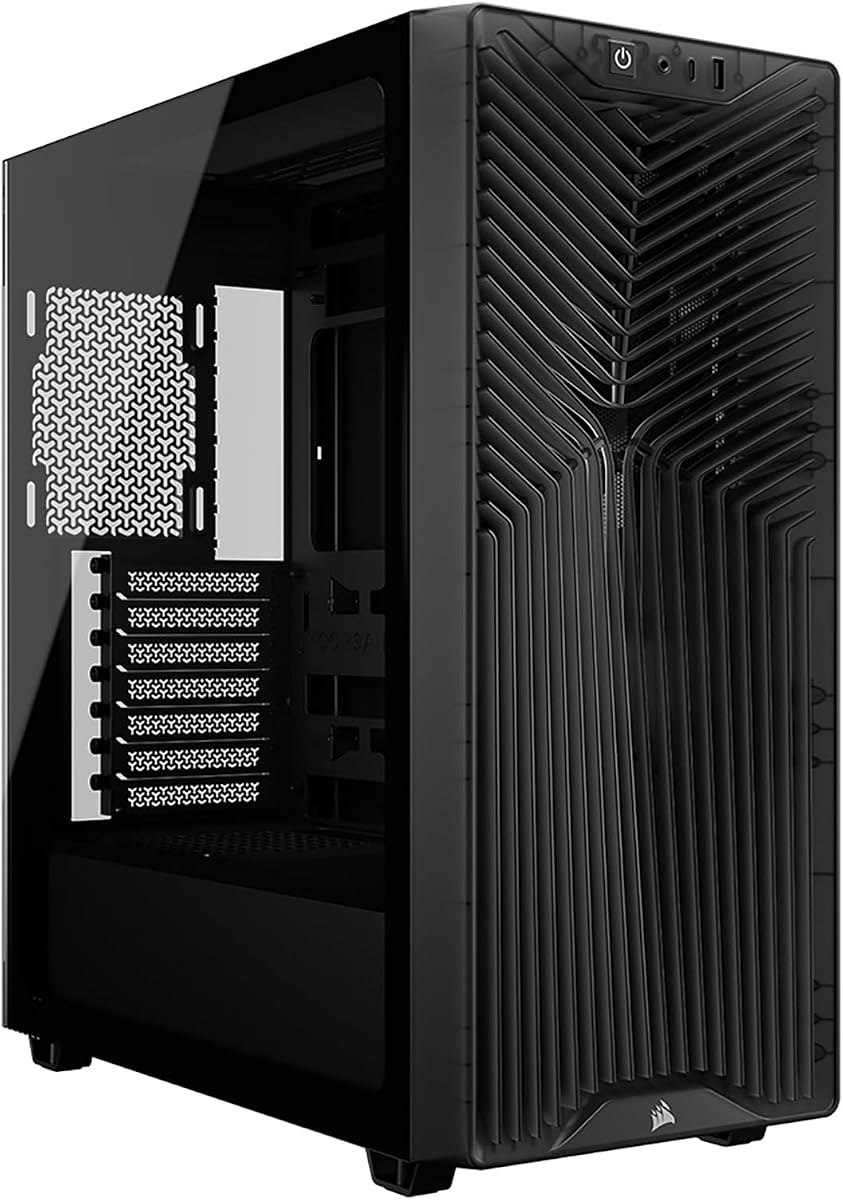


The CORSAIR 4000D RS stands out as the top choice in our guide for its innovative FRAME Modular Case System. It earned a high rating of 4.7 and offers unmatched customization, allowing users to change components like the motherboard tray and I/O panel as needs evolve.
We may earn a commission when you buy through this link, at no additional cost to you.
Its standout quality lies in the InfiniRail Fan Mounting System, which provides exceptional flexibility for front and roof fan placement. This ensures you can direct airflow exactly where it is needed most. The 3D Y-Pattern Airflow Panel minimizes restriction, allowing cool air to enter efficiently.
While the design is excellent, some users may find that additional dust filters are needed for specific orientations to maintain optimal cleanliness. The tempered glass side panels also tend to show fingerprints easily, requiring regular cleaning to keep the build looking pristine.
This case is ideal for builders who want a future-proof chassis that can adapt to changing hardware needs without replacing the entire case. We highly recommend it for anyone prioritizing airflow efficiency and modular flexibility in their cooling computer case selection.
The FRAME system allows for upgrades like billet aluminum trays, making the case adaptable to future hardware requirements seamlessly.
The perforated front panel ensures low-obstruction paths for air, keeping internal temperatures low even under heavy load conditions.
We may earn a commission when you buy through this link, at no additional cost to you.
The NZXT H5 Flow offers exceptional value for budget-conscious builders seeking effective thermal management. With a rating of 4.6, it excels in airflow design, featuring a perforated PSU shroud that enables optimal air intake for the graphics card directly.
We may earn a commission when you buy through this link, at no additional cost to you.
Its key strengths include the ultra-fine mesh on the top, front, and side panels, which maximizes airflow while filtering out dust particles effectively. This ensures that cooling performance remains high over time without excessive maintenance requirements for the system interior.
However, the compact design means top radiator support is slightly limited compared to larger towers. Additionally, the I/O panel offers basic connectivity which might not be sufficient for users requiring extensive front-facing port options for their peripherals and devices.
For gamers and enthusiasts who want a reliable cooling computer case without breaking the bank, this model is an excellent choice. It balances cost with performance, making it a top pick for entry-level and mid-range system builds focused on airflow.
The side and bottom perforated PSU shroud ensures the graphics card receives a steady supply of cool air for optimal performance.
The mesh panels keep dust levels low while maintaining high airflow rates for consistent system cooling.
We may earn a commission when you buy through this link, at no additional cost to you.
The CORSAIR AIR 5400 RS represents the pinnacle of cooling computer case design with its unique Triple-Chamber layout. Rated 4.6, it isolates heat sources effectively, ensuring that the CPU cooling system does not interfere with the GPU or PSU chambers.
We may earn a commission when you buy through this link, at no additional cost to you.
Its key feature is the innovative Airflow Ducts on the bottom fan array, which accelerate airflow velocity without increasing fan speed. This results in exceptional cooling power while keeping noise levels low for a quiet and efficient computing environment at home or office.
The high price point and complex assembly process may deter some users, but the performance benefits justify the investment for power users. The design ensures that hot air from components is exhausted efficiently without mixing with cooler intake air streams.
This case is perfect for high-end builds where thermal management is critical and budget is less of a constraint. We recommend it for professionals and enthusiasts who want the best possible cooling computer case to protect their expensive components.
Separate chambers for CPU, GPU, and PSU prevent heat transfer between components, maximizing overall system efficiency.
The triple-chamber design supports large panoramic glass panels that showcase your build without compromising cooling integrity.
We may earn a commission when you buy through this link, at no additional cost to you.
The Antec Flux Pro is a robust option for users needing a cooling computer case that supports E-ATX motherboards and high-end components. With a 4.7 rating, it comes with six PWM fans pre-installed, ensuring immediate high-performance airflow out of the box.
We may earn a commission when you buy through this link, at no additional cost to you.
Its standout feature is the multi-directional vent design, which supports up to twelve fans simultaneously for maximum thermal potential. The innovative iShift PSU mount allows for a 90-degree rotation, saving space and improving air intake efficiency for the power supply unit.
While it offers exceptional cooling, the large physical footprint requires a spacious desk or floor area for placement. Additionally, the heavy build quality due to metal, glass, and wood materials makes it difficult to move once assembled in a home setup.
This case is ideal for professional workstations or extreme gaming setups that generate significant heat. We recommend it for users who prioritize raw cooling capacity and build quality over portability and compact dimensions in their cooling computer case.
Support for up to twelve fans allows users to tailor airflow specifically to their component layout needs.
The 90-degree iShift mount optimizes internal space for better cable routing and improved intake for the PSU.
We may earn a commission when you buy through this link, at no additional cost to you.
The Lian Li V100 combines high performance with affordability, earning a strong 4.8 rating. It offers a seamless build experience with tool-less side panels and supports back-connect ATX motherboards for cleaner and more organized internal routing.
We may earn a commission when you buy through this link, at no additional cost to you.
Key strengths include the 4 pre-installed ARGB PWM fans that provide adaptable airflow and vibrant lighting effects. The integrated 26-LED strip adds visual appeal and syncs with motherboard software, allowing for a polished look without extra costs.
Cable management is somewhat basic compared to premium cases, which might frustrate builders looking for perfect hidden routing. Additionally, the number of drive bays is limited, so storage requirements need to be checked before purchase for large data needs.
This case is great for builders who want a clean aesthetic and strong performance without a premium price tag. We recommend it for those prioritizing visual appeal and ease of assembly in their cooling computer case selection.
Easy removal of side panels allows for quick hardware changes without needing extra tools during builds.
The built-in LED strip and fan synchronization provide a complete lighting setup straight out of the box.
We may earn a commission when you buy through this link, at no additional cost to you.
The Cooler Master HAF II 500 is a powerhouse for thermal performance, earning a 4.8 rating. It features oversized 220mm and 180mm fans that provide massive airflow with low resistance design for high-performance gaming and rendering PCs.
We may earn a commission when you buy through this link, at no additional cost to you.
Its key strengths include the split-level cable management system that optimizes routing space and creates room for the massive rear exhaust cooling. The MasterRail mounting system offers flexibility for various radiator and fan sizes across the case front and top sections.
The primary trade-off is the large physical dimensions, which may not fit in all desktop environments or smaller living spaces. Additionally, the premium price reflects the high-end components and design, making it an investment for serious enthusiasts.
This case is perfect for users with extreme hardware needs who require maximum cooling potential. We recommend it for those prioritizing raw airflow performance and component stability in their cooling computer case choice.
The oversized fan setup ensures that even the hottest components are kept cool under heavy loads.
Split-level design reduces clutter and improves airflow pathways by keeping cables out of the way.
We may earn a commission when you buy through this link, at no additional cost to you.
The MSI MAG Forge 321R focuses on aesthetics and customizable lighting, earning a 4.6 rating. It supports up to eleven system fans, providing ample ventilation for better stability and cooling efficiency in gaming environments.
We may earn a commission when you buy through this link, at no additional cost to you.
Its key strengths include the bundle with 1 to 6 ARGB LED control board and Mystic Light Sync compatibility for seamless lighting effects. The magnetic dust filter on top is designed for easy uninstalling and cleaning, maintaining a tidy interior over time.
While the exterior is polished, the internal cable management features are somewhat basic compared to other models in the list. The plastic trim on the I/O panel may also feel less premium than metal options found in higher-end cooling computer cases.
This case is ideal for users who prioritize lighting customization and visual impact in their builds. We recommend it for gamers who want a stylish case that offers decent airflow and strong RGB capabilities at a competitive price point.
The included LED control board provides multiple ways to decorate your rig with precise color effects.
The magnetic dust filter ensures easy access for cleaning while protecting internal components from debris.
We may earn a commission when you buy through this link, at no additional cost to you.
The CORSAIR 3200D RS is designed for modern builds, rated 4.6, It supports room for nine 120mm fans and includes a built-in GPU anti-sag stabilization arm to support super-heavy graphics cards effectively.
We may earn a commission when you buy through this link, at no additional cost to you.
Its key strengths include compatibility with reverse-connector motherboards and a single connector for front cables, making building easier. The USB Type-C port on the front I/O panel ensures compatibility with the latest peripherals and device needs.
The smoke tint on the side panels limits the view of internal components, which might not appeal to users wanting a clear look. Also, the lack of a dedicated fan controller means you rely on motherboard headers for managing all included fans.
This case is a solid choice for modern builds requiring extensive USB connectivity and strong structural support. We recommend it for users prioritizing build ease and component protection in their cooling computer case selection.
USB Type-C and reverse-connector support ensure the case works well with new motherboard standards.
The built-in anti-sag arm prevents heavy GPUs from bending, ensuring long-term reliability of your system.
We may earn a commission when you buy through this link, at no additional cost to you.
The CORSAIR AIR 5400 LX offers a unique cooling computer case design with its triple-chamber layout. Rated 4.7, it isolates CPU cooling from GPU and PSU chambers, ensuring heat generated in one area does not affect others negatively.
We may earn a commission when you buy through this link, at no additional cost to you.
Its key strengths include innovative Airflow Ducts that accelerate airflow velocity without increasing noise levels. This design ensures efficient cooling power while maintaining a quiet environment for your system. The panoramic glass panels provide a stunning view of your build.
The high price point may be a barrier for some users, and the assembly process is more complex due to the isolated chamber design. However, the thermal benefits justify the investment for those serious about managing high heat loads effectively.
This case is ideal for users prioritizing thermal isolation and visual aesthetics in their build. We recommend it for enthusiasts who want a cooling computer case that protects components and looks impressive.
Isolated chambers ensure efficient heat exhaust without warming other parts of the system unnecessarily.
The dual panoramic glass setup lets you view your components clearly without sacrificing cooling efficiency.
We may earn a commission when you buy through this link, at no additional cost to you.
The MONTECH XR provides a great entry point into panoramic PC cases, rated 4.7. It features panoramic front and side tempered-glass panels that keep the GPU and cooling in full view for a stunning gaming rig appearance.
We may earn a commission when you buy through this link, at no additional cost to you.
Its key strengths include the unique wood-grain I/O area that adds a warm accent to the black chassis. The 2 side-mounted reverse-blade ARGB PWM fans present their illuminated faces toward the interior, giving a cleaner and more polished showcase.
While the brand is less recognized than others, the build quality and airflow performance are impressive for the price. The cable routing options are standard, which might not satisfy users looking for premium management features in their cooling computer case.
This case is perfect for budget builders who want a premium look without paying a premium price. We recommend it for those prioritizing visual impact and value in their cooling computer case choice.
The wood-grain accent adds a distinct look to the case that stands out from typical black or white designs.
The side fans hide their frames, creating a seamless view of the lighting for a cleaner build.
We may earn a commission when you buy through this link, at no additional cost to you.
Choosing the right cooling computer case requires evaluating several factors that directly impact thermal performance and build quality. This guide outlines the essential aspects you should consider to ensure your system stays cool and performs efficiently over time.
Airflow design is the most critical factor in selecting a cooling computer case. Look for cases with perforated front panels and mesh covers that allow unobstructed air passage. A well-ventilated chassis ensures that cool air reaches your components and hot air exits efficiently.
Prioritize cases with open mesh designs over those with solid plastic front panels to maximize cooling potential and system longevity.
Check how many fans the case supports and if they are included with the purchase. A cooling computer case that comes with pre-installed fans saves money and ensures immediate airflow capability. Look for support for larger fans like 200mm or 140mm for better performance.
Ensure the case supports at least one intake fan at the front and one exhaust fan at the rear for balanced pressure and optimal cooling.
If you plan to use liquid cooling, verify the radiator support size and position. The cooling computer case should accommodate the radiator size you intend to mount, such as 240mm, 280mm, or 360mm, preferably on the top or front.
Confirm that the support for your radiator size is available on both the top and front to allow flexibility for your specific liquid cooling setup.
High-quality materials like tempered glass and steel panels contribute to the durability and aesthetics of the cooling computer case. Avoid cases that feel flimsy or use thin plastic parts that may break during transport or assembly.
Choose a case with robust construction materials that protect your hardware and look professional on your desk or floor setup.
Effective cable management is crucial for maintaining airflow inside the case. Look for a cooling computer case with ample routing channels, tie-down points, and dedicated spaces to hide cables behind the motherboard tray.
Proper cable management ensures that air moves freely through the case without obstruction, improving overall cooling efficiency.
Dust filters help keep the interior of your cooling computer case clean and reduce maintenance frequency. Check if filters are removable and washable to make cleaning easier over the long term.
Install filters on all intake areas to prevent dust accumulation on fans and radiators, which can degrade cooling performance.
Ensure the cooling computer case fits your motherboard form factor and GPU length. A full-tower case offers more room but requires significant desk space, while a mid-tower balances performance and footprint.
Measure your desk area before purchase to ensure the case dimensions fit comfortably without overcrowding your workspace.
Consider extra features like USB-C ports, RGB lighting controllers, or anti-sag brackets for heavy GPUs. A cooling computer case with these additions enhances convenience and functionality for your specific needs.
Look for these extra features to improve daily usability and support modern hardware components more effectively.
To maintain optimal cooling performance, regularly clean the dust filters and fans using a soft brush or compressed air. Remove the filters from the cooling computer case and wash them with mild soap if they are washable to ensure unrestricted airflow.
Check fan cables and connections occasionally to ensure they are securely plugged into the motherboard headers. Verify that all fans are spinning freely and listen for any unusual noises that might indicate bearing wear or obstruction.
Keep the exterior of the case free from spills and physical damage. Use a microfiber cloth to wipe down glass panels and steel surfaces to maintain the aesthetic appeal of your cooling computer case over time.
A cooling computer case features optimized airflow designs with mesh panels and strategic vent placements. Unlike standard cases, these models ensure that heat dissipates efficiently, preventing thermal throttling and protecting components from overheating.
Some cooling computer cases come with pre-installed fans, which is convenient for budget builds. However, you may want to add more fans if you plan to run high-end hardware or liquid cooling systems for better thermal control.
Remove the dust filters from the cooling computer case and use compressed air to blow out dust. For washable filters, rinse them gently with water and let them dry completely before reinserting into the case.
No, only cooling computer cases with specific radiator support can accommodate liquid coolers. Check the case specifications for maximum radiator size on the top or front to ensure your chosen AIO will fit.
The ideal configuration involves intake fans at the front and exhaust fans at the rear and top. This setup creates positive pressure that draws cool air in and pushes hot air out efficiently across the cooling computer case.
Dual chamber designs isolate the power supply and hard drives from the main components. This improves airflow for the CPU and GPU, resulting in lower temperatures and a cleaner look for the cooling computer case interior.
RGB lighting does not affect cooling performance but adds aesthetic value. Some cooling computer cases integrate RGB fans or strips that allow you to customize lighting effects while maintaining airflow efficiency.
Choose a mid-tower for standard builds that balance size and cooling efficiency. Opt for a full-tower if you need more space for water cooling, multiple GPUs, or extensive storage drives in your cooling computer case.
We have reviewed ten top-rated options that deliver excellent thermal management and build quality. The CORSAIR 4000D RS stands out as the best overall for its modular design and airflow optimization.
Whether you prioritize budget, aesthetics, or raw cooling power, there is a suitable model in this list for you. Consider your hardware needs and case dimensions to find the perfect fit for your system.
Please remember that product availability and prices change frequently. Check current details before making your final purchase decision to ensure you get the best value and performance available today.