
HP Desktop Tower
4.5Editor score
Intel Core i5 processor
16GB DDR4 RAM
256GB PCIe SSD storage
Discover the top desktop computers for home use in October 2026. Our guide compares performance, storage, connectivity, and value to help you choose the
Finding the right desktop computer for home use involves balancing power, size, and budget. Whether you need a machine for remote work, gaming, or family tasks, modern systems offer incredible versatility and efficiency to meet diverse household demands.
We evaluated ten top models based on processor speed, memory capacity, storage type, and connectivity options. Each product was selected for its reliability, user feedback, and ability to handle common home computing tasks without unnecessary complexity or cost.
Each pick highlights key strengths, potential limitations, and ideal user scenarios to guide your decision. Prices and availability fluctuate frequently, so verify current details before purchasing to ensure you get the best value for your specific needs.
4.5Editor score

4.5Editor score

4.4Editor score
This side-by-side comparison highlights the core specifications of each selected desktop computer. Use this table to quickly identify differences in processor generation, memory size, storage type, and operating system across all ten models.


The Dell Slim Desktop stands out as the Editor's Choice for home users seeking a balance of modern performance and compact design. With a 4.5-star rating, this system leverages the Intel Core Ultra 5 processor to deliver AI-enhanced productivity for everyday tasks.
We may earn a commission when you buy through this link, at no additional cost to you.
Its standout quality is the ability to connect up to four FHD monitors or two 4K displays, making it ideal for multitasking professionals or digital creatives. The tool-less entry and removable side panel allow users to access internal components quickly for convenient upgrades without specialized tools.
Honest trade-offs include limited memory expansion options compared to larger tower models and the absence of a dedicated graphics card for heavy gaming. However, the integrated Intel UHD graphics and AI features provide sufficient power for most home workloads and streaming entertainment.
This computer is best suited for remote workers, students, and families needing a reliable, space-saving desktop. If you prioritize sustainability, multi-monitor setups, and easy maintenance, the Dell Slim Desktop is a strong recommendation for your home office.
The Intel Core Ultra processor includes built-in AI features that accelerate tasks like content creation and data analysis, helping users work smarter and faster without extra software.
Crafted from recycled materials with refined corners, the Slim Desktop offers an elegant footprint that fits seamlessly into small workspaces while maintaining a modern aesthetic.
We may earn a commission when you buy through this link, at no additional cost to you.
The Dell Tower Desktop earns the Best Premium badge with its powerful Intel Core Ultra 7 processor and massive 32GB RAM configuration. Rated 4.4 stars, this system is engineered for heavy multitasking and demanding home office applications requiring sustained performance.
We may earn a commission when you buy through this link, at no additional cost to you.
Key strengths lie in its ability to handle complex workflows without slowdowns, supported by AI acceleration for productivity tasks. The tool-less side panel ensures that future upgrades remain accessible, extending the system's lifespan for evolving home computing needs.
Trade-offs include a higher initial cost compared to mid-range options and reliance on integrated graphics rather than a discrete GPU. While perfect for business automation and media consumption, gamers seeking high-end visual fidelity may need to consider external graphics solutions.
Choose this desktop if you need top-tier processing power for professional home use, data analysis, or content creation. Its premium build quality and expandability make it a long-term investment for users who demand reliability and speed.
With 32GB of RAM and the latest Ultra 7 processor, this system effortlessly manages multiple applications, virtual machines, and heavy browser tabs without performance degradation.
The tower combines elegance with sustainability using recycled materials, offering a stylish addition to any home office that aligns with eco-conscious values.
We may earn a commission when you buy through this link, at no additional cost to you.
HP's 2026 Desktop Tower delivers exceptional value with its Intel i7-11700F processor and generous 1TB storage capacity. Rated 4.4 stars, it targets students and families who need robust computing power for homework, streaming, and light business tasks at an accessible price.
We may earn a commission when you buy through this link, at no additional cost to you.
The system handles multiple applications simultaneously, thanks to 16GB of DDR4 RAM and a fast PCIe SSD that ensures quick boot times. Included keyboard and mouse accessories mean you can start working immediately without purchasing additional peripherals.
Trade-offs include reliance on an older generation processor and basic integrated graphics that are sufficient for casual entertainment but not for AAA gaming. However, for everyday productivity and educational use, these limitations are acceptable given the price-performance ratio.
This desktop is ideal for budget-conscious professionals, students on a tight budget, or families seeking dependable computing. If you prioritize storage capacity and essential connectivity without premium features, this model offers a reliable solution for home use.
Complete with keyboard, mouse, and ample storage, this system provides everything students need for assignments, research, and online learning immediately out of the box.
Built-in graphics and WiFi 6 ensure smooth video streaming and casual gaming, making it a versatile choice for family entertainment and shared household use.
We may earn a commission when you buy through this link, at no additional cost to you.
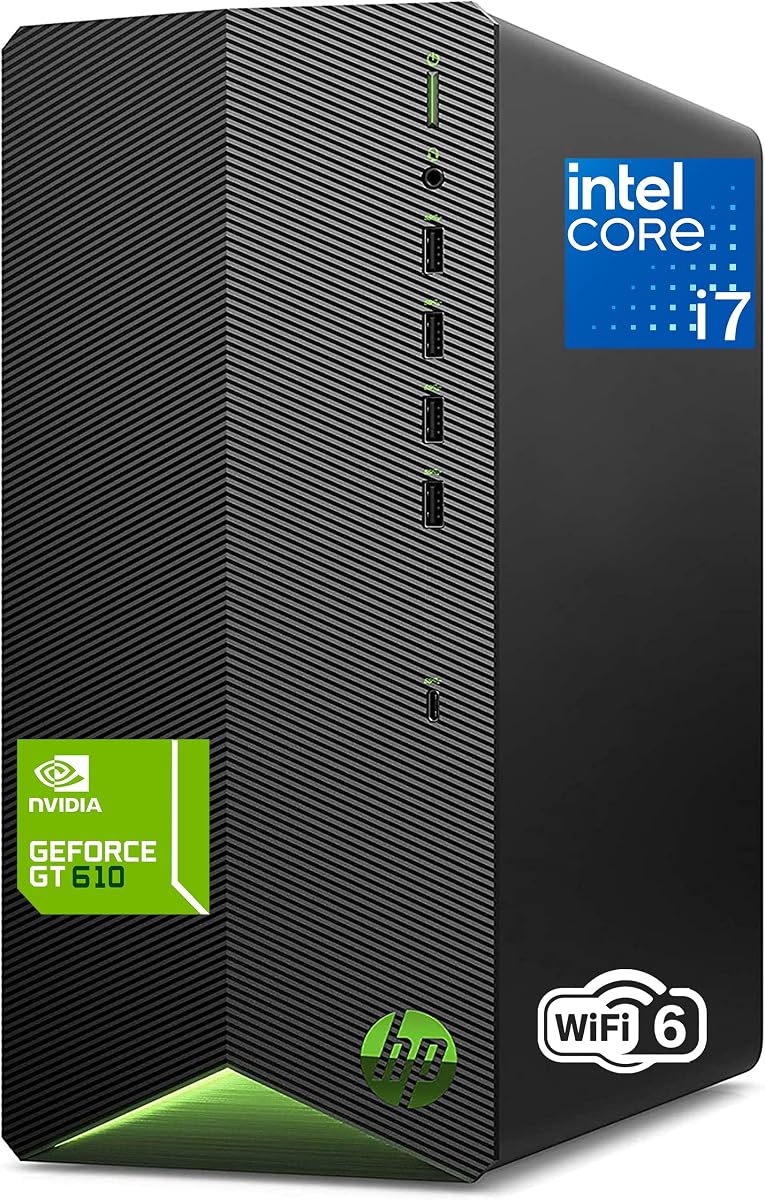
The HP Desktop Tower secures the Best Budget spot with its competitive pricing and solid Intel Core i5 performance. With a 4.5-star rating, it serves households needing a reliable machine for homework, photo editing, and web browsing without breaking the bank.
We may earn a commission when you buy through this link, at no additional cost to you.
Key strengths include the compact microtower design that fits on desks and the inclusion of Windows 11 Pro for enhanced security and parental controls. The dedicated graphics support enables smooth video playback and light gaming for casual entertainment.
Trade-offs involve the smaller 256GB SSD storage, which may require external drives for large media libraries. However, the speed of the NVMe SSD compensates for capacity limits, offering rapid app launches and system responsiveness for typical daily tasks.
This model is perfect for households with multiple users and diverse computing needs where space and budget are constraints. If you need a quiet, secure, and efficient desktop for general family use, this HP tower is an excellent entry-level choice.
Windows 11 Pro provides robust security features and parental controls, ensuring safer browsing and usage for children and family members within the household.
Designed for home environments, the system runs quietly, avoiding distractions during work or study sessions and maintaining a peaceful atmosphere in shared spaces.
We may earn a commission when you buy through this link, at no additional cost to you.
The Dell Optiplex 3060 offers compelling value as a renewed model with massive 32GB RAM and 1TB SSD storage. Rated 4.0 stars, it is ideal for users seeking business-grade hardware at a fraction of the cost of new systems.
We may earn a commission when you buy through this link, at no additional cost to you.
Key strengths include the high memory capacity which supports executive multitasking and media streaming without lag. Built-in WiFi and Bluetooth ensure modern connectivity, while the Microsoft Authorized Refurbisher certification provides confidence in the hardware quality.
Trade-offs involve the older 8th Generation processor and the fact that it is a renewed unit rather than brand new. However, for users who do not require the latest CPU architecture, the generous storage and RAM make up for these older specifications.
This desktop is best suited for home offices needing reliable performance for content creation or administrative tasks. If you prioritize memory and storage over the latest processor generation, the Optiplex offers a cost-effective solution for demanding workloads.
Certified by a leading Microsoft Authorized Refurbisher, this system comes with a quality guarantee and free tech support, ensuring reliability without the premium price tag.
With 32GB of RAM, this computer handles multiple browser tabs and applications simultaneously, making it perfect for power users who need extensive workspace.
We may earn a commission when you buy through this link, at no additional cost to you.
The HP ProDesk 400 G9 is a Small Form Factor desktop that combines a sleek design with enterprise-grade features. Rated 4.4 stars, it is perfect for users who need dual 4K display support in a footprint that fits anywhere on a desk.
We may earn a commission when you buy through this link, at no additional cost to you.
Key strengths include the extensive connectivity options, including USB-C and HDMI, alongside robust security features like HP Wolf Security. The 32GB RAM ensures smooth multitasking for administrative tasks and data handling without performance bottlenecks.
Trade-offs involve the use of a Celeron processor which limits raw processing power compared to Core i-series chips. While excellent for office automation and web browsing, it is not designed for intensive content creation or heavy computational tasks.
Choose this system if you need a space-saving, secure computer for home office or light business use. Its reliability and connectivity make it a dependable choice for professionals prioritizing organization and security over raw speed.
Weighing under 9 pounds and measuring just 11.9 x 10.6 x 3.7 inches, this system frees up valuable desk space while delivering reliable performance for daily computing.
Windows 11 Pro and HP Wolf Security provide complete protection against threats, ensuring your data remains safe during remote work and online transactions.
We may earn a commission when you buy through this link, at no additional cost to you.
The Dell 2026 Tower offers future-ready features with DDR5 RAM and a 14th Gen processor in a compact design. Rated 4.4 stars, it is designed for home users who want modern connectivity and multi-monitor support for data analysis or financial trading.
We may earn a commission when you buy through this link, at no additional cost to you.
Key strengths include the massive 32GB high-speed DDR5 RAM that eliminates lag during heavy multi-application processing. The Intel UHD Graphics 730 supports up to dual 4K monitors, providing extensive visual real estate for complex workflows.
Trade-offs include the use of an i3 processor which may limit high-end performance compared to i5 or i7 models. However, the combination of fast RAM and SSD storage ensures responsive performance for most professional home and office tasks.
This desktop is ideal for users requiring extensive screen space and modern connectivity standards. If you value DDR5 speed and multi-monitor capabilities for productivity, this system provides a solid foundation for your home office setup.
Equipped with 32GB DDR5 RAM, this system delivers faster data transfer rates and improved efficiency, ensuring smooth performance for demanding multi-application workflows.
Optimized thermal airflow layout and compact footprint ensure system longevity and quiet operation, making it suitable for continuous daily operations without overheating.
We may earn a commission when you buy through this link, at no additional cost to you.
The HP 2026 Desktop provides reliable 12th Gen performance tailored for families and small businesses. Rated 4.5 stars, it handles inventory management, student research, and daily computing needs with ease and includes lifetime web access to Office 365.
We may earn a commission when you buy through this link, at no additional cost to you.
Key strengths include the 16GB RAM for smooth multitasking and comprehensive connectivity with eight USB ports for all peripheral needs. The 512GB SSD offers fast boot times and enough space for essential documents and media.
Trade-offs involve storage capacity that may require cloud solutions for large file archives. However, the integrated graphics and stable processor make it highly capable for video conferencing, educational activities, and household management.
Choose this desktop if you need a consistent, ready-to-use system for shared home use. Its durability and software support make it an excellent choice for students and home office workers needing professional software support without subscriptions.
Lifetime access to Office 365 on the web means you can create and share documents from any browser without additional subscription costs or setup hassles.
Built with a reliable Pro Tower design, this system offers dependable performance for productivity tasks, making it suitable for budget-conscious users needing premium support.
We may earn a commission when you buy through this link, at no additional cost to you.
The Lenovo IdeaCentre Tower earns a 4.6-star rating with its modern Intel Ultra 5 processor and DDR5 RAM. It delivers responsive performance for everyday computing and office tasks, making it a strong contender for users seeking a balanced home setup.
We may earn a commission when you buy through this link, at no additional cost to you.
Key strengths include the 10-core design which ensures reliable multitasking and the inclusion of Office 365 Web for document creation. WiFi 6E and 7 USB ports provide fast and stable wireless connections for modern accessories.
Trade-offs include limited physical ports compared to larger towers and integrated graphics which are sufficient for standard tasks but not for heavy 3D rendering. However, the plug-and-play setup and included keyboard and mouse simplify immediate use.
This desktop is ideal for home and office users needing a reliable, modern system without complexity. If you value DDR5 speed and wireless connectivity, the IdeaCentre offers a compelling balance of performance and convenience.
Powered by the 10-core Ultra 5 processor with 20MB Smart Cache, this system delivers reliable performance for office tasks, multitasking, and light productivity workloads.
Built-in WiFi 6E and Bluetooth 5.1 provide fast and stable wireless connections, while the Ethernet port ensures reliable wired network performance when needed.
We may earn a commission when you buy through this link, at no additional cost to you.
The Dell Pro Tower earns a remarkable 4.9-star rating for its business-ready design and compact build. Powered by the 14th Gen Intel Core i3, it offers reliable multitasking for video conferencing and content creation in a small footprint.
We may earn a commission when you buy through this link, at no additional cost to you.
Key strengths include Windows 11 Pro for enhanced security and remote desktop capabilities, combined with 16GB DDR5 RAM for seamless multitasking. The comprehensive connectivity ensures flexible connection options for peripherals and displays in professional environments.
Trade-offs include reliance on integrated graphics which may limit high-end visual tasks. However, for standard office work and secure computing, the system provides smooth performance and a secure build that fits comfortably in any workspace.
This desktop is perfect for small businesses and professionals seeking secure, efficient computing solutions. If you value Windows 11 Pro features and DDR5 speed in a compact design, the Pro Tower is an excellent choice for daily collaboration.
Windows 11 Pro provides enhanced security features and remote desktop capabilities, ensuring safe and efficient computing for professional environments and remote work.
Supporting dual monitors via HDMI 2.1 and DisplayPort 1.4, this system expands your workspace for spreadsheets, data analysis, and video conferencing effectively.
We may earn a commission when you buy through this link, at no additional cost to you.
Selecting the right desktop requires evaluating hardware, size, and intended use. This guide breaks down essential factors to ensure you pick a machine that fits your home needs perfectly.
The processor is the brain of your computer. For general home use, an Intel Core i3 or i5 handles daily tasks like web browsing and video streaming efficiently. Professionals or power users should consider i7 or Ultra series chips for heavy multitasking and content creation.
Prioritize newer generations for better efficiency and longevity. Modern CPUs offer AI capabilities and improved performance per watt, ensuring your system stays relevant longer without requiring frequent upgrades.
RAM determines how many applications you can run simultaneously. 16GB is the sweet spot for most households, allowing smooth multitasking between browsers, documents, and media. Power users or those running virtual machines should aim for 32GB or more.
DDR5 memory is becoming standard for newer systems, offering faster speeds. If you plan to keep your desktop for several years, investing in DDR5 ensures future compatibility and performance headroom for demanding tasks.
Solid State Drives (SSD) are essential for fast boot times and application loading. Look for at least 512GB for a balance of speed and space. If you store large media files, consider 1TB or plan to use external drives.
PCIe SSDs are faster than older SATA models. Avoid traditional Hard Disk Drives (HDD) for your primary drive as they are significantly slower and can bottleneck system performance even with a powerful processor.
Desktops come in various sizes from towers to small form factors. Towers offer more expansion potential for future upgrades, while compact models save space on crowded desks. Choose based on your workspace constraints and need for internal access.
Consider noise levels for home environments. Compact systems often have smaller fans that may run louder under load. If you work in a quiet home office, look for models designed for silent operation.
Modern ports are crucial for connecting peripherals. Ensure the desktop has USB-C for fast data transfer and charging, and HDMI or DisplayPort for monitors. WiFi 6 or 6E ensures stable wireless connections for streaming and remote work.
Check for Ethernet ports if you rely on wired connections for stability. Built-in card readers and headphone jacks add convenience for multimedia users. Verify the number of USB ports to avoid needing extra hubs.
Windows 11 Home is standard for consumer desktops, offering familiar tools and updates. Windows 11 Pro adds features like BitLocker and remote desktop which are valuable for business users or those managing sensitive data at home.
Check if software is included. Some models offer lifetime web access to Office 365 or antivirus trials. This can save costs, but verify what is included to avoid unexpected subscription fees later.
Integrated graphics handle everyday video playback and light tasks. However, gamers or video editors need a dedicated graphics card for smooth performance. Most budget and business desktops rely on integrated solutions which suffice for general home use.
Check expansion slots if you plan to upgrade graphics later. Tower cases usually support larger GPUs. Small form factors may have size limits, so research compatibility before investing in high-end display needs.
Future-proofing is key for desktop longevity. Look for tool-less designs that make accessing internal components easy. If you want to add more RAM or storage later, ensure the motherboard has available slots and the power supply supports it.
Business class models often have better upgrade paths than ultra-thin consumer units. Prioritize systems with accessible side panels and clear maintenance guides to extend the lifespan of your investment without voiding warranties.
Start by placing your desktop in a well-ventilated area away from direct sunlight to prevent overheating. Dust accumulation can clog fans and reduce efficiency, so keep the surrounding area clean. Position the tower on a hard surface rather than carpet to ensure proper airflow intake.
Manage your storage by regularly clearing temporary files and uninstalling unused applications. Use cloud storage or external drives to back up critical data at least monthly. Organize your files logically to maintain system performance and make retrieval easier during daily use.
Keep your system updated by installing OS and security patches regularly. These updates fix vulnerabilities and improve stability. Use built-in tools to schedule automatic updates so your system remains protected without requiring constant manual intervention.
For a home office, prioritize performance and security. The Dell Slim Desktop is an excellent choice due to its AI capabilities and multiple monitor support. It balances speed with a compact design that fits easily into small home workspaces.
It depends on the model. Tower computers like the Dell Tower Desktop often have accessible RAM slots for easy upgrades. Compact models may have soldered RAM, so check specs before purchase if future expansion is a priority for your needs.
Most models in this roundup, including HP and Lenovo options, include a keyboard and mouse in the box. This allows immediate setup and use. However, always check the product listing details to confirm if peripherals are included for your specific unit.
Windows 11 Pro offers enhanced security features like BitLocker encryption and remote desktop capabilities. These tools are vital for protecting business data or managing your home system remotely. Home users may not need these features unless handling sensitive files.
Yes, refurbished models like the Dell Optiplex 3060 are often reliable and certified by authorized refurbishers. They undergo rigorous testing and come with warranties. For budget-conscious buyers seeking high specs at a lower cost, they represent excellent value.
Most systems support dual 4K or multiple FHD monitors. A 24 to 27-inch 1080p monitor is standard for general use. For productivity, dual 27-inch screens provide ample real estate. Ensure the PC has the necessary ports like HDMI 2.1 or DisplayPort.
We have reviewed ten top models ranging from the affordable HP Desktop Tower to the powerful Dell Tower Desktop. Whether you need a budget-friendly solution for homework or a premium system for professional work, this guide highlights options that meet diverse home computing needs.
Prioritize performance factors like processor speed and RAM capacity based on your specific workload. For multitasking and future-proofing, 16GB RAM and SSD storage are essential. If space is a constraint, consider compact models that fit easily into modern living areas.
Prices and stock change frequently so verify current listings before finalizing your purchase. Use our comparison table to weigh specs and decide based on your priorities. With the right choice, you can ensure a productive and efficient computing experience for years to come.