
Microsoft Surface Dock (Pd9-00003)
4.5Editor score
2x Mini display ports
4 USB 3.0 ports
Magnetic Surface Connect
Explore our expert guide comparing the top docking stations for Surface Pro to find the perfect connectivity solution for your desktop workflow today.
Choosing the right docking station for your Surface Pro can transform your tablet into a powerful desktop workstation. With the right hub, you gain access to multiple monitors, faster data transfer, and stable networking without cluttering your desk with cables.
We evaluated ten top-rated models based on port variety, charging speed, video output quality, and build durability. Our comparison highlights options for budget buyers, professionals needing triple displays, and users seeking premium Thunderbolt performance.
Each pick includes detailed specs, pros, and cons to help you decide quickly. Note that availability and pricing may change, so verify current details before purchasing to ensure you get the best value for your specific setup needs.
4.5Editor score

4.4Editor score

4.8Editor score
Below is a side-by-side comparison of all ten products we reviewed. Each entry includes key specifications to help you quickly identify the model that matches your connectivity and performance requirements.



This premium docking station delivers lightning-fast connectivity and versatile port options for your Surface Pro. With a strong rating, it stands out for its speed and reliability in demanding workflows.
We may earn a commission when you buy through this link, at no additional cost to you.
Thunderbolt 4 ports enable rapid data transfers and media streaming while charging your device quickly. Support for up to two 4K monitors enhances your visual workspace significantly.
While expensive, the performance justifies the cost for professionals. Raised tactile indicators prevent fumbling, and the eco-friendly design reflects a commitment to sustainability.
Ideal for users needing top-tier performance, this dock transforms your Surface into a powerful desktop. It is highly recommended for those prioritizing speed and screen real estate.
Thunderbolt 4 ensures data and media flow instantly without delays.
Multiple USB-C and USB-A ports accommodate all your peripherals seamlessly.
We may earn a commission when you buy through this link, at no additional cost to you.
This classic docking station offers essential connectivity for Surface users at an affordable price. It transforms your laptop into a desktop with simple magnetic cable connection.
We may earn a commission when you buy through this link, at no additional cost to you.
It includes two Mini DisplayPorts for video output and four USB 3.0 ports for peripherals. The magnetic Surface Connect cable ensures quick and secure attachment every time.
Though it lacks newer Thunderbolt speeds, it provides reliable performance for standard tasks. Compatibility with older Surface models makes it a versatile choice for various setups.
Best for budget-conscious buyers or those with older devices, this dock delivers stability and ease of use. It is a solid entry-level solution for expanding your workspace.
Turn your Surface into a desktop PC with one simple cable connection.
USB 3.0 ports provide reliable speeds for external drives and accessories.
We may earn a commission when you buy through this link, at no additional cost to you.
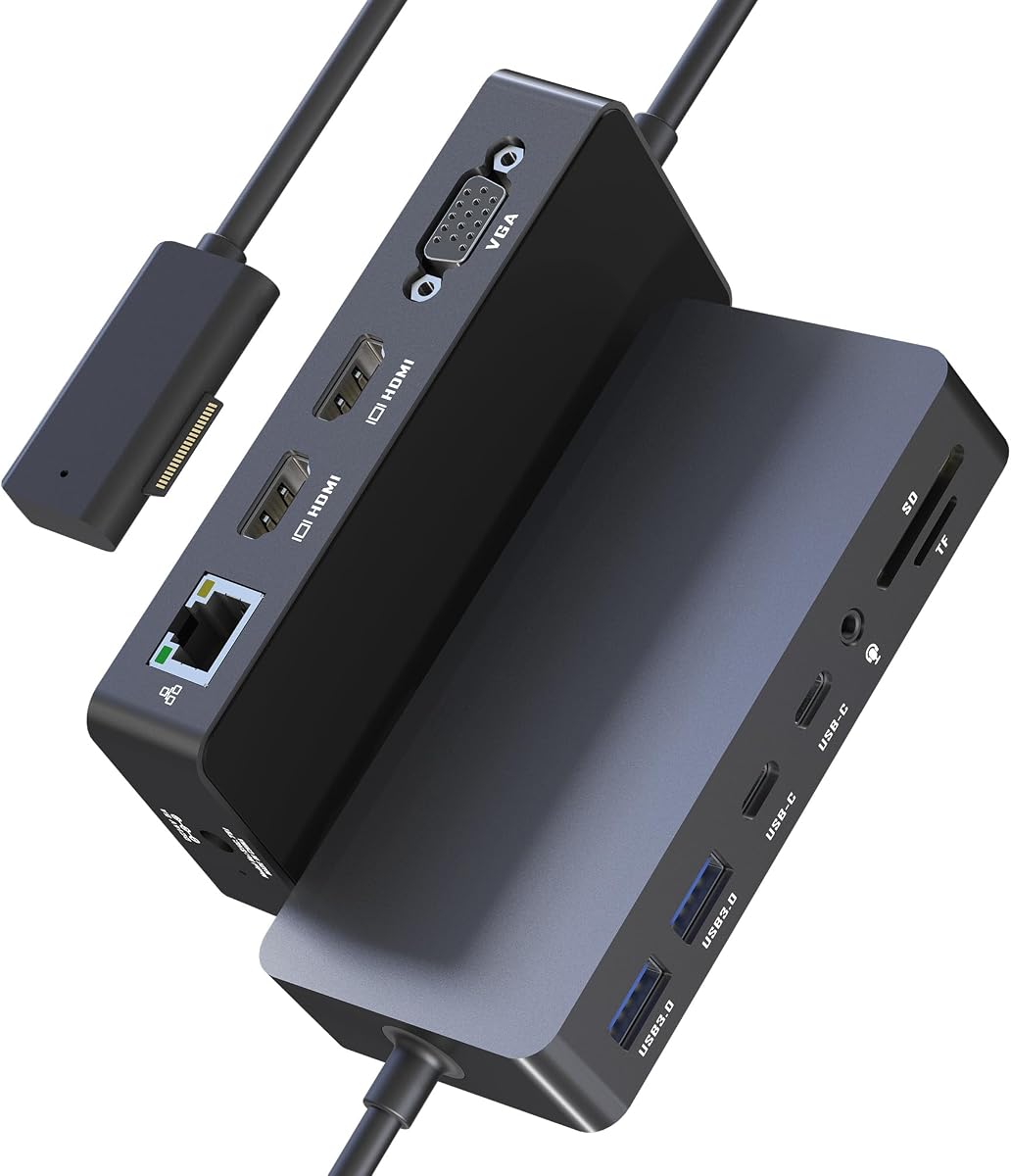
This versatile 12-in-1 station supports triple displays and offers extensive connectivity for Surface Pro. Its high ratings reflect solid performance for multi-monitor productivity setups.
We may earn a commission when you buy through this link, at no additional cost to you.
Dual HDMI ports and a VGA port allow you to extend your workspace across three screens. SD and TF card slots enable fast photo transfers for photographers and creators.
Note that using three external displays may require turning off the Surface screen. However, the compact design and included power adapter make it easy to integrate into any desk.
Best for users needing multiple screens without breaking the bank, this hub expands functionality effectively. It is recommended for hybrid workers who need visual flexibility.
Boost efficiency with three monitors using HDMI and VGA connections.
USB 3.0 and card slots ensure rapid file transfers for your devices.
We may earn a commission when you buy through this link, at no additional cost to you.
This 12-in-1 docking station stands out with a high rating and robust features for creative professionals. It transforms your Surface into a powerful workstation instantly.
We may earn a commission when you buy through this link, at no additional cost to you.
Dual HDMI 4K outputs and VGA support enable triple displays. The 72W power supply ensures your device charges while running peripherals, eliminating the need for a separate charger.
USB 3.0 and USB-C ports offer blazing-fast data transfer speeds. Its minimalist design reduces desk clutter while maximizing functionality for daily workflows.
Perfect for designers and editors needing extensive connectivity and charging power, this dock is a premium choice. It delivers reliable performance for complex visual tasks.
Work efficiently on three screens with high-resolution display options.
72W power supply meets demands of busy mobile pros and remote workers.
We may earn a commission when you buy through this link, at no additional cost to you.
This 12-in-1 docking station offers comprehensive connectivity for your Surface Pro. Its strong rating indicates a reliable choice for daily multitasking and streaming.
We may earn a commission when you buy through this link, at no additional cost to you.
Dual 4K HDMI and VGA ports support up to three monitors simultaneously. The included 72W power port keeps your device charged while connected, simplifying your desk.
USB 3.0 and USB-C ports enable high-speed file transfers. While Ethernet is 100Mbps, it ensures a stable connection for video calls and streaming.
Best for users seeking an all-in-one solution, this dock consolidates needs effectively. It is ideal for professionals who need reliable connectivity and power.
Maximize multitasking with crystal-clear multi-screen viewing options.
Power your device and peripherals all day with included adapter.
We may earn a commission when you buy through this link, at no additional cost to you.
This next-gen dock instantly turns your Surface into a desktop with high-speed ports. Its strong rating reflects quality for those needing high-resolution outputs.
We may earn a commission when you buy through this link, at no additional cost to you.
It supports dual 4K displays at 60Hz, delivering stunning visuals. The 199W power supply charges your device and peripherals simultaneously, even under heavy loads.
USB-C and USB-A ports offer versatile connectivity for modern accessories. The longer Surface Connect cable enhances reach and convenience at your desk.
Best for users with newer Surface models needing high-performance connectivity, this dock is reliable. It is highly recommended for professional visual workflows.
Turn your Surface into a desktop PC with advanced connectivity.
Enjoy high-resolution visuals on two external monitors easily.
We may earn a commission when you buy through this link, at no additional cost to you.
This dock converts your Surface into a desktop PC with next-gen ports. With an excellent rating, it is perfect for users needing high-resolution visuals.
We may earn a commission when you buy through this link, at no additional cost to you.
Dual 4K monitors at 60Hz provide immersive visuals for detailed work. The included 199W power supply ensures stable charging even with multiple peripherals connected.
USB-C Gen 2 and USB-A ports support versatile modern accessories. Kensington-compatible security locks add peace of mind for office environments.
Best for professionals prioritizing high-resolution connectivity and security, this dock delivers. It is a premium choice for versatile use across Surface devices.
Convert your Surface into a desktop PC quickly with next-gen ports.
Multiple USB-C and USB-A ports offer flexible connection choices.
We may earn a commission when you buy through this link, at no additional cost to you.
This 12-in-1 expansion hub turns your device into a desktop powerhouse. Its rating reflects reliable performance for creative professionals and students.
We may earn a commission when you buy through this link, at no additional cost to you.
Dual 4K@60Hz HDMI and VGA outputs support triple displays. The dedicated 100W DC input ensures your laptop stays fast-charged without battery drain.
USB 3.0 and USB-C ports enable ultra-fast data sync. Gigabit Ethernet guarantees a stable, low-latency connection for video conferencing.
Best for users demanding speed and multi-monitor setups, this dock delivers. It is a reliable upgrade for future-proofing your mobile workstation.
Eliminate adapter clutter with all essential ports in one hub.
Boost multitasking with crystal-clear resolutions on three screens.
We may earn a commission when you buy through this link, at no additional cost to you.
This renewed dock offers high-efficiency expansion for Surface users. With a strong rating, it provides trusted performance for professional workflows.
We may earn a commission when you buy through this link, at no additional cost to you.
Dual 4K 60Hz display output supports high-resolution setups. The 199W power adapter ensures fast charging and stable performance for peripherals.
USB-C video capable ports enable multi-screen video connectivity via one cable. Thermal management maintains consistency even under heavy loads.
Best for users seeking reliable, renewed hardware, this dock is a solid option. It delivers durability and performance at a competitive value.
Expand your Surface with high-speed ports for efficient workflows.
Includes original power supply and USB-C cable for instant setup.
We may earn a commission when you buy through this link, at no additional cost to you.
This docking station uses Surface connection technology for tidy connectivity. Its rating reflects solid performance for daily multitasking and streaming.
We may earn a commission when you buy through this link, at no additional cost to you.
Two Mini DP ports support external monitors with decent resolution. The 90W power supply ensures your device charges while connected to peripherals.
Four USB 3.0 ports and Gigabit network ensure versatile connectivity. The 10-in-1 interfaces meet most daily needs without clutter.
Best for users seeking a straightforward setup, this dock works well. It is a practical option for basic expansion without complex features.
Keep your desktop tidy with high-speed cable connection.
Connect multiple peripherals with USB and network ports easily.
We may earn a commission when you buy through this link, at no additional cost to you.
Selecting the right docking station involves considering your specific connectivity needs, display requirements, and budget. Here are key factors to evaluate.
Ensure the dock has the right mix of USB-A, USB-C, HDMI, and Ethernet ports. Look for options that match your peripheral needs to avoid extra adapters.
Prioritize docks with ample ports to reduce clutter on your desk and improve organization.
Check how many monitors the dock supports and at what resolution. If you need triple displays, look for HDMI and VGA or dual HDMI options.
High resolution and refresh rates ensure smooth visuals for design or video work.
Verify the power delivery wattage to ensure your Surface stays charged while using peripherals. Higher wattage like 72W or 199W is better for demanding tasks.
Avoid bus-powered docks if you need consistent performance for heavy workloads.
USB 3.0 and Thunderbolt 4 offer faster file transfers compared to older standards. Fast speeds save time when moving large files or media.
Choose docks with USB-C Gen 2 or Thunderbolt if speed is a priority.
A Gigabit Ethernet port provides a stable connection for video calls and downloads. Look for docks that include an Ethernet port to ensure reliability.
Wired connections often reduce latency and improve performance during critical work.
Look for durable materials and compact designs that fit your workspace. Tactile indicators or minimal designs can enhance usability and aesthetics.
A well-built dock ensures longevity and reduces wear on your device.
Confirm the dock is compatible with your specific Surface model. Some docks work only with newer devices or specific ports.
Always check the manufacturer's list to ensure seamless plug and play functionality.
Select a dock with a solid warranty and customer support options. This protects your investment and ensures help if issues arise.
Longer warranties often indicate higher confidence in the product's reliability.
Start by connecting all your peripherals like monitors, mouse, and keyboard to the dock. Then plug the Surface Connect cable into your laptop and dock simultaneously for power and data.
Adjust display settings in your operating system to extend or mirror screens across monitors. Configure audio outputs through the dock's jack if needed.
Keep ports clean and dust-free by wiping gently with a dry cloth. Avoid moving the dock while devices are plugged in to prevent connection issues.
The Microsoft Surface Thunderbolt 4 Docking Station is ideal for Pro 11 due to its high speed and dual 4K support. It offers reliable charging and extensive port options for productivity.
Yes, many docks are designed to work with various Surface models. Check compatibility lists to ensure your specific device is supported for seamless connection.
Most top docks support up to three monitors using HDMI and VGA. Thunderbolt models may support dual 4K at 60Hz for higher resolution setups.
No, docking stations typically include power adapters to charge your Surface while connected. Ensure the wattage matches your device's requirements for full speed.
Thunderbolt 4 offers faster data transfer and higher video bandwidth than standard USB-C. It is better for creative professionals needing high performance.
Yes, official Surface docks ensure perfect compatibility and build quality. Third-party options offer great value with similar features for budget-conscious users.
We reviewed ten top docking stations ranging from budget-friendly models to premium Thunderbolt options. Each offers unique strengths depending on your needs.
Prioritize port variety, display output, and charging power when selecting a dock. Match the dock to your specific workflow for optimal productivity.
Prices change frequently, so verify current availability before purchasing. Ensure the dock fits your device model for seamless connectivity.