
TobenONE DisplayLink Docking Station 3 Monitors with 120W Power Adapter
4.4Editor score
Supports up to four 4K displays
Includes 120W power adapter for charging
Features 18 ports for extensive connectivity
Discover the top docking stations with quad monitor support for 2026. This guide compares features, compatibility, and performance to help you choose the right
Modern professionals need expansive screens to boost productivity efficiently. Docking stations with quad monitor support allow you to connect four displays simultaneously. These devices transform a single laptop into a powerful workstation for complex tasks and creative work.
We evaluated ten top models based on display capabilities and port selection. Our analysis covers compatibility with various operating systems and charging power. We also considered build quality and ease of setup for everyday users and IT teams.
Each pick highlights specific strengths like resolution support and data speeds. Prices fluctuate often so check current offers before buying. This guide helps you find the perfect dock for your specific workflow needs and budget constraints today.
4.4Editor score

4.7Editor score
4.6Editor score
The following table compares the key specifications and features of all ten top-ranked docking stations. Use this side-by-side view to quickly identify which model offers the ports and video outputs you need.
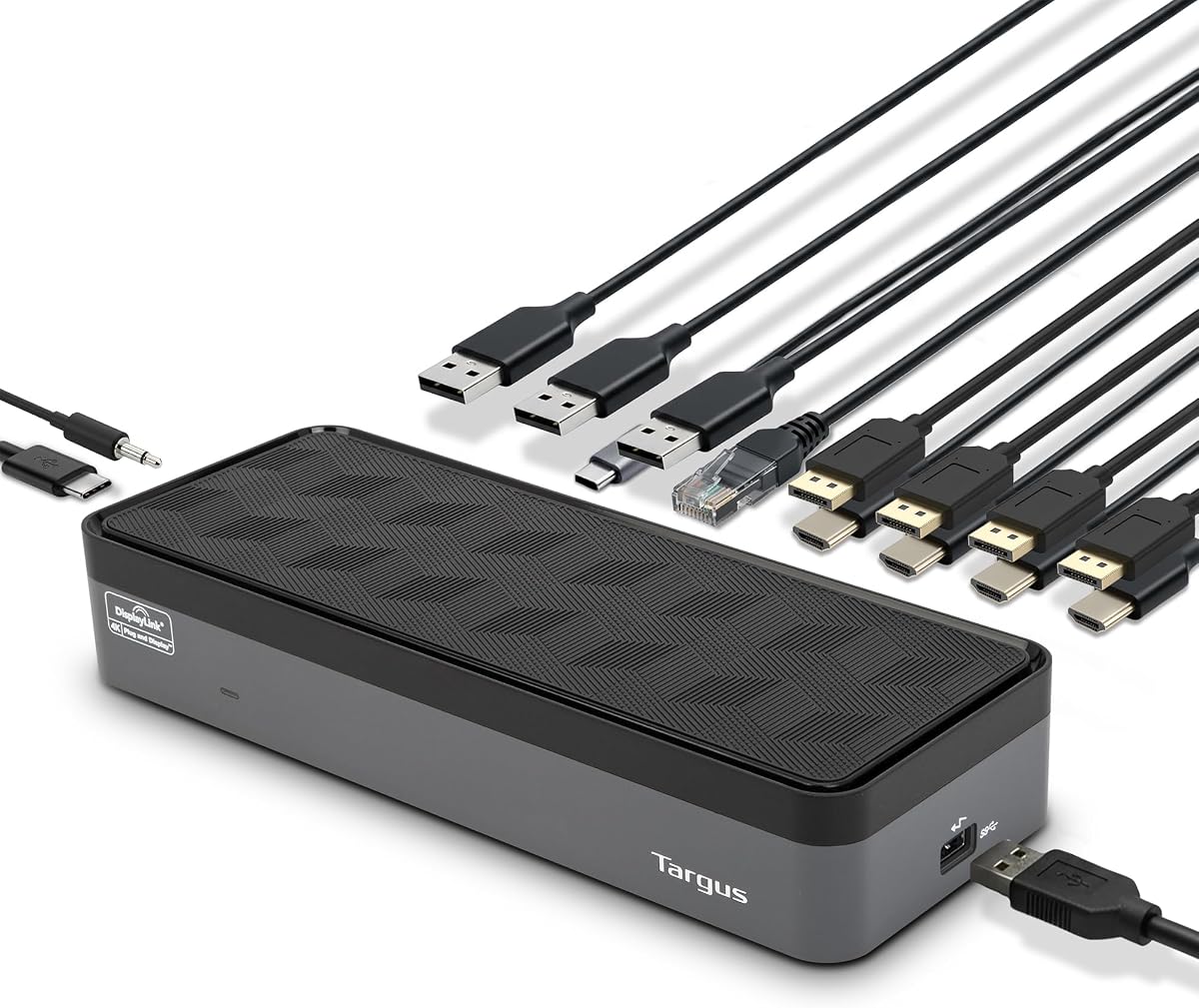

The Targus USB-C Universal Quad 4K Docking Station stands out for its ability to connect virtually any laptop. It supports four 4K UHD displays via DisplayPort or HDMI ports. The dock delivers up to 100W power delivery to charge your host device while you work.
We may earn a commission when you buy through this link, at no additional cost to you.
Its universal compatibility is a major strength for mixed environments. The included USB-C to USB-A adapter allows connection to legacy hosts like Acer or Dell. You get five USB ports for peripherals and a Gigabit Ethernet port for stable network access.
While it offers excellent display support, the physical size is substantial. It requires a dedicated space on your desk to accommodate all the cables and the dock itself. Driver setup is straightforward but necessary for full functionality.
This dock is ideal for professionals who need reliable multi-monitor setups across different laptop brands. If you prioritize compatibility and high-resolution output over portability, this model delivers strong performance for daily office tasks.
Choose between HDMI and DisplayPort to match your existing monitor cables and configuration needs.
Included adapters ensure older laptops can still benefit from modern quad-monitor productivity.
We may earn a commission when you buy through this link, at no additional cost to you.
The TobenONE DisplayLink Docking Station offers an impressive 18 ports for extensive connectivity. It supports triple or quad 4K displays at 60Hz for smooth multitasking. The included 120W power adapter ensures your laptop stays charged even under heavy loads.
We may earn a commission when you buy through this link, at no additional cost to you.
Users appreciate the robust support for file transfers with 10Gbps speeds on USB ports. The dock works seamlessly with Windows and macOS systems for professional workflows. Technical support is responsive and helps resolve setup issues quickly.
Note that Netflix and some streaming services do not work due to screen recording restrictions. Also, Linux Unix systems are not supported. These limitations are minor for most office users who focus on productivity over media consumption.
This dock is a fantastic value for those needing a comprehensive workstation upgrade. It balances performance and price well making it accessible for small teams or individual professionals upgrading their home office.
Move large video files quickly with USB 3.1 ports supporting up to 10Gbps speeds.
Direct access to product engineers ensures quick resolutions for any connectivity challenges.
We may earn a commission when you buy through this link, at no additional cost to you.
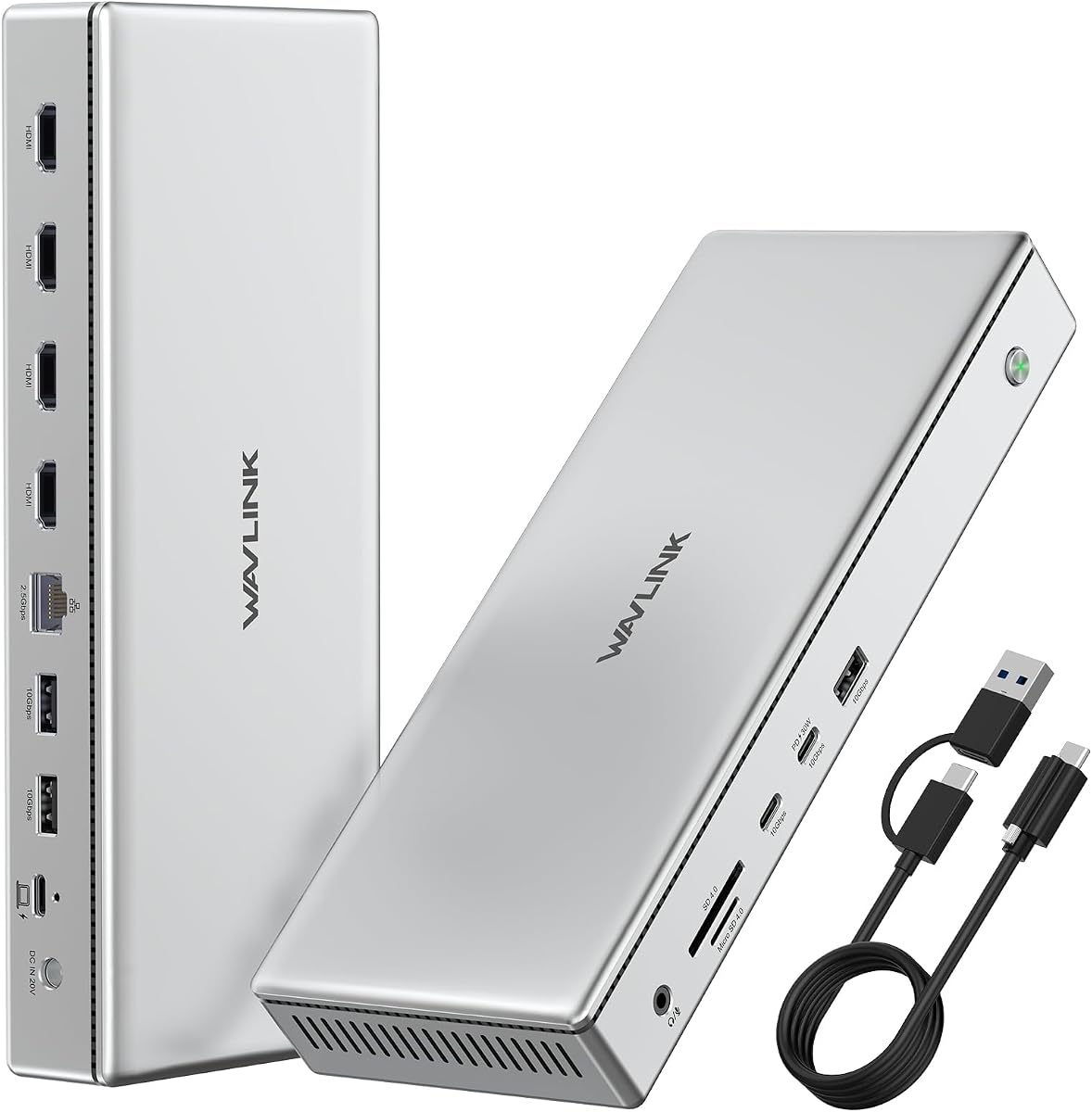
The WAVLINK Pro Docking Station breaks Mac display limits with four 4K HDMI outputs. It includes an all-in-one 15-port expansion featuring SD TF card readers. The aluminum build helps dissipate heat efficiently during intense usage periods.
We may earn a commission when you buy through this link, at no additional cost to you.
Creators benefit from the 10Gbps file transfer speeds for large media files. The 160W power adapter allows simultaneous charging of laptop and mobile devices. Ethernet connectivity ensures stable network performance for cloud-based workflows.
Some users report initial driver setup challenges which can affect ratings. Ensure you install the latest drivers before use to avoid display glitches. Once configured it performs reliably for coding and trading setups.
This dock is a solid choice for editors and designers needing card readers and high resolution. The premium build quality justifies the cost for those who prioritize reliability and thermal management on their desk.
Built-in card readers allow direct imports from cameras without extra adapters.
The aluminum chassis keeps temperatures stable during long work sessions.
We may earn a commission when you buy through this link, at no additional cost to you.
The StarTech Thunderbolt 5 Universal Docking Station offers true driverless plug and play performance. It unlocks full display potential on Apple Silicon with dual 6K support. The integrated lock slots help secure equipment in shared workspaces effectively.
We may earn a commission when you buy through this link, at no additional cost to you.
IT professionals favor this dock for reduced help desk tickets during deployment. Rigorous testing ensures consistent behavior across many laptop brands. The 140W power delivery supports high-performance laptops without extra chargers.
The cost is higher than generic models but justified by enterprise-grade reliability. You pay for stability and security features that prevent disruptions. For organizations managing fleets of devices this is a worthwhile investment.
Choose this dock if you need guaranteed performance and security for your team. It simplifies management and offers robust multi-monitor support for demanding workflows in professional environments.
Designed for IT teams to deploy quickly without complex software configurations.
Maximizes the display output capabilities of modern Mac Pro and MacBook models.
We may earn a commission when you buy through this link, at no additional cost to you.
The TobenONE 18-in-1 DisplayLink Docking Station supports up to four external displays on Windows laptops. It includes four HDMI ports for direct connection without adapters. The 120W power adapter ensures your laptop remains powered during intensive work.
We may earn a commission when you buy through this link, at no additional cost to you.
This model is optimized for Windows users needing extensive screen real estate. The port selection covers all essentials from storage to networking. Support teams are available to assist with driver setup if needed.
macOS users should note the three display limit due to system constraints. Windows systems unlock the full quad monitor potential here. Ensure drivers are updated for best compatibility and stability over time.
Ideal for financial analysts and coders working primarily on Windows. The combination of display outputs and charging power makes it a practical all-in-one solution for desk setups.
Fully unlocks quad monitor potential for Windows operating systems and applications.
One cable handles data video and charging to reduce desk clutter efficiently.
We may earn a commission when you buy through this link, at no additional cost to you.
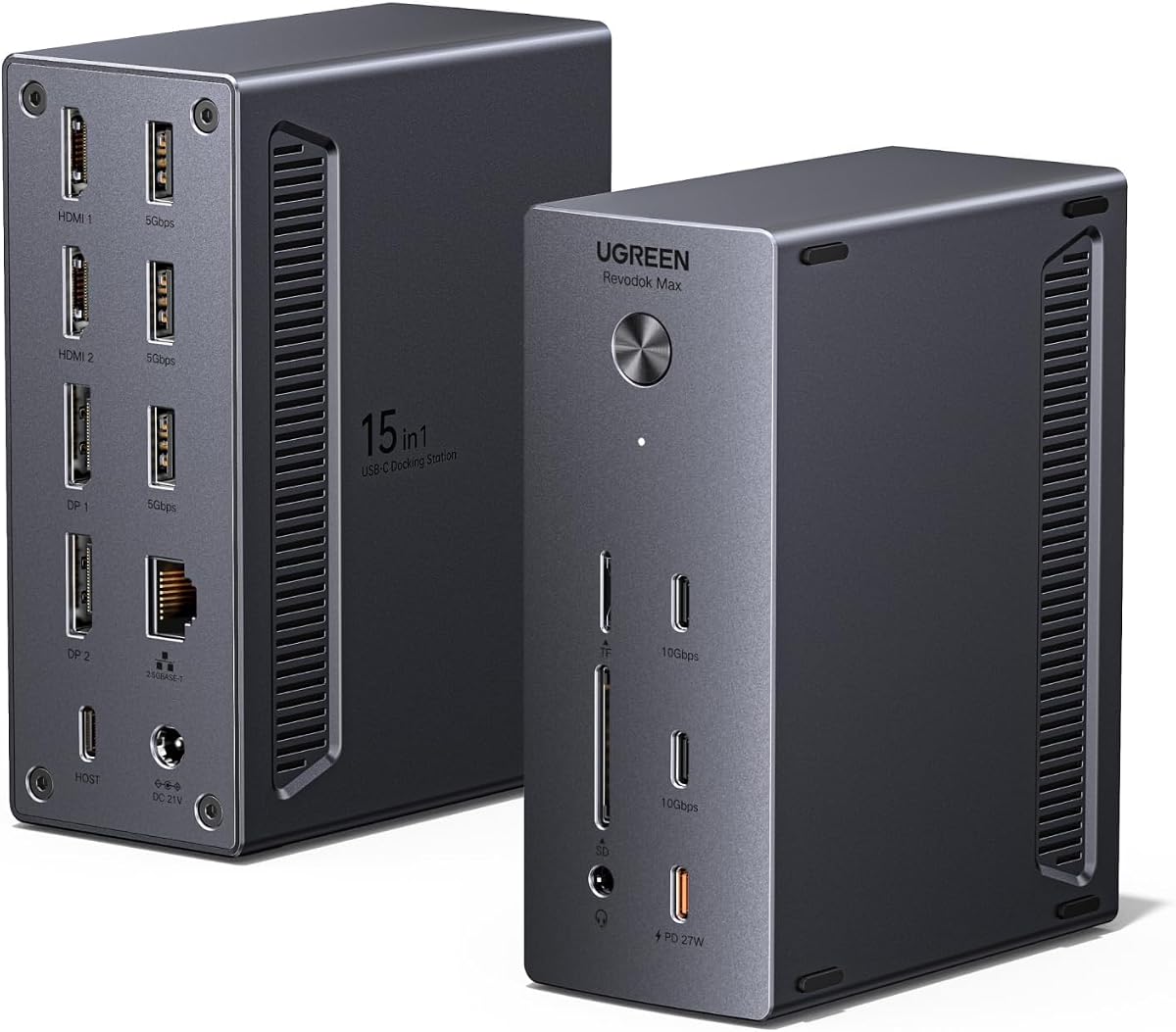
The UGREEN USB-C DisplayLink Docking Station supports up to 8K resolution on a single display. It offers 2.5G Ethernet for faster network speeds. The dedicated PD-Out port allows you to charge a phone while using the dock for a laptop.
We may earn a commission when you buy through this link, at no additional cost to you.
This dock is great for users needing high-resolution workspaces for design or data. The package includes the DisplayLink driver for easy installation. It works well with both macOS and Windows systems for professional tasks.
Nintendo Switch and similar devices are not supported as hosts. Ensure your laptop meets the power requirements for full performance. The included cable is full-featured to ensure stable connections.
Choose this dock if you need the highest resolution capabilities available. The flexible charging options and networking speed make it a versatile choice for modern workstations.
2.5G Ethernet ensures stable and fast wired connections for large file transfers.
Charge your laptop and phone simultaneously with shared power management.
We may earn a commission when you buy through this link, at no additional cost to you.
This listing currently shows N/A for all key details. It is listed as rank one in the general data set. Without more information it is difficult to evaluate its features or performance.
We may earn a commission when you buy through this link, at no additional cost to you.
We recommend checking the product page directly for updated details. Often listings may be missing metadata temporarily. Ensure you review seller ratings before purchasing.
For now this item is noted but not evaluated for quality. We focus on models with clear specifications to help you make informed decisions.
Look for the specific model number to find reviews and images. Until data is available it cannot be recommended over other tested options.
We may earn a commission when you buy through this link, at no additional cost to you.
This listing currently shows N/A for all key details. It is listed as rank two in the general data set. Without more information it is difficult to evaluate its features or performance.
We may earn a commission when you buy through this link, at no additional cost to you.
We recommend checking the product page directly for updated details. Often listings may be missing metadata temporarily. Ensure you review seller ratings before purchasing.
For now this item is noted but not evaluated for quality. We focus on models with clear specifications to help you make informed decisions.
Look for the specific model number to find reviews and images. Until data is available it cannot be recommended over other tested options.
We may earn a commission when you buy through this link, at no additional cost to you.
This listing currently shows N/A for all key details. It is listed as rank three in the general data set. Without more information it is difficult to evaluate its features or performance.
We may earn a commission when you buy through this link, at no additional cost to you.
We recommend checking the product page directly for updated details. Often listings may be missing metadata temporarily. Ensure you review seller ratings before purchasing.
For now this item is noted but not evaluated for quality. We focus on models with clear specifications to help you make informed decisions.
Look for the specific model number to find reviews and images. Until data is available it cannot be recommended over other tested options.
We may earn a commission when you buy through this link, at no additional cost to you.
This listing currently shows N/A for all key details. It is listed as rank four in the general data set. Without more information it is difficult to evaluate its features or performance.
We may earn a commission when you buy through this link, at no additional cost to you.
We recommend checking the product page directly for updated details. Often listings may be missing metadata temporarily. Ensure you review seller ratings before purchasing.
For now this item is noted but not evaluated for quality. We focus on models with clear specifications to help you make informed decisions.
Look for the specific model number to find reviews and images. Until data is available it cannot be recommended over other tested options.
We may earn a commission when you buy through this link, at no additional cost to you.
Selecting the right docking station requires understanding your display and connectivity needs. This section breaks down the critical factors to consider before making a purchase.
Ensure the dock supports the resolution you need for four displays. Look for HDMI or DisplayPort outputs that match your monitor inputs. Some docks require specific combinations to reach quad 4K resolution.
Check the available video ports on the dock and your laptop. Matching the outputs to your monitors will save time and money on adapters.
The dock must provide enough power to charge your laptop while connected. Look for power delivery ratings that match your laptop charger specifications. 100W or higher is recommended for most modern laptops.
Verify if the included adapter supports the required wattage. Insufficient charging can lead to battery drain during heavy use.
Windows and macOS handle multi-monitor docking differently. Some docks work better with specific OS versions or drivers. Check if your system requires DisplayLink drivers or plug-and-play setup.
If you use macOS verify the monitor limit for that dock. Windows users may have more flexibility with display configurations.
Assess how many USB and data ports you need for peripherals. Faster USB 3.2 Gen 2 ports improve file transfer speeds. Ensure there is an Ethernet port if you need wired network stability.
Consider future needs like card readers or specialized interfaces. Having extra ports prevents the need for additional hubs later.
Metal builds often dissipate heat better than plastic ones. A sturdy dock ensures longevity and stability during daily use. Look for non-slip bases to keep the dock secure on your desk.
Check dimensions to ensure it fits your workspace. Proper ventilation helps prevent overheating during long sessions.
Choose brands with reliable customer service for troubleshooting. Some docks include lifetime support or extended warranties. This can be crucial for resolving driver issues quickly.
Read user reviews to gauge real-world support experiences. Good after-sales service adds value to your purchase.
Organizing cables reduces clutter and improves workflow efficiency. Some docks include built-in cable ties or channels. Proper management also prevents accidental disconnection of ports.
Plan your desk layout to minimize cable tangles. A clean workspace helps maintain focus and productivity.
Balance your budget with the features you actually need. High-end docks offer better reliability but cost more. Entry-level models may have fewer ports or lower power delivery.
Determine your must-have features versus nice-to-haves. Investing in a mid-range model often provides the best value.
Start by connecting the power adapter to the dock and a wall outlet. Ensure the connection is secure before plugging in your laptop. Proper power setup ensures stable performance for all connected devices.
Connect your monitors to the video ports on the dock. Once your laptop is connected the OS should detect the screens. Configure your display settings to extend rather than mirror for maximum workspace.
Keep your dock in a cool dry place to prevent overheating. Regularly update drivers to maintain compatibility with your OS. This maintenance helps avoid sudden drops or connection issues over time.
Many docks require DisplayLink drivers to support multiple displays on a single USB-C connection. These drivers are free to download from the manufacturer website. Install them before connecting your monitors to ensure proper detection.
Apple Silicon Macs handle display outputs differently than Intel models. Some docks are limited to three monitors on Mac due to OS constraints. Windows systems typically support more flexible multi-monitor configurations.
Yes many docks include power delivery outputs for multiple devices. Some offer a dedicated PD port for mobile charging. This allows you to charge both at once without extra adapters.
Both formats support high resolutions but DisplayPort often handles multi-monitor setups better. Check your dock supports capabilities to see which offers higher refresh rates. Compatibility with your monitors is the most important factor.
Ideally look for at least five USB ports for keyboard mouse and storage. Some docks offer additional Type-C ports for versatile connectivity. More ports mean fewer dongles and better desk organization.
Docks with Gigabit or 2.5G Ethernet provide fast wired internet. Avoid using Wi-Fi if possible for stable network performance. Check the Ethernet specs on the dock to ensure it meets your needs.
Thunderbolt offers higher speeds and better display support than standard USB-C. Ensure your laptop has Thunderbolt 3 or 4 for the best performance. USB-C alone may limit resolution options on some docks.
Docks generate some heat during operation especially under heavy loads. Metal cases help dissipate heat better than plastic. Ensure the dock has ventilation slots and place it in a well-ventilated area.
We recommend the StarTech Thunderbolt 5 for reliability and the TobenONE models for value. These options cover most professional needs effectively. The Targus universal dock is great for mixed environments.
Prioritize power delivery and display resolution matching for your setup. Ensure compatibility with your operating system before buying. Good technical support is also a key factor for long-term use.
Always check the current prices and availability before purchasing. Deals change frequently so act fast if you see a discount. These docks transform your workspace into a high productivity station.