
MINISFORUM MS-S1 MAX Mini AI Workstation PC
4.5Editor score
AMD Ryzen AI Max+ 395 APU
128GB Unified LPDDR5x Memory
Dual Unit Cluster Configuration Support
This guide compares the top ten dual GPU AI setup options for local inference and training, covering workstations, servers, and mini clusters from leading
Building a powerful dual GPU AI setup is essential for running large language models locally without relying on expensive cloud services. These systems combine high-end graphics cards with robust CPUs and ample memory to handle complex inference tasks efficiently.
We evaluated ten leading options ranging from compact mini workstations to massive rackmount servers. Our comparison focuses on VRAM capacity, compute throughput, software compatibility, and overall system reliability for AI developers and researchers.
Each pick highlights specific strengths like unified memory, cooling efficiency, or expandability. Note that availability and pricing fluctuate frequently, so verify current stock before making a final decision on your hardware configuration.
4.5Editor score

5.0Editor score

5.0Editor score
The following table provides a side-by-side technical overview of all ten systems, highlighting their core specifications to help you identify the best fit for your specific AI workload requirements.


The WEELIAO MAXSUN Intel Arc Pro B60 stands out as the top choice for its innovative dual-GPU design that combines two GPUs into a single card. This configuration provides 48GB of VRAM and 394 TOPS of compute power, making it ideal for running large quantized models locally.
We may earn a commission when you buy through this link, at no additional cost to you.
Its massive VRAM capacity allows users to run 70B-class models like DeepSeek-R1:70B entirely on a single card without needing expensive multi-card setups. The dual-GPU architecture ensures each chip is separately recognized by the system for flexible task assignment and high-concurrency inference.
While the system requires a motherboard that supports PCIe lane bifurcation to achieve full bandwidth, this is a manageable requirement for most enthusiasts. The unique design significantly lowers the total system cost for local LLM deployment compared to traditional multi-GPU configurations.
This setup is perfect for developers who need powerful inference capabilities without the complexity of managing multiple physical cards. We highly recommend it for those seeking a balance between performance, cost, and ease of use in a dual GPU AI setup.
The 48GB VRAM ensures smooth operation for large language models without needing to offload layers to system RAM.
Since each GPU is separately recognized, you can assign different tasks to each chip for better resource utilization.
We may earn a commission when you buy through this link, at no additional cost to you.
The APC MES2X Dual GPU AI Workstation is a powerful machine built for professionals who need top-tier performance for complex AI workflows. With dual RTX PRO 6000 Blackwell GPUs and a Ryzen 9 9950X processor, it delivers exceptional computing power.
We may earn a commission when you buy through this link, at no additional cost to you.
The inclusion of dual RTX PRO 6000 GPUs ensures you have access to professional-grade drivers and optimized performance for AI applications. Combined with 256GB of DDR5 RAM, this system handles massive datasets and complex training tasks with ease.
However, the high price point makes it a significant investment, and it might be overkill if you only need to run smaller models. The liquid cooling system adds to the complexity and cost but ensures the system remains stable under heavy loads.
This workstation is ideal for enterprises and researchers who require a reliable, high-performance system for daily use. If budget is not a constraint, the MES2X offers a robust solution for demanding AI workloads.
The RTX PRO 6000 GPUs provide certified drivers for enterprise applications and optimized AI performance.
256GB of RAM allows for simultaneous processing of multiple large models and datasets without bottlenecks.
We may earn a commission when you buy through this link, at no additional cost to you.
The APC ES620 Dual GPU AI Workstation brings the latest GeForce RTX 5090 GPUs to the table, offering unmatched performance for local AI training and inference. This system is a true powerhouse designed for those who need the absolute best available.
We may earn a commission when you buy through this link, at no additional cost to you.
With two RTX 5090 cards, each featuring 32GB of GDDR7 memory, you have ample VRAM for running very large models locally. The 256GB DDR5 RAM ensures the CPU has no bottlenecks when feeding data to the GPUs during intense operations.
The main trade-off is the significant cost and the physical size required for the full tower chassis. The liquid cooling system helps manage the heat from these high-powered components, but it adds to the overall complexity of the build.
This workstation is best suited for professional researchers or studios that need maximum performance without compromise. It is a premium choice for anyone who wants to push the limits of what is possible on a local dual GPU AI setup.
The RTX 5090 offers the latest advancements in AI compute efficiency and memory bandwidth.
The 8TB RAID NVMe storage ensures fast data access and ample space for large datasets and checkpoints.
We may earn a commission when you buy through this link, at no additional cost to you.
The NVIDIA DGX Spark 2 Pack offers supercomputer performance in a compact, energy-efficient design suitable for desktop environments. With the GB10 Grace Blackwell chip, it delivers up to 1 petaFLOP of AI performance for local model fine-tuning and analytics.
We may earn a commission when you buy through this link, at no additional cost to you.
Each unit provides 128GB of unified memory, which allows for seamless access to data across CPU and GPU without traditional bottlenecks. This is particularly useful for running large models up to 200 billion parameters at FP4 directly on your desktop.
While the price is high, the value lies in the seamless integration of the full NVIDIA AI software stack and the ability to prototype locally. The design is meant to augment laptop or cloud resources, providing a secure environment for experimentation.
This setup is ideal for teams who need to validate ideas quickly without relying on external cloud services. If you have the budget, the DGX Spark offers a unique and powerful solution for local AI development.
The unified memory architecture allows larger models to run smoothly without worrying about VRAM splits.
Full integration with NVIDIA AI stack ensures compatibility with industry-standard tools and libraries.
We may earn a commission when you buy through this link, at no additional cost to you.
The ASUS Dual EPYC 9965 is a high-performance computing server designed for enterprise clusters and demanding AI workloads. With two AMD EPYC 9005 processors, it offers 192 Zen 5c cores and support for up to eight high-end GPUs.
We may earn a commission when you buy through this link, at no additional cost to you.
The server supports massive storage expansion with up to 10 PCIe 5.0 NVMe SSDs and vast networking options to reduce latency. This makes it ideal for data centers where throughput and scalability are critical for production AI services.
However, this system requires a dedicated server environment and significant power infrastructure. It is not suitable for a standard office desk, and the cost reflects its high-end professional specifications.
This rackmount server is perfect for organizations building large-scale AI infrastructure. It provides the reliability and performance needed for enterprise-level deployment of complex machine learning models.
The 192 core CPU allows for parallel processing of massive datasets and concurrent AI inference tasks.
Support for high-bandwidth 200GbE NICs ensures fast data transfer across large distributed systems.
We may earn a commission when you buy through this link, at no additional cost to you.
The Cloud Ninjas Iron Bull AI Workstation is designed for specific professional use cases like PIX4Dsurvey and other mapping applications. It features a Ryzen Threadripper 9970X processor paired with a powerful RTX 5090 GPU.
We may earn a commission when you buy through this link, at no additional cost to you.
With 128GB of ECC DDR5 RAM, this system ensures data integrity during long processing jobs. The 1600W power supply and 360mm liquid cooler keep the system stable under sustained high loads typical in professional workflows.
While powerful, the high price and specialized design may not appeal to general AI hobbyists. The inclusion of 10GbE networking makes it suitable for high-speed data transfer in office environments.
This workstation is best for professionals who need a reliable machine for heavy 3D modeling and surveying tasks. It offers the performance needed to handle complex geometric computations and large point clouds.
ECC memory helps prevent errors during long computations, which is critical for professional data analysis.
10GbE networking allows for quick transfer of large datasets to network storage systems.
We may earn a commission when you buy through this link, at no additional cost to you.
The AMD EPYC 9965 Workstation PC is a massive system designed for training large LLMs and running deep learning models locally. It features three RTX PRO 6000 GPUs and a staggering 768GB of DDR5 ECC RAM.
We may earn a commission when you buy through this link, at no additional cost to you.
The massive memory pool allows for real-time ingestion and manipulation of huge datasets. The Gen5 NVMe SSDs eliminate storage bottlenecks, ensuring that data moves quickly from disk to GPU.
However, the power requirements are extreme, needing 240V/20A for full capability. The cost is also a major consideration, making this a choice for those with significant budgets.
This system is perfect for engineering teams that need to handle multi-million polygon assemblies and complex physics simulations. It offers a turnkey solution for high-end local AI infrastructure without cloud reliance.
768GB of RAM ensures you can load entire datasets into memory for faster processing speeds.
192 cores provide unmatched multi-threaded processing for complex simulations and rendering tasks.
We may earn a commission when you buy through this link, at no additional cost to you.
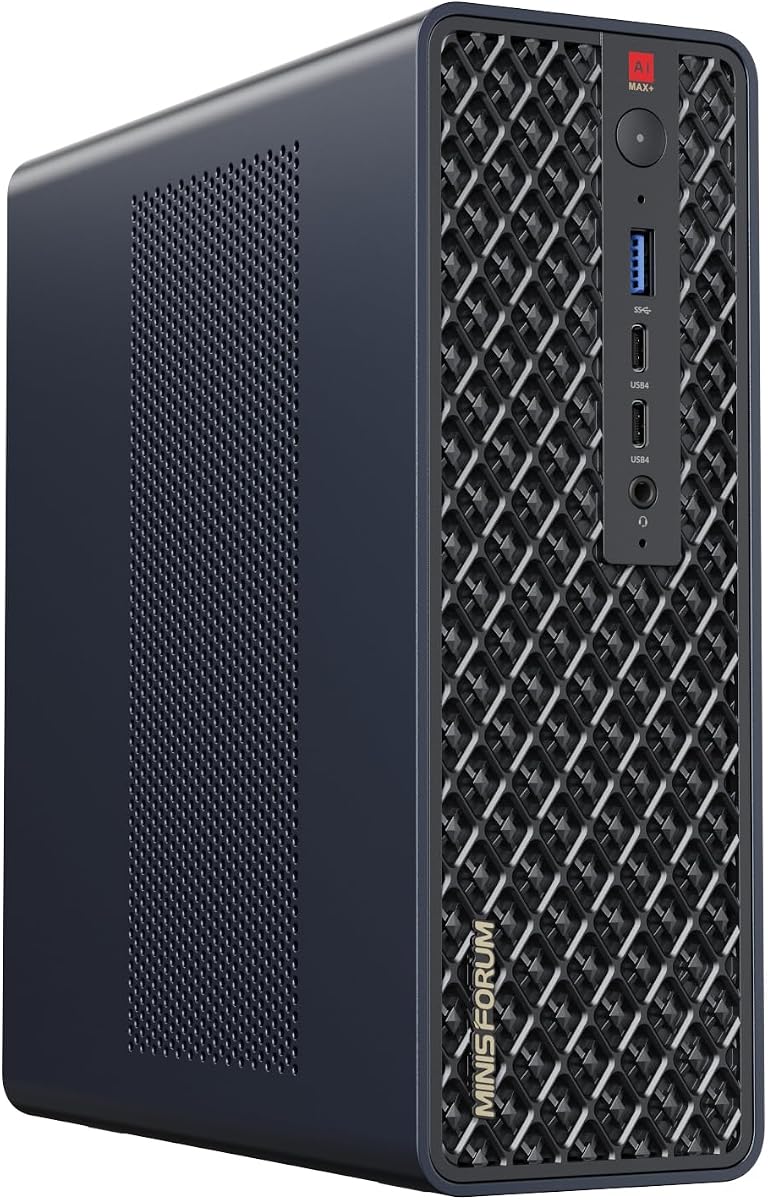
The MINISFORUM MS-S1 MAX is a compact AI workstation that packs impressive performance into a small form factor. Featuring the AMD Ryzen AI Max+ 395 APU, it delivers 126 TOPS of total system output for AI tasks.
We may earn a commission when you buy through this link, at no additional cost to you.
The 128GB of LPDDR5x unified memory eliminates VRAM bottlenecks, allowing for smooth high-intensity computations. It is ideal for running local LLMs and multimodal models without the need for a large tower system.
While it might be limited compared to desktop workstations, the ability to configure two units as a dual-unit cluster expands its capabilities. This makes it a versatile choice for those needing a balance of cost and capability.
This mini workstation is best for individual developers or small studios working on moderate AI projects. It offers a cost-effective entry point into local AI inference with strong support for scaling via clustering.
UMA design maximizes performance stability under high loads by allowing shared access to memory pools.
Multiple units can be cascaded into a distributed cluster to create a higher-efficiency computing center.
We may earn a commission when you buy through this link, at no additional cost to you.
The NVIDIA RTX PRO 6000 Blackwell max-Q is a powerful GPU designed for building custom workstation setups. With 96GB of next-gen GDDR7 ECC memory, it allows teams to host heavy open-source LLMs locally.
We may earn a commission when you buy through this link, at no additional cost to you.
The efficient Max-Q Edition delivers high AI performance while capping power consumption at 300 Watts. This makes multi-GPU desktop scaling viable for demanding research labs without overwhelming power budgets.
It offers unmatched thermal management, which is crucial for sustained inference tasks. The PCIe 5.0 interface ensures zero-lag multi-stream editing and real-time encoding for video content.
This GPU is perfect for those building their own systems who need top-tier performance and reliability. It is a strong choice for professionals who need enterprise-grade features in a desktop environment.
The 300W power cap allows for multiple cards in a standard desktop chassis without excessive power draw.
ECC memory and enterprise-grade design ensure stability during long training runs and data processing.
We may earn a commission when you buy through this link, at no additional cost to you.
The MINISFORUM MS-S1 Max Mini Workstation offers a powerful APU with five 8K video outputs and flexible connectivity options. It is ideal for fields that require high-performance computing like digital signage and engineering design.
We may earn a commission when you buy through this link, at no additional cost to you.
The 128GB LPDDR5 RAM and fast M.2 SSD storage provide a solid foundation for light AI tasks and general productivity. The enhanced heat dissipation system ensures stable performance even at peak power consumption.
While it is a versatile mini PC, it may lack the raw power needed for heavy local training of massive models. However, its compact size makes it a great addition to any modern workstation setup.
This unit is best for users who need a space-saving PC that can still handle complex visual and light AI workflows. It offers strong value for those needing high connectivity and efficient cooling in a small form factor.
Five video outputs support multiple monitors for wider field of view and improved work efficiency.
Phase change cooling and dual centrifugal fans ensure consistent performance output while maintaining a quiet environment.
We may earn a commission when you buy through this link, at no additional cost to you.
Choosing the right dual GPU AI setup requires careful consideration of several technical factors to ensure the system meets your specific performance and budget needs.
VRAM is critical for running large language models locally. More VRAM allows you to load bigger models without offloading to system RAM.
Look for systems with at least 24GB VRAM per GPU for practical AI tasks.
High system memory ensures smooth data movement between CPU and GPU during training or inference phases.
Aim for 128GB of DDR5 RAM to avoid bottlenecks when processing large datasets.
A powerful CPU handles data preprocessing and task scheduling efficiently. A high core count helps when managing multiple GPU tasks.
Choose processors like Ryzen Threadripper or EPYC for heavy multi-threaded workloads.
Dual GPU systems draw significant power. A high-wattage supply ensures stable operation without throttling.
Select a PSU rated at least 1200W for high-end dual GPU configurations.
Proper cooling prevents thermal throttling during long inference sessions. Active cooling is often better than passive.
Liquid cooling or high airflow designs are recommended for sustained loads.
Fast NVMe SSDs reduce latency when loading models and datasets. Storage speed impacts training iteration times.
Choose PCIe 5.0 or Gen4 NVMe drives for optimal performance.
Compatibility with frameworks like PyTorch is essential for seamless deployment. Ensure drivers are up to date.
Check vendor support for open-source AI libraries before buying.
Future-proofing your system allows for adding more components later. Check available PCIe slots and USB ports.
Systems with expansion slots offer more flexibility as your needs grow.
Start by updating all GPU drivers to the latest versions to ensure compatibility with AI frameworks. Proper drivers are essential for stable performance and access to new features.
Install your preferred AI frameworks like PyTorch or TensorFlow via official package managers to avoid conflicts. Use virtual environments to manage dependencies cleanly.
Regularly clean dust from fans and vents to prevent overheating. Monitoring temperatures during load helps identify any cooling issues early.
For running quantized models efficiently, you generally need at least 24GB of VRAM. Larger models may require more, such as 48GB or 96GB depending on the size.
No, you need a motherboard that supports PCIe lane bifurcation to run two GPUs at full speed. Consumer boards often lack this feature.
Yes, 128GB is a solid starting point. It allows for efficient data preprocessing without bottlenecks in most professional use cases.
Yes, consumer cards like RTX 5090 are viable for AI work. However, they may lack specific enterprise features or certifications.
Liquid cooling helps maintain lower temperatures which reduces throttling. This ensures consistent performance during long AI jobs.
Most mini PCs are not designed for dual discrete GPUs. However, some cluster configurations or APU setups can work for light AI tasks.
You connect GPUs via PCIe slots on the motherboard. Ensure your PSU has enough power connectors and wattage for both cards.
Yes, cloud training is still useful for massive models. However, local setups offer better data privacy and lower long-term costs.
We reviewed ten diverse options ranging from compact mini workstations to massive rackmount servers. Each setup offers unique strengths for different types of local AI workflows.
When choosing, prioritize VRAM capacity and cooling efficiency. These factors determine how large a model you can run and how reliably it will perform.
Always check current prices and availability before buying. The hardware market changes quickly and prices for these specialized components fluctuate.