
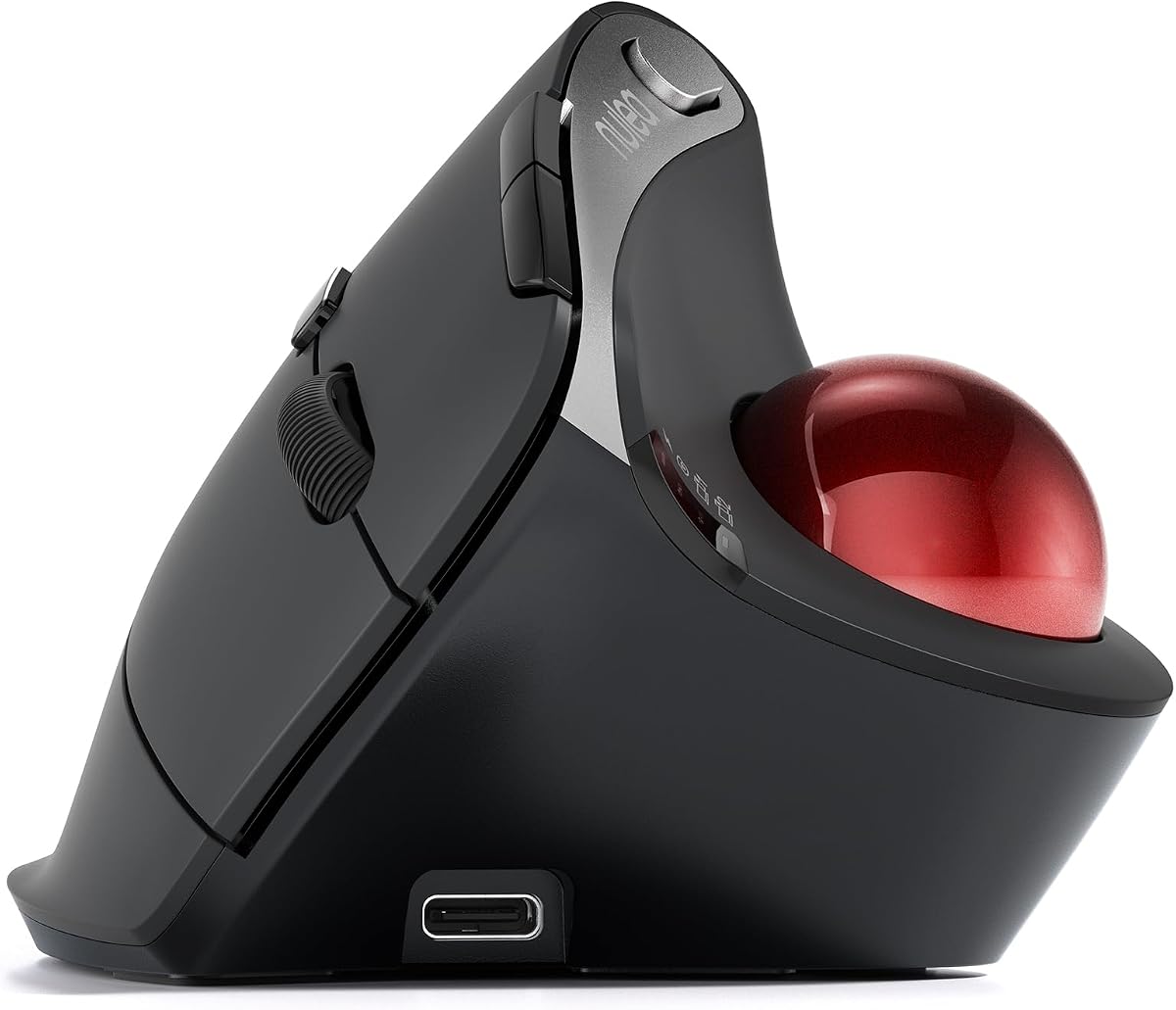
Nulea M501 Wireless Trackball Mouse Ergonomic Thumb Control 4 DPI Levels
4.4Editor score
Rechargeable battery built in
Three device connectivity options
Smooth thumb control trackball
This guide compares the top ergonomic trackball mice for comfort and precision. We review features, design, and performance to help you choose the best device.
Ergonomic trackball mice offer a unique solution for users seeking comfort during long work sessions. By keeping your hand stationary and using a thumb or finger to control the cursor, these devices reduce strain on your wrist and forearm significantly.
We have carefully evaluated the leading models available in the current market to identify the most effective options. Our analysis focuses on build quality, connectivity, battery life, and specific ergonomic features that define a superior user experience for diverse needs.
Each pick in this list highlights specific strengths whether you need budget friendly value or advanced customization capabilities. Please note that prices and availability can change frequently so verify current details before making your final purchasing decision online.
4.4Editor score
4.5Editor score

4.4Editor score
The following comparison table outlines the key specifications and features of each model to help you quickly identify the device that aligns with your specific workflow requirements and ergonomic needs.




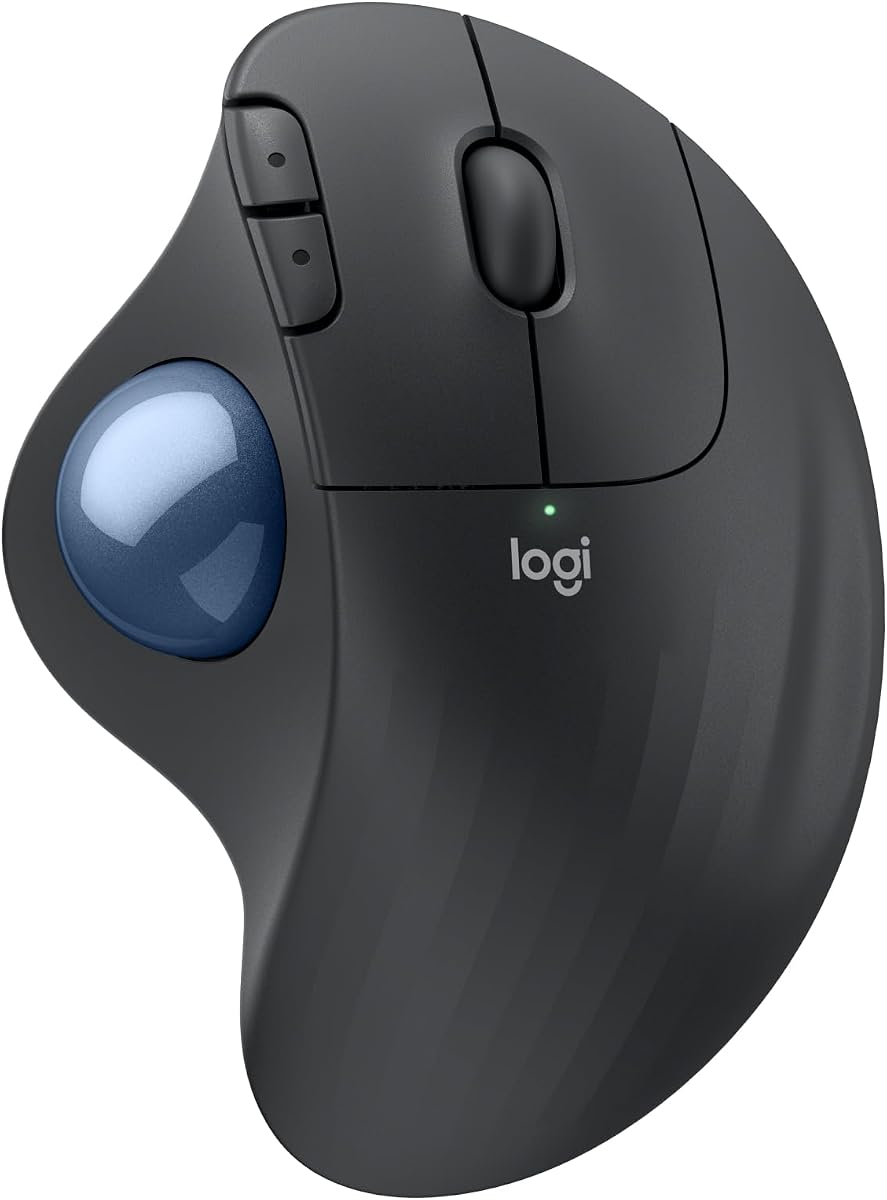
The Logitech Ergo M575S stands out as a top performer in the ergonomic trackball category with a strong rating from users. Its sculpted shape and thumb control mechanism are designed to keep your hand relaxed during extended work sessions.
We may earn a commission when you buy through this link, at no additional cost to you.
Key strengths include the significant reduction in muscle strain and the inclusion of quiet clicks which are perfect for shared workspaces. The device connects easily via Bluetooth or USB receiver and offers a long battery life that minimizes interruptions.
While it requires the Logi Options+ App for full customization which might be a minor hurdle for some users the trade-off is worth it for the added functionality. The price point is also reasonable considering the quality and ergonomics provided.
This mouse is ideal for office workers and professionals who spend hours at a desk and need reliable comfort. We recommend it as a primary choice for anyone seeking a proven ergonomic solution without breaking the budget.
The ergonomic shape realigns your forearm into a better posture throughout the day reducing long term strain risks.
With the trackball you can move your cursor without moving your hand making it ideal for small or space-saving setups.
We may earn a commission when you buy through this link, at no additional cost to you.
The Nulea M501 offers an accessible entry point into the world of ergonomic trackball mice with solid performance and features. Users appreciate the natural palm position and the ability to switch between devices seamlessly for better productivity.
We may earn a commission when you buy through this link, at no additional cost to you.
Strengths include the rechargeable battery which eliminates the need for disposable cells and the precise tracking that works well on various surfaces. The adjustable DPI levels allow you to tailor cursor speed to your preference easily.
One trade-off is that the buttons are not programmable limiting advanced customization options compared to higher end models. However for basic navigation and office tasks this limitation is often acceptable given the value provided.
This model is best for students or home office users who need an ergonomic solution without a high cost. We suggest it for those prioritizing battery convenience and device flexibility in their daily workflow.
The optimal angle of the trackball mouse allows you to keep your palm in a natural position for all-day comfort.
Connect up to 3 devices by either bluetooth or USB dongle and switch easily between them to improve your efficiency.
We may earn a commission when you buy through this link, at no additional cost to you.
The Logitech 910007026 Ergo M575S in Black provides a reliable version of the popular ergonomic trackball with a strong user rating. It focuses on core functionality ensuring comfort and precision without unnecessary complexity in the design.
We may earn a commission when you buy through this link, at no additional cost to you.
Strengths include the long battery life which ensures uninterrupted work and the improved forearm posture support that reduces strain during daily use. The thumb control is smooth and responsive making navigation efficient on any surface.
While it lacks some advanced customization features found in other models it excels in simplicity and ease of use. The trade-off is minor for users who want a straightforward tool that works well out of the box every time.
This mouse is perfect for general office tasks and users who prefer a no-frills approach to ergonomics. We recommend it for those seeking a trusted brand name with proven comfort at a competitive price point.
The ergonomic shape of the device supports your hand and realigns your forearm into a better posture throughout the day.
Connect your ergonomic wireless mouse using Bluetooth or the included Logi Bolt USB receiver for stable performance.
We may earn a commission when you buy through this link, at no additional cost to you.
The Logitech MX Ergo S Advanced delivers premium features with a strong rating from users seeking high performance. Its 20-degree tilt and USB-C charging make it a top choice for modern work environments that value efficiency and ergonomics.
We may earn a commission when you buy through this link, at no additional cost to you.
Key strengths include the ability to switch between speed and precision tracking and the significant reduction in muscle strain due to the tilt design. The quiet clicks and customizable buttons further enhance productivity for complex tasks.
The main trade-off is the higher cost compared to standard models but the long battery life and charging speed often justify the investment. Users may need to install the Logi Options+ App to unlock all available features and customization options.
This mouse is ideal for power users and professionals who demand advanced control and comfort for long sessions. We recommend it for those willing to invest in a high quality device that supports diverse workflow needs.
The MX Ergo S Advanced wireless trackball mouse gives more control with less movement at the tap of a button.
Enjoy up to 24h of use from a 1 min charge or up to 120 days with a full charge for convenience.
We may earn a commission when you buy through this link, at no additional cost to you.
The TECKNET Wireless Trackball Mouse combines vertical ergonomics with trackball precision offering a unique solution for users with wrist issues. Its 16-degree angle promotes a natural posture and the silent operation is excellent for quiet environments.
We may earn a commission when you buy through this link, at no additional cost to you.
Strengths include the fast charging capability with 15 minutes powering a full day and the precise tracking that works well on all surfaces. The silent design ensures you can work without disturbing others which is a key benefit.
One trade-off is the initial learning curve associated with both vertical and trackball designs but most users adjust quickly over a few weeks. The non-programmable buttons are another minor limitation but do not impact basic functionality significantly.
This model is best for users seeking a vertical design with added precision and low noise operation. We recommend it for those who need a comfortable solution for large hands and frequent use.
Featuring a unique 16° vertical angle this ergonomic wireless mouse promotes better forearm posture and reduces muscle strain.
The silent mouse design ensures you can work without disturbing others which is a key benefit for shared spaces.
We may earn a commission when you buy through this link, at no additional cost to you.
The Nulea M506 stands out with a 54-degree vertical structure and a high user rating making it a top choice for wrist comfort. The contoured shell and textured surface provide a steady grip that reduces fatigue during creative or office work.
We may earn a commission when you buy through this link, at no additional cost to you.
Strengths include the detachable trackball which simplifies cleaning and maintains smooth rolling over time. The adjustable DPI settings and seamless device switching further enhance its usability for multitasking environments.
While the buttons are not programmable the ergonomic benefits often outweigh this limitation for users focused on comfort. The angle may feel steep initially but it encourages a natural hand position that reduces strain significantly.
This mouse is ideal for users with wrist pain or those seeking a strong vertical solution. We recommend it for creative professionals and office workers who prioritize long-term comfort and reliable performance.
The 54° vertical structure keeps your wrists and forearms in natural relaxed positions for better ergonomic support.
The trackball is removable for easy cleaning and clear dust and dirt without tools to ensure precise control.
We may earn a commission when you buy through this link, at no additional cost to you.
The Nulea Wireless Ergonomic Vertical Trackball Mouse offers a 65-degree angle and an infinite scroll wheel for efficient navigation through long documents. Users appreciate the silent control and the wave-textured surface that fits the palm seamlessly.
We may earn a commission when you buy through this link, at no additional cost to you.
Strengths include the advanced scroll wheel which switches between modes based on speed and the silent operation that minimizes distraction. The multi-device connection ensures you can switch between PC Mac and laptop with ease during work.
The lower rating may reflect a learning curve with the high angle or the lack of programmable buttons for advanced users. However for standard office tasks this model provides solid comfort and reliability without needing extra setup.
This model is best for users who frequently scroll long documents and want a quiet ergonomic solution. We recommend it for those who value smooth navigation and a comfortable grip over advanced customization features.
The advanced infinite scroll wheel automatically switches between precise and fast modes based on scrolling speed for easy navigation.
Experience a completely noise-free operation which is perfect for shared spaces late-night work or anyone who values total focus.
We may earn a commission when you buy through this link, at no additional cost to you.
The Nulea Wireless Trackball Mouse with Tilt Stand provides a 21.7-degree tilt that delivers a more natural wrist position for ergonomic comfort. Its silent operation and multi-device connection make it a versatile choice for shared workspaces.
We may earn a commission when you buy through this link, at no additional cost to you.
Strengths include the elevated stand that fits your palm precisely and the 6-button layout that supports high performance tasks. The adjustable DPI levels ensure you can find the right speed for drawing editing or daily office work.
One trade-off is that the buttons are not programmable limiting workflow customization for advanced users. The tilt angle may also require a short adaptation period but it offers significant comfort improvements once adjusted.
This model is ideal for users needing a compact ergonomic option with silent functionality. We recommend it for those seeking a budget-friendly device that supports multiple devices and a natural grip.
The ergonomic wireless mouse comes with a 21.7° tilt stand for a more natural wrist position and comfortable grip.
Experience a completely noise-free operation which is perfect for shared spaces late-night work or anyone who values total focus.
We may earn a commission when you buy through this link, at no additional cost to you.
The Logitech Ergo M575 for Business offers enterprise-grade reliability and remote monitoring capabilities for scalable deployment. It focuses on reducing muscle activity and promoting better forearm posture for all-day comfort across teams.
We may earn a commission when you buy through this link, at no additional cost to you.
Strengths include the remote deploy and monitor features with Logitech Sync and the use of recycled plastic materials that support sustainability goals. The smooth tracking and long battery life ensure consistent performance for employee workflows.
For individual users the business features might be less critical but the ergonomic comfort and reliability remain highly valuable. The price is competitive for a branded device designed for durability and ease of maintenance.
This model is best for businesses or users who prioritize durability and remote management options. We recommend it for those needing a trustworthy device that supports health and sustainability priorities.
Remotely deploy and monitor with Logitech Sync making it ideal to deploy at scale for employees who want comfort.
The plastic parts include 52% post consumer recycled plastic demonstrating a commitment to environmental responsibility.
We may earn a commission when you buy through this link, at no additional cost to you.
The Logitech MX Ergo S Advanced provides advanced control with encrypted dongle support ensuring secure wireless connections. Its programmable buttons and fast charging make it a top choice for professionals who prioritize security and productivity.
We may earn a commission when you buy through this link, at no additional cost to you.
Strengths include the ability to switch between speed and high-precision tracking and the ergonomic tilt angle that reduces muscle strain. The quiet clicks and USB-C charging further enhance its usability for long work sessions without interruption.
The higher cost is justified by the security features and high-quality build but users should be ready to install the Logi Options+ App for full functionality. The trade-off is minimal for those who need secure customizable performance.
This model is ideal for IT professionals or users in secure environments who need advanced features. We recommend it for those seeking a top-tier device that combines security precision and comfort effectively.
The encrypted dongle ensures secure wireless connectivity for users working in environments that demand data protection.
Switch between speed and high-precision tracking at the touch of a button to match your specific task needs.
We may earn a commission when you buy through this link, at no additional cost to you.
Selecting the right ergonomic trackball mouse requires understanding your specific needs and the features that impact comfort and productivity. This guide outlines key factors to consider before making your decision.
The shape and angle of the mouse should support your natural hand position to reduce wrist and forearm strain over time. Look for models with tilt angles or vertical designs that align with your comfort level.
Choose a device with a sculpted shape that fits your palm well to ensure long-term comfort without pain.
Decide between thumb or finger-operated trackballs based on your hand size and preference for movement. Thumb controls are generally more precise while finger controls allow for faster navigation.
Select a trackball mechanism that feels smooth and responsive to your touch for efficient cursor movement.
Wireless connectivity via Bluetooth or USB dongle offers flexibility for different work setups and devices. Multi-device support can enhance productivity if you switch between multiple computers frequently.
Ensure the connection type you choose supports your operating system and provides stable performance.
Battery life impacts how often you need to replace cells or charge the device during your workday. Rechargeable models save money and reduce waste while AA battery options offer convenience if you prefer them.
Opt for a battery solution that matches your usage patterns and reduces interruption during critical tasks.
Programmable buttons and software support allow you to tailor the mouse to your workflow for higher efficiency. Advanced options may include shortcuts macro recording or cursor speed adjustments.
Look for a model that offers the level of customization you need to streamline your daily tasks.
High quality materials ensure durability and longevity especially if the device is used heavily every day. Look for rubber grips or textured surfaces that provide a secure hold and reduce slipping.
Choose a device made with reliable materials that can withstand frequent use and maintain performance over time.
Budget options may lack advanced features but still provide essential ergonomic benefits for general use. Premium models often offer better build quality and more customization at a higher cost.
Balance your budget against the features that matter most to you for the best value.
Quiet clicks are important for shared workspaces or late-night work sessions to minimize distractions. Many modern trackball mice include silent button mechanisms to support focus.
Prioritize silent operation if you need to maintain a quiet environment while using your device.
Place the mouse on a stable flat surface that allows the trackball to roll freely without obstruction. Ensure your hand rests naturally on the device without reaching or stretching to minimize strain.
Use your thumb or fingers to rotate the trackball for cursor movement rather than moving the entire device. Adjust the sensitivity settings in your device options to find a comfortable speed for your work.
Regularly clean the trackball and the internal housing to prevent dust buildup that can affect performance. If the model allows remove the ball to wipe it down with a soft dry cloth as needed.
Yes ergonomic trackball mice can reduce strain on the wrist and forearm which is beneficial for users with carpal tunnel syndrome. By keeping the hand stationary and using a thumb or finger to control the cursor you minimize repetitive movements. However proper posture is also important so consult a medical professional if you have persistent pain.
Battery life varies by model but many offer up to 18 months on a single AA battery. Rechargeable options typically provide weeks of use on a single charge with fast charging support on premium devices. Check the specific battery details for your chosen model to ensure it meets your needs.
Trackball mice generally work on any surface because they do not require a traditional mouse pad or surface interaction. The trackball mechanism relies on your movement rather than an optical sensor which makes them versatile for different desks and work areas.
Most users find that it takes one to two weeks to get accustomed to a trackball mouse as the control method differs from traditional mice. With practice the motion becomes natural and you may appreciate the reduced wrist strain over time.
Most modern ergonomic trackball mice are compatible with both Mac and PC operating systems via Bluetooth or USB dongles. Some features may require specific software installation so check system compatibility before purchasing for your device.
Thumb-operated trackballs are generally more precise and suitable for users with medium to large hands. Finger-operated trackballs allow for faster movement and may be preferred by users with smaller hands or specific mobility needs.
Our review highlights the top ergonomic trackball mice that balance comfort precision and value for diverse needs. Whether you seek the reliability of Logitech or the budget-friendly features of Nulea there is a model suited to your workflow.
Prioritize ergonomic features like tilt angles and battery life to ensure long-term comfort and productivity in your daily tasks. Consider your specific needs such as multi-device support or quiet operation to refine your choice further.
Remember to verify current prices and availability on retailer sites before making your final decision. Taking the time to select the right device will help you maintain better posture and reduce strain effectively.