
iKKEGOL Upgraded USB Triple Foot Pedal
4.4Editor score
Quiet optical switches
Programmable HID device
Wide pedal surface area
This guide compares the best foot pedals for transcriptionists including durability compatibility and ergonomic design to help you choose the right control for
Finding the right foot pedal for transcription work is essential for maintaining efficiency during long sessions. A quality device allows you to control playback without lifting your hands from the keyboard, which significantly boosts productivity and reduces typing interruptions.
We evaluated ten top-rated models based on build quality, software compatibility, and ergonomic design. Our comparison covers a wide range of options from budget-friendly picks to professional-grade controls that meet the demands of medical legal and general transcription professionals.
Each pick highlights specific strengths such as switch durability, pedal layout, and plug-and-play functionality. Please note that product availability and pricing may change over time so verify current details before making your final purchase decision for your office setup.
4.4Editor score

4.5Editor score

4.2Editor score
The following table provides a side-by-side overview of the ten featured models. Each entry highlights key specifications to help you quickly identify which control best matches your software requirements and comfort needs for daily transcription tasks.


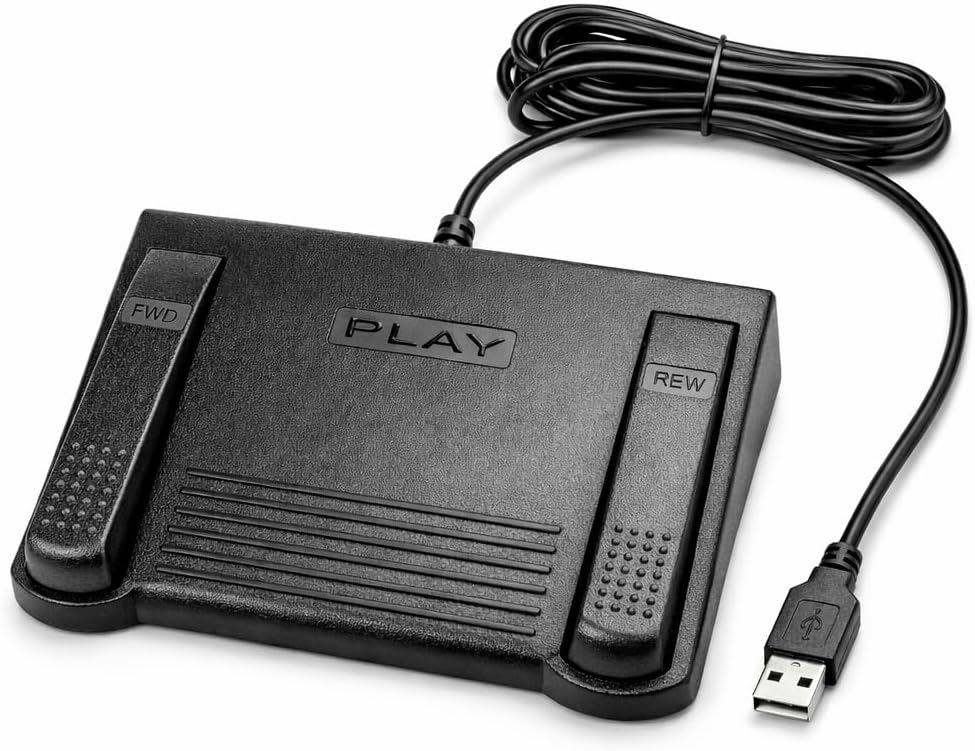

The Infinity 3 USB Foot Pedal stands out as a reliable choice for transcriptionists who need consistent performance without complex setup. With a rating of 4.5 stars it reflects strong user satisfaction regarding its build quality and ease of use during long work sessions.
We may earn a commission when you buy through this link, at no additional cost to you.
Its sturdy design incorporates ultra-heavy-duty micro switches that ensure countless hours of trouble-free performance. The ergonomic layout features a wide central sloping play pedal that makes it easy to move your foot between play fast forward and rewind keys without accidental presses.
While this model lacks advanced software customization options the fixed function mapping works well for most standard transcription workflows. The trade-off is acceptable for users who prioritize physical reliability and immediate plug-and-play functionality over programmable macro features.
This pedal is ideal for professionals who want a no-fuss device that gets the job done reliably. We recommend it for daily transcription tasks where durability and comfort are the primary concerns.
The heavy-duty switches are engineered to withstand frequent use without degradation over time.
The sloping design reduces foot strain during extended transcription sessions by supporting natural positioning.
We may earn a commission when you buy through this link, at no additional cost to you.
The VEC in-USB-2 Infinity offers a blend of durability and convenience for transcriptionists who prefer wireless freedom. Its rechargeable battery provides up to 1000 hours of recording time making it suitable for long days without frequent charging interruptions.
We may earn a commission when you buy through this link, at no additional cost to you.
A mechanical stop prevents accidental triggering of the center pedal while stepping on side pedals ensuring precise control during use. The switches are rated for 2,000,000 depressions which is a strong indicator of longevity under heavy workload conditions.
The main downside is the need to manage battery life which adds a minor maintenance step. However the convenience of cable-free operation often outweighs this for mobile professionals working from different locations.
We suggest this model for users who value flexibility and want a pedal that integrates seamlessly with most leading dictation products.
The rechargeable battery enables mobility and reduces desk clutter by eliminating a USB cable tether.
Mechanical stops ensure you only activate the intended pedal even during fast or complex foot movements.
We may earn a commission when you buy through this link, at no additional cost to you.
The Philips ACC2330 introduces a distinctive toe touch control feature that offers fine-grained operation for experienced users. Its design allows you to swing the foot using the heel and easily relax during pause time which can reduce fatigue.
We may earn a commission when you buy through this link, at no additional cost to you.
The increased width of the center pedal helps avoid unintended presses of other pedals enhancing accuracy during complex transcription tasks. The layout is specifically optimized for foot feel when changing control areas to minimize missteps.
Transitioning to toe touch control may take some time for those accustomed to standard pedal layouts. The trade-off is a more intuitive physical interface once mastered which can speed up your workflow.
This pedal is best for professionals seeking advanced control features that align with their specific foot positioning habits.
Toe touch control allows for subtle adjustments without fully committing to a pedal press.
The design supports natural foot relaxation during pauses to prevent muscle strain over time.
We may earn a commission when you buy through this link, at no additional cost to you.
The DAC 3 Function Foot Pedal stands out with its unique next job and record buttons designed for specific software environments. It holds a perfect 5.0 rating reflecting high satisfaction among users who require these specialized functions.
We may earn a commission when you buy through this link, at no additional cost to you.
Its large labeled buttons make it easy to identify functions at a glance which reduces errors during busy transcription periods. The USB connector ensures a stable connection to your computer for consistent performance.
This model is not suitable for general use across all platforms since it targets specific workflow needs. The trade-off is a highly specialized tool that excels where it fits but lacks broad versatility.
Choose this pedal if your software supports these specific commands and you need reliable access to them.
The next job function streamlines batch processing tasks without requiring keyboard shortcuts.
Large labeled buttons reduce confusion during high-pressure transcription sessions.
We may earn a commission when you buy through this link, at no additional cost to you.
The Infinity USB Digital Foot Control offers a sleek low profile design that fits well under most desks. Its greater non-slip surface area ensures your foot stays in place even during intense transcription work.
We may earn a commission when you buy through this link, at no additional cost to you.
The digital control system provides reliable operation without extra bulk which is ideal for users with limited desk space. It connects via USB for straightforward integration with your existing setup.
Some users might find the low profile less substantial than bulkier models though it remains sturdy enough for daily use. The benefit is saving valuable workspace while maintaining functionality.
This pedal is recommended for those with tight workspace constraints who still demand consistent performance.
The slim design allows placement under desks without cluttering the floor area.
Non-slip surfaces prevent movement during rapid foot transitions between commands.
We may earn a commission when you buy through this link, at no additional cost to you.
The Express Scribe ECS-FPAE is tailored exclusively for NCH Software's Express Scribe platform ensuring reliable and precise playback control. Its oversized pedal design allows easy movement between play fast forward and rewind functions supporting comfortable low-fatigue operation.
We may earn a commission when you buy through this link, at no additional cost to you.
It comes pre-programmed and ready to use right out of the box with no manual configuration required. This plug-and-play setup saves time and eliminates the need for wizards or complex settings adjustments.
The main limitation is that it will not work with other transcription programs which restricts its utility. The trade-off is a simplified experience optimized for a single ecosystem.
If you rely on Express Scribe this pedal offers a seamless experience that complements your software perfectly.
Built specifically for Express Scribe to ensure maximum compatibility and performance.
Pre-programmed functionality means you can start transcribing immediately after connection.
We may earn a commission when you buy through this link, at no additional cost to you.
The ECS-IN-USB-1 delivers reliable hands-free audio playback control allowing transcribers to work faster without interrupting typing flow. It is designed for broad compatibility with major dictation and transcription software platforms.
We may earn a commission when you buy through this link, at no additional cost to you.
Its ergonomic layout supports natural foot positioning to help minimize strain and fatigue during extended use. This makes it a dependable choice for professional environments like medical or legal settings where precision matters.
While it offers solid performance some users report average feedback compared to higher-rated models. The trade-off is a functional tool that covers essential needs without premium features.
We recommend this model for professionals needing a versatile device for daily transcription workloads.
Works with major software platforms reducing the need for multiple hardware purchases.
Thoughtful design helps prevent repetitive strain during long transcription sessions.
We may earn a commission when you buy through this link, at no additional cost to you.
The iKKEGOL Upgraded Triple Foot Pedal offers excellent value with quiet optical switches and full programmability. It acts as a standard HID device allowing you to map foot actions to keyboard commands for various applications.
We may earn a commission when you buy through this link, at no additional cost to you.
Its ergonomic wide pedal design ensures lasting comfort and can bear over 100kg of weight. Four TPU rubber feet keep it securely in place on hard floors during intensive use.
While it lacks dedicated transcription software support the programmable nature lets you adapt it to your specific needs. The budget-friendly price makes it accessible for those starting out or working remotely.
This pedal is ideal for users seeking affordability without sacrificing core functionality and durability.
High-quality optical switches at a low cost point make this a smart budget pick.
Map any key or macro to pedals for tailored workflow optimization.
We may earn a commission when you buy through this link, at no additional cost to you.
The Philips LFH-2330 features a four pedal design that can be completely configured to suit your workflow using a user-friendly wizard. Its slim ergonomic profile minimizes foot movement to reduce physical strain during long hours.
We may earn a commission when you buy through this link, at no additional cost to you.
The anti-slip bottom surface ensures the pedal stays in the right place even during rapid movements. This model is designed to optimize comfort and control for professional environments.
The higher price and requirement to use setup software are trade-offs for the customization it offers. However users who need fine control over multiple functions will find it worthwhile.
We recommend this for professionals seeking a premium experience with maximum flexibility.
Four pedals allow complex workflows without switching between multiple devices.
Slim design minimizes unnecessary foot movement to lower fatigue over time.
We may earn a commission when you buy through this link, at no additional cost to you.
The iKKEGOL Triple Mech offers tactile feedback through mechanical switches ideal for users who want clear physical confirmation. It includes ElfKey software support to program commands for Windows macOS and Linux environments.
We may earn a commission when you buy through this link, at no additional cost to you.
With three pedals you can execute macros key combinations or mouse clicks without lifting hands from the keyboard. The design ensures long-lasting comfort with wide pedals and four TPU rubber feet for stability.
While the software adds powerful functionality it requires some initial learning to map your desired shortcuts. The benefit is a highly adaptable tool for transcription gaming or coding workflows.
Choose this if you need detailed customization and prefer mechanical switch feel over soft options.
Mechanical switches provide a crisp click that confirms each action clearly.
Compatible with Windows macOS and Linux for broad professional use.
We may earn a commission when you buy through this link, at no additional cost to you.
Selecting the right foot pedal involves evaluating several factors that impact comfort and efficiency.
Ensure the pedal works with your transcription software. Some devices are designed for specific platforms like Express Scribe while others are universal.
Check if your software supports custom key mapping or requires dedicated hardware drivers.
Three or four pedals offer more flexibility for playback record and job functions. The layout should allow natural foot movement without strain.
Consider whether the pedal surface is wide enough to prevent accidental slips during rapid use.
Look for heavy-duty switches rated for millions of cycles. Quality materials ensure the pedal withstands daily professional use.
Durability reduces long-term costs and prevents disruptions during critical work.
USB plug-and-play devices offer the easiest setup without needing additional drivers. Wireless options provide mobility but require battery management.
Choose a connection type that fits your workspace and mobility needs.
Pedals with sloping or low-profile designs reduce foot strain during long sessions. Anti-slip surfaces keep the device stable on your floor.
Comfort is crucial for avoiding repetitive strain injuries over time.
Programmable pedals allow you to assign macros or shortcuts to fit your workflow. This adds flexibility but may require learning software tools.
Decide if you need simple fixed functions or advanced customizable features.
A solid warranty indicates manufacturer confidence and protects your investment. Check for mail-in parts or labor coverage terms.
Support availability ensures help is accessible if issues arise with the device.
Place the pedal on a flat non-slip surface under your desk close to your dominant foot. Connect it to your computer via USB and allow the operating system to recognize it automatically.
Test each pedal to confirm it triggers the correct playback or command function in your transcription software. Adjust foot position if you notice accidental presses during transitions.
Clean the pedal regularly with a soft dry cloth to remove dust. Check the bottom surface for debris and avoid exposing the unit to moisture or spills.
Most USB foot pedals are compatible with Mac as they use standard HID protocols. Verify software support specifically for macOS before purchasing to ensure full functionality.
Some pedals come pre-mapped while others require configuration software. Use the provided wizard or download the manufacturer's tool to assign desired keyboard shortcuts.
Yes programmable pedals can control media players games or macros in non-transcription software. Ensure your application supports external input mapping for best results.
Optical switches are quieter and have fewer moving parts while mechanical ones offer tactile feedback. The best choice depends on your noise environment and personal feel preference.
High-quality models rated for millions of cycles can last several years of daily use. Proper placement and occasional cleaning can extend their functional lifespan further.
Check the USB connection and try a different port. Ensure your software recognizes HID devices and restart your computer to refresh driver detection.
The Infinity 3 and iKKEGOL Triple provide excellent value for most transcription needs. The Philips LFH-2330 stands out for those requiring advanced customization options.
Prioritize durability and comfort to maintain productivity during long sessions. A pedal that fits your specific workflow will save time and reduce strain.
Check current availability and details before purchasing to ensure you get the model that suits your requirements best today.