
Acer 13-in-1 Docking Station
4.5Editor score
Triple display expansion support
110W power adapter included
Compact aluminum design
This guide compares the top 10 HDMI docking stations for multiscreen workstations, evaluating port selection, display support, charging power, and compatibility
Modern professionals need reliable HDMI docking stations for multiscreen workstations to maximize productivity. These devices transform a single laptop port into a full desktop experience with multiple displays and peripherals.
We compared ten top-rated HDMI docking stations based on port variety, display capabilities, charging power, and system compatibility. Each model offers unique strengths for different workstation requirements and budgets.
Each pick shows key features, pros, cons, and detailed analysis to help you choose. Note that product availability and pricing change frequently, so verify current details before purchasing.
4.5Editor score
4.3Editor score

4.7Editor score
The following comparison table provides a side-by-side overview of all ten HDMI docking stations. Each entry highlights critical specifications to help you evaluate which model fits your specific multiscreen workstation needs.


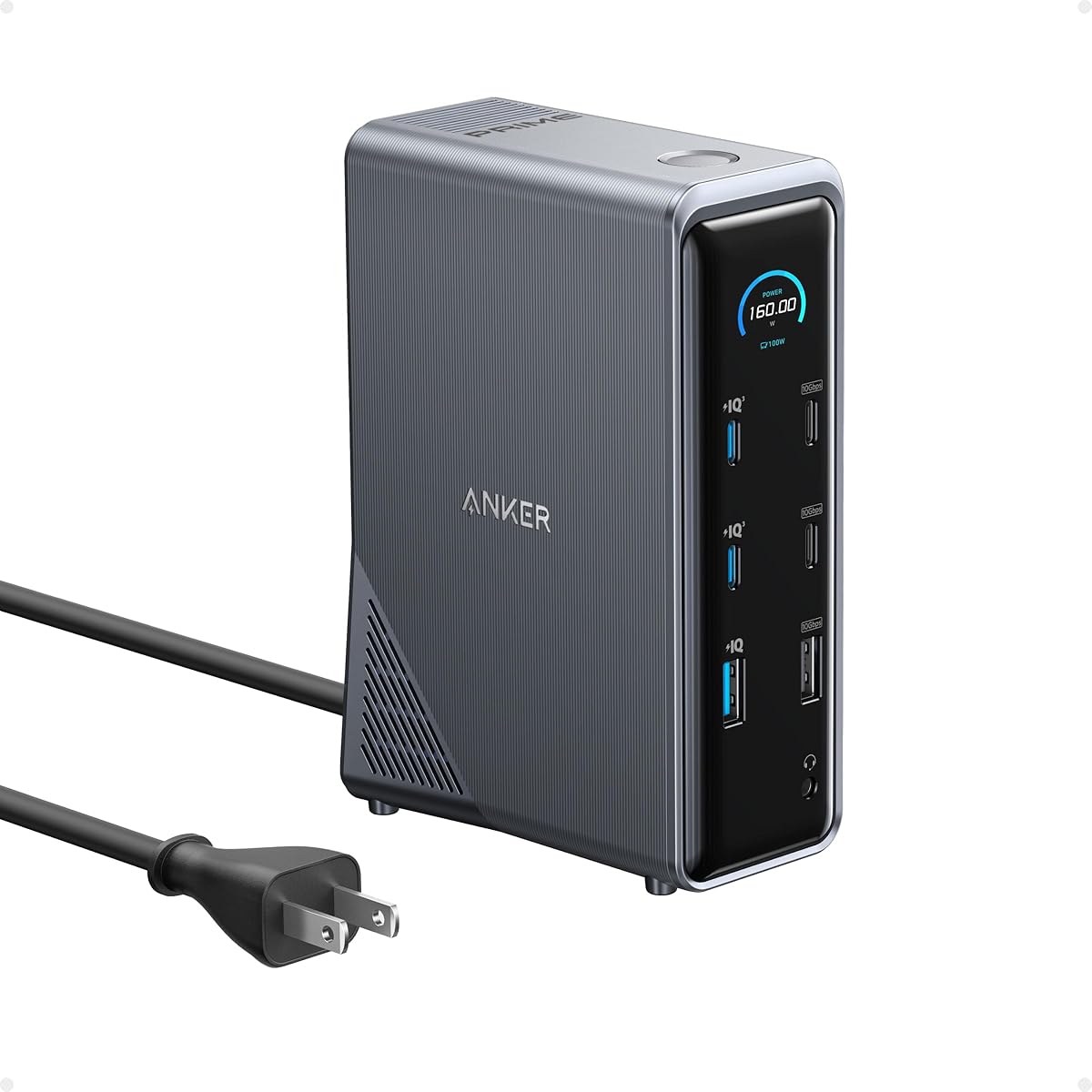
The Anker Prime Docking Station ranks as our top choice for HDMI docking stations designed for multiscreen workstations. With a 14-in-1 configuration, it delivers 160W total output and dual 4K display support, making it ideal for power users.
We may earn a commission when you buy through this link, at no additional cost to you.
Its standout feature is the powerful charging capability, supporting up to four devices simultaneously. The USB-C ports offer 10Gbps speeds, ensuring quick data transfers. Dual HDMI ports enable crystal-clear streaming or mirroring across two displays up to 2K@60Hz.
While it offers extensive connectivity, note that it does not support Linux systems. For macOS users, displays on both external monitors will be identical rather than extended. These limitations are acceptable given its robust performance and versatility for Windows and ChromeOS environments.
This station is perfect for professionals needing a reliable hub for multitasking. Whether managing data flow across multiple devices or connecting high-resolution monitors, it provides the stability and features required for an efficient workstation setup.
The station delivers 160W total output with three USB-C ports capable of 100W each. This ensures your laptop and peripherals stay charged even under heavy workloads.
Efficiently manage data across devices with 11 ports offering speeds up to 10Gbps. This facilitates quick file transfers and seamless connectivity for various peripherals.
We may earn a commission when you buy through this link, at no additional cost to you.
The Anker Prime DL7400 is a premium option for those needing triple 4K displays on Windows systems. Featuring DisplayLink technology, it bypasses native limitations to support three extended monitors simultaneously for enhanced multitasking.
We may earn a commission when you buy through this link, at no additional cost to you.
Its smart display provides real-time updates on charging power, display performance, and fan cooling mode. The 140W upstream port ensures your laptop stays powered while peripherals charge via front USB-C ports. ActiveShield 3.0 maintains stable operation under load.
Users should note that DRM-protected streaming may show black screens due to DisplayLink limitations. Additionally, the latest driver installation is required. Despite these minor issues, its ability to handle triple 4K outputs makes it a top-tier workstation solution.
Ideal for analysts or creators needing multiple large screens, this station offers the flexibility and power to transform a laptop into a full desktop command center. Ensure your system supports DisplayLink before purchasing.
Power up three external monitors at once in 4K resolution. This setup allows for ultra-efficient multitasking with extended desktop capabilities on Windows.
View charging and display status directly from the smart display. This feature gives you precise control over your workstation's power and cooling.
We may earn a commission when you buy through this link, at no additional cost to you.
The Acer 13-in-1 docking station stands out as a budget-friendly option without compromising on essential features. It supports triple display expansion and includes an 110W power adapter, ensuring reliable performance for most workstation needs.
We may earn a commission when you buy through this link, at no additional cost to you.
Its compact aluminum body efficiently dissipates heat during prolonged use. The included adapter delivers 100W power directly to your laptop, maintaining charging stability even under heavy workloads. Additionally, a security slot helps lock the station to your desk.
Note that macOS users only get mirroring, not extended desktop. Triple 4K on Windows requires DSC support. These constraints are acceptable given the low price and solid connectivity options for Windows users seeking a triple-monitor setup.
Perfect for small businesses or home offices, this station consolidates networking, storage, and power into one sleek unit. It offers an excellent blend of affordability and advanced features to elevate your workflow.
Build a powerful command center with three independent screens. This allows you to multitask across financial charts or code efficiently.
The integrated security slot lets you lock the docking station to your desk. This adds a crucial layer of physical security in shared spaces.
We may earn a commission when you buy through this link, at no additional cost to you.
The Anker 8-in-1 docking station is perfect for users needing a simple, compact solution for dual monitors. It features two HDMI ports, USB-A ports, Ethernet, and SD card readers, all powered via USB-C.
We may earn a commission when you buy through this link, at no additional cost to you.
This model supports dual HDMI display with 4K@30Hz or single 4K@60Hz. Power Delivery compatibility provides up to 85W pass-through charging. Its small footprint makes it ideal for portable workstations or tight desk spaces.
It lacks the extensive port variety of larger models and doesn't support Linux. However, for basic dual-monitor setups on Windows or ChromeOS, it offers excellent performance and reliability at a competitive price point.
This hub is best for professionals on the go who need quick connectivity. It eliminates cable chaos and supports a focused workflow without overcomplicating the setup.
Designed for portability with a slim profile. All essential ports fit into a small package that travels easily.
Supports mirroring or extending to two displays. Stream or mirror content efficiently to maximize screen real estate.
We may earn a commission when you buy through this link, at no additional cost to you.
The Plugable docking station is designed for enterprise environments requiring robust multi-monitor setups. It supports up to three HDMI displays and bypasses native limitations on Apple Silicon MacBooks for extended multitasking.
We may earn a commission when you buy through this link, at no additional cost to you.
Integrated DisplayLink graphics technology ensures full multi-display support across Windows and macOS. With 100W USB-C Power Delivery, your laptop charges continuously during use. It is trusted by IT professionals for reliable hot-desking and office deployments.
HDCP is not supported, which limits encrypted streaming on external displays. However, the lifetime technical support and compatibility guarantee make it a safe choice for organizations managing mixed-fleet devices.
This station is perfect for hybrid workforces needing stable connectivity and performance. Transform any notebook into a multi-monitor workstation with professional-grade reliability and support.
Bypasses single-display limitations on M1/M2/M3/Neo MacBooks. This allows triple displays where standard hardware fails.
Engineered for seamless IT integration with stable networking and charging. Ideal for managed office workspaces.
We may earn a commission when you buy through this link, at no additional cost to you.
The TobenONE DisplayLink docking station is unmatched for users needing four external monitors. Supporting Quad 4K@60Hz resolution, it delivers a seamless multitasking experience for professional workflows requiring maximum screen real estate.
We may earn a commission when you buy through this link, at no additional cost to you.
It features 20 ports including 4 HDMI and 4 DP ports. A 150W power adapter ensures 100W charging for your laptop. A power button on the dock controls all external devices, simplifying shutdown procedures.
While M1 MacBooks are limited to three monitors, Windows laptops achieve full quad 4K performance. Driver installation is required, but the two-year defect coverage provides assurance. This model is perfect for traders or designers.
Experience immersive visual performance with this powerhouse station. Whether for data analysis or content creation, it ensures you can view all critical information without switching windows constantly.
Connect to four external monitors for ultimate multitasking. All monitors deliver stunning 4K@60Hz resolution.
The dock's power button controls all external devices. This provides convenience and safety for your workspace.
We may earn a commission when you buy through this link, at no additional cost to you.
The Acer 16-in-1 DisplayLink docking station offers seamless triple display expansion with 4K@60Hz support on macOS and Windows. It features 16 versatile ports, including dual HDMI and dual DP, for flexible display configurations.
We may earn a commission when you buy through this link, at no additional cost to you.
Included is a 130W power adapter delivering 100W to your laptop. The dual DP and HDMI channels support three independent screens. DisplayLink driver installation is mandatory for full functionality. Active cooling maintains stable performance.
Mac users need screen recording permissions for external signals. This is standard for display capture on macOS. For Windows users, it offers a robust command center for complex workloads.
This station is perfect for professionals needing triple high-resolution screens. It ensures you can extend financial charts or code across monitors with professional support backing.
Delivers triple 4K@60Hz for smooth rendering. Essential for high-resolution professional workflows.
The 130W adapter ensures robust power delivery. Keeps your laptop charged under heaviest workloads.
We may earn a commission when you buy through this link, at no additional cost to you.
The TobenONE 18-in-1 docking station offers quad monitor support with 18 powerful ports. It supports up to four external displays on Windows laptops and three on MacBooks with 4K@60Hz resolution.
We may earn a commission when you buy through this link, at no additional cost to you.
It includes a 120W power adapter delivering 96W PD charging. This allows you to leave the heavy adapter at home or use it for travel. USB-C ports support up to 18W phone charging for added convenience.
Mac users can select only one HDMI port due to OS limitations. Despite this, its port variety and power make it ideal for professionals needing a complete hub. Technical support ensures any issues are resolved quickly.
Whether working from home or the office, this station boosts productivity by unlocking multi-display potential. It combines speed, security, and convenience for a clutter-less workspace.
Supports up to four external displays for immersive visual experiences. Unlock multitasking potential across multiple screens.
Provides up to 96W charging for quick laptop power. Charge your phone via front USB-C ports simultaneously.
We may earn a commission when you buy through this link, at no additional cost to you.
The Dell Pro Dock WD25 is part of a commercial docking family designed for modern workplace manageability. It offers enhanced compatibility for Dell AI PCs and non-Dell PCs with native support for up to four high-res displays.
We may earn a commission when you buy through this link, at no additional cost to you.
Features include an ambidextrous USB-C cable routing option and a robust connector for durability. With up to 72% reduction in standby power consumption, it stands out for sustainable innovation. Built with 65% post-consumer recycled materials.
While specs are not as detailed in the data, it ensures accessories stay connected and charged. It prioritizes IT efficiency and user productivity. This is ideal for enterprises needing reliable, manageable hardware.
Upgrade your workspace with a solution focused on modern work needs. It combines sustainability with reliable performance to keep users working without disruption.
Part of the world's most manageable commercial docking family. Flexible capabilities uplevel IT efficiency.
Significant reduction in power consumption and recycled materials. Experience eco-friendly workspace upgrades.
We may earn a commission when you buy through this link, at no additional cost to you.
The Anker 13-in-1 docking station turns your laptop into a desktop workstation with 13 ports. It runs up to three external monitors at 1080p@60Hz and includes an 185W power adapter for desktop-grade power delivery.
We may earn a commission when you buy through this link, at no additional cost to you.
It supports full-functional USB-C, USB4, and Thunderbolt 3/4/5. Extended triple displays work on Windows and ChromeOS via MST. The compact vertical design saves desk space. Built by Anker, a trusted mobile charging brand.
Mac users can charge and transfer data, but displays are mirrored. For power-users needing 1080p productivity, it offers solid performance. The included adapter means no extra purchases are needed for setup.
This station is best for users needing a compact, vertical hub. It provides a reliable workflow with 10Gbps data transfer and SD card reading.
Transfer files at 10Gbps and read SD cards at 104 MB/s. This supports efficient professional workloads.
Includes 135W adapter for desktop power out of the box. Charge your laptop and phone simultaneously.
We may earn a commission when you buy through this link, at no additional cost to you.
Selecting the right HDMI docking station for multiscreen workstations requires understanding key factors. This guide outlines essential considerations to help you find the perfect fit for your specific needs.
Ensure the docking station supports the number of monitors you need. Some models offer triple or quad display capabilities using DisplayLink technology, while others rely on native MST. Check if your laptop supports the required resolution and refresh rates.
Verify compatibility with your operating system. Windows, macOS, and ChromeOS have different display limitations. For example, macOS often requires DisplayLink drivers for extended multi-monitor setups.
Look for docking stations with sufficient USB-C Power Delivery (PD) output. High-powered laptops require at least 100W to charge under heavy workloads. Ensure the included power adapter matches your laptop's needs.
Check if the hub charges only the laptop or other peripherals as well. Some models allow phone charging via front USB-C ports, adding convenience to your workstation.
Count the total ports needed for your peripherals. Essential ports include HDMI, DisplayPort, USB-A, USB-C, Ethernet, and SD card slots. More ports mean less need for additional hubs.
Consider future needs. Investing in a hub with more ports than currently required can save costs and setup time later as your device count grows.
Check USB port speeds. USB 3.2 Gen 1 (5Gbps) or Gen 2 (10Gbps) ensures fast data transfers for external drives. Slower ports may bottleneck performance for large files.
USB-C upstream connections should match your laptop's capabilities. Ensure your laptop supports USB-C DP Alt Mode or Thunderbolt for video and power delivery.
Confirm the station is compatible with your specific laptop model. Most support Windows 10/11 and ChromeOS, but Linux support varies. Check for specific driver requirements.
Apple Silicon MacBooks have native display limits that require DisplayLink. If using a Mac, ensure you can install the necessary software drivers for full functionality.
Look for durable materials like aluminum to dissipate heat efficiently. Overheating can cause performance drops or system disconnects during long sessions.
Some premium models include active cooling fans or smart displays to monitor temperature. This adds reliability, especially for high-power setups.
Check the warranty period. Most reputable brands offer 18 months to 2 years. Lifetime technical support can be valuable for troubleshooting driver issues.
Ensure customer service is accessible. Look for brands with established support teams for quick resolutions if compatibility issues arise.
Consider the physical dimensions. Compact hubs save desk space but may have fewer ports. Vertical designs are space-efficient but may be less stable.
If you travel, look for lightweight models with integrated power management. Some adapters are heavy, so check if you can leave them at a primary office.
Connect the docking station to your laptop using the included USB-C cable. Ensure the cable supports both data and power delivery. Plug in the power adapter to the dock and a wall outlet for stable operation.
Install necessary drivers if required. For DisplayLink models, download the latest software from the manufacturer's website. This ensures extended display functionality works correctly on all operating systems.
Regularly clean the ports to prevent dust buildup. Ensure proper ventilation to avoid overheating. Update firmware periodically to maintain compatibility with new laptop models and systems.
Most HDMI docking stations require a USB-C port that supports Display Alt Mode or Thunderbolt. Check your laptop's specifications to confirm it supports video output via USB-C. Without this feature, video connectivity will not work.
Native USB-C video output often limits laptops to one external display. DisplayLink technology bypasses this by compressing and rendering video signals through software. This allows extended displays on systems with limited GPU capabilities.
Yes, but macOS has specific limitations. Newer Apple Silicon MacBooks typically require DisplayLink drivers for more than one external display. Some models mirror displays by default without extra software.
This depends on the model. Basic hubs support two displays, while premium options support three or four using DisplayLink. Check the product specifications to ensure it meets your multi-monitor needs.
Many models feature Power Delivery (PD) to charge your laptop through the USB-C cable. Ensure the wattage matches your laptop's charging requirements for optimal performance.
MST splits native GPU video signals for multiple screens, while DisplayLink uses software compression. DisplayLink often works better on systems where MST is limited or unavailable.
Use the included USB-C cable to ensure full functionality. Third-party cables may not support the required data speeds or power delivery, leading to connection issues.
Yes, docking stations typically include USB-A and USB-C ports for external storage. Ensure the ports support high-speed transfer rates for efficient data access.
We reviewed ten top HDMI docking stations for multiscreen workstations, highlighting models like the Anker Prime for overall performance and the Acer 13-in-1 for budget-friendly triple displays.
Prioritize display compatibility, power delivery, and port variety based on your specific needs. Ensure the station supports your operating system to avoid driver limitations.
Prices and availability fluctuate. Check current listings before buying to ensure you get the latest version with optimal support and features.