
Amazon Basics 120W Fast Charging USB-C Nano GaN Wall Charger
4.2Editor score
120W total output power
Compact foldable plug design
Three port simultaneous charging
This guide compares the top high wattage USB C chargers for laptops and phones, featuring GaN technology, multiport designs, and smart displays.
Finding the right high wattage USB C charger can transform how you power your devices. Modern laptops and phones demand more energy, and a single reliable block can save space while ensuring fast charging across your entire ecosystem.
We evaluated ten top models based on power output, port count, safety features, and real-world performance. Each product offers unique strengths, from compact travel designs to powerful desktop stations capable of charging multiple laptops simultaneously.
Every pick includes detailed specs, pros, cons, and usage notes to help you decide. Prices fluctuate often so verify current listings before purchase to ensure you get the best value for your specific charging needs today.
4.2Editor score

4.7Editor score

4.5Editor score
This table provides a quick side-by-side comparison of all ten selected high wattage USB C chargers. Review the key specifications to find the model that best fits your power requirements and device ecosystem.




This 380W charging station stands out for its massive power capacity. It supports up to eight devices at once, making it ideal for households with many gadgets needing power simultaneously.
We may earn a commission when you buy through this link, at no additional cost to you.
The inclusion of four USB cables adds significant value. You do not need to source your own cables to start using this charger right away. The GaN III chip ensures efficiency and heat management even under heavy load.
While powerful, the physical size is larger than typical wall plugs. It requires a dedicated spot on a desk or power strip. There is also no digital display to show real-time power distribution per port.
This unit is best for users who need to charge many devices at once. If you run a home office or tech hub, this station eliminates the need for multiple separate chargers and cables.
The 380W total output ensures that even high-demand laptops and tablets can charge together without slowing down.
Four included cables mean you can plug in phones and tablets immediately without searching for compatible adapters.
We may earn a commission when you buy through this link, at no additional cost to you.
This Anker charger is a reliable choice for single-device charging needs. It delivers a solid 100W which is enough to power most high-end laptops and phones at full speed.
We may earn a commission when you buy through this link, at no additional cost to you.
The 5ft cable provides flexibility for placement. You can plug it into an outlet across the room without strain. The foldable plug makes packing it in a bag much easier than rigid prong models.
However, it only has one USB C port. This limits its use to one device at a time unless you use a separate hub. For users who need to charge a laptop and phone simultaneously, this may be a limitation.
Choose this charger if you value simplicity and portability. It is perfect for students or professionals who carry their laptop daily and need a dependable backup power source on the go.
ActiveShield continuously monitors temperature to prevent overheating, ensuring safety for your expensive devices.
A 5-foot cable gives you enough reach to place your laptop comfortably while charging.
We may earn a commission when you buy through this link, at no additional cost to you.
This UGREEN charger combines high wattage with smart features. The 160W output supports multiple devices including large laptops like the MacBook Pro. The digital display adds a modern touch to the setup.
We may earn a commission when you buy through this link, at no additional cost to you.
The touch control panel allows you to see port data instantly. This transparency helps you manage power distribution effectively. The GaN technology keeps the unit smaller than traditional brick chargers.
The main downside is the cost compared to simpler models. Additionally, the display requires power so it will remain visible even when not charging. For most users this is a minor issue.
If you need a desktop power hub that looks good and performs well, this is the top choice. It balances power, features, and portability better than most other options available today.
The rotatable touch screen displays wattage and temperature, giving you real-time control over your power usage.
Five ports allow you to charge a laptop, phone, and accessories all at once from a single wall outlet.
We may earn a commission when you buy through this link, at no additional cost to you.
This charger is designed for travelers who want visibility. The smart display shows charging status and temperature clearly. The 100W max ensures you get fast speeds for one main device while supporting accessories on others.
We may earn a commission when you buy through this link, at no additional cost to you.
The frame is 330% smaller than many competitors. This makes it easy to slip into a coat pocket. Low current mode protects small devices like earbuds from damage by maintaining safe charging levels.
The display may add slight weight to an already compact unit. Also, you cannot charge two high wattage laptops simultaneously due to port limits. It is optimized for one laptop plus accessories.
Choose this if you want a premium look with smart features. It is excellent for business travelers who need a reliable, safe, and easy-to-monitor charger for daily commutes and flights.
Automatically switches to safe modes for small devices like earbuds to prevent overcharging or damage.
The small size makes it easy to carry in a backpack without taking up much space.
We may earn a commission when you buy through this link, at no additional cost to you.
This Amazon Basics charger offers great performance for the price. The 120W total output is enough for most laptop and phone setups. It uses Nano GaN technology to keep the size small.
We may earn a commission when you buy through this link, at no additional cost to you.
You get three ports to split power between devices. The foldable plug adds convenience for storage. It also supports universal voltage which is perfect for international travel without extra adapters.
The build feels sturdy but lacks premium features like a display. Performance is reliable but it does not match the speed of 160W or 300W stations. For budget users this is a strong contender.
It is the best choice if you need a reliable charger without spending much. Students and home users will appreciate the balance of price, size, and port count found in this model.
Offers solid power and port count at a lower cost than most competitors in this category.
Uses advanced GaN material to reduce heat and size compared to traditional silicon chargers.
We may earn a commission when you buy through this link, at no additional cost to you.
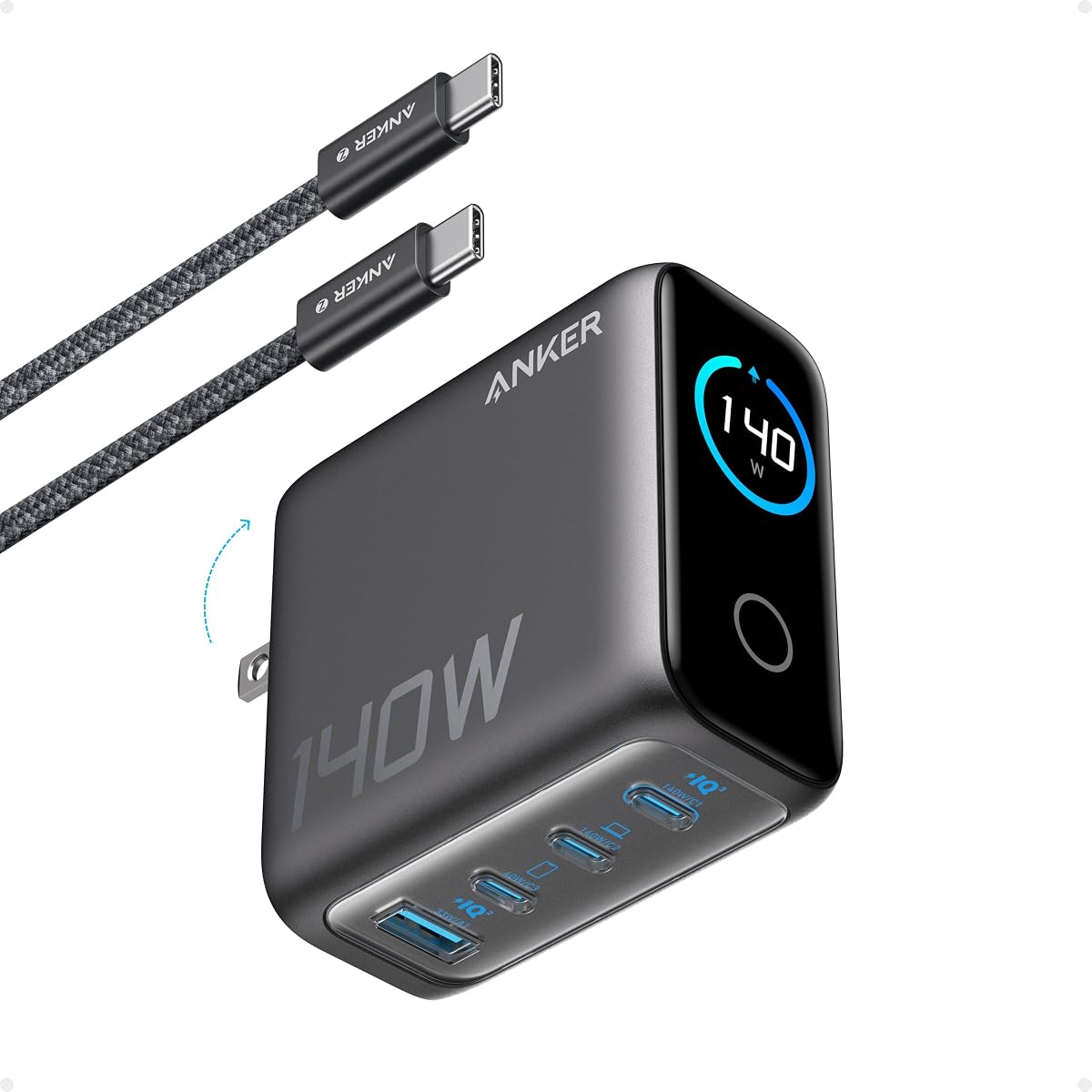
This Anker charger is built for power users with larger laptops. The 140W output ensures your MacBook can charge quickly even during heavy use. The color display provides clear data on your screen.
We may earn a commission when you buy through this link, at no additional cost to you.
ActiveShield 4.0 monitors temperature millions of times a day. This provides robust safety for your expensive equipment. The four ports allow for good flexibility in device placement.
The unit is heavier than the Nano models. This adds weight to your bag but ensures stability. The price is higher than average so it is an investment for those who need serious power.
If you need a charger that matches high performance laptops, this is a top choice. It offers the speed and safety required for professional workstations on the go without sacrificing port availability.
Delivers 140W to charge laptops quickly even during high performance tasks like video editing.
Monitors temperature frequently to prevent overheating and protect your connected devices.
We may earn a commission when you buy through this link, at no additional cost to you.
The Nano charger is one of the smallest 100W options available. It weighs very little and fits easily in a pocket. The 6ft cable included means you can charge from almost any nearby outlet.
We may earn a commission when you buy through this link, at no additional cost to you.
Despite its size it delivers full 100W to one device. This makes it perfect for daily commuters who prioritize low weight. The foldable prongs ensure it stays secure in the outlet while charging.
There is only one port so you cannot charge extra devices directly. Also it lacks the smart display features found in other models. This simplicity is a trade-off for its tiny size.
Choose this if you want the lightest possible charger for travel. It is ideal for users who only need to charge their laptop and do not need multiple ports for other gadgets.
At just 4.23 oz it is one of the lightest 100W chargers available for easy portability.
The matte prongs lock firmly into the wall outlet to prevent loosening or falling out.
We may earn a commission when you buy through this link, at no additional cost to you.
This charger is designed for users who need to power two laptops. With 200W total output you can run two high power devices together. The 140W single port ensures one gets full speed.
We may earn a commission when you buy through this link, at no additional cost to you.
The four port layout allows room for phones and accessories. GaN technology keeps the unit small despite the high power. It supports foldable plugs which help with travel packing and storage.
Managing power distribution between ports requires some attention. Also it is more expensive than 100W models. But for professionals who juggle multiple laptops this capability is a game changer.
If you need to charge two workstations simultaneously this is the best option. It combines high power with port flexibility in a package that fits on a desk or in a bag.
Designed specifically to power two MacBook Pros at the same time without slowing down.
The folding prongs make this high power unit easy to pack for business trips.
We may earn a commission when you buy through this link, at no additional cost to you.
This charging station is a powerhouse for complex setups. With 300W total output it can charge three laptops simultaneously. The 140W port supports the fastest charging speeds available on a single port.
We may earn a commission when you buy through this link, at no additional cost to you.
Five ports mean you can connect many accessories at once. It includes a 240W USB C to USB C cable which handles the high current requirements efficiently. Safety features protect against overheat and overcurrent.
The price is high and it takes up more space than wall plugs. This is best for stationary use on a desk rather than travel. The performance justifies the cost for heavy users.
If you run a studio or home office with many devices this is the ultimate solution. It replaces multiple chargers with one solid unit that handles even the highest power needs.
Supports three laptops at once with dedicated power ports for maximum workflow efficiency.
Built-in GaN tech guards against overheating and short circuits to protect your devices.
We may earn a commission when you buy through this link, at no additional cost to you.
This pack provides two chargers for a low total price. Each unit offers 85W which is enough for most laptops and phones. You can place one at home and one at work easily.
We may earn a commission when you buy through this link, at no additional cost to you.
Both units have three ports for splitting power. Safety features like thermal sensors prevent overheating. The universal compatibility ensures it works with iPhones, Samsungs, and Macs without issues.
The 85W power is lower than 100W models so it charges slower on high demand devices. It is best for standard daily use rather than heavy load scenarios. But the value of two units is high.
Choose this if you need chargers in multiple locations. It is an efficient way to stock up on reliable power sources for your household or team without spending a lot of money.
You get two chargers so you can have one at home and one at office or travel.
Thermal sensors keep temperature under control and protect against overcurrent and overvoltage.
We may earn a commission when you buy through this link, at no additional cost to you.
Selecting the right charger requires understanding power needs and safety features. Below are the key factors to consider before you buy.
Total power output tells you how much energy the charger can deliver in total across all ports. For laptops you generally need at least 100W to charge efficiently while using the device. Higher wattage like 160W or 300W allows multiple devices to charge fast.
Look for a charger that matches or exceeds your device's power needs to ensure fast and reliable charging.
The number and type of ports determine how many devices you can charge at once. Check if you need USB C for laptops or USB A for older gadgets. Some chargers share power between ports which may slow down speeds.
Choose a charger with enough ports for your devices to avoid buying multiple power blocks.
GaN or Gallium Nitride technology allows chargers to be smaller and cooler than traditional silicon models. It improves efficiency so less energy is wasted as heat. This makes the unit safer and easier to carry around.
Prioritize GaN models for better performance and compact size especially if you travel often.
Some chargers include digital displays that show real-time wattage and temperature. This helps you monitor how much power your devices are using. It also alerts you to overheating issues before they become dangerous.
A display adds convenience for power management and helps ensure your devices stay within safe limits.
A foldable plug makes it easy to store the charger in a bag without bending or breaking. Rigid prongs can take up more space and pose a risk of damage during transit. Foldable designs are essential for travelers.
Ensure the charger has foldable prongs if you plan to carry it in a backpack or briefcase.
Safety features like overheat and overvoltage protection are vital to prevent damage. Look for brands that mention proprietary safety tech like ActiveShield or multi-protection systems. Certified chargers reduce the risk of fire or hardware failure.
Always check that the charger includes multiple layers of safety protection before making your purchase.
Some chargers come with cables included while others require you to buy them separately. A good cable ensures that you can start using the charger right away. Long cables offer more flexibility in placing your devices.
Check if a cable is included and ensure it supports the high wattage you need for fast charging.
A solid warranty shows the manufacturer stands behind their product. Look for offers like 18 months or more to cover potential defects. Good customer service ensures you get help quickly if something goes wrong.
Choose a brand that offers a strong warranty to protect your investment in the long term.
Plug the charger into a wall outlet and connect your devices using compatible USB C cables. Ensure the power switch if present is turned on. The charger will automatically detect the connected device and supply the necessary power.
To maintain longevity keep the charger in a cool dry place when not in use. Avoid wrapping the cable tightly around the block as this can damage internal wires. Use a cable organizer if needed for storage.
Regularly check the ports for dust or debris that could interfere with connections. Clean gently with a dry cloth if needed. Avoid using water or chemicals as these can damage sensitive electronic components inside the unit.
Yes you can safely use a 100W charger for a 65W laptop. The device will only draw the power it needs. This ensures your laptop charges at its maximum safe speed without any risk of damage.
Most high wattage chargers support standard USB C devices. However some older devices may not support fast charging protocols. Always check your device's requirements to ensure compatibility with the charger.
GaN chargers use Gallium Nitride which is more efficient than silicon. This allows them to be smaller and run cooler. They also charge devices faster with less energy waste.
Modern chargers have safety features that cut off power when devices are full. However unplugging saves energy and reduces wear on the unit. It is best to unplug when not in use for long periods.
Total wattage is the maximum power the charger can output across all ports. Port wattage is the power available for a single port. Using multiple devices may reduce the power available per port.
It is normal for chargers to warm up during high load charging. GaN technology reduces heat but some warmth is expected. If it gets too hot to touch turn it off and let it cool down.
Many chargers support universal voltage from 100V to 240V. This means they work globally with just a physical adapter. Always check the label for voltage ratings before traveling abroad.
Chargers last several years if well maintained. Replace yours if you notice frayed cables or unusual heat. Regular inspections help ensure safety and consistent charging performance over time.
We reviewed ten powerful models ranging from 85W to 300W. The top picks offer different strengths for travelers families and professionals. Whether you need a compact block or a full power hub there is a match here.
Consider your main devices and how many you need to charge at once. Safety and GaN technology are essential features to prioritize for better efficiency and longevity. Also check if cables are included to avoid extra costs.
Prices for these chargers vary based on features and power output. Always verify the current price on Amazon before buying to get the best deal. With the right charger you can power your devices reliably everywhere.