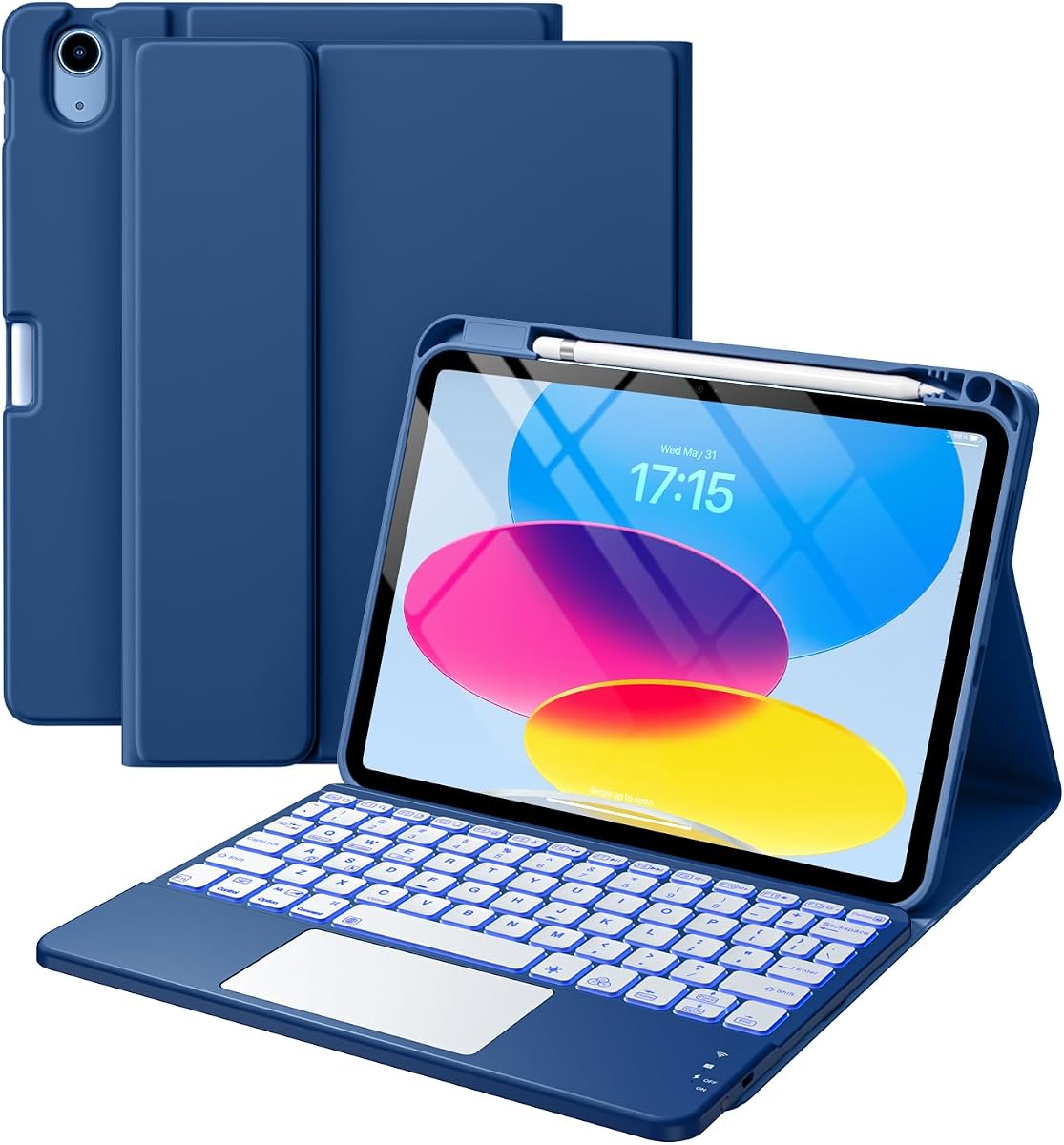
Harvopu Keyboard Case
4.3Editor score
RGB backlit keys
Detachable magnetic keyboard
Multi-angle viewing stand
Finding the right keyboard for your iPad A16 transforms it into a powerful productivity machine. Whether you are a student, professional, or creative user, a quality keyboard case provides comfort, precision, and versatility for daily tasks.
We have carefully evaluated ten top-rated models based on compatibility, build quality, trackpad performance, and overall value. Our comparison focuses on real-world usage scenarios to ensure you find a solution that meets your specific workflow needs.
Each pick highlights unique strengths and trade-offs to help you make an informed decision. Please note that pricing and availability change frequently, so verify current details before purchasing to ensure you get the best deal available.
4.3Editor score

4.5Editor score
4.4Editor score
As an Amazon Associate we earn from qualifying purchases.
This side-by-side comparison breaks down the key specifications and unique attributes of each keyboard case to help you quickly identify which model aligns with your specific requirements and budget constraints.


The Logitech Combo Touch stands out as the top choice for users seeking a professional computing experience. It combines a premium typing surface with a highly responsive trackpad that supports complex gestures seamlessly.
We may earn a commission when you buy through this link, at no additional cost to you.
Its Smart Connector eliminates the need for batteries or Bluetooth pairing. This ensures a stable connection and extends battery life for the iPad itself. The keyboard keys are well-spaced and provide excellent tactile feedback.
While it lacks backlighting and comes at a higher cost, the convenience of zero maintenance charging is a significant trade-off. The protective case design is sturdy and maintains a sleek profile.
Ideal for professionals and students who prioritize reliability and productivity features over flashy aesthetics. It delivers a laptop-like experience that fully leverages the iPad A16 hardware capabilities.
The Smart Connector draws power directly from the iPad so you never need to charge the keyboard separately.
Four distinct modes allow you to type, read, sketch, or view content with optimal ergonomics for each task.
We may earn a commission when you buy through this link, at no additional cost to you.
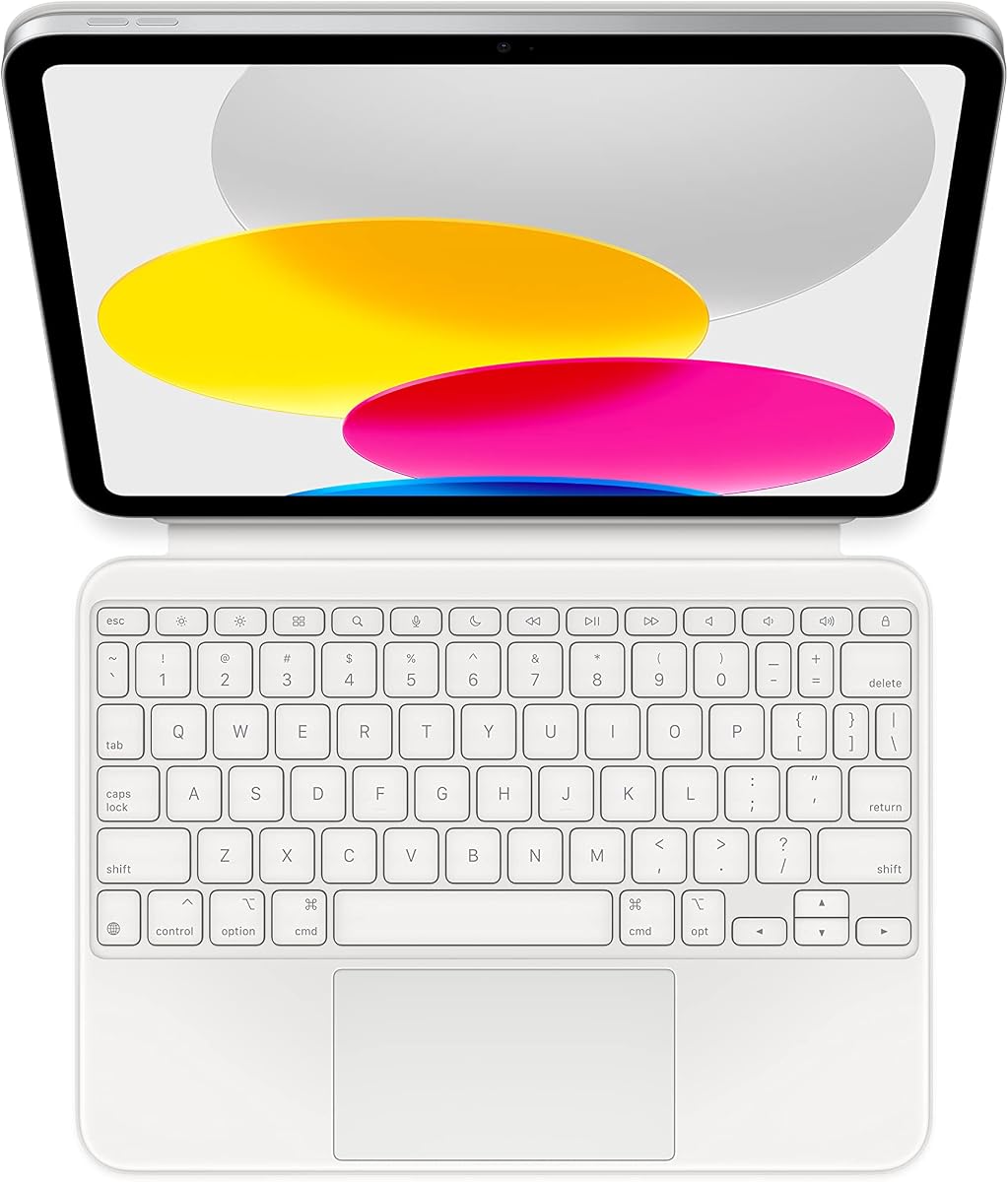
Apple's Magic Keyboard Folio offers an unmatched integration with the iPad A16 hardware. It provides a streamlined setup that requires no pairing or charging cables for operation.
We may earn a commission when you buy through this link, at no additional cost to you.
The two-piece design allows the keyboard to detach easily while the back panel remains as a protective cover. The trackpad supports multi-touch gestures that make navigation intuitive and efficient.
Users might find the price higher than third-party alternatives but the seamless performance justifies the investment. The white finish complements the iPad design perfectly for a cohesive look.
Best suited for those who value ecosystem integration and simplicity. It transforms the iPad into a capable workstation without the complexity of managing accessories or charging schedules.
Simply attach the keyboard to the iPad and it powers on immediately without any Bluetooth setup or batteries.
The dedicated function row provides quick access to media controls and brightness adjustments directly on the keys.
We may earn a commission when you buy through this link, at no additional cost to you.
The Harvopu keyboard case delivers exceptional value by packing premium features at a budget-friendly price. It includes RGB backlighting and a detachable design that adds significant versatility.
We may earn a commission when you buy through this link, at no additional cost to you.
Its magnetic connection is robust and the trackpad allows for multi-finger gestures to improve workflow efficiency. The battery life is impressive and supports long periods of typing without interruptions.
While the weight is slightly higher than lighter models it ensures durability and stability during use. The build quality remains solid despite the lower cost compared to premium brands.
Perfect for students or casual users who want full functionality without a large financial commitment. It offers a complete typing solution that meets most daily productivity needs effectively.
RGB backlighting allows you to adjust colors and brightness to match your environment and personal style preferences.
Multiple viewing angles provide optimal screen positioning for typing drawing or watching videos in different settings.
We may earn a commission when you buy through this link, at no additional cost to you.
The typecase Edge brings a unique floating stand design that mimics a traditional laptop layout effectively. This structure elevates the screen for better ergonomics during extended typing sessions.
We may earn a commission when you buy through this link, at no additional cost to you.
Its precision trackpad supports swipe and scroll gestures while the backlighting offers eleven color choices to suit any mood. The keyboard includes a full row of shortcut keys for common iPadOS functions.
Users should note that hinge stability can vary depending on usage intensity and handling. However the overall build quality remains consistent with the price range and offers good protection.
Recommended for users who want a stylish design with practical features for daily tasks. It balances affordability with enough features to support work and study workflows comfortably.
The floating stand keeps the screen elevated for a natural viewing angle that reduces neck strain during long work sessions.
Choose from eleven colors to set the right ambiance for night work or creative tasks in dimly lit environments.
We may earn a commission when you buy through this link, at no additional cost to you.
The typecase Touch features a patented 360-degree rotating hinge that enables seven distinct use modes. This flexibility makes it ideal for switching between typing and media consumption easily.
We may earn a commission when you buy through this link, at no additional cost to you.
Its multi-touch trackpad supports standard gestures and the RGB backlighting enhances usability in low-light conditions. The thin hard-shell case protects the iPad sides without adding significant bulk.
The hinge mechanism is robust but may require careful handling to ensure long-term functionality. Protection focuses on the sides rather than corners which could be a risk for drops.
Best for users who need adaptability and portability. It serves well for presentations and reading where orientation changes are frequent and required for comfort.
Rotate the hinge to access seven modes ranging from typing to sketching and reading to suit different content formats.
A slim hard shell wraps the edges of the iPad while keeping the overall weight minimal for easy carrying.
We may earn a commission when you buy through this link, at no additional cost to you.
The runelk Keyboard Case mimics the premium design of expensive models while offering significant value. Its cantilever stand ensures a stable typing position that feels secure during active use.
We may earn a commission when you buy through this link, at no additional cost to you.
Equipped with a 750mAh battery it supports weeks of usage on a single charge. The trackpad handles standard navigation tasks well and includes shortcut keys for essential controls.
Build quality is durable with synthetic vegan leather that resists wear and tear. The charging process is fast and the magnetic attachment remains secure even with regular use.
Recommended for users seeking a balanced solution with strong battery performance. It is practical for travel and remote work where reliability and longevity are critical factors.
The 750mAh battery allows for weeks of usage so you rarely need to find a power source while working.
Strong magnets keep the keyboard and iPad aligned perfectly without slipping even during vigorous typing sessions.
We may earn a commission when you buy through this link, at no additional cost to you.
The Logitech Slim Folio focuses on simplicity and weight reduction for users who prefer wireless convenience. It provides a full-size keyboard with a clean design that is easy to carry.
We may earn a commission when you buy through this link, at no additional cost to you.
With a three-year battery life on replaceable coin cells it eliminates frequent charging needs. The Bluetooth connection is reliable and the keyboard keys are well-spaced for comfort.
It lacks a built-in trackpad and the case offers basic protection rather than rugged defense. However the soft outer fabric resists wear and maintains a professional appearance.
Ideal for travelers who prioritize lightweight gear and extended battery autonomy. It supports basic typing needs without the complexity of integrated touchpads or rechargeable batteries.
Replaceable coin cell batteries power the keyboard for years so you never need to stop working to charge.
The slim profile and soft fabric keep the weight low and fit easily into bags without adding bulk.
We may earn a commission when you buy through this link, at no additional cost to you.
This model supports a wide range of iPad Air and standard models making it versatile for families. The detachable keyboard allows you to keep the case while switching to tablet-only mode easily.
We may earn a commission when you buy through this link, at no additional cost to you.
It features an 11-color backlight and a rechargeable battery that supports weeks of usage. The kickstand adjusts to multiple angles for comfortable viewing or writing in any position.
The trackpad is functional but smaller than some competitors which may limit gesture complexity. The hinge design is solid but may require occasional tightening for stability.
Best for households with multiple devices needing a single compatible accessory. It offers practicality and style without compromising on essential typing features.
Designed to work with various iPad Air and standard models making it a flexible choice for multiple devices.
The keyboard snaps off easily so you can use the tablet case independently for drawing or media.
We may earn a commission when you buy through this link, at no additional cost to you.
The ESR Keyboard Case is built for those who need the lightest possible typing solution. It features an extra-large trackpad that enhances precision without adding bulk to the iPad.
We may earn a commission when you buy through this link, at no additional cost to you.
Its thin profile ensures it slides into bags effortlessly while maintaining a strong magnetic hold during use. The triangular support keeps the screen steady for reliable viewing angles.
While it lacks backlighting the trackpad size compensates by offering more room for gesture control. The case covers the iPad securely without sacrificing accessibility to ports or buttons.
Perfect for mobile workers who prioritize minimal weight. It delivers a solid typing experience that keeps travel loads low while maintaining comfort and stability.
At just 6.9 mm thick the keyboard remains incredibly light and easy to carry for travel or daily commutes.
The large touchpad area supports smooth gestures and multi-finger controls for better navigation efficiency.
We may earn a commission when you buy through this link, at no additional cost to you.
The ZAGG Rugged Book provides military-grade protection ensuring your iPad survives rough handling without damage. It includes a detachable keyboard with a secure magnetic attachment.
We may earn a commission when you buy through this link, at no additional cost to you.
Its hinge supports multiple viewing angles and the seven-color backlight helps with visibility in dark environments. You can switch between devices easily for added workflow flexibility.
The durability comes at the cost of added weight and bulk which may not suit lightweight travel needs. However for field work the protection level outweighs the portability concerns.
Ideal for rugged environments or users who work in variable conditions. It prioritizes safety and reliability while maintaining a functional typing experience for demanding tasks.
The case withstands drops up to 6.6 feet making it suitable for construction sites or outdoor work.
Switch between your iPad and other devices easily so you can manage multiple workflows on one keyboard.
We may earn a commission when you buy through this link, at no additional cost to you.
Selecting the right keyboard requires evaluating several critical factors including compatibility power source protection and ergonomic features to match your usage.
Always check your iPad model number to ensure the keyboard case fits correctly since the iPad A16 and 10th Gen share specific dimensions.
Verify the model numbers listed in the product description before purchasing to avoid return hassles.
Decide between Bluetooth models with internal batteries and Smart Connector models that draw power directly from the iPad.
Choose Smart Connector for simplicity or Bluetooth for more accessory flexibility.
Look for multi-touch trackpads that support gestures like scrolling and switching apps to improve navigation efficiency.
Ensure the trackpad supports palm rejection to prevent accidental cursor movements.
If you travel frequently consider lightweight options with detachable designs to reduce overall weight and bulk.
Lighter cases are easier to carry but may sacrifice some protection features.
Backlit keyboards are essential for typing in low-light environments or during nighttime work sessions.
Check for adjustable brightness and color options to customize your setup.
Adjustable kickstands and rotating hinges allow you to find comfortable angles for typing or watching videos.
More angle options provide better ergonomics for varied tasks throughout the day.
Determine if you need a slim cover or a rugged case that can withstand drops and harsh environments.
Rugged cases offer safety but add weight so consider your typical usage environment.
If using a rechargeable Bluetooth keyboard check the mAh rating and estimated usage time on a single charge.
Long battery life reduces interruptions for recharging during busy work periods.
Connect the keyboard by following the pairing instructions provided in the manual and ensure your iPad Bluetooth settings are active.
Keep the keyboard clean by wiping it regularly with a soft cloth and avoiding spills to maintain functionality over time.
Store the iPad in a cool dry place and avoid exposing the keyboard to extreme temperatures to prolong battery and component life.
Most keyboards listed are designed specifically for the iPad A16 and 10th Generation models. Using them with older models may result in fit issues or compatibility errors so always verify model numbers.
Bluetooth keyboards usually use USB-C charging cables provided in the box. Smart Connector models do not require charging as they draw power directly from the iPad when connected.
Most cases include a dedicated Pencil holder so you can store your stylus securely. Check the specific product description to confirm the holder position and accessibility.
New models may have different dimensions or connectors which could affect compatibility. Check the manufacturer website for updated compatibility lists before upgrading your tablet.
Replacement keys are rarely sold separately by manufacturers. If a key breaks you may need to contact support for a warranty replacement or purchase a new unit entirely.
The trackpad supports standard iPadOS gestures like two-finger scrolling and three-finger app switching. It integrates directly into the system for smooth navigation across all apps.
With regular use a quality keyboard case typically lasts several years. Proper maintenance and avoiding physical stress can significantly extend the lifespan of the components.
Some models support both orientations with adjustable hinges while others are optimized for landscape use. Verify the product specifications to ensure your preferred mode is supported.
Our top picks include the Logitech Combo Touch for productivity the Apple Magic Keyboard Folio for premium integration and the Harvopu case for budget value.
Prioritize the features that matter most to your workflow whether it is power source trackpad precision or portability when making your final decision.
Always check current prices and availability before purchasing to ensure you get the best deal for the specific model you choose.