
Transparent Mechanical Keyboard RGB Backlit
3.2Editor score
Transparent acrylic design
Triple mode connectivity
Rotary knob control
This guide compares the top 10 keyboards with acrylic chassis, highlighting design, features, and performance to help you choose the perfect transparent
Finding the right keyboard with acrylic chassis can transform your workspace into a stunning visual centerpiece. These keyboards offer unique transparency that showcases internal components and RGB lighting beautifully. Whether you prioritize aesthetics or performance, an acrylic chassis provides a modern look that stands out.
We have carefully reviewed ten top-rated models to bring you this comprehensive guide. Our comparison focuses on build quality, connectivity options, typing experience, and customization features. Each product was selected based on user ratings, expert feedback, and unique design elements that define the category.
Each pick in this list highlights specific strengths for different user needs and preferences. You will find options ranging from budget-friendly models to premium gaming keyboards with advanced features. Please note that product availability and specifications may change over time, so always verify details before purchasing.
3.2Editor score

4.7Editor score
5.0Editor score
This side-by-side comparison helps you evaluate each keyboard with acrylic chassis across key specifications. Review the layout, connectivity, switch type, and unique features to determine which model aligns best with your specific workflow and aesthetic preferences.


The KiiBoom Phantom81 V4 stands out as a premier keyboard with acrylic chassis due to its mesmerizing semi-translucent design. With a rating reflecting mixed but generally positive sentiment, this model offers a sophisticated look that hides internal components while radiating elegance. The frosted finish resists fingerprints and ensures lasting beauty for your desk setup.
We may earn a commission when you buy through this link, at no additional cost to you.
Its standout quality lies in the combination of a massive 8000mAh battery and tri-mode connectivity. You can switch effortlessly between 2.4GHz wireless, Bluetooth 5.0, and USB-C wired modes. The gasket-mounted structure provides a creamy typing experience, while the rotary knob adds convenient control for volume or brightness adjustments.
Honest trade-offs include the need for a specific driver for full customization which may limit cross-platform usability. However, the robust build quality and extended battery life make these minor inconveniences acceptable for users prioritizing aesthetics and reliability. The stainless-steel base also ensures stability during intense sessions.
This keyboard is ideal for enthusiasts who want a statement piece that blends aesthetics with functionality. Whether you are gaming or working, the visual appeal and performance capabilities justify the investment. We recommend it for those seeking a premium acrylic experience with long endurance.
The frosted acrylic construction creates a sophisticated look that diffuses RGB light beautifully without exposing raw internals.
The 8000mAh capacity ensures weeks of use on a single charge, eliminating anxiety during travel or long sessions.
We may earn a commission when you buy through this link, at no additional cost to you.
For budget-conscious buyers seeking a keyboard with acrylic chassis, this transparent model offers a compelling entry point. While the rating indicates room for improvement, the visual appeal of the crystal-clear design is undeniable. It reveals intricate internal mechanics beautifully, making it a great choice for those who love the see-through aesthetic.
We may earn a commission when you buy through this link, at no additional cost to you.
Key strengths include the triple-mode connectivity allowing connections via Bluetooth 5.0, 2.4GHz, and USB-C. The rotary knob provides easy control over brightness and volume without complex menus. The compact 80-key layout saves desk space while retaining essential navigation keys for productivity.
Trade-offs involve limited software customization compared to higher-end models. The build quality is decent but may not match premium tiers in terms of durability. However, for casual users or those decorating a room on a budget, this keyboard delivers significant style for the price.
We recommend this keyboard for students or casual gamers who prioritize aesthetics over hardcore performance. It serves well as a secondary device or a stylish addition to a minimalist setup. If you want acrylic style without breaking the bank, this is a strong contender.
The ultra-transparent acrylic material ensures every component and LED shines through vividly for maximum visual impact.
Support for multiple devices simultaneously helps streamline workflows for users switching between laptops and desktops easily.
We may earn a commission when you buy through this link, at no additional cost to you.
The GravaStar Mercury K1 Lite earns a high rating thanks to its unique Crystal Aurora design and solid build quality. As a keyboard with acrylic chassis, it uses a PC frame that enhances lighting effects and airflow. The gradient keycaps transform RGB into a dreamy northern light display that is truly captivating.
We may earn a commission when you buy through this link, at no additional cost to you.
This model excels in typing comfort due to its five-layer gasket mount system. The custom linear switches provide light, effortless keystrokes that are ideal for long sessions. The hot-swappable feature allows further customization, letting you tailor the feel to your exact preference later.
While the lack of a numpad might be a drawback for data entry, the compact 75% layout is perfect for gaming and creative work. The price point is higher than basic models, but the visual and tactile quality justify it. Battery life is sufficient for extended daily use without frequent charging.
Ideal for creators and gamers who value visual impact alongside performance, this keyboard elevates any desk setup. Its aesthetic appeal makes it a centerpiece rather than just an accessory. We highly recommend it for users who want a polished, premium look.
The translucent keycaps and open frame work together to create a multi-layered glow that feels immersive and unique.
Soft rubber gaskets ensure every keypress feels consistent and reduces bottom-out shock for a premium tactile response.
We may earn a commission when you buy through this link, at no additional cost to you.
The YUNZII X98 is a powerhouse for customization among keyboards with acrylic chassis. With a high rating, it offers a unique jelly texture keycap blend that enhances RGB brightness significantly. The 96% layout retains essential keys while saving space compared to full-sized boards.
We may earn a commission when you buy through this link, at no additional cost to you.
Its main strength is the QMK/VIA open-source firmware support. This allows advanced users to remap keys and create complex macros without proprietary software. The rotary knob adds a modern touch, controlling volume or macros seamlessly. The hot-swap PCB ensures you can change switches without soldering.
Trade-offs include the size of the 96% layout which might not fit all desks. Additionally, setting up VIA requires some technical knowledge for non-tech users. However, for enthusiasts who want full control, this model is exceptional. The pre-lubed switches provide a smooth experience right out of the box.
We recommend this keyboard for tinkerers and power users who prioritize functionality alongside style. The combination of a translucent aesthetic and deep programmability makes it a standout choice. If you want a keyboard that grows with you, this is it.
Open-source firmware allows complete control over every key and lighting layer without vendor limitations.
The jelly keycaps diffuse light evenly, creating a glowing look that is softer than clear plastic alternatives.
We may earn a commission when you buy through this link, at no additional cost to you.
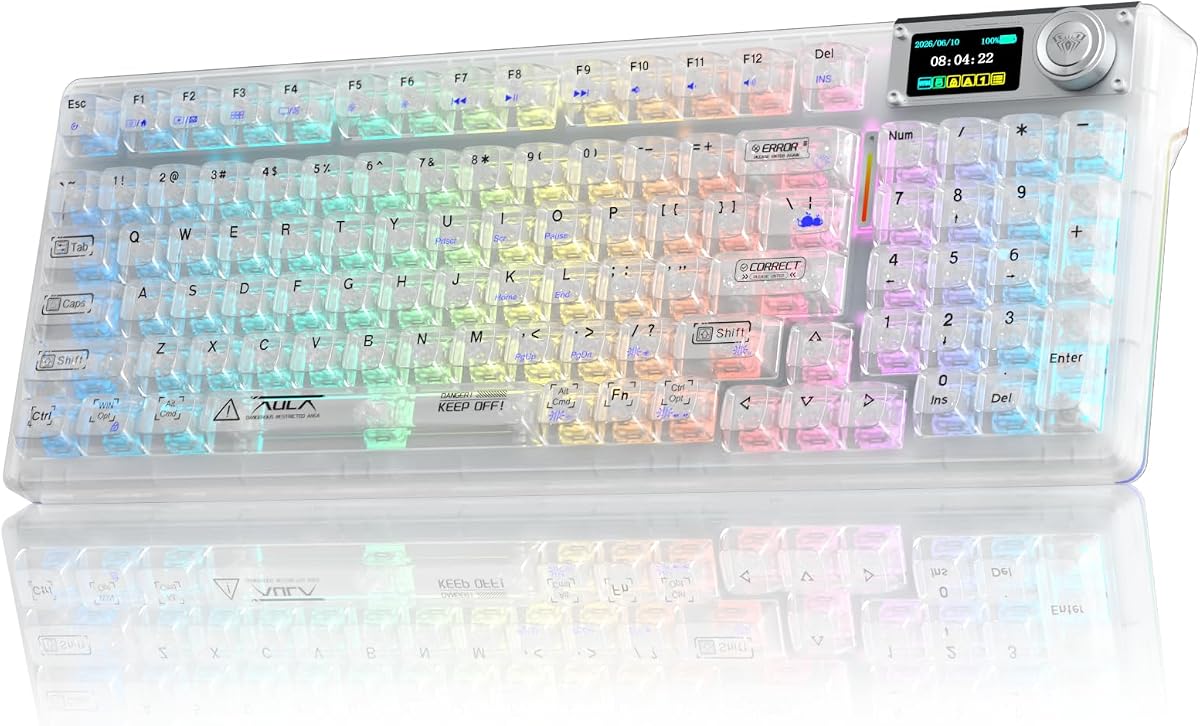
The Aula F98Pro V3 introduces a smart TFT screen to the keyboard with acrylic chassis category. This feature displays battery levels, time, and connection status in real-time, adding utility beyond typing. The clear design allows RGB light to shine through, complementing the high-tech look.
We may earn a commission when you buy through this link, at no additional cost to you.
Key strengths include a massive 10000mAh battery that reduces charging frequency significantly. The tri-mode connectivity supports various workflows, allowing seamless switching between devices. The multifunction knob simplifies volume control and RGB adjustments quickly. It is a solid choice for those who need reliable battery life.
Trade-offs involve the complexity of setting up the screen via driver which can be tricky on some systems. The overall rating suggests some inconsistency in quality control compared to other models. However, the innovative display and large battery make it an interesting option for tech enthusiasts.
This keyboard is best suited for users who value functionality and unique features over pure aesthetics. It makes a great companion for gamers or professionals who need to check system status easily. If you want something different, this screen-enabled model is worth exploring.
The built-in screen provides instant visual feedback on system status without needing to check your phone.
A massive battery capacity ensures uninterrupted use for weeks, perfect for mobile or desktop setups alike.
We may earn a commission when you buy through this link, at no additional cost to you.
Another standout from YUNZII, this Crystal version focuses on pure transparency and build quality. With a high rating, it offers a clean look with a high-transparency PC chassis that reveals internal components clearly. The double-layer keycaps keep characters crisp while maximizing RGB brightness.
We may earn a commission when you buy through this link, at no additional cost to you.
Its strengths lie in the gasket mount system which provides a soft and elastic hand feel. The pre-lubed Snow switches offer a smooth and quiet typing experience suitable for shared offices. The connectivity options are reliable, allowing easy switching between devices during work.
Trade-offs include the lack of advanced features like a screen compared to other models. The software is functional but may not be as robust as open-source alternatives. However, for users seeking a reliable and beautiful acrylic keyboard without complexity, it is a safe choice.
We recommend this for users who want a balance of performance and aesthetics. It is a solid daily driver for office or home use. If you prefer simplicity and clarity, this keyboard delivers on both fronts effectively.
The PC material ensures the case remains clear and scratch-resistant over time for lasting visual appeal.
The gasket mount combined with pre-lubed switches delivers a creamy sound that is pleasing and non-intrusive.
We may earn a commission when you buy through this link, at no additional cost to you.
The GravaStar Mercury V60 HE brings Hall Effect magnetic technology to the keyboard with acrylic chassis market. With a high rating, it offers incredible responsiveness thanks to an 8000Hz polling rate. The Crystal Rose design is a visual highlight for streamers and creative gamers alike.
We may earn a commission when you buy through this link, at no additional cost to you.
Key strengths include Rapid Trigger technology which resets keys faster than mechanical switches for improved movement. The magnetic switches are customizable, allowing you to adjust actuation points to your preference. The hot-swap support ensures long-term usability even if you want to upgrade later.
Trade-offs involve the 60% layout which excludes dedicated arrow and navigation keys. This may not suit users who need frequent access to specific keys. However, for competitive FPS players, the performance gain is worth the sacrifice. The build quality feels premium and robust.
We recommend this keyboard for serious gamers who prioritize speed and customization. It is a top-tier choice for esports enthusiasts who want a unique aesthetic. If you want a cutting-edge gaming experience, this model is hard to beat.
The 8000Hz polling rate ensures your inputs are registered instantly, giving you a competitive edge in fast-paced games.
The Crystal Rose finish creates a soft and beautiful aesthetic that stands out from typical black gaming gear.
We may earn a commission when you buy through this link, at no additional cost to you.
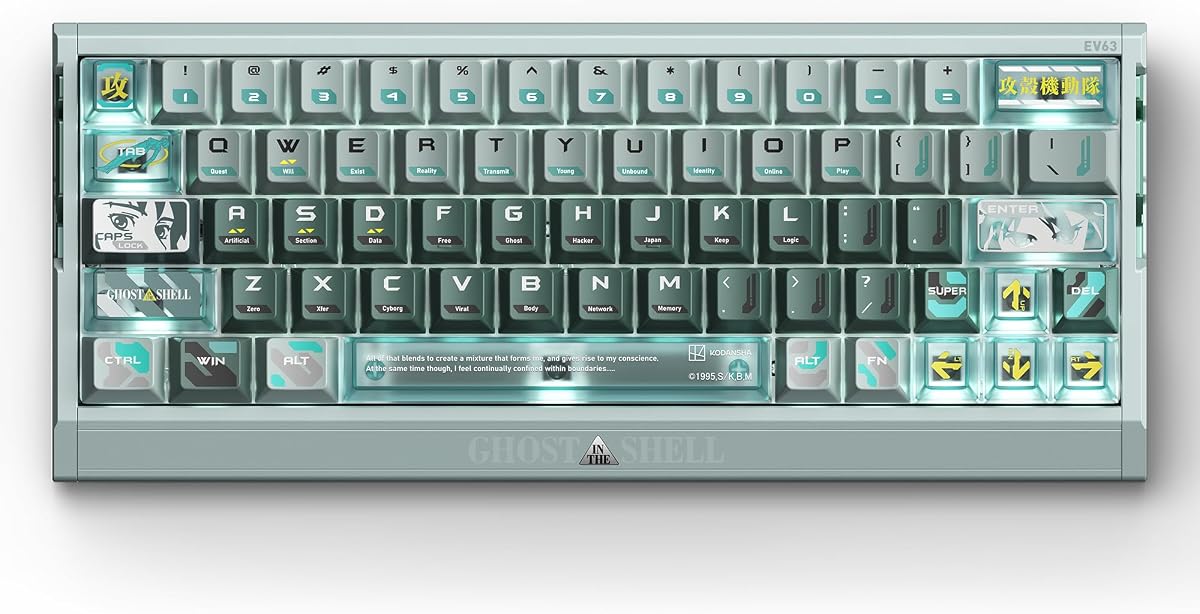
The IQUNIX EV63 stands as the pinnacle of keyboards with acrylic chassis design and performance. With a perfect 5.0 rating, it combines official Ghost in the Shell licensing with top-tier magnetic switches. The CNC aluminum case gives it a cold-touch premium metal finish that feels incredibly durable.
We may earn a commission when you buy through this link, at no additional cost to you.
Its standout feature is the HyperCore V3 technology which ensures cleaner magnetic signals and more stable inputs. The rapid trigger capability supports complex movements like counter-strafing with ease. The aesthetic details, including lexicon sublegends, create a cyberpunk desk centerpiece.
Trade-offs include the high price and lack of wireless connectivity. However, for collectors and enthusiasts who value build quality and theme, this is a worthwhile investment. The wired connection ensures zero latency which is crucial for high-end gaming.
This keyboard is best for those who want a luxury item that doubles as a serious gaming tool. It is perfect for collectors of sci-fi and anime memorabilia. If you are willing to pay for the best, this is the one to choose.
The heavy CNC aluminum case provides a solid, premium feel that keeps the keyboard stable during intense play.
Every detail from the case to the keycaps reflects the Ghost in the Shell aesthetic for an immersive experience.
We may earn a commission when you buy through this link, at no additional cost to you.
The KiiBoom Phantom81 Lite offers a compelling balance of style and features in the keyboard with acrylic chassis category. With a high rating, it provides frosted ABS molding that mimics the look of premium acrylic without the high cost. The 75% layout maintains essential keys for productivity.
We may earn a commission when you buy through this link, at no additional cost to you.
Key strengths include VIA programmability which allows deep customization of macros and layers. The five-layer dampening structure reduces noise significantly, creating a satisfying typing sound. The hot-swappable PCB ensures you can swap switches easily as your preferences change over time.
Trade-offs include the use of ABS keycaps which might develop shine over time compared to PBT. The RGB modes are standard but lack some advanced patterns found on competitors. However, for the price, the features and build quality are exceptional.
We recommend this for users who want a high-quality experience without a premium price tag. It is a strong daily driver for office or home use. If you want value and performance, this model is a safe and smart choice.
Multiple layers of foam and silicone ensure every keystroke feels and sounds polished and refined.
VIA support allows you to map complex commands without needing official vendor drivers.
We may earn a commission when you buy through this link, at no additional cost to you.
The Aula F98Pro V3 Standard provides full-size functionality with the added benefit of an acrylic chassis. With a strong rating, it offers a 98% layout that retains a numpad for data entry. The integrated TFT screen adds utility, showing time and status information clearly.
We may earn a commission when you buy through this link, at no additional cost to you.
Its strengths include a massive 10000mAh battery that ensures weeks of use on a single charge. The clear design enhances RGB effects, making it visually appealing while practical. The transparent switches and keycaps improve light transmission for a uniform backlighting effect.
Trade-offs include the large footprint which requires more desk space. Additionally, the driver is only compatible with Windows wired connections which limits flexibility. However, for users needing a numpad and long battery life, this is a robust solution.
We recommend this for professionals who need a numpad and style. It is a great choice for office environments where battery reliability is key. If you want a full-featured keyboard with a modern look, this is a great option.
The 98% layout includes a full numpad making it ideal for accountants or data entry tasks.
Clear switches and keycaps ensure RGB lighting shines through brightly without blockage.
We may earn a commission when you buy through this link, at no additional cost to you.
Selecting the perfect keyboard with acrylic chassis requires understanding key factors like material, connectivity, and layout. This guide breaks down the essential elements to help you make an informed decision tailored to your specific needs.
Acrylic chassis come in varying forms such as frosted, clear, or semi-translucent. High-quality PC or ABS blends ensure the case is durable and scratch-resistant. Look for reinforced bases that add stability during typing to prevent unwanted movement.
Always check the material description to ensure the finish resists fingerprints and maintains clarity over time.
Most modern keyboards offer tri-mode connectivity including Bluetooth 5.0, 2.4GHz wireless, and USB-C wired. This flexibility allows you to connect to multiple devices simultaneously. Ensure the battery capacity supports your usage hours if you plan to use it wirelessly often.
Prioritize models with high polling rates for gaming to reduce latency even when using wireless modes.
Choose a layout that fits your desk and usage habits. Options range from 60% compact boards to 98% full-size with numpads. A 75% or 96% layout often offers the best balance of space-saving and functionality.
Consider if you need a dedicated numpad or navigation keys before committing to a smaller layout.
Most acrylic keyboards use mechanical or magnetic Hall Effect switches. Mechanical switches are hot-swappable for easy customization. Magnetic switches offer adjustable actuation points for faster gaming response.
Decide if you prefer linear for smoothness or tactile for feedback, and check if the board supports your preferred type.
Transparency amplifies RGB effects, so look for per-key lighting and software control. Some models feature specific keycaps that enhance light diffusion. Ensure the RGB driver supports your operating system to avoid limitations.
Check if the software allows for macros and lighting effects that match your aesthetic preferences.
A gasket mount design improves typing comfort by isolating the PCB from the case. It usually includes layers of foam and rubber to dampen sound. This feature is common in premium models for a softer feel.
If you value a thocky or soft sound profile, prioritize a model that explicitly states it uses gasket mounting.
Many modern keyboards include a rotary knob for quick adjustments. This knob typically controls volume, brightness, or macros. It saves space compared to adding dedicated keys for these functions.
Ensure the knob is easy to use and programmable to add value to your workflow.
For wireless usage, battery capacity is critical. Look for at least 4000mAh to ensure daily usage without frequent charging. Some models offer up to 10000mAh for weeks of continuous use.
Consider charging speed and cable options if you plan to leave the keyboard plugged in for long periods.
To keep your keyboard looking pristine, clean the acrylic surface regularly with a microfiber cloth. Avoid harsh chemicals that could scratch or cloud the material. Use a soft brush to remove dust from the crevices between keys.
Store the keyboard in a cool, dry place when not in use to prevent warping or damage. If it is wireless, turn off the power when leaving for long periods to conserve battery life. Regularly update the driver software to ensure full functionality.
Avoid placing heavy objects on the keys to protect the internal mechanisms. If you swap switches, do so gently to prevent damaging the sockets. With proper care, your acrylic keyboard will maintain its stunning appearance for years.
Yes, modern acrylic keyboards are built with durable materials like PC or ABS that resist wear. They are designed to handle daily typing and gaming without significant degradation. With proper care, the finish should remain clear and scratch-free for years.
Acrylic keycaps are generally more resistant to shine than standard ABS. However, frequent use and friction can cause some wear over years. High-quality models often include coatings to reduce this effect and maintain clarity.
Most modern keyboards with acrylic chassis support hot-swappable switches. This allows you to change mechanical switches without soldering. Check the product specs to ensure compatibility with 3-pin or 5-pin switches.
Absolutely, many acrylic keyboards feature gaming-specific switches and high polling rates. Some models include Hall Effect switches for ultra-low latency. The sturdy build ensures stability during intense gaming sessions.
Many keyboards with acrylic chassis offer tri-mode wireless connectivity. You can switch between Bluetooth, 2.4GHz, and USB-C easily. Ensure the battery life meets your usage needs for continuous wireless operation.
Use a dry microfiber cloth to wipe away dust and fingerprints. Avoid using alcohol-based cleaners which might cloud the acrylic. For deep cleaning, remove keycaps and use a soft brush on the internal frame.
A rotary knob provides quick access to volume or brightness adjustments without changing software. It adds convenience and saves space on your desk layout. Many models allow you to remap the knob to other functions.
Yes, there are many entry-level models that feature acrylic designs. These often include basic RGB and reliable connectivity options. They offer a great balance of style and performance at an affordable price point.
We have explored ten exceptional keyboards with acrylic chassis that cater to different needs and budgets. From the budget-friendly Transparent Mechanical Keyboard to the premium IQUNIX EV63, there is a model for everyone. Each option balances aesthetics with performance to enhance your workspace.
When choosing, prioritize factors like switch type, connectivity, and layout to match your workflow. Look for features like gasket mount or hot-swap support to ensure long-term satisfaction. Consider the visual design to ensure it complements your desk setup effectively.
Always verify current availability and specifications before purchasing as updates may occur. Checking reviews and detailed specs ensures you get the best value for your money. Enjoy the unique blend of style and functionality that an acrylic keyboard brings.