
LeapFrog 2-in-1 LeapTop Touch
4.7Editor score
Flips to tablet mode
5 learning modes included
Customizable name features
Discover the best laptop for 5 year old kids with our expert guide comparing top educational toys, tablets, and real laptops for learning and play.
Finding the right laptop for a five year old requires balancing educational value with engaging play features. Children at this age need devices that spark curiosity while teaching foundational skills like math, reading, and logic. The ideal choice combines durability with age appropriate content that grows with your child.
We compared ten top rated products based on learning modes, screen quality, and user feedback. Our analysis focuses on how each device supports early education through interactive activities, bilingual options, and realistic design elements. This list helps parents choose tools that inspire confidence and creativity.
Each pick highlights key strengths such as battery life, parental controls, or specific themed content. We also note tradeoffs like screen size or connectivity limits to ensure informed decisions. Remember that prices and availability change frequently so check current offers before buying any recommended item today.
4.7Editor score

4.5Editor score

4.2Editor score
This side by side comparison evaluates all ten featured laptops across key criteria including learning content, screen type, and design realism. Each entry summarizes core specifications to help you quickly identify which device aligns with your child interests needs and your budget constraints.





The VTech Genio Bilingual JuniorBook stands out as a top rated option with its robust array of 80 preloaded activities. It earns high marks for introducing foundational skills through interactive apps that cover math science and language arts. Its full size keyboard mimics real devices helping children build confidence early.
We may earn a commission when you buy through this link, at no additional cost to you.
Children benefit from the bilingual design allowing seamless switching between English and Spanish modes. The built in music player and weekly calendar features encourage daily engagement while the offline capability ensures play anywhere without Wi-Fi. This versatility supports both casual play and structured learning sessions at home.
One tradeoff is the reliance on batteries rather than a rechargeable unit which may add ongoing cost. Additionally the screen is smaller than modern tablets but suits the toy laptop form factor. These limits are acceptable given the strong educational focus and durable construction designed for young users.
This laptop is ideal for families seeking a standalone educational tool that grows with your child. Parents who value language exposure and realistic computer simulation will find it a worthy investment. We recommend it as a primary learning companion for kindergarten age kids.
Switching between English and Spanish within the same activity helps children absorb vocabulary naturally.
Since no internet is required you can take this laptop on car rides or trips without worry.
We may earn a commission when you buy through this link, at no additional cost to you.
The Lexibook Unicorn Educational Laptop combines a sleek design with practical learning activities tailored for young users. It offers a realistic mouse and keyboard setup that encourages proper typing habits from an early age. The slim profile makes it easy for small hands to carry and use comfortably.
We may earn a commission when you buy through this link, at no additional cost to you.
Children can engage with music activities that teach notes and melody composition alongside logic and memory games. The keyboard reading feature helps develop time awareness while general knowledge quizzes expand their worldview. These varied modes keep interest high across different learning styles and preferences.
A potential downside is the lower count of activities compared to other models in this roundup. The unicorn theme appeals to many but might not resonate with every child equally. Still the build quality and ergonomic focus make it a solid choice for focused play.
Families prioritizing design and ease of use will appreciate this laptop refined form. It works well as a second device or travel companion where portability matters most. We suggest it for kids who enjoy creative play alongside structured lessons.
Young learners can compose their own tunes which boosts auditory and motor skills simultaneously.
The lightweight construction ensures children can manage the device independently without strain.
We may earn a commission when you buy through this link, at no additional cost to you.
This Kids Laptop delivers clear visuals on its 4.3 inch color screen which enhances engagement during activities. It includes 48 learning modes covering animals colors and general knowledge to support diverse curriculum needs. The protective film ensures the display stays scratch free until you peel it off at setup.
We may earn a commission when you buy through this link, at no additional cost to you.
Practical tools like the calendar and clock reading features teach time management skills in a fun way. The keyboard and mouse setup replicate adult devices so children practice typing and navigation confidently. Its slim design fits easily into backpacks for on the go learning sessions.
Users should remember to remove the protective film for best viewing experience which can be missed at first. Hardware capabilities remain basic compared to tablets but the focus is on education rather than multitasking. These minor steps ensure smooth operation for daily use.
This model suits families wanting a visual focused learning tool without complex setup. It is a great gift for kids transitioning from toys to more structured educational play. We recommend it for its clear screen and wide activity range.
Interacting with a digital calendar helps children understand days and schedules early.
Bright colors on the TFT screen keep young eyes engaged without excessive glare.
We may earn a commission when you buy through this link, at no additional cost to you.
The LeapFrog 2-in-1 LeapTop Touch earns top ratings by transforming from laptop to tablet with a flip. It supports pretend play through e-mailing activities and personalized name features that make learning feel real. The keyboard and touch interface guide children through letters numbers and basic messages effortlessly.
We may earn a commission when you buy through this link, at no additional cost to you.
Five learning modes include ABCs numbers games music and messages to cover essential preschool topics. Parents can customize content to help their child spell their name or favorite words which reinforces literacy skills. This flexibility makes it adaptable for different developmental stages within the age range.
The device is aimed slightly younger at two to five years so older kids may outgrow it faster. Its black and white display limits visual variety compared to color screen rivals. Still the durability and educational focus keep it a trusted budget option.
This product is perfect for families needing an affordable dual mode toy that sparks imagination. It bridges the gap between simple toys and more advanced devices effectively. We recommend it as a starter laptop for preschoolers and early kindergarteners.
Switching between keyboard and touch allows kids to experiment with different input styles.
Entering their own name makes the device feel special and encourages repeated use.
We may earn a commission when you buy through this link, at no additional cost to you.
The VTech Play Smart Preschool Laptop looks like a grown-up device with a sleek pink design that appeals to many children. It includes 30 activities with leveled learning that adjust to your child progress keeping tasks challenging yet achievable. Customization options let you set a name age and avatar for a personal touch.
We may earn a commission when you buy through this link, at no additional cost to you.
Activities introduce basic Spanish words alongside letter sounds and number identification to broaden early language skills. Logic games and animal sounds explore categorization skills such as sorting fruits from vegetables. This mix supports cognitive development through playful interactions with familiar categories.
The lower activity count compared to top rivals means less variety over time but the quality remains high. The pink casing may not suit all preferences but the content is gender neutral and inclusive. Parents appreciate the structured approach that prevents overwhelming younger users.
This laptop works well for families seeking a guided learning path with customization. It is especially useful for children who benefit from gradual difficulty increases. We recommend it as a primary tool for preschool aged kids.
As skills grow the activities adjust to ensure continued engagement without frustration.
Listening to animal sounds helps children associate auditory cues with visual representations.
We may earn a commission when you buy through this link, at no additional cost to you.
The LEXiBOOK LAPTAB 10 inch Version 11 Touchscreen Laptop delivers premium performance with an octa-core processor and 128GB storage. It runs real apps via Google Play while maintaining safety through customizable profiles and parental controls. The 10.1 inch HD touchscreen provides crisp visuals for games and educational ebooks alike.
We may earn a commission when you buy through this link, at no additional cost to you.
A Power Academy app and 300 ebooks support structured learning with ReadEra and multi-language translation tools. Parents can manage screen time and app access through Google Suite ensuring a balanced digital experience. Video conferencing and Bluetooth connectivity extend its use beyond simple toy functions.
This device costs more than toy laptops and requires internet for full setup which may complicate initial use. The advanced features are best suited for families comfortable managing digital safety settings. Still the long-term value for growing tech skills is significant.
Families wanting a transition to real computing will find this laptop a strong investment. It bridges the gap between educational toys and adult devices safely. We recommend it for households ready to support digital literacy early.
Time limits and app restrictions let you shape a safe browsing and play environment.
128GB capacity allows installing numerous games and learning tools without running out of space.
We may earn a commission when you buy through this link, at no additional cost to you.
This Kids Laptop stands out with a built-in camera allowing children to take photos and record memories. It offers 64 learning modes ranging from alphabet drills to music and games that keep engagement high. Photo filters and frames encourage creativity while reinforcing subject mastery through interactive tasks.
We may earn a commission when you buy through this link, at no additional cost to you.
The 4.3 inch TFT display provides vibrant colors that make activities visually appealing without eye strain. Its realistic mouse and keyboard design help kids develop proper typing habits early. The compact form fits comfortably in small hands for extended use during play sessions.
The camera captures still images only with no video recording which limits multimedia options. Resolution is adequate for toy use but not comparable to modern phones. These limits align with safety and simplicity goals for young children using digital tools.
Families valuing creativity alongside education will find this laptop a unique option. It works well for kids who enjoy documenting daily life through pictures. We recommend it for its blend of learning and artistic expression tools.
Taking photos helps children notice details in their environment and express them creatively.
Applying cute frames to photos adds joy to learning activities and keeps kids motivated.
We may earn a commission when you buy through this link, at no additional cost to you.
The LeapFrog LeapPad Academy offers a tablet hybrid design with a stylus for drawing and writing practice. It includes more than 20 educator approved apps that grow with your child from reading to coding skills. A seven inch shatter-safe screen ensures durability while the rechargeable battery supports long sessions.
We may earn a commission when you buy through this link, at no additional cost to you.
A three month trial of LeapFrog Academy unlocks 2000 games videos and eBooks for expanded learning. Parent controls allow managing time limits and exploring kid-friendly web content safely. The tough bumper and kickstand make it resilient for daily use in various settings.
Full access to additional content requires a subscription which adds ongoing costs beyond the device price. The tablet form differs from traditional laptops but appeals to users who want touch and writing features. These factors are worth considering based on your budget and goals.
This device suits families wanting a durable educational tablet with structured curriculum support. It works well for kids who enjoy drawing and interactive lessons on a screen. We recommend it for its comprehensive app ecosystem and safety features.
Using a stylus to draw and write strengthens hand coordination needed for handwriting.
The built-in kickstand lets children watch videos or read eBooks comfortably.
We may earn a commission when you buy through this link, at no additional cost to you.
The Lexibook Barbie Educational Laptop engages children with 124 activities covering math logic and music in two languages. Its realistic mouse and keyboard create an immersive environment that encourages ergonomic usage and learning interest. The compact dimensions make it easy to carry for trips or outings.
We may earn a commission when you buy through this link, at no additional cost to you.
Each activity offers multiple levels so kids can test and improve skills at their own pace. Snake and memory games provide entertainment after educational tasks to balance focus and fun. The slim design mimics adult devices while remaining safe and lightweight for young hands.
The theme may limit appeal to children uninterested in the character but the content remains broadly educational. It lacks connectivity options keeping it simple but offline focused. These tradeoffs support reliability and ease of use for daily learning routines.
Families seeking a themed learning tool with extensive content will appreciate this laptop. It works well as a portable option for on the go education. We recommend it for its activity variety and bilingual support.
Adjustable difficulty ensures tasks remain challenging as children learn and improve.
Its small footprint fits in bags for learning anytime and anywhere.
We may earn a commission when you buy through this link, at no additional cost to you.
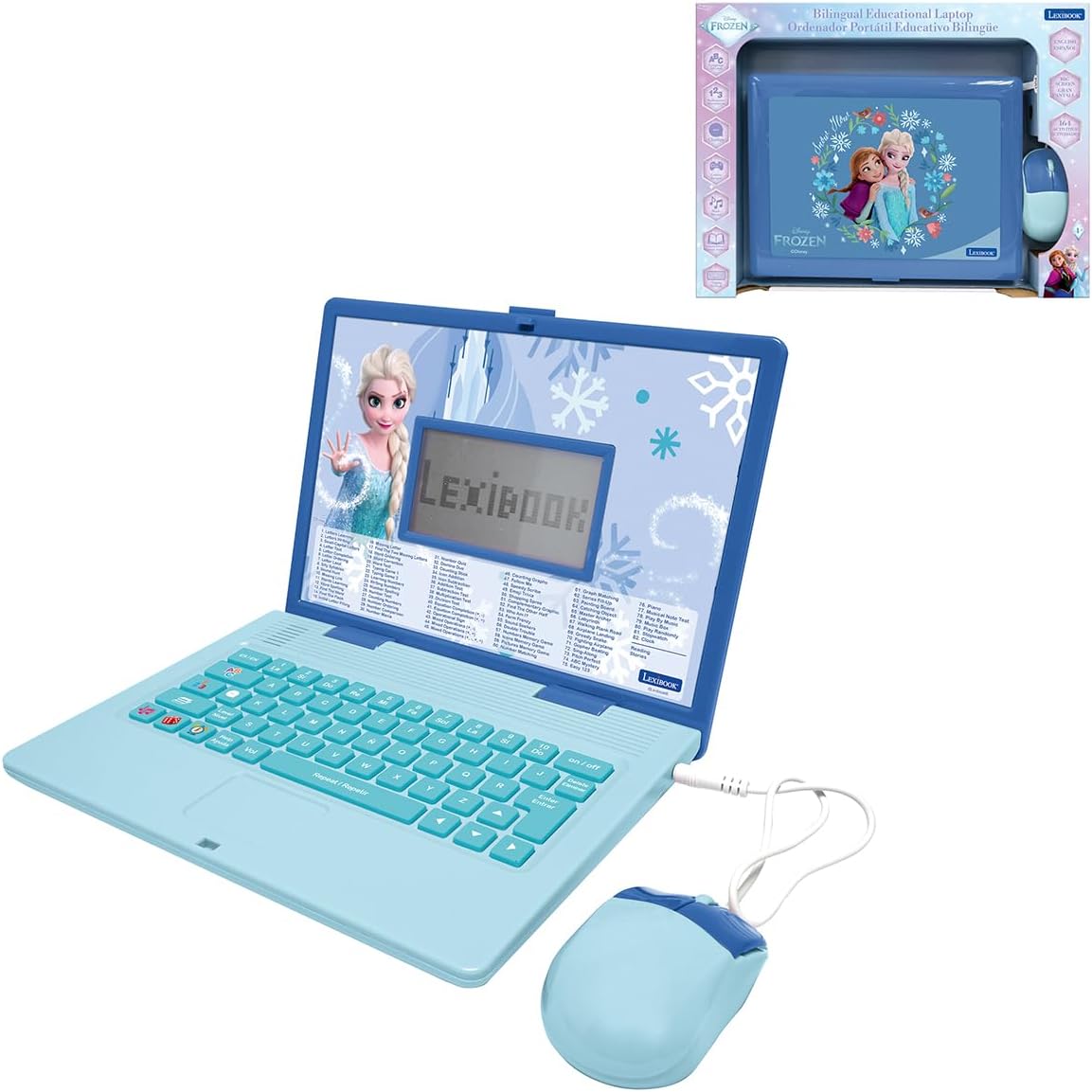
The LEXiBOOK Frozen Educational Laptop offers 164 activities focused on English and Spanish language skills alongside math and music. Voice guidance and a clear LCD screen help children navigate tasks independently with confidence. Its lightweight frame ensures comfort during extended play or learning sessions at home.
We may earn a commission when you buy through this link, at no additional cost to you.
Bilingual modes allow seamless switching so kids can practice comprehension through motivating exercises. Logic games and music modes make learning sessions enjoyable to sustain engagement over time. The keyboard and screen design prioritize ease of use for younger learners.
Customer ratings are not verified yet so reliability feedback is limited compared to other models. The theme targets specific interests but the educational content remains functional for general use. These factors are considerations for families prioritizing language development.
This laptop suits households focused on early language exposure and structured learning. It works well for children who respond well to voice cues and bilingual practice. We recommend it for its robust activity count and language tools.
Clear prompts guide children through activities without constant adult supervision.
Switching languages within tasks helps reinforce vocabulary and comprehension skills.
We may earn a commission when you buy through this link, at no additional cost to you.
Selecting a laptop for a five year old involves weighing learning content against design and safety features. This section breaks down essential factors to help you match a device to your child interests and your family priorities.
Look for devices that cover core subjects like math reading and logic through interactive modes. Higher activity counts often mean longer engagement but check that topics match school readiness goals. Bilingual options add value if language exposure is a priority.
Choose models with leveled learning so challenges grow as skills improve without overwhelming the child.
Realistic keyboards and mice help children develop habits for future real computer use. Slim lightweight designs reduce strain on small hands during play. Features like flip modes or touchscreens add versatility for different activities.
Prioritize durable builds and rounded edges to withstand active use at home or school.
Displays between four and seven inches offer a balance of visual appeal and portability. TFT or HD screens provide brighter images that keep attention. Smaller screens suit toy laptops while larger ones work for tablets.
Ensure the screen has a protective layer to prevent scratches during daily use.
Offline capable toys remove reliance on Wi-Fi and reduce screen time risks. Devices with app stores allow growth but require parental oversight. Decide if you want a closed system or open access.
Check if internet features include safe browsers and content filters before buying.
Rechargeable batteries offer convenience while AA units are simpler to replace. Longer battery life supports travel or extended play without interruptions. Consider cost of replacements if using disposable batteries.
Select a power source that aligns with how often and where you plan to use the device.
Robust controls let you manage app access screen time and data privacy. Customizable profiles help track progress and tailor content for your child. Ensure the brand has certifications or safety approvals.
Verify that time limits and content restrictions are easy to set and adjust.
Cameras music players or drawing tools encourage creativity beyond standard lessons. Themed designs can spark interest but choose neutral options for long-term use. Check for voice guidance or multi-language support.
Match special features to hobbies your child already enjoys to maximize engagement.
Basic toy laptops cost less while premium models offer apps and growth paths. Calculate total cost including batteries subscriptions or accessories. Higher initial spend may pay off if the device grows with the child.
Pick a device that balances your budget with features that will stay useful over time.
Start by setting up user profiles or names to personalize the experience. Install any protective films on screens before first use and adjust volume levels to safe limits. This ensures safety and engagement from the start.
Schedule short daily sessions to maintain interest without fatigue. Rotate between learning and game modes to keep tasks fresh. Use parental controls to set timers and manage access to apps.
Store the device in a dry place away from direct sunlight. Clean the keyboard and screen with a soft cloth regularly. Replace batteries promptly to avoid leaks and prolong the device life.
Yes all products are designed for young children with rounded edges and durable materials. Parental controls and offline options help limit screen time risks. Brands often have safety certifications for toy electronics.
Some premium laptops include Wi-Fi for apps and browsers while most toy laptops stay offline. Devices with connectivity require parental setup to ensure safe access. Always check internet features before purchasing.
Many models focus on ABCs numbers and logic which support kindergarten skills. Leveled learning adjusts difficulty as your child progresses. Use them alongside physical activities for balanced development.
Battery life varies by model but most offer several hours of play on fresh batteries. Rechargeable units may last longer but need charging time. Always check specifics for your chosen device.
Compact toy laptops are highly portable for car rides or vacations. Larger tablets require cases to prevent damage on the go. Look for slim designs if travel is a priority.
Use built-in timers and parent controls to set daily limits. Schedule breaks to encourage physical play. Rotate devices or activities to reduce dependency.
Our top picks include the VTech Genio for breadth of content, the LeapFrog LeapTop for versatility, and the LEXiBOOK LAPTAB for advanced features. Each balances education with fun to support growth and creativity effectively.
Focus on your child needs such as language learning, design preference, or connectivity before deciding. Leveled content and parental controls are key priorities for long-term value.
Prices and availability change so review current offers before purchase. Choose the device that best fits your family routine and learning goals today.