
Hearvo USB 3.0 HDMI KVM Switch
4.0Editor score
4K resolution at 60Hz
Four USB 3.0 ports
Automatic device detection
Discover the top 10 laptop with KVM support options for seamless multi-computer workflows, comparing features and compatibility for professionals.
Finding a reliable laptop with KVM support is essential for professionals who manage multiple systems efficiently. These devices allow seamless switching between computers while sharing monitors and peripherals without constant cable swapping.
This guide compares ten top-rated KVM solutions designed specifically for laptops and desktop setups. We evaluated performance, compatibility, video quality, and user experience to help you choose the right tool.
Each pick highlights unique strengths for different workflows. Prices change frequently, so verify current offers before purchasing. Our detailed analysis ensures you invest in a setup that boosts productivity without compromising quality.
4.0Editor score

4.9Editor score
4.6Editor score
This comparison table presents key specifications for all ten products. Review each option carefully to find the best fit for your specific laptop and peripheral needs.


The Hearvo USB 3.0 HDMI KVM Switch offers an affordable entry point into multi-computer management. With a solid rating, it delivers reliable performance for users needing basic switching capabilities between two PCs.
We may earn a commission when you buy through this link, at no additional cost to you.
Its key strength lies in seamless sharing of peripherals like keyboards and mice alongside a single monitor. The 4K@60Hz support ensures crisp visuals, while USB 3.0 ports handle data transfers efficiently.
Trade-offs include support for only one monitor and fewer advanced features found in premium models. These limitations are acceptable for budget-conscious buyers prioritizing core functionality over expansion.
Ideal for home offices or small setups where cost matters. This device provides a straightforward solution to declutter desks without sacrificing essential connectivity or video quality.
Users can toggle between systems via the physical button or included wired remote. This flexibility keeps your workspace tidy while maintaining quick access to both computers.
Compatible with Windows, Mac, Linux, and gaming consoles like PS4. It automatically detects connected devices for stable performance across various operating systems.
We may earn a commission when you buy through this link, at no additional cost to you.
This KVM switch supports four computers and dual monitors, making it ideal for complex work environments. Its hybrid design accepts various video inputs, accommodating laptops and desktops simultaneously.
We may earn a commission when you buy through this link, at no additional cost to you.
Key strengths include 4K@60Hz clarity and USB 3.0 peripheral sharing. The 100W PD port charges laptops while maintaining connectivity, reducing cable clutter significantly.
Setup complexity may challenge novice users due to multiple connection requirements. External power is mandatory for stability with high-power USB devices, adding slight bulk.
Best for offices needing extensive multi-computer control. It consolidates diverse setups into one streamlined station without compromising video quality or data transfer speeds.
Accepts combinations of USB-C, DisplayPort, and HDMI from different PCs. This flexibility ensures compatibility regardless of your computer ports configuration.
Integrated PD port delivers up to 100W for laptop charging. This keeps devices powered during transitions, avoiding interruptions from battery drain.
We may earn a commission when you buy through this link, at no additional cost to you.
Designed for triple-monitor setups across two laptops, this KVM switch expands workspace capabilities. It combines docking functions with switching, enhancing productivity for multitaskers.
We may earn a commission when you buy through this link, at no additional cost to you.
Key strengths include 10Gbps USB transfer speeds and 4K@60Hz dual outputs. The 100W PD port ensures laptops stay charged while connected to multiple displays.
Mac users face limitations due to MST support constraints. Cables must meet specific length and version requirements to avoid display flickering or black screens.
Perfect for professionals managing multiple displays and data transfers. This device maximizes screen real estate and peripheral sharing without needing separate docking stations.
Supports dual 4K and one 1080P monitor simultaneously. This configuration turns one laptop into a robust workstation for detailed tasks.
USB 3.1 Gen2 ports deliver 10Gbps transfer rates. Ideal for moving large files quickly between connected laptops or external drives.
We may earn a commission when you buy through this link, at no additional cost to you.
This KVM docking station delivers 8K resolution and extensive peripheral sharing. It merges docking and switching, eliminating the need for separate devices in dual-computer setups.
We may earn a commission when you buy through this link, at no additional cost to you.
Key strengths include maintaining Ethernet connectivity on both PCs during switches. High-speed USB ports and SD card access further reduce external adapters.
Mac users experience mirrored display restrictions. The premium price may be steep for basic users, but power users will appreciate the comprehensive functionality.
Suitable for demanding workflows like content creation. It ensures seamless transitions and maximum productivity across advanced multi-monitor environments.
Shared 1Gb Ethernet keeps both computers online. Background tasks run uninterrupted, saving time and improving workflow efficiency.
Built-in SD card reader and audio jacks simplify file transfers. This reduces clutter by eliminating additional dongles or readers.
We may earn a commission when you buy through this link, at no additional cost to you.
Optimized for managing two laptops on dual monitors, this dock simplifies hybrid work. It enables instant switching while sharing peripherals and internet connectivity.
We may earn a commission when you buy through this link, at no additional cost to you.
Key strengths include 12-in-1 connectivity and 60W simultaneous charging. The EDID emulation ensures smooth transitions without restarting applications.
Mac users face mirrored display limitations. Using provided cables is essential for optimal performance. These constraints are minor compared to its functional benefits.
Ideal for developers or consultants switching environments frequently. It offers a clutter-free workspace without losing essential connectivity or power.
Switch between work and personal laptops in seconds. This reduces downtime and keeps focus on tasks rather than cables.
Optimized for pairing laptops with Mac Mini. Enables efficient coding workflows across systems without repeated reconnections.
We may earn a commission when you buy through this link, at no additional cost to you.
With a near-perfect rating, this KVM switch excels in reliability and performance. It supports triple-monitor setups and 8K visuals, appealing to high-end users.
We may earn a commission when you buy through this link, at no additional cost to you.
Key strengths include persistent network connectivity for both PCs and high-speed USB 3.2 ports. The 100W PD port handles charging efficiently during transitions.
HDMI and DisplayPort cables must be purchased separately. The cost is higher, but the features justify investment for professionals needing top-tier display management.
Recommended for those prioritizing stability and advanced visuals. It delivers a polished experience suitable for demanding workloads like gaming or trading.
Switch systems without losing internet connectivity. Downloads and updates continue seamlessly on the inactive computer.
Supports 8K@60Hz and 4K@165Hz. Perfect for design work where color accuracy and detail are non-negotiable.
We may earn a commission when you buy through this link, at no additional cost to you.
This docking station facilitates dual-laptop sharing with comprehensive ports. It ensures both systems maintain internet access simultaneously via a shared Ethernet connection.
We may earn a commission when you buy through this link, at no additional cost to you.
Key strengths include 4K@60Hz display and automatic wake-up features. Switching occurs in seconds, enhancing productivity for frequent switchers.
Mac users are limited to mirror mode due to MST constraints. Some laptops may struggle with dual 4K outputs, so compatibility checks are vital.
Best suited for hybrid workers balancing personal and business tasks. It keeps workspaces organized while maintaining necessary connectivity.
Single Ethernet port serves both laptops seamlessly. Eliminates the need for separate network adapters or Wi-Fi dependency.
EDID emulation ensures instant transitions. This minimizes downtime and maintains workflow momentum across devices.
We may earn a commission when you buy through this link, at no additional cost to you.
Focused on DisplayPort performance, this KVM switch delivers impressive 8K clarity. It supports 4K@120Hz and offers reliable switching between two systems.
We may earn a commission when you buy through this link, at no additional cost to you.
Key strengths include four USB 3.0 ports for peripheral sharing. The wired remote allows placement flexibility, keeping the desk clean.
Users must supply DP cables separately. Lack of keyboard shortcut support may inconvenience power users accustomed to hotkeys.
Excellent for gaming or media setups prioritizing resolution. It provides a stable platform for high-refresh displays without extra complexity.
Supports 4K@120Hz for smooth motion. Ideal for gaming where fluidity enhances performance and experience.
Remote control allows hidden unit installation. This optimizes desk space while maintaining easy access for switching.
We may earn a commission when you buy through this link, at no additional cost to you.
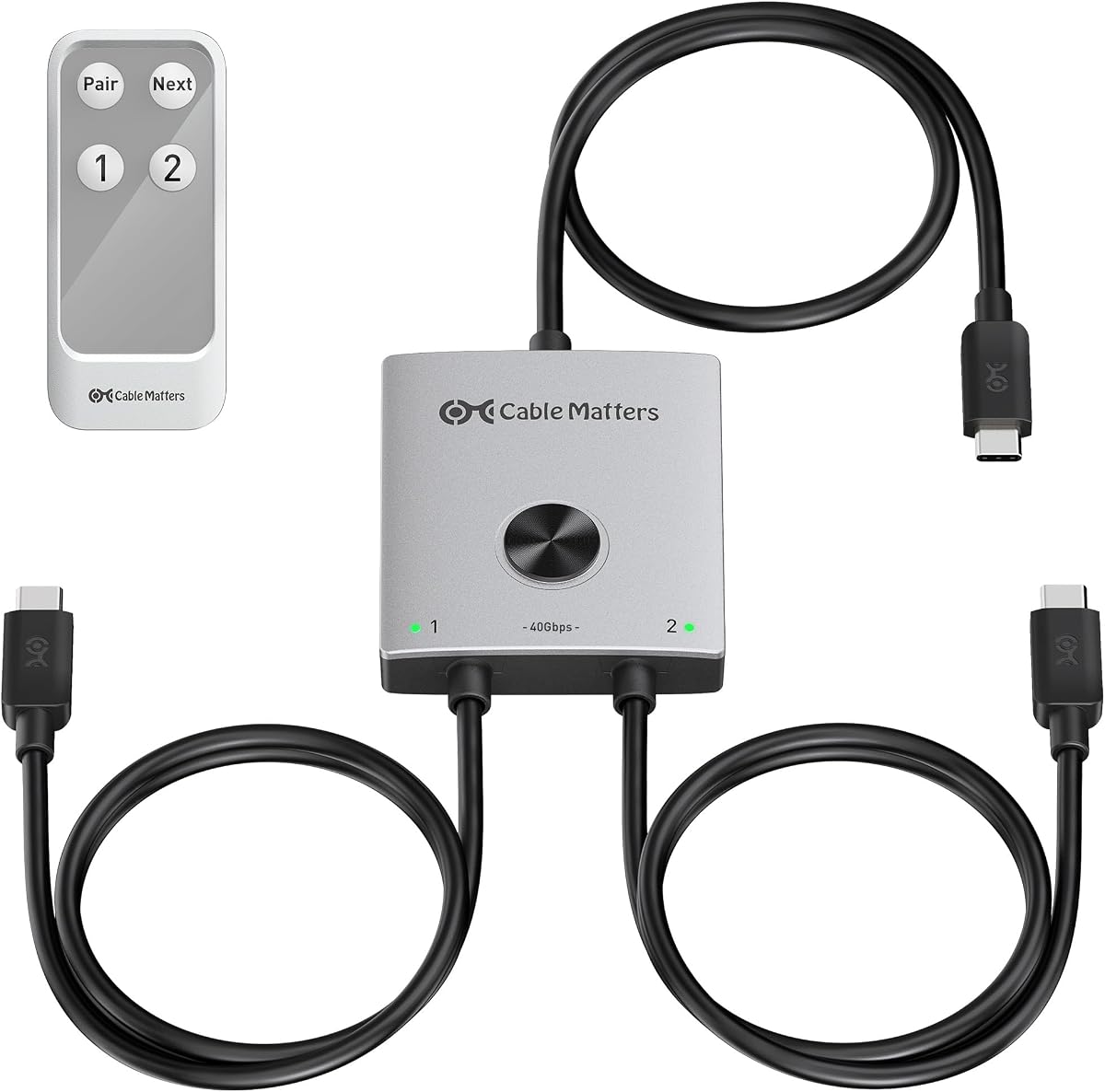
This USB-C switch prioritizes high-speed data and charging capabilities. It handles 20Gbps transfers and supports up to 140W power delivery for laptops.
We may earn a commission when you buy through this link, at no additional cost to you.
Key strengths include compatibility with Thunderbolt 4 monitors and compact size. Wireless remote access further simplifies daily use.
Incompatibility with Dell docking stations is a major limitation. Short pigtail requirements for docks may cause issues for some setups.
Best for users needing portable high-performance switching. It suits travelers or professionals who require rapid file transfers.
Supports pass-through charging up to 140W. Keeps devices fully powered without needing separate adapters during transitions.
Connects directly with docking stations for full performance. Ensures stable data transfer when paired correctly with monitors.
We may earn a commission when you buy through this link, at no additional cost to you.
At the premium end, this switch offers unmatched 40Gbps throughput for Thunderbolt users. It is designed for MacBooks and high-end Windows laptops alike.
We may earn a commission when you buy through this link, at no additional cost to you.
Key strengths include RF remote control and support for top-tier docks like CalDigit. Video outputs reach 8K@60Hz or 6K@60Hz effortlessly.
Cannot be used with built-in host cables, limiting compatibility. It requires specific docks to function correctly, demanding research before purchase.
Ideal for professionals investing in top-tier ecosystems. It ensures no data bottlenecks and maximizes performance across connected devices.
Handles full Thunderbolt 4 bandwidth. Perfect for connecting high-end docks without sacrificing performance or speed.
RF remote operates without line of sight. Enables flexible placement of the switch while maintaining full control.
We may earn a commission when you buy through this link, at no additional cost to you.
Selecting the right KVM switch requires understanding your display, data, and power needs. This guide outlines critical factors to consider.
Determine how many displays you need to share. Single-monitor setups are simpler, while dual or triple monitors require specific MST or HDMI/DP support.
Check if your laptops support multi-stream transport to drive multiple screens effectively.
Match the switch ports to your laptops' outputs. USB-C with DP Alt Mode is common, but HDMI or DisplayPort may be necessary for older models.
Ensure the switch supports the maximum resolution and refresh rate your monitors require.
USB 3.0 provides 5Gbps, but newer models offer 10Gbps or higher for rapid file transfers. High-speed ports are essential for SSDs or large media files.
Avoid older USB 2.0 hubs if you need consistent transfer speeds.
Many KVMs include PD ports to charge laptops. Look for 100W or higher if your device needs full-speed charging.
Verify if the switch delivers power when switching or only to the active computer.
Ethernet ports allow shared internet access without separate cables. This ensures both computers stay online for downloads or updates.
Some models maintain connection to both systems simultaneously even during switches.
MacOS has restrictions on multi-monitor support like MST. Ensure the switch advertises compatibility if you use a MacBook.
Linux and Windows generally offer broader flexibility with USB or HDMI switching.
Manual buttons, wired remotes, or wireless remotes offer different convenience levels. Consider where you want to place the physical unit.
Hotkey support via keyboard shortcuts can further streamline daily operations.
Solid casing and reliable connectors prevent wear over time. A warranty offers peace of mind for long-term investments.
Check customer reviews for durability reports before purchasing expensive models.
Start by connecting your monitors to the KVM outputs and your computers to the inputs using appropriate cables. Ensure all USB peripherals are plugged into the KVM's USB ports.
Use the front panel button or included remote to toggle between systems. Wait for indicator lights to stabilize before interacting with the active computer.
Keep the unit ventilated and clean to maintain performance. Avoid bending cables sharply and check connections periodically to prevent signal loss.
Yes, but with limitations. macOS supports USB sharing but often restricts extended multi-monitor setups due to MST limitations. Mirrored displays usually work reliably across supported models.
Not all models. Look for Power Delivery ports in product specs. Some switches pass through charging while others focus solely on display and peripheral sharing.
Most modern units support 4K@60Hz. Higher-end models enable 8K or high refresh rates for gaming. Verify your monitor specs match the switch capabilities.
Yes, mixing Windows and Mac laptops is supported if ports align. Video cables must match inputs, but USB and display functions remain consistent across platforms.
Most switches offer multiple USB ports for keyboard, mouse, printer, and more. High-speed models support additional storage devices without performance loss.
Some models require external adapters, especially for high-power USB devices. Basic switches might draw power from computers but stability benefits from dedicated power supplies.
Choosing the right KVM switch significantly enhances productivity by reducing cable clutter and streamlining workflows. The top picks offer diverse solutions ranging from budget options to premium docking stations.
Prioritize video resolution, USB speed, and power delivery based on your daily tasks. Matching your laptop's ports to the switch capabilities ensures smooth performance without bottlenecks.
Verify current product details before purchasing as specs and pricing may evolve. Investing in a compatible KVM setup guarantees a cleaner and more efficient workspace.