
Brother HL-L6310DW
4.2Editor score
52ppm print speed
Expandable paper capacity
Triple Layer Security
This guide compares the top laser printers for large workgroups based on speed, security, and capacity to help your business choose the right model.
Choosing the right laser printer for large workgroups is critical for maintaining high productivity levels in any modern office environment. You need machines that can handle high volumes without frequent jams or slow downs. Reliable devices ensure your team stays focused on core tasks rather than troubleshooting hardware issues.
We evaluated ten top-rated models focusing on print speed, paper capacity, security features, and connectivity options. Our analysis considers real-world performance data and user feedback to ensure every recommendation meets enterprise demands. This list helps you narrow down choices based on specific workflow requirements and department sizes.
Each pick includes detailed specifications and standout features to guide your purchasing decision effectively. Keep in mind that product availability and features may evolve over time. We update our recommendations regularly to reflect the latest technology and value propositions available on the market today.
4.2Editor score

4.4Editor score

4.0Editor score
The following comparison table provides a side-by-side overview of all ten selected printers. Use this reference to quickly identify differences in speed, capacity, and key features across models.


The Brother MFC-L8930CDW stands out as a top contender for large workgroups needing reliable color printing. With a solid 4.4 rating, it delivers professional results with sharp text and vibrant colors suitable for presentations and marketing materials. Its fast print speeds help keep workflows moving efficiently even during peak business hours.
We may earn a commission when you buy through this link, at no additional cost to you.
This model excels in productivity features including a large multipurpose tray and dual-band wireless connectivity. The 80-page auto document feeder supports high-volume scanning tasks essential for document management systems. Security features like Triple Layer Security and NFC card readers ensure sensitive documents remain protected throughout transmission and storage processes.
While the machine offers significant value through included toner cartridges, the ongoing cost of color toner replacements should be factored into your budget. The design is compact compared to previous models but still requires adequate space for paper trays and ventilation. Some users might find the initial network configuration slightly complex without IT support.
For businesses requiring frequent color output alongside black-and-white volume printing this unit is highly recommended. It balances performance and cost effectively making it an ideal choice for mid-sized departments within larger organizations. The combination of speed security and quality makes it a versatile addition to any modern office environment.
The 7-inch color touchscreen allows easy menu navigation and customizable shortcuts for frequently used tasks saving time daily.
High-speed two-sided scanning up to 104ipm helps digitize large batches of documents quickly and efficiently.
We may earn a commission when you buy through this link, at no additional cost to you.
The Brother HL-L5210DWT is designed specifically for high-volume monochrome printing needs in busy office environments. Its 4.3 rating reflects consistent performance delivering professional-quality documents at impressive speeds up to 48ppm. This makes it perfect for teams that prioritize speed and efficiency over color printing capabilities.
We may earn a commission when you buy through this link, at no additional cost to you.
Dual paper trays provide a solid starting capacity reducing the frequency of paper refills during busy periods. Connectivity is robust with built-in Gigabit Ethernet and dual-band wireless ensuring seamless integration into any network setup. Security features mirror those found in more expensive models safeguarding data and network integrity effectively.
While toner costs are low with high-yield options the lack of scanning functionality means you might need a separate scanner for document digitization. The design is straightforward and reliable but lacks the touchscreen interfaces found on all-in-one models. Users should plan for optional trays if maximum paper capacity is a priority for their workflow.
This printer is an excellent choice for departments focused purely on printing tasks like legal or accounting firms. It offers outstanding value for money by balancing speed capacity and security without unnecessary features. Businesses looking to minimize operational costs while maintaining high output quality will find this model highly suitable.
Super high-yield replacement toner cartridges help reduce operating costs significantly over the lifespan of the device.
Seamless setup and sharing on wired or wireless networks ensures easy access for all employees.
We may earn a commission when you buy through this link, at no additional cost to you.
The HP LaserJet Enterprise MFP M634z represents the pinnacle of enterprise printing capabilities with top-of-line features. Its 4.0 rating indicates strong performance though it is designed for the most demanding environments. The machine handles massive workloads effortlessly ensuring continuous operation even during peak demand periods.
We may earn a commission when you buy through this link, at no additional cost to you.
With up to 55ppm print speed and a 2300-sheet input capacity this printer reduces downtime significantly. The included 3-bin stapler/stacker enhances productivity by automating finishing tasks directly at the device. Advanced security features protect sensitive data from threats making it ideal for regulated industries like finance or healthcare.
The significant investment required for this unit is justified by its durability and efficiency over time. However the physical size is large requiring dedicated space in your office layout. Users might also find the extensive feature set overwhelming without proper training on advanced configuration options.
Large organizations with high document volumes benefit most from this powerful machine. It streamlines workflows through automation and provides robust security necessary for enterprise environments. If budget and space allow this printer delivers unmatched performance and reliability for critical business operations.
Features like a 150-page ADF with single-pass scanning help detect errors and ensure proper orientation automatically.
Embedded security features help protect sensitive data and thwart malware continuously detecting and stopping attacks.
We may earn a commission when you buy through this link, at no additional cost to you.
The Brother MFC-L6810DW delivers enterprise-level monochrome performance tailored for mid to large-sized workgroups. With a 4.1 rating it offers fast printing and copying speeds up to 52ppm ensuring tasks are completed quickly. The integration of Alexa support adds convenience for modern smart office environments.
We may earn a commission when you buy through this link, at no additional cost to you.
Scanning capabilities are robust with an 80-page ADF supporting single-pass two-sided scanning up to 200ipm. This high-speed scanning reduces wait times during document processing workflows significantly. Advanced security features help safeguard networks and devices ensuring data protection without compromising ease of use for staff.
Users might find the absence of color printing limiting for certain tasks requiring visual impact. The touchscreen is functional but smaller than some competitors offering less screen real estate for menu navigation. The included toner cartridge provides good initial value though high-yield replacements may be needed for heavy usage.
This model suits teams needing fast reliable monochrome all-in-one functionality with smart capabilities. It balances speed and connectivity well making it a strong choice for offices prioritizing efficiency. The combination of security and speed makes it a reliable workhorse for daily business operations.
The 80-page capacity auto document feeder supports single-pass two-sided scanning up to 200ipm efficiently.
Triple Layer Security features safeguard your network and protect documents in transit to and from devices.
We may earn a commission when you buy through this link, at no additional cost to you.
The Brother HL-6210DW is a professional monochrome laser printer designed to dominate office printing tasks. With a solid 4.1 rating it offers an impressive 50ppm output speed ensuring high-volume jobs are completed with precision. This makes it an ideal choice for teams focused on rapid document generation.
We may earn a commission when you buy through this link, at no additional cost to you.
Superior capacity is achieved through a 520-sheet main tray and expandable options up to 1660 sheets. Advanced connectivity includes built-in Gigabit Ethernet and dual-band wireless allowing seamless integration across your business network. Security features ensure comprehensive protection for devices and documents during transmission and printing processes.
The lack of scanning functionality means you will need separate hardware for document digitization tasks. The interface is straightforward but may lack the customization options found in higher-end all-in-one units. Users should consider total cost of ownership when selecting toner cartridges for optimal budget management.
This printer is perfect for departments requiring fast high-volume monochrome printing without extra bells and whistles. It delivers exceptional efficiency and precision for standard business documents. The balance of speed capacity and cost makes it a practical choice for many small to mid-sized businesses.
Print business documents with a 520-sheet main tray and 100-sheet multipurpose tray for uninterrupted performance.
Seamless integration with Gigabit Ethernet and dual band wireless networking enables efficient printer sharing.
We may earn a commission when you buy through this link, at no additional cost to you.
The Brother MFC-L5915DW delivers high-quality monochrome output for busy offices needing reliable all-in-one performance. Its 4.3 rating reflects consistent efficiency with print and copy speeds up to 50ppm. This device ensures fast professional-quality documents without frequent downtime or maintenance interruptions.
We may earn a commission when you buy through this link, at no additional cost to you.
Cost-efficiency is a key highlight with support for ultra high-yield replacement toner cartridges reducing operating expenses significantly. The 70-page auto document feeder supports single-pass two-sided scanning which streamlines digitization workflows. Flexible connectivity options allow seamless setup and sharing on your wired or wireless networks easily.
While the ADF is functional it might feel small for organizations handling very large document batches daily. The design is compact yet robust but lacks advanced finishing features like stapling or hole punching. Users may need to manage these tasks separately depending on their workflow requirements.
This printer suits small to mid-sized offices looking for balanced performance and affordability. It provides essential all-in-one functionality without overwhelming complexity. The combination of speed cost-efficiency and ease of use makes it a reliable daily driver for office needs.
Help reduce operating costs by using the Brother Genuine TN920UXXL ultra high-yield replacement toner cartridge.
The 70-page capacity auto document feeder offers single-pass two-sided scanning up to 56ipm quickly.
We may earn a commission when you buy through this link, at no additional cost to you.
The HP LaserJet Enterprise M507n is designed to keep up with the demands of a growing business securely. Its 4.0 rating indicates reliable performance for consistent high-quality monochrome document output. Security is a primary focus with embedded features protecting printer information and thwarting malware effectively.
We may earn a commission when you buy through this link, at no additional cost to you.
Centralized printing control via HP Web JetAdmin helps build business efficiency by simplifying device management. Optional mobile printing allows employees to print from smartphones without needing complex app installations or setup. Toner cartridges designed for this printer ensure high-quality results and reduce unnecessary service calls or wasted supplies.
The lack of built-in wireless might limit flexibility for organizations relying heavily on mobile connectivity options. Advanced finishing options are minimal so you may need separate hardware for stapling or collating tasks. Configuration policies can be set with HP JetAdvantage Security Manager ensuring robust network protection.
This printer is ideal for businesses prioritizing network security and administrative control over user convenience. It delivers consistent performance that aligns with corporate standards and requirements. For secure network printing this model offers strong value and reliability for growing enterprises.
The industry's strongest security helps protect your printer's information and detect attacks continually.
Help build business efficiency with HP Web JetAdmin by easily adding new devices and solutions.
We may earn a commission when you buy through this link, at no additional cost to you.
The HP LaserJet Enterprise MFP M634z combines performance energy efficiency and security in a robust multifunction device. Its 4.0 rating reflects reliability for demanding work environments needing high output consistently. This printer is built to keep business moving with fast first page out times and efficient energy usage.
We may earn a commission when you buy through this link, at no additional cost to you.
Workflow acceleration is enhanced by a 150-page auto-document feeder with single-pass two-sided scanning. A 9-inch color touchscreen provides intuitive navigation for various tasks and settings. Loaded for productivity the device supports massive paper capacity and automatic finishing options to reduce manual labor.
The physical size and cost represent a significant commitment that must fit your office space and budget. Users should ensure adequate space is reserved for operation maintenance and paper refills. Configuration may require IT expertise to leverage all features effectively within your network infrastructure.
This model suits large enterprises requiring high-volume secure printing with minimal manual intervention. It delivers professional-quality documents and robust security suitable for regulated industries. The investment is justified by its capacity to handle complex workflows efficiently over long periods.
Keep business moving with duplex printing and print speeds of up to 55 ppm efficiently.
Your monochrome laser printer has the industry's deepest security with embedded features protecting sensitive data.
We may earn a commission when you buy through this link, at no additional cost to you.
The Brother HL-L8430CDWT is built for dependable performance and professional results in busy office environments. With a impressive 4.6 rating users appreciate its vibrant color output and sharp black prints. This model optimizes business productivity with reliable performance supporting teams needing frequent color documents.
We may earn a commission when you buy through this link, at no additional cost to you.
Dual paper trays offer flexibility for mixed media and higher capacity reducing refills. The included toner cartridges provide value while high-yield replacements help lower overall printing costs significantly. Sustainability features like EPEAT Gold rating and recycled materials align with modern corporate environmental goals and standards.
The speed is slower than monochrome counterparts which may impact workflows with extreme volume needs. Color toner management can be more complex than black and white printing requiring careful monitoring. However the vibrant output quality compensates for the slight speed difference in many use cases.
This printer is perfect for departments needing color capabilities without the bulk of an all-in-one device. It balances cost efficiency with professional output quality effectively. The high user rating reflects satisfaction with its reliability and ease of integration into existing networks.
Built for dependable performance and professional results with vibrant color and sharp black output.
EPEAT Gold rated with EPS-free packaging and Post Consumer Recycled material supporting eco-friendly practices.
We may earn a commission when you buy through this link, at no additional cost to you.
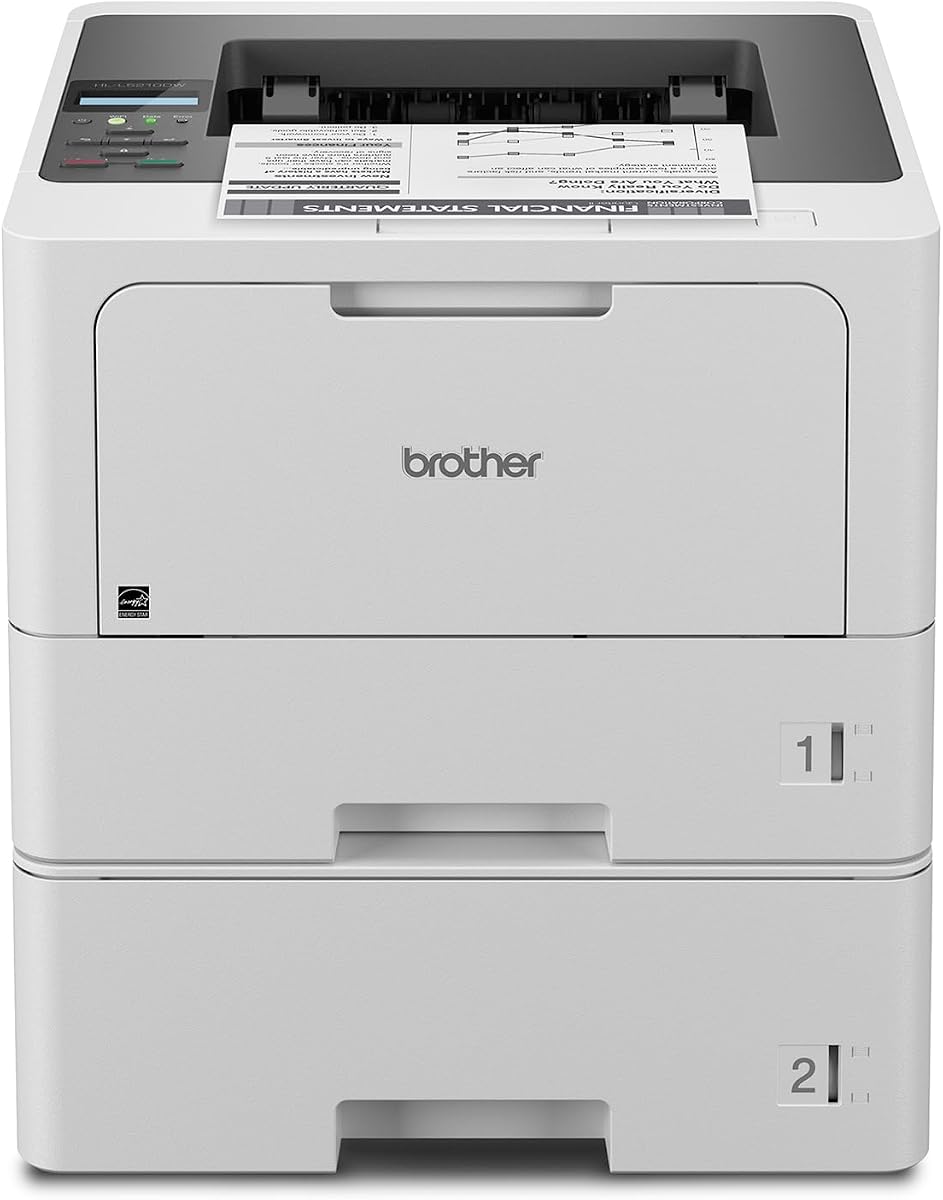
The Brother HL-L6310DW delivers high-quality output for mid to large-sized workgroups with efficiency. Its 4.2 rating reflects strong performance and reliability in enterprise environments. With print speeds up to 52ppm this machine ensures fast professional quality documents are produced consistently without delays.
We may earn a commission when you buy through this link, at no additional cost to you.
Large expandable paper capacity allows users to spend less time refilling trays during busy periods. Alexa integration adds convenience for voice-activated tasks and modern smart office setups. Security features help safeguard networks and protect documents in transit ensuring safe operations daily.
The lack of scanning limits versatility if you need all-in-one functionality for your department. The user-friendly design is simple but might lack advanced features found in higher-end models. Users should plan for mass distribution of device configurations if managing multiple units across a network.
This printer is ideal for businesses needing fast secure monochrome printing with smart features. It offers lifetime value with included toner and options for ultra high-yield replacements. The balance of speed capacity and cost makes it a strong choice for growing workgroups.
Delivers high-quality output with a print speed of up to 52ppm to boost productivity.
Triple Layer Security features help safeguard your network and protect documents in transit and.
We may earn a commission when you buy through this link, at no additional cost to you.
Selecting the right printer for large workgroups requires evaluating several critical factors to ensure long-term satisfaction and efficiency.
Print speed is measured in pages per minute (ppm) and determines how quickly documents are produced. For large workgroups, you need models with high ppm ratings to prevent bottlenecks during peak hours. Additionally, output quality must remain consistent across high-volume jobs to avoid reprints and wasted resources.
Large workgroups require printers with substantial paper capacity to minimize manual refilling interruptions. Look for models with at least 500 sheets total, with options to expand up to 2000 sheets if needed. This ensures continuous operation for departments processing thousands of pages daily without downtime.
Security is paramount for businesses handling sensitive data daily. Enterprise-grade printers offer multiple layers of defense including secure print release and encryption. Ensure the device supports network authentication protocols to protect information from unauthorized access or breaches effectively.
Versatile connectivity is essential for integrating with various network infrastructures. Modern models support wireless, Ethernet, and mobile printing options for seamless access across devices. Flexible interfaces ensure that all team members can print easily regardless of their location or device type.
Consider whether your workgroup needs scanning and copying capabilities alongside printing. All-in-one units consolidate tasks and save space but may cost more upfront. If scanning is rare, a dedicated printer might be more cost-effective for your specific operational requirements.
The cost of ownership extends beyond the initial purchase price to include toner replacements. High-yield cartridges often offer a better value for large volumes compared to standard options. Evaluate the page yield and cost per page to ensure long-term budget efficiency for your department.
The physical size of the printer impacts where it can be placed within your office. Larger models with more paper trays take up more room and require clearance for ventilation. Measure your available space carefully to ensure the unit fits comfortably without obstructing walkways.
For IT departments, easy management of multiple devices is a crucial factor. Look for printers that support centralized configuration and monitoring tools. Features like easy firmware updates and diagnostic alerts help maintain performance without excessive IT overhead or intervention.
To ensure optimal performance, keep your printer in a cool, dry environment away from direct sunlight. Dust can affect internal components, so regularly wipe the exterior with a soft, dry cloth to prevent buildup. Proper placement also aids in ventilation which is crucial for cooling systems during heavy usage.
Replacement frequency depends on print volume and the type of cartridge used. Standard toner usually lasts for a few thousand pages, while high-yield options can last significantly longer. Monitor your printer's usage stats to anticipate when a replacement is needed to avoid unexpected downtime.
Single-sided printing uses only one side of the paper, while double-sided printing utilizes both sides to save paper. Most modern enterprise printers support automatic duplex printing as a standard feature. This not only reduces paper costs but also lowers the environmental impact of your printing operations.
Yes, most enterprise laser printers support a wide range of paper sizes from standard letter to legal. Check the specifications to confirm support for specialty sizes if your workflow requires them. Adjustable trays often allow for easy switching between different paper formats without much hassle.
Standard features often include encrypted data transmission and user authentication to prevent unauthorized use. Some models offer secure release features where you must physically badge in to release print jobs. These measures protect sensitive information from being left unattended on the output tray.
Wireless printing can be secure if proper encryption and authentication protocols are enabled. Enterprise models often support WPA3 encryption to protect data over wireless networks. It is best to segregate printer traffic on a dedicated VLAN for added network security and isolation.
Regular maintenance includes cleaning the rollers and fuser unit to prevent smudges and streaks. Many printers have built-in cleaning programs that run automatically to maintain output quality. If issues persist, consult the manufacturer's manual for deeper maintenance steps or replacement parts.
Most modern laser printers support mobile printing via apps or cloud services like AirPrint. This allows employees to print directly from smartphones or tablets without needing a computer. Always ensure your mobile devices are on the same network or connected via cloud protocols for seamless access.
Frequent jams are often caused by paper quality issues or worn-out rollers. Use high-quality paper that matches the printer's specifications to avoid this problem. Regularly inspect and replace worn components to maintain smooth paper feeding through the device.
Choosing the right printer for large workgroups involves balancing speed, capacity, and security. The Brother MFC-L8930CDW offers a strong all-in-one solution, while the HP LaserJet Enterprise MFP M634z suits high-volume needs. Selecting a model that fits your workflow ensures productivity and cost efficiency for your team.