
RedThunder One Handed Gaming Keyboard RGB Backlit 35 Keys Portable Mini Gaming Keypad Ergonomic Game Controller for PC Gamer
4.4Editor score
35 Keys Anti-ghosting
Macro Recording Keys
RGB Backlit Modes
Discover the top left handed gaming keyboards for 2026. This guide compares ten unique models designed to enhance comfort, performance, and ergonomics for
Left handed gaming keyboards offer a unique solution for gamers who prefer using their dominant hand for mouse control. These specialized devices reposition keys to reduce strain and improve reaction times during intense sessions.
We evaluated ten top models based on build quality, switch technology, and ergonomic design. Each product was analyzed for its ability to support fast-paced gaming while maintaining comfort over long periods of use.
Every pick highlights key features and real-world performance. Prices and availability change frequently, so checking current listings is recommended before making a final purchase decision for your setup.
4.4Editor score

4.6Editor score

4.6Editor score
This comparison table provides a side-by-side overview of all ten products. It highlights essential specifications to help you quickly identify which model fits your specific gaming needs and budget.



The RK ROYAL KLUDGE L98 stands out as a premier choice for gamers seeking a full-sized experience with left-handed optimization. Its rating of 4.6 reflects strong user satisfaction with the unique layout and build quality.
We may earn a commission when you buy through this link, at no additional cost to you.
This keyboard features a gasket structure that provides a soft, cushioned touch while reducing vibrations. The inclusion of five sound-dampening layers ensures a smooth and satisfying typing experience that minimizes hollow sounds.
While the design is robust, the initial setup for customizing switches and connectivity modes may require some patience. However, these trade-offs are acceptable given the high level of comfort and versatility it offers.
Gamers looking for a balance of performance and ergonomics should consider this model. It is particularly well-suited for those who want to maximize mouse space without sacrificing key functionality.
Five internal layers reduce noise significantly for a quieter gaming environment.
Switch between wireless Bluetooth and wired USB-C for seamless transitions.
We may earn a commission when you buy through this link, at no additional cost to you.
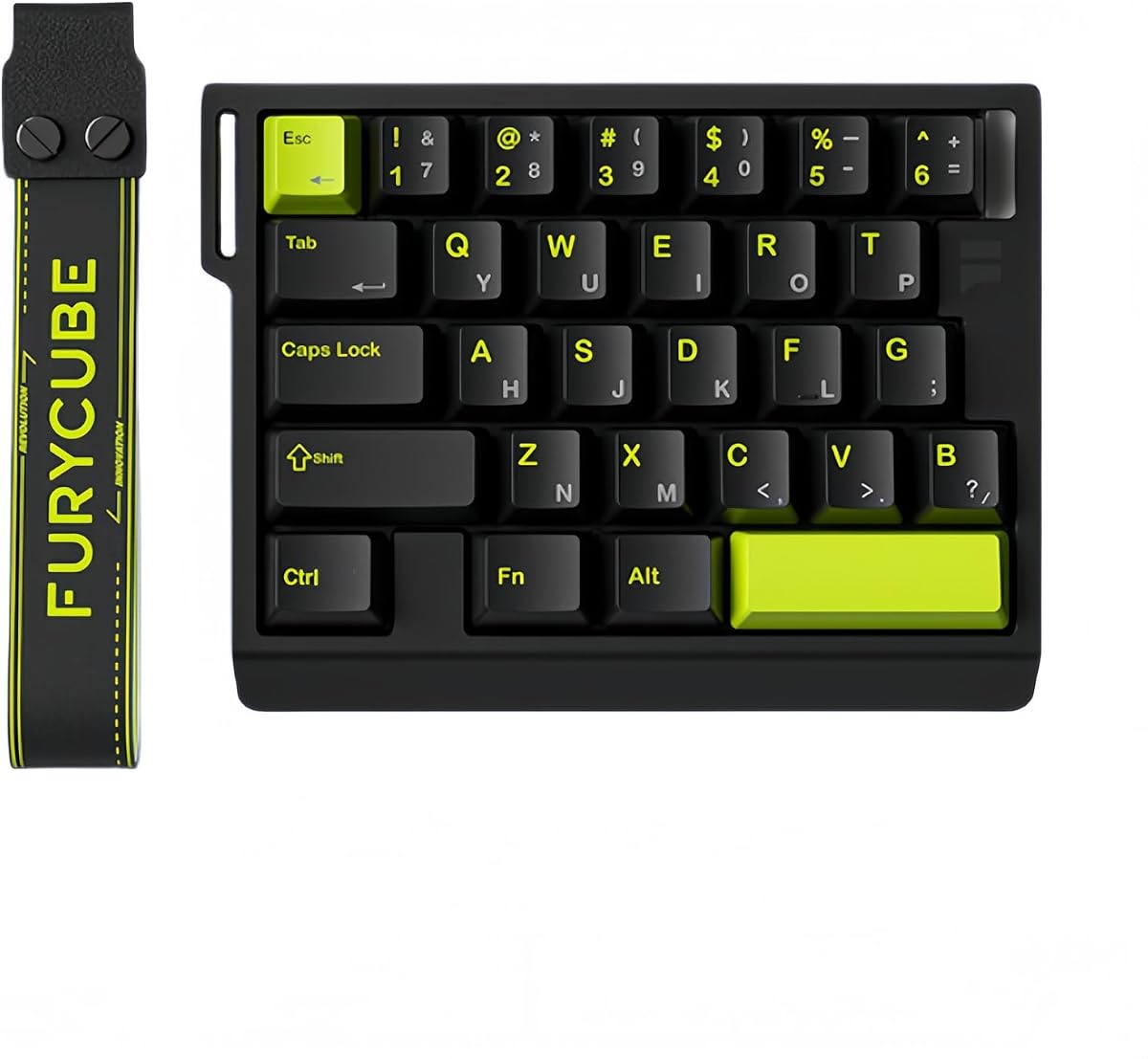
The RedThunder One Handed Gaming Keyboard offers an accessible entry point for those wanting a dedicated gaming keypad. With a rating of 4.4, it is praised for its simplicity and effectiveness in game scenarios.
We may earn a commission when you buy through this link, at no additional cost to you.
Its 35-key layout covers essential gaming commands while saving valuable desk space. The macro recording feature allows players to automate complex actions easily, enhancing performance in RPG and strategy games.
The build quality is functional but not premium, which is expected at this price point. Some users might find the keys less durable over time compared to higher-end mechanical options.
Budget-conscious gamers or students will find this keypad ideal for quick setups. It provides a solid foundation for one-handed control without requiring a significant financial investment.
Simple key combos let you record and replay complex sequences instantly.
Small footprint makes it easy to carry for gaming on the go.
We may earn a commission when you buy through this link, at no additional cost to you.
The AZERON Keyzen represents the pinnacle of one-handed gaming technology with its robust feature set. It holds a strong 4.6 rating due to its superior ergonomics and high-performance components like Cherry MX switches.
We may earn a commission when you buy through this link, at no additional cost to you.
The 360-degree Hall-effect joystick provides drift-free analog control, which is crucial for precise movement in competitive games. The modular design ensures that parts can be replaced or upgraded as needed.
The steep price point and complexity of customization may deter casual users. However, serious enthusiasts will appreciate the depth of control and the potential to tailor every aspect of the device.
This keypad is recommended for professionals and competitive gamers seeking the ultimate in precision. It serves as a long-term investment for those who demand the highest quality from their hardware.
Magnetic sensors enable smooth and accurate analog movement without drift.
Famous mechanical switches ensure a consistent and satisfying typing feel.
We may earn a commission when you buy through this link, at no additional cost to you.
The AZERON Gaming Keypad offers a unique approach to one-handed gaming with its adjustable and customizable design. With a 4.3 rating, it appeals to users looking for specialized control features beyond standard keyboards.
We may earn a commission when you buy through this link, at no additional cost to you.
The hall effect thumbstick allows for analog movement which can be mapped to WASD or 360-degree zones. This feature is particularly useful for simulation and role-playing games requiring nuanced control.
The 3D printed construction provides a distinct aesthetic but may have durability concerns over extended use. Additionally, the device relies heavily on software for configuration which adds a layer of dependency.
Gamers who value unique control schemes and analog inputs will find this device appealing. It is best suited for those willing to invest time in setting up their ideal control profile.
Fine-tune sensitivity and dead zones for tailored movement precision.
Store up to six layouts on the keypad for quick access during games.
We may earn a commission when you buy through this link, at no additional cost to you.
The AJAZZ AK029 is engineered for competitive performance with its rapid trigger capabilities and high polling rate. A rating of 4.5 indicates strong approval from users who prioritize speed and precision in their gameplay.
We may earn a commission when you buy through this link, at no additional cost to you.
Its hall effect magnetic switches allow for near-instantaneous resets and precise actuation. This technology ensures that every keystroke is registered quickly without delay which is vital for shooter games.
The compact 29-key layout frees up significant space for mouse movement but might feel restrictive for general tasks. It is specifically designed for gaming and lacks some broader utility keys found in larger boards.
Competitive players seeking an edge in FPS titles should consider this device. It delivers professional-grade responsiveness in a package that maximizes available desk space.
Instant key resets enable smoother strafing and faster double-taps.
Compact layout reduces clutter and maximizes room for mouse flicks.
We may earn a commission when you buy through this link, at no additional cost to you.
This ergonomic keyboard is tailored for business and accounting professionals who need left-handed efficiency. With a 4.4 rating, it is recognized for its ability to reduce strain during long hours of data entry.
We may earn a commission when you buy through this link, at no additional cost to you.
The patented Natural_A keycaps are designed to align fingers naturally reducing shoulder and back strain. Multimedia hotkeys provide quick access to common functions enhancing workflow efficiency for office tasks.
While excellent for productivity, the device lacks the advanced features found in gaming specific models. Users seeking gaming performance may find the keys and connectivity options insufficient for intense play.
Office workers dealing with repetitive strain injuries will find this tool highly beneficial. It prioritizes health and efficiency making it a practical choice for professional environments.
Layout adjustments help prevent carpal tunnel and improve posture daily.
Eight multimedia keys streamline access to essential software shortcuts.
We may earn a commission when you buy through this link, at no additional cost to you.
The Keychron C0 HE combines high-performance features with easy browser-based customization. Its 4.2 rating reflects solid performance though some users may prefer software-based configuration for advanced settings.
We may earn a commission when you buy through this link, at no additional cost to you.
With an 8K polling rate and rapid trigger switches this keypad ensures low latency and precise inputs. It is ideal for both gaming and content creation where quick shortcuts are necessary for efficiency.
The reliance on a web-based tool is convenient but may limit offline adjustments. Additionally being wired restricts portability compared to wireless alternatives available in the current market.
Users who prefer simple setup and cross-platform compatibility will appreciate this model. It bridges the gap between professional tools and competitive gaming hardware effectively.
No software download needed to adjust key mapping and RGB effects.
Ideal for OBS scenes and timeline controls during streaming sessions.
We may earn a commission when you buy through this link, at no additional cost to you.
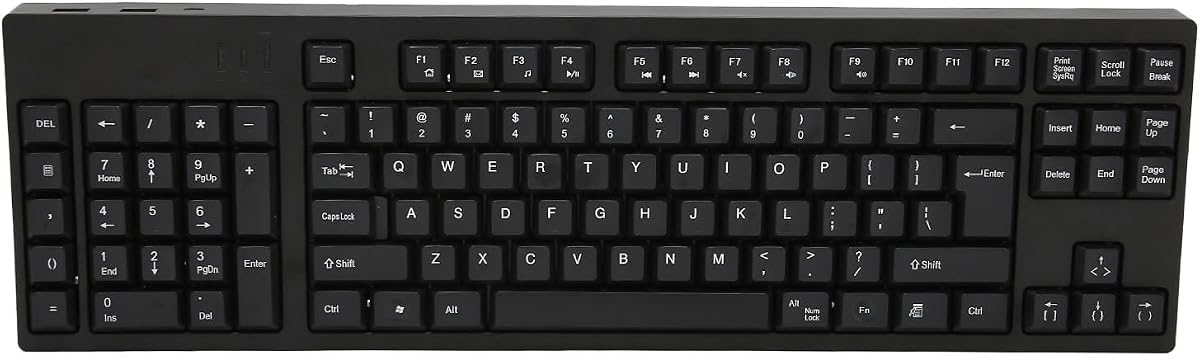
This left-handed keyboard offers a full 109 key layout which is rare in specialized ergonomic devices. With a perfect 5.0 rating it is highly regarded for its reliable construction and straightforward usability.
We may earn a commission when you buy through this link, at no additional cost to you.
The ergonomic layout ensures the right hand remains free for mouse usage while the left handles numeric tasks. Two additional USB interfaces allow for connecting peripherals making it a hub for your setup.
The micro USB connection is older technology compared to modern USB-C options found in newer models. While functional it may not future-proof the device for upcoming peripheral standards.
Accountants and designers need a full keypad will find this option practical and efficient. It provides a complete typing experience without compromising on essential productivity features.
All standard keys and numpad available for complete data entry tasks.
Built-in USB ports let you connect mouse or other devices easily.
We may earn a commission when you buy through this link, at no additional cost to you.
The FKZ M30HE offers unique features like hot-swappable switches and adjustable actuation points. With a 4.0 rating it appeals to users who want customization options without a massive price tag.
We may earn a commission when you buy through this link, at no additional cost to you.
Its magnetic switches allow for precise control over trigger points which is beneficial for competitive play. The web driver supports extensive remapping making it versatile for different game genres.
Some users report minor quality inconsistencies in the build quality compared to higher rated rivals. The compact 30-key layout may not cover all necessary keys for complex gaming scenarios.
DIY enthusiasts looking to customize their own switch setup will enjoy this model. It provides a flexible platform for experimentation at an affordable price point.
Hot-swap sockets let you test different switches without soldering.
Set trigger points from 0.1 to 3.4 mm for your specific needs.
We may earn a commission when you buy through this link, at no additional cost to you.
The A4tech Ergonomic Left Handed Keyboard focuses on health and productivity with its specialized layout. A 4.3 rating suggests it effectively reduces shoulder and back strain for users requiring left-sided input.
We may earn a commission when you buy through this link, at no additional cost to you.
Its patented natural shape aims to improve posture during long hours of data entry. Eight multimedia hotkeys provide quick access to functions enhancing efficiency for business professionals.
The device is purely functional without advanced features suitable for gaming. Users looking for performance in fast-paced scenarios will need to look elsewhere for dedicated gaming hardware.
Office workers and those with existing carpal tunnel concerns will find this device helpful. It serves as a reliable tool for daily tasks while prioritizing physical comfort.
Layout design aligns hands naturally to reduce shoulder strain.
Eight hotkeys streamline access to essential office shortcuts.
We may earn a commission when you buy through this link, at no additional cost to you.
Selecting the right left handed gaming keyboard requires understanding your specific needs and preferences. This section breaks down the most important factors to consider before making a purchase.
Key count determines how many functions you can map directly on the device. Full layouts offer versatility while compact boards save space for mouse movement. Consider how many macros or commands you need during intense gameplay.
Choose a layout that balances convenience with desk space requirements for your setup.
Mechanical switches provide tactile feedback and durability compared to membrane options. Hall effect switches offer adjustable actuation and faster reset times for competitive play. The type of switch significantly impacts your typing and gaming feel.
Select switches that match your preference for speed tactile feedback or quiet operation.
Left-handed keyboards should reduce strain on your dominant hand and wrist. Look for adjustable angles palm rests and natural shapes to prevent injury during long sessions. Comfort is critical for consistent performance over time.
Prioritize designs that support natural hand positions to avoid repetitive strain issues.
Wired connections ensure zero latency which is vital for competitive gaming. Wireless options offer flexibility but may introduce lag or require charging. Decide whether you prioritize convenience or raw performance for your games.
Choose wired for esports and wireless if you value cable management and mobility.
Robust software allows you to map keys and create macros tailored to your needs. Look for web-based tools or apps that let you save profiles on the device. Customization options can greatly enhance your gameplay efficiency.
Ensure the software is intuitive and supports the level of control you require.
Materials like aluminum or high-quality ABS plastic ensure the device lasts longer. Check for features like hot-swappable components that allow for future upgrades. A sturdy build protects your investment during heavy daily use.
Opt for durable construction that can withstand the rigors of regular gaming sessions.
Features like RGB lighting and wrist rests add value and enhance the user experience. Some models include audio jacks or USB hubs for extra utility. Evaluate which extras fit your workflow and aesthetic preferences.
Consider add-ons that genuinely improve your setup rather than just adding cost.
Prices range significantly from budget-friendly options to high-end specialized devices. Determine how much you are willing to spend based on your gaming habits. Higher cost often correlates with better build quality and features.
Set a realistic budget that balances cost with the features you need most.
Begin by connecting the device to your PC via USB or Bluetooth depending on the model. Install any necessary software to configure key mappings and macros according to your preferences.
Clean the keyboard regularly with a soft brush or compressed air to remove dust and debris. This maintenance prevents key sticking and ensures consistent performance over time.
Store the device in a dry and cool place when not in use to protect internal components. Avoid exposure to liquids or extreme temperatures to maintain its longevity and functionality.
A left-handed gaming keyboard is a specialized input device designed with the numeric keypad and main keys on the left side. This layout frees up the right side for mouse usage allowing for better ergonomics and faster reaction times.
Most models support standard PC games via USB connections. Some require software configuration for specific titles but generally they function as standard input devices across platforms like Windows and macOS.
Yes many models are designed for productivity as well as gaming. The ergonomic layout reduces strain during typing and data entry making them suitable for office tasks and accounting work.
Some models offer Bluetooth or 2.4GHz wireless connectivity for greater flexibility. However wired connections are often recommended for competitive gaming to ensure the lowest possible latency.
A Hall Effect switch uses magnetic sensors to detect key presses instead of physical contacts. This technology allows for adjustable actuation points and faster reset times which is beneficial for rapid gaming inputs.
Most devices come with dedicated software or web-based configurators. You typically record a sequence of keystrokes and assign them to a single key via the software interface.
We have explored ten top models ranging from compact keypads to full ergonomic boards. Each option offers unique benefits for gamers and professionals seeking specialized left-handed support.
Prioritize factors like switch type and ergonomics to find a device that fits your style. Investing in quality hardware can significantly improve your performance and comfort.
Always check current prices and availability before buying as these details change regularly. Making an informed choice ensures you get the best value for your gaming setup.