
EooCoo for MacBook Neo Case
4.7Editor score
Crystal clear transparency
Slim lightweight design
Includes keyboard cover
Compare the top 10 MacBook Neo Protective Case options for 2026. This guide reviews hard shells, sleeves, and complete kits for the A3404 model with A18 Pro
Protecting your new MacBook Neo is essential given its sleek design and premium materials. A good case prevents scratches, dents, and daily wear while maintaining access to all ports. Finding the right fit requires checking model compatibility carefully.
We evaluated ten top-rated cases based on protection, design, and value. Each option offers unique benefits ranging from slim shells to robust bundles with accessories. Our analysis focuses on verified compatibility with the 2026 Neo models.
Each pick highlights specific strengths like heat dissipation, drop protection, or included accessories. Prices and availability change frequently so verify details before purchasing. Choose the solution that best matches your daily usage and style preferences.
4.7Editor score

4.8Editor score

4.8Editor score
This side-by-side comparison highlights the key features of the ten top-rated protective solutions for the MacBook Neo. Use this table to quickly identify which case meets your specific needs for protection, style, and accessory inclusion.




This SUPCASE option earns top marks for combining rugged protection with thoughtful engineering. It holds a strong 4.8 rating from verified buyers who praise its durability. The dual-layer construction offers security without compromising the laptop's functionality.
We may earn a commission when you buy through this link, at no additional cost to you.
The PC hard shell and soft TPU frame work together to absorb shocks from daily drops. Rubber feet on the bottom improve stability and assist with heat disbursement. Precise cutouts ensure easy access to all ports and features.
While it adds minimal bulk, it is heavier than ultra-thin options. The black finish may show smudges requiring occasional wiping. However, the protection level justifies these minor trade-offs for active users.
Ideal for students and professionals needing maximum durability. This case provides peace of mind while keeping your Neo looking pristine. It balances style and function better than most competitors in its class.
Certified to MIL-STD-810H standards this case withstands significant physical stress.
Ventilation and rubber feet ensure your laptop stays cool during intense tasks.
We may earn a commission when you buy through this link, at no additional cost to you.
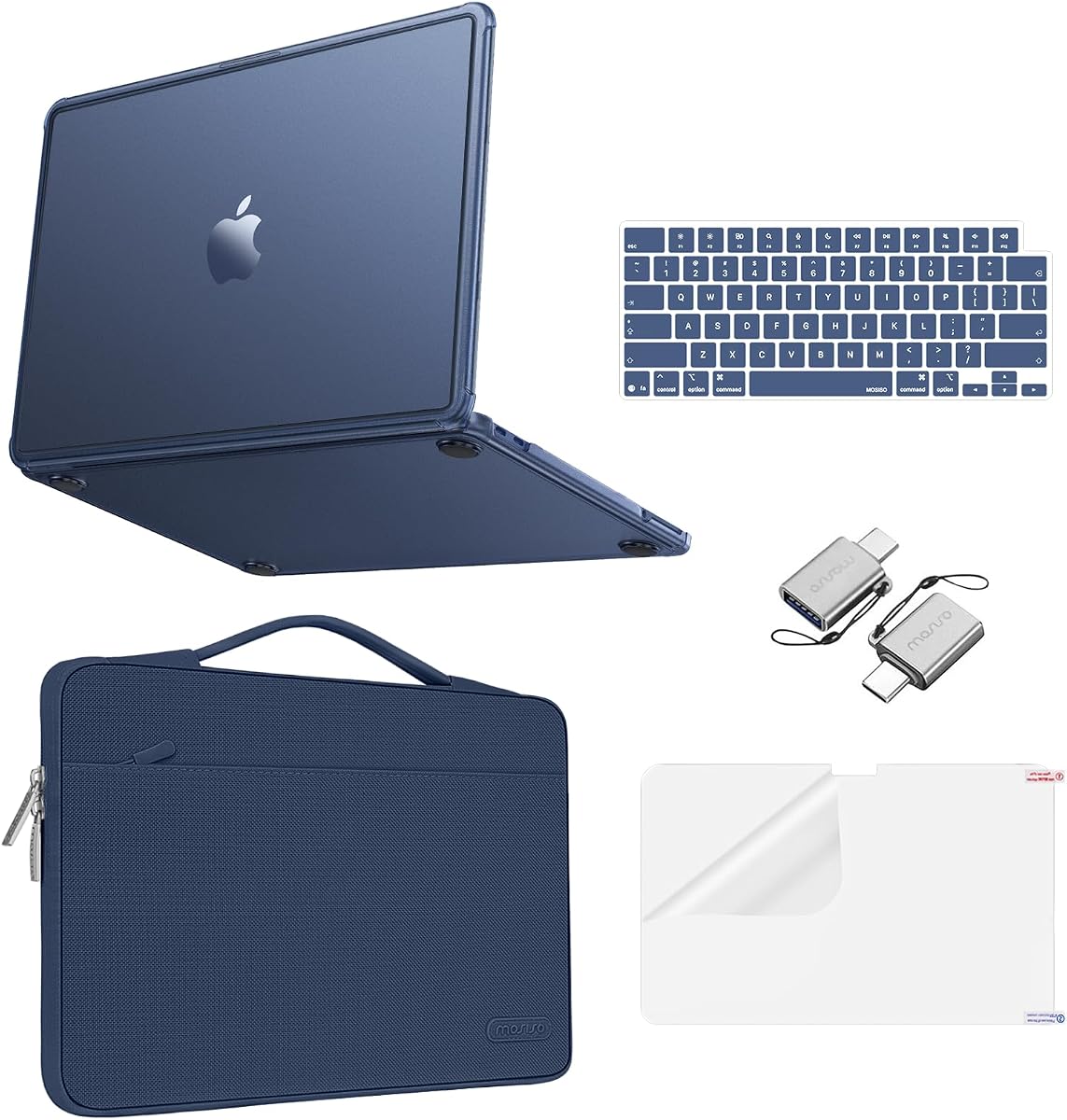
This MOSISO bundle offers incredible value by including everything needed for basic protection. With a 4.5 rating it satisfies users looking for a budget friendly option. The high-transparency shell allows the Neo's design to shine through.
We may earn a commission when you buy through this link, at no additional cost to you.
The hard shell wraps every side guarding against keys and scratches. Two dustproof keyboard covers and a screen protector add extra layers of security. The kit comes ready to use straight out of the box.
Transparency is great but clear plastic can yellow after long use. The shell is not as impact-resistant as dual-layer cases. Still it is an excellent choice for careful users prioritizing looks and price.
Best for those wanting a full set at a low cost. The accessories make it a convenient all-in-one purchase. It keeps your device clean and protected without adding bulk.
Getting a case keyboard covers and screen protector in one package saves effort.
The high-transparency design ensures your device color remains visible.
We may earn a commission when you buy through this link, at no additional cost to you.
BlueSwan delivers a sleek matte finish that repels fingerprints and smudges effectively. Rating 4.5 it appeals to users wanting a clean look. The soft TPU bumper complements the hard shell for solid impact protection.
We may earn a commission when you buy through this link, at no additional cost to you.
A Mac OS shortcuts sticker helps productivity immediately. Precision 3D cutting ensures full access to ports and speakers. The built-in cooling vents won't block heat output from the device.
Some may prefer a glossy finish over matte. The included sticker might not fit every layout perfectly. These minor issues do not detract from the overall quality and build.
Ideal for professionals seeking a refined aesthetic. The non-slip texture improves handling and reduces accidental drops. It is a reliable choice for daily protection and style.
The frosted coating keeps the case looking new for longer periods.
Textured surfaces prevent slips during transport or typing.
We may earn a commission when you buy through this link, at no additional cost to you.
This sleeve stands out for its focus on impact protection during transport. It holds a 4.8 rating reflecting consistent reliability. CornerArmor technology specifically targets vulnerable corners for maximum safety.
We may earn a commission when you buy through this link, at no additional cost to you.
Recycled fabrics reduce environmental impact without sacrificing durability. The front pocket stores chargers and cables efficiently. A dedicated strap holds keys or trackers for easy access on the go.
It protects the device from bumps but does not cover the exterior surface. It is designed to slide inside a backpack rather than be carried alone. Users should pair it with a hard shell for full protection.
Perfect for commuters and travelers needing portable safety. The premium build quality justifies the investment. It offers a balance of sustainability and rugged protection.
CornerArmor tech provides reinforced shielding where it matters most.
Front pockets keep essential tech organized and accessible.
We may earn a commission when you buy through this link, at no additional cost to you.
This kit combines a hard shell case with a protective sleeve for versatility. The matte finish actively repels fingerprints and smudges from daily use. It carries a solid 4.6 rating for its practical design.
We may earn a commission when you buy through this link, at no additional cost to you.
The sleeve prevents spills and scratches when the laptop is stored. Two keyboard covers and a screen protector add extra defensive layers. Everything needed for full-body protection comes right out of the box.
The combined set adds more volume than a single case. It is heavier to carry if you use the sleeve daily. However the protection level is comprehensive for frequent travelers.
Best for users wanting a complete solution in one box. The fingerprint resistance keeps the look professional. It simplifies the purchase process with all essential accessories included.
Special materials reduce marks and keep the case pristine.
Soft padding protects the shell when stored in bags.
We may earn a commission when you buy through this link, at no additional cost to you.
EooCoo offers a simple and effective solution for protecting the Neo. With a 4.7 rating users appreciate its transparency and low cost. The clear PC material allows the device design to remain visible.
We may earn a commission when you buy through this link, at no additional cost to you.
The slim profile ensures the laptop fits easily into bags. It includes a keyboard cover and a versatile USB-C adaptor. Daily scratches and dust are prevented without adding unnecessary weight.
Protection is limited compared to reinforced dual-layer cases. Long term clear plastic might scratch or yellow slightly. These drawbacks are minor given the extremely low price point.
Ideal for students needing a lightweight protective layer. The included adaptor adds practical value beyond the case. It is a great starter option for new Neo owners.
Minimal bulk ensures the original look remains unchanged.
A useful USB-C to USB-A adaptor is included in the box.
We may earn a commission when you buy through this link, at no additional cost to you.
This kit excels at keeping all your tech organized and safe. It holds a 4.7 rating for its thoughtful design features. The plush interior cushions the laptop against scratches during movement.
We may earn a commission when you buy through this link, at no additional cost to you.
A smart front pocket with a pen holder helps keep essentials handy. The bundle includes a sleeve plus two keyboard covers and a USB adapter. This 5-in-1 setup covers most protection needs at once.
Managing many items might be complex for minimalists. The price is higher than a simple shell alone. However the organizational benefits justify the cost for power users.
Best for professionals carrying multiple gadgets daily. The pen slot is a unique feature that adds convenience. It combines style with serious utility in one package.
Built-in holders keep pens and cables tidy during travel.
Plush lining prevents scratches when storing the laptop.
We may earn a commission when you buy through this link, at no additional cost to you.
This unique option pairs a standard case with a stylish quilted sleeve. With a 4.6 rating users enjoy the visual appeal and soft touch. The puffy design helps absorb shocks from bumps and drops.
We may earn a commission when you buy through this link, at no additional cost to you.
The square quilted polyester adds a fashionable touch to daily use. It protects against spills while remaining lightweight. The kit includes covers for keyboard and screen to complete the protection.
The hard case itself lacks extra features. The puffy texture can collect dust and lint over time. These issues are minor compared to the aesthetic and practical benefits offered.
Ideal for users wanting a fashionable protection combo. The soft exterior provides comfort during handling. It is a unique choice for those standing out visually.
The grid pattern gives a trendy look to daily gear.
Polyester material prevents liquid damage to the laptop.
We may earn a commission when you buy through this link, at no additional cost to you.
This variant adds a hidden kickstand for better ergonomics and viewing. With a 4.6 rating it appeals to users needing better posture. The hidden design keeps the look clean when the stand is not in use.
We may earn a commission when you buy through this link, at no additional cost to you.
The kickstand provides an ergonomic angle reducing neck strain. Built-in vents ensure heat dissipation is never blocked. The case maintains the same military-grade protection as other SUPCASE models.
The stand adds some bulk making it less pocketable. It requires a flat surface for best use. Still the ergonomic benefits make it worth the trade-off for long sessions.
Best for professionals needing better viewing angles often. The stand helps reduce physical strain during work. It combines practical ergonomics with solid protection.
The stand helps improve posture during long typing sessions.
The stand folds flat to maintain a sleek profile.
We may earn a commission when you buy through this link, at no additional cost to you.
SEYMAC offers a unique combo featuring a case with a mouse pad top. Rating 4.6 users value the versatility it provides. The blue variant adds a distinctive style choice for personalization.
We may earn a commission when you buy through this link, at no additional cost to you.
The mouse pad surface allows for mouse use without a pad. The folding stand provides ergonomic viewing benefits. Shock-absorbing materials protect against drops and daily bumps well.
The blue finish might show scratches more than dark colors. The mouse pad texture may feel different to some users. These are minor compromises for the added utility offered.
Ideal for users wanting a portable workspace. The built-in mouse pad is highly convenient for travel. It stands out as an innovative solution for mobile workers.
The top surface doubles as a space for mouse movement.
Purchase includes maintenance options within the first months.
We may earn a commission when you buy through this link, at no additional cost to you.
Choosing the right case requires balancing protection with daily needs. Consider materials fit and accessories before buying.
Hard PC shells resist scratches well while soft TPU absorbs impact. Look for military-grade certification if you often drop devices or work in harsh environments.
Choose hard shells for scratch resistance and TPU layers for shock absorption.
Verify your model number on the back of the laptop. Only select cases explicitly mentioning Model A3404 and A18 Pro Chip to ensure proper fit and port access.
Always confirm the model number before purchasing to avoid fitting issues.
Proper ventilation is critical for the Neo's performance. Look for designs with rubber feet and vents on the bottom to prevent overheating during heavy use.
Ensure the case does not block airflow vents to maintain optimal laptop temperature.
Decide between minimal scratch protection and full drop safety. Dual-layer cases offer better impact resistance while slim cases maintain the original feel.
Pick a protection level that matches how you travel and use your device daily.
Some bundles include keyboard covers and screen protectors. These kits add value and save money compared to buying items separately.
Look for kits if you want screen and keyboard protection immediately.
Choose between clear shells that show the device or colored matte options that hide fingerprints. The style should match your personal preference and professional needs.
Consider your preference for transparency versus matte finishes.
Sleeves protect during transport but do not cover the laptop surface. Consider combining a hard case with a sleeve for total safety.
Use a sleeve for travel to add an extra layer of impact protection.
Some cases include stands or mouse pad surfaces for better usability. These features help reduce strain and improve workflow while traveling.
Consider stands or integrated tools if you work from various locations.
Clean the case regularly using a soft dry cloth to remove dust and smudges. Avoid harsh chemicals that might damage the matte or clear finishes.
Ensure all ports are clear before closing the laptop to prevent pinching wires. Check that the fit remains snug over time without forcing the case on.
Store the laptop in a dry place when not in use to prevent moisture damage. If using a sleeve, keep it dry to maintain the fabric's integrity.
No this case is designed specifically for the 2026 Neo A3404 model. Other models like the Air or Pro have different dimensions and port locations. Always check your model number before buying to ensure compatibility.
Most quality cases include bottom vents and rubber feet to ensure airflow. They are designed not to block heat dissipation performance during operation. Avoid models that cover the bottom entirely.
Remove the laptop gently and wipe the inside with a soft dry cloth. Avoid water or wet cleaners to prevent moisture damage to the device. Regular cleaning prevents dust buildup.
A sleeve protects during transport but does not protect the laptop surface. Hard shells protect against scratches and daily wear. For full protection use both a hard case and a sleeve.
Clear cases show the device color while matte ones hide fingerprints. Clear cases may yellow over time but matte finishes look cleaner longer. Both offer similar scratch resistance for daily use.
Thin hard cases usually work fine with docks but check port alignment. Some sleeves or thick cases may block specific connectors. Ensure cutouts match your accessories before purchasing.
We found the SUPCASE offering provides the best overall protection with military-grade durability. The EooCoo option stands out as a budget-friendly choice for basic safety. For travelers the tomtoc sleeve offers premium safety and sustainability.
Prioritize cases that allow heat dissipation and match your model number exactly. Bundles with keyboard covers are good for immediate accessory needs. Choose based on your daily environment and protection level.
Prices and availability change so verify current details on the official listings. Check your model number carefully before ordering to ensure fit. Your Neo is an investment worth protecting well.