
5X Magnifying Glass with Clip for Reading
3.6Editor score
Flexible gooseneck design
Large 10×6 inch area
Detachable clip on stand
Finding the right magnifying glasses for computer monitors can transform your digital experience. Whether you need clearer text for work or better visibility for gaming, a quality screen enlarger reduces eye strain significantly.
We evaluated ten top-rated products based on optical clarity, adjustability, and user comfort. Our comparison covers clip-on designs, headsets, and desktop stands to ensure you find the perfect fit for your setup.
Each pick below highlights key features, pros, and cons to help you decide. Prices and availability change frequently, so check the latest details before purchasing to ensure you get the best value available today.
3.6Editor score

4.6Editor score
3.4Editor score
As an Amazon Associate we earn from qualifying purchases.
This side-by-side comparison highlights the key specifications and features of each product to help you quickly identify which magnifier best suits your specific needs and monitor size.


This screen magnifier stands out for its high definition optical lens material and sturdy wooden frame bracket. It is designed to enhance clarity on laptop and phone screens effectively. The product claims to prevent radiation harm and offers 3D vision experiences for users.
We may earn a commission when you buy through this link, at no additional cost to you.
Its dimensions are substantial with a total length of 19.41 inches and a height of 14.3 inches. The screen length is 19.3 inches with a height of 10.28 inches. The 6 branch points allow for 180 degree rotation to suit various tasks like reading or music scores.
While it offers versatile pivot points and adjustable angles, the rating is currently listed as N/A which might indicate limited user feedback. Some users might prefer a more established track record before committing to this specific model for critical tasks.
This magnifier is ideal for those seeking a stylish and functional accessory for laptops and phones. It makes a thoughtful gift for elderly family members or tech enthusiasts. Its design helps protect eyes from close viewing distances while maintaining a clean aesthetic.
The high definition optical lens material ensures that text and images appear sharp and clear on your screen.
With multiple pivot points and branch connections, you can rotate the frame to find the perfect viewing angle for any task.
We may earn a commission when you buy through this link, at no additional cost to you.
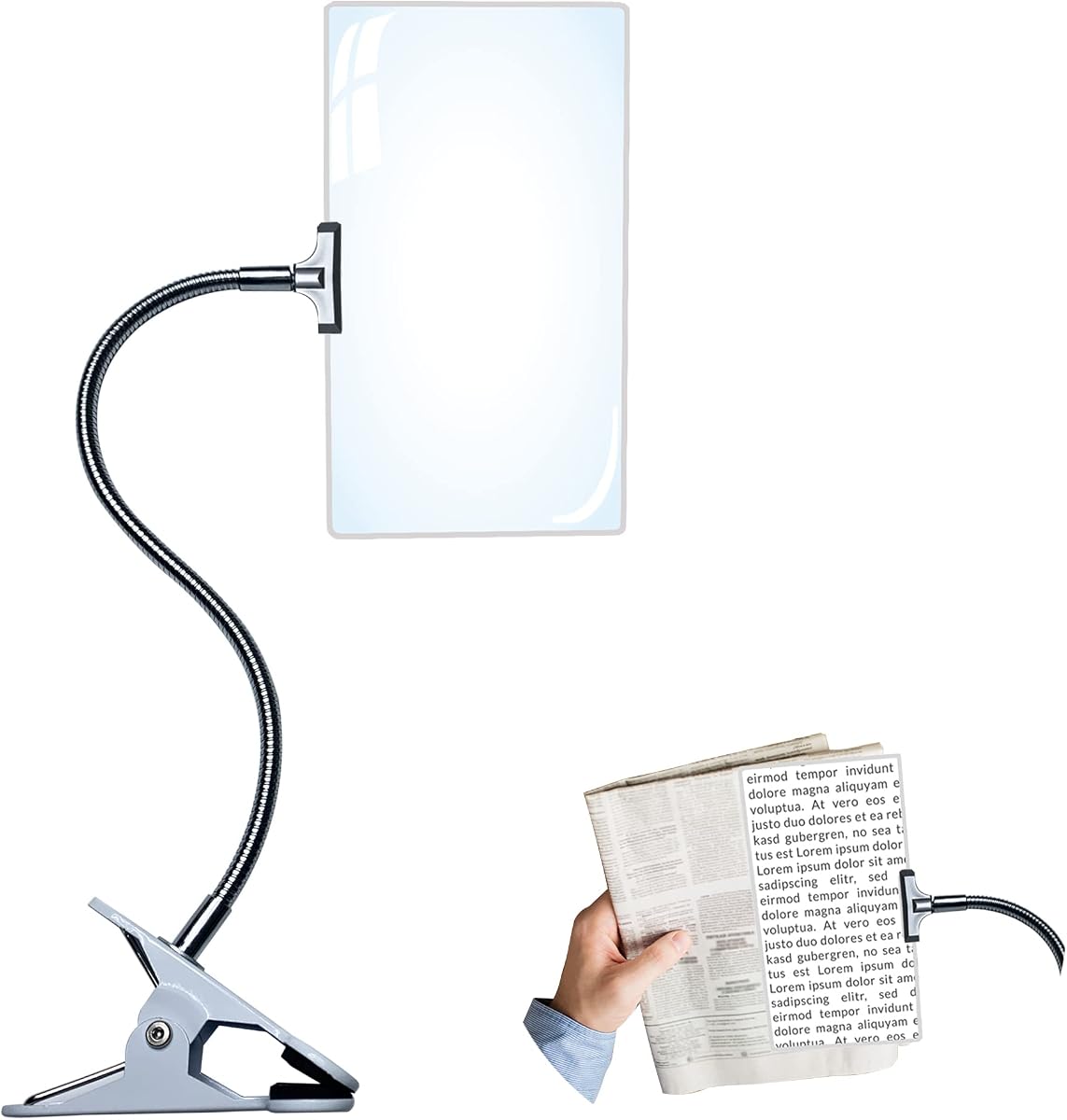
This large full page magnifier features a 5X optical lens made from optical grade PVC. It provides a clear image with minimal distortion which is ideal for seniors or low vision individuals. The viewing area covers 10×6 inches effectively.
We may earn a commission when you buy through this link, at no additional cost to you.
The flexible gooseneck is 14 inches long allowing you to bend it in any direction without constant adjustment. The magnifier is detachable from the desktop stand so you can use it handheld if needed. It weighs only 3.5 ounces for extended use comfort.
Although it offers a large viewing area and flexible neck, the overall rating is only 3.6 which suggests mixed user experiences. Some users may find the PVC lens less durable than glass alternatives over long term daily use.
This magnifier is perfect for hobbies like embroidery or painting where hands free reading is essential. It is also suitable for daily reading tasks where you need to reduce strain on aging eyes. The clip on design makes it easy to attach to desks or beds.
The 10×6 inch visible area enlarges content by 500 percent without distortion for detailed work.
Bend the 14-inch neck to any angle to position the lens exactly where you need it.
We may earn a commission when you buy through this link, at no additional cost to you.
This 21 inch screen magnifier is designed to magnify laptop screens 3 to 5 times for immersive viewing. It uses an HD acrylic Fresnel lens with a spiral pattern for clear vision. It is recommended for low light environments where the effect is most obvious.
We may earn a commission when you buy through this link, at no additional cost to you.
You can adjust the standing angle from 0 to 45 degrees or the lying reading angle from 45 to 90 degrees. It is lightweight and collapsible making it perfect for home office or travel use. The design does not obstruct keyboard operation.
While the adjustable angles are convenient the device is not recommended for use in backlight or reflective environments. Direct sunlight or bright objects can cause reflections that distract from the content you are trying to view.
This magnifier is a thoughtful gift for seniors who enjoy watching movies or reading news on a laptop. It reduces visual fatigue by allowing comfortable viewing away from the screen. The collapsible design makes it easy to store when not in use.
The spiral pattern on the Fresnel lens helps create a 3D effect away from the screen.
Choose between standing or lying angles to suit your reading position and comfort.
We may earn a commission when you buy through this link, at no additional cost to you.
This screen magnifier stands out for its high definition optical lens material and sturdy wooden frame bracket. It is designed to enhance clarity on laptop and phone screens effectively. The product claims to prevent radiation harm and offers 3D vision experiences for users.
We may earn a commission when you buy through this link, at no additional cost to you.
Its dimensions are substantial with a total length of 19.41 inches and a height of 14.3 inches. The screen length is 19.3 inches with a height of 10.28 inches. The 6 branch points allow for 180 degree rotation to suit various tasks like reading or music scores.
While it offers versatile pivot points and adjustable angles, the rating is currently listed as N/A which might indicate limited user feedback. Some users might prefer a more established track record before committing to this specific model for critical tasks.
This magnifier is ideal for those seeking a stylish and functional accessory for laptops and phones. It makes a thoughtful gift for elderly family members or tech enthusiasts. Its design helps protect eyes from close viewing distances while maintaining a clean aesthetic.
The high definition optical lens material ensures that text and images appear sharp and clear on your screen.
With multiple pivot points and branch connections, you can rotate the frame to find the perfect viewing angle for any task.
We may earn a commission when you buy through this link, at no additional cost to you.
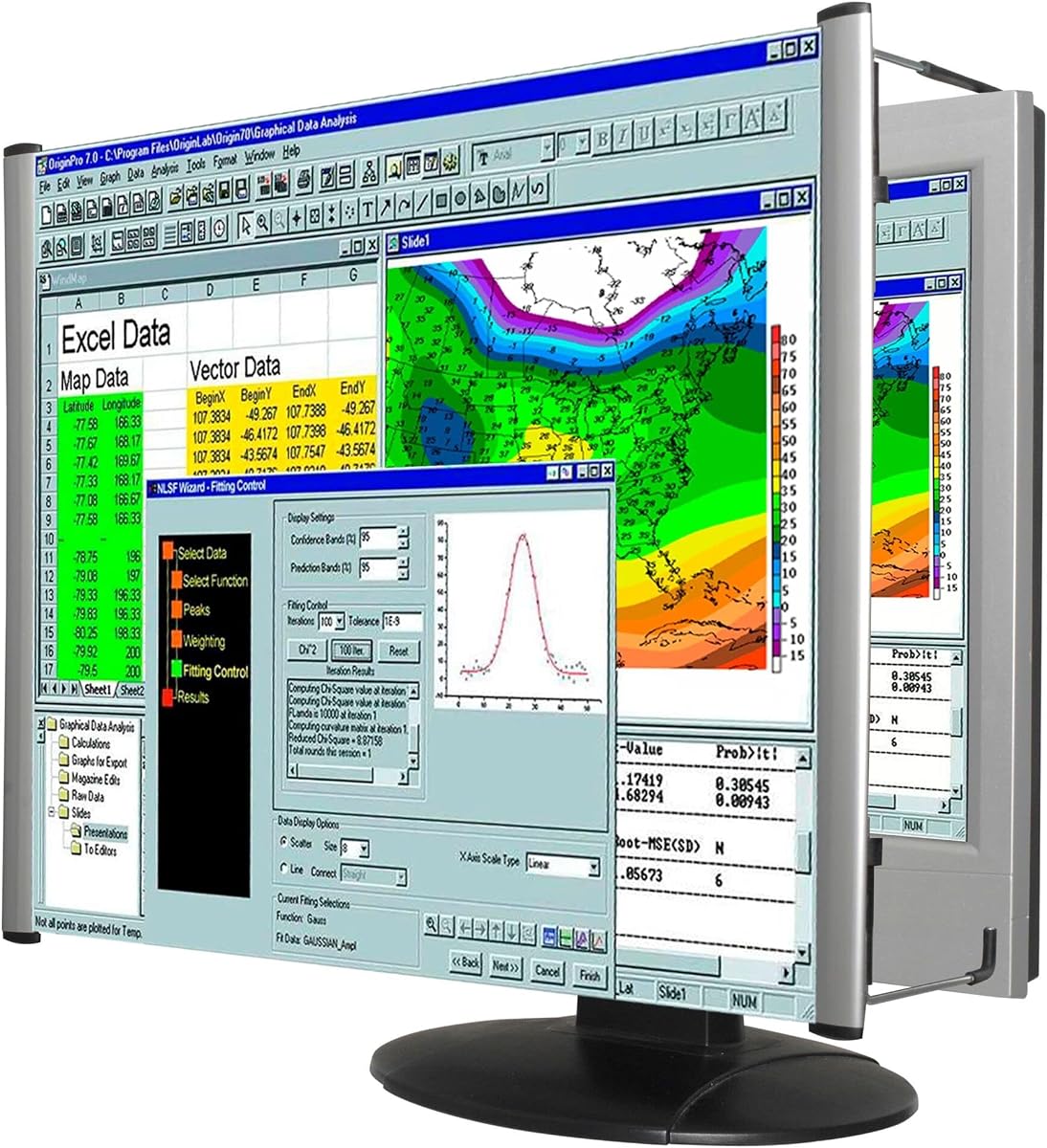
The Kantek MAXVIEW magnifier is manufactured from an optical grade acrylic Fresnel lens with a light tint for contrast enhancement. It increases image size up to double and is fully assembled for ease of use. The patented design offers a lightweight alternative to heavy glass lenses.
We may earn a commission when you buy through this link, at no additional cost to you.
Screen magnification is adjustable by moving the magnifier closer or farther from the display. The greater the distance the larger the image appears. It is designed for 21.5 to 22 inch widescreen monitors and is not suitable for laptops.
Although the design is elegant and lightweight the manufacturer notes it is not designed for the visually impaired. The tinted lens may further restrict visibility for those needing high contrast. You must ensure the visual area matches your monitor size exactly.
This filter is best for general office use in normal ambient light environments. It helps increase readability for standard users but avoid intense lighting around the perimeter to prevent reflection issues. Its patented design ensures easy adjustability and durability.
Move the magnifier closer or farther to adjust the screen magnification level to your preference.
The light tint on the optical grade acrylic lens improves contrast for better readability.
We may earn a commission when you buy through this link, at no additional cost to you.
This headset offers an interchangeable lens design allowing you to switch between five optical lenses easily. The magnification powers range from 0.75X to 4.0X with durable acrylic resin lenses. It features three LED lights with two brightness levels for illuminating detailed surfaces.
We may earn a commission when you buy through this link, at no additional cost to you.
The rechargeable built-in lithium battery is charged via a USB Type-C cable. It saves money and energy by eliminating the need for disposable batteries. The design includes a wholly rubber wrapped nose bridge to lighten the load on your nose.
While the flexible nose bridge helps fit the glasses to your face perfectly they are not for vision correction or medical use. The lens surface hardness reaches 5H grade for wear resistance but care is needed to avoid scratches over time.
This magnifier is perfect for close work like painting sewing and jewelry making. It is a hobbyist magnifier for precision work that helps reduce hand strain. The lightweight rubber head strap effectively prevents falling during extended use.
Two levels of brightness are available by tapping the power button on the side for better visibility.
A wholly rubber wrapped nose bridge spreads pressure evenly to prevent fatigue.
We may earn a commission when you buy through this link, at no additional cost to you.
This magnifying glass features detachable and durable high definition lenses with magnifications from 1.5X to 5.0X. The lenses are made of acrylic resin with a surface hardness of 5H for wear resistance. It includes an adjustable LED light that you can direct up and down.
We may earn a commission when you buy through this link, at no additional cost to you.
The headset magnifier is designed with an ergonomic glasses frame and a silicone coated nose bracket. It fits different sized heads and won't put too much pressure on your temples. The battery power indicator light shows when it is time to charge.
Each lens has a fixed focal length so you must adjust the distance between the lens and object to focus. You can replace lenses quickly using the one lens slot and your fingers. The package includes a soft cleaning cloth to wipe fingerprints safely.
This wearable magnifier helps you improve low vision and release your hands during close work. It is great for hobbies like diamond painting beading and lash tech. The battery lasts 3.5 to 7 hours continuously when fully charged.
Swap out lenses easily with the one lens slot to change magnification power quickly.
Silicone coated nose bracket and elastic headband prevent fatigue during long use.
We may earn a commission when you buy through this link, at no additional cost to you.
These hands free magnifying glasses offer a durable and lightweight 200 percent magnification polycarbonate lens. The frame has bright LED lighting built into both sides for greater visibility. Blue light blocking technology helps protect your eyes from harmful emissions.
We may earn a commission when you buy through this link, at no additional cost to you.
The ergonomic design is lightweight and comfortable for reading needlework or repairing circuit boards. You can charge the battery quickly with the included charging cable in just 1.5 hours. This reduces weight and saves money on buying disposable batteries.
While the 200 percent magnification is suitable for small text it is fixed and not adjustable. Users requiring higher magnification may find this limiting. However the blue light blocking feature makes it a good choice for those using devices often.
This magnifier is convenient for extended periods of reading or hobby work under artificial lighting. The hands free design allows you to work with both hands while viewing details clearly. It is a practical tool for reducing eye strain and fatigue.
Bright LEDs on both sides of the frame provide greater visibility for detailed tasks.
Built in blue light blocking technology reduces eye strain and headaches from screen use.
We may earn a commission when you buy through this link, at no additional cost to you.
This LCD monitor magnifier is designed for 22 inch widescreen flat panel monitors with 16:9 or 16:10 aspect ratios. It features a lightweight design that is fully assembled and installs quickly and easily. The Fresnel lens includes an antiglare coating to reduce reflections.
We may earn a commission when you buy through this link, at no additional cost to you.
The adjustable magnification allows you to customize the viewing experience according to your needs. The filter is lightweight so it does not add significant weight to your monitor setup. It is a straightforward solution for enhancing readability on desktop screens.
Although it is a proven solution the rating is modest which may indicate some users find it less intuitive than newer models. The aspect ratio support is specific so ensure your monitor matches the 16:9 or 16:10 standard before purchasing.
This filter is a practical addition for office use where reducing eye strain is important. It helps you read smaller text without squinting and supports a standard widescreen setup. The antiglare coating ensures clear visibility even in bright office environments.
The Fresnel lens coating reduces glare for a clearer and more comfortable viewing experience.
Fully assembled and lightweight for quick and easy setup on your desktop monitor.
We may earn a commission when you buy through this link, at no additional cost to you.
This large clip-on magnifier features a high-definition lens providing up to 5x magnification for reading books and labels. The bendable hose design lets you change the lens angle and height with ease. It sits on a desktop stable design that takes up little space.
We may earn a commission when you buy through this link, at no additional cost to you.
The adjustable viewing angle helps you position the magnifier for reading or repair work comfortably. It supports a wide range of daily tasks including sewing maintenance and watch repair. The super-large lens makes small text and fine details easier to see.
While the stable design is convenient it requires a flat desk surface to remain secure during use. Users working on uneven surfaces may need to place it carefully. The clear detail view ensures tasks are completed more comfortably without constant adjustment.
This magnifying tool is suitable for seniors needing hands-free reading support for books and labels. It is also a helper for repair work and maintenance tasks where precision matters. The portable design makes it easy to move between home and office.
Bend the hose to change lens angle and height for comfortable reading positions.
The structure sits securely on a desk taking up little space for convenient access.
We may earn a commission when you buy through this link, at no additional cost to you.
This large magnifying glass can be clamped on a desk or bed without worrying about falling off. It enlarges the full page of a book clearly with a Fresnel lens that expands the viewing area by 400 percent. It is ideal for reading in bed for visually impaired users.
We may earn a commission when you buy through this link, at no additional cost to you.
The flexible adjustable magnifying gooseneck adapts to various complex scenarios and displays the viewing area as needed. The plastic lens is non-glass so it will not easily break or scratch. Detachable lenses can also be used by hand without tiredness.
Although it is designed for seniors and visually impaired users the rating is only 3.3 suggesting some users find it difficult to secure. The plastic lens is lightweight but may not offer the same optical precision as glass over time.
This magnifier is a helpful gift for kids elderly or visually impaired individuals needing stable hands free viewing. It supports reading sewing and crafts for long periods without feeling tired. The gooseneck ensures you can position the lens exactly where you need it.
The clip design ensures stable and perfect clamping on beds or desks without falling off.
Enlarges the full page of a book by 400 percent without distortion for easy reading.
We may earn a commission when you buy through this link, at no additional cost to you.
Choosing the right magnifying glasses for computer monitors depends on your specific visual needs and workspace setup. This guide breaks down the essential factors to consider before making a purchase.
Magnification power determines how much larger text and images appear on your screen. Look for lenses that offer at least 2X to 5X magnification for standard reading tasks. For detailed work like repair or crafting you may need higher magnification options such as 10X or more.
Choose a magnification level that reduces eye strain without making the image too large or distorted for your tasks.
High definition optical lenses provide clearer images with minimal distortion compared to basic plastic options. Acrylic Fresnel lenses are lightweight and durable but can sometimes show concentric rings on the image. Optical grade PVC or glass lenses offer better clarity for extended viewing sessions.
Prioritize lenses with optical grade materials to ensure text remains sharp and readable over long periods.
Decide whether you need a desktop stand a clip-on design or a headset. Clip-on magnifiers are portable and great for travel or moving between different devices. Headsets offer hands-free operation which is ideal for detailed work where both hands are needed.
Select a mounting style that fits your workspace and whether you need to move the magnifier frequently or keep it stationary.
An adjustable gooseneck or hinge allows you to position the lens at the perfect height and angle for your eyes. Look for designs that offer 360-degree rotation or multiple pivot points to suit various tasks. Fixed magnifiers are less flexible but more stable for specific fixed setups.
Opt for flexible or adjustable frames to accommodate different viewing angles and reduce neck strain during use.
Built-in LED lighting can significantly improve visibility in low-light environments or when working with small details. Adjustable brightness levels help prevent glare while ensuring the task area is well illuminated. Some magnifiers feature rechargeable batteries for long-term convenience.
Consider models with built-in LED lights if you often work in dim conditions or need extra illumination for detailed tasks.
Ensure the magnifier covers your screen effectively by checking its dimensions against your monitor size. Some models are designed specifically for 21 to 22 inch screens while others are universal for laptops and phones. Using a mismatched magnifier can lead to distorted images or restricted viewing areas.
Verify the product dimensions match your screen size to ensure full coverage and accurate magnification.
Lightweight designs reduce fatigue during extended use especially for headset models worn on the head. Look for ergonomic features such as rubber nose bridges and adjustable headbands for a comfortable fit. A heavy magnifier can cause strain on the neck and shoulders over time.
Choose a lightweight and ergonomic design to ensure comfort during long reading or work sessions.
Robust materials such as alloy clamps and sturdy hinges ensure the magnifier lasts through daily use. Plastic lenses are less prone to breaking than glass but may scratch more easily over time. Check user reviews for feedback on long-term durability and reliability.
Prioritize durable construction and reliable hinges to ensure the magnifier withstands regular handling and use.
Position the magnifier at the correct distance from your monitor to achieve the best focus. For desktop magnifiers adjust the gooseneck until the image appears sharp and comfortable to view. If using a headset adjust the headband to fit securely without pinching your temples.
Clean the lenses regularly with a soft microfiber cloth to remove dust and fingerprints. Avoid using harsh chemicals that could damage the lens coating. If the lens becomes scratched it may distort the image and reduce clarity so handle it with care.
Store the magnifier in a protective case or cover when not in use to prevent accidental damage. For rechargeable models charge the battery before it fully depletes to maintain battery life. Regular maintenance will extend the life of your magnifier and ensure consistent performance.
Yes many magnifiers are designed to enhance gaming visuals by reducing eye strain and making on-screen details clearer. However ensure the model does not obstruct your keyboard or view. Some users prefer 3D screen magnifiers for a more immersive experience.
Most magnifiers are designed for single screens. For multi-monitor setups you may need separate units or a universal magnifier that covers both displays. Always check the product dimensions to ensure it fits your specific monitor configuration.
Some models feature blue light blocking technology to protect eyes from harmful emissions. If this is a priority look for products explicitly mentioning blue light protection. Standard magnifiers may not filter blue light unless specified.
For general reading text 2X to 5X magnification is usually sufficient. For detailed tasks like fine print review higher magnification such as 10X may be necessary. Choose based on your specific visual needs and comfort level.
Yes many magnifiers are designed specifically for seniors with low vision or aging eyes. They offer hands-free reading and clear text enlargement. Look for models with adjustable angles to reduce strain during extended reading sessions.
Use a soft microfiber cloth to gently wipe the lens surface. Avoid using paper towels or harsh chemicals that can scratch or degrade the lens. For stubborn dirt use a lens cleaning solution designed for optical surfaces.
Yes clip-on magnifiers can be used with touch screens but ensure the design does not block the touch area. Some models may limit usability on touch screens so check product details before purchasing.
This guide reviewed ten top-rated magnifying glasses for computer monitors to help you enhance your digital experience. Whether you need hands-free reading or better clarity for gaming there is a model to suit your specific needs.
Prioritize optical clarity adjustability and comfort when selecting a magnifier. Ensure the product fits your monitor size and matches your primary use case whether for work or personal hobbies.
Prices and availability change frequently so always check the latest details before purchasing. We hope this guide helps you find the perfect magnifier to reduce eye strain and improve your daily productivity.