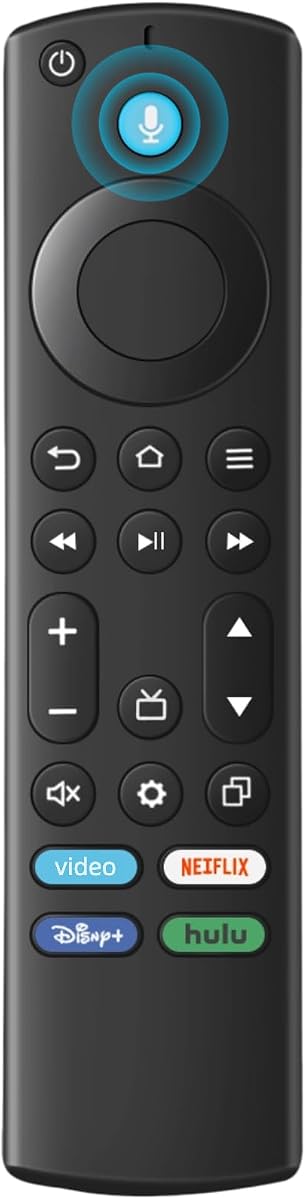
Replacement Voice Remote for Fire Stick
4.2Editor score
Compatible with Fire Stick 3rd Gen
Voice command support included
Includes user manual and guide
Find the best Fire Stick Replacement Remote for your device. We compare ten top models for voice control, compatibility, and ease of use.
When your original remote stops working, finding a reliable Fire Stick Replacement Remote becomes essential. You need a device that supports voice commands, matches your TV model, and offers durability. This guide reviews the top options available this month.
We compared ten products based on compatibility, voice functionality, build quality, and user feedback. Each selection meets strict criteria for performance and value. Our analysis ensures you find a remote that works seamlessly with your streaming setup.
Each pick highlights key features, pros, and cons to help you decide. Prices and availability can change quickly online. Always check the current listing before purchasing to confirm compatibility with your specific Fire TV or smart TV model.
4.2Editor score
4.5Editor score

4.5Editor score
This comparison table highlights the key specifications and features of each top-rated replacement remote. Use it to quickly identify which model fits your specific Fire TV generation and desired functionality.


This replacement voice remote stands out as a top budget-friendly choice for Fire Stick owners. With a solid rating, it offers essential voice search capabilities without breaking the bank. It supports a wide range of Fire TV devices and smart TVs.
We may earn a commission when you buy through this link, at no additional cost to you.
The remote works well with Fire Stick 3rd Gen and 4K models. Voice commands help you find content quickly. It also supports brands like Toshiba and Omni. The pairing process is straightforward and documented in the included manual.
However, it does not include batteries. You will need to buy two AAA batteries separately. There are fewer customizable buttons compared to premium models. These trade-offs are acceptable given the low price point.
This remote is ideal for users seeking basic functionality at a low cost. It is perfect for replacing a lost or broken remote quickly. We recommend it for casual viewers who need reliable voice search.
It supports multiple generations of Fire Stick and Smart TVs.
Use voice commands to find shows and launch apps quickly.
We may earn a commission when you buy through this link, at no additional cost to you.
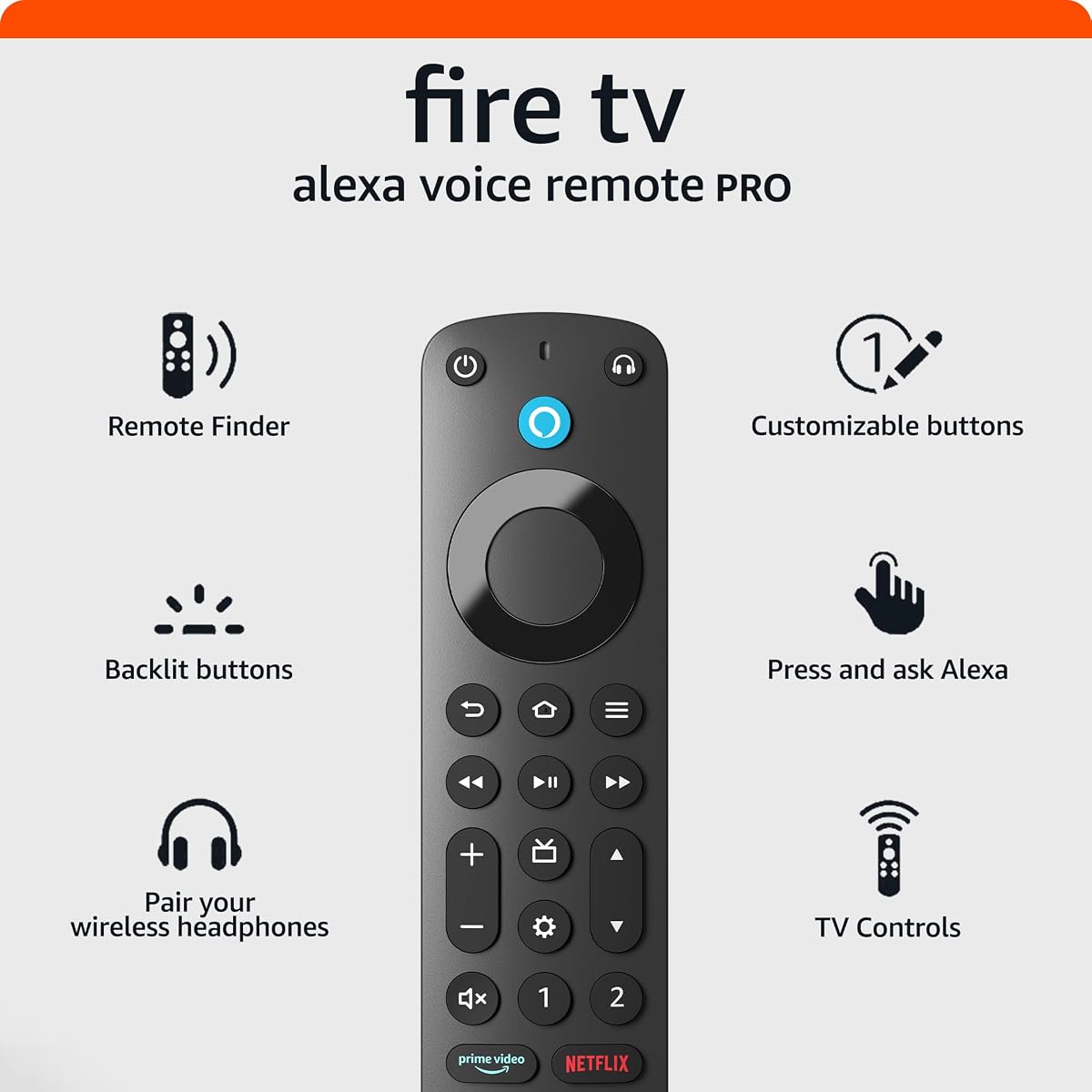
The Amazon Fire TV Alexa Voice Remote Pro is our top pick for premium features. It includes a remote finder that makes it easy to locate lost remotes. The backlit buttons are perfect for late night viewing sessions.
We may earn a commission when you buy through this link, at no additional cost to you.
This remote offers two customizable buttons for quick app access. It also has a dedicated button for pairing headphones. The TV controls allow you to manage power and volume from one device. It supports most modern Fire TV devices.
While it costs more than generic replacements, the added features justify the price. The backlight saves you from pressing buttons blindly. However, it does not include batteries. Overall it is a robust choice for heavy users.
This remote is best for users who want extra convenience features. If you lose remotes often or watch in the dark, this is the best choice. We highly recommend it for a premium experience.
Use Alexa to make the remote emit a ring sound.
Buttons light up automatically in dimly lit rooms.
We may earn a commission when you buy through this link, at no additional cost to you.
This replacement remote offers solid compatibility with various Fire TV models. It supports the Fire Stick 4K Max and multiple generations. The four shortcut buttons help you access favorite apps quickly. It is a strong competitor in the mid range category.
We may earn a commission when you buy through this link, at no additional cost to you.
It includes 2 customization buttons for personalization. Voice function is available after pairing. The remote works with many Fire Smart TV series. It is a practical choice for those needing a direct replacement.
It is not compatible with Roku devices. Also check your model before buying. Batteries are not included in the package. These limitations are typical for third party remotes but do not hinder performance.
This remote is a good balance of features and price. It is suitable for users with newer Fire Stick models. We suggest checking the compatibility list before purchase to ensure a fit.
Program two buttons to launch specific apps or commands.
Works with many Fire TV and Smart TV series.
We may earn a commission when you buy through this link, at no additional cost to you.
This remote is designed for durability and range. It supports a range of up to 12 meters. This is useful for larger rooms. It also includes four shortcut buttons for quick app access. The voice control is enabled by default.
We may earn a commission when you buy through this link, at no additional cost to you.
It works with Fire Stick Select, Plus, and Max. It also supports Omni and Toshiba smart TVs. The 60-day guarantee adds peace of mind. Customer support responds quickly to any issues.
You need to cycle power to pair it. Batteries are not included. These steps are simple but add a bit of setup time. The long range and buttons make up for this minor inconvenience.
This remote is a solid choice for those needing range. It is great for living rooms where you sit far away. We recommend it for users who value reliability and support.
Control your device from up to 12 meters away.
Get help quickly with a 60-day satisfaction guarantee.
We may earn a commission when you buy through this link, at no additional cost to you.
This remote focuses on simplicity and ease of use. It syncs automatically with your streaming device. You do not need complex setup. It supports devices from 2018 to 2026. The shortcut buttons give quick access to apps.
We may earn a commission when you buy through this link, at no additional cost to you.
It is compatible with Fire Stick 4K Max and 3rd Gen. It also works with Insignia and Toshiba smart TVs. The voice feature is not included on this specific model. This makes it a good basic option.
Batteries are not included. You will need to provide them. The lack of voice search might be a downside for some. But for basic navigation it is efficient and reliable.
This remote is ideal for users who want simplicity. It is a great backup remote for the family. We recommend it for those who do not need voice features.
The remote syncs without complex configuration.
Get one-tap access to popular streaming apps.
We may earn a commission when you buy through this link, at no additional cost to you.
This remote covers a broad range of Fire Series devices. It supports Fire Stick 4K and 4K Max. The voice control allows for hands free navigation. It is a comprehensive choice for most users.
We may earn a commission when you buy through this link, at no additional cost to you.
Pairing involves holding the Home button for ten seconds. The LED indicator guides you. It works with many smart TV series. The manual provides clear instructions. It is a reliable replacement option.
It is not compatible with 1st Gen models. You must check your model before ordering. Batteries are not included. These are standard limitations. The wide compatibility is a strong point.
This remote is a good middle ground option. It offers voice control at a budget price. We recommend it for Fire TV Stick users needing a voice remote.
Control content, play music, and check weather with voice.
Fits many Fire Stick, Cube, and Smart TV models.
We may earn a commission when you buy through this link, at no additional cost to you.
This is an official Amazon remote with high reliability. It includes two AAA batteries out of the box. This is a rare benefit. The dedicated TV controls manage power and volume. It is designed for Fire Stick 3rd Gen and later.
We may earn a commission when you buy through this link, at no additional cost to you.
The guide button helps view live TV apps. It supports Fire Stick 4K and Cube. Voice control is easy with Alexa. It is a premium choice for quality. The battery inclusion adds value.
It is not compatible with older 1st Gen models. The price is higher than third party options. But the official support and battery inclusion make it worth it. It is a solid buy for new devices.
This remote is best for users wanting official support. If you need immediate battery inclusion and high build quality choose this. We recommend it for those prioritizing reliability.
Includes two AAA batteries so you can use it immediately.
View live TV listings and apps easily.
We may earn a commission when you buy through this link, at no additional cost to you.
This remote is flexible for many Fire Smart TV devices. It supports Fire Stick Lite and 2nd Gen. The voice function helps you control content. It is a solid choice for mid-range needs.
We may earn a commission when you buy through this link, at no additional cost to you.
Pairing is done by holding the Home button for ten seconds. The LED light flashes to indicate status. It works with 3rd Gen Smart TVs. The instructions are clear. It is a user-friendly option.
Sometimes manual matching is needed if pairing fails. Batteries are not included. These are minor issues. The compatibility with Lite models is a strong point. It is a good value.
This remote is best for Lite and 2nd Gen users. It offers voice control at a good price. We recommend it for those needing a compatible voice remote.
Use voice commands like volume up to operate devices.
LED light shows pairing status clearly.
We may earn a commission when you buy through this link, at no additional cost to you.
This remote offers a very low price point. It is compatible with Hisense, Insignia, and Pioneer. The four preset buttons allow quick access. Voice function is included. It is a great budget option.
We may earn a commission when you buy through this link, at no additional cost to you.
Automatic pairing occurs after 30 seconds. Standard navigation controls work well. It supports 3rd Gen Fire TVs. It is a versatile choice. The low cost makes it attractive.
It does not work with Samsung TVs. Check your model before ordering. Batteries are not included. These are common trade-offs. The price makes it a top budget pick.
This remote is best for budget conscious users. If you have a compatible TV it works well. We recommend it for those seeking value and basic voice features.
Access favorite apps quickly with preset buttons.
Works with Hisense, Insignia, and Pioneer Smart TVs.
We may earn a commission when you buy through this link, at no additional cost to you.
This remote supports Fire Stick HD and 4K Max. It also supports Omni and QLED TVs. Voice search helps find content easily. The LED blinks during pairing. It is a reliable choice.
We may earn a commission when you buy through this link, at no additional cost to you.
It offers four shortcut buttons for apps. It is a good replacement. The support team is available. The pairing process is clear. It is a solid option for many users.
It is not compatible with 1st Gen. Batteries are not included. The price is competitive. The Omni and QLED support is a key benefit. It is a strong contender.
This remote is best for users with newer HD or 4K models. It offers voice search and app shortcuts. We recommend it for those needing a versatile replacement.
Use voice to find movies and shows quickly.
LED light blinks to show pairing progress.
We may earn a commission when you buy through this link, at no additional cost to you.
Choosing the right replacement remote requires understanding compatibility, features, and build quality. We outline the key factors to consider before purchasing a new remote for your Fire TV or smart TV setup.
The most important factor is ensuring the remote works with your specific device model. Check if it supports Fire Stick 3rd Gen, 4K, or Cube. Also verify if it is compatible with your smart TV brand like Toshiba or Insignia.
Always verify the device model before ordering to avoid returns.
Voice control is a standard feature for modern remotes. It lets you search for shows and control devices hands free. Look for models with built-in microphones. Check how to activate the voice feature via pairing.
Prioritize remotes that support voice search for convenience.
Some remotes offer dedicated buttons for apps like Netflix or Prime Video. These save time when launching content. Look for customizable buttons if you want personal shortcuts. This improves user experience significantly.
Choose a remote with buttons that match your most used apps.
Durability matters for long term use. Look for remotes that mention test clicks or solid construction. Plastic quality and button resistance are key. Higher priced official remotes often last longer.
Check product details for durability claims and guarantees.
Most remotes require two AAA batteries. Some include them while others do not. If you want to use the remote immediately, choose a model that includes batteries. This is a common point of confusion.
Always check if batteries are included in the package.
Replacement remotes range from budget to premium options. Budget models cover basic needs. Premium options offer backlit buttons or remote finders. Determine which features matter most to you before buying.
Balance the cost against the features you actually need.
Pairing usually involves holding the Home button. Most remotes guide you with an LED indicator. Some require power cycling. Simple pairing saves time. Read instructions to ensure a smooth setup experience.
Ensure the pairing method is simple for your setup.
Look for remotes that offer a satisfaction guarantee. Some brands provide a 60-day guarantee. Reliable customer service helps if issues arise. This adds peace of mind to your purchase.
Check for guarantees and support contact info before buying.
After receiving your remote, insert the batteries carefully. Ensure the polarity matches the diagram. Then power on your device. Hold the Home button for ten seconds to enter pairing mode. The LED light should flash to indicate success.
To activate voice control, press and hold the mic button. Speak clearly to search for content. If pairing fails, remove the batteries for a few seconds. Reinsert them and try again. Check your device model for compatibility.
Clean the remote with a soft dry cloth. Avoid water or harsh chemicals. Store it in a safe place to prevent loss. If using backlit models, ensure you are in a dim room for the backlight to activate.
Not all replacement remotes work with every Fire Stick generation. Some are designed for 1st Gen models while others support 4K. Always check the compatibility list on the product page. This ensures you buy the correct remote.
To pair a new remote, hold the Home button for ten to fifteen seconds. The LED indicator will flash amber. Wait thirty to sixty seconds for the connection to establish. If it fails, restart your Fire TV device.
Most replacement remotes do not include batteries. You will need to provide two AAA batteries. Some official Amazon remotes do include them. Check the package details to confirm what is included.
Many Fire remotes support smart TVs from brands like Toshiba and Insignia. They work via infrared and Bluetooth. Check if your TV supports Fire TV voice commands. If not, basic navigation may still work.
Voice remote issues often stem from pairing or battery problems. Ensure the batteries are inserted correctly. Check that the device is updated. If problems persist, remove and reinsert batteries to reset.
Third party remotes are often more affordable. They offer similar features like voice and shortcuts. However, build quality may vary. Official remotes tend to have better support and battery inclusion.
Battery life depends on usage. Most batteries last several months. Heavy voice use may drain them faster. Keep spare AAA batteries on hand. This prevents interruptions in your streaming.
We reviewed ten top replacements for Fire Stick and Fire TV devices. Each offers unique features from budget options to premium models with backlit buttons. The Amazon Fire TV Alexa Voice Remote Pro stands out for advanced features.
Prioritize compatibility and voice control when choosing. If you need durability, check the build quality. For convenience, look for battery inclusion. These factors ensure you get the right remote for your needs.
Always check current prices and availability before buying. Models may change or go out of stock. We hope this guide helps you find the perfect remote for your streaming setup.