
Logitech G203 Wired Gaming Mouse – Black
4.6Editor score
8000 DPI optical sensor
Customizable RGB lighting
Six button design
Discover the top analog gaming mice for precision and speed. This guide compares ten leading models to help you choose the perfect gaming mouse today.
Choosing the right analog gaming mouse is essential for competitive play and comfort. A great mouse offers precise tracking, ergonomic design, and reliable buttons for long sessions without fatigue.
We compared ten top models based on sensor accuracy, build quality, and customization features. Each entry highlights key specs and real-world performance to simplify your decision process effectively.
Every pick shows unique strengths for different play styles and budgets. Prices and availability change frequently, so check current listings before making your final purchase decision for your setup.
4.6Editor score

4.6Editor score
4.5Editor score
This side by side comparison outlines key features across all ten products. It helps you quickly identify which mouse matches your specific gaming needs and preferred grip style.



The Logitech G502 Hero stands out as a top contender for gamers seeking precision and versatility. It boasts a HERO sensor capable of tracking up to 25600 DPI without smoothing or acceleration.
We may earn a commission when you buy through this link, at no additional cost to you.
Its eleven programmable buttons allow for extensive customization of macros and commands. The dual mode hyper-fast scroll wheel offers both free-spin and tactile modes for different tasks.
While the adjustable weights let you tailor the feel, some users might find it heavier than preferred for fast-paced FPS games. The weight system adds balance but requires setup time.
This mouse is ideal for players who value control and comfort over long sessions. It delivers reliable performance across various genres and is a solid investment for serious gamers.
The HERO sensor ensures accurate movements on various surfaces with zero smoothing or filtering applied during use.
Eleven buttons and software support let you map complex actions to simplify gameplay execution and improve reaction times.
We may earn a commission when you buy through this link, at no additional cost to you.
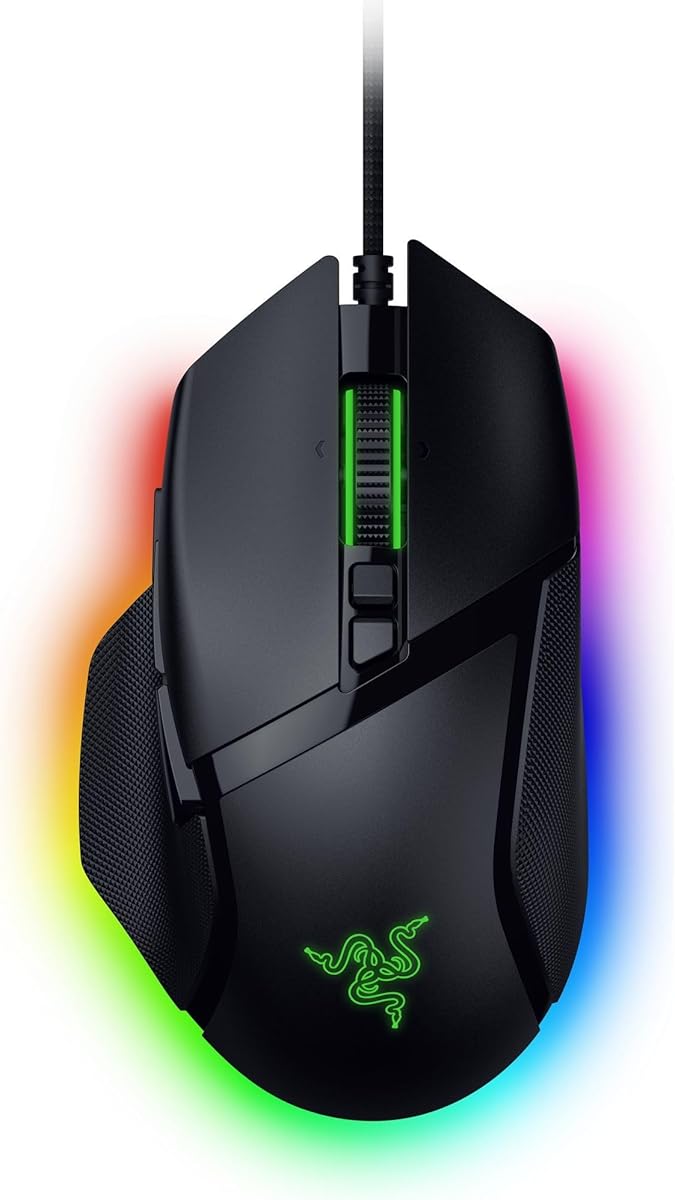
The Razer Basilisk V3 offers an ergonomic design favored by millions for comfort during extended gaming sessions. It features eleven programmable buttons for limitless configurations including macros.
We may earn a commission when you buy through this link, at no additional cost to you.
Its HyperScroll tilt wheel supports smooth free-spin or tactile cycling for precision. The twelve Chroma RGB lighting zones allow for dynamic effects reacting with over 150 games.
Some users may find the form factor better suited for larger hands. The reliance on Razer Synapse software can be a hurdle for those preferring plug and play simplicity.
This mouse is a great choice for gamers who prioritize comfort and customization without breaking the bank. It balances performance and aesthetics effectively for most play styles.
The signature form factor supports the hand with optimally positioned buttons for quick access and reduced fatigue over time.
Gen 2 optical switches provide zero unintended misclicks and a fast actuation speed ensuring reliable response during intense gameplay.
We may earn a commission when you buy through this link, at no additional cost to you.
The Logitech G403 Hero delivers supreme comfort with a shape designed for easy grip and control. It uses the next-generation Hero 16K sensor for precise tracking up to 16000 DPI.
We may earn a commission when you buy through this link, at no additional cost to you.
Its intelligent RGB lighting responds to in-game action and can be customized via G Hub software. The lightweight build at 87 grams includes a removable weight for balance tweaks.
While the G Hub software allows for six programmable buttons and DPI shifting, some may find the setup process complex. The rubber grips offer comfort but might wear over years.
This model is excellent for users seeking a blend of comfort and performance in a wired design. It suits those who prefer a contoured shape and reliable tracking accuracy.
The Hero 16K sensor ensures 1:1 tracking with no smoothing or acceleration for consistent movement across different surfaces.
Light sync RGB offers full spectrum lighting that reacts to screen color and audio for an immersive visual experience.
We may earn a commission when you buy through this link, at no additional cost to you.
The Logitech G203 is a great starting point for gamers upgrading from standard mice. It features an 8000 DPI optical sensor with zero filtering for improved control over standard models.
We may earn a commission when you buy through this link, at no additional cost to you.
You can customize RGB lighting via G HUB with colors or sync it to react to screen color shifts. The six-button design offers comfort and control for essential gaming functions.
While it lacks adjustable weights or extensive macro capabilities, its simplicity is a strength for many. The durable metal spring tensioning ensures reliable performance over time.
This mouse is perfect for budget-conscious users who still want decent precision and RGB effects. It works well for casual to mid-level gaming on PC or Mac.
The 8000 DPI optical sensor provides zero smoothing for accurate tracking and better control than standard computer mice.
Light sync technology allows you to create custom lighting effects or sync with other compatible gear for a cohesive look.
We may earn a commission when you buy through this link, at no additional cost to you.
The Logitech G MX518 brings back a classic design with modern performance features like the HERO 25K sensor. It delivers 400+ IPS tracking across 100 to 25600 DPI range.
We may earn a commission when you buy through this link, at no additional cost to you.
On-board memory lets you save up to five profiles to use on any PC without extra software. Eight programmable buttons can be configured for macros using G HUB.
Some users might miss more modern ergonomic tweaks given the older shape. The 1 ms report rate ensures fast feedback but may require software setup to unlock full potential.
This mouse is suitable for fans of the classic MX518 shape who need reliable modern tracking. It balances nostalgia with high accuracy for competitive gaming sessions.
The HERO 25K sensor captures movements at 17000 frames per second for zero smoothing or acceleration during use.
On-board memory stores up to five profiles so you can use your settings on any PC without logging in.
We may earn a commission when you buy through this link, at no additional cost to you.
The Corsair Scimitar RGB Elite is built for frequent actions and complex macros in MMOs and MOBAs. It includes seventeen fully programmable buttons ideal for executing many abilities.
We may earn a commission when you buy through this link, at no additional cost to you.
Its patented key slider control system lets you reposition the side buttons to fit your grip comfortably. The native 18000 DPI optical sensor allows for adjustable tracking steps.
The contoured shape may feel bulky for games that need swift mouse movements. Reliance on Corsair iCUE software can be a barrier if you prefer minimal setup.
This mouse is a strong choice for MMO players needing extensive button access without external add-ons. It offers durable construction to withstand extended wear and tear.
The key slider system allows you to adjust the position of side buttons to match your hand shape for better comfort.
A custom PixArt sensor delivers 18000 DPI with 1-step adjustments for highly accurate and customizable tracking control.
We may earn a commission when you buy through this link, at no additional cost to you.
The Razer Basilisk V3 35K offers best-in-class tracking with the Focus Pro 35K optical sensor. It supports a wider variety of surfaces including glass with intelligent functions.
We may earn a commission when you buy through this link, at no additional cost to you.
Thirteen customizable controls allow for endless command combinations across easy-access buttons. The HyperScroll tilt wheel lets you switch between tactile cycling and smooth free-spin modes.
Gen 3 optical switches provide a 90-million click lifecycle with zero double-clicking issues. The speedflex cable is woven for minimal drag to support quicker smoother swipes.
This model suits players who need granular aim control and premium build quality. It is an excellent pick for those willing to invest in top-tier tracking technology.
The Focus Pro 35K sensor offers best-in-class tracking on more surfaces with 1-DPI step adjustments for precise control.
Gen 3 switches ensure a 90-million click lifecycle with zero double-clicking issues and 0.2ms actuation speed.
We may earn a commission when you buy through this link, at no additional cost to you.
The Corsair NIGHTSWORD features a smart tunable weight system that detects center of gravity in real time. You can adjust weight between 119g and 141g to fit your grip.
We may earn a commission when you buy through this link, at no additional cost to you.
Its custom Pixart PMW3391 optical sensor offers 18000 DPI with 1-DPI steps for ultra-accurate tracking. The contoured shape with rubber grips provides professional comfort inspired by pro sports.
Precise weight calibration with six mounting locations offers 120 configurations for balance. However, the setup may take time and requires software for some calibration features.
This mouse is ideal for players who want to fine-tune balance to their exact preference. It combines advanced tech with ergonomic design for FPS and MOBA play.
The software detects center of gravity and allows real-time adjustment of weight between 119g and 141g for perfect balance.
A custom Pixart sensor gives total sensitivity customization and ultra-accurate tracking with 18000 DPI and 1-step adjustments.
We may earn a commission when you buy through this link, at no additional cost to you.
The Corsair M65 RGB Ultra features an iconic aluminum frame for lasting durability. It uses the CORSAIR MARKSMAN 26000 DPI optical sensor to capture every movement with 650 IPS.
We may earn a commission when you buy through this link, at no additional cost to you.
Its AXON Hyper-Processing Technology registers movements and clicks up to 8x faster thanks to a native 8000Hz polling rate. Optical switches deliver hyper-fast and precise responses.
Sensor fusion control combines a gyro and accelerometer for ultra-low lift-off distance. This adds complexity but supports accurate tracking when repositioning the mouse.
This mouse is built for FPS players demanding high polling rates and precise tracking. It combines a sturdy frame with advanced sensor tech for competitive accuracy.
AXON technology transmits movements and clicks up to 8x faster with a native 8000Hz polling rate for minimal latency.
Sensor fusion control uses a gyro and accelerometer to enable ultra-low lift-off distance for accurate repositioning.
We may earn a commission when you buy through this link, at no additional cost to you.
The Razer Basilisk V3 Customizable offers an iconic ergonomic design supported by millions worldwide. It includes eleven programmable buttons for essential actions like push-to-talk or pings.
We may earn a commission when you buy through this link, at no additional cost to you.
Its HyperScroll tilt wheel speeds through content with free-spin or tactile modes. The Focus plus 26K sensor tracks movement with zero smoothing for pixel-precise accuracy.
Gen 2 optical switches provide crisp execution at 0.2ms actuation for up to 70 million clicks. You can customize eleven RGB lighting zones reacting with over 150 Chroma games.
This mouse is a versatile all-rounder for gamers seeking comfort and reliability. It suits a wide range of play styles and integrates well with Razer ecosystems.
The iconic ergonomic design with thumb rest supports the hand while optimally positioning buttons for quick access.
The Focus plus 26K sensor tracks movement with zero smoothing for pixel-precise accuracy and crisp responses.
We may earn a commission when you buy through this link, at no additional cost to you.
Selecting the best analog gaming mouse involves weighing several factors to match your play style. Below we break down key considerations to guide your choice effectively.
Sensor accuracy determines how well the mouse tracks movement without smoothing or acceleration. Higher DPI ranges like 16000 or 25600 allow for fine adjustments across various screen resolutions and gaming genres.
Look for sensors with zero smoothing and filtering to ensure 1:1 tracking performance during fast movements.
Programmable buttons let you assign macros or shortcuts to improve gameplay efficiency. Models with six to eighteen buttons cater to different needs from general FPS to complex MMO setups.
Choose a mouse with enough buttons for your workflow but avoid unnecessary complexity if simplicity is preferred.
An ergonomic shape reduces strain during long gaming sessions. Consider your hand size and grip style to pick a contour that fits naturally and supports your wrist.
A comfortable mouse should feel stable in your hand without requiring extra effort to maintain control over time.
Weight affects how quickly you can move the mouse across your surface. Some models offer adjustable weights or fixed lighter designs to suit personal preference for speed versus stability.
Test different weight configurations to find a balance that matches your sensitivity and movement style.
Mechanical or optical switches define click feel and lifespan. Optical switches offer faster actuation speeds and higher click ratings without double-clicking issues over time.
Prioritize switches rated for millions of clicks to ensure long-term reliability during intensive use.
Wired mice provide consistent input with no battery concerns. Look for braided or flexible cables that minimize drag and resistance during movement.
Ensure the cable length suits your desk setup to avoid tension or interference with your mouse pad area.
Software enables advanced customization of buttons DPI and lighting. Some mice require specific apps to unlock full features which might affect setup ease.
Choose a brand with reliable software that supports your needs for macros and synchronization without excessive overhead.
RGB lighting can enhance immersion and personalize your setup. Many mice support synchronization with other peripherals or reactive effects during gameplay.
Decide if visual customization adds value to your experience or if you prefer a minimal appearance without extra lighting.
Begin by connecting the mouse to your PC via the included USB cable. Install the manufacturer's software to configure buttons and adjust sensitivity to match your comfort level.
Keep your mouse pad clean to prevent debris from interfering with sensor performance. Regularly wipe the surface with a soft cloth to ensure smooth gliding during sessions.
Store the mouse in a dry place to protect internal components from moisture or dust. Avoid dropping or applying excessive force on buttons to maintain long-term reliability.
Analog gaming mice feature advanced sensors for precise tracking without smoothing. They often include adjustable DPI settings and programmable buttons tailored for competitive play and extended use.
Wired mice offer consistent input without battery concerns or potential interference. They provide reliable performance at a lower cost which suits most competitive gaming scenarios effectively.
Most mice allow DPI adjustment via software or a dedicated button on the device. Use the provided application to set steps that match your gaming style and screen resolution needs.
Yes many models support general computer use alongside gaming. Customizable buttons can streamline workflows and ergonomic designs improve comfort during long work sessions.
Basic functions work without software but advanced features like macros and lighting require it. Some models offer on-board memory to save settings for use on other systems easily.
Ideal weight depends on personal preference and play style. Lighter mice enable faster movements while heavier ones provide stability and control during precise actions.
We reviewed ten top analog gaming mice covering various needs from entry-level to premium. The Logitech G502 Hero stands out as a versatile choice offering precision and customization for many gamers.
Consider factors like sensor accuracy ergonomic design and button flexibility when making your decision. Balancing performance with comfort ensures your mouse supports your gaming goals effectively over time.
Prices and availability may change so verify current listings before purchase. Use this guide to find a model that matches your style and enhances your gaming experience.