
MAYFLASH Arcade Stick F700
4.5Editor score
Compatible with PS5 and Switch
Wireless Bluetooth connectivity
Supports Sanwa components
This guide compares the top arcade stick for PS5 options including official licensed models and third-party controllers for fighting game enthusiasts.
Finding the right arcade stick for PS5 is essential for serious fighting game players who demand precision and durability. A quality stick enhances your gameplay experience by providing tactile feedback and reliable inputs during intense matches.
We have carefully evaluated ten top-rated products based on compatibility, build quality, and user feedback. Each selection offers unique features ranging from official licensing to customizable components for different player preferences.
Each pick highlights specific strengths and weaknesses to help you make an informed decision. Prices and availability may change so please verify current details before making your final purchase decision online.
4.5Editor score

4.6Editor score

4.2Editor score
This side-by-side comparison highlights key specifications across all ten selected arcade sticks to help you identify the best match for your specific gaming needs and budget constraints.




The HORI PlayStation 5 Fighting Stick Alpha stands out as the top choice for serious fighters seeking official licensing. With a solid 4.6 rating it delivers tournament grade performance with premium components.
We may earn a commission when you buy through this link, at no additional cost to you.
Its Hayabusa buttons and joystick provide crisp inputs and responsive feedback essential for competitive play. The case opens easily allowing quick maintenance and part replacement without tools.
While it carries a premium price it justifies the cost with durability and official Sony certification. The lack of included customization kits might deter those wanting immediate personalization.
We recommend this stick for players who value official support and build quality. It is the ideal choice for those investing in long term competitive gear.
The stick is engineered for durability with a solid case and high end internal components that withstand intense use.
Being officially licensed by Sony guarantees seamless integration with PS5 features and eliminates compatibility worries.
We may earn a commission when you buy through this link, at no additional cost to you.
The Nacon Daija Arcade Fight Stick offers extensive customization options for players who want to tailor their setup. It scores a 4.2 rating reflecting strong feature set despite some software complexity.
We may earn a commission when you buy through this link, at no additional cost to you.
It includes Sanwa joystick and action buttons known for reliability. The software allows full button mapping and profiles which is great for multi game setups.
The textured palm rest adds comfort during long sessions but the software can be tricky for beginners. The audio jack is a nice addition for tournament play.
This stick is best for players who prioritize customization and software control. It balances premium features with reasonable pricing for advanced users.
Users can swap joystick heads and customize faceplates to match personal style and ergonomic preferences.
The accompanying software enables deep button mapping and profile management for different games.
We may earn a commission when you buy through this link, at no additional cost to you.
The MAYFLASH Arcade Stick F700 delivers excellent value for those on a budget. With a 4.5 rating it offers versatile connectivity and wide platform compatibility.
We may earn a commission when you buy through this link, at no additional cost to you.
It supports wireless Bluetooth and includes a 2.4G receiver for stable connections. The firmware updates allow Switch 2 compatibility which is rare at this price.
Xbox compatibility is missing but the wide platform support covers most users. The hidden receiver compartment keeps things organized during travel.
We recommend this for casual players and those wanting wireless options. It is the best entry level choice for PS5 and Switch gamers.
Multiple connection methods ensure you can play wirelessly or wired depending on your setup needs.
Compatibility extends to multiple systems including PS5 PS4 Switch and PC for broader utility.
We may earn a commission when you buy through this link, at no additional cost to you.
The Qanba N3 Drone 2 offers a compact design with official Sony licensing. It holds a 4.5 rating for reliability and authentic component quality.
We may earn a commission when you buy through this link, at no additional cost to you.
It features Qanba buttons and lever for authentic arcade feel. The full control panel includes a touch pad which is unique for PS5.
Lack of wireless connectivity limits portability but the build is robust. The microphone input allows headset integration for communication during matches.
This stick is ideal for players who prefer wired reliability and authentic components. It suits those wanting official PS5 peripheral status.
Qanba branded buttons and lever ensure a feel similar to traditional arcade machines.
The 3.5mm mic input enables direct headset use without needing additional controllers.
We may earn a commission when you buy through this link, at no additional cost to you.
The MAYFLASH F700 Elite upgrades the standard model with premium Sanwa components. It maintains a 4.6 rating for performance and build quality.
We may earn a commission when you buy through this link, at no additional cost to you.
It includes high quality buttons and joystick for faster response. The anti-slip mat keeps the stick secure during intense matches.
Bluetooth support makes it great for wireless setups. The lack of Xbox support remains a limitation for some players.
This is the top choice for PS5 users wanting wireless with quality parts. It offers the best balance of performance and convenience.
Included Sanwa components provide reliable and responsive inputs essential for competitive play.
The anti-slip mat ensures the stick stays in place even during fast moves.
We may earn a commission when you buy through this link, at no additional cost to you.
The MAYFLASH F500 Bundle provides a complete package for multi console use. It holds a 4.0 rating reflecting its broad compatibility and affordability.
We may earn a commission when you buy through this link, at no additional cost to you.
The Magic Boots allow direct PS5 use without a controller. It also works with Xbox Series S X which is rare for sticks.
On Xbox a controller is needed for some functions. The turbo settings add functionality for retro games.
This bundle is best for players owning multiple consoles. It offers the widest compatibility for the price.
The Magic Boots simplify setup on PS5 eliminating the need for extra controller pairing.
Support spans PS5 Xbox PC Switch and more ensuring versatility across different systems.
We may earn a commission when you buy through this link, at no additional cost to you.
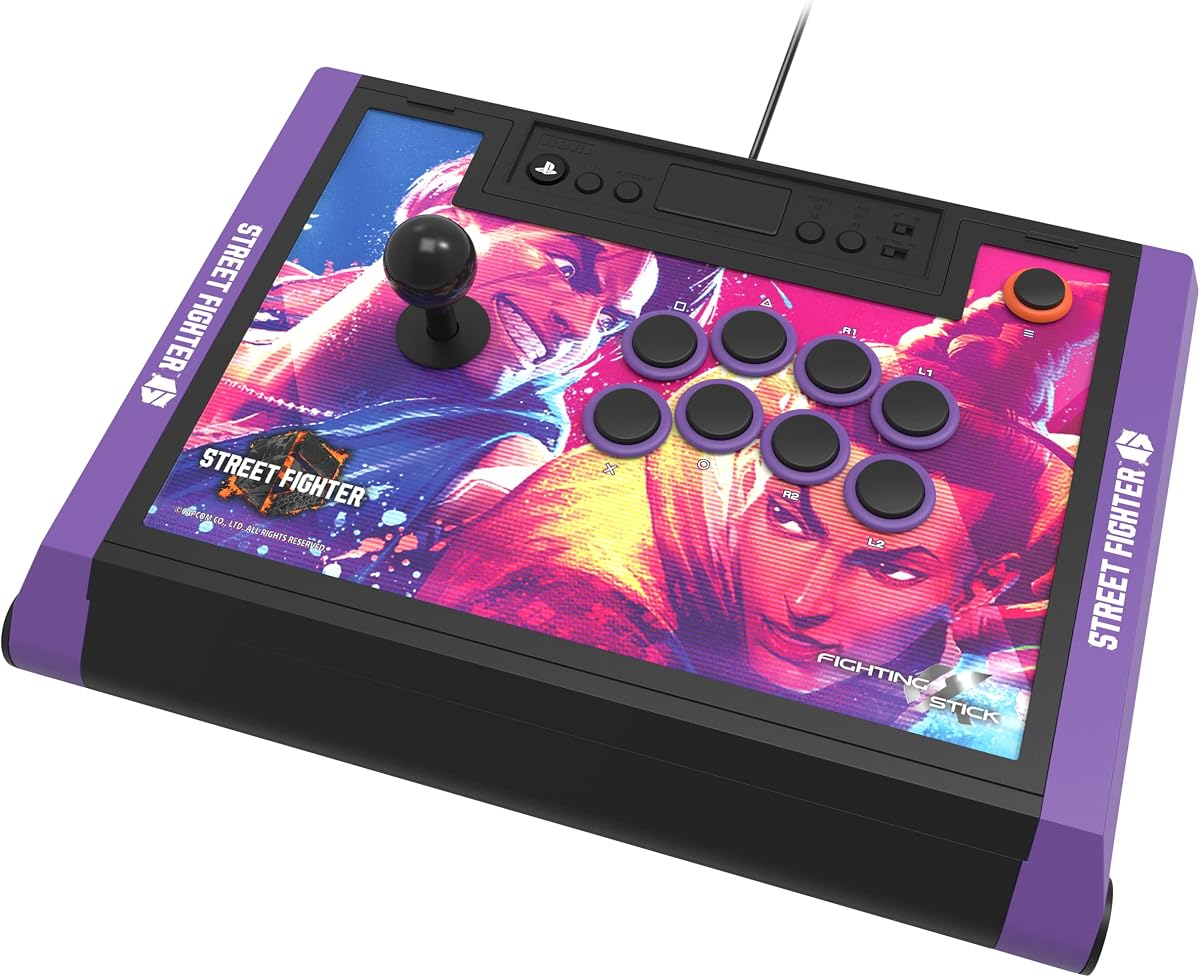
The HORI Fighting Stick Alpha SF6 Edition features exclusive Street Fighter 6 artwork. It rates 4.5 stars for build quality and licensed performance.
We may earn a commission when you buy through this link, at no additional cost to you.
It shares the same internals as the standard Alpha model with Hayabusa components. The downloadable artwork allows customization for fans.
The cost is higher than generic models but the theme appeals to specific players. Build quality remains top notch for competitions.
We recommend this for Street Fighter fans wanting official gear. It combines theme with tournament level performance.
Street Fighter 6 graphics provide a unique look for dedicated fans of the series.
The underlying hardware meets high standards for competitive play and reliability.
We may earn a commission when you buy through this link, at no additional cost to you.
The Qanba Q7 Obsidian 2 offers a unique design with swappable joystick tops. It holds a 4.3 rating for quality and official licensing.
We may earn a commission when you buy through this link, at no additional cost to you.
It allows easy changes to joystick tops without tools. The system switch simplifies moving between PS5 PC and PC.
Being wired limits wireless play but the components are durable. The obsidian look stands out from typical sticks.
This stick suits players who value design and modularity. It is great for those who want to change feel often.
Easy to swap joystick tops allow changing feel without technical skill.
Physical switch enables quick platform changes without unplugging cables.
We may earn a commission when you buy through this link, at no additional cost to you.
The HORI Fighting Stick Alpha Tekken 8 Edition features exclusive Tekken branding. It scores 4.6 stars for performance and build quality.
We may earn a commission when you buy through this link, at no additional cost to you.
It uses the same high end Hayabusa components as other Alpha models. The downloadable artwork offers customization options for fans.
The cost is higher but justified for Tekken enthusiasts. Build quality ensures longevity and reliability in matches.
We recommend this for Tekken players seeking official gear. It merges theme with top tier performance.
Tekken 8 themed panels appeal to fans of the fighting series.
Alternate artwork can be downloaded and printed for personal customization.
We may earn a commission when you buy through this link, at no additional cost to you.
The GuileKeys GK-18 offers a leverless design with 18 keys for precise inputs. It rates 4.3 stars for innovative layout and customization.
We may earn a commission when you buy through this link, at no additional cost to you.
It uses Kailh Choc switches for fast response and hot swapping. The RGB lighting allows personalization for your setup.
Using it on PS5 needs an adapter which adds cost. The layout takes time to learn but offers competitive edge.
This is best for advanced players seeking unique inputs. It is ideal for those wanting hot swap and RGB features.
Replacing the lever with buttons reduces errors for complex combos.
Hot swappable switches and RGB lighting allow deep personal customization.
We may earn a commission when you buy through this link, at no additional cost to you.
Selecting the right arcade stick involves considering compatibility, build quality, and features that match your play style.
Ensure the stick is compatible with PS5 and other systems you play on. Check for official licensing to avoid connectivity issues.
Official licenses guarantee seamless integration and support for game features.
Look for sturdy materials and high quality switches like Sanwa or similar brands. Durability affects performance over time.
Investing in quality parts ensures longer lifespan and better input accuracy.
Consider how easy it is to swap parts or change artwork. Customizable sticks allow for personal preferences and repairs.
Easy maintenance keeps your stick in top condition for tournaments.
Decide between wired and wireless options based on your setup. Wireless offers flexibility while wired provides stability.
Choose based on whether you need mobility or consistent input response.
Set a budget that balances cost with features. High end sticks cost more but offer better components.
Determine how much you are willing to spend for the features you need.
Evaluate the joystick type and button layout. Different games may benefit from different control schemes.
Match the control scheme to your preferred games for optimal performance.
Look for extras like audio jacks, turbo buttons, or RGB lighting. These features enhance the overall gaming experience.
Extra features can provide utility or aesthetic value depending on your preferences.
Connect the stick to your PS5 using the included USB cable. Ensure it is detected before starting a game.
Press the power button if available to activate wireless mode. Wait for the light to stabilize.
Clean the buttons and joystick regularly with a soft cloth to prevent dust buildup. Check for loose parts periodically.
Yes many arcade sticks like HORI and Qanba are officially licensed by Sony. This ensures they work seamlessly with PS5 games.
Most PS5 sticks are compatible with PC via USB. Check the product specs to confirm support for Windows systems.
Wired sticks do not need batteries. Wireless models may require charging or batteries depending on the model.
Use a soft dry cloth to wipe the surface. Avoid using liquids that can seep into the buttons.
High quality sticks use durable materials and switches. Proper care ensures they last for years of use.
Many sticks allow part swapping or panel changes. Check if the model supports customization before buying.
Arcade sticks work best with fighting games like Tekken and Street Fighter. Other genres may not support them fully.
The HORI Alpha stands out as the top overall choice for its official licensing and quality. The MAYFLASH F700 offers great value for budget shoppers.
Prioritize features that matter most to you whether it is customization or wireless options. Your play style will guide the best choice.
Check current prices before purchasing as deals may vary. Ensure the model fits your budget and gaming needs.